Specialist Government Software Cost Estimator Website Template
Roster is a government membership management landing page template built for agencies that can't afford compliance surprises. It opens with a live compliance calculator, moves into a brutal side-by-side comparison table, and closes with a clear call to action. The design uses Bold Brutalist styling with an Acid Digital color system to signal institutional authority with sharp, modern energy.
by Rocket studio
Quick summary
Roster is a single-page landing page template built for government compliance platforms. It leads with a live compliance calculator that quantifies risk before asking for anything, then drops into a stark comparison table contrasting manual processes against automated credential tracking. The design is Bold Brutalist with an Acid Digital palette that commands attention without a single stock photo.
Who this template is for
This template is designed for government software vendors selling credential and compliance platforms to public-sector agencies. It speaks directly to the people who feel the weight of audit season.
- State HR directors managing tens of thousands of civil servants across multiple departments
- County clerks reconciling membership rosters against federal compliance mandates
- Municipal IT liaisons tasked with replacing legacy spreadsheet systems that no one else will maintain
What problem this template solves
Government agencies track thousands of credentials, renewal dates, and compliance flags across sprawling departments. When that tracking lives in spreadsheets, gaps appear quietly and surface loudly during audits.
- Agencies have no immediate way to see how many certifications are expired or at risk
- Manual roster reconciliation wastes hours that HR and compliance staff cannot spare
- Audit failures carry real institutional and legal consequences that reactive processes cannot prevent
What you get with this template
This template delivers a complete, conversion-focused landing page that moves visitors from problem awareness to demo request in one focused scroll. Every section has a job and does it.
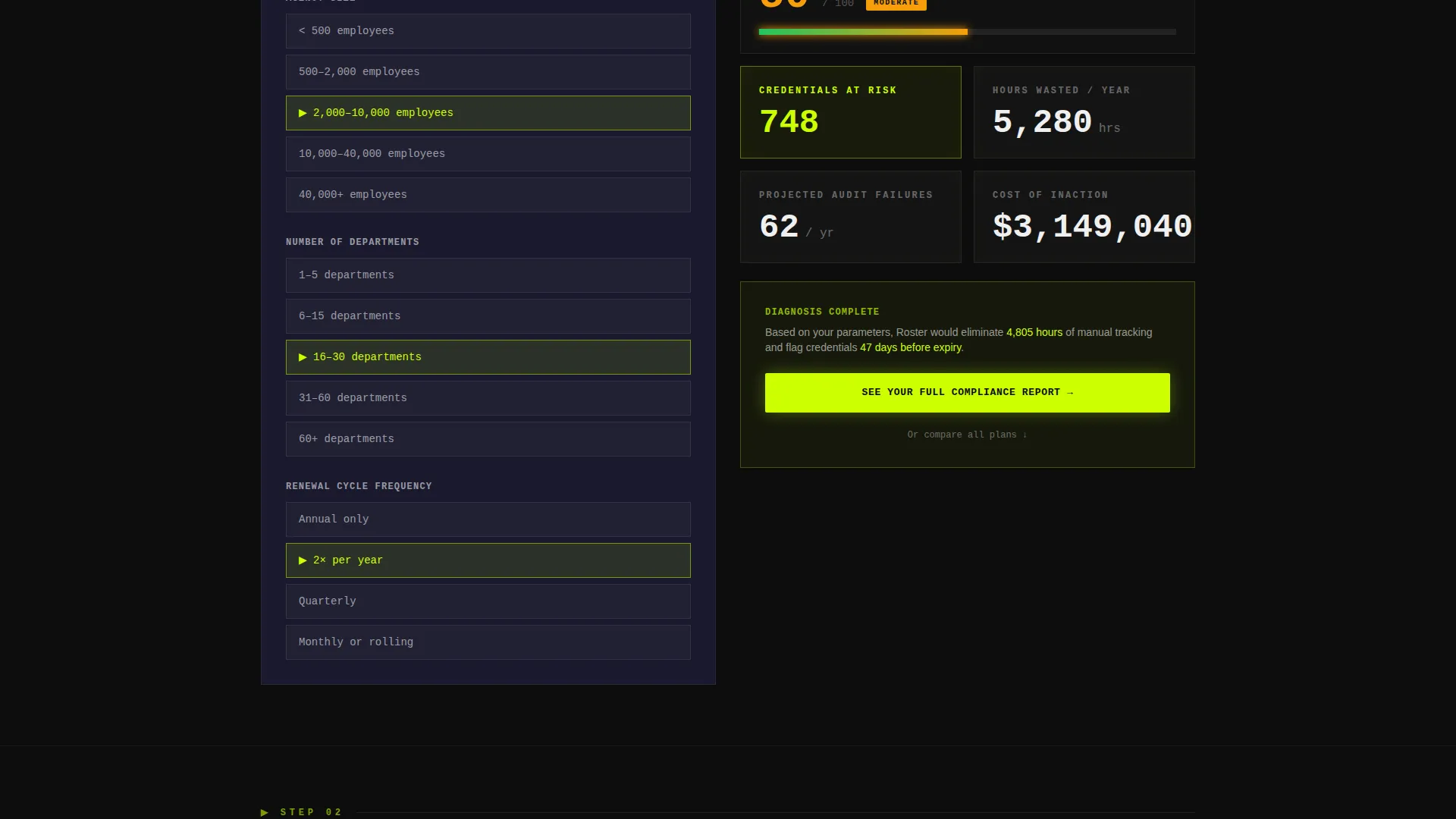
- A live compliance calculator that renders a risk score, estimated hours saved, and projected audit-failure count based on agency inputs
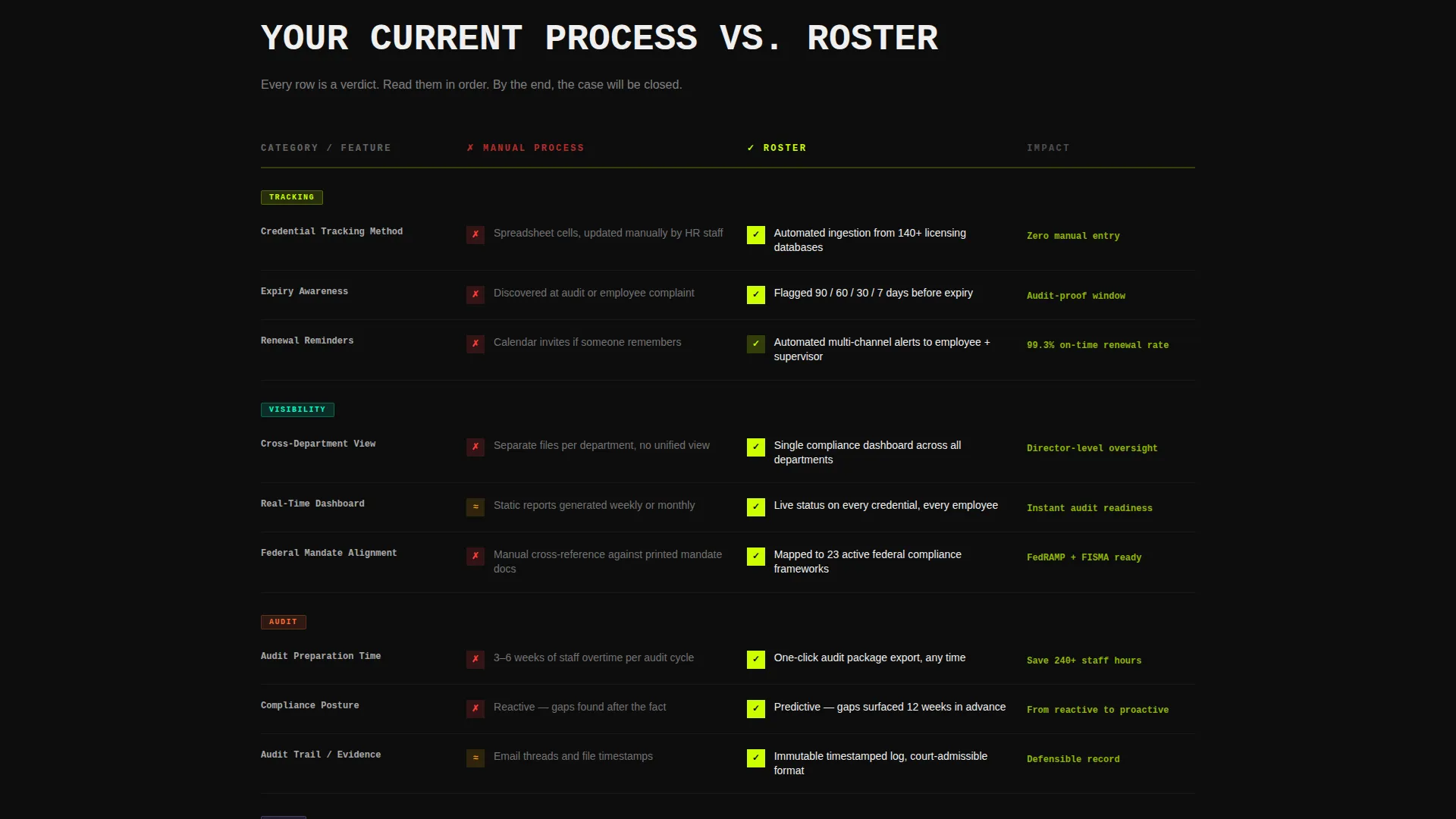
- A row-by-row comparison table contrasting the visitor's current process with the Roster platform
- A click-through call-to-action flow with a primary lime-green button and a secondary anchor link to the comparison table
Feature list
This template is built around a clear creative direction: diagnose the problem first, then present the solution with evidence. Each feature below reflects a deliberate structural and visual decision from the source brief.
Live Compliance Risk Calculator
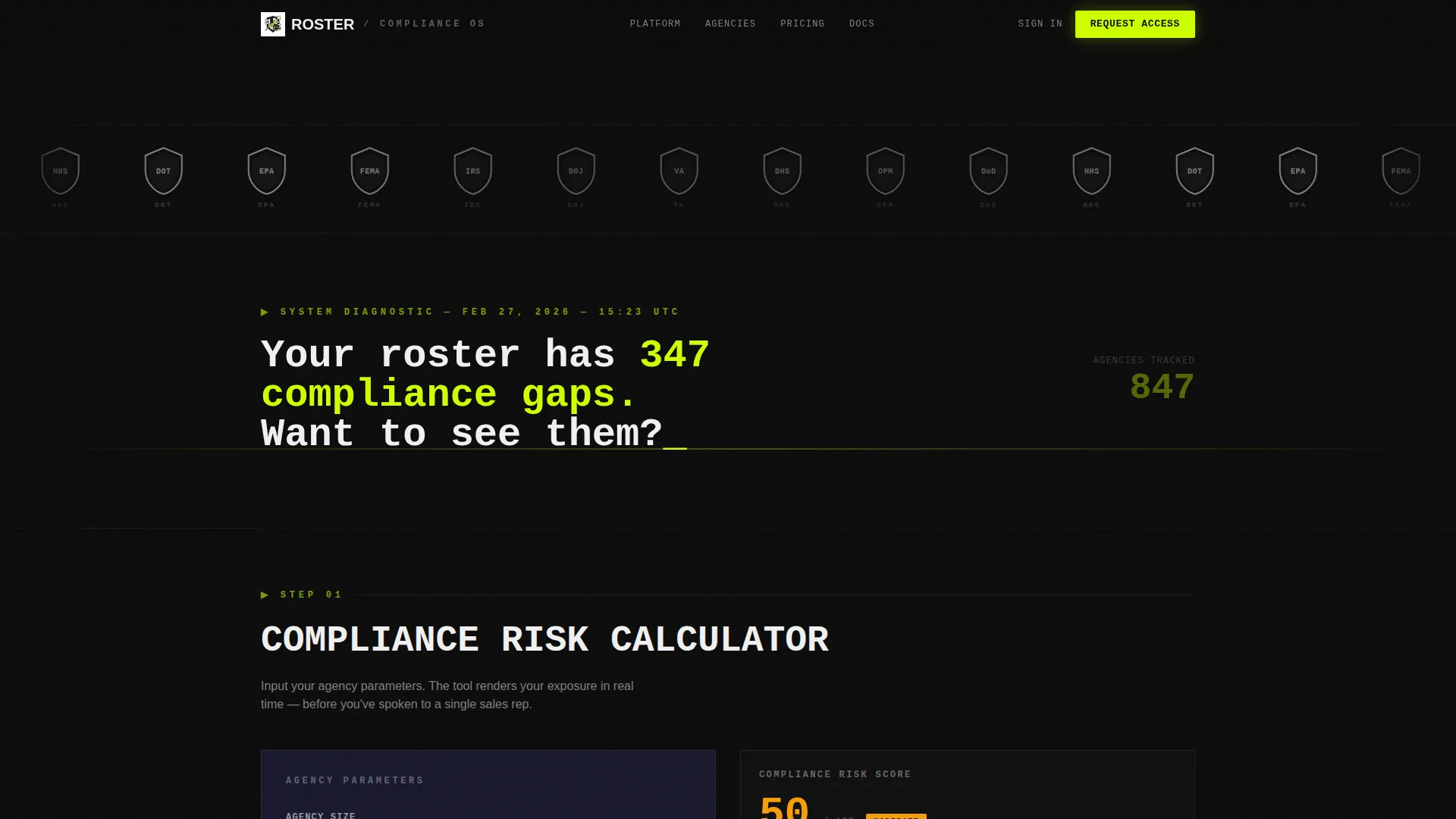
Before any sales copy appears, visitors interact with a tool. They select agency size, number of departments, and renewal cycle frequency. The calculator instantly returns a risk score, an estimated hours-saved figure, and a projected audit-failure count. It makes the cost of inaction specific and numerical before asking for a click.
Side-by-Side Comparison Table
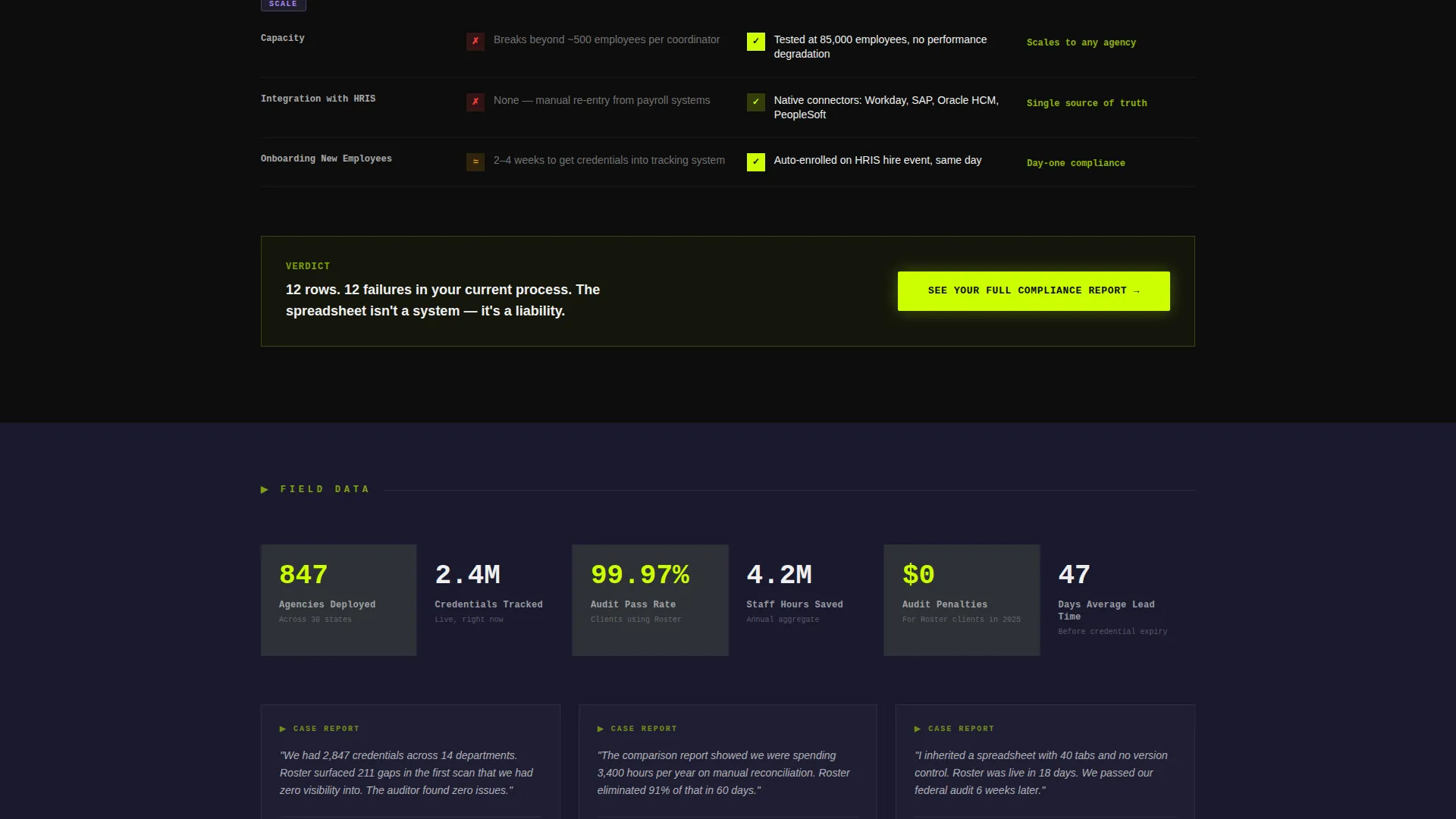
The core content section is a structured comparison table that stacks the visitor's current process against the Roster platform row by row. Each row covers a distinct dimension: manual tracking versus automated alerts, spreadsheet audits versus real-time dashboards, reactive compliance versus predictive flagging. Every row reads like a verdict.
Monochrome Agency Logo Bar Header
The page opens with a horizontal parade of agency seals, department shields, and federal program logos rendered in monochrome against a void-black background. Each logo pulses brighter as the cursor passes. There is no hero image and no stock photography. The logo bar signals institutional trust through proof, not decoration.
Click-Through Call-to-Action Flow
The calculator output ends with a lime-green primary button reading "See Your Full Compliance Report" that navigates visitors to a dedicated demo-booking page. A secondary text link beneath reads "Or compare all plans" and anchors down to the comparison table. The two-path call to action preserves momentum for visitors at different stages of readiness.
Bold Brutalist Visual Layout
The layout uses stacked concrete-slab sections, oversized monospaced typography, and hard edges throughout. There are no soft gradients or decorative illustrations. Sections stack with the weight and clarity of institutional architecture, making the page easy to scan and hard to dismiss.
Page sections overview
| Section | Purpose |
|---|---|
| Agency Logo Bar | Establish institutional credibility at a glance |
| Compliance Risk Calculator | Quantify the visitor's specific compliance exposure before sales copy |
| Calculator Results Display | Show risk score, hours saved, and projected audit failures |
| Primary call to action Block | Drive demo-booking clicks with a lime-green action button |
| Comparison Table | Contrast manual processes against automated compliance tracking row by row |
| Secondary Anchor Link | Offer an alternative path for visitors comparing plans |
Design & branding system
The visual identity is Bold Brutalist with an Acid Digital color system. The palette combines institutional weight with dangerous fluorescent energy, making data feel urgent and trustworthy at the same time.
- Core colors: void black (#0D0D0D) for backgrounds, bureaucratic charcoal (#1A1A2E) for section slabs, electric lime (#CCFF00) for all interactive elements and data highlights, and sterile white (#F0F0F0) for table cells and body text
- Typography uses oversized monospaced type for headlines, reinforcing the terminal-screen aesthetic of a government system that means business
- Interactive states use lime as the active signal: buttons, toggle states, comparison checkmarks, and calculator outputs all use electric lime against black or charcoal backgrounds
Mobile & speed optimization
The template is built with a layout that translates the brutalist desktop structure into a clean, scrollable mobile experience. Heavy visual elements are handled through CSS-first approaches rather than large asset files.
- The comparison table collapses gracefully on smaller screens without losing row-by-row clarity
- The compliance calculator inputs and output display are sized for touch interaction on mobile devices
- Logo bar logos scale and reflow across viewport widths without breaking the monochrome treatment
How this template helps you convert
The page is structured as a diagnostic funnel. Visitors do not encounter a sales pitch first. They encounter a tool that makes their own situation measurable.
- The compliance calculator opens the page and generates a personalized risk number, creating immediate relevance before any product claim is made.
- The comparison table escalates the argument by placing the visitor's current process directly beside the platform's capabilities, row by row, with no softening language.
- The lime-green call-to-action button appears after the visitor has already seen their own risk data, making the click feel like the logical next step rather than a sales surrender.
Other information about this template
This template fits naturally into a broader government software marketing stack. It is designed to work as a standalone campaign page for sales outreach, paid media, or conference follow-up.
- The page type is a single-page click-through landing page, optimized to move one type of visitor toward one specific action: booking a compliance demo
- The template style is a comparison table layout, which is particularly effective for government buyers who need to justify a platform switch to procurement committees
- The creative direction is Calculator/Tool First, a format that builds trust with data-driven public-sector audiences before presenting any commercial argument
- The header concept is a Logo Bar, replacing conventional hero imagery with institutional proof that resonates with agency administrators who recognize the seals on display
- This template is suited for government membership management platforms, compliance tracking vendors, and credential management software providers targeting state, county, and municipal agencies
Theme
Bold Brutalist
Creative direction
Calculator/Tool First
Color system
Acid Digital
Style
Comparison Table
Direction
Click-Through
Page Sections
Live Compliance Risk Calculator
Row-by-row Comparison Table
Monochrome Agency Logo Bar
Two-path Click-through Call to Action
Bold Brutalist Section Layout
Related questions
Who is this landing page template designed for?
Does this template include a working compliance calculator?
Can I edit the comparison table rows for my specific platform?
What is the call-to-action structure on this page?
What design style does this template use?



