Software & SaaS Cost Estimator Website Template
Roster is a sports team management landing page template built for the Software and SaaS niche. It uses a bold split-screen layout, an interactive time-saved calculator, and a paired before-and-after feature flow to show coaches, club administrators, and tournament directors exactly what they gain by switching from scattered group chats and spreadsheets to one organized platform.
by Rocket studio
Quick summary
Roster is a click-through landing page template designed for sports team management platforms. It opens with a credibility-first logo bar, then splits into a headline and live calculator that delivers a personalized time-saved estimate. Paired feature panels build the case section by section, and a sticky call-to-action bar drives visitors toward a free trial without a single form field on the page.
Who this template is for
This template is built for founders, product teams, and marketers who need to sell a sports team management platform to hands-on organizers. The layout speaks directly to the people doing the admin work, not just the people reading about it.
- Sunday league captains who manage availability, payments, and schedules across a single team
- Club administrators tracking registration fees and rosters across multiple age groups
- Tournament directors who need to seed brackets and communicate with dozens of teams before a deadline
What problem this template solves
Organizers lose significant time every week switching between group chats, spreadsheets, and paper sign-up sheets. A generic software landing page rarely conveys that cost in a way that feels personal. This template solves that by making the time-waste visible and specific before the visitor reads a single feature claim.
- Visitors cannot see the real cost of fragmented admin until the calculator puts a number on it
- Standard feature-list layouts fail to show the contrast between the old way and the new way
- A form-heavy signup flow creates friction before the visitor feels invested in the product
What you get with this template
You get a fully structured, single-page click-through layout ready to represent a sports team management platform. Every section is designed to carry the visitor forward, from first impression to trial click, without asking them to fill in anything on this page.
- A horizontal logo bar at the top for instant social proof from leagues, clubs, and associations
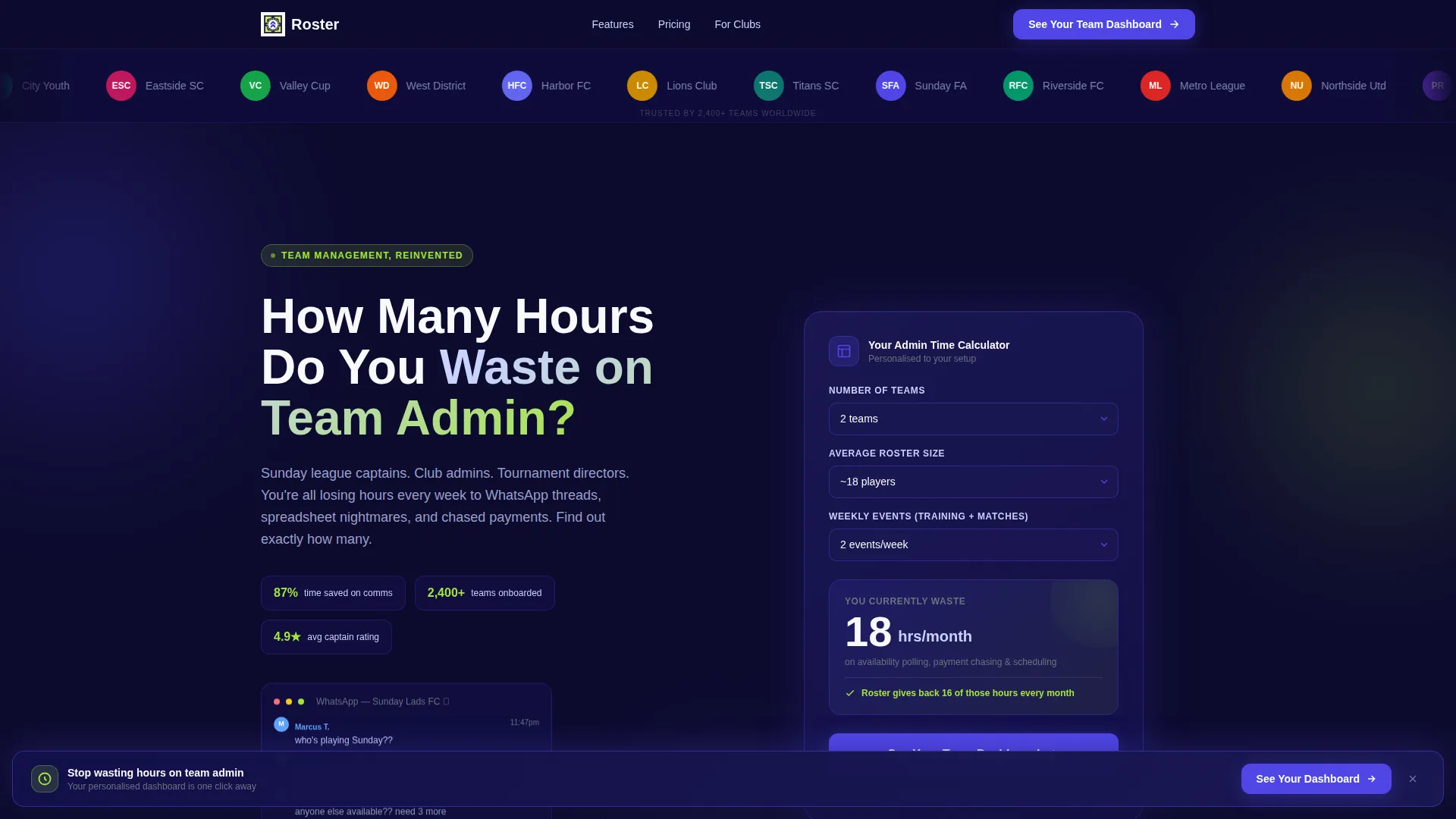
- A 50/50 split-screen hero with a bold cost-framing headline and a live three-input calculator
- Paired before-and-after feature panels that escalate from small daily friction to full season scheduling
Feature list
This template delivers six purposeful components, each tied directly to the conversion goal of getting a visitor to click through to a free trial.
Credibility Logo Bar
A full-width horizontal scroll of league crests, club badges, and association logos runs edge to edge at the very top of the page. It establishes trust before the visitor reads the headline, signaling that real organizations already use this platform.
Split-Screen Hero Section
The hero divides 50/50 between a bold cost-framing headline on the left and an interactive calculator on the right. The asymmetry is intentional: the question hooks attention, and the tool delivers a personalized answer that makes the visitor feel seen.
Interactive Time-Saved Calculator
Visitors choose their number of teams, average roster size, and weekly events from three dropdown menus. The calculator instantly renders a personalized hours-per-month estimate, turning an abstract benefit into a concrete, visitor-specific number.
Paired Before-and-After Feature Panels
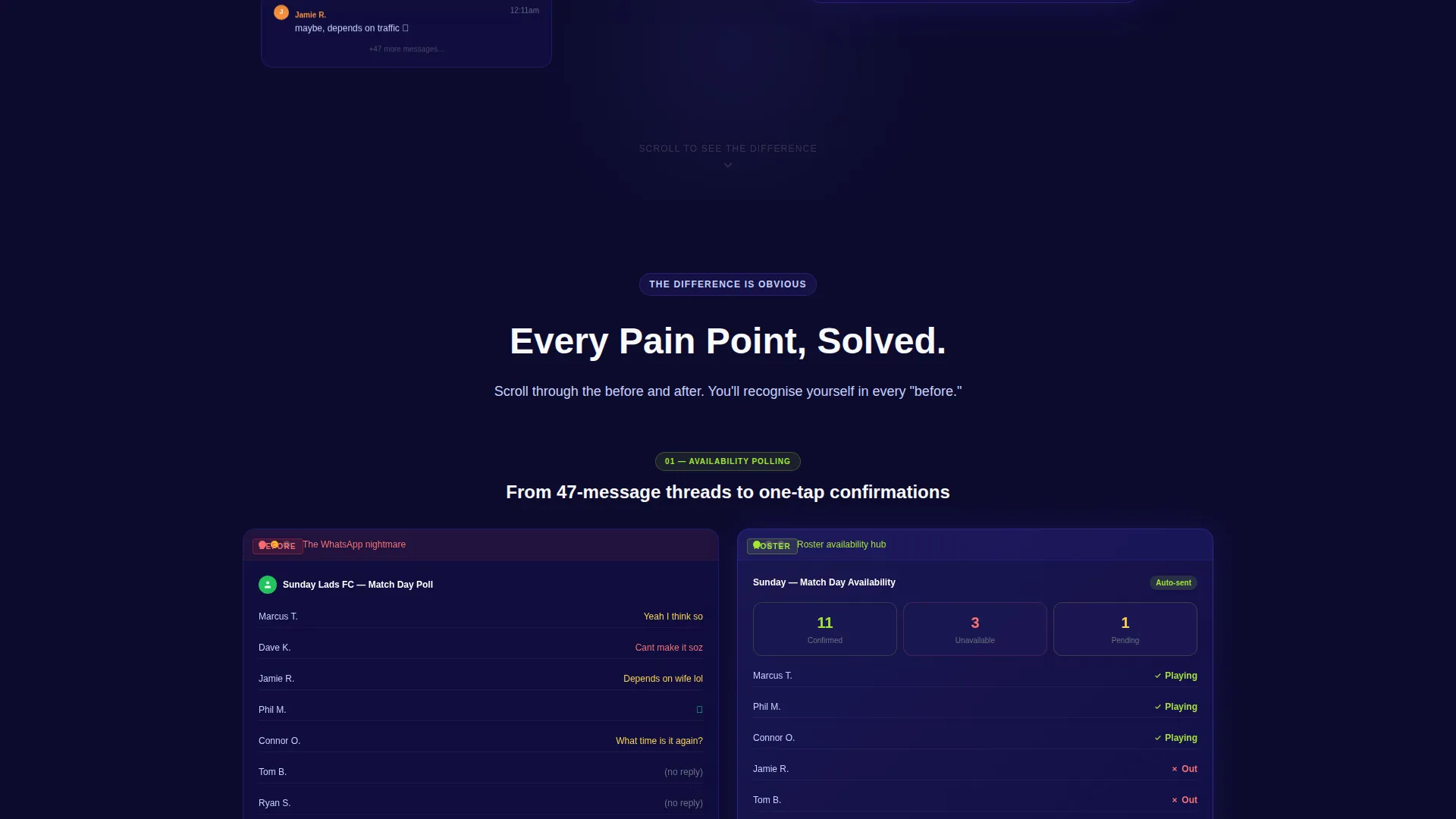
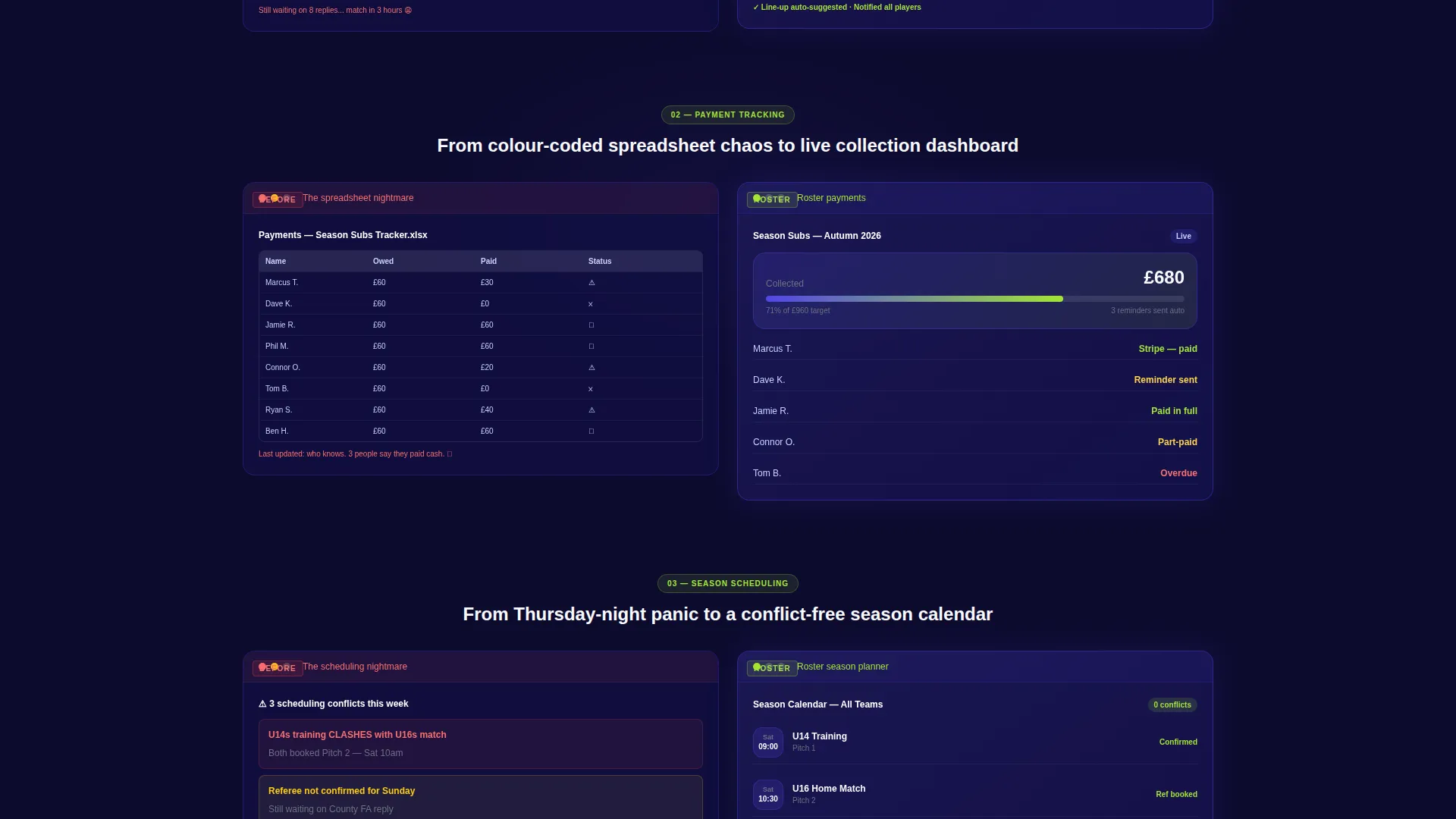
Each feature is shown as a two-panel comparison: the left side displays the messy status quo, such as a cluttered group chat screenshot or a color-coded spreadsheet, while the right side shows the clean platform equivalent. Panels escalate from availability polling through payment tracking to full season scheduling.
Sticky Click-Through Call-to-Action Bar
The primary call-to-action, "See Your Team Dashboard", first appears anchored to the calculator result. After the third section it reappears as a sticky bottom bar that follows the visitor down the page. No form fields appear anywhere; the bar carries calculator inputs forward as URL parameters so the trial entry feels seamless.
URL Parameter Handoff
Calculator inputs are passed forward as URL parameters when the visitor clicks through to the trial signup. This creates continuity between the landing page experience and the onboarding flow, so the next page can greet the visitor with their own team data already in place.
Page sections overview
| Section | Purpose |
|---|---|
| Logo Bar | Establish instant credibility with recognizable league and club badges |
| Split-Screen Hero | Frame the time-cost problem and deliver a personalized calculator result |
| Time-Saved Calculator | Convert visitor inputs into a concrete hours-per-month estimate |
| Before-and-After Panels | Show the contrast between scattered admin tools and the platform solution |
| Sticky call to action Bar | Keep the trial click accessible throughout the scroll without repeating a form |
Design & branding system
The visual identity follows a Directory and Discovery theme built around the Electric Indigo color system. The palette is designed to feel like a night match under stadium floodlights: deep and atmospheric, with sharp accents that draw the eye exactly where action is needed.
- Deep pitch-dark navy (#0D0B2E) as the base background, creating contrast and focus across every section
- Electric indigo (#4F46E5) as the primary brand color for buttons, active states, and section dividers
- Crisp kit-white (#F8F9FC) for body copy and layout breathing room, with reactive lime (#A3E635) reserved for hover states and active toggles
Mobile & speed optimization
The split-screen layout is built to reflow cleanly on smaller screens, stacking the headline above the calculator rather than forcing a side-by-side view that breaks on mobile. The sticky call-to-action bar is particularly well suited to mobile browsing, keeping the trial click within thumb reach at all times.
- The calculator dropdowns are touch-friendly and sized for mobile tap targets
- The paired before-and-after panels stack vertically on narrow viewports so the contrast story reads in the correct order
How this template helps you convert
This template is engineered around a single conversion goal: get the visitor to click through to the free trial. Every design and copy decision supports that goal without adding friction.
- The calculator creates personal investment early. A visitor who has entered their own team size and schedule feels like the platform is already partly theirs before they click anything.
- The before-and-after panels build a compounding case. Each paired comparison raises the stakes, so by the time the visitor reaches the sticky call-to-action bar, they have seen three concrete reasons to switch.
- The URL parameter handoff removes the cold-start problem. The trial page receives the visitor's inputs automatically, making the onboarding feel like a continuation rather than a new form to fill out.
Other information about this template
This template is categorized under Technology, specifically within the Software and SaaS subcategory, with a niche focus on sports team management. It is built as a single click-through landing page, meaning its entire job is to move a qualified visitor to the next step rather than to host a full product site.
- The template style is Split Screen (50/50), a layout well suited to side-by-side problem-solution storytelling
- The creative direction is Calculator or Tool First, a conversion pattern where the interactive element does the selling before any feature copy appears
- The header concept is a Logo Bar, which front-loads social proof at the very top of the page
- The theme is Directory and Discovery, reflected in the way feature panels are organized as browsable, paired comparisons rather than a flat list
Theme
Directory & Discovery
Creative direction
Calculator/Tool First
Color system
Electric Indigo
Style
Split Screen (50/50)
Direction
Click-Through
Page Sections
Credibility Logo Bar
Split-screen Hero Section
Interactive Time-saved Calculator
Paired Before-and-after Feature Panels
Sticky Click-through Call to Action Bar
URL Parameter Handoff
Related questions
Does this template include a working calculator?
Can I use this template without a development team?
How many sections does this landing page include?
Is the color system easy to update for a different brand?
Who is the primary audience for this landing page template?



