Route — Field Service Landing Page Template
Dispatch is a single-page landing page template built for home service business owners who are ready to stop dispatching from whiteboards and spreadsheets. It pairs an animated live dashboard header with a clickable comparison table and a two-step lead capture form. The result is a focused, high-converting page that shows field service operators exactly what they gain the moment they switch.
by Rocket studio
Quick summary
Dispatch is a conversion-focused landing page template designed for home services booking software. It opens with a live-action dashboard preview, walks visitors through an interactive comparison table, and closes with a progressive two-step form. Every design decision serves one goal: turning a skeptical owner-operator into a signed-up lead before they scroll back to their whiteboard.
Who this template is for
This template is built for software founders and product marketers selling scheduling or dispatch tools to small and mid-size home service businesses. It speaks directly to the person running a five-to-fifty-truck operation who still relies on paper, sticky notes, or a shared calendar.
- Owner-operators running HVAC, plumbing, electrical, or cleaning companies
- SaaS teams targeting field service operators who need to see the product before they commit
- Marketers launching or repositioning a home services booking software product
What problem this template solves
Home service business owners lose bookings, miss calls, and burn hours every week because their scheduling lives across three different tools that were never meant to work together. A generic landing page cannot communicate that pain or resolve it fast enough. Dispatch solves this by making the product the hero from the first pixel.
- Visitors arrive skeptical and leave without converting because they never see the tool in action
- A static feature list fails to show the difference between the old way and the new way
- A long one-step form kills momentum before the visitor is ready to commit
What you get with this template
You get a complete, ready-to-customize single-page layout that guides a field service business owner from curiosity to conversion. Every section is purposeful and sequenced to build trust before asking for anything.
- An animated dashboard header section that renders the actual dispatch board mid-use
- A fully interactive comparison table with expandable micro-interaction rows
- A two-step progressive lead capture form and an inline hours-saved calculator
Feature list
This template includes six core building blocks, each grounded in the brief and ready for your product content.
Animated Dashboard Header
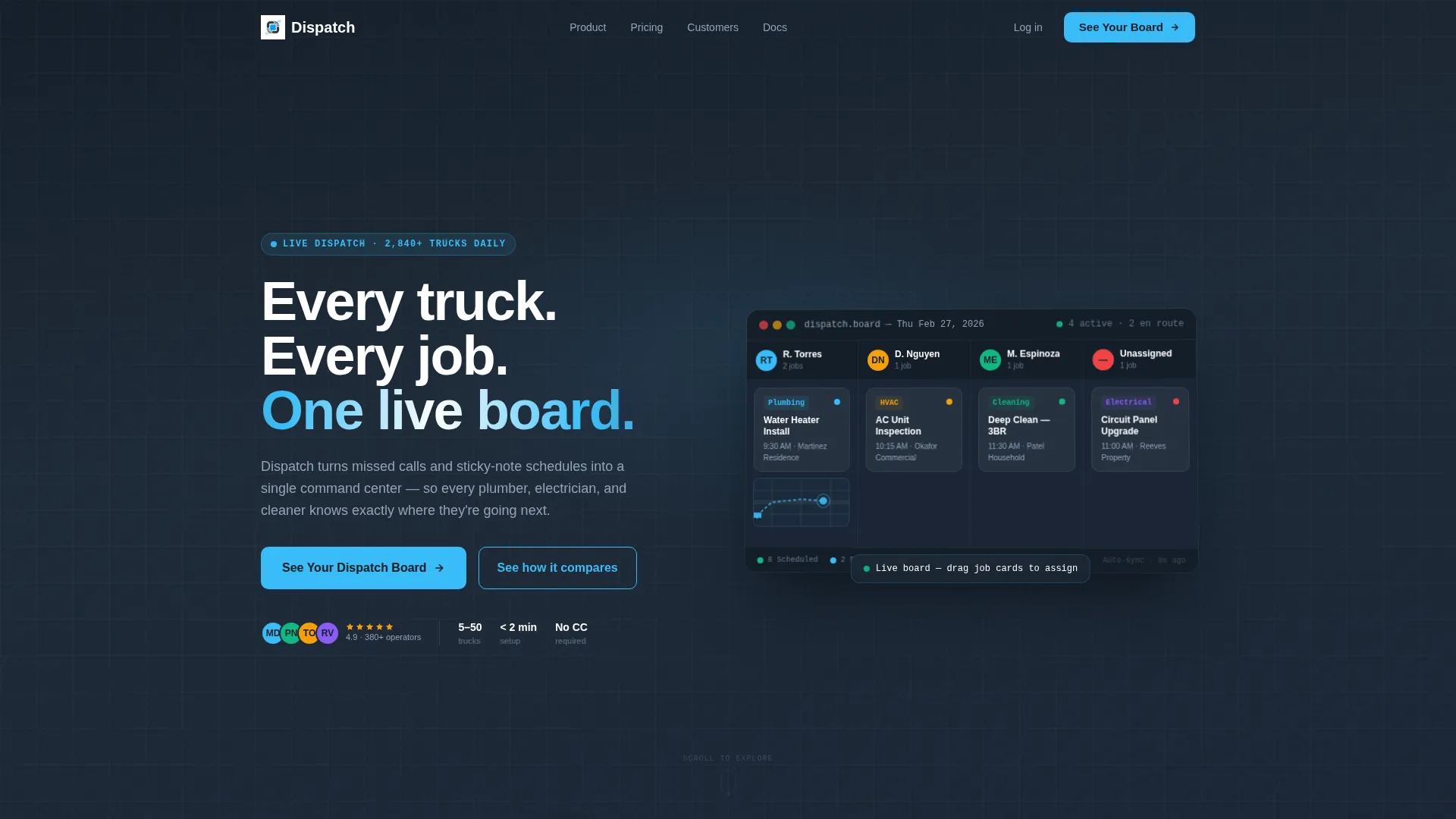
The header renders a pixel-accurate dispatch board mid-morning. Realistic job cards, a technician avatar shown on a map snippet, and an incoming booking notification create immediate product credibility. A subtle cursor animation drags a job card from "Unassigned" to a technician column and the board reorganizes live, with no stock photography involved.
Interactive Comparison Table
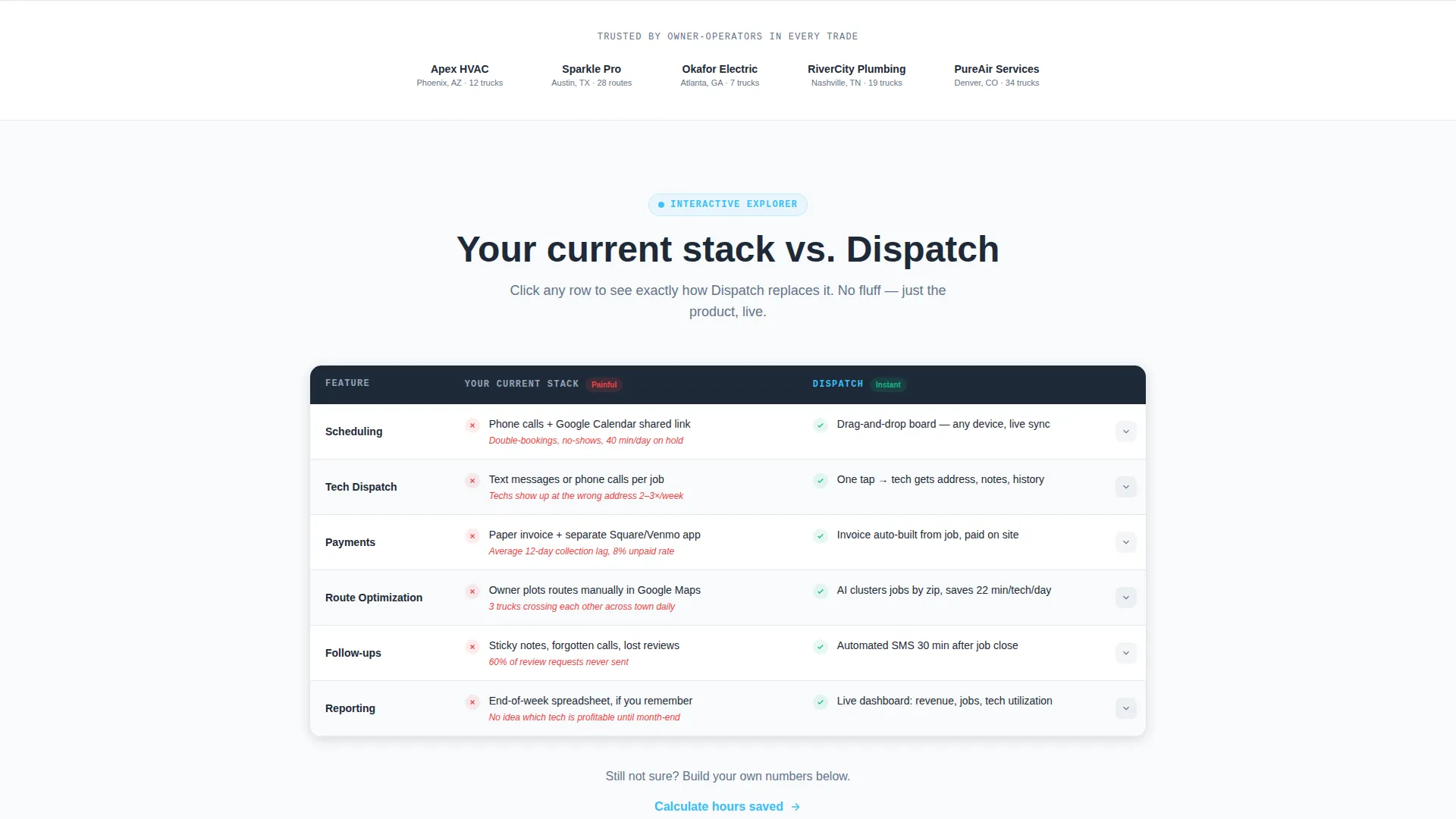
The comparison table places the visitor's current stack on the left and Dispatch on the right. Each row is clickable. Tapping a row like "Scheduling" expands a looping animation of drag-and-drop calendar booking. Tapping "Payments" shows a receipt assembling on screen. The table escalates from basic scheduling through route optimization to automated follow-ups.
Two-Step Progressive Lead Form
The primary call to action, "See Your Dispatch Board," opens a two-field first step asking only for company name and trade type. Submitting that step reveals the second screen: technician count, current scheduling method, and work email. The low-friction entry point reduces drop-off before commitment feels real.
Inline Hours-Saved Calculator
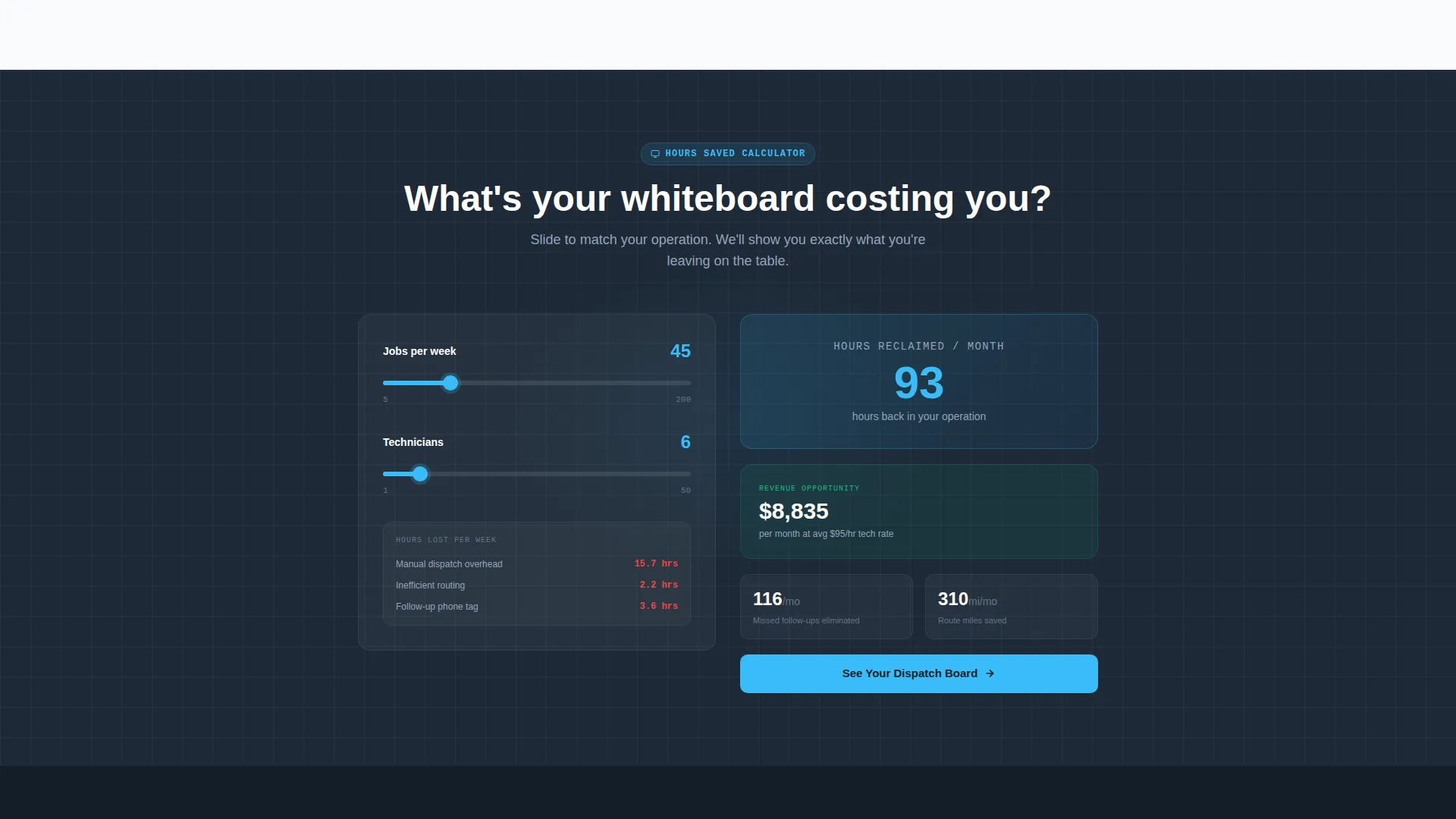
A secondary conversion path sits beneath the comparison table. Visitors enter their weekly job count and technician count. The page returns an estimated number of hours reclaimed per month. This builds quantified urgency before the visitor ever reaches the main form.
Startup Velocity Visual Theme
The layout uses the Slate and Sky color system with a charcoal operations-room base, steel body text, and open-sky blue on every clickable element. The palette is readable in low light and built to guide the eye toward action states without visual clutter.
Conversion-Sequenced Page Flow
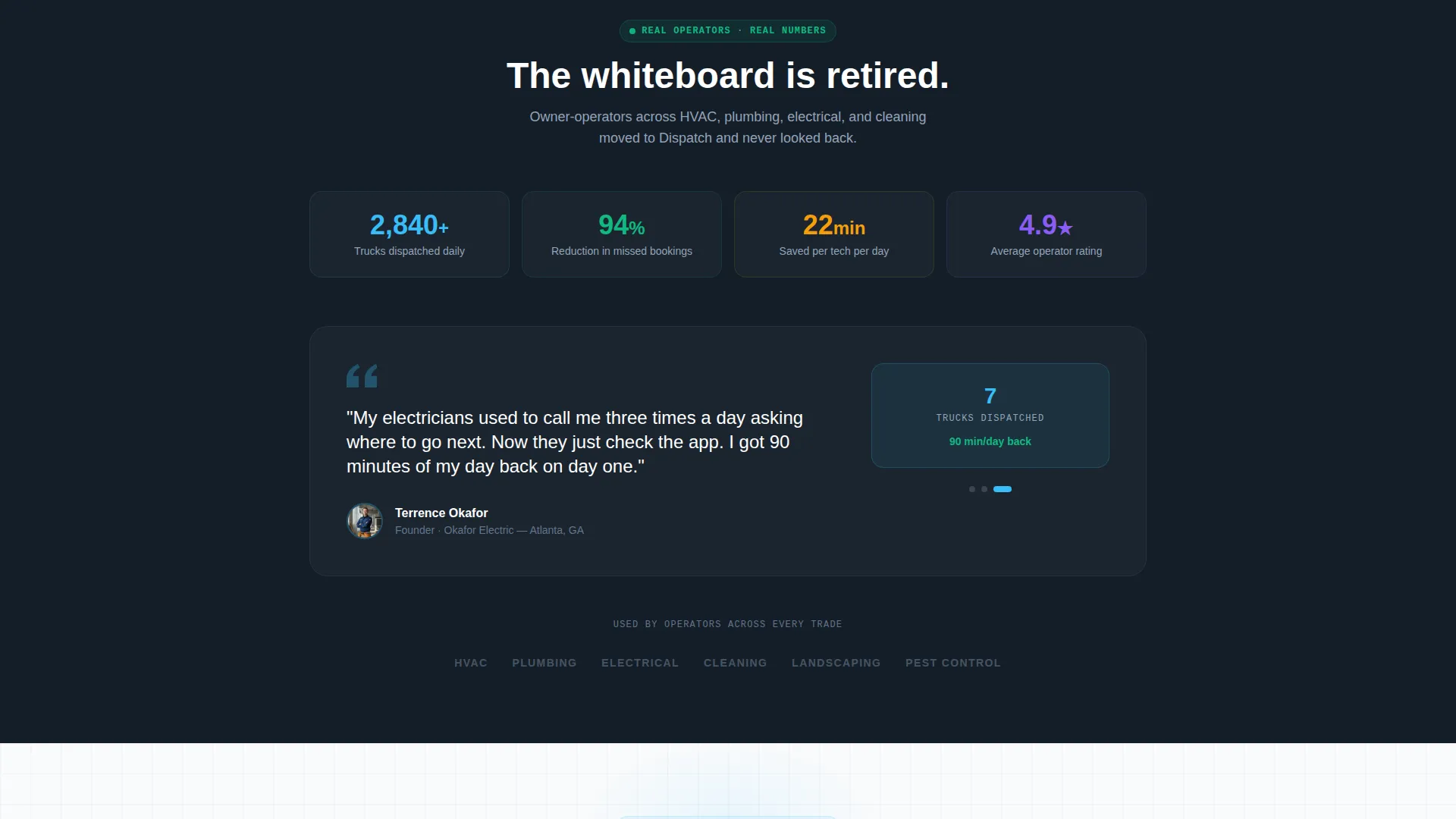
The page is structured so each section raises the stakes before asking for anything. The dashboard creates desire, the comparison table creates contrast, the calculator creates urgency, and the form captures the lead. The sequence is deliberate and designed to match how a skeptical buyer makes decisions.
Page sections overview
| Section | Purpose |
|---|---|
| Animated Dashboard Header | Opens with live product-in-use preview to establish credibility immediately |
| Interactive Comparison Table | Lets visitors tap each row to see micro-interactions contrasting old tools with Dispatch |
| Hours-Saved Calculator | Provides personalized, quantified urgency before the visitor reaches the form |
| Two-Step Lead Form | Captures company name, trade type, technician count, scheduling method, and work email in two low-friction steps |
Design & branding system
The Slate and Sky color system gives this template a dispatch-room aesthetic that feels purpose-built for operations-focused buyers. Every color choice has a functional role, not just a decorative one.
- Deep charcoal (#1E2A38) anchors headers and data-dense sections for strong visual hierarchy
- Brushed-steel mid-gray (#64748B) carries body text and table borders, while open-sky blue (#38BDF8) marks every interactive and clickable element
- Cloud-white (#F8FAFC) opens up comparison rows so the eye can scan without fatigue
Mobile & speed optimization
The template is structured for fast scanning on any screen size. A field service owner checking it from a van cab or a phone between jobs needs the key message to land in the first scroll.
- The dashboard header crops at a slight angle to read clearly on smaller screens without losing the product detail
- Comparison table rows are tap-friendly, with expandable micro-interaction states sized for touch input
- The two-step form keeps each screen to two or three fields, reducing cognitive load on mobile
How this template helps you convert
Every design and copy decision in this template is built to move a hesitant buyer closer to submitting their details.
- The live dashboard header removes abstraction immediately. Visitors see a real dispatch board in use, not a marketing illustration, so trust builds before a single word is read.
- The interactive comparison table makes the cost of the old way visible. Each row the visitor taps reinforces why their current stack is holding them back, raising the emotional stakes row by row.
- The two-step form and inline calculator work together. The calculator delivers a personalized payoff number, and the low-friction first form step turns that momentum into a submitted lead.
Other information about this template
This template is part of the Startup Velocity theme collection and uses the Slate and Sky color system throughout. It is categorized under Technology, specifically within the Home Services Software and SaaS subcategory, targeting the home services booking software niche.
- The creative direction follows an Interactive Explorer pattern, meaning the scroll itself is designed to feel like a product test drive
- The header concept is a Dashboard Preview, using a live product rendering rather than illustration or photography
- The landing page direction is Lead Generation, with every section sequenced toward form submission
- The template style is a Comparison Table layout, purpose-built to contrast the visitor's current tools against the featured product
Theme
Startup Velocity
Creative direction
Interactive Explorer
Color system
Slate & Sky
Style
Comparison Table
Direction
Lead Generation
Page Sections
Animated Live Dashboard Header
Clickable Comparison Table with Micro-interactions
Two-step Progressive Lead Form
Inline Hours-saved Calculator
Startup Velocity Slate and Sky Design System
Conversion-sequenced Page Layout
Related questions
Can I change the trade type options in the lead form dropdown?
Does the comparison table require coding knowledge to edit?
Is the hours-saved calculator connected to a fixed formula?
What business size is this landing page built for?
Can this template be used for a pre-launch or waitlist campaign?



