Instant Logistics Dispatch Landing Page Template
Haul is a bento grid landing page template built for waste management dispatch software. It opens with an interactive Waste Savings Calculator, guides visitors through live route maps, workflow toggles, and hauler testimonials, then converts them with a frictionless three-field signup. The Data Command visual style, deep charcoal, sky blue, and signal white, makes every metric feel urgent and every call to action impossible to miss.
by Rocket studio
Quick summary
Haul is a single-page, bento grid landing page template designed for real-time fleet dispatch software in the waste management industry. It puts an interactive savings calculator above the fold, walks visitors through live route intelligence and workflow demos, then closes with a no-credit-card signup. The result is a page that feels less like a brochure and more like a working dispatch console.
Who this template is for
Operations managers, municipal waste directors, and roll-off dispatchers all share the same core problem: too many moving parts and not enough visibility. This template speaks their language from the first slider drag. It is built for software teams selling to the people who run truck fleets daily and need proof before they commit to anything.
- Operations managers at regional haulers running anywhere from 15 to 80 trucks who are still managing route planning in spreadsheets at 4 a.m.
- Municipal solid waste directors who need clear, data-backed numbers to defend budgets in front of city councils.
- Roll-off dispatchers handling angry contractor calls because the right equipment never arrived on time.
What problem this template solves
Trucking companies selling dispatch software face a specific conversion challenge. Buyers are skeptical, time-poor, and tired of vendor demos that never show real numbers. A generic landing page that leads with feature lists loses them in seconds. The template solves this by replacing passive reading with active proof. Visitors interact with their own data before they read a single headline.
- Scattered route sheets, missed pickups, and overflowing container alerts create daily chaos that generic software pages fail to address directly.
- Back office staff and drivers often work from different versions of information, making driver communication slow and error-prone.
- Most landing pages for fleet management software lead with features instead of outcomes, losing buyers who need to see ROI fast.
What you get with this template
This template delivers a complete, conversion-focused landing page layout for waste management dispatch software. Every section is a self-contained proof point. Visitors drag sliders, toggle workflows, and read testimonials with specific tonnage and fuel figures, all before they hit the signup form. The page is structured to streamline the buyer journey from curiosity to committed trial.
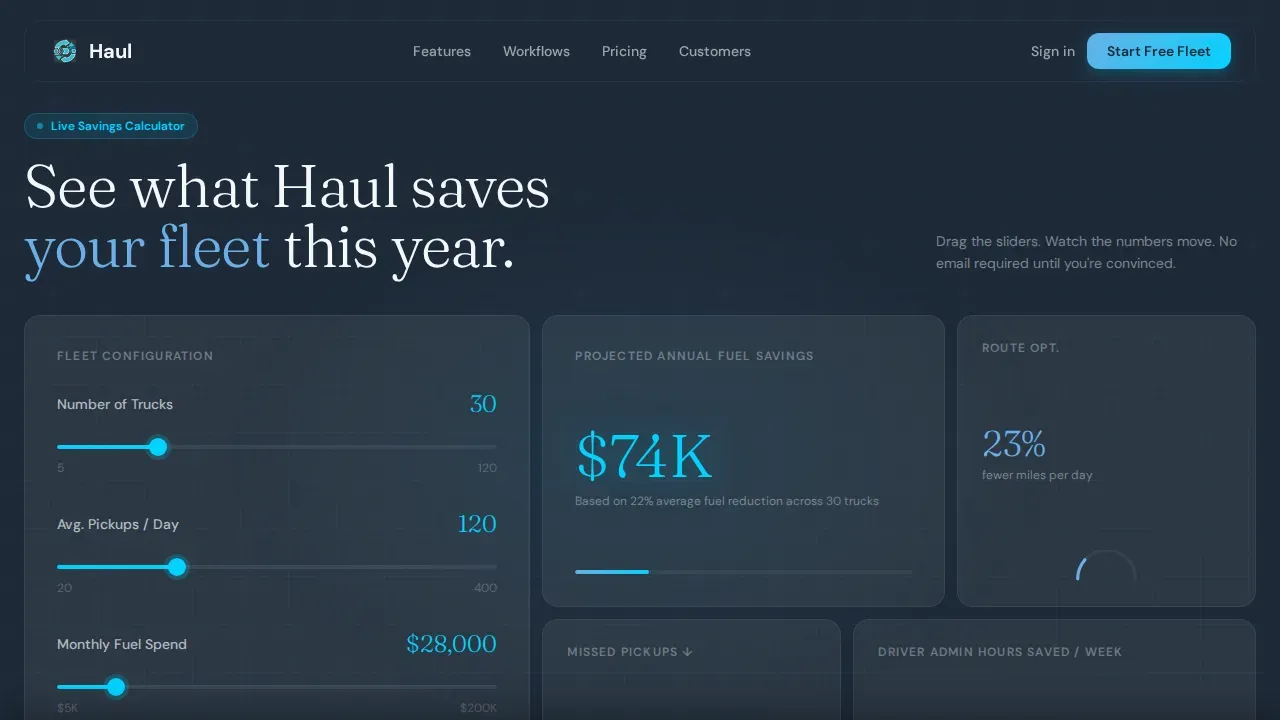
- A working Waste Savings Calculator bento cluster above the fold, with animated truck route trace and live metric cards showing projected annual savings, route optimization percentage, and missed-pickup reduction.
- A before-and-after live route map section, a three-mode workflow toggle covering residential, commercial, and roll-off operations, and a stacked social proof card with named hauler testimonials.
- A three-field signup modal (work email, company name, fleet size dropdown) seeded with the visitor's calculator inputs, plus a sticky bottom call-to-action bar that follows the visitor throughout the scroll.
Feature list
This template is built around interactive proof, not passive copy. Each feature below maps directly to a section or component described in the source brief.
Interactive Waste Savings Calculator
The hero section is a fully interactive calculator. Visitors input their number of trucks, average pickups per day, and current monthly fuel costs. Large, sky-blue counters animate projected annual savings, route optimization percentage, and missed-pickup reduction in real time. A subtle truck-icon animation traces an optimized route in the background, connecting the math to the road visually. This above-the-fold experience lets trucking companies show ROI before a single line of marketing copy is read.
Live Route Intelligence Panel
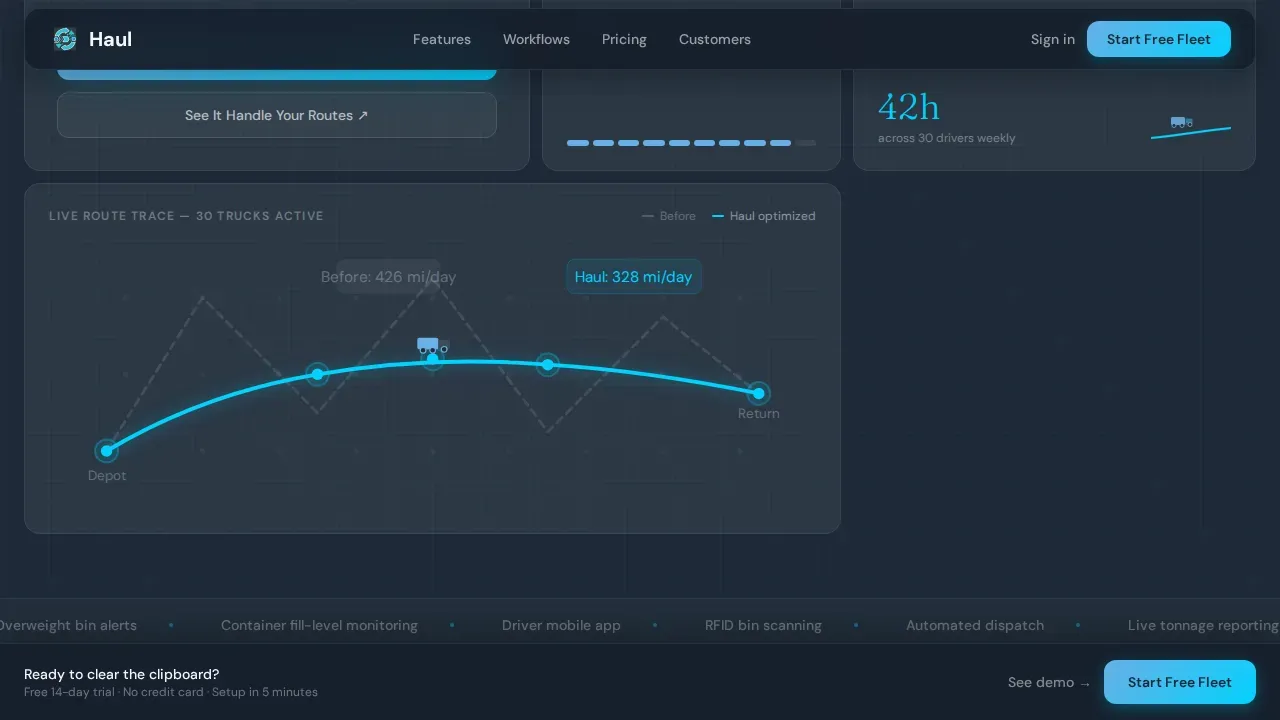
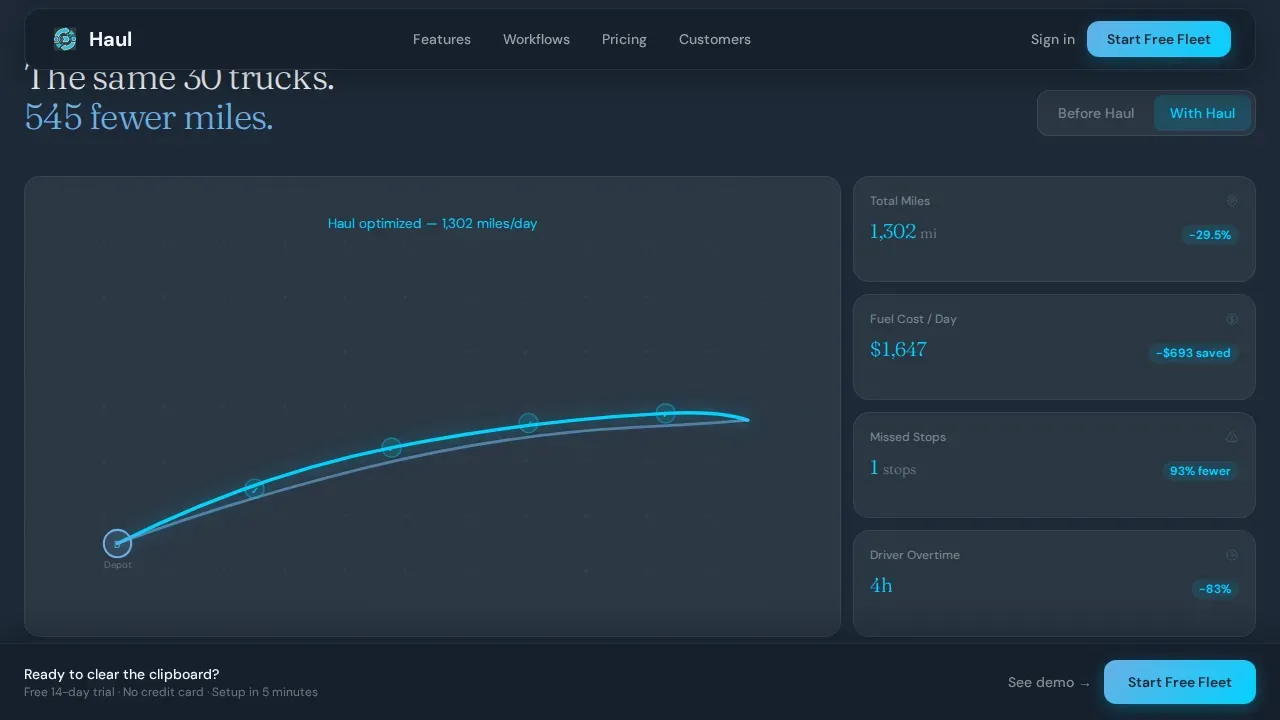
Below the fold, a dedicated bento card displays a live-updating route map. Visitors toggle between a before state and an after state to see the difference in total miles driven. The card makes the case for route efficiency and reduced empty miles without requiring any explanation. It turns an abstract promise about route optimization into something a dispatcher can see and immediately understand.
Three-Mode Workflow Toggle
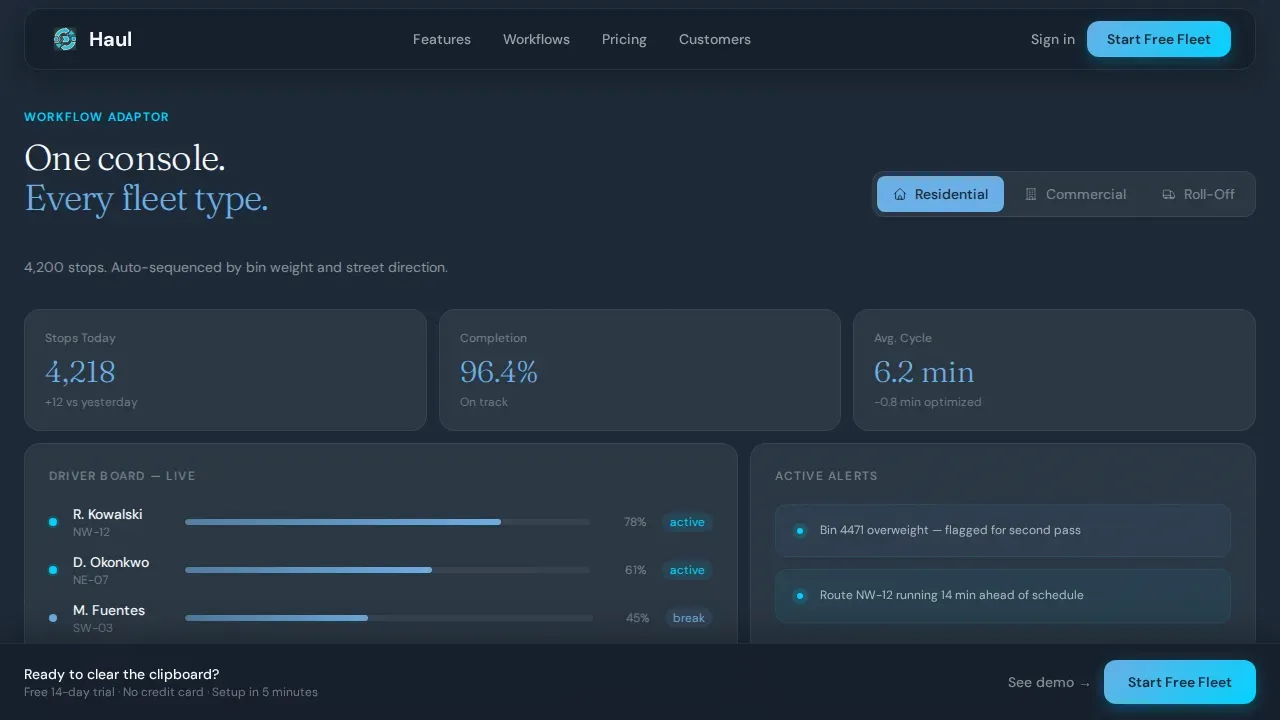
A single interactive card lets visitors switch between residential, commercial, and roll-off dispatch workflows. The interface adapts in real time to show how the software handles each operation type. This is especially useful for trucking companies that manage construction sites, handle bulk materials, or coordinate delivery of construction materials across multiple stops. It removes the need for separate demos and keeps the visitor inside one dashboard.
Stacked Social Proof Card
Three hauler testimonials are stacked inside a single bento card, each citing specific tonnage figures and fuel savings percentages. Names and company details are included for credibility. Reliability is the primary selling point in logistics, and this section delivers the statistical evidence and word-of-mouth trust that turn skeptical operations managers into trial signups. Customer satisfaction is shown through real words from real dispatchers, not generic praise.
Frictionless Three-Field Signup Modal
The primary call to action, "Start Your Free Fleet," opens a modal with exactly three fields: work email, company name, and fleet size dropdown. No credit card is required. Lead capture forms that ask only for necessary information reduce friction and improve conversion. The modal is pre-seeded with the fleet size and inputs the visitor already entered in the calculator, making the trial feel personalized before an account is even created.
Sticky Viewport Call-to-Action Bar
A secondary call-to-action bar pins to the bottom of the viewport as the visitor scrolls. It stays visible throughout the entire page, offering a persistent entry point back to the signup modal. The bar also carries a "See It Handle Your Routes" link that triggers a 90-second interactive demo using the visitor's own calculator inputs. This keeps the conversion path open at every point in the scroll journey.
Page sections overview
| Section | Purpose |
|---|---|
| Hero Calculator Cluster | Interactive savings calculator with animated truck route trace and live metric bento cards |
| Route Intelligence Panel | Before-and-after route map toggle showing mile count reduction and route efficiency gains |
| Workflow Adaptor Toggle | Three-mode interface switcher for residential, commercial, and roll-off dispatch workflows |
| Social Proof Stack | Stacked hauler testimonials with specific fuel savings percentages and tonnage figures |
| Free Fleet Signup | Three-field conversion modal pre-seeded with calculator inputs, no credit card required |
| Sticky Bottom Bar | Persistent viewport call-to-action bar with demo trigger and primary signup link |
| Footer Row | Linear single-row footer with essential links and branding |
Design & branding system
The visual identity follows a Data Command theme. The palette is built around a Slate and Sky color system that evokes a predawn dispatch office: dark monitors glowing blue against concrete walls, the sky just beginning to lighten outside the loading bay. Typography pairs DM Sans for interface body text with Fraunces for display headlines, keeping the page both functional and memorable.
- Color palette: deep dispatch charcoal (#1E2A38) for backgrounds, wet-asphalt slate (#3B4A5C) for grid gutters, open-morning sky (#6AAFE6) for metrics and calls to action, signal white (#F4F7FA) for card surfaces, and route-highlight cyan (#00D2FF) for interactive elements and live data accents.
- Animation system: high-intensity GSAP scroll animations, counter animations on metric cards, a truck route trace SVG that animates behind the calculator, and stagger reveals on bento card entries.
Mobile & speed optimization
The template is desktop-first, built for operations managers reviewing data at dispatch desks. It also responds cleanly to tablet viewports, recognizing that back office staff and field supervisors often check status updates on mobile devices. Performance is built into the architecture: static sections use server components for fast initial load, while interactive sections like the calculator and route toggle use client components only where needed.
- The layout is mobile friendly with touch-friendly controls on sliders and toggle buttons, ensuring dispatchers can interact with the calculator and workflow toggle on tablets without needing a mouse.
- Every bento card lifts cleanly off the background on smaller screens, maintaining the signal white card-surface contrast against the charcoal grid at all viewport sizes.
How this template helps you convert
This template is designed around one conversion model: get the visitor invested in their own data before asking for anything. The dispatch process from first visit to free trial is compressed into a single scroll. Every interactive element is a micro-commitment that makes the signup feel like the natural next step.
- The calculator captures attention above the fold by showing projected savings in real time, so visitors immediately see ROI without reading any marketing copy. Trucking companies that manage fleet costs closely respond to numbers before they respond to words.
- The workflow toggle and route map keep the visitor inside the product experience rather than sending them to an external demo or a separate page, reducing drop-off and building confidence that the software can handle their specific operation.
- The sticky call-to-action bar and pre-seeded signup modal eliminate the need for the visitor to repeat information, lowering friction at the exact moment they are ready to commit. Automated invoicing previews and load details visible in demo mode reinforce the value of starting a free trial immediately.
Other information about this template
This template is built specifically for the waste management vertical, but its structure is adaptable to any fleet-heavy trucking business that needs to demonstrate real-time value before asking for a signup. Operators who manage more trucks as they grow will find the fleet size dropdown in the signup modal already accounts for that scale. The page is built with today's digital age in mind: buyers expect interactive proof, not static copy.
- The template supports integration of trust badges, partner logos, and performance statistics alongside testimonials to strengthen the credibility layer for trucking services competing in a crowded market.
- Trucking companies that track shipments across construction sites or haul bulk materials and construction materials will find the three-mode workflow toggle directly mirrors their daily operations.
- The page structure supports connection to a custom domain and a custom domain name for teams launching on their own branded URL, helping establish a strong digital identity for any trucking business.
- Back office staff can rely on the same data being surfaced to drivers via the mobile app, ensuring the whole team sees status updates from one dashboard without redundant phone calls or manual work.
- The template's visual layout can accommodate load details, load planning blocks, and load templates sections if a team chooses to expand the page for freight or hauling freight use cases.
- Access controls, audit logs, and safety regulations sections can be added as additional bento cards for operators who need to display compliance features to enterprise buyers or municipal clients.
- Audit logs, access controls, and driver utilization metrics are natural additions for teams targeting larger fleet management buyers who require compliance visibility.
- Automated invoicing previews, driver performance data, and maintenance schedules can be surfaced as additional metric cards within the existing bento grid layout.
- Teams can connect the page to social media platforms and use google analytics to track visitor behavior and measure which calculator inputs drive the most trial signups.
- The template supports custom pricing display blocks for teams that want to show tiered plans alongside the freemium call to action.
- Back office teams benefit from complete visibility into daily operations when the platform is properly introduced through this landing page, reducing manual data entry and unnecessary data entry across office staff workflows.
- The design and structure are aligned with what trucking services buyers expect when evaluating dispatch software in today's digital age: speed, clarity, and interactive proof before commitment.
Theme
Data Command
Creative direction
Calculator/Tool First
Color system
Slate & Sky
Style
Bento Grid
Direction
Freemium/Trial
Page Sections
Interactive Waste Savings Calculator
Live Route Intelligence Toggle
Three-mode Workflow Adaptor
Stacked Hauler Testimonial Card
Pre-seeded Signup Modal
Sticky Viewport Conversion Bar
Related questions
Who is this landing page template designed for?
Does the template require a credit card to launch the free trial?
Can this template be adapted for freight or construction hauling operations?
How does the personalized demo feature work?
Is the template mobile friendly for dispatchers in the field?



