Intelligent Dispatch Operations Landing Page Template
Pipeline is a real-time dispatch management landing page template built for plumbing businesses. It presents a glassmorphic cockpit dashboard with a live job queue, animated truck tracking, and a feature matrix grid. The template is designed to capture leads fast, with a floating call-to-action bar, a three-field form, and a demo video path built in from the start.
by Rocket studio
Quick summary
Pipeline is a single-page dispatch management landing page template for plumbing field service businesses. It pairs a full-viewport isometric dashboard preview with a scrollable feature matrix, stat callout strips, social proof cards, and a focused lead capture form. Every section is planned to move a visitor from curiosity to sign-up without friction.
Who this template is for
This template is built for the people who run plumbing operations day to day. Whether you manage two vans or twenty crews, the layout speaks directly to your workflow and shows your future process before the first field is filled in.
- Owner-operators running small fleets of service vehicles who need one screen to manage all dispatch tasks
- Franchise managers overseeing multiple crews across a metro area who track jobs, timelines, and technician progress simultaneously
- Office coordinators currently relying on whiteboards or spreadsheets who want real time visibility into every job stage
What problem this template solves
Dispatch chaos is the core problem. Plumbing businesses deal with overlapping jobs, missed callbacks, and no single place to monitor progress across the team. Sales teams and operations staff both lose revenue when details fall through the cracks. This template presents a solution that makes the problem visible and the product credible.
- No central view: jobs are scattered across calls, texts, and sticky notes instead of one pipeline management screen
- Slow response times: without live tracking, businesses cannot assign the nearest tech or flag overdue tasks quickly
- Weak lead pages: most plumbing software landing pages are text-heavy and fail to show the product doing real work
What you get with this template
You get a fully planned, section-led landing page that puts the dispatch dashboard front and center. The layout is designed to build trust fast, capture leads with minimal friction, and present the product's workflow coverage in a visual grid. Every component is included and ready to customize.
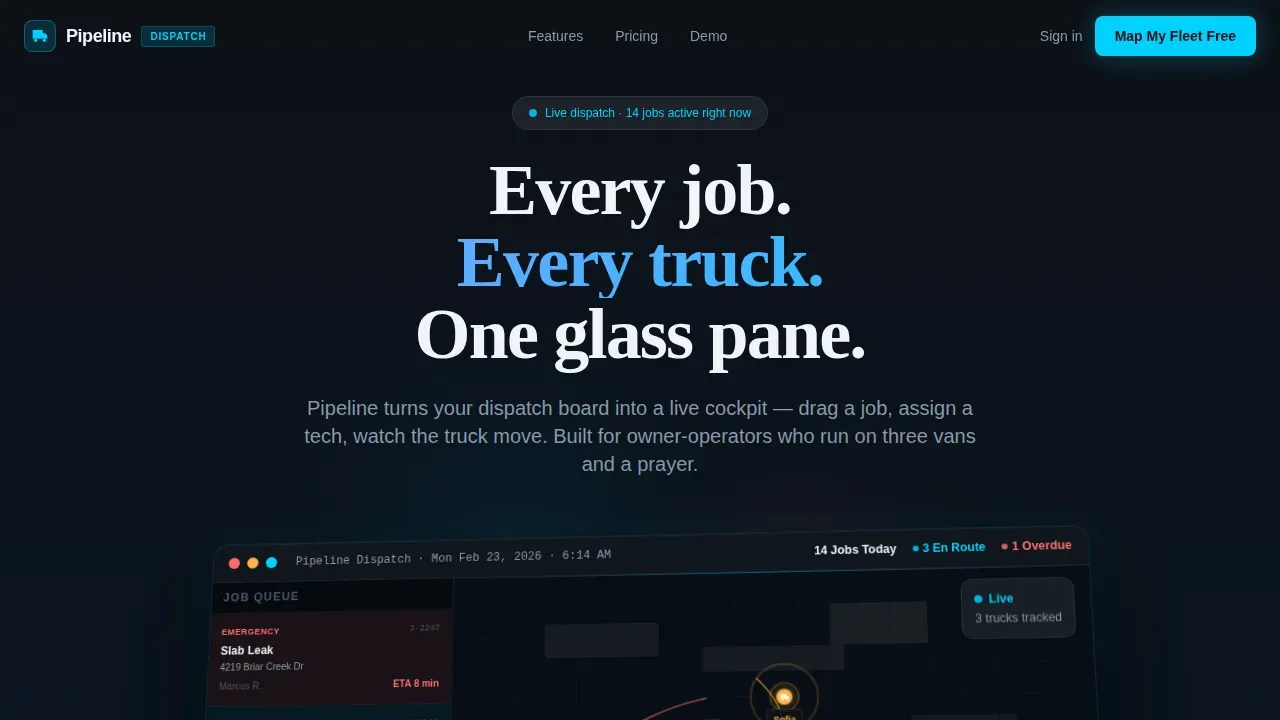
- A full-viewport hero with an isometric dashboard preview, animated truck icons, a live job queue panel, and a floating call-to-action bar that appears on first scroll
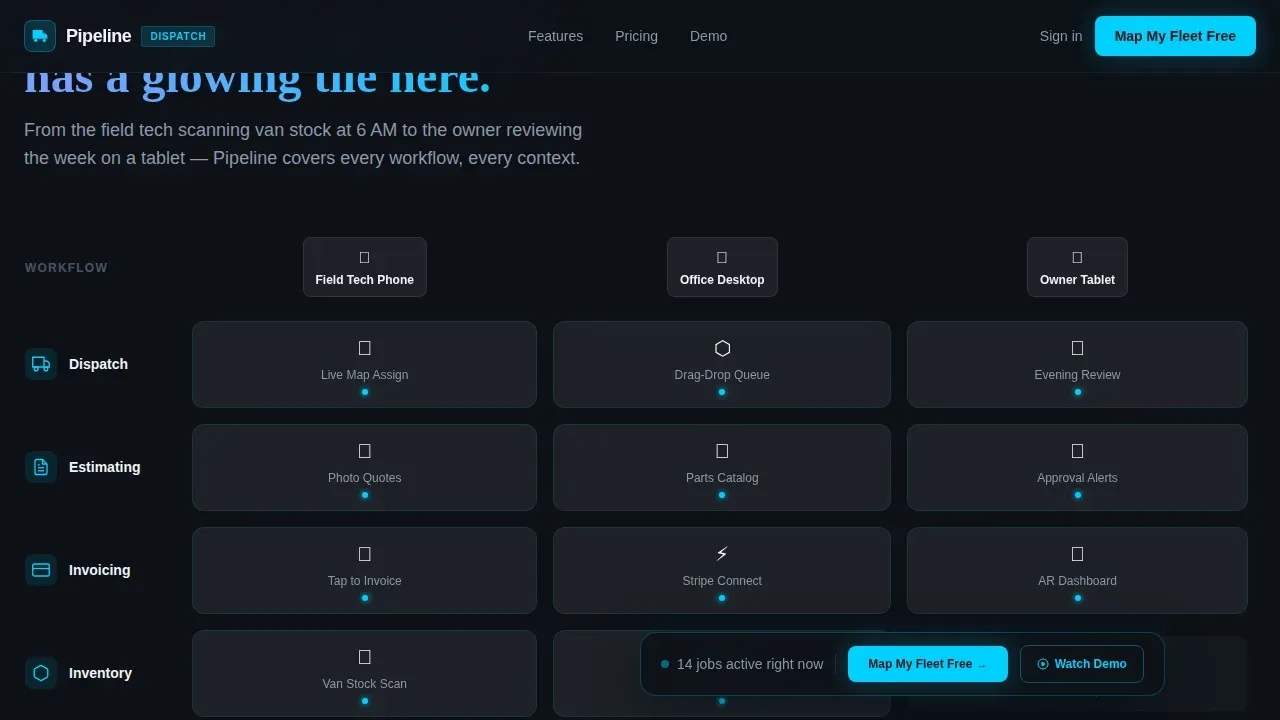
- A workflow-by-context feature matrix where each cell represents a capability at a specific stage: field phone, office desktop, or owner tablet
- A three-field lead capture form asking for company name, fleet size via a slider, and work email, plus a ghost-button path to a gated demo video
Feature list
This template covers the full set of components a high-converting plumbing dispatch landing page needs. Each section below describes what is built in and how it supports your sales process.
Isometric Dashboard Hero
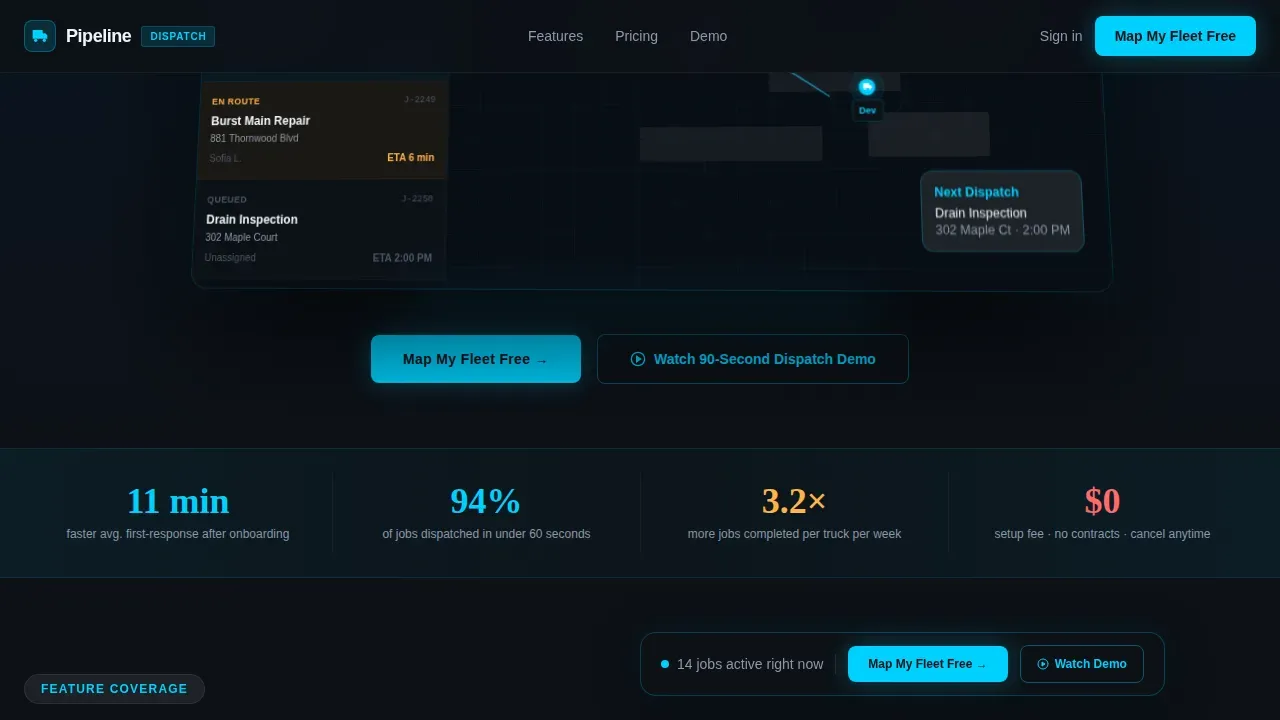
The hero occupies the full viewport and renders a pixel-accurate replica of the dispatch screen at a shallow isometric tilt. Visitors see a live map with pulsing truck icons, a left-rail job queue with color-coded cards, and a top bar showing job count, en-route status, and overdue alerts. Micro-animations keep the composition alive: a truck nudges forward, a job card slides from queue to assigned.
Workflow Feature Matrix Grid
The feature matrix is the core storytelling section. Rows represent plumbing workflows including dispatch, estimating, invoicing, inventory, and customer follow-up. Columns represent the context: field tech phone, office desktop, and owner tablet. Each cell is a frosted card with an icon and label that brightens on hover, letting visitors evaluate capabilities across every stage of their process.
Stat Callout Strips
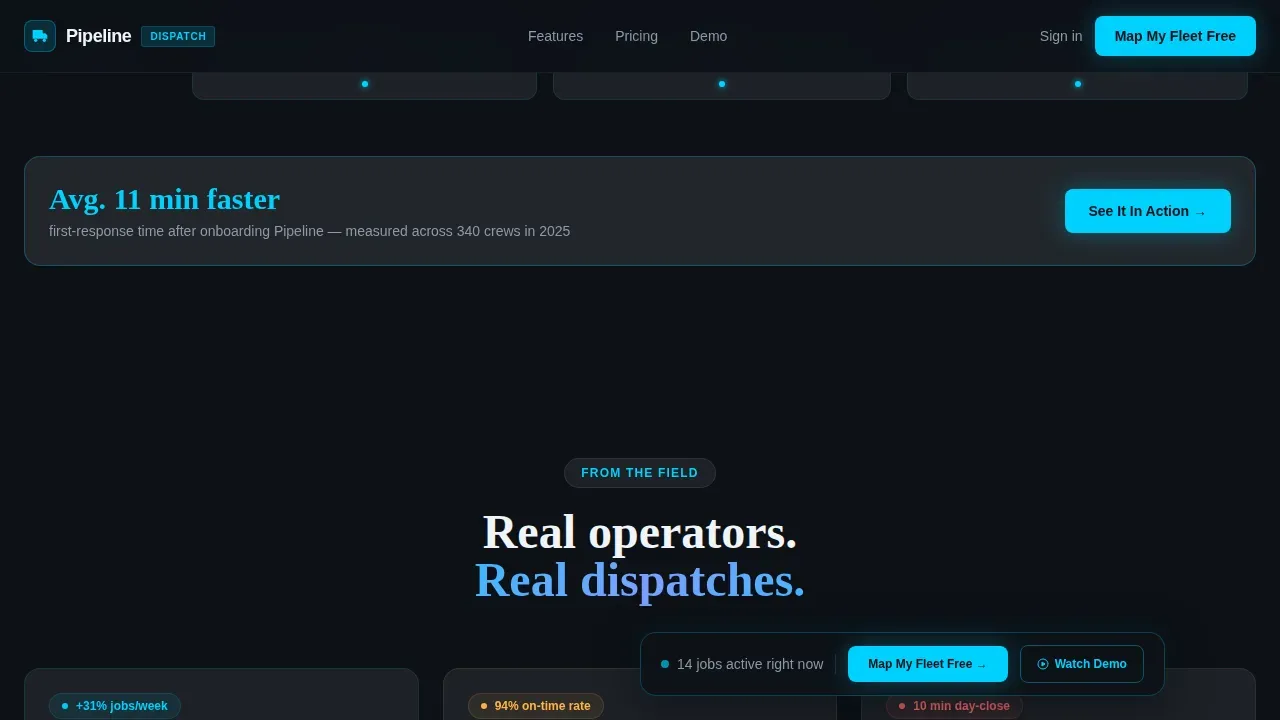
Between matrix rows, full-width callout strips land a single quantifiable result in large type. The planned stat example is "Avg. 11 min faster first-response after onboarding." These strips serve as proof points that break up the grid and keep the scroll momentum going.
Floating Lead Capture Bar
A frosted-glass bar pins to the viewport after the first scroll. It holds the primary call-to-action "Map My Fleet Free" and a ghost-button secondary path to the demo video. Both paths lead to the same email capture, keeping the lead funnel consistent and conversion-focused.
Social Proof Section
Testimonial cards from owner-operators and franchise managers include names, company types, and before-and-after metrics. This section gives stakeholders and decision-makers the peer validation they need before they complete a sign-up.
Footer Strip
A single-row linear footer holds brand details and navigation links without competing with the conversion flow above.
Page sections overview
| Section | Purpose |
|---|---|
| Hero Dashboard Preview | Anchors trust with a live isometric dispatch view and floating call-to-action |
| Feature Matrix Grid | Proves workflow coverage across every device context and job stage |
| Stat Callout Strips | Delivers quantifiable results between matrix rows to sustain momentum |
| Social Proof Cards | Builds credibility through owner and manager testimonials with real metrics |
| Lead Capture Form | Collects company name, fleet size, and work email in three fields |
| Linear Footer Strip | Closes the page cleanly without disrupting the conversion environment |
Design & branding system
The visual identity follows a Data Command theme with a glassmorphic color system. The palette feels like a cockpit instrument cluster reflected in a rain-wet windshield: translucent panels layered over deep black, with every glow tied to a function. Nothing is decorative.
- Colors: deep pipeline black (#0D1117) as background, frosted-glass white at 12% opacity (#FFFFFF1F) for panel cards, live-status cyan (#00D1FF) for active jobs and primary actions, and urgent-callout coral (#FF6B6B) for overdue alerts
- Typography: DM Sans for interface labels and data details, Fraunces for display headlines and section titles
- Animations: truck nudge movement, job card slide transitions, pulse rings on map icons, and scroll-linked reveals via Intersection Observer
Mobile & speed optimization
The template is built desktop-first because the dispatch dashboard requires screen real estate to present its full data grid. A mobile fallback is planned to serve logistics managers and office coordinators who monitor progress on phones throughout the day.
- The hero collapses to a centered, scaled dashboard preview on smaller screens, keeping the visual impact intact
- The feature matrix reflows to a single-column card list on mobile so every workflow stage remains readable
- Scroll-triggered animations use CSS and Intersection Observer for smooth reveal performance without heavy scripts
How this template helps you convert
The conversion strategy is layered across every section so visitors move naturally from awareness to action. The template does not rely on a single call-to-action at the bottom of the page.
- The hero earns the click before any form appears. Visitors see the product in full operation, with job cards, truck routes, and live alerts already visible. This builds the belief that the product is real and ready.
- The floating call-to-action bar stays present as visitors scroll through the matrix, keeping "Map My Fleet Free" accessible at every deal stage of their evaluation.
- The three-field form removes friction at the moment of intent. Asking only for company name, fleet size, and work email means fewer abandoned forms and more qualified leads moving into the sales funnel.
Other information about this template
This template is part of the Pipeline product line and is designed for businesses in the plumbing field service market. Below are additional details that help project managers, operations leads, and sales teams evaluate whether it fits their process.
- Project pipeline management refers to tracking a series of projects from ideation to launch using a standardized, repeatable method. This template supports that model by presenting each job as a tracked stage in a visual pipeline, helping teams monitor progress and individual tasks at a glance.
- A well-managed project pipeline provides useful insights into timelines, progress, and statuses across multiple projects. The dashboard hero and matrix grid reflect this principle by giving stakeholders a high level visuals overview of every active workflow.
- Sales pipeline management templates help sales teams visualize deal stages, track leads through the sales funnel, and focus on closing deals without missing steps. The layout borrows these conventions and applies them to field service dispatch.
- Project portfolio management principles are embedded in the matrix design: each row is an individual project type and each column is a resource context, enabling resource allocation decisions at a glance.
- Bar graphs and a gantt chart view can be added to the stat section during development or testing to present key metrics in a visual format that stakeholders and project managers can share during a proposal or review.
- The template can support multiple pipelines if a business runs separate dispatch workflows for different service lines, configure each matrix row independently to reflect those details.
- Automated project management tools help streamline project workflows and enhance team collaboration. This template is designed to present those capabilities on landing pages that convert visitors into informed leads.
- The pipeline real time dispatch management landing page template is structured so that businesses can launch quickly, customize the palette and copy, and create a page that reflects their brand without rebuilding from scratch.
- Strategic goals such as faster response times and higher revenue per tech are supported by the stat callout strips, which present quantifiable results tied to real operational outcomes.
- Risk analysis and project execution details can be added to the social proof section as before-and-after comparisons, giving prospects the data they need to evaluate the product confidently.
Theme
Data Command
Creative direction
Feature Matrix
Color system
Glassmorphic
Style
Dashboard/Data Grid
Direction
Lead Generation
Page Sections
Isometric Dashboard Hero with Micro-animations
Workflow by Context Feature Matrix
Floating Call-to-action Bar
Three-field Lead Capture Form
Social Proof and Stat Callout Strips
Scroll-linked Reveals and Animation System
Related questions
Can I customize the colors and typography in this template?
Does the template include the actual dispatch software or app?
How does the lead capture form work?
Is this template suitable for franchise operations with many crews?
Can the stat callout strips be updated with my own metrics?



