Route — Smart Logistics Landing Page Template
Dispatch is a hub-and-spoke landing page template built for voice-activated supply chain management platforms. It pairs a dark, glass-panel visual identity with interactive spoke modules, an animated supply-chain graph, and a click-through funnel that leads visitors to a guided sandbox demo. The layout is designed for enterprise logistics buyers who need to see the product think before they commit.
by Rocket studio
Quick summary
Dispatch is a single-page, hub-and-spoke landing page template for voice-activated supply chain platforms. It opens with a live-motion supply-chain graph in a dark full-bleed header, guides visitors through self-contained interactive scenario modules, and drives them toward a sandbox demo via a persistent call-to-action pill. Every design decision reinforces a control-room atmosphere built for enterprise operations buyers.
Who this template is for
This template is built for teams marketing enterprise-grade, voice-activated logistics and supply chain software to a senior operations audience. It suits products where showing the interface in motion is more persuasive than describing it in words.
- Operations directors at mid-market manufacturers managing multiple stock-keeping units across global regions
- Procurement leads at retail chains who need to communicate last-mile delay risks clearly to technical and non-technical buyers
- Warehouse supervisors and platform vendors whose buyers need hands-free, voice-driven workflow tools
What problem this template solves
Enterprise logistics software is often complex and abstract. Buyers in this space need to feel confidence before they click anything. A static marketing page with screenshots fails to convey how a voice-activated platform actually responds in real time.
- Static hero images cannot show a voice command triggering a live reroute across a global supply-chain graph
- Long-form feature lists lose senior operations buyers who evaluate tools by watching them work, not reading about them
- There is no natural on-page moment to demonstrate the product's intelligence before asking for a sign-up
What you get with this template
Dispatch gives you a fully structured, interaction-led landing page layout designed around a hub-and-spoke navigation model. Every element from the animated header to the sticky call-to-action bar is included as a ready-to-customize component.
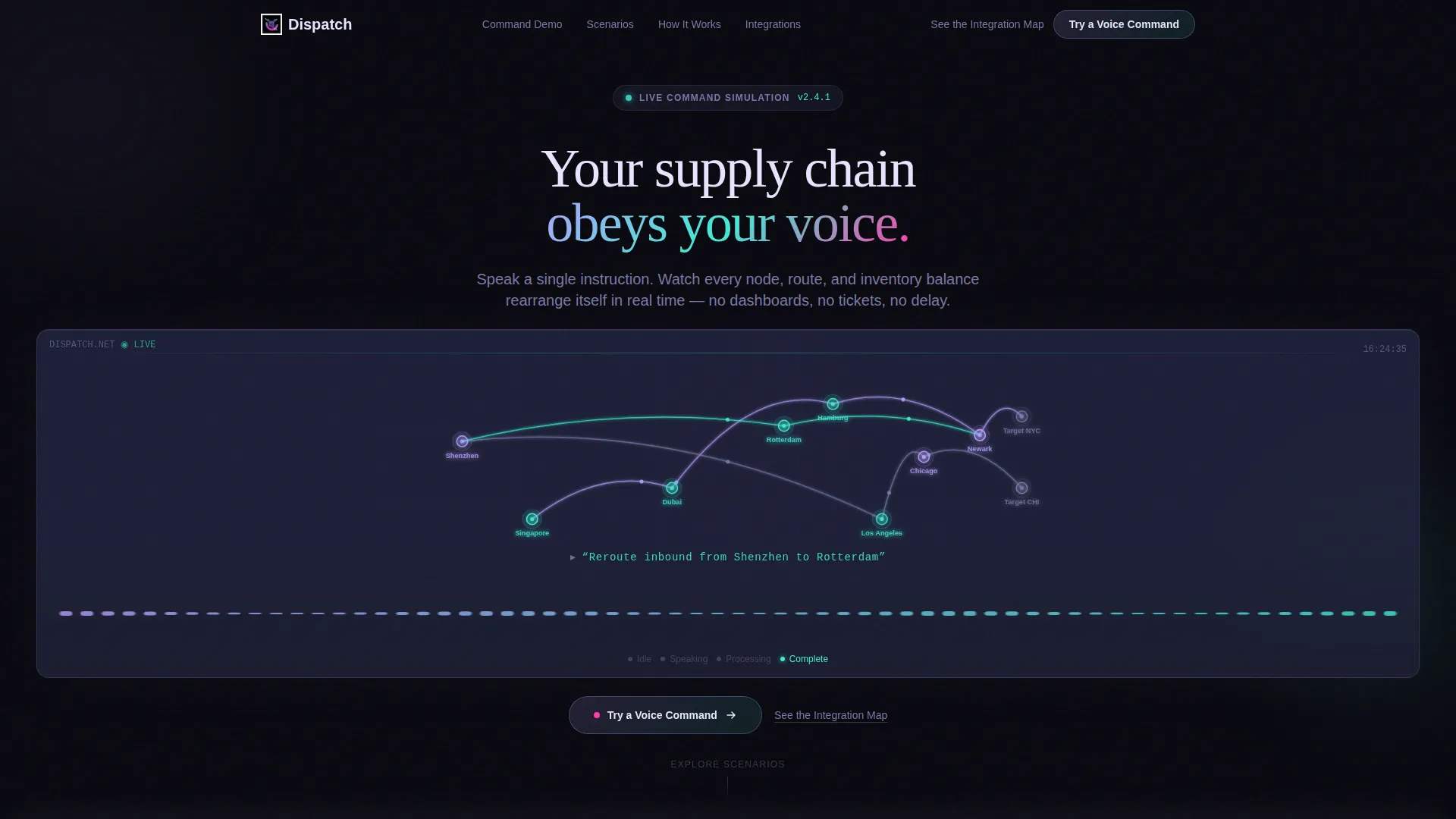
- A dark full-bleed header with an animated supply-chain graph, a simulated voice waveform, and a live rerouting animation sequence
- Six self-contained spoke modules, each built as a clickable scenario the visitor can trigger independently
- A layered call-to-action system including a floating glass pill, per-module repeat placements, and a sticky bottom bar that activates after the third section
Feature list
This template is built around a small number of high-impact, prompt-defined components. Each one is designed to work together as a coherent control-room experience.
Animated Supply-Chain Graph Header
The header is not a static image. It contains a floating supply-chain graph with nodes representing factories, ports, warehouses, and storefronts. Iridescent lines pulse between nodes, and a simulated voice waveform runs across the bottom third. When the animation resolves, one route dissolves and a new path draws itself in a teal-to-magenta gradient while nodes flare as they activate.
Hub-and-Spoke Anchor Navigation
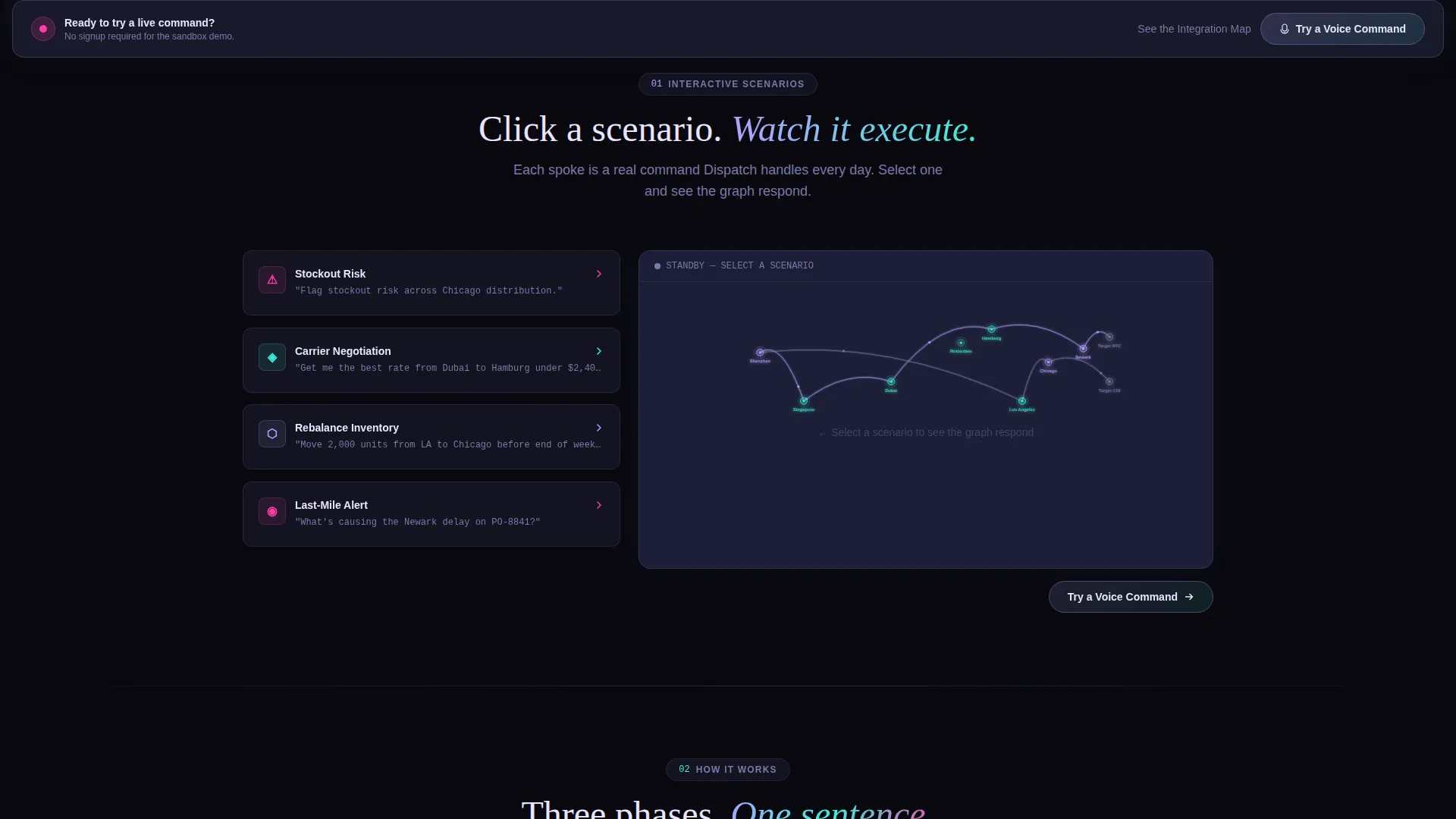
The central anchor navigation acts as the command hub. Each spoke links to a self-contained scenario section. Clicking a spoke, such as "Stockout Risk" or "Carrier Negotiation," triggers a visual response within the graph and its associated module, giving buyers an interactive product preview without leaving the page.
Interactive Scenario Modules
Each spoke section is a standalone interactive scenario. "Stockout Risk" redraws the graph to highlight endangered supply nodes. "Carrier Negotiation" flips cards to reveal rate comparisons while a synthesized voice queries carrier data. These modules let the product demonstrate its reasoning before the visitor is asked to act.
Orbital Scroll Behavior
Scrolling through Dispatch rotates the visitor around the hub rather than revealing content in a flat linear sequence. Each section dims the previous one and illuminates the next, creating a sense of piloting through a live environment rather than reading a brochure.
Layered Call-to-Action System
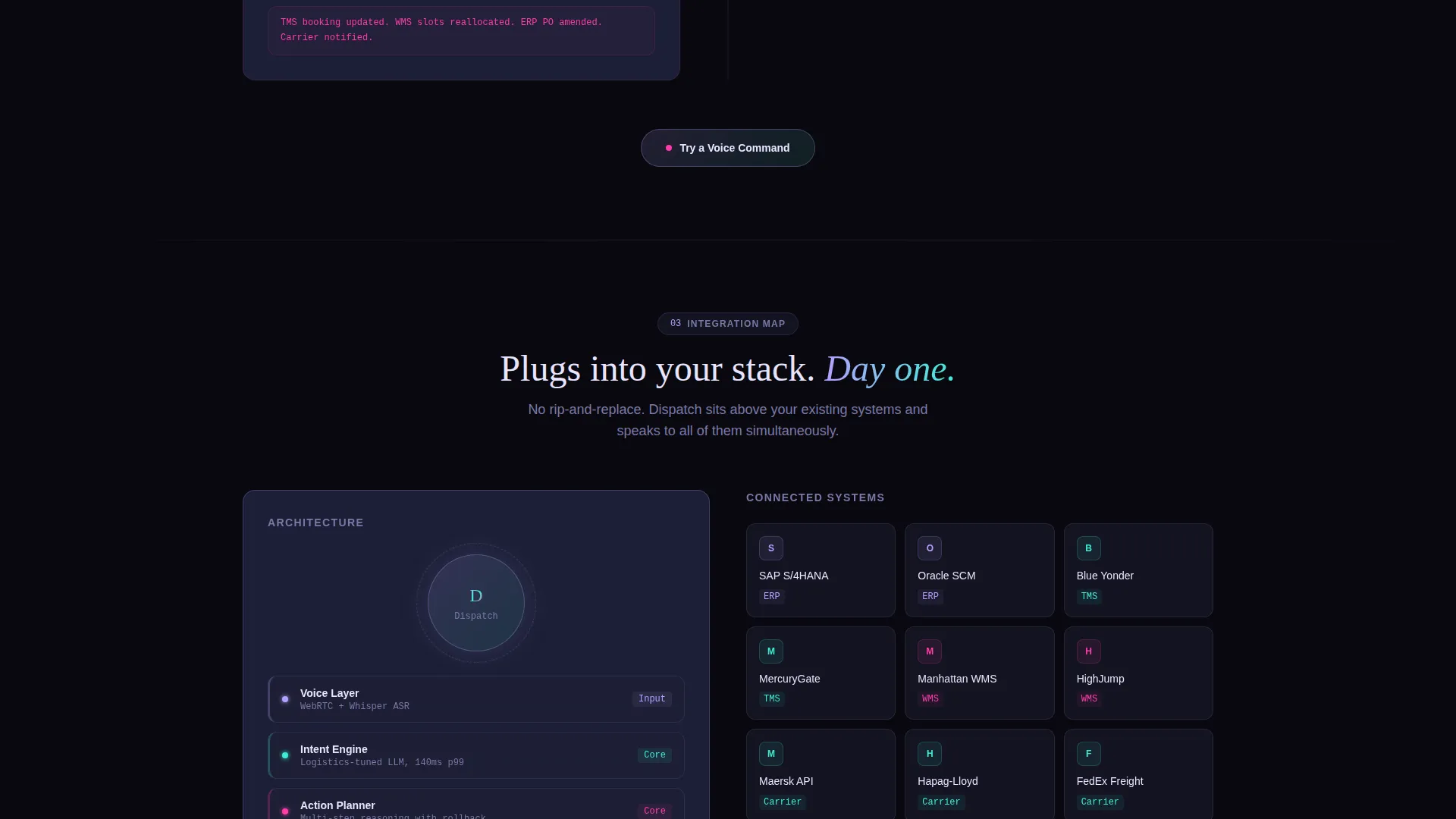
The primary call-to-action, "Try a Voice Command," first appears as a floating glass pill after the header animation resolves. It reappears at the close of every spoke module. After the third section, it locks into a sticky bottom bar that follows the visitor for the remainder of the page. A secondary text link, "See the Integration Map," is placed for technical buyers who need architecture context before converting.
Tech Glass Visual Framework
The entire page is built on a Tech Glass design system using the AI Iridescent color palette. Void black and frosted panel backgrounds keep the layout dark and focused. Prismatic lilac-to-holographic teal gradient accents mark active paths and data flows. Hot-signal magenta is reserved exclusively for active-state glows and spoken-command pulse animations.
Page sections overview
| Section | Purpose |
|---|---|
| Full-Bleed Header | Introduces the product via animated supply-chain graph and voice waveform |
| Anchor Nav Hub | Central navigation linking visitors to each spoke scenario module |
| Stockout Risk Spoke | Interactive scenario showing endangered supply nodes highlighted on the graph |
| Carrier Negotiation Spoke | Flipping card scenario revealing rate comparisons with synthesized voice query |
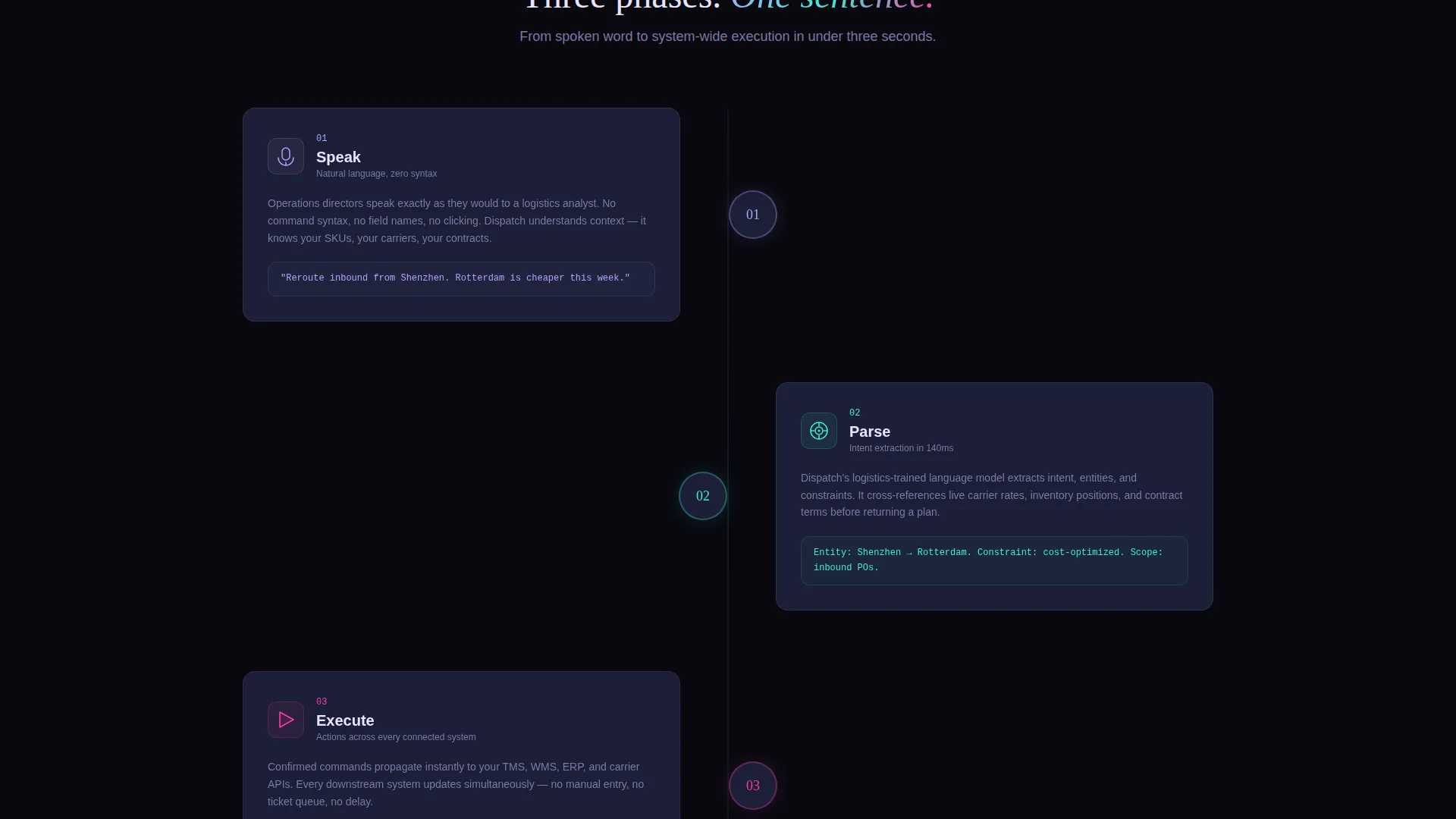
| Additional Spoke Modules | Remaining self-contained scenario sections completing the hub-and-spoke structure |
| Sticky call to action Bar | Persistent bottom bar locking in the primary call-to-action after the third section |
| Integration Map Link | Secondary text link for technical buyers seeking architecture detail |
Design & branding system
Dispatch uses a Tech Glass theme built on the AI Iridescent color system. The palette is intentionally minimal, keeping most of the visual field dark and still while reserving color for moments of action and data movement.
- Core colors: void black (#09090F) for backgrounds, frosted panel (#1A1C2E) for glass-surface card containers, prismatic lilac (#B4A0FF) shifting to holographic teal (#3EECD5) across gradient accents
- Hot-signal magenta (#FF3CAC) is used only for active-state glows and spoken-command pulse animations, keeping it visually distinct and high-impact
- The overall aesthetic evokes a darkened control room where light refracts through a prism at every active edge, creating a spectral, alive quality reserved for moments of data change
Mobile & speed optimization
The Dispatch layout is designed with a layered, animation-heavy visual system. The template structure accounts for the weight of interactive components by organizing the page around discrete, independently rendered spoke modules.
- Each spoke module is self-contained, which supports loading and rendering them independently without blocking the full page
- The sticky call-to-action bar and floating glass pill are lightweight overlay components that remain functional regardless of the heavier animated sections above
- The orbital scroll mechanic transitions between sections by dimming and illuminating rather than triggering complex redraws, keeping visual transitions smooth across viewport sizes
How this template helps you convert
Dispatch is structured as a click-through funnel. There is no form on the page. Every layout decision is made to build enough confidence that a visitor clicks to the sandbox demo on their own terms.
- The animated header lets visitors watch the platform respond to a voice command before they read a single line of copy, establishing product credibility in the first seconds of the visit.
- Each interactive spoke module gives the visitor a low-friction way to explore a specific use case, making the product feel tangible and decision-relevant before the call-to-action appears.
- The layered call-to-action system, from the floating glass pill to the sticky bottom bar, keeps the primary action visible at every stage without forcing the visitor into a form or commitment before they are ready.
Other information about this template
Dispatch is categorized under Technology, specifically the Voice-Activated Enterprise Software subcategory, and targets the Voice-Activated Supply Chain Management niche. It is built as a hub-and-spoke anchor navigation landing page with an Interactive Explorer creative direction, meaning the page is designed to be explored rather than read.
- The template style is Hub and Spoke with Anchor Navigation, making it well suited for platforms that offer multiple distinct use-case scenarios within a single product
- The header concept is Dark Full-Bleed with Glow, a deliberate choice to position the product as a professional, after-hours operations tool rather than a daytime dashboard
- The landing page direction is Click-Through, meaning the page's sole conversion goal is earning a click to the guided sandbox demo, with no data capture on this page itself
- This template is suitable for use in the broader category of enterprise logistics technology, voice-driven workflow platforms, and supply chain intelligence software marketed to senior operations decision-makers
Theme
Tech Glass
Creative direction
Interactive Explorer
Color system
AI Iridescent
Style
Hub & Spoke (Anchor Nav)
Direction
Click-Through
Page Sections
Animated Supply-chain Graph Header
Hub-and-spoke Anchor Navigation
Interactive Scenario Modules
Orbital Scroll Mechanic
Layered Call-to-action System
Tech Glass Visual Framework
Related questions
Is there a form or sign-up step on this landing page?
Can I customize the spoke modules for different use cases?
How does the orbital scroll behavior work in the template?
Who is the secondary call-to-action designed for?
Does this template include the voice waveform and graph animations?



