Premium Consulting Firm Software Professional Website Template
Routea is a scroll-reveal landing page template built for route optimization consulting firms. It combines an animated dashboard header, interactive before-and-after route visualizations, and a progressive scroll experience to guide logistics directors, last-mile delivery startups, and transit planners toward downloading a personalized Route Audit App. The design runs on a dark, iridescent Data Command visual system.
by Rocket studio
Quick summary
Routea is a single-page, scroll-reveal landing page template designed for consulting firms that specialize in fleet route optimization. It opens with a live animated map dashboard, walks visitors through the optimization process layer by layer, and closes with a full-width app download call to action. The template is built for teams selling intelligence, not just software.
Who this template is for
This template is purpose-built for consulting firms that help fleets move smarter. It speaks directly to the decision-makers who feel the cost of inefficiency every day.
- Logistics directors at regional carriers dealing with rising fuel surcharges and inefficient routing
- Last-mile delivery startups burning budget on redundant stops and unoptimized driver schedules
- Municipal transit planners working to expand neighborhood coverage without adding vehicles
What problem this template solves
Communicating the value of route optimization is difficult when your audience is data-driven but time-poor. A generic consulting page does not build enough trust to earn a download or a discovery call.
- Visitors leave before understanding the depth of the optimization process
- The before-and-after impact of machine learning on real routes is hard to show with static content
- Generating qualified leads requires more than a contact form, it requires proof of value upfront
What you get with this template
Routea delivers a complete, production-ready landing page structure. Every section is designed to build credibility progressively as the visitor scrolls.
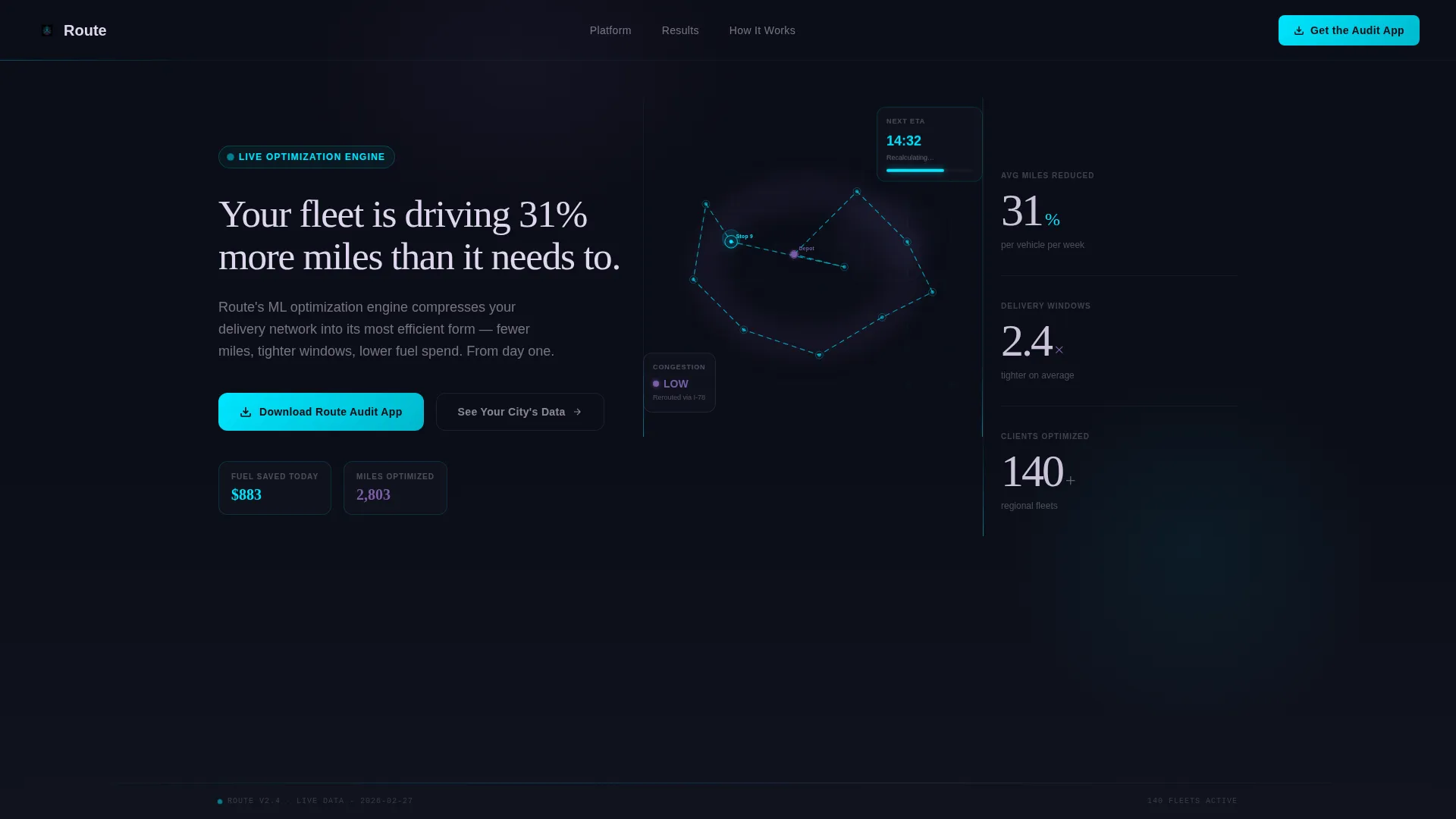
- An animated header showing a live city delivery network with pulsing cyan route lines, fuel savings counters, and a congestion heat layer
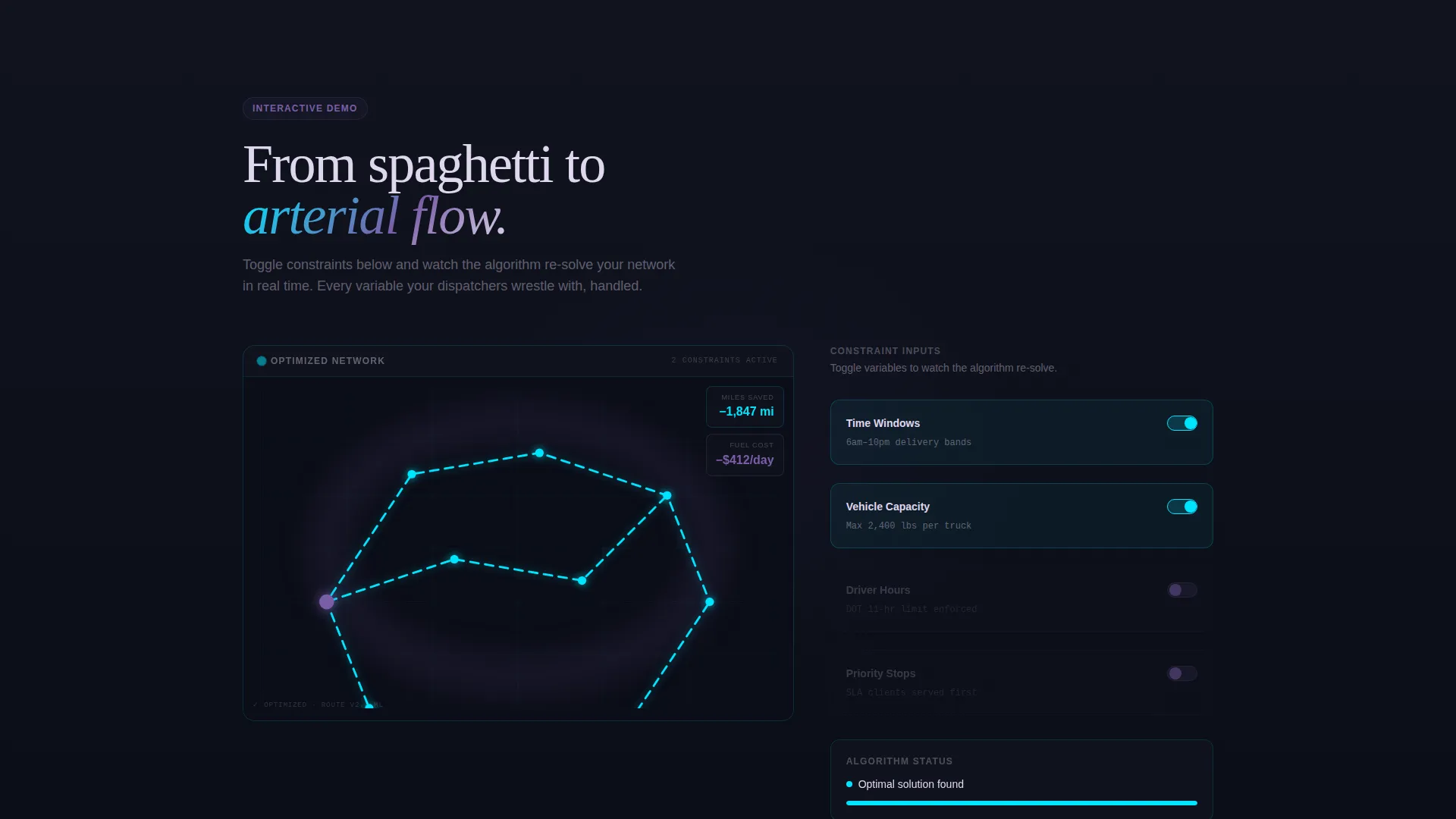
- A scroll-triggered interactive explorer that visually transforms tangled route threads into clean optimized arcs
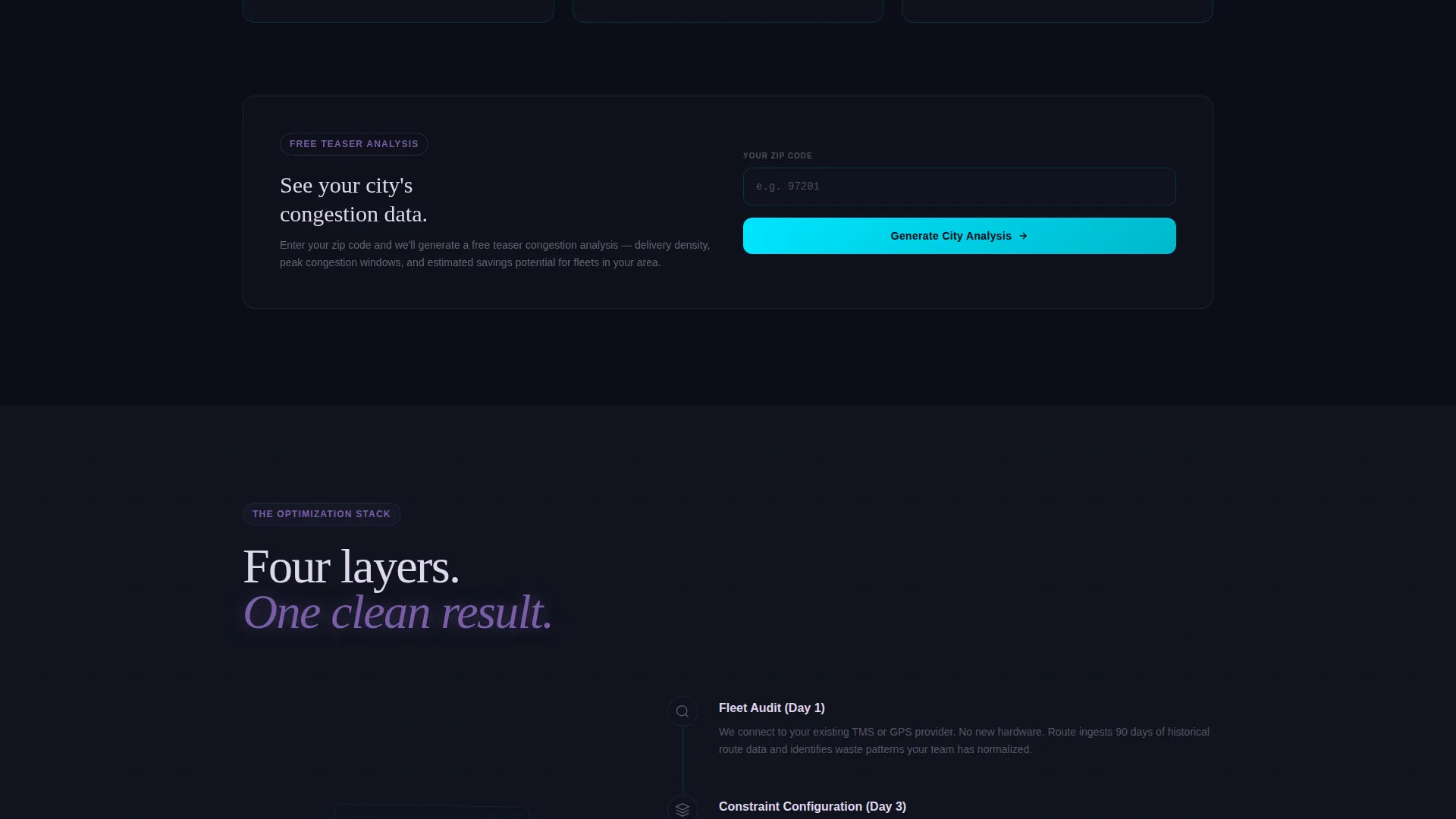
- A two-path conversion system with a persistent floating app download pill and a zip-code-based city data teaser
Feature list
This template ships with a focused set of high-impact components. Each one is designed to carry its weight in the conversion journey.
Animated Dashboard Header
The header opens on a simulated city delivery map. Dots pulse along cyan route lines, a sidebar ticks up fuel savings in real time, and ETAs recalculate as the camera slowly zooms from satellite view down to a single truck finishing its final stop. A self-typing headline reads: "Your fleet is driving 31% more miles than it needs to."
Progressive Scroll Reveal
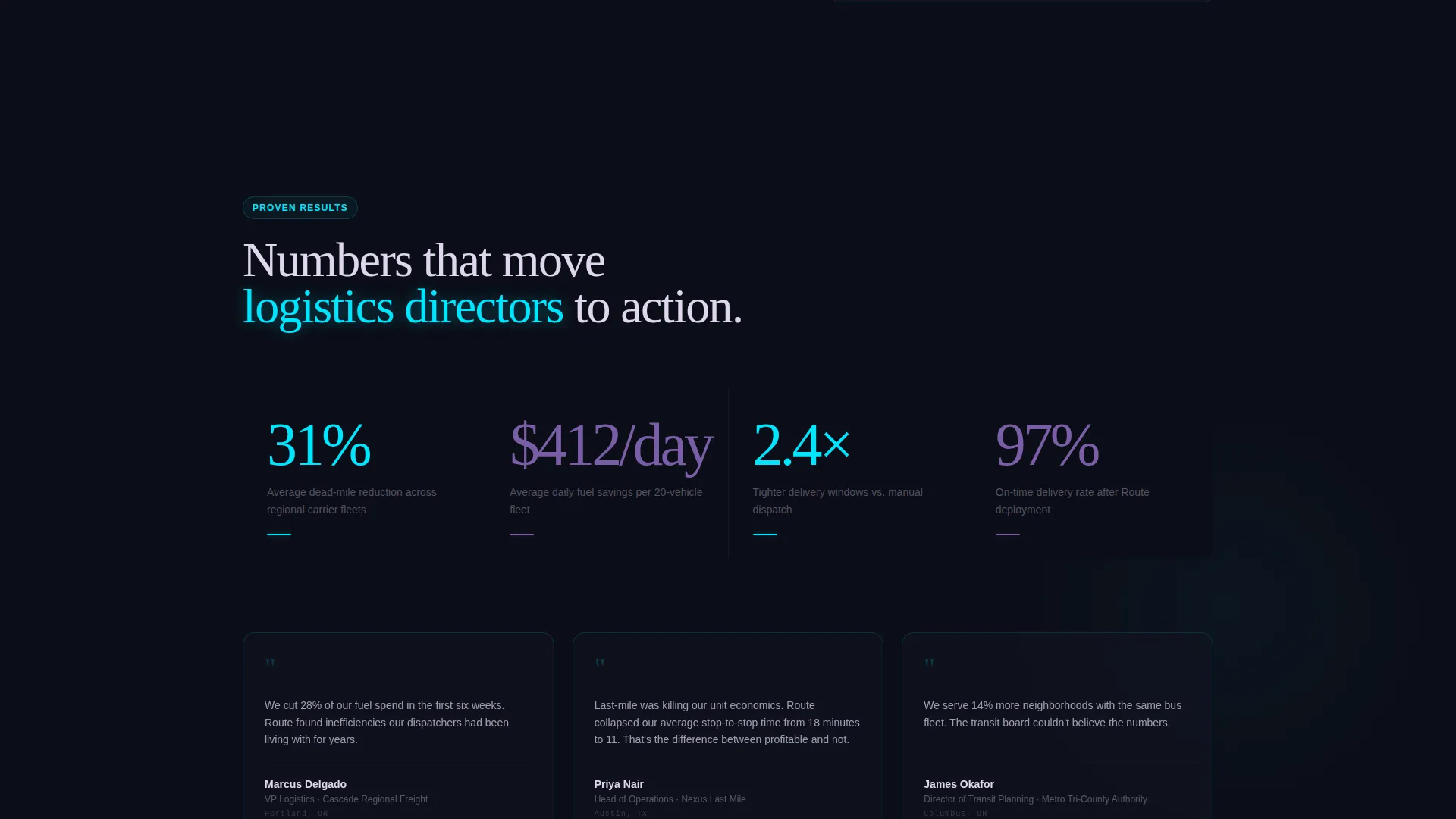
Each scroll increment exposes a new layer of the optimization story. First comes the chaos of unoptimized routes rendered as tangled red threads, then toggleable constraint inputs like time windows, vehicle capacity, and driver hours, then the algorithm visually re-solving the map as threads untangle into clean cyan arcs.
Interactive Route Explorer
Visitors can toggle constraint variables and watch the route map respond. This hands-on visualization communicates the complexity of the optimization engine while making the value immediately tangible for logistics professionals evaluating the service.
Persistent App Download call to action
A floating pill button for "Download the Route Audit App" appears after the second scroll section and stays visible throughout the page. At the page climax, a full-width call to action block reinforces the same action, reducing friction at the moment of highest intent.
Zip Code Congestion Teaser
A secondary conversion path lets visitors enter their zip code to generate a teaser congestion analysis for their city. This value-first mechanic builds enough trust that surrendering a work email for the full app feels like a fair exchange.
Two-Field Download Form
The app download form collects only a work email and estimated fleet size. The minimal friction design keeps completion rates high while capturing the two data points most useful for qualifying a lead.
Page sections overview
| Section | Purpose |
|---|---|
| Animated Map Header | Opens the page with a live city delivery network visualization and a self-typing headline |
| Chaos Route Layer | Shows unoptimized routes as tangled red threads to establish the problem visually |
| Constraint Toggle Panel | Lets visitors set time windows, vehicle capacity, and driver hours interactively |
| Algorithm Solve Animation | Re-renders the map in real time as optimized cyan arcs replace the red thread chaos |
| Before and After Comparison | Slides a split view into frame showing the measurable difference optimization makes |
| Floating Download Pill | Persistent call to action button that appears after the second section and follows the visitor |
| Zip Code Teaser | Secondary conversion path that generates a city-specific congestion preview |
| Full-Width call to action Block | Page climax section anchoring the primary app download call to action |
| Two-Field Download Form | Captures work email and fleet size to trigger a personalized download link |
Design & branding system
The visual identity follows a Data Command theme built on the AI Iridescent color system. The palette is designed to make data feel luminous against a deep, dark canvas.
- Void black (#0B0D17) forms the primary background, keeping every data element crisp and readable
- Holographic violet (#7B5EA7) drives data overlays, graph lines, and the congestion heat layer beneath route paths
- Electric cyan (#00E5FF) marks active route paths and interactive highlights, with shifting pearl (#E0D7EE) used for all typography and interface chrome
Mobile & speed optimization
The template is built with a progressive reveal structure, meaning content loads section by section as the visitor scrolls. This approach keeps the initial page load focused and the experience smooth on any screen size.
- Animations trigger only when each section enters the viewport, avoiding unnecessary rendering overhead
- The floating call to action pill and two-field form are sized and spaced for easy tap interaction on mobile screens
- Data visualizations animate from zero on entry, ensuring they always display correctly regardless of when the visitor arrives at that section
How this template helps you convert
The entire scroll journey is structured as a proof-of-value sequence. Each section earns the next click before asking for anything in return.
- The animated header immediately signals authority by showing a real-time-style fleet dashboard, setting the expectation that this firm understands operational complexity at a granular level.
- The interactive route explorer lets visitors self-qualify by toggling constraints that match their own fleet reality, creating a personalized sense of relevance before the call to action appears.
- The zip code congestion teaser delivers genuine value for free, lowering the psychological cost of submitting an email for the full Route Audit App download.
Other information about this template
Routea is a single landing page template, not a multi-page website. It is built specifically for the consulting firm route optimization niche and is categorized under Technology and Consulting Firm Software on the template marketplace.
- The template style is Scroll Reveal (Progressive), meaning sections animate into view sequentially as the visitor moves down the page
- The header concept is Dashboard Preview, a design pattern that positions the consulting firm as a command-level intelligence operation from the first second of the visit
- The landing page direction is App Download, making the Route Audit App the primary conversion goal throughout the entire page flow
- The creative direction is Interactive Explorer, meaning the page is designed to be experienced rather than just read
Theme
Data Command
Creative direction
Interactive Explorer
Color system
AI Iridescent
Style
Scroll Reveal (Progressive)
Direction
App Download
Page Sections
Animated City Dashboard Header
Progressive Scroll Reveal Structure
Interactive Route Constraint Explorer
Persistent Floating Download Call to Action
Zip Code Congestion Teaser
Related questions
Who is this landing page template designed for?
Can I customize the route visualization animations?
What does the app download conversion flow look like?
Does the zip code congestion teaser require a live data connection?
Is this template suitable for a firm serving multiple industries?



