Premium Hospitality Software Professional Website Template
Routesync is a dashboard-style landing page template built for hospitality route optimization platforms. It opens with an animated code snippet showing real dispatch logic, then guides visitors through a data-driven narrative, heat maps, cost comparisons, and a live route simulation, before a clear call to action. The result is a page that makes inaction feel expensive before the first click.
by Rocket studio
Quick summary
Routesync is a single-page template designed for hospitality logistics platforms. It combines an animated code-snippet header, an industry-report scroll narrative, and a simulated dispatch dashboard to build a convincing case for route optimization. Every section escalates the evidence. By the time the call to action appears, the visitor already feels the cost of staying on manual routing.
Who this template is for
This template is built for software companies and logistics platforms that serve the hospitality supply chain. It speaks directly to buyers who manage real fleets and real delivery schedules.
- Regional hospitality distributors running fleets of fifteen to eighty vehicles
- Operations managers at hotel management groups handling linen and amenity resupply across multiple properties
- Food service logistics coordinators who lose margin when drivers backtrack through dense urban routes
What problem this template solves
Manual routing is slow, expensive, and invisible. Dispatchers making decisions without optimized sequencing burn fuel, lose time, and leave margin on the table. The template's job is to make that cost visible before the visitor ever reaches a sign-up form.
- No compelling way to show the gap between manual and optimized routing in a single scroll
- Prospects need numerical proof of waste before they trust a new platform
- Generic software landing pages fail to speak the language of hospitality logistics buyers
What you get with this template
You get a fully structured, single-page template that functions as both a product pitch and a mini logistics study. The layout is built around data visualization components and progressive evidence-building.
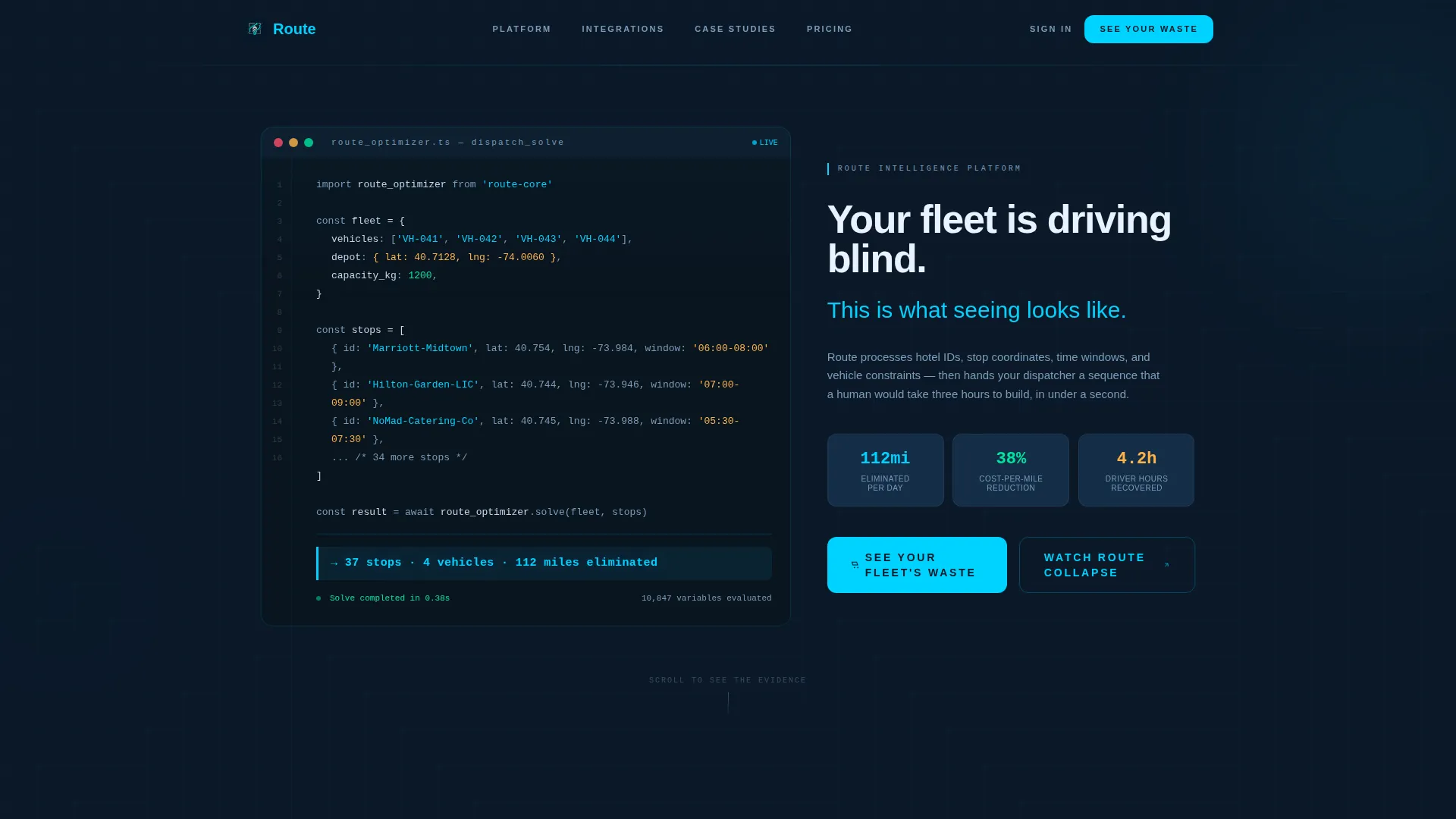
- An animated code-snippet header that simulates a live route optimization call with real output figures
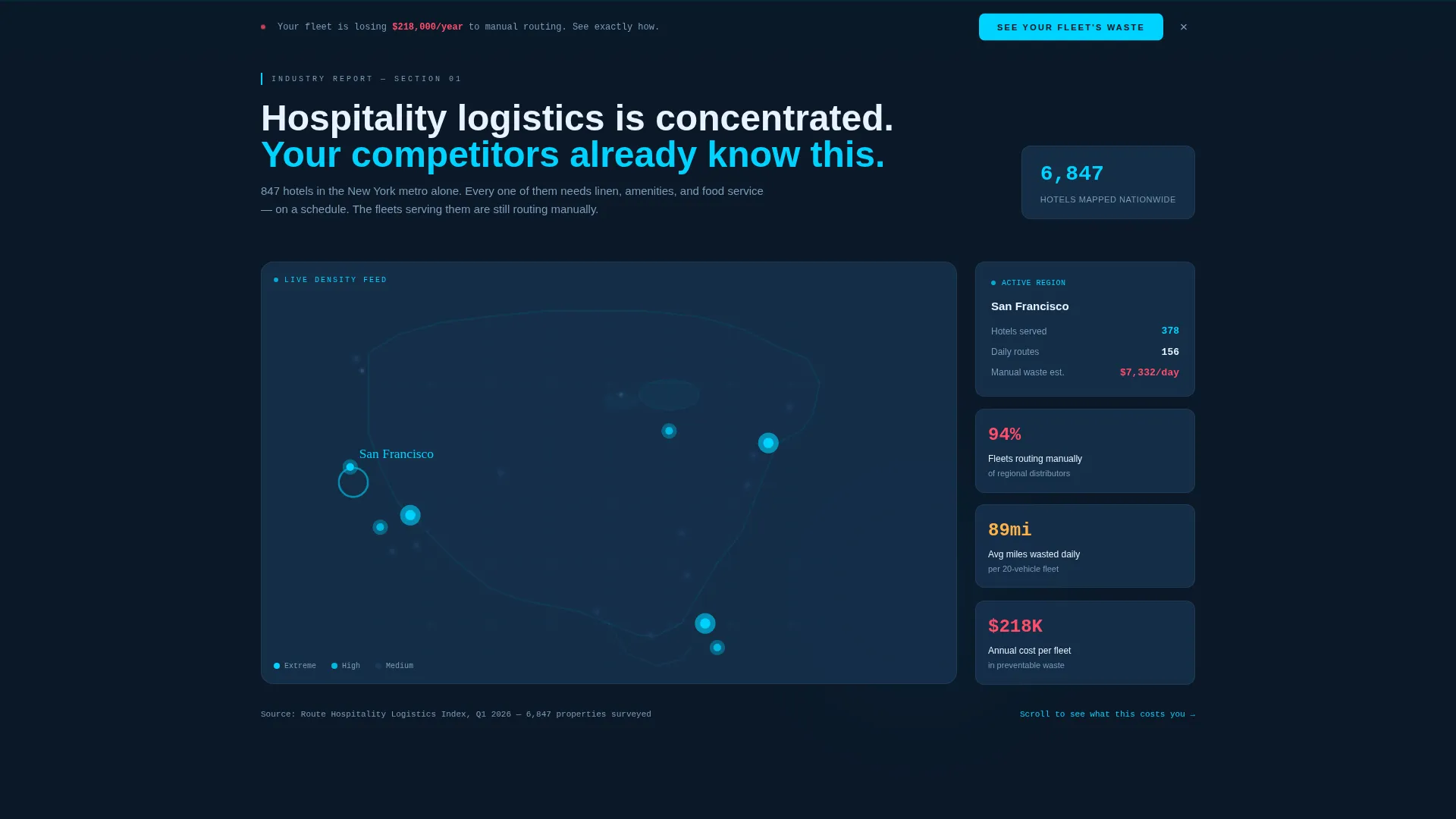
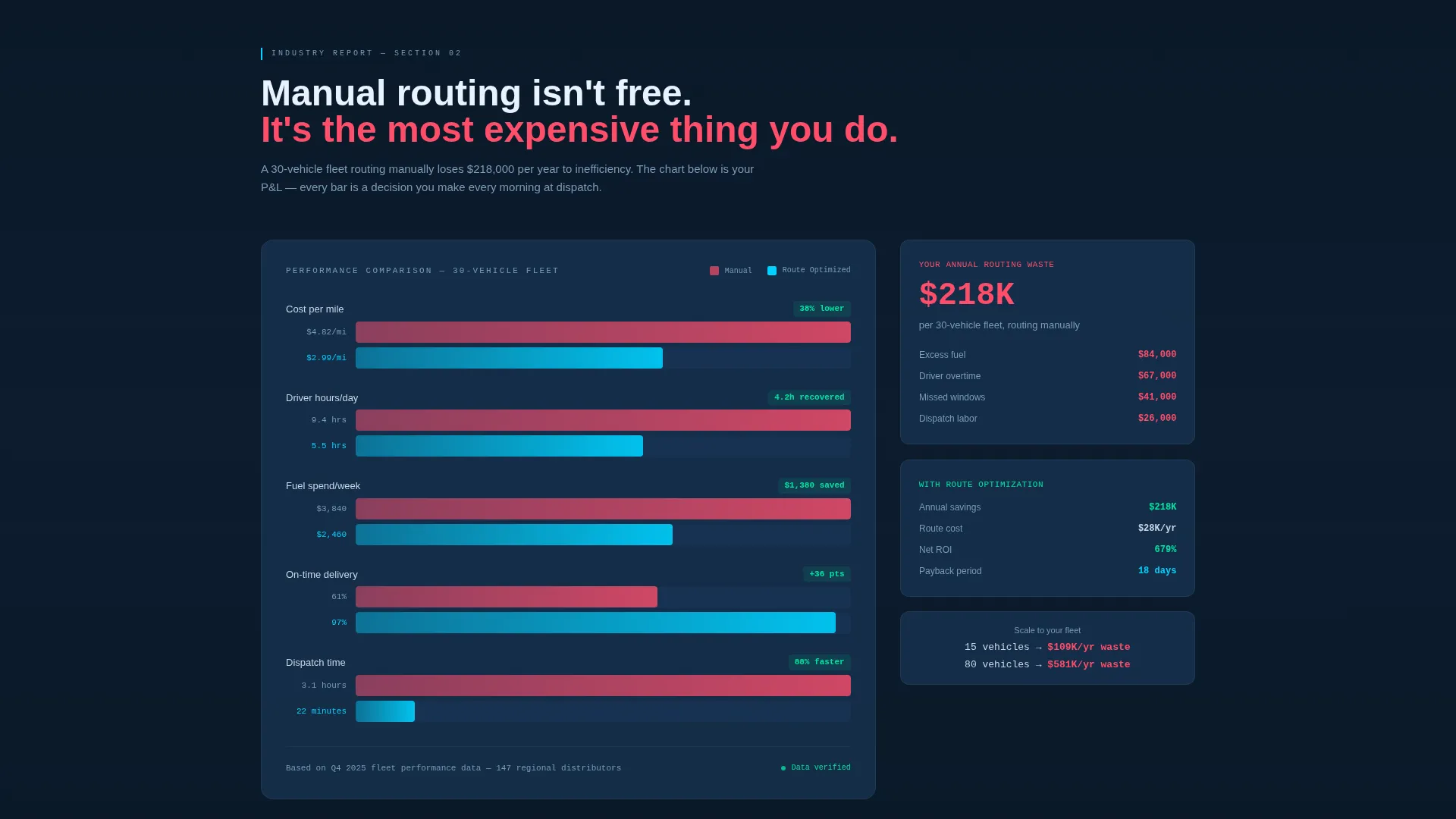
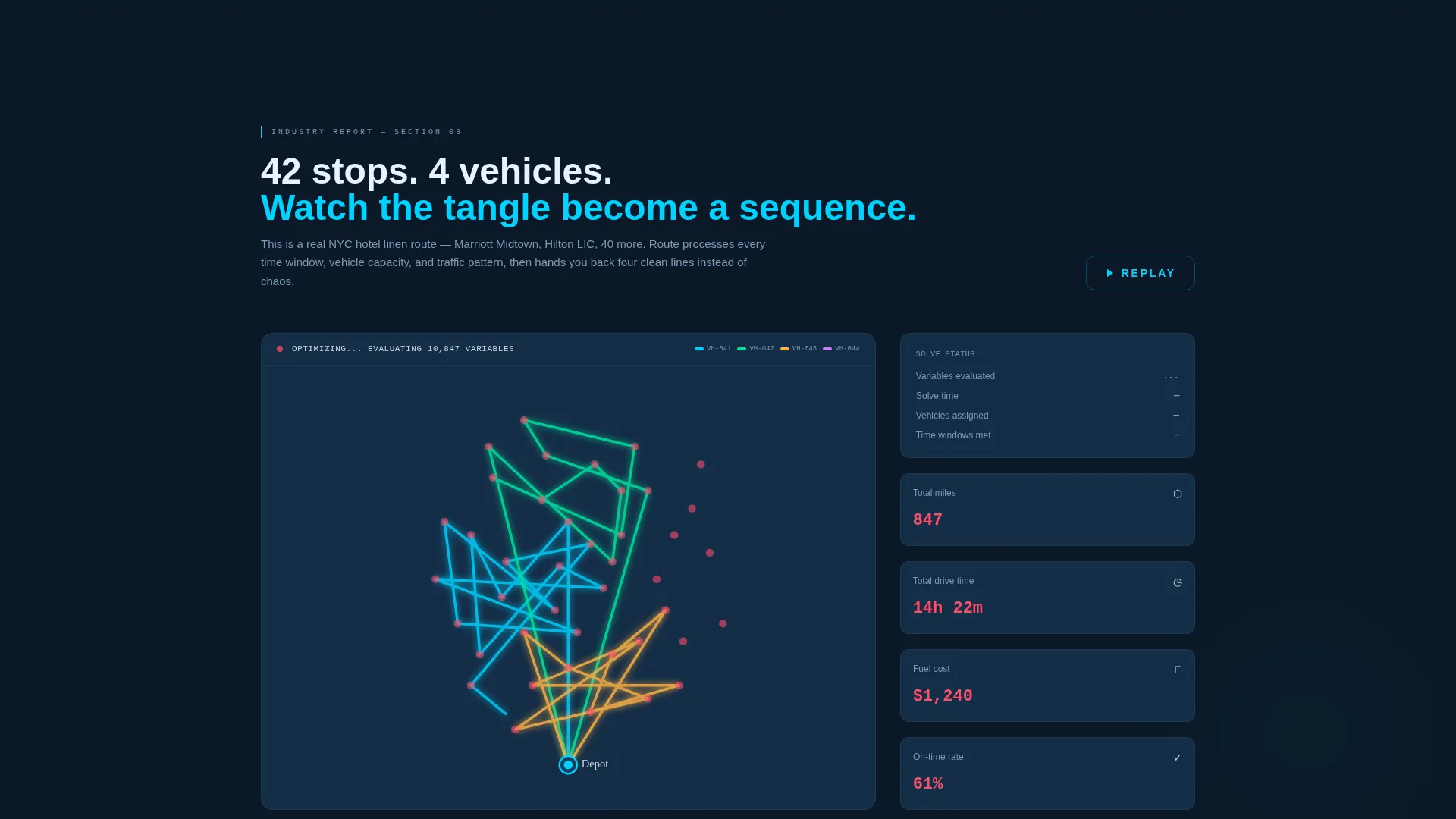
- Three escalating data sections: a national heat map, an animated cost-per-mile bar chart, and a 42-stop route simulation collapsing into a clean four-vehicle sequence
- A dual conversion path with a primary click-through call to action and a secondary gated PDF download
Feature list
This section covers the core built-in components and layout capabilities included in the template.
Animated Code Snippet Header
The header opens with a monospaced code block that animates line by line, showing vehicle IDs, stop coordinates for named hotels, and time-window constraints. The final output line punches in with a cyan highlight: "37 stops. 4 vehicles. 112 miles eliminated." It sets the tone before the visitor reads a single headline.
National Delivery Heat Map
The first scroll section renders a hospitality delivery density map by metro area, with the visitor's likely region highlighted with a pulse animation. It establishes scale and relevance without requiring the visitor to imagine the problem.
Animated Cost-Per-Mile Bar Chart
The second scroll section builds an animated bar chart as it enters the viewport. It compares manual routing costs against optimized routing costs on a per-mile basis. The chart is designed to make the financial gap impossible to ignore.
Live Route Simulation Dashboard
The third data section shows a real 42-stop hotel linen route collapsing from a tangled multi-path map into a clean four-vehicle sequence. Miles, time, and fuel figures update live as the animation plays. This is the template's most persuasive single component.
Sticky Call-to-Action Bar
A sticky bar reading "See Your Fleet's Waste" appears once the visitor scrolls past the cost breakdown section. It stays visible for the remainder of the page, keeping the primary conversion path accessible at all times.
Dual Conversion Path Layout
The primary call to action routes visitors to a demo-request page with three low-friction fields: fleet size, primary service area, and number of daily stops. The secondary path offers a gated PDF download, capturing email and company name for visitors not yet ready to book a demo.
Page sections overview
| Section | Purpose |
|---|---|
| Code Snippet Header | Opens with animated route optimization logic and a punchy output result |
| Main Headline Block | Delivers the core value statement in silver type below the snippet |
| Hospitality Heat Map | Shows delivery density by metro to establish geographic scale |
| Cost Breakdown Chart | Animated bar chart comparing manual versus optimized cost per mile |
| Route Simulation Dashboard | 42-stop linen route collapsing into a four-vehicle optimized sequence |
| Primary call to action Block | "See Your Fleet's Waste" button placed after the simulation dashboard |
| Sticky call to action Bar | Persistent conversion bar that appears after the cost breakdown |
| PDF Gated Download | Secondary path offering a hospitality routing report for email capture |
Design & branding system
The visual identity follows a Dynamic Motion theme built on a Midnight Blue color system. Every color in the palette carries functional meaning, like a real logistics command center.
- Deep terminal navy (#0B1929) as the full-page primary background, steel-blue (#1B3A5C) for card surfaces and data panels, and cool silver (#C8D6E5) for body text and axis labels
- Electric cyan (#00D2FF) reserved exclusively for active routes, hover states, and live-data pulse moments, so every bright element signals something is moving
- Monospaced type in the header and a clean sans-serif hierarchy throughout, reinforcing the dispatch-terminal aesthetic without sacrificing readability
Mobile & speed optimization
The template is structured to remain legible and functional across screen sizes. Data-heavy sections are laid out to reflow cleanly on smaller viewports.
- The dashboard and bar chart components are built to scale down without losing the core visual narrative
- Animation triggers are tied to viewport entry, so the scroll-driven data story works on both desktop and mobile devices
- The three-field demo-request flow is deliberately minimal, keeping friction low on any device
How this template helps you convert
The page is engineered as a click-through template. Every section is designed to move the visitor one step closer to the primary call to action by making inaction feel numerically costly.
- The animated header creates immediate credibility by showing real dispatch logic and concrete output figures, establishing that this is a serious tool for serious operations.
- The three escalating data sections build a case progressively: scale, then cost, then proof of capability, so by the time the call to action appears the visitor has already done the mental math on their own fleet.
- The dual conversion path catches visitors at different stages of readiness, with the demo-request form for buyers close to deciding and the gated PDF for those still in research mode.
Other information about this template
This template is category-matched to hospitality software and logistics technology. It is suited to route optimization platforms targeting the hospitality supply chain vertical.
- The template style is Dashboard and Data Grid, designed to communicate operational precision at a glance
- The creative direction follows an Industry Report format, making the scroll feel like reading a proprietary logistics study rather than a typical software sales page
- The header concept is a Code Snippet, a deliberate choice to signal technical depth to operations buyers who understand dispatch systems
- The theme is Dynamic Motion, meaning key data moments animate on entry rather than sitting static on the page
- This template is a strong fit for platforms competing in hospitality route optimization, a niche where visual proof of efficiency gains is a primary purchase driver
Theme
Dynamic Motion
Creative direction
Industry Report
Color system
Midnight Blue
Style
Dashboard/Data Grid
Direction
Click-Through
Page Sections
Animated Code Snippet Header
National Delivery Heat Map
Animated Cost-per-mile Chart
Live Route Simulation Dashboard
Sticky Conversion Bar
Dual Conversion Path Layout
Related questions
Who is this template designed for?
What makes this template different from a generic software landing page?
Can I update the simulation and chart data to match my platform?
Does the template support both demo requests and lead capture?
What visual style does this template use?



