Fitness Facility Risk Management Landing Page Template
Comply is a split-screen landing page template built for fitness compliance software. It showcases automated audit trail tracking for liability waivers, equipment inspections, trainer certifications, and incident reports across multiple gym locations. Designed for multi-site gym owners and boutique studio operators, this template pairs a control-room visual identity with high-converting calls to action that drive app downloads and free facility audits.
by Rocket studio
Quick summary
The Comply template is a single-page, split-screen landing page built around a gym liability audit trail software product. It uses a Feature Tab Switcher header, an escalating Feature Matrix scroll, and a dual-path conversion section driving both app downloads and free facility audits. Every design decision targets multi-site fitness operators who need to replace spreadsheet chaos with a centralized compliance dashboard.
Who this template is for
This template is built for operators who manage fitness compliance at scale and feel the pressure every time an inspection log goes missing or a trainer certification quietly expires. It speaks directly to people who know the cost of getting it wrong.
- Multi-site gym owners and franchise operators managing five to fifty locations who need centralized record keeping across every facility
- Boutique studio operators preparing for insurance renewals and looking to present clean, up to date liability waiver documentation to underwriters
- Regional fitness directors currently managing legal requirements with spreadsheets, paper forms, or a combination of both
What problem this template solves
Gym operators face a specific and serious problem: compliance gaps that are invisible until they become lawsuits. A signed waiver filed in the wrong folder, an overdue equipment inspection, a personal trainer whose certification expired three weeks ago, each one is a potential legal liability. Most operators do not discover these gaps until something goes wrong.
- No centralized system for tracking waiver form submissions, equipment checks, and staff certifications means critical records are scattered, outdated, or simply missing
- Paper-based or spreadsheet workflows fail to flag inherent risks in time, leaving fitness center operators exposed to potential legal claims they cannot defend against
- Insurance renewals become stressful guessing games when operators cannot quickly produce a completed waiver log, an up to date inspection record, or verified trainer credentials
What you get with this template
This template gives you a fully structured, single-page layout that presents gym compliance software as the calm, organized answer to real operational chaos. Every section is purposefully sequenced to build trust and drive action.
- A Feature Tab Switcher hero section with a bold headline and three interactive dashboard views covering waivers, equipment, and certifications
- An escalating Feature Matrix scroll that pairs specific liability scenarios on the left with calm software responses on the right, guiding visitors through their own risk profile before showing the solution
- A dual-path conversion section offering both a platform-detect app download with a QR code and a short free facility audit form for operators who want to start with an assessment
Feature list
This section outlines the core capabilities built into the Comply landing page template. Each feature is grounded in the prompt specification and reflects what the layout directly delivers.
Interactive Feature Tab Switcher
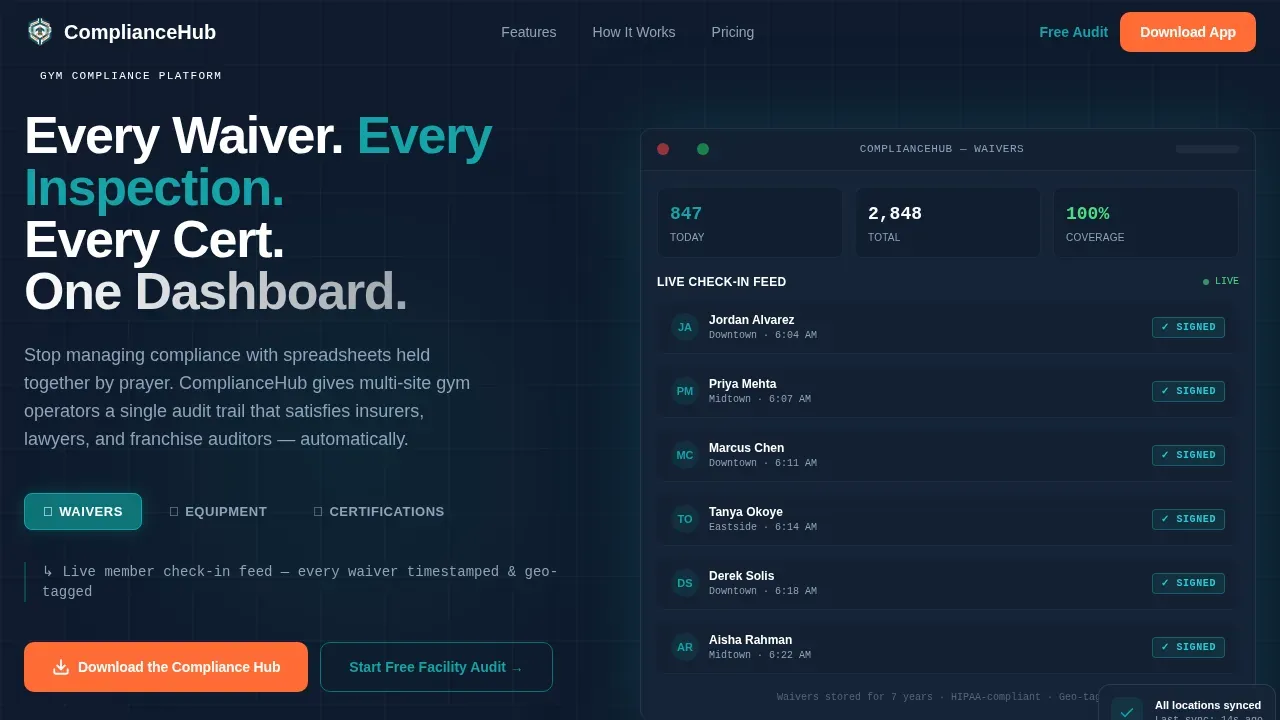
The header splits the screen 50/50. The left side holds the main headline and three clickable tabs labeled Waivers, Equipment, and Certifications. Each tab swaps the right panel to show a live-fidelity dashboard mockup: a member check-in feed with green completion badges, an inspection calendar with overdue flags in alert orange, and a trainer grid with expiration countdown timers. The effect feels like flipping between security monitors, each revealing a different zone of compliance now fully under control.
Escalating Feature Matrix Sections
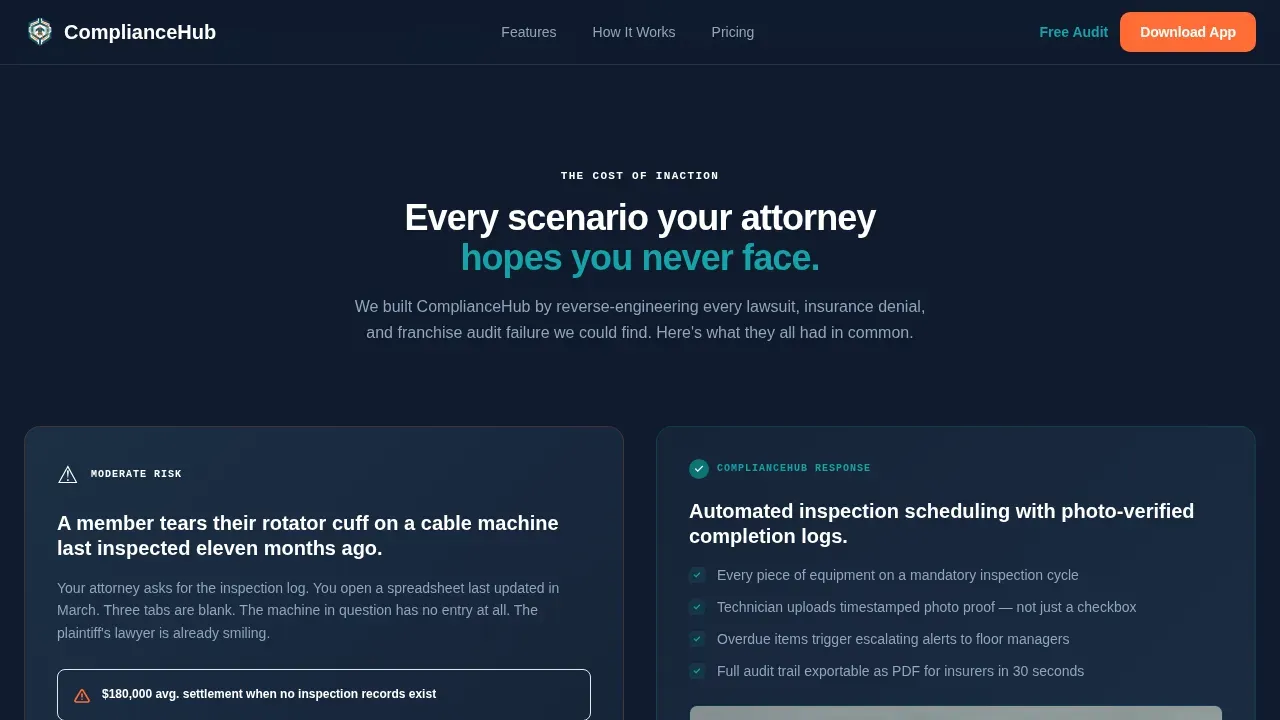
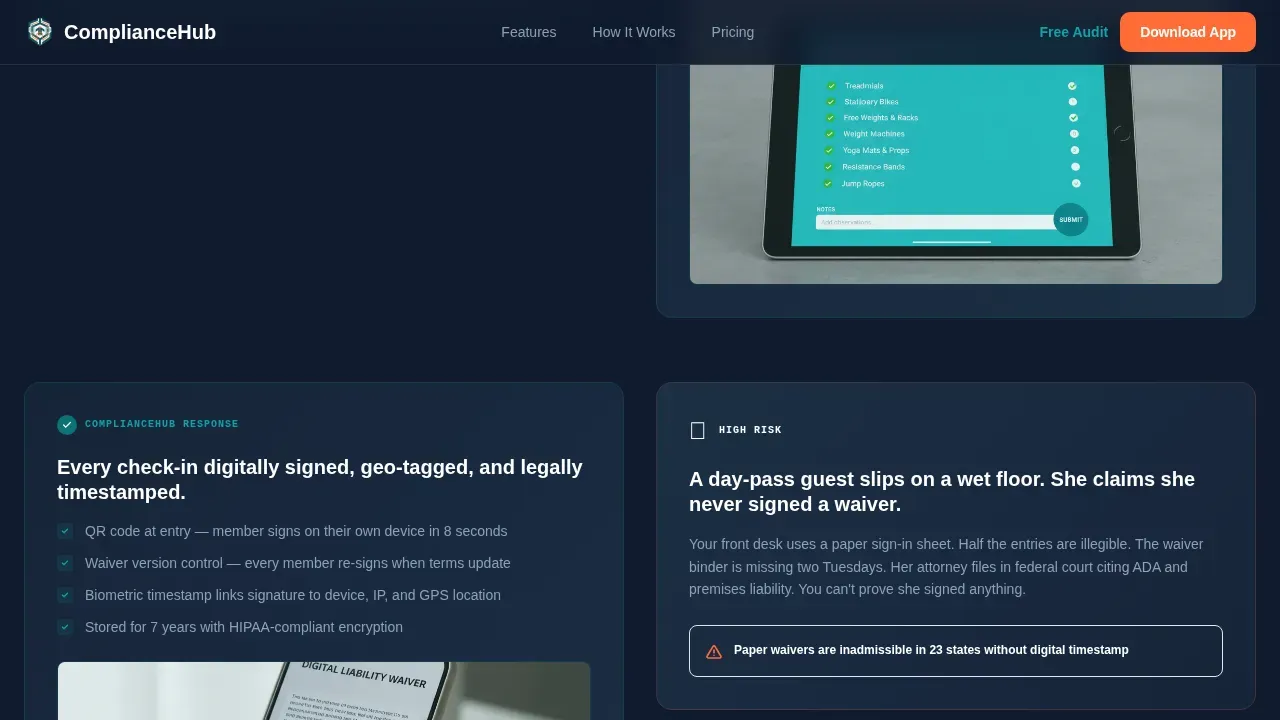
Scrolling past the header, each section presents a real compliance problem on the left and the software's response on the right. Scenarios escalate from minor paperwork gaps to lawsuit-grade liability holes. One section shows a member tearing a rotator cuff on a cable machine last inspected eleven months ago; the right side responds with the inspection scheduling screen showing automated reminders and photo-verified completion logs. This structure walks visitors through their worst fears and extinguishes them one by one, making the release of liability documentation feel urgent and necessary.
Dual-Path App Download Section
The conversion section offers two clear paths. The primary call to action is "Download the Compliance Hub" with platform-detect buttons for iOS and Android, paired with a QR code for instant mobile scanning. The secondary path is "Start With a Free Facility Audit," a short form that collects the number of locations, current compliance method via dropdown, and a work email. Keeping form fields minimal makes the process a straightforward process for busy operators.
Waiver and Consent Log Displays
The Waivers dashboard view presents a member check-in feed where every informed consent acknowledgment is tagged with a green completion badge. This visual makes clear that each liability waiver is automatically stored, timestamped, and linked to a specific participant. Operators can see at a glance which members have a completed waiver on file and which ones need follow-up, supporting consistent record keeping across every location.
Trainer Certification Countdown Grid
The Certifications tab reveals a trainer grid with individual expiration countdown timers. One trainer's badge pulses red, signaling an expiration that demands immediate attention. This view surfaces the specific risks of letting personal trainers operate with lapsed credentials, and it shows how the software makes certification status visible and manageable before it becomes a legal document problem.
Equipment Inspection Calendar
The Equipment tab displays an inspection calendar view with two items flagged in alert orange as overdue. Maintenance and inspection records in this view represent timestamped logs of equipment checks and safety inspections. The visual communicates that every piece of gym equipment has a scheduled review date, and that overdue items are surfaced automatically rather than discovered after an incident.
Page sections overview
| Section | Purpose |
|---|---|
| Hero Tab Switcher | Introduces the platform with an interactive split-screen headline and three live dashboard tab views |
| Feature Matrix Scroll | Pairs escalating liability scenarios with calm software responses across multiple split-screen sections |
| Multi-Location Control | Demonstrates scale with a bento grid layout showing compliance visibility across many facilities |
| Social Proof | Presents specific operator testimonials and compliance metrics to build trust |
| App Download call to action | Drives conversions via platform-detect download buttons, QR code, and a free facility audit form |
| Footer | Provides a single linear row with navigation, privacy policy link, and contact details |
Design & branding system
The Comply template uses a Dashboard Pro theme with the Teal Catalyst color system. The palette is built to feel like a control room at 6 AM: cool, precise, and authoritative, with orange appearing only when something demands immediate action.
- Deep operational teal (#0D7377) serves as the primary brand anchor for headlines, active tab indicators, and navigation elements; midnight panel (#0F1B2D) frames all dashboard backgrounds; and clinical white (#F7F9FC) provides clean data surfaces where participant information and waiver status are easy to read
- Catalyst orange (#FF6B35) is used exclusively for alert badges, overdue-status indicators, primary call-to-action buttons, and pulsing certification expiry signals, ensuring the brand identity stays clean while urgent items are impossible to miss
- Typography follows DM Sans for all headings and body copy, with JetBrains Mono reserved for data labels, countdown timers, and status badges, reinforcing the precision of a compliance-grade platform
Mobile & speed optimization
The template is built desktop-first to showcase the dashboard product at full resolution, with responsive behavior ensuring that allowing participants to sign digitally from any device remains a smooth experience. The free facility audit form and app download section are both optimized for mobile viewing.
- Tab switcher animations, scroll-fade reveals, pulsing badges, and beam borders are implemented as client-side interactive components, keeping static content rendered efficiently at the server level
- The app download section includes a QR code for instant mobile scan, platform-detect buttons for both iOS and Android, and a minimal form that collects only essential fields, reducing friction for on-the-go visitors
How this template helps you convert
The Comply template earns the download before asking for it. It leads with the cost of inaction, walks visitors through their own liability exposure, and then presents the app as the logical, immediate answer. The conversion architecture is intentional from the first scroll.
- The hero tab switcher creates an immediate sense of product confidence by letting visitors interact with live dashboard mockups before reading a single feature description, making the release of liability tracking feel tangible rather than abstract
- The Feature Matrix sections use escalating real-world scenarios to connect emotionally with operators who recognize their own gaps, building urgency organically so that by the time the app download section appears, the call to action feels less like a sale and more like a sensible next step
- The dual-path conversion section removes the binary pressure of a single call to action by offering both an immediate download and a lower-commitment free audit form, capturing visitors at different stages of readiness and keeping both conversion paths visible without competing for attention
Other information about this template
The Comply template is designed with several practical considerations that make it a strong foundation for fitness compliance software marketing. Here is additional context that informs how the template can be used and customized.
- The waiver form components shown in the dashboard mockups reflect key elements of a well-structured liability waiver: participant identification, emergency contact fields, assumption of risk acknowledgment, and the guardian signature section required for participants under 18 who need parental consent
- The form builder approach used in the free audit form demonstrates conditional logic, allowing the dropdown selection for current compliance method to shape the experience without overwhelming visitors with unnecessary form fields
- Proper storage and retrieval of signed waivers are essential for legal compliance; the template's dashboard mockups communicate this by showing records that are automatically stored, searchable, and timestamped, reflecting best practices for legal documentation
- Event organizers and fitness center operators can adapt this template's section structure for their own compliance products, as the Feature Matrix layout and tab switcher concept are flexible enough to support different waiver form and release of liability tracking use cases
- Consulting a legal professional and seeking legal counsel review is recommended when finalizing the waiver language shown in any live deployment of this template; the template itself provides the visual framework, while the legal language inside each liability waiver should be reviewed by a legal professional to ensure alignment with local laws and applicable legal requirements
- The free facility audit form supports participant information gathering by collecting the number of locations, compliance method, and work email, which mirrors the recommended practice of keeping form submissions minimal and focused on essential contact details
- Digital liability waivers shown in the dashboard mockups reflect the principle that electronic signatures are legally enforceable under applicable statutes when proper procedures are followed, and that records should be securely stored for legal purposes
- Unlimited forms support is implied by the platform concept, and the template's design supports showcasing a form template for waivers, incident reports, and inspection logs within the same product dashboard
- The comply gym liability audit trail landing page template integrates high-converting design with compliance tracking features as a unified product experience, making it relevant for market research into how fitness compliance software is positioned and sold
- The template's organization's branding is fully customizable; operators can replace the Teal Catalyst palette with their own brand identity colors while maintaining the structural layout and compliance-focused messaging hierarchy
- The primary goal shown across this template is risk management: protecting gym operators from lawsuits, insurance exposure, and regulatory compliance failures by making every record visible, up to date, and retrievable on demand
- A well-drafted liability waiver can serve as a strong defensive measure in legal disputes; courts often favor documented proof that both the participant and the facility acknowledged the risks involved before any activity began
- The informed consent framework shown in the Waivers dashboard tab reflects the principle that each participant must confirm they have read and understood the waiver terms, the inherent dangers of physical activity, and any specific risks associated with the exercises or group classes they are joining
- The assumption of risk section visible in the mockup communicates the physical demands and inherent risks of fitness activity, ensuring that each release of liability is grounded in clear, specific language that a legal professional would recognize as necessary for a legally binding document

Theme
Dashboard Pro
Creative direction
Feature Matrix
Color system
Teal Catalyst
Style
Split Screen (50/50)
Direction
App Download
Page Sections
Interactive Feature Tab Switcher Hero
Escalating Feature Matrix Scroll
Dual-path App Download Conversion
Waiver and Consent Log Dashboard View
Equipment Inspection Calendar with Overdue Alerts
Trainer Certification Countdown Grid
Related questions
What types of compliance records does this template showcase?
Can this template work for a boutique studio or a large multi-location gym chain?
Does the template include a live waiver form participants can submit?
How should the legal language inside the displayed waivers be handled?
Can we customize the template to match our existing brand identity?



