Church Safety Management Landing Page Template
Safeguard is a church safety management landing page template built around a live Safety Score Calculator. It turns a visitor's congregation size, service schedule, and current safety measures into a scored, prioritized vulnerability report, and then drives lead generation through a personalized full-audit request. The design follows a Data Command aesthetic with deep navy, frosted glass panels, and altar gold highlights.
by Rocket studio
Quick summary
Safeguard is a single-page, dashboard-style template for church and religious safety management platforms. The header leads with an interactive Safety Score Calculator that scores real vulnerability gaps in real time. Below it, data-driven modules deepen the diagnosis. The result is a landing page that earns trust through evidence before it ever asks for a lead.
Who this template is for
This template is designed for safety-focused organizations that serve houses of worship at every scale. It speaks directly to the people responsible for keeping congregations safe.
- Executive pastors managing multi-campus megachurches who need a clear, defensible safety program across multiple locations.
- Volunteer safety directors at smaller congregations, especially those with law enforcement backgrounds who want a professional tool to organize risk priorities.
- Denominational insurance coordinators working to reduce claims and standardize safety practices across dozens of parishes at once.
What problem this template solves
Most congregations carry scattered, informal safety concerns with no clear way to prioritize them. There is no unified picture of what is covered, what is missing, and what matters most. This template solves that visibility gap.
- It replaces guesswork with a scored, structured vulnerability assessment that visitors can complete in minutes.
- It turns disconnected safety concerns, such as unlocked doors or untrained ushers, into a clear, ranked action plan with category-level breakdowns.
- It gives the platform a credible, data-led first impression that immediately demonstrates value before asking for any contact information.
What you get with this template
You get a complete, lead-generating landing page with a working calculator at its core. Every section is styled as a live dashboard module, not a static marketing page.
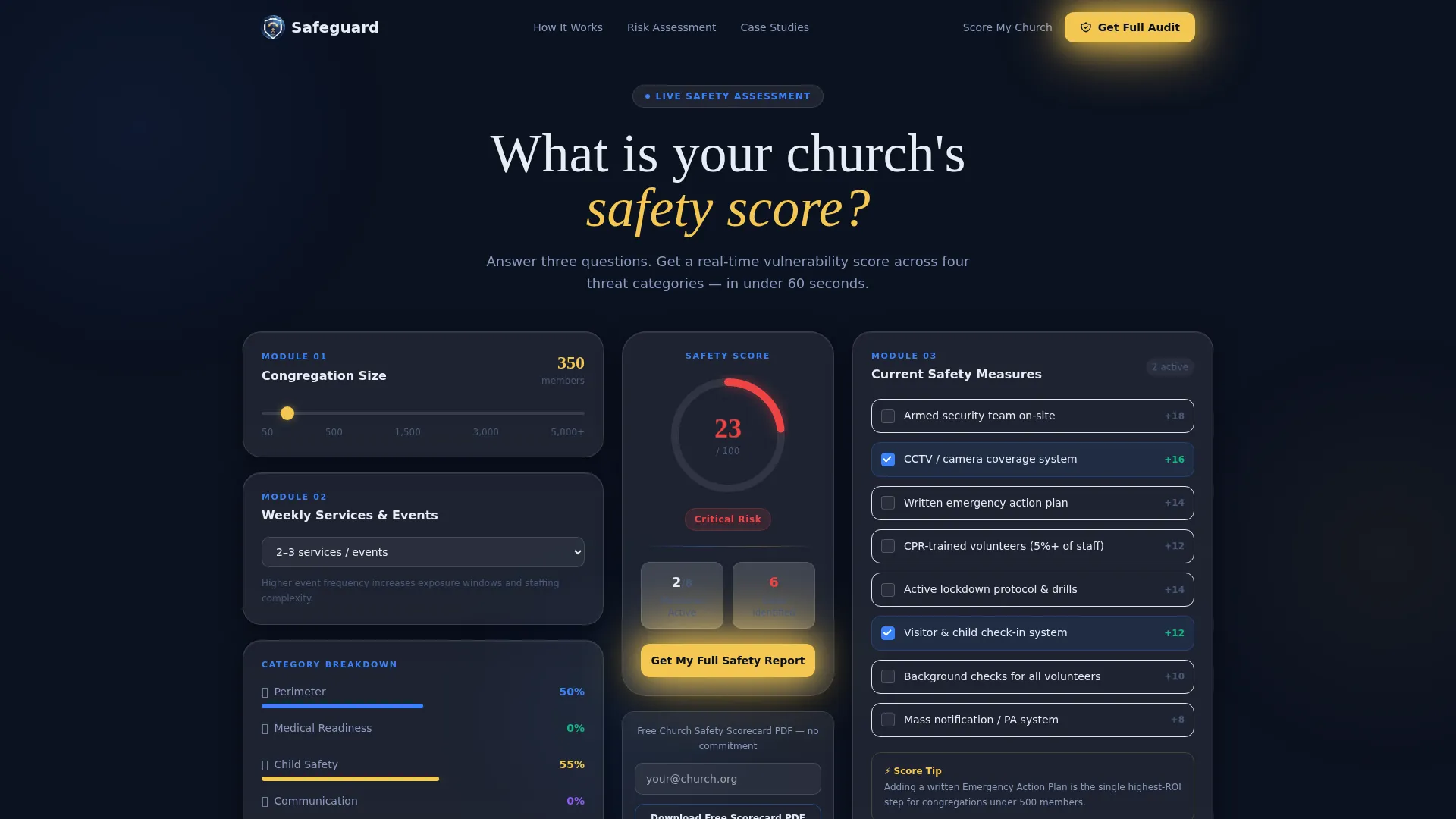
- An interactive Church Safety Score Calculator with real-time radial gauge animation, threat-category breakdown cards, and a frosted modal lead capture flow.
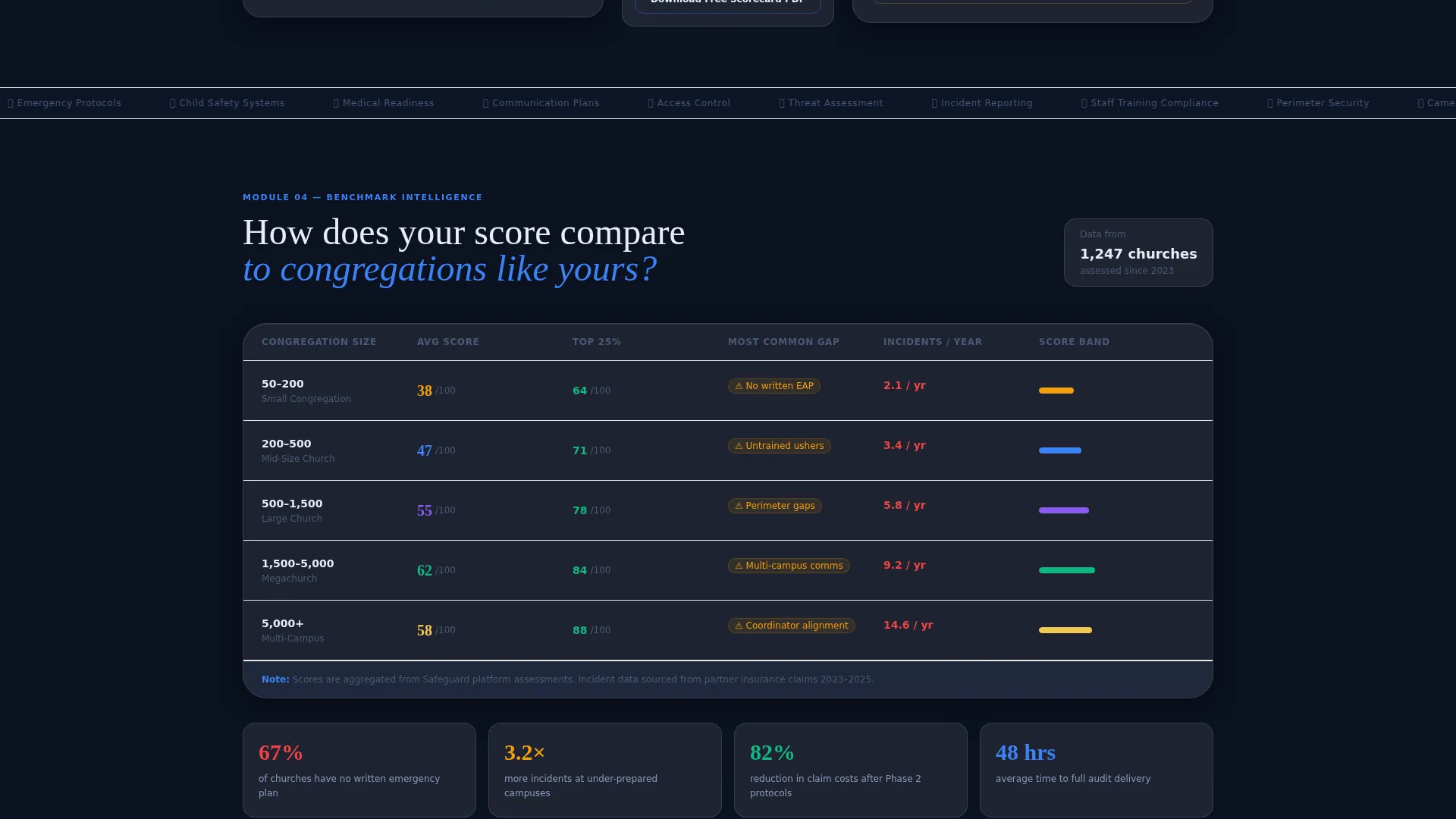
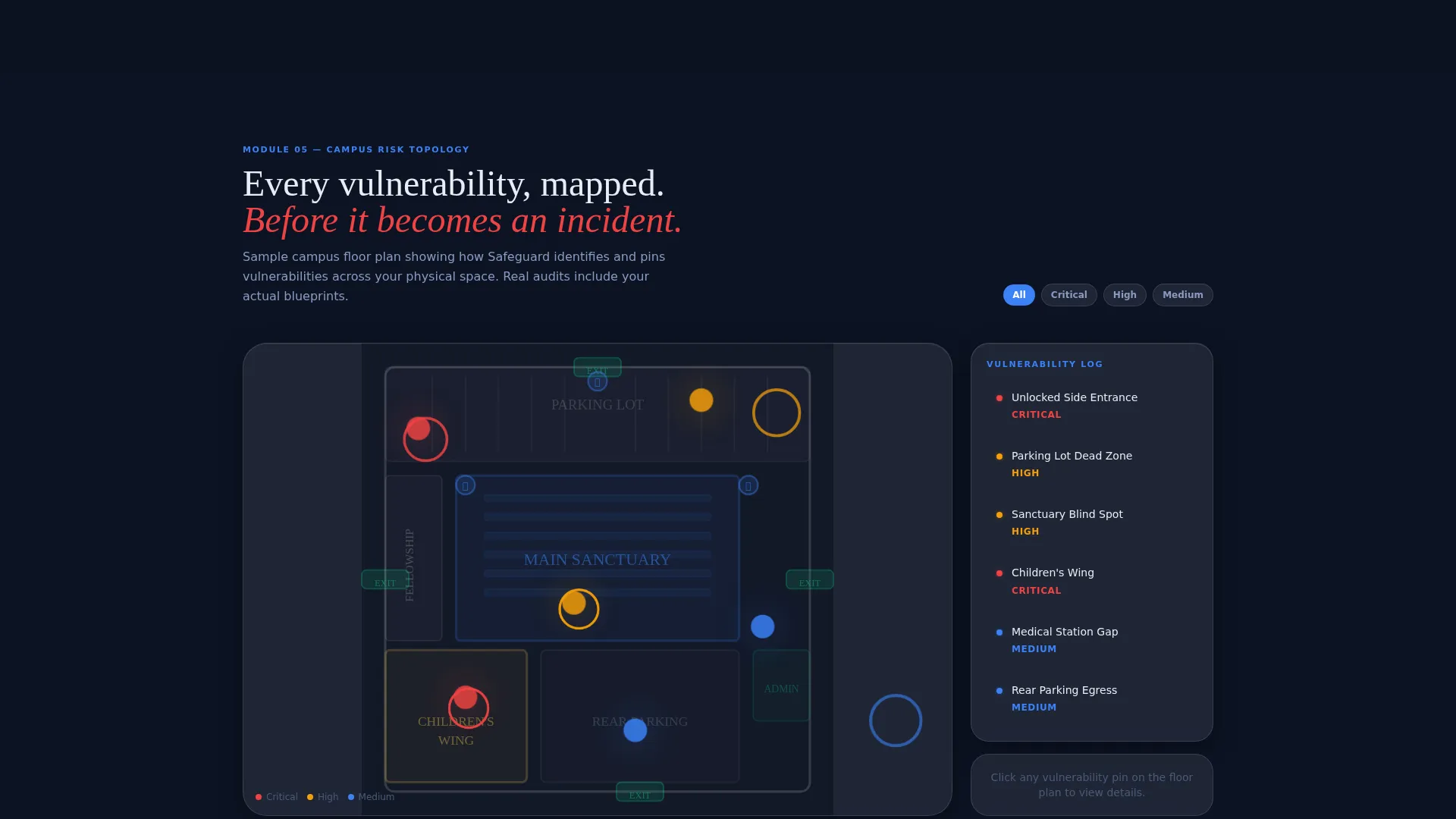
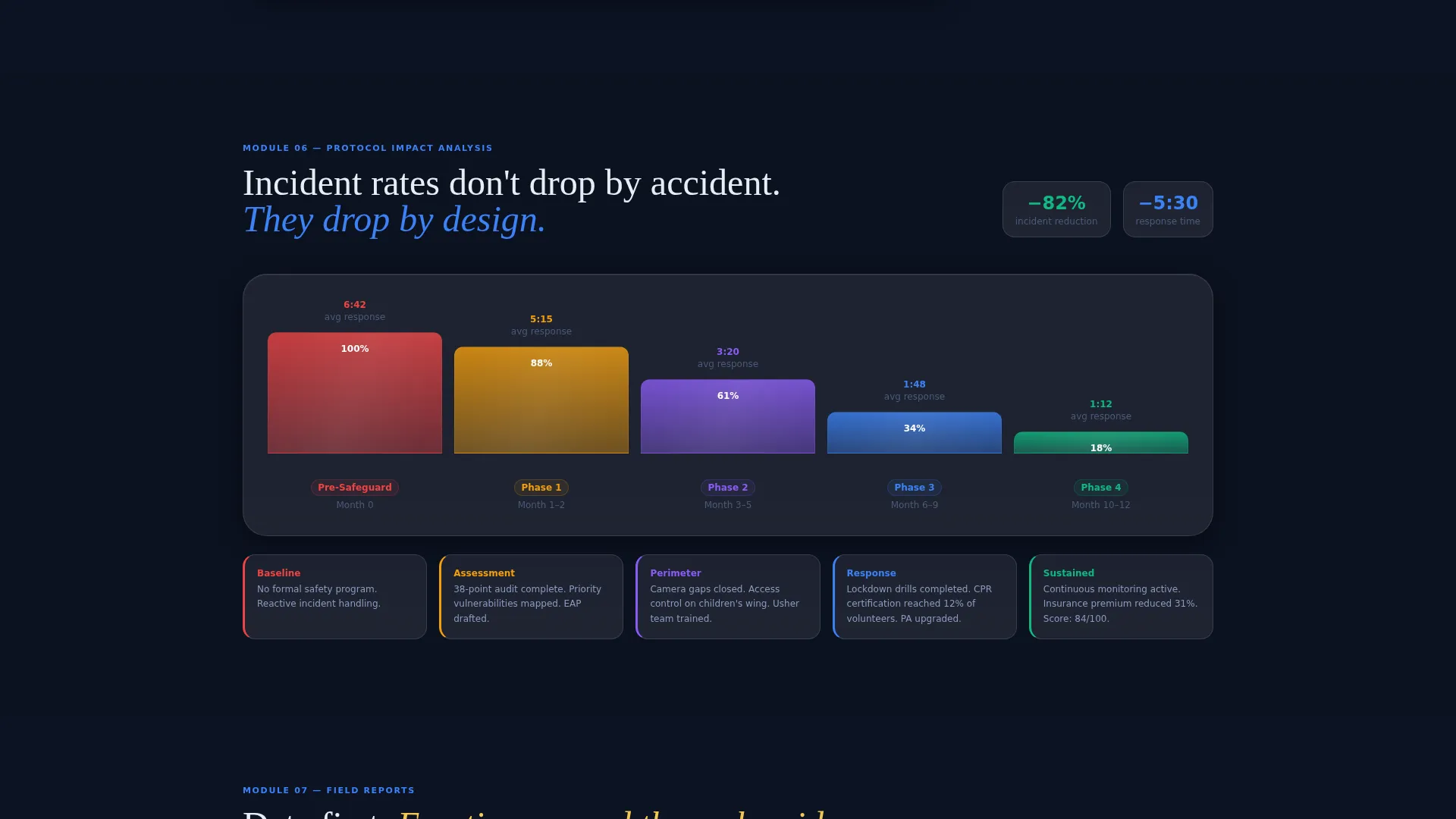
- A data comparison grid, a risk heat map section with campus floor plan and vulnerability pins, and a timeline chart showing how incident rates respond to tiered safety protocol adoption.
- Testimonial cards styled as incident-report summaries, a full-audit request form, and a lightweight secondary lead path for PDF scorecard downloads.
Feature list
This template packages several purposeful, prompt-built components into one cohesive dashboard experience. Each feature serves a specific role in moving a visitor from curiosity to committed lead.
Interactive Safety Score Calculator
Three frosted-glass input panels let visitors enter their congregation size via a slider, select weekly service and event frequency from a dropdown, and check off existing safety measures. The radial score gauge animates in real time as inputs change, cycling from red through amber to guardian blue, with the score number pulsing at the center in altar gold.
Threat-Category Score Breakdown
Below the main gauge, four individual score cards auto-populate with results across key safety domains. Each card covers one area: Perimeter, Medical Readiness, Child Safety, and Communication. Every card includes a micro progress bar so visitors can instantly see their weakest categories at a glance.
Comparative Data Grid Module
A dashboard module places the visitor's score in context by comparing it against congregations of similar size. This benchmarking section helps visitors understand whether their current safety posture is below average, average, or leading for their tier, making the platform's value immediately concrete.
Risk Heat Map Section
A sample campus floor plan section displays vulnerability pins across the building layout. This visual risk heat map gives visitors a spatial understanding of where gaps tend to cluster in congregations like theirs, adding a diagnostic layer that purely numeric scores cannot deliver alone.
Incident-Report Style Testimonials
Social proof is presented as data-first incident-report summary cards rather than traditional quote blocks. Metrics come first, for example how response times improved after a phase of implementation, so emotional credibility is earned through evidence rather than stated.
Dual Lead Capture Paths
A frosted modal slides up after the calculator is completed, offering a full 38-point safety audit via a detailed form. A lighter secondary path lets visitors download a free Church Safety Scorecard in portable document format by entering only an email address, reducing friction for visitors who are not yet ready for a full consultation.
Page sections overview
| Section | Purpose |
|---|---|
| Safety Score Calculator | Primary interactive header tool for real-time vulnerability scoring |
| Threat Category Cards | Breaks score into Perimeter, Medical, Child Safety, and Communication scores |
| Score Comparison Grid | Benchmarks visitor score against similar-size congregations |
| Risk Heat Map | Visual campus floor plan with vulnerability pin overlays |
| Incident Timeline Chart | Shows incident rate trends after tiered protocol adoption |
| Testimonial Report Cards | Data-first social proof styled as incident-report summaries |
| Full Audit Modal | Frosted lead capture form for the 38-point safety audit request |
| PDF Scorecard Download | Lightweight secondary lead path requiring only an email address |
Design & branding system
The visual identity follows a Data Command theme built on a Glassmorphic color system. The goal is to feel like a control room operating inside a cathedral: purposeful, calm, and authoritative.
- The primary background is deep sanctuary navy (#0B1120), with frosted translucent panels at rgba(255,255,255,0.08) floating above it to create the layered glass-card effect.
- Guardian blue (#3B82F6) drives active data states, progress rings, and interactive user interface elements, while altar gold (#F4C752) is reserved exclusively for alerts, score numerals, and primary call-to-action buttons.
- Typography and layout follow a dashboard grid structure, keeping data-dense sections readable and scannable without visual clutter.
Mobile & speed optimization
The template is designed so that its data-heavy layout remains usable and visually coherent on smaller screens. Dashboard modules reflow into single-column stacks on mobile without losing the glassmorphic layering effect.
- The calculator inputs, score gauge, and category breakdown cards are all sized and spaced to work on touch screens, preserving the interactive experience on phones and tablets.
- The frosted modal lead capture form is designed to slide in cleanly on mobile, keeping form fields accessible without covering the score result the visitor just generated.
How this template helps you convert
Every design decision in this template serves one goal: make the visitor feel informed and trust the platform enough to share their contact details. The conversion architecture works in three stages.
- The calculator delivers immediate, personalized value by generating a real vulnerability score before any form appears. By the time the lead capture modal slides up, the visitor has already seen their own gaps and wants the full picture.
- The data comparison grid and risk heat map sections add diagnostic depth that keeps visitors scrolling. Each module feels like the next tab in a live safety dashboard, reinforcing the platform's authority and the visitor's need for a fuller audit.
- The dual lead capture structure removes the all-or-nothing barrier. Visitors who are not ready for a full consultation can still enter their email for a free scorecard, giving the platform two separate conversion entry points from a single page.
Other information about this template
This template is built for the church and religious safety management niche, where trust and credibility must be established before any sales conversation begins. A few additional details are worth noting.
- The template style is Dashboard and Data Grid, making it well-suited for platforms that need to communicate complex safety data in a clear, visual format.
- The header concept is a Calculator and Estimator, which is a high-engagement pattern for lead generation because visitors receive personalized output in exchange for their attention.
- The creative direction is Calculator and Tool First, meaning the interactive experience is the marketing message, not supporting copy around it.
- This template fits within the broader Church and Religious Software category and is purpose-built for safety management use cases, including risk assessment, protocol planning, and multi-campus oversight.
- The lead generation flow is structured around a 38-point safety audit offer, a benchmark grounded in the source platform's assessment depth.
Theme
Data Command
Creative direction
Calculator/Tool First
Color system
Glassmorphic
Style
Dashboard/Data Grid
Direction
Lead Generation
Page Sections
Interactive Safety Score Calculator
Threat-category Score Breakdown
Comparative Benchmark Data Grid
Risk Heat Map with Vulnerability Pins
Incident-report Style Testimonial Cards
Dual Lead Capture Flow
Related questions
Who is the primary audience for this template?
Does the calculator work without any backend connection?
What lead capture options does this template include?
Is this template suitable for multi-campus church organizations?
Can smaller congregations use this template effectively?



