Real Estate Compliance Landing Page Template
Safeguard is a compliance-focused landing page template built for real estate safety management platforms. It uses a dark Data Command visual theme, a three-column comparison table, and live-styled counters to show property managers and compliance officers exactly why spreadsheets fail, and why a centralized inspection dashboard is the smarter choice.
by Rocket studio
Quick summary
Safeguard is a single-page compliance landing page template designed for real estate safety management software. It opens with a scrolling logo bar and live counter stats, then walks visitors through a detailed spec-sheet comparison before driving them toward an interactive portfolio demo. The page is built for property managers and compliance teams who need proof, not promises.
Who this template is for
This template is built for software products serving professionals who manage building safety compliance across large real estate portfolios. If your platform tracks inspections, certifications, or regulatory deadlines, this template speaks your buyers' language.
- Property managers overseeing multi-building portfolios who need a single tracking view
- Regional compliance officers responsible for fire, elevator, and OSHA certification deadlines
- Real estate investment trust (REIT) legal and operations teams who require audit-ready documentation
What problem this template solves
Safety compliance across large portfolios is fragmented. Deadlines live in spreadsheets, certifications get missed, and audit requests arrive without warning. This template addresses the specific pain of scattered tracking and demonstrates how a live dashboard replaces that chaos.
- Missed re-certification deadlines that expose property managers to legal and regulatory risk
- No single source of truth for fire inspections, elevator certifications, and emergency lighting checks
- Slow, manual audit preparation that delays responses to legal and compliance requests
What you get with this template
You get a fully structured, single-page layout built around a Spec Sheet creative direction. Every section is designed to answer the next logical question a compliance buyer will ask before they ask it.
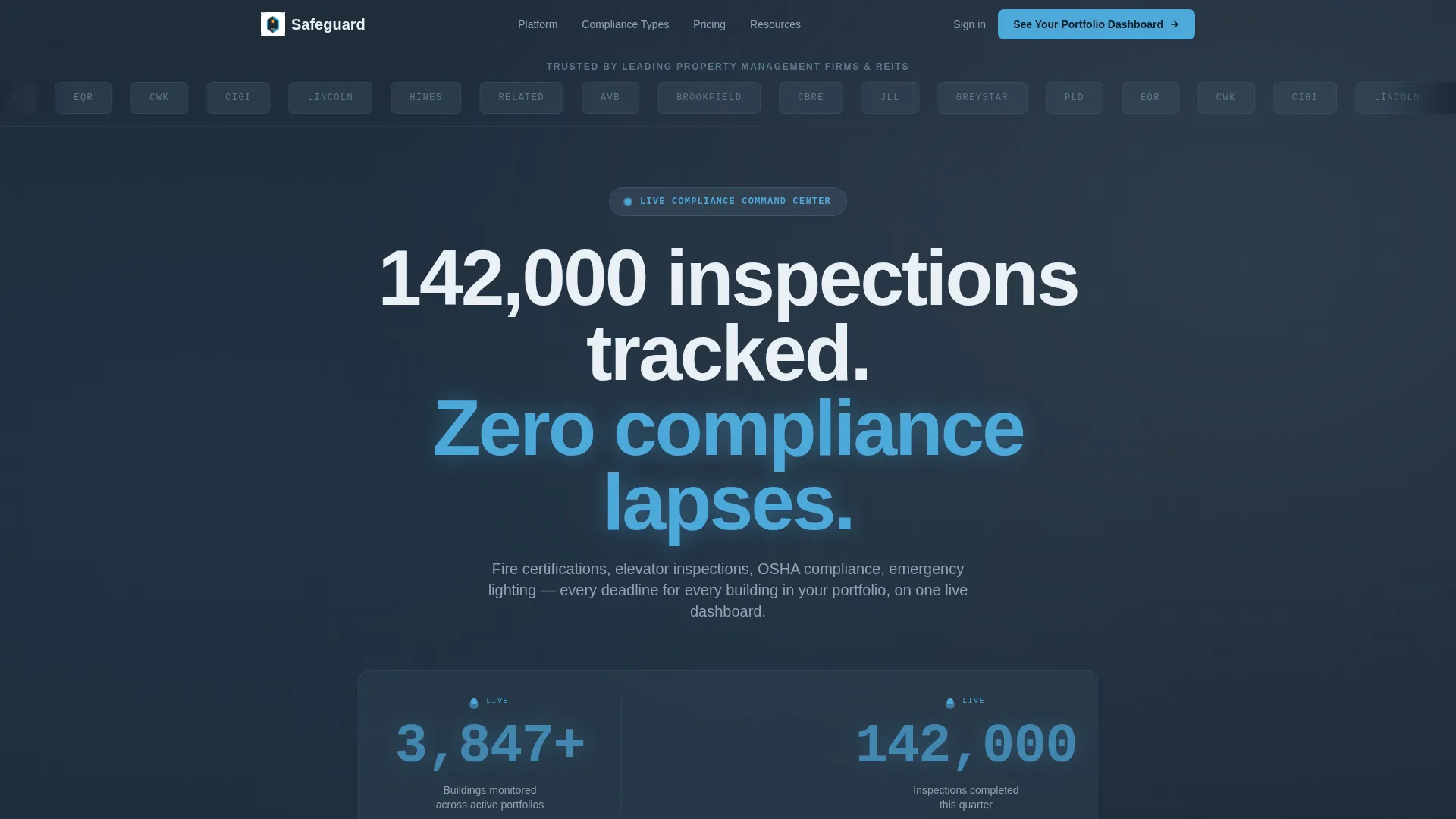
- A header with a scrolling REIT and property firm logo bar, a bold headline, and three live-styled numeric counters
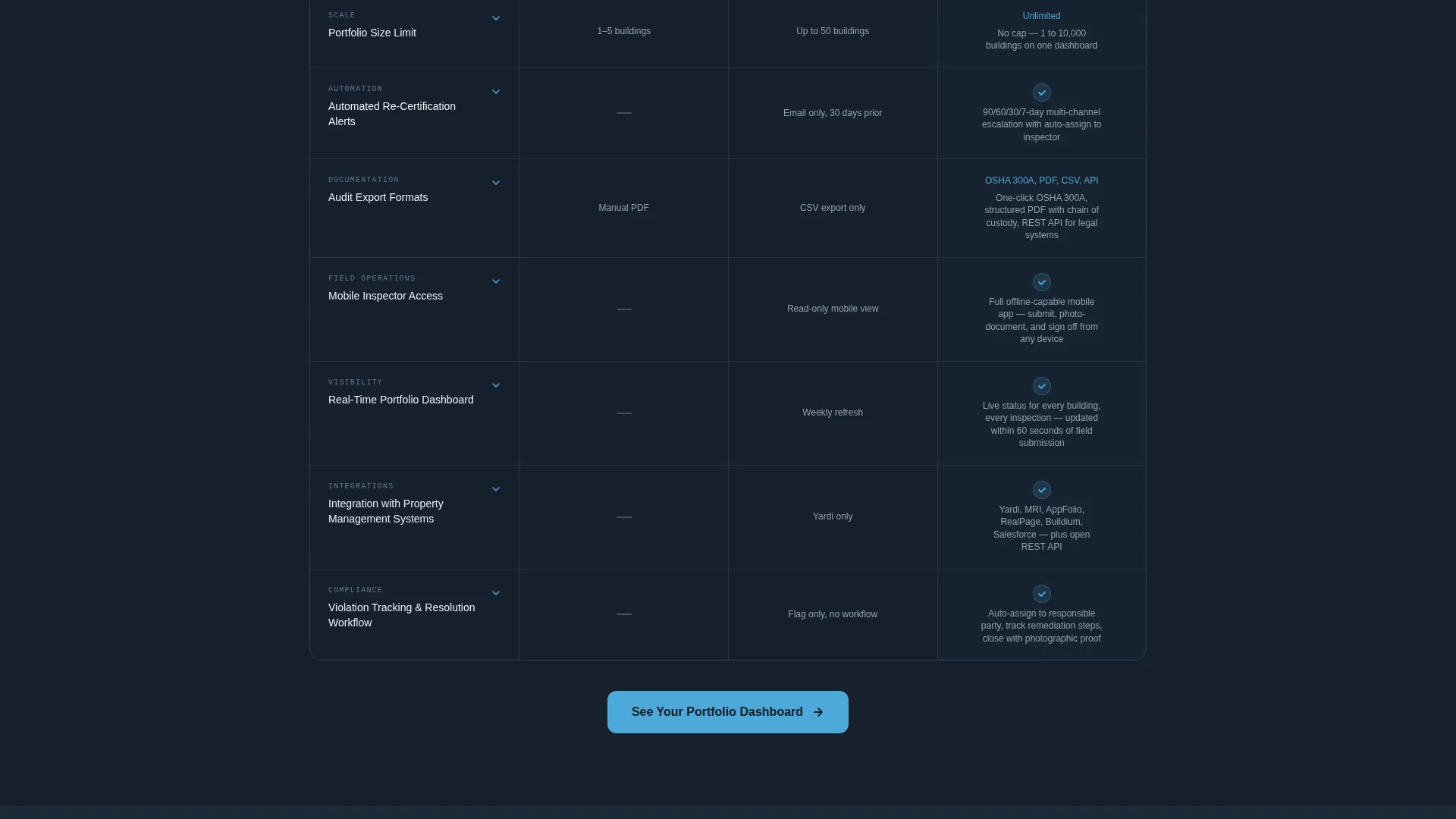
- A three-column comparison table covering manual tracking, competitor software, and your platform across five feature rows
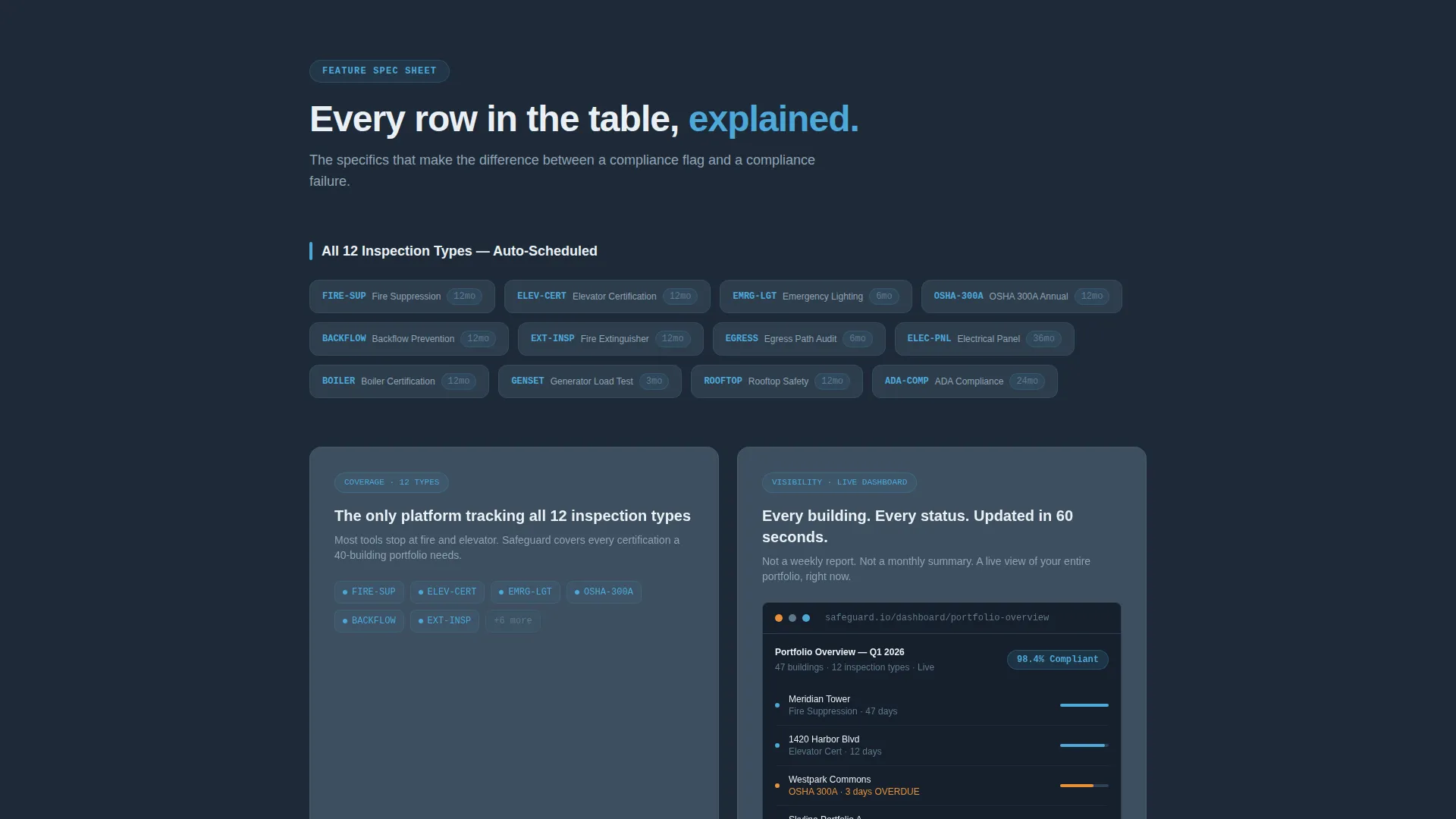
- Per-row spec-sheet deep dives with exact numbers, integration logos, and a screenshot placeholder for each feature in the live interface
- A sticky bottom bar with a primary call-to-action and a secondary email-capture inline form for a downloadable compliance checklist
Feature list
This template packages several purpose-built components that work together to move a skeptical compliance buyer toward action.
Three-Column Comparison Table
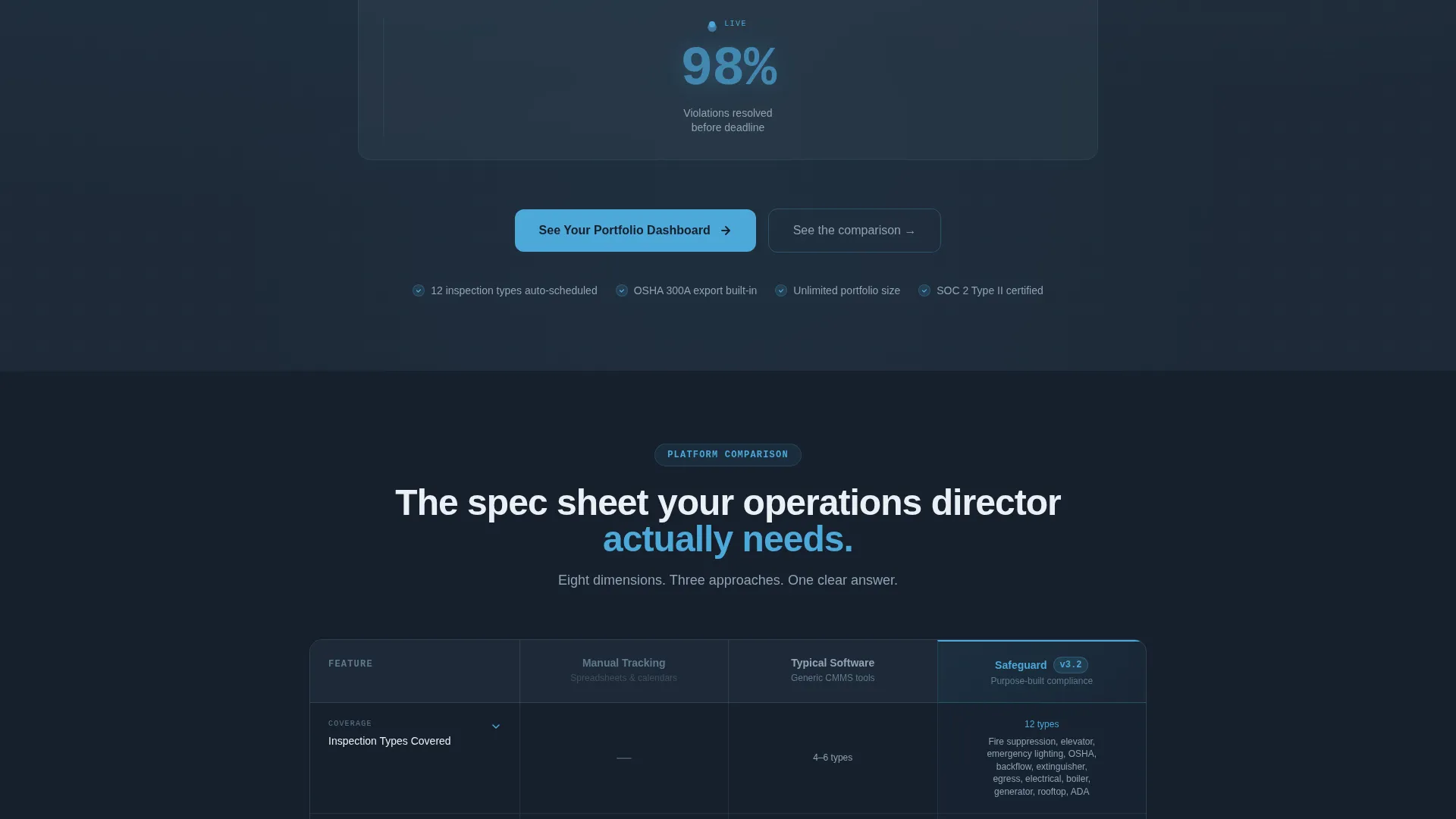
The comparison table puts your platform side by side with manual tracking and competitor software. Rows cover inspection types, portfolio size limits, automated re-certification alerts, audit export formats, and mobile inspector access. Sky blue checkmarks versus muted slate dashes make your advantages impossible to miss at a glance.
Live-Styled Stat Counters
Three counters in the header tick upward like telemetry readouts, displaying buildings monitored, inspections completed this quarter, and violations resolved. Each number pulses faintly in sky blue, turning raw data into a confidence signal before the visitor reads a single word of body copy.
Spec-Sheet Section Deep Dives
Each row of the comparison table expands into its own dedicated section below. These deep dives include exact numbers, integration logo placements, and a screenshot slot showing the feature inside a live interface view. This structure rewards methodical readers and removes the need for a separate product documentation page.
Sticky Bottom Bar with Dual Call-to-Action
After the comparison table, a sticky bar locks to the bottom of the viewport. It carries the primary "See Your Portfolio Dashboard" call-to-action alongside a secondary inline form that captures an email address in exchange for a downloadable PDF compliance checklist.
Interactive Demo Routing
The primary call-to-action on every section break routes visitors to a pre-built interactive demo. The demo is pre-populated with sample buildings and dummy inspection data, so visitors can explore the dashboard without signing up first.
Scrolling Logo Bar Header
The page opens with a horizontal ribbon of REIT, property management firm, and municipal housing authority logos scrolling slowly on a deep slate background. This social proof element establishes credibility before the headline lands.
Page sections overview
| Section | Purpose |
|---|---|
| Scrolling Logo Bar | Establish credibility with recognizable industry logos |
| Headline and Counters | Lead with live-data proof instead of a hero image |
| Comparison Table | Show feature advantages across three tracked columns |
| Spec-Sheet Deep Dives | Expand each table row into a detailed evidence section |
| Section Break calls to action | Route visitors to the interactive portfolio demo |
| Sticky Bottom Bar | Persistent dual call to action with email capture for PDF download |
Design & branding system
The visual identity follows a Data Command theme using a Slate and Sky color system. The palette is designed to feel like a building engineer's tablet screen, readable in a dim environment and visually urgent where action is needed.
- Deep operations slate (#1E2A38) for primary backgrounds, brushed gunmetal (#3D4F5F) for card surfaces, and clean white (#EAF0F5) for body text
- Open-sky blue (#4DA8DA) as the primary action color, used on counters, checkmarks, and all clickable call-to-action elements
- Alert tangerine (#E8913A) reserved exclusively for overdue badges and warning state indicators, keeping urgency visually distinct
Mobile & speed optimization
The template layout is structured to remain clear and navigable on smaller screens. The dense comparison table and sticky bottom bar are both designed with focused, minimal components that translate cleanly to narrower viewports.
- The sticky bottom bar and inline email form are built as compact, single-row elements suited to mobile interaction
- Counter and table components use contained, card-based layouts that stack predictably on reduced screen widths
How this template helps you convert
Every design and copy decision in this template is calibrated to earn the click from a skeptical, detail-oriented compliance buyer.
- The comparison table makes platform advantages concrete and immediate. Buyers do not have to take your word for it, they see exactly which twelve inspection types auto-schedule and how audit exports match OSHA 300A formatting.
- The spec-sheet deep dives sustain engagement through the full scroll. Each section answers the next logical question, reducing drop-off from readers who need specificity before they commit.
- The sticky bottom bar keeps the call-to-action visible at all times. The secondary PDF download option gives hesitant visitors a lower-commitment first step, capturing their email while they continue evaluating.
Other information about this template
This template is categorized under Technology and Real Estate Software, making it a strong fit for compliance-focused SaaS platforms targeting property operations teams. A few additional details worth knowing before you customize:
- The template is a single landing page, not a multi-page site, so all persuasion happens within one continuous scroll
- The Data Command theme and Spec Sheet creative direction are intentionally paired to appeal to operations-minded buyers who distrust vague marketing language
- The comparison table rows and deep-dive sections are modular, meaning you can add or remove feature rows to match your actual platform capabilities
- The inline PDF checklist form is a single-field email capture, keeping friction minimal for visitors who are not yet ready to request a demo
- This template is well-suited for platforms covering fire inspection tracking, elevator certification management, emergency lighting compliance, and OSHA record-keeping workflows
Theme
Data Command
Creative direction
Spec Sheet
Color system
Slate & Sky
Style
Comparison Table
Direction
Click-Through
Page Sections
Three-column Comparison Table
Live-styled Stat Counters
Spec-sheet Section Deep Dives
Sticky Bottom Bar with Dual Call to Action
Scrolling Logo Bar Header
Interactive Demo Routing
Related questions
What type of business is this template designed for?
Can I customize the comparison table rows to match my platform's features?
Does the template include the interactive demo or just the routing link?
What is the purpose of the sticky bottom bar?
Is this a single-page layout or a multi-page site?



