Advanced Veterinary Software Privacy Policy & Terms Website Template
SafeVet is a veterinary safety management landing page template built on a bento grid layout with a Dashboard Pro theme. It showcases a compliance platform through a Feature Tab Switcher header, live-styled product screenshots, a Spec Sheet scroll experience, and a freemium signup flow. Practice managers, hospital administrators, and relief vets are the intended audience.
by Rocket studio
Quick summary
SafeVet is a single-page bento grid landing page template designed for a veterinary workplace safety and compliance platform. It uses a Feature Tab Switcher header, live-styled product screenshots, and a Spec Sheet creative direction to guide visitors from broad dashboard views to granular feature detail. The page converts on a freemium trial model with a frictionless three-field signup form.
Who this template is for
This template is built for teams launching a veterinary safety or compliance platform and needing a landing page that speaks directly to the people managing risk inside a practice. The layout and copy direction are tuned for a specific, professional audience.
- Practice managers running small-to-mid-size veterinary clinics who track safety binders between appointments
- Hospital administrators overseeing multi-location veterinary groups where a missed waste disposal log can trigger a regulatory citation
- Relief veterinarians who walk into unfamiliar practices and need to orient quickly to hazard protocols
What problem this template solves
Veterinary safety platforms face a credibility problem on the web. A generic software landing page does not convince a practice manager who already owns a binder. This template solves that by making the product feel immediately real, specific, and trustworthy before the visitor ever clicks signup.
- Scattered compliance information, paper binders, and missed OSHA deadlines are common pain points this page addresses head-on
- Visitors need to see the product working, not just read about it, so the tab-switching screenshot system shows the dashboard in action
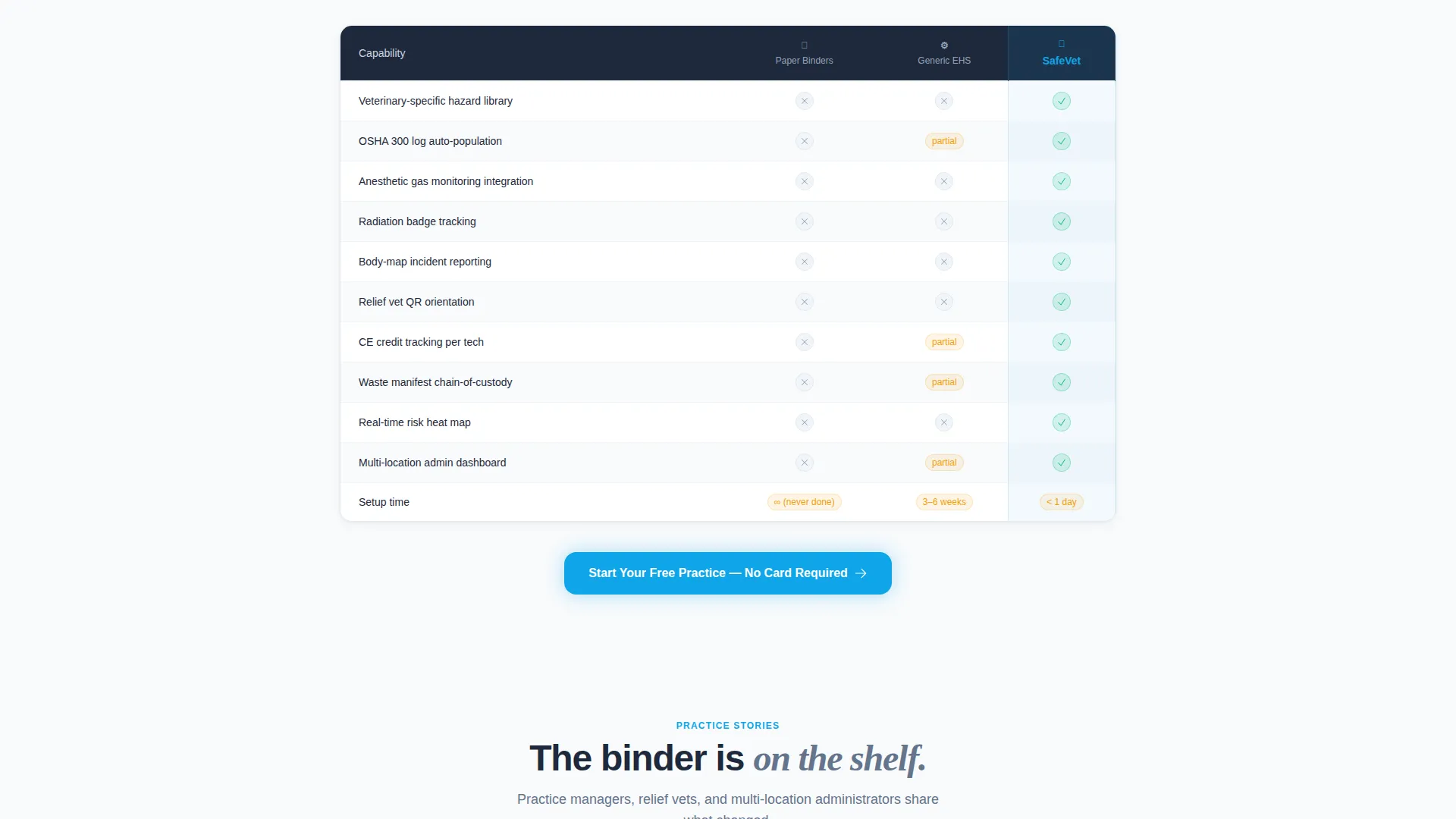
- The comparison row makes the gap between manual processes and the platform viscerally clear without requiring the visitor to imagine it
What you get with this template
You get a fully structured bento grid landing page with every major section pre-built and copy-ready for a veterinary safety compliance product. The layout moves from a strong hero to granular feature cells, ending at a clear conversion point.
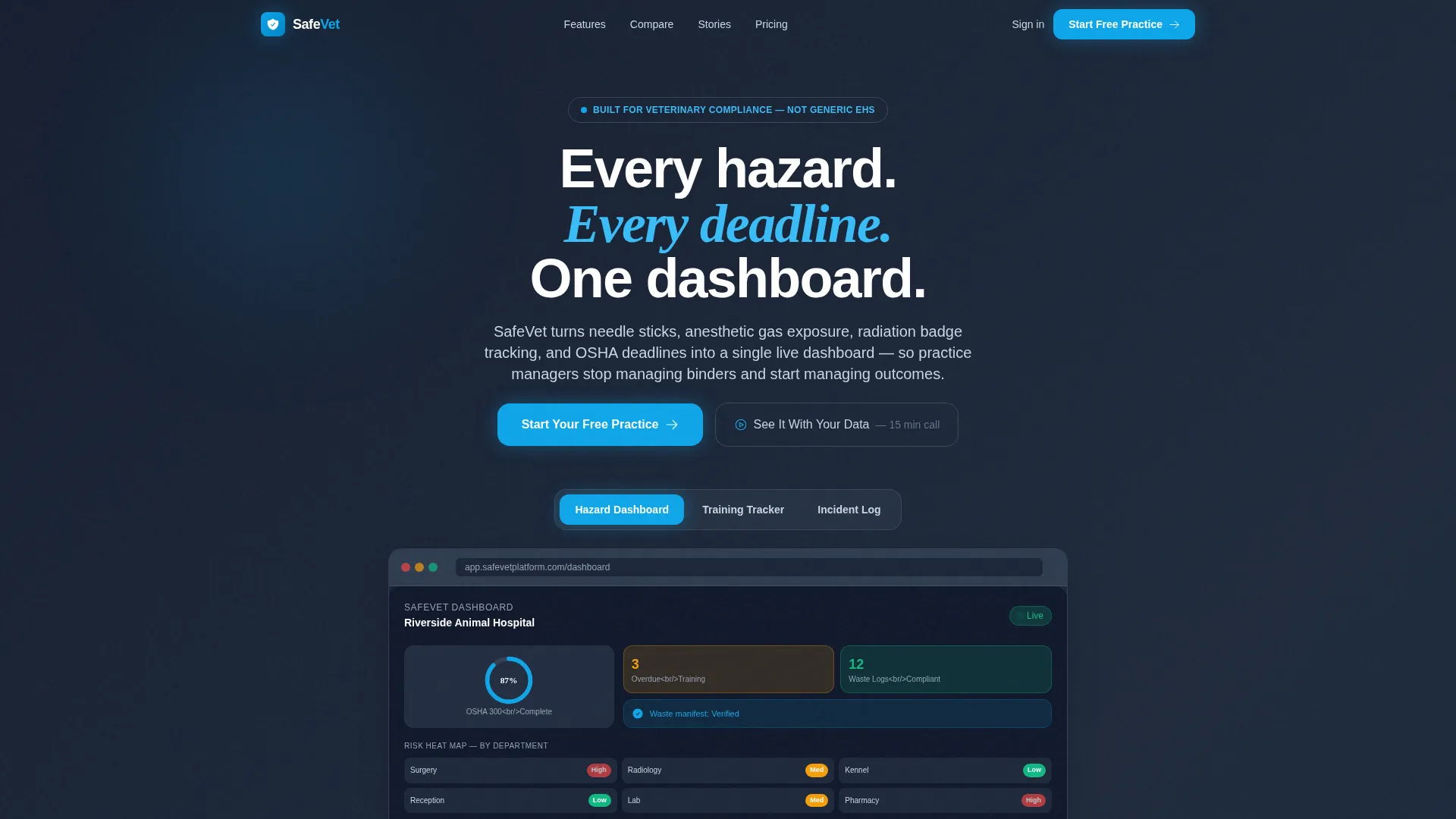
- A Feature Tab Switcher header with three clickable tabs and a crossfade product screenshot area
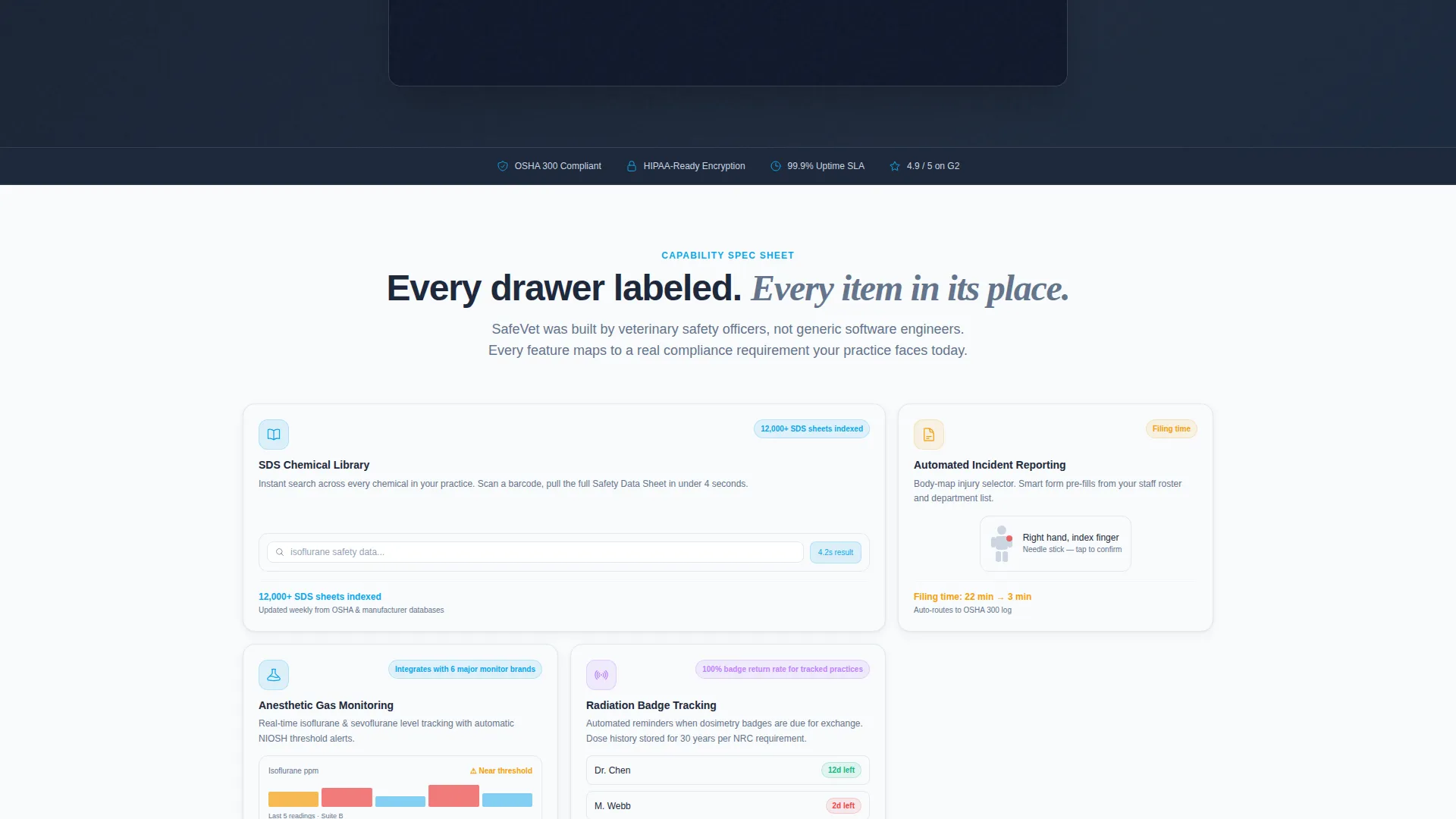
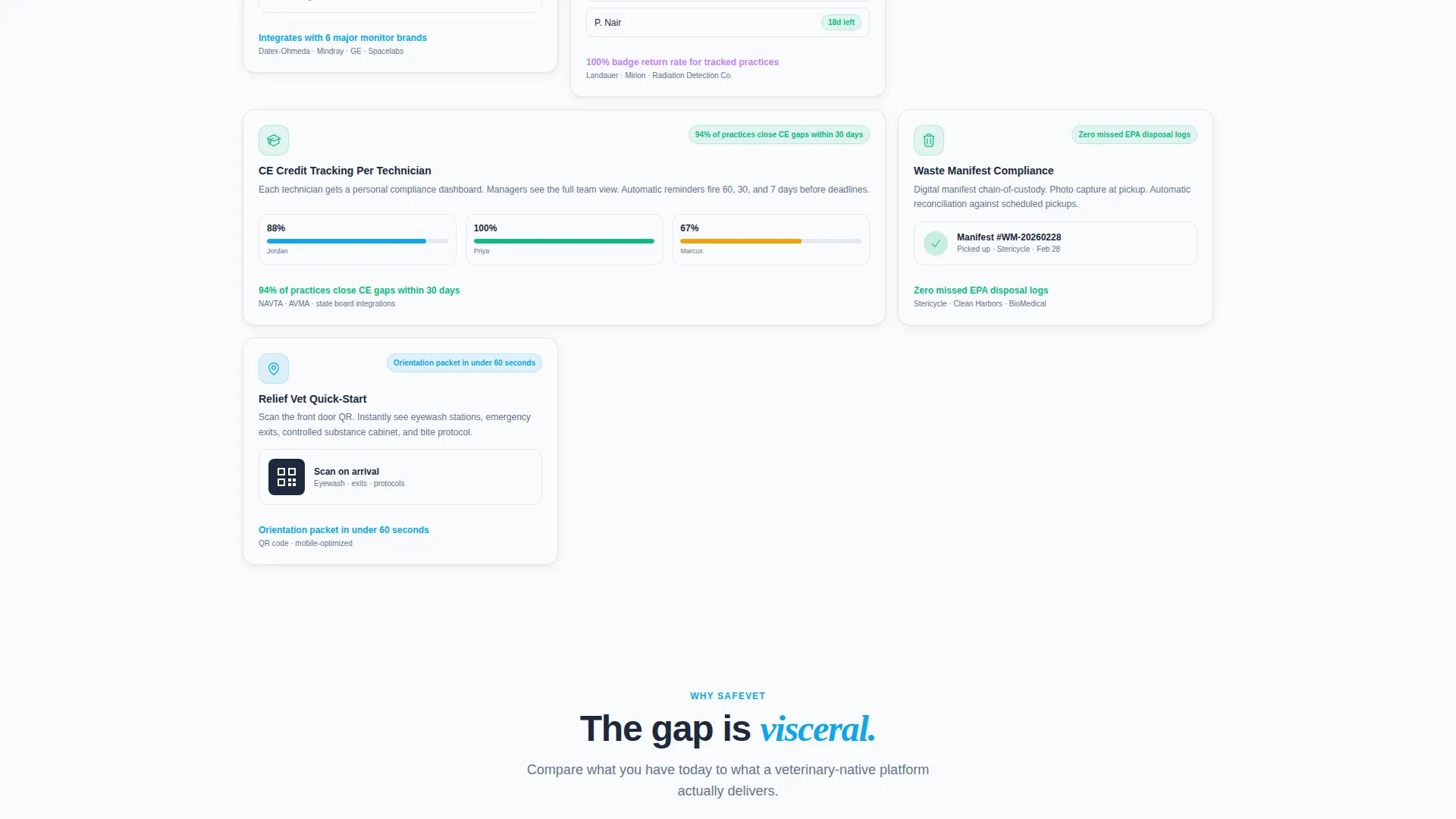
- A Spec Sheet bento grid body with individual capability cells, micro-screenshots, one-line stats, and a three-column comparison row
- A freemium conversion flow with a sticky mobile call-to-action bar and a secondary booking link for a fifteen-minute onboarding call
Feature list
This template's built-in sections and components translate directly into demo-able features that a buyer's development or design team can populate with real product content.
Tab-Switching Hero Header
Three labeled tabs sit above a live-styled product screenshot area. Each tab click triggers a smooth crossfade to reveal a different view: Hazard Dashboard, Training Tracker, or Incident Log. Visitors tour the product without leaving the fold.
Live Dashboard Screenshot Panel
The default Hazard Dashboard view displays a risk heat map by department, an OSHA 300 log completion ring at 87 percent, three overdue training flags in amber, and a green waste manifest compliance badge. Every element is pre-composed to look like a working product.
Bento Grid Spec Cells
Each bento cell isolates one platform capability with a micro-screenshot, a one-line performance stat, and a small-print compatibility note. The grid tightens as the visitor scrolls, creating a zoom-in effect from broad overviews to granular feature specs.
Three-Column Comparison Row
A dedicated comparison section places paper binders, generic environmental health and safety software, and the platform side by side. Checkmarks make feature gaps immediately clear and give the visitor a concrete reason to move forward.
Freemium Signup Form
The primary call-to-action opens a three-field inline form: practice name, team size dropdown, and work email. No credit card is required. The form appears at the header, mid-page after the comparison grid, and as a sticky bar on mobile.
Secondary Onboarding Call Link
A "See It With Your Data" secondary path books a fifteen-minute onboarding call. The team pre-loads the practice's real hazard profile before the call, giving high-intent visitors a personalized next step beyond the self-serve trial.
Page sections overview
| Section | Purpose |
|---|---|
| Tab Switcher Header | Lets visitors preview Hazard Dashboard, Training Tracker, and Incident Log |
| Live Dashboard View | Shows risk heat map, OSHA log ring, training flags, and compliance badge |
| Bento Capability Grid | Isolates SDS library, incident reporting, gas monitoring, and CE tracking cells |
| One-Line Stat Row | Anchors each feature cell with a specific time-saving or accuracy claim |
| Comparison Row | Contrasts paper binders, generic software, and the platform with checkmarks |
| Mid-Page call to action | Repeats the primary signup prompt after the comparison section |
| Onboarding Call Link | Offers a personalized fifteen-minute demo path for high-intent visitors |
| Sticky Mobile Bar | Keeps the primary call-to-action visible throughout the scroll on mobile |
Design & branding system
The template uses a Slate and Sky color system rooted in deep instrument slate for primary backgrounds and sterile white for card surfaces. The overall feel is a veterinary surgical suite at early morning: cool overhead light on stainless steel, blue scrubs moving with purpose, and monitors glowing with steady vitals.
- Deep instrument slate (#1E293B) dominates headers and background weight; clinical mid-gray (#64748B) fills secondary panels
- Open-sky blue (#0EA5E9) marks every interactive element, button, and live-data highlight so the visitor's eye always finds the action
- Sterile white (#F8FAFC) floats as card surfaces inside the bento grid, keeping individual feature cells clean and readable against the dark background
Mobile & speed optimization
The template's bento grid is designed to reflow cleanly for smaller screens. The sticky bottom bar ensures the primary call-to-action stays accessible on mobile without interrupting the scroll experience.
- The sticky mobile bar pins the "Start Your Free Practice" call-to-action to the bottom of the screen throughout the entire page scroll
- Bento grid cells are structured to stack and resize naturally, keeping micro-screenshots and one-line stats legible on narrow viewports
How this template helps you convert
The page earns the click by showing the product working rather than describing it in abstract terms. Every interactive element, stat, and visual is positioned to reduce doubt and shorten the decision.
- The tab-switching header lets visitors self-qualify by exploring the feature view most relevant to their role, arriving at the signup form already engaged with a specific use case
- The one-line stats inside each bento cell, such as reducing incident report filing from 22 minutes to 3, give concrete proof that removes the "is this worth my time" hesitation before the call-to-action appears
- The no-credit-card freemium form and the secondary onboarding call together cover two buyer intents: the self-serve visitor who wants to start immediately and the cautious evaluator who needs a guided look first
Other information about this template
This template is built on the Dashboard Pro theme and is categorized under Veterinary Software within the Technology category. It suits teams building or launching a veterinary safety management product and wanting a high-specificity landing page that speaks the language of the industry.
- The template style is a Bento Grid, suitable for platforms with multiple distinct feature modules that benefit from visual separation
- The creative direction follows a Spec Sheet approach, meaning the scroll mimics a technical data sheet and earns trust through exhaustive specificity rather than marketing generalities
- The header concept is a Feature Tab Switcher, a pattern well suited to multi-view software products where different user roles care about different parts of the interface
- The landing page direction is Freemium/Trial, which means both the form copy and the call-to-action placement are calibrated for a low-friction, no-payment-required entry point
Theme
Dashboard Pro
Creative direction
Spec Sheet
Color system
Slate & Sky
Style
Bento Grid
Direction
Freemium/Trial
Page Sections
Feature Tab Switcher Header
Live Hazard Dashboard Panel
Bento Grid Capability Cells
Three-column Comparison Row
Freemium Three-field Signup Form
Secondary Onboarding Call Path
Related questions
Can I customize the tab labels and screenshot content in the header?
Does the freemium signup form require a payment integration?
Can I add or remove bento cells from the feature grid?
Who is the 'See It With Your Data' secondary call-to-action designed for?
Is this template specific to veterinary safety platforms only?



