Expert Culinary Training Landing Page Template
The Mise professional restaurant training platform landing page template is a mobile-first, card-grid landing page designed for restaurant training platforms. Built on a Dashboard Pro theme with an Electric Indigo color system, it displays course modules, team management tools, and compliance tracking in a dark, luminous layout that drives app downloads from line cooks, managers, and franchise operators alike.
by Rocket studio
Quick summary
This restaurant landing page template is purpose-built for training platforms serving the foodservice industry. It uses a modular card-grid layout, a striking dark Dashboard Pro visual theme, and a clear app-download call to action. The design is mobile-first and structured to move individual learners and multi-location operators toward downloading the app in just a few clicks.
Who this template is for
This template is ideal for anyone building a restaurant landing page around a digital training or learning platform. It works equally well for solo product teams and enterprise operators who need a polished presence fast.
- Line cook and culinary grad-focused training apps targeting ServSafe prep and skill-building
- Restaurant managers and chefs overseeing team onboarding across one or more locations
- Franchise operators and multi-location restaurant businesses managing compliance at scale
What problem this template solves
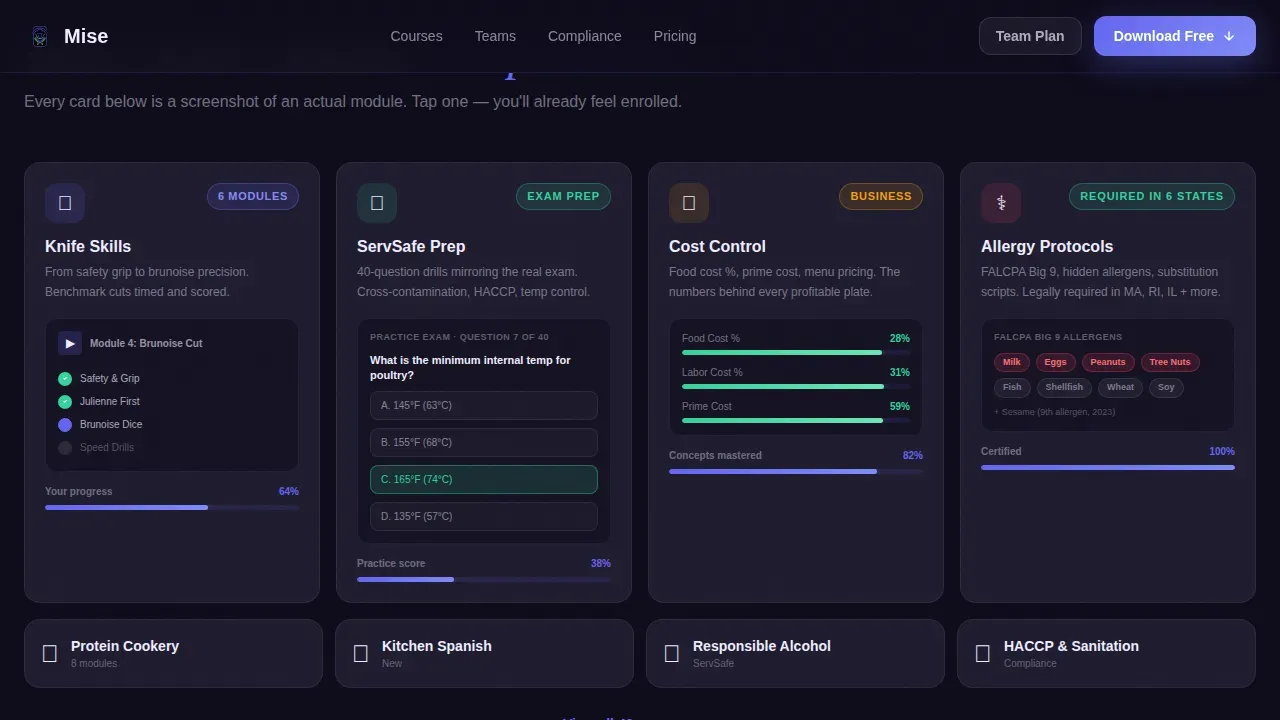
Restaurant training pages often struggle to communicate real product value. Visitors land, see vague promises, and leave. This landing page solves that by showing actual course content inside every card, so visitors already feel enrolled before they ever tap the download button.
- No clear visual hierarchy between individual learner features and team-admin features
- Generic restaurant landing page layouts that fail to display training depth or compliance tools
- Slow build times that force designers to start from scratch on every new launch
What you get with this template
You get a fully structured, single-page layout that covers everything a high-converting restaurant training landing page needs. The framework is already in place, so you focus on customizing colors, photos, logos, and content to match your brand.
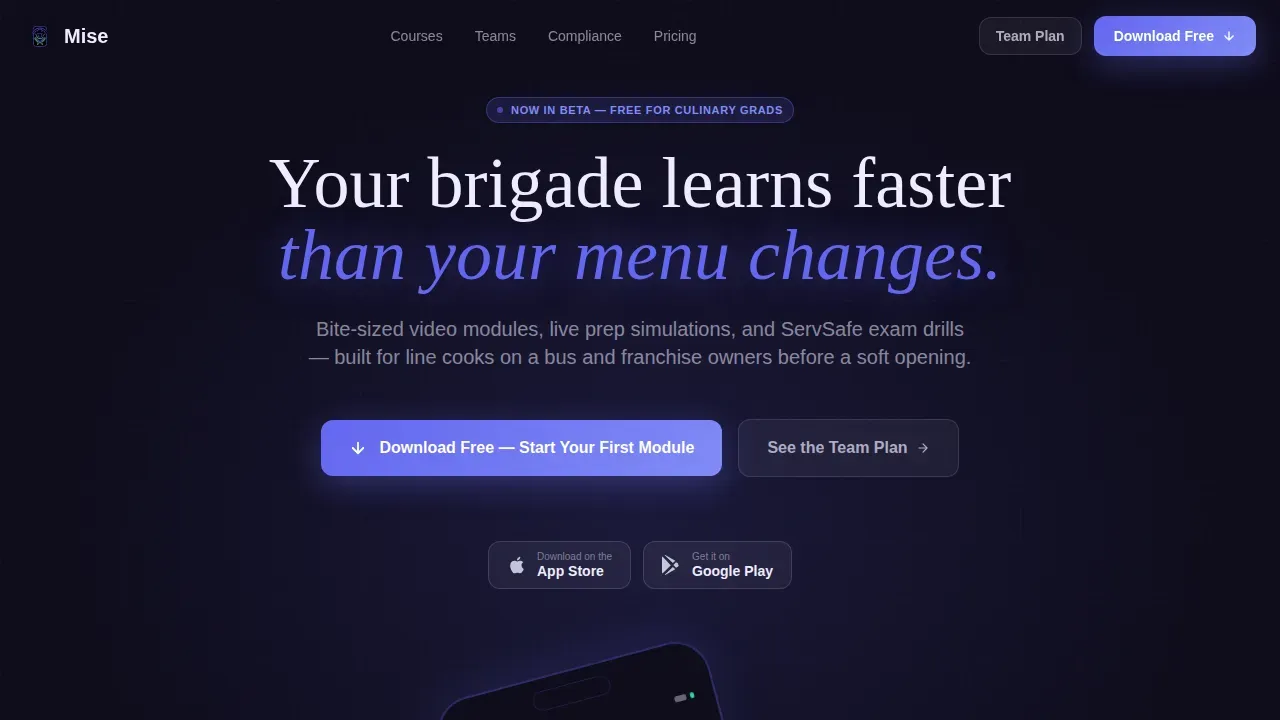
- A hero section with a product screenshot header, headline, and paired app-download calls to action
- Four modular card-grid sections covering course library, team management, compliance tracking, and social proof
- A sticky mobile call-to-action bar and a secondary qualification path for multi-location inquiries
Feature list
This template is designed with precision. Every section and component serves a specific conversion purpose.
Hero Product Screenshot Header
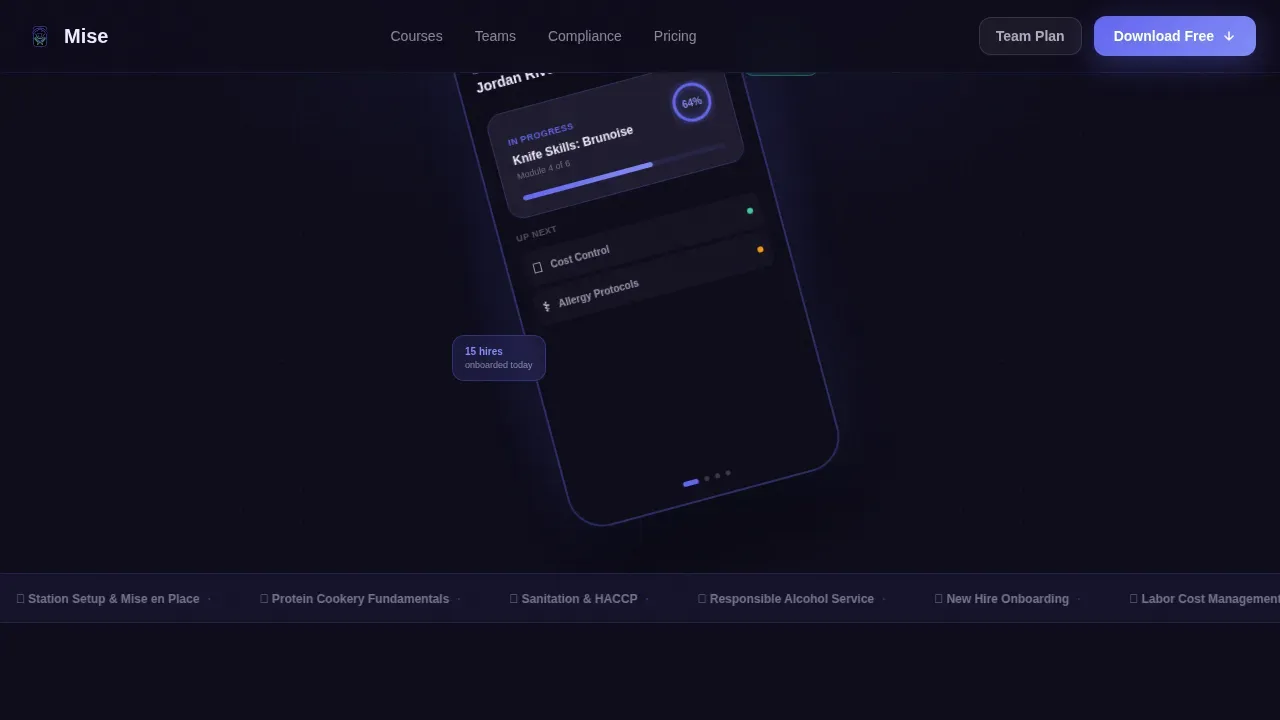
The header displays a pixel-perfect app dashboard render. It shows a half-completed module with a progress ring, a streak counter, and an upcoming-courses sidebar. High-quality visuals like this set expectations immediately and capture attention before visitors read a single word.
Modular Feature Matrix Cards
Cards are uniform in size and designed to display one capability each. Each card contains a micro-illustration or user interface fragment showing the feature in action, from a progress bar filling to a manager's view of trainee completion rates. The grid escalates from individual learner features to team-admin features to enterprise-fleet features as visitors scroll.
Compliance and Certification Grid
This section is designed around ServSafe exam drills, certificate generation, and progress tracking. It helps protect operators by showing exactly how the platform handles food-safety compliance. Cards display completion badges in bright mint against the dark background for instant visual clarity.
Team Management Dashboard Cards
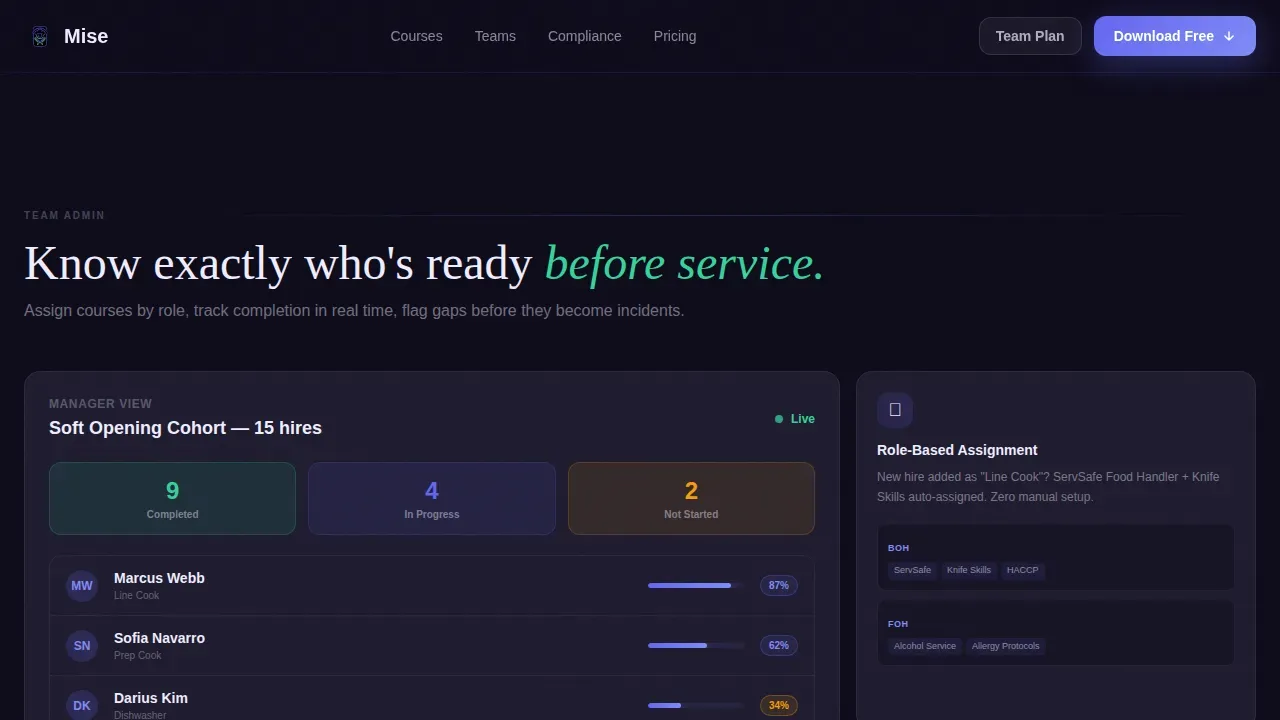
Managers and franchise owners can see at a glance how the platform handles role-based assignments and trainee oversight. Cards display a manager's view of ten trainees' completion rates, making the team-admin value immediately clear without lengthy copy.
Sticky Mobile Call-to-Action Bar
A sticky bottom bar appears on mobile screens, keeping the primary download prompt visible at all hours of scrolling. This removes friction for on-the-go users and supports the platform's mobile-first audience of staff learning between shifts.
Social Proof Section
The page closes with industry statistics and outcome metrics before the final call to action. Completion streaks and retention figures build trust and give visitors the confidence to move forward.
Page sections overview
| Section | Purpose |
|---|---|
| Hero Header | Display app dashboard screenshot and primary download call to action |
| Course Library Grid | Show actual course cards including knife skills, menu cost control, and allergy protocols |
| Team Management Grid | Display manager dashboard cards with trainee completion rates and role assignments |
| Compliance Certification Grid | Present ServSafe exam drills, certificate generation, and progress tracking cards |
| Social Proof | Deliver outcome metrics and retention statistics to build visitor trust |
| Sticky Mobile Bar | Keep app download call to action visible during full-page scroll on mobile |
| Footer | Single-row linear footer with essential links and brand identifiers |
Design & branding system
The visual identity is built on a Dashboard Pro theme using an Electric Indigo color system. Every element feels backlit and purposeful, like a restaurant management tablet after midnight. Swap your own logos, fonts, and photos in minutes to match your brand.
- Deep kitchen-dark background (#0D0B1A), electric indigo (#6366F1) primary, cool slate (#1E1B2E) for card surfaces, bright mint (#34D399) for badges, and ticket-white (#F0EDFF) for typography
- Display headlines use Fraunces, a serif typeface, while all user interface elements use Plus Jakarta Sans for clean readability
- Icons, progress rings, and completion badges are woven throughout the grid to provide visual rhythm and guide the eye down the page
Mobile & speed optimization
Mobile-first optimization is essential for a restaurant training platform. Staff access training on buses, at workstations, and between prep tasks. This template is designed to deliver a smooth experience on small screens without sacrificing the richness of the desktop admin view.
- Server Components handle the static card grid, while Client Components power animations and interactive states
- GSAP ScrollTrigger drives staggered card reveals, progress ring animations, and glow effects that respond to scroll depth
- The sticky bottom call-to-action bar ensures the download prompt is always visible on mobile, maximizing conversions across all device sizes
How this template helps you convert
A restaurant landing page that shows real course content converts better than one that makes abstract promises. This template is structured to build trust and drive action through every scroll zone.
- The hero section captures attention immediately with a live-looking app screenshot, a clear headline, and app-store badges, turning visitors into leads before they reach the first card row.
- The feature matrix escalates scope naturally from individual learner tools to enterprise fleet features, so every person reading the page finds a reason to download or inquire.
- The social proof section closes with measurable outcomes and a final call to action, giving undecided visitors the last nudge toward purchasing or submitting a team-plan inquiry.
Other information about this template
This template is ideal for training platforms that need a modern restaurant landing page without building from scratch. It covers a wide range of use cases across the foodservice industry and adapts to a variety of restaurant business types.
- A modern cafe website, a bar and pub page, or a full-service restaurant website each have different content needs. This template's modular structure means you can adapt card rows to display menu highlights, private events packages, reservations details, or any other services your brand offers.
- Training manuals and course links can be shared as public or private links, embedded in websites, or downloaded in various formats, making this layout useful beyond app-download campaigns.
- The Mise professional restaurant training platform landing page template is designed for teams that want to launch a polished training site without delays. Digital modules accelerate onboarding, and investing in staff development improves employee retention by delivering clear paths to success.
- MISEbox performance tracking and analytics help operators monitor training progress and identify skill gaps across every location.
- The Culinary Foundations Library offers 22 units and 78 lessons with over 1,500 instructional videos, covering everything from basic knife technique to ingredient handling and cost-control tasks.
- Multilingual content support accommodates diverse teams, with training available in English, Spanish, French, Mandarin, and Arabic.
- New restaurant pre-launch pages can use this template to generate demand with menu sneak peeks, an opening countdown, and an email waitlist for reservations.
- Food truck and cafe operators can embed a location map widget, display business hours, and integrate social media platforms for a complete online presence.
- Private events pages can be built by adapting card sections to showcase capacity details and inquiry forms, capturing leads from event organizers.
- Bar and pub pages benefit from the card-grid layout to display drink lists, happy hour specials, and event calendars.
- Fine dining websites can use the same framework to showcase a seasonal menu, a curated wine list, chef biography, and dress code information.
- Using this pre-designed landing page template is very budget-friendly compared to building from scratch, with prices that save significant design hours and reduce overall complexity.
- Designers can test layout changes in minutes and swap visuals, fonts, and content to match any restaurant brand without starting over.
- A clear call to action is key to maximizing the impact of any restaurant landing page, and this template places prominent calls to action at the top, in the scroll path, and at the bottom to capture every visitor intent.
Theme
Dashboard Pro
Creative direction
Feature Matrix
Color system
Electric Indigo
Direction
App Download
Page Sections
Hero Product Screenshot Header
Modular Feature Matrix Cards
Compliance and Certification Grid
Team Management Dashboard Cards
Sticky Mobile Call-to-action Bar
Social Proof and Outcome Metrics
Related questions
Can I use this template for a cafe or bar website?
Does this template work for multi-location restaurant operators?
How quickly can I launch with this template?
Can training materials be shared outside the app?
Is this template suitable for a pre-launch restaurant page?



