AI for Construction Reviews Website Template
Scaffold is a hub-and-spoke landing page template built for a construction AI content writing tool. It guides project managers, estimators, and general contractors from skepticism to install through anchor navigation, live before-and-after document rewrites, speed metrics, contractor testimonials, and a real-time demo. The page ends with a direct app download call to action.
by Rocket studio
Quick summary
Scaffold is a single-page, anchor-navigated landing page template for a construction AI content writer. It opens with a logo bar, delivers five spoke sections covering daily logs, bid proposals, safety reports, RFI responses, and submittals, then closes with a live rewrite demo and a full-width app download section. The visual system is Void and Violet: bold, dark, and purposeful.
Who this template is for
This template is built for teams and founders launching AI-powered writing tools aimed at the construction industry. It speaks directly to the people sitting at the intersection of field work and documentation pressure.
- Project managers who spend hours each day turning rough field notes into formatted reports
- Estimators and general contractors who need consistent, professional scope descriptions produced quickly and at scale
- Software founders or product teams positioning a construction AI content writer for app store distribution
What problem this template solves
Construction documentation is slow, inconsistent, and expensive. Field notes arrive as fragmented voice memos or typo-riddled texts. Turning them into polished RFI responses, submittals, or safety reports takes time that project teams rarely have.
- There is no single page that shows the AI working in real time before asking for a download commitment
- Documentation output varies wildly across subcontractors, creating brand and compliance headaches for general contractors
- Visitors arrive skeptical and need to feel the product working before they tap a store link
What you get with this template
You get a complete, conversion-focused landing page layout designed specifically for a construction AI writing product. Every section is purpose-built to move a skeptical field professional toward an app install.
- A sticky anchor navigation bar linking five spoke content sections, a live demo, and the download call to action
- Five fully structured spoke sections, each with a before-and-after document display and inline speed metrics
- A live rewrite demo embed, a full-width app download section with iOS and Android buttons, and a QR code block
Feature list
This template ships with a tightly choreographed set of layout components. Each one is designed to reduce friction and build confidence at a specific stage of the visitor journey.
Logo Bar Header
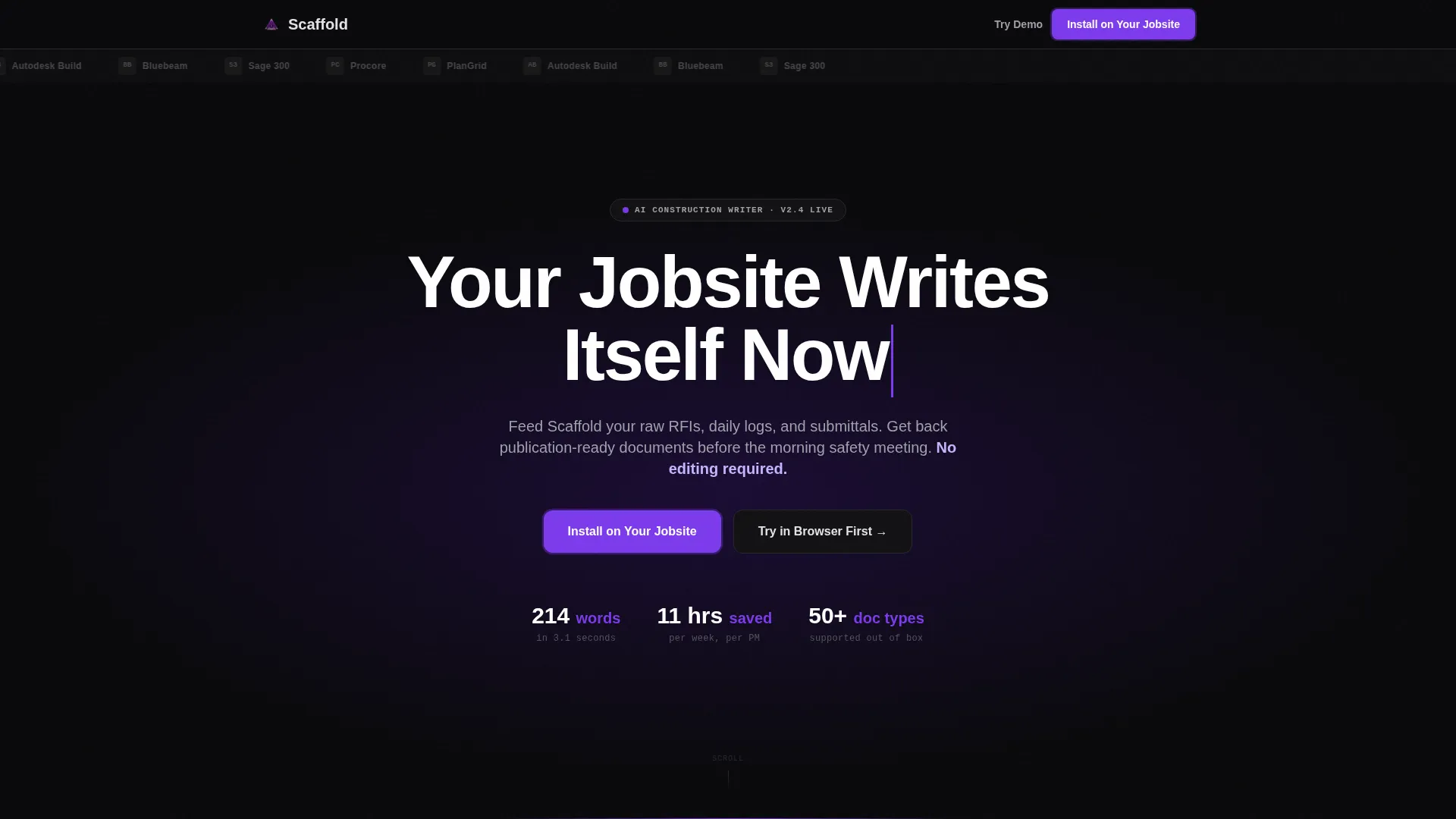
A slim horizontal strip displaying the logos of construction software ecosystems the product connects with. No explanatory copy surrounds the logos. Their presence alone signals professional credibility and product legitimacy.
Hub and Spoke Anchor Navigation
A sticky navigation bar anchors to five named content spokes: Daily Logs, Bid Proposals, Safety Reports, RFI Responses, and Submittals. Violet highlights the active state as visitors scroll, keeping them oriented inside a long single-page layout.
Before and After Document Panels
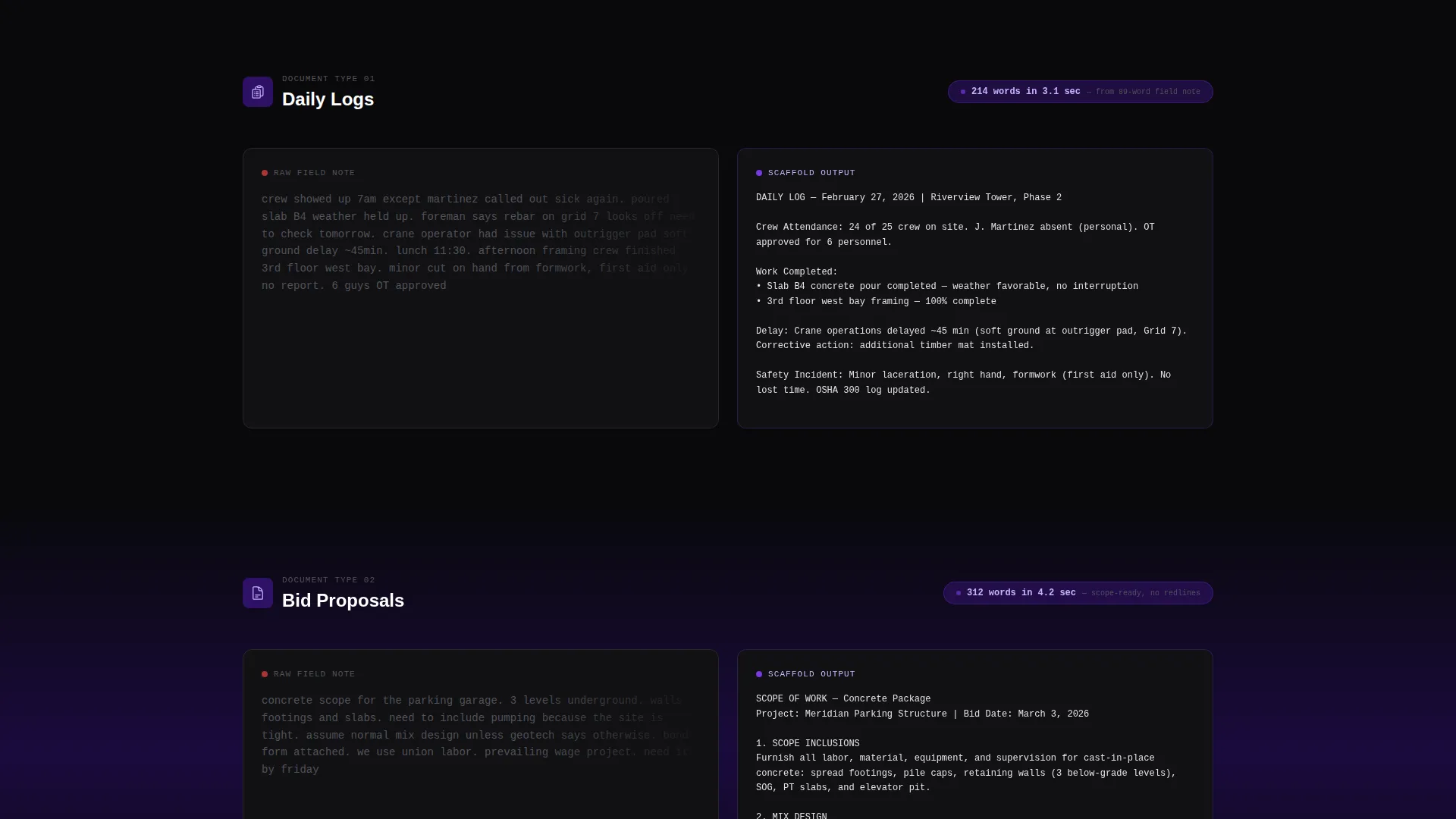
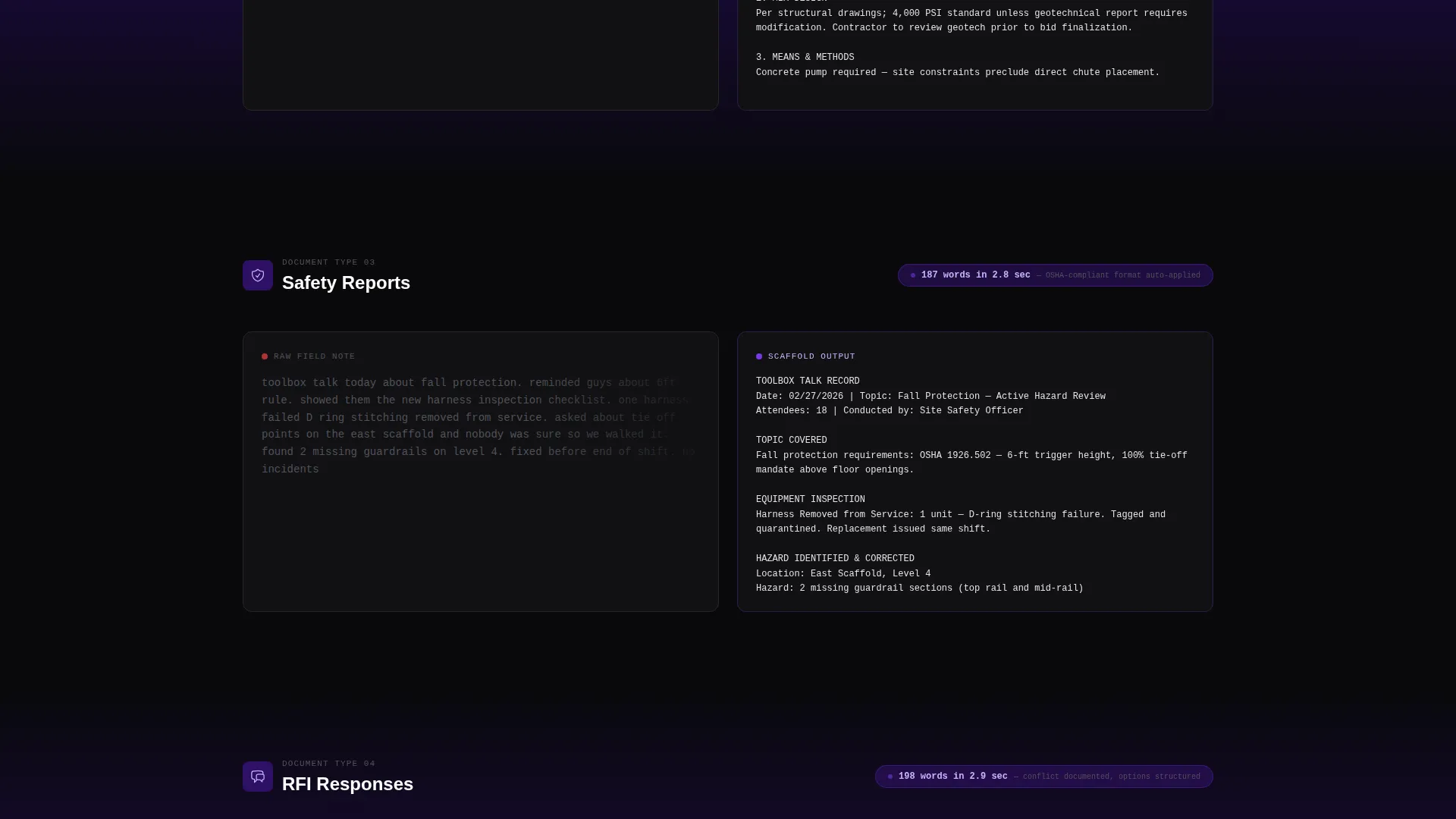
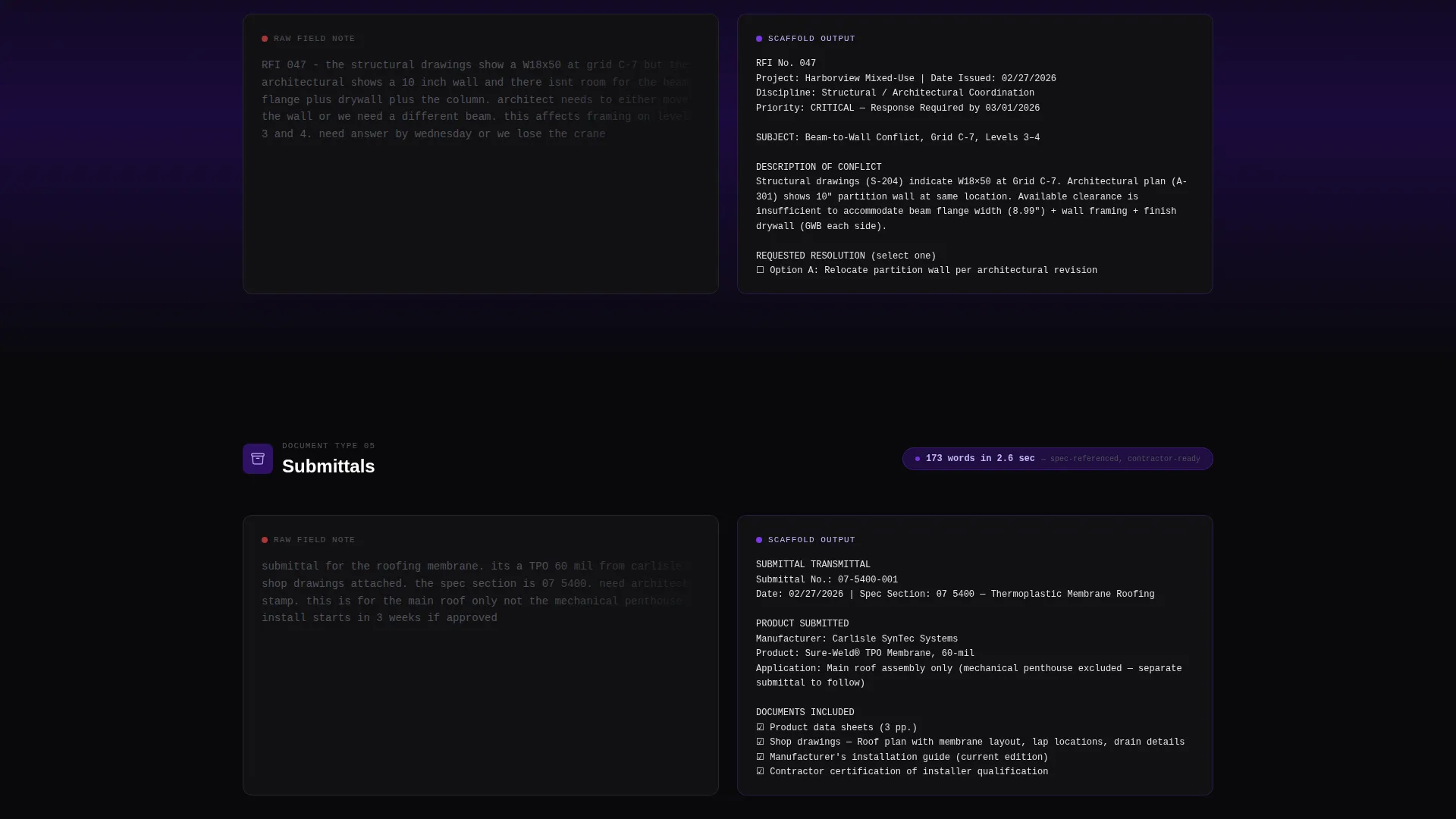
Each spoke section opens with a side-by-side comparison. A raw, typo-riddled field note sits on the left. A clean, formatted AI-generated document appears on the right. Speed metrics flash inline, showing word count and generation time.
Live Rewrite Demo Embed
Visitors paste any rough field note into an input area and watch the AI rewrite it in real time. Violet text streams character by character onto the screen. This is the primary conversion engine of the page.
Social Proof with Hard Numbers
Contractor testimonials appear with specific, quantified results. Example callouts include metrics like hours saved per week. These are placed after the spoke sections to reinforce momentum before the final call to action.
Full-Width App Download Section
After the live demo, a dedicated full-width section presents the primary call to action: Install on Your Jobsite. Two platform buttons for iOS and Android sit beside a QR code for instant mobile access. A secondary "Try in Browser First" link serves desktop visitors.
Page sections overview
| Section | Purpose |
|---|---|
| Logo Bar Header | Establish credibility with construction software ecosystem logos |
| Hero Headline Block | Capture attention with a bold AI-typed headline on void background |
| Anchor Navigation Bar | Let visitors jump directly to each spoke section from anywhere on the page |
| Daily Logs Spoke | Show raw-to-polished log transformation with speed metrics |
| Bid Proposals Spoke | Demonstrate AI-generated scope descriptions with before-and-after panels |
| Safety Reports Spoke | Display field note to formatted safety report conversion |
| RFI Responses Spoke | Illustrate rapid, clean RFI response generation from rough inputs |
| Submittals Spoke | Present submittal document output with inline generation timing |
| Social Proof Section | Build trust through contractor testimonials with measurable outcomes |
| Live Demo Embed | Convert skeptics by letting them paste a note and see the AI write |
| App Download Section | Drive installs with iOS and Android buttons, QR code, and browser fallback |
Design & branding system
The visual identity runs on a Void and Violet color system. The palette is deliberately nocturnal, evoking a server room in the early hours: powerful, focused, and already working.
- Absolute void black (#09090B) dominates all backgrounds; deep plum (#2E1065) creates separation between section layers; electric violet (#7C3AED) activates on calls to action, progress indicators, and the live text stream
- Poured-concrete light gray (#E4E4E7) carries all body copy and card surfaces, keeping text readable against dark backgrounds without breaking the mood
- Typography uses a tight grotesque face for headlines, with the hero headline set at oversized scale and a blinking violet cursor at the end to simulate a live AI output
Mobile & speed optimization
The template is built with mobile-first visitors in mind. Construction professionals often access tools from a phone on an active jobsite, so the layout adapts cleanly to smaller screens.
- The sticky anchor navigation collapses gracefully on mobile, keeping spoke section access available without cluttering the screen
- The QR code and dual platform buttons in the app download section are sized and spaced for easy tap targets on touch devices
- The before-and-after document panels stack vertically on smaller viewports so both states remain fully readable without horizontal scrolling
How this template helps you convert
This template is engineered to earn the install before it asks for it. Every layout decision moves a skeptical construction professional closer to tapping the download button.
- The live rewrite demo lets visitors experience the product firsthand, turning abstract claims about AI speed into a felt, personal moment of proof before any store link appears
- Speed metrics embedded in each spoke section ("214 words generated in 3.1 seconds") give technical credibility a concrete, scannable form that resonates with time-pressured project managers
- The sticky app download call to action and QR code remove all friction at the moment a visitor is ready to act, whether they are on desktop or pulling out their phone
Other information about this template
This template is part of the Startup Velocity theme collection, which focuses on forward-momentum layouts designed for live, launched products. A few additional details worth knowing before you build:
- The template style is Hub and Spoke with Anchor Navigation, meaning each spoke section is a self-contained proof point that also functions as a standalone scroll destination
- The creative direction is Launch Energy: the page assumes the product is already live and the copy reflects that the machine is ready and waiting, not coming soon
- The Void and Violet color system pairs well with construction-adjacent dark-mode design conventions and distinguishes the product visually from legacy construction software interfaces
- The lp direction targets App Download, making this template especially well suited for teams distributing a mobile-first AI writing tool through iOS and Android app stores
- The header concept is Logo Bar, which works best when the product already has documented integrations or partnerships with recognized construction software platforms
Theme
Startup Velocity
Creative direction
Launch Energy
Color system
Void & Violet
Style
Hub & Spoke (Anchor Nav)
Direction
App Download
Page Sections
Logo Bar Credibility Header
Anchor Navigation with Active States
Before and After Document Panels
Real-time Live Rewrite Demo
Quantified Social Proof Blocks
Full-width App Download Section
Related questions
What types of construction documents does this template cover?
Who is this landing page template designed for?
Does the live demo come with AI functionality built in?
Can I use this template if my tool is web-only and not yet on mobile?
What makes the Void and Violet color system a good fit for construction audiences?



