Construction Company Specialist Reviews Website Template
Scaffold is a construction company testimonials landing page built for heavy-commercial contractors in the Sun Belt. It pairs an interactive project-filter estimator with a structured card grid that presents verified client reviews across five performance dimensions. Procurement officers, facility managers, and general contractors can sort, pin, and compare testimonials before ever contacting your sales team.
by Rocket studio
Quick summary
Scaffold is a single-page testimonials landing page designed for established commercial construction firms. The header opens with a live filter estimator that surfaces matching reviews instantly. Below it, a modular card grid lets visitors sort, pin, and compare up to three testimonials side by side. Every visual decision points toward one outcome: giving serious buyers the evidence they need to act.
Who this template is for
This template is built for commercial construction companies that work across diverse project types and need to earn trust with sophisticated buyers. It speaks directly to the firms that already have a strong portfolio but struggle to present it in a format that matches how buyers actually evaluate contractors.
- General contractors and subcontractors who need a professional page to support bid vetting
- Facility managers comparing renovation proposals and needing side-by-side contractor evidence
- Municipal procurement teams that require verified references before a Request for Proposals closes
What problem this template solves
Most construction firms hand a PDF deck to prospects and hope for the best. That approach fails with procurement officers who need filterable, verifiable data rather than a curated highlight reel.
- Buyers cannot self-filter testimonials by project type, budget range, or region without calling your office
- Static review pages give no sense of how a contractor performs across multiple performance dimensions
- There is no structured path for procurement officers to download a formatted reference document
What you get with this template
You get a fully structured, single-page testimonials layout that turns passive reading into active buyer evaluation. Every component is defined in the brief and designed to reduce friction between a skeptical visitor and a qualified lead.
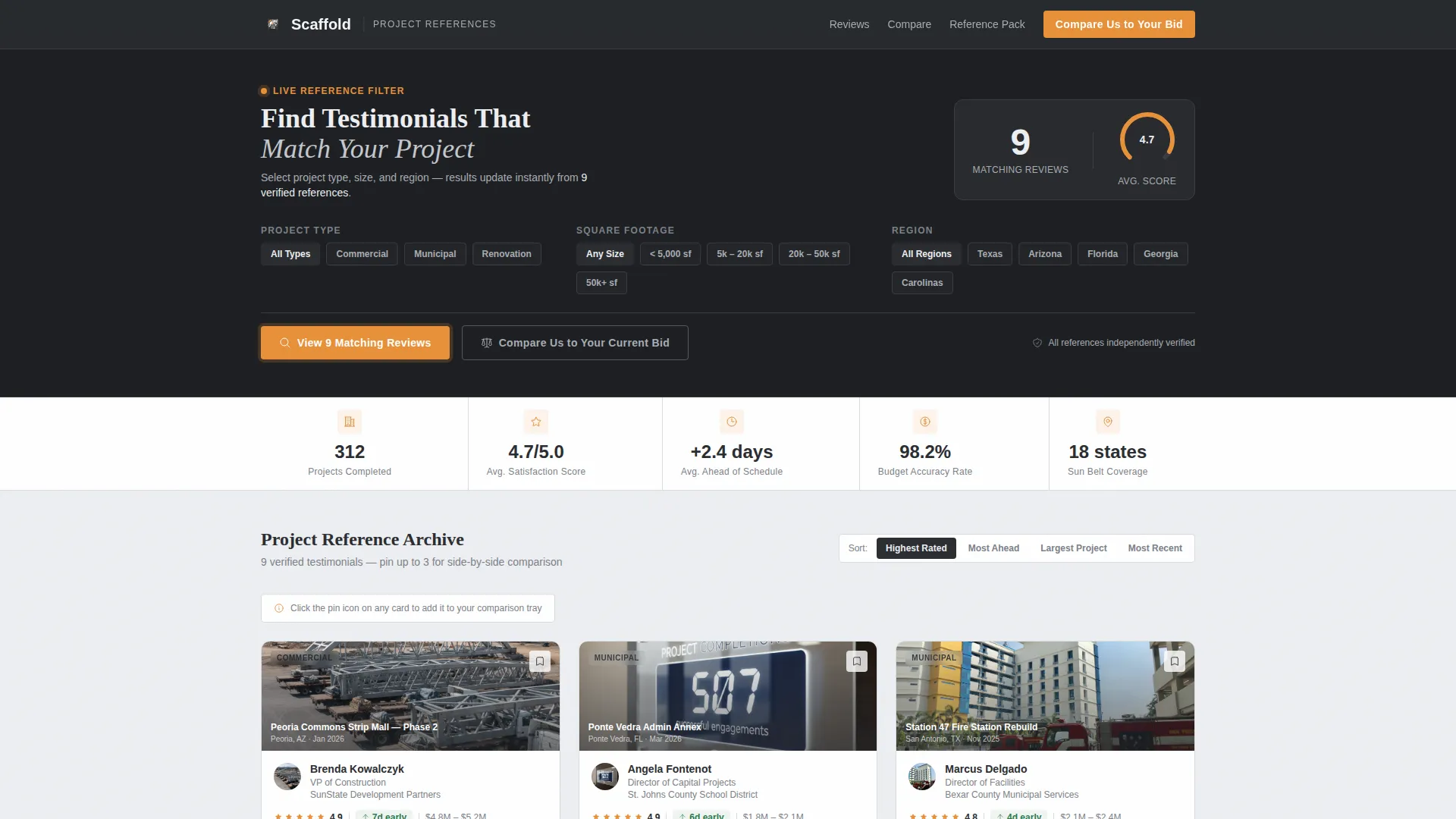
- An interactive estimator header with project-type, square-footage, and region filters plus a live aggregate satisfaction gauge
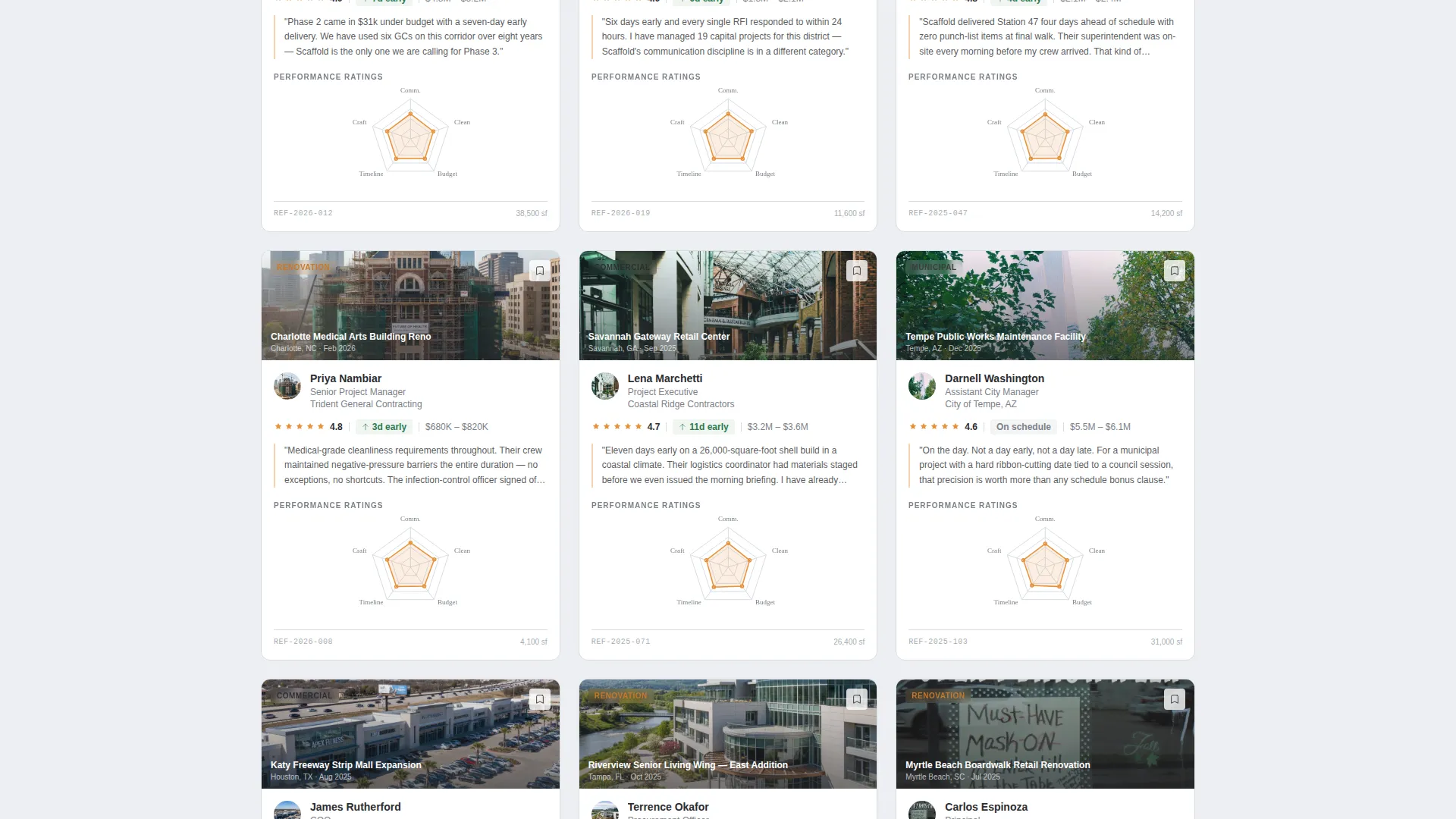
- A modular testimonial card grid with radar charts, project badges, budget ranges, and schedule delta indicators
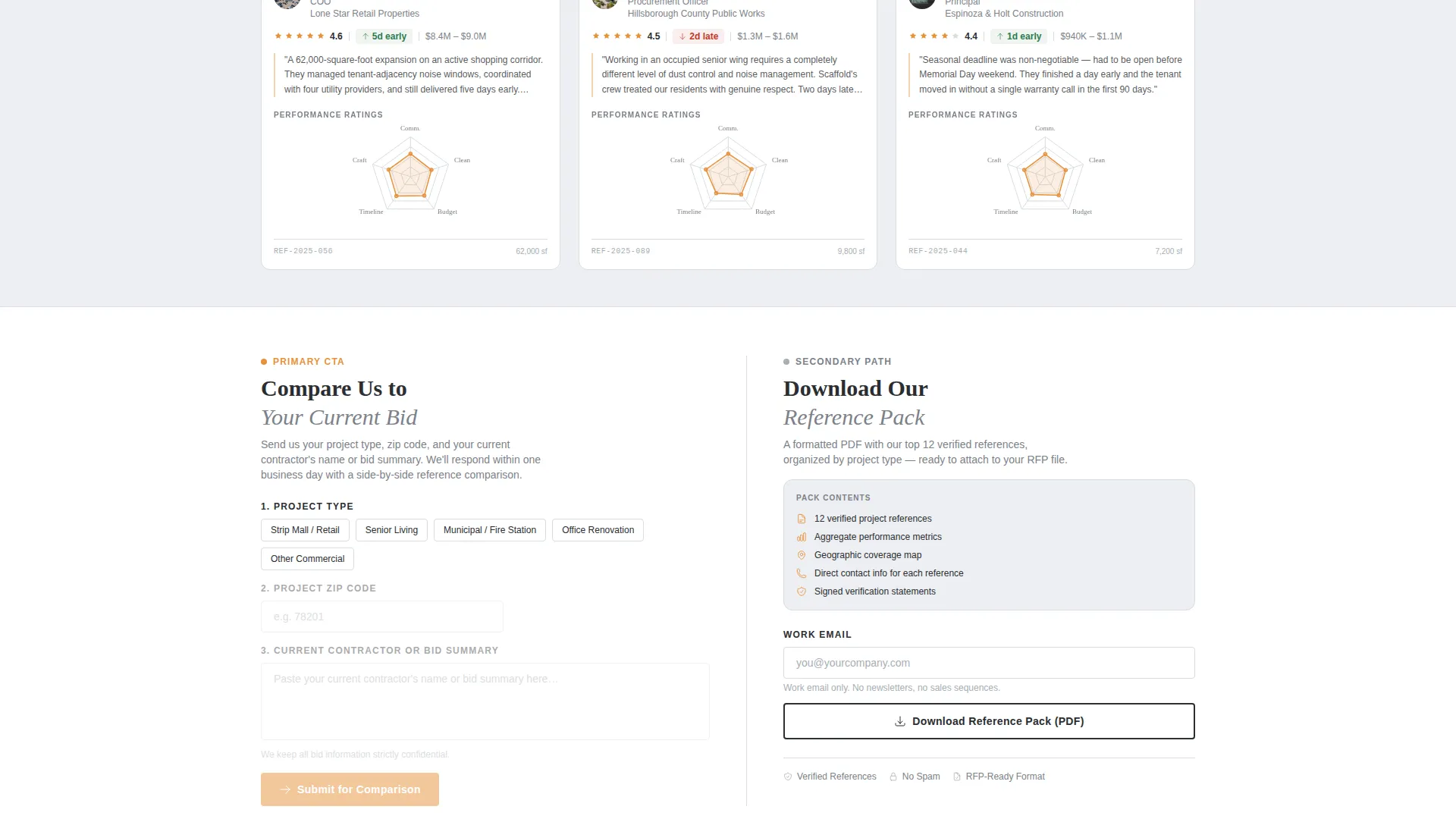
- Two conversion paths: a direct comparison form and a gated reference pack download requiring only a work email
Feature list
This section describes the core functional components delivered in the Scaffold template.
Interactive Filter Estimator Header
The page opens with a structured calculator panel rather than a static hero image. Visitors select project type, square footage range, and region. The panel instantly shows how many verified testimonials match those inputs alongside a radial satisfaction gauge. The amber accent color activates on the "View Matching Reviews" button, making the call to action visually unmissable.
Modular Testimonial Card Grid
Each card in the grid follows an identical structure: a project thumbnail, client name and title, project type badge, budget range, completion delta showing days ahead or behind schedule, and a five-axis radar chart. The five axes rate communication, cleanliness, budget accuracy, timeline, and craftsmanship. This consistency makes every card scannable and directly comparable.
Persistent Comparison Tray
A fixed tray at the bottom of the viewport lets visitors pin up to three testimonial cards. Once two cards are pinned, a sticky bar appears with the primary call to action: "Compare Us to Your Current Bid." This transforms passive scrolling into an active, self-directed evaluation process.
Multi-Dimension Grid Sorting
The card grid can be re-sorted by project size, by any of the five radar chart rating dimensions, or by geography. Each filter click narrows the visible evidence to match the visitor's exact situation. The interaction is designed to feel precise and controlled rather than like browsing a blog.
Dual Conversion Paths
The primary path asks for project type, zip code, and a contractor name or bid summary. The secondary path offers a downloadable reference pack gated behind a single work email field. Both paths serve different buyer modes without competing for attention.
Monochrome Steel Visual System
The layout uses a four-value color system: structural charcoal, mill-finish aluminum, concrete form white, and weld-spark amber. Amber appears only on interactive states, ratings, and call-to-action pulses. This discipline keeps the visual hierarchy clean and ensures every active element is immediately recognizable.
Page sections overview
| Section | Purpose |
|---|---|
| Filter Estimator Header | Let visitors surface matching testimonials by project type, region, and square footage |
| Aggregate Satisfaction Gauge | Display a live radial score reflecting filtered testimonial results |
| Testimonial Card Grid | Present structured client reviews with radar charts and project metadata |
| Persistent Comparison Tray | Allow visitors to pin and compare up to three cards simultaneously |
| Sticky Comparison Bar | Trigger the primary call to action once two cards are pinned |
| Comparison Request Form | Collect project type, zip code, and bid context for a direct comparison |
| Reference Pack Download | Offer a gated PDF reference document requiring only a work email |
Design & branding system
The visual identity follows a Dashboard Pro theme built on a Monochrome Steel color system. The palette was chosen to match the working environment of its audience: organized, load-bearing, and free of decoration for its own sake.
- Four defined values: structural charcoal (#2B2D31), mill-finish aluminum (#A8ADB3), concrete form white (#EDEFF2), and weld-spark amber (#E8913A)
- Amber is reserved exclusively for interactive states, star ratings, and call-to-action pulses to ensure maximum contrast and intentional emphasis
- The overall aesthetic feels like a well-organized fabrication shop tool wall: every surface either structural or reflective, with no color wasted
Mobile & speed optimization
The card grid and comparison tray are designed to remain functional and readable across screen sizes. A layout built on modular cards adapts naturally to narrower viewports without losing the structured data that makes each card useful.
- Each testimonial card is self-contained and stacks cleanly on smaller screens without losing its radar chart or project metadata
- The filter estimator header collapses into a compact selection flow suitable for touch interaction
- The sticky comparison bar and conversion form remain accessible at all scroll positions on mobile viewports
How this template helps you convert
Scaffold is built around the idea that buyers who build their own proof case are far more likely to convert. Every layout decision supports that path.
- The estimator header gives visitors an immediate, personalized view of relevant testimonials, which reduces the effort required to find evidence that matches their project type and budget
- The comparison tray and sticky call-to-action bar create a natural moment for conversion by activating only after a visitor has already engaged with at least two cards
Other information about this template
Scaffold is categorized under construction company website templates and is specifically designed for the construction company testimonials page use case. It fits within the broader Technology category on the template marketplace.
- The template style is a Card Grid (Modular) layout, consistent with the Feature Matrix creative direction
- The header concept is a Calculator/Estimator module, which is uncommon in construction templates and functions as the primary differentiator
- The landing page direction is Comparison/Versus, meaning the entire page is structured to help buyers evaluate one contractor against alternatives
- The theme is Dashboard Pro, which explains the data-dense card structure, the radial gauge, and the radar chart components
Theme
Dashboard Pro
Creative direction
Feature Matrix
Color system
Monochrome Steel
Style
Card Grid (Modular)
Direction
Comparison/Versus
Page Sections
Interactive Filter Estimator Header
Structured Testimonial Card Grid
Persistent Comparison Tray
Multi-dimension Grid Sorting
Dual Conversion Paths
Related questions
Who is this landing page built for?
Can I customize the project types shown in the estimator filter?
What does the five-axis radar chart measure on each testimonial card?
How does the reference pack download work?
Is this a single-page layout or a multi-page website?



