AI for E-Commerce Booking Website Template
Schedule is a modular landing page template built for an AI-powered e-commerce scheduling assistant. It features a Feature Tab Switcher header, a dense Spec Sheet card grid, and a sticky "Connect Your Store Free" call to action. The Monochrome Steel visual system and OAuth-first onboarding flow make it ideal for solo operators and lean direct-to-consumer teams ready to automate their storefront.
by Rocket studio
Quick summary
Schedule is a single-page landing page template designed for an AI-driven e-commerce scheduling assistant. It uses a Feature Tab Switcher header, a modular Spec Sheet card grid, and a frictionless OAuth onboarding flow. The Monochrome Steel color system delivers an engineered, precision-first visual identity built to earn trust fast and move visitors toward connecting their store.
Who this template is for
This template speaks directly to operators who run their store without a full team. It is built for people who need automation to feel immediate and credible, not aspirational.
- Solo Shopify operators managing promotions, restocks, and social posts alone
- Lean direct-to-consumer brands where the marketing manager also picks warehouse orders
- Scaling e-commerce teams that have outgrown manual spreadsheets but are not yet ready to hire a full operations role
What problem this template solves
Most e-commerce operators lose revenue not because they lack ideas, but because timing is everything and manual processes always lag behind real demand. This template addresses that gap directly.
- Communicating that AI acts on live conversion probability, not fixed schedules or guesswork
- Showing busy operators exactly what gets automated so they can stop juggling browser tabs at 2 a.m.
- Converting skeptical visitors quickly with a zero-friction onboarding path that requires no email form and no credit card
What you get with this template
The template delivers a complete, ready-to-customize landing page layout built around the product's core capabilities. Every section is purposeful and prompt-backed.
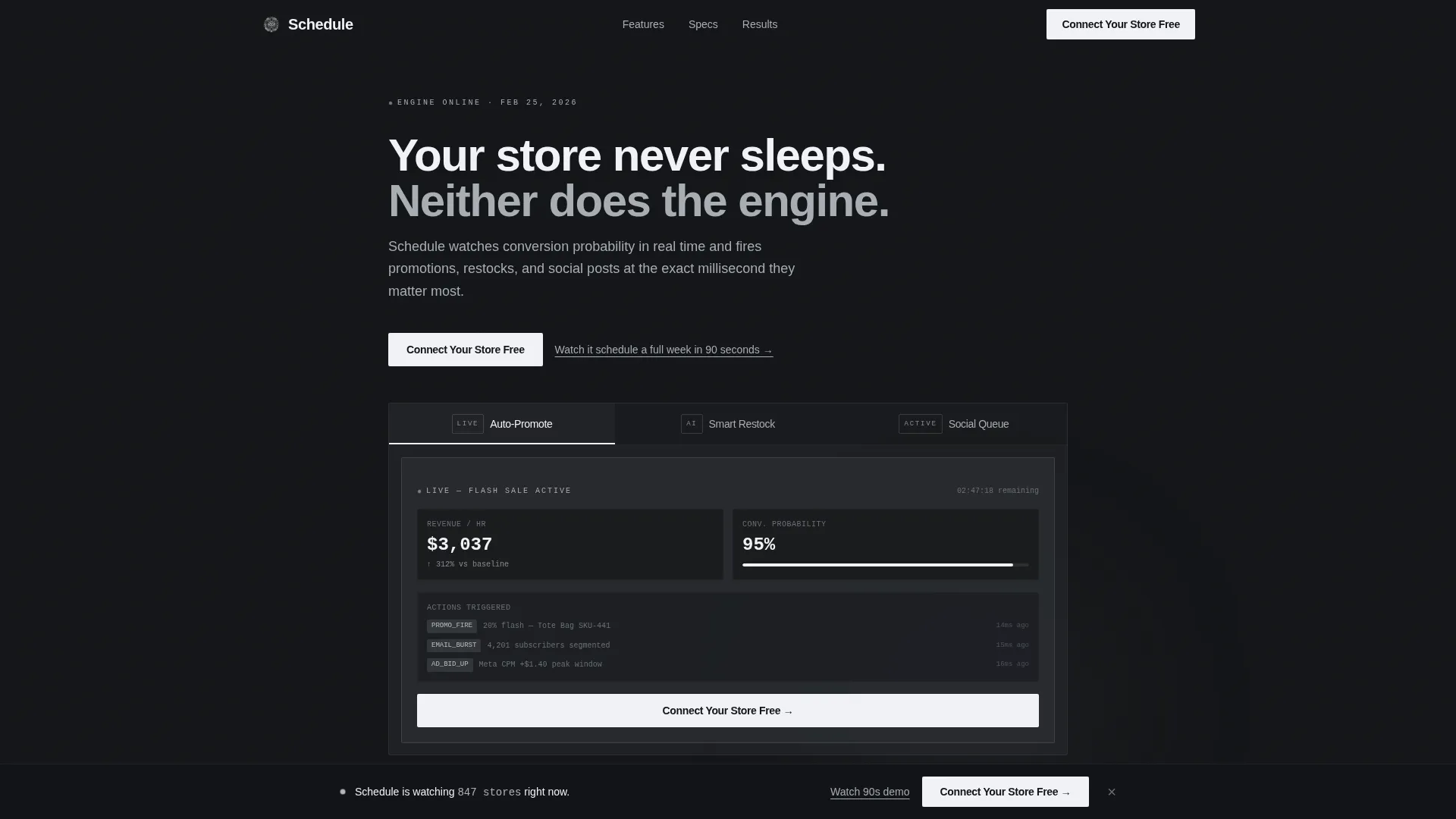
- A Feature Tab Switcher header with three live-data tabs: Auto-Promote, Smart Restock, and Social Queue
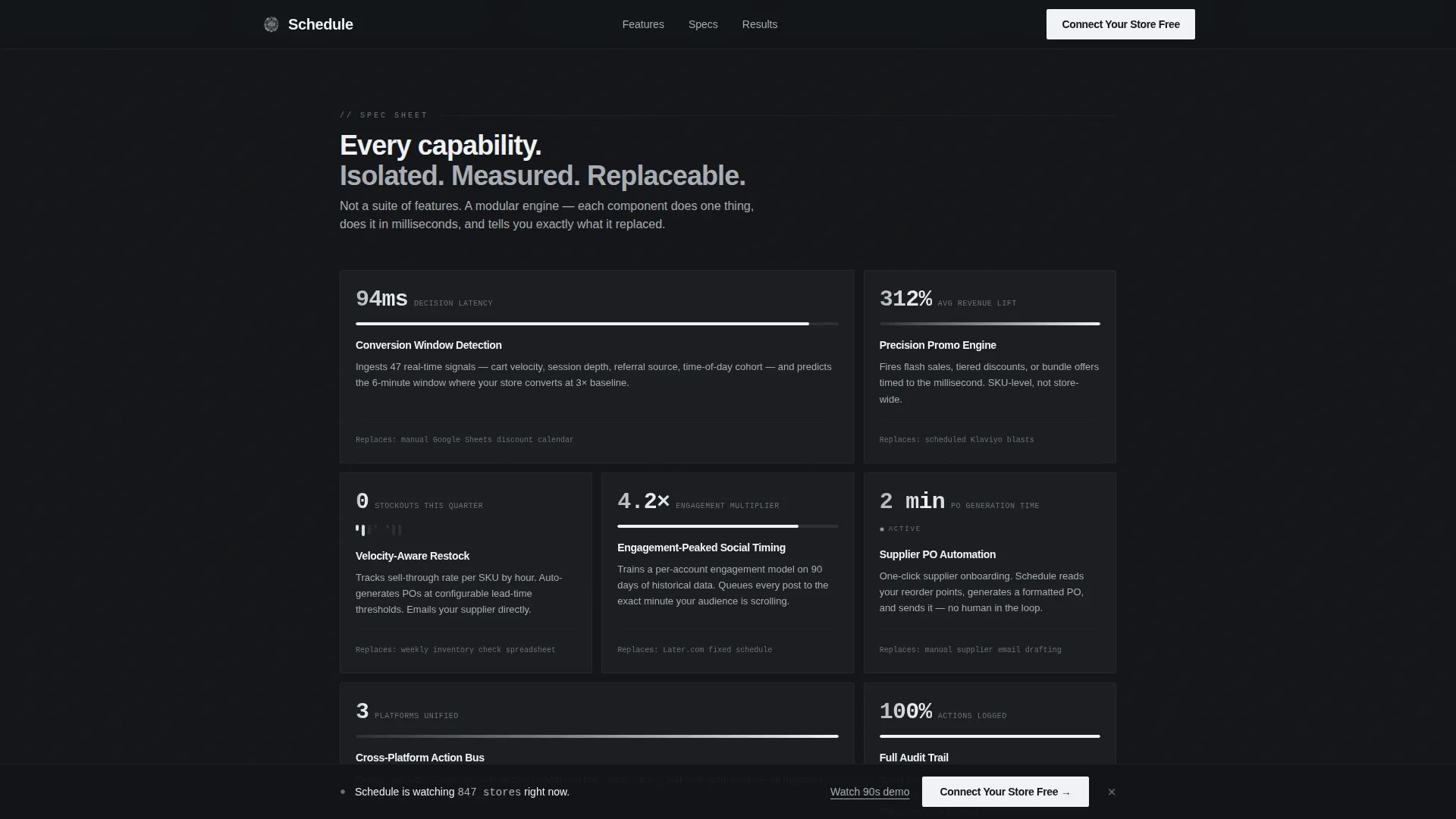
- A dense modular card grid where each card isolates one capability with a stat, a micro-animation, and a "Replaces:" comparison line
- A sticky bottom call-to-action bar, a Results Strip for operator metrics, a Platform Trust section, and a single-row linear footer
Feature list
This template is built around five core layout and interaction capabilities drawn directly from the product brief.
Feature Tab Switcher Header
Three clickable tabs labeled Auto-Promote, Smart Restock, and Social Queue each reveal a different live-data card. Each tab animates in with a mechanical slide, simulating a storefront dashboard mid-action. The primary "Connect Your Store Free" call to action lives inside the active tab.
Spec Sheet Card Grid
Each modular card isolates one product capability. Cards display a single stat, a micro-animation of the feature in motion, and a one-line "Replaces:" comparison showing what manual task this feature eliminates. The grid densifies as the visitor scrolls, revealing complexity layer by layer.
Sticky Call-to-Action Bar
After the third card row, a persistent bottom bar keeps "Connect Your Store Free" visible throughout the scroll. This ensures the conversion entry point is never more than one click away, regardless of where a visitor pauses on the page.
OAuth Onboarding Modal
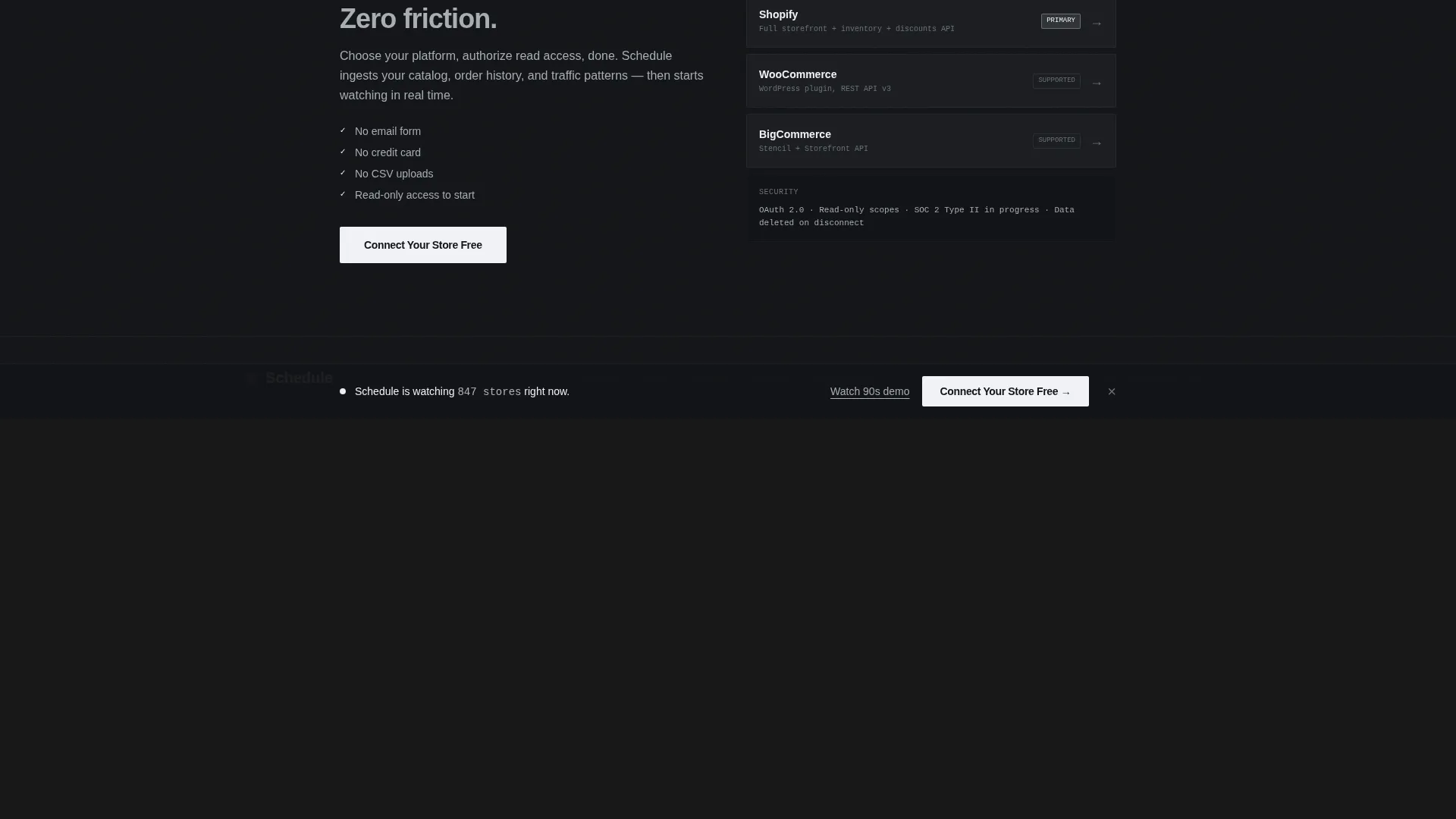
Clicking the primary call to action opens a single-step OAuth flow. Visitors choose their platform and authorize access. There is no email form and no credit card required. A secondary text link below the call to action points to a 90-second demo video for visitors who want to see the product before connecting.
Results Strip and Platform Trust Section
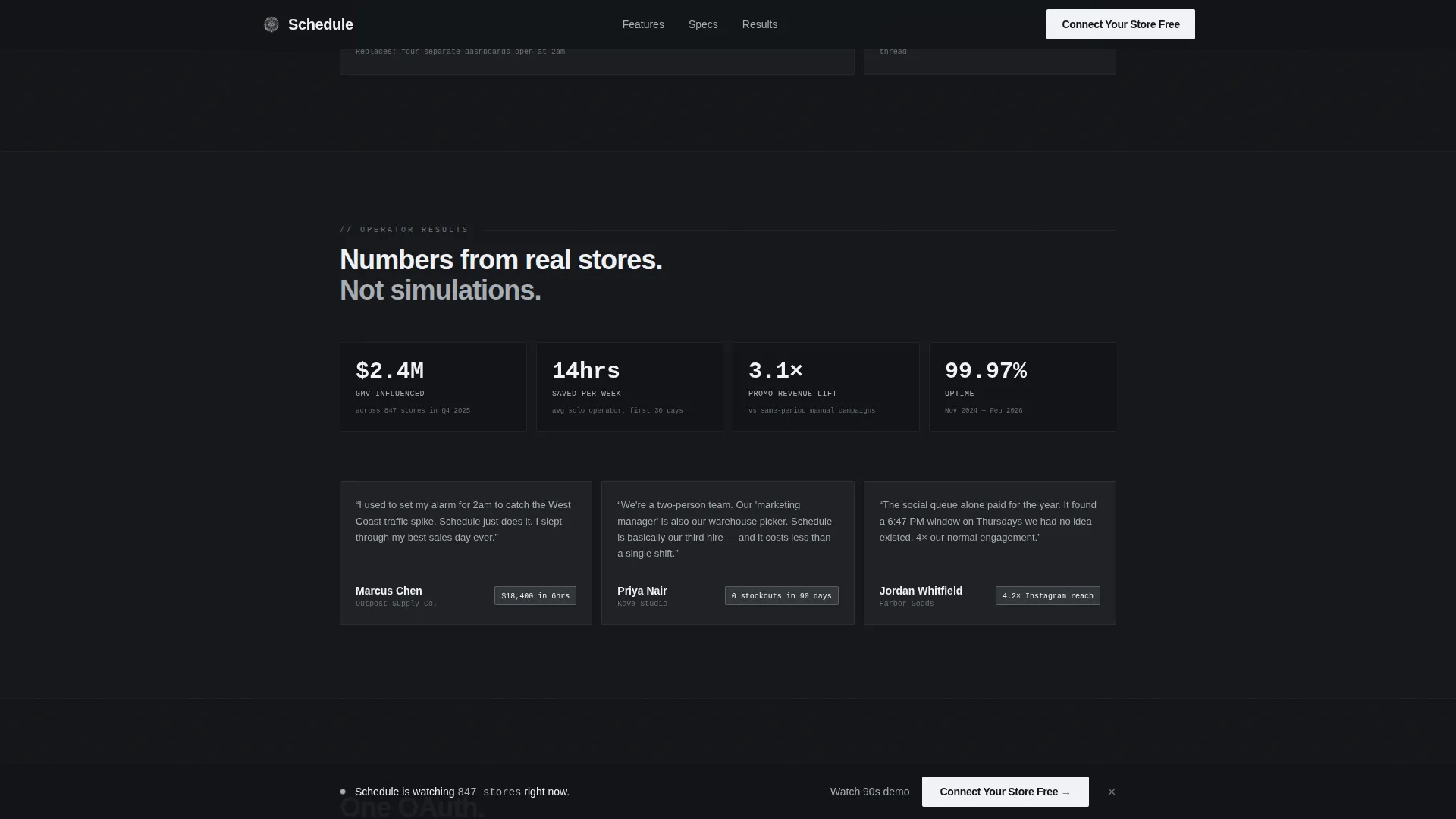
A dedicated strip presents real operator metrics including revenue lifted, hours saved, and purchase orders auto-filed. The Platform Trust section displays platform logos alongside a security note, giving first-time visitors confidence in the connection process.
Page sections overview
| Section | Purpose |
|---|---|
| Feature Tab Switcher | Introduce core AI capabilities and primary call to action |
| Spec Sheet Grid | Show each capability as an isolated, scannable capability card |
| Results Strip | Display real operator performance metrics |
| Platform Trust | Reinforce credibility with platform logos and security note |
| Sticky call to action Bar | Keep conversion entry point visible after scroll |
| Linear Single-Row Footer | Close the page cleanly with minimal distraction |
Design & branding system
The visual identity is built on a Monochrome Steel palette that prioritizes information over decoration. The overall feel is engineered precision, like the inside of a milled laptop chassis.
- Color system: forge-black (#121417) as the base, brushed graphite (#2C2F33) for card surfaces, machined aluminum (#A8ADB3) for secondary text, and electric white (#F0F2F5) reserved for active states, call-to-action elements, and data highlights
- Typography: DM Sans for body and interface copy, IBM Plex Mono for data values and code-style labels, reinforcing the product's analytical identity
- Animation approach: mechanical tab slides, card stagger reveals on scroll, and live data pulse effects that make the interface feel active without being distracting
Mobile & speed optimization
The template is designed desktop-first to match the primary use case of operators working on laptops late at night. Mobile support is included as a solid secondary layer.
- Desktop layout prioritizes the dense card grid and tab switcher interactions that operators rely on most
- Mobile layout adapts the grid and sticky bar so the call to action remains reachable on smaller screens
- Interactive components such as the tab switcher and OAuth modal are built as client components, while static sections use server components to keep load weight balanced
How this template helps you convert
Every layout and interaction decision in this template is tied to a specific conversion moment in the visitor journey.
- The Feature Tab Switcher puts a live-action product demo front and center before any scroll, so visitors understand the value before they read a single line of copy.
- The Spec Sheet card grid builds confidence progressively by showing exactly what manual task each feature replaces, reducing purchase anxiety for skeptical operators.
- The OAuth onboarding flow removes every possible friction point: no email, no credit card, just a platform choice and an authorization click, making the first conversion step feel almost effortless.
Other information about this template
This template is part of the Startup Velocity theme family and sits within the Technology category under the AI for E-Commerce subcategory. A few additional details are worth noting for teams evaluating this template.
- The template style is Card Grid (Modular), making individual sections easy to reorder or extend as the product evolves
- The landing page direction is Freemium and Trial, meaning the entire layout is optimized around a zero-barrier first step rather than a hard sell
- The creative direction follows a Spec Sheet format, which works especially well for technical products where showing specifics builds more trust than broad claims
- The color system and typography choices are intentionally neutral and data-forward, avoiding warmth or lifestyle aesthetics that would conflict with the product's analytical positioning
Theme
Startup Velocity
Creative direction
Spec Sheet
Color system
Monochrome Steel
Style
Card Grid (Modular)
Direction
Freemium/Trial
Page Sections
Feature Tab Switcher Header
Spec Sheet Modular Card Grid
Sticky Conversion Bar
Zero-friction Oauth Modal
Results Strip and Operator Metrics
Related questions
What types of e-commerce operators is this template designed for?
Does the template include the OAuth connection flow?
Can I customize the capability cards in the Spec Sheet grid?
Is there a way to show the product in action before visitors commit?
What visual style does this template use?



