Home Services Software Booking Website Template
Schedule is a modular card grid landing page template built for home services dispatch software. It combines a live scheduling efficiency calculator, animated capability cards, and a sticky app download bar into one dark, data-forward layout. The template targets operations managers, office coordinators, and solo contractors who need a fast path from interest to install.
by Rocket studio
Quick summary
Schedule is a single-page, card grid landing page template designed for home services appointment scheduling apps. It opens with an integration logo bar, leads with a live revenue calculator, and flows through modular capability cards toward a frictionless app download. The Data Command visual theme gives the page the focused, authoritative feel of a professional dispatch system.
Who this template is for
This template is built for teams and individuals who manage real-world scheduling pressure every day. If your operation runs on trucks, time slots, and callbacks, this page speaks your language directly.
- Operations managers at regional home services companies running 15 to 80 trucks who need to demonstrate scheduling software to stakeholders quickly
- Office coordinators juggling cancellations and callbacks who have outgrown whiteboards and manual processes
- Solo contractors who lose jobs weekly because follow-ups slip through the cracks
What problem this template solves
Scheduling software for home services is a hard sell because the pain is invisible until something goes wrong. Dead miles, double-bookings, and 4-hour arrival windows are daily frustrations, but most landing pages fail to make that pain concrete before asking for a sign-up.
- Visitors leave before they feel the value because the page leads with features instead of outcomes
- Operations-minded buyers distrust polished marketing pages that never show a real workflow
- App download goals stall when the page puts a form or email gate in the way of a first conversion
What you get with this template
You get a complete, ready-to-customize landing page that does the persuasion work before asking for anything. Every section is designed to earn the next scroll rather than demand it.
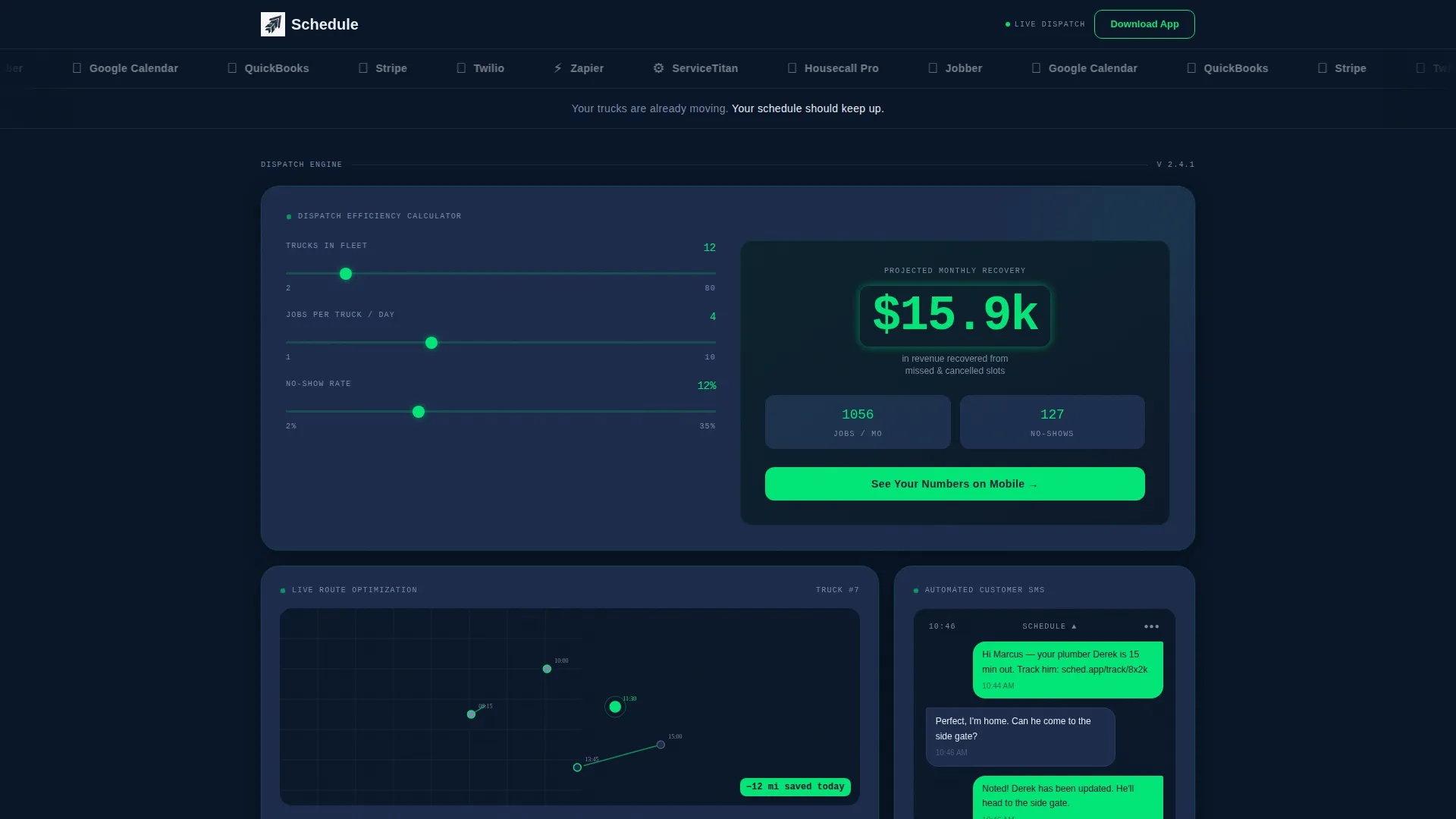
- A live scheduling efficiency calculator card that shows projected recovered revenue in real time, placed immediately below the header
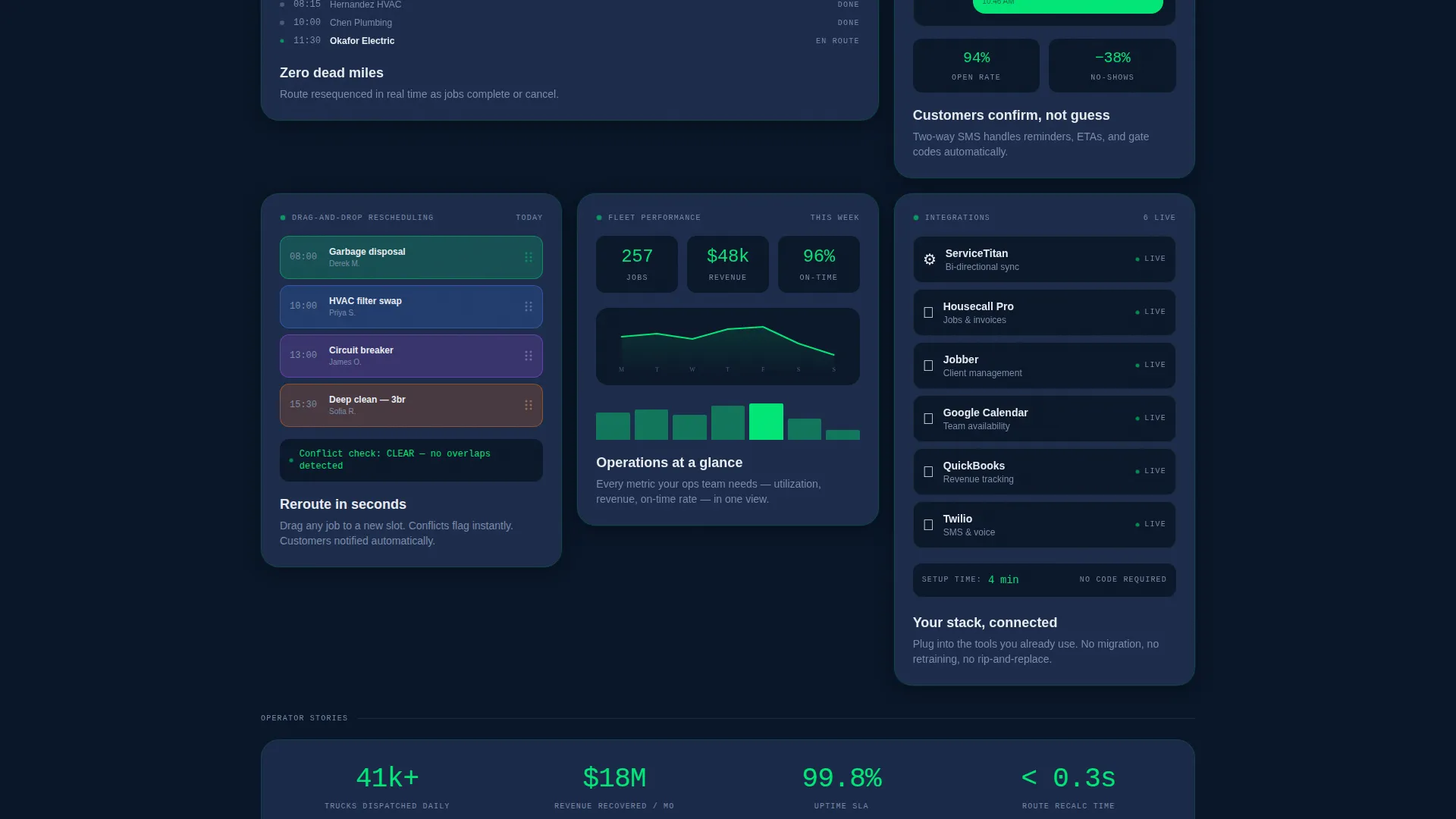
- A modular card grid of capability proofs covering route optimization, automated customer messaging, and drag-and-drop rescheduling, each with built-in micro-interaction demos
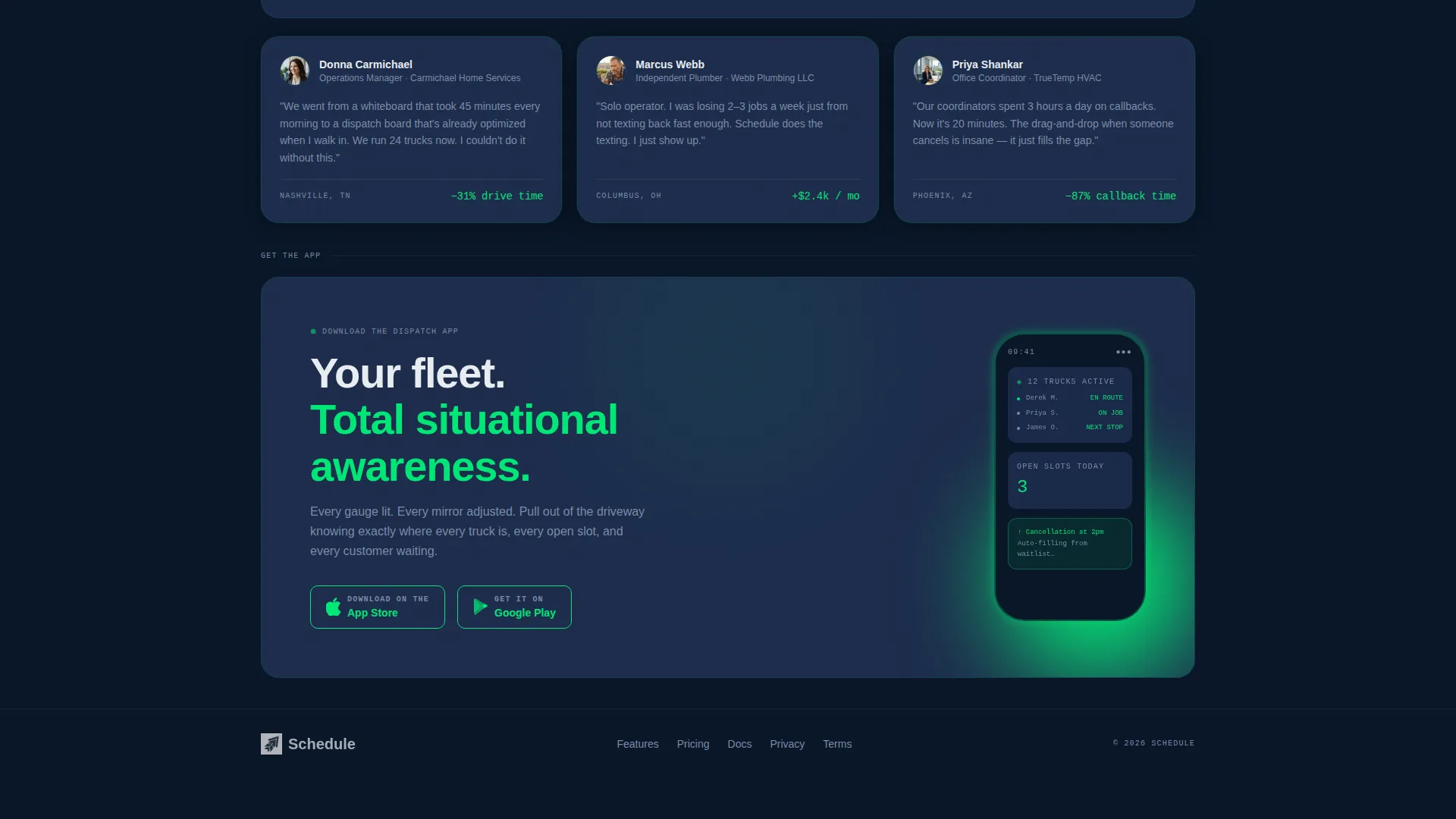
- A sticky bottom bar with app download badges and urgency copy that appears after 40 percent of the page is scrolled
Feature list
This template packages each major capability into its own self-contained card, so visitors can absorb proof at their own pace without being funneled through a linear pitch.
Live Scheduling Efficiency Calculator
The first interactive card lets visitors enter their truck count, average jobs per day, and estimated no-show rate. The result displays projected recovered revenue per month in signal green digits that count upward, making the value of better scheduling immediately tangible.
Modular Capability Card Grid
Each card in the grid is a standalone proof of one specific feature. Route optimization shows a miniature animated map. Automated customer messaging shows a real SMS preview. Drag-and-drop rescheduling includes a micro-interaction demo. Cards are ordered from biggest pain solved to most delightful discovery.
Integration Logo Bar Header
A slow-scrolling horizontal strip of recognizable home services and business tool logos sits at the top of the page. It establishes integration credibility before a single line of feature copy appears, signaling to operators that this product fits their existing workflow.
Sticky App Download Bar
After a visitor scrolls 40 percent of the page, a persistent bottom bar appears with app store download badges and the line "Your next open slot is going to waste." It creates urgency without a countdown timer and keeps the primary call to action visible at all times.
Calculator-to-App Deep Link
The revenue calculator result card includes a secondary call to action: "See Your Numbers on Mobile." This button deep-links directly to the relevant app store, shortening the path from demonstrated value to completed install.
Zero-Friction Download Flow
There are no form fields and no email gate on this template. The calculator earns trust, the card grid builds confidence, and both primary and secondary calls to action lead straight to an app store install with a single tap.
Page sections overview
| Section | Purpose |
|---|---|
| Integration Logo Bar | Establish tool compatibility and credibility before copy |
| Revenue Calculator Card | Convert abstract pain into a concrete, personalized number |
| Route Optimization Card | Show how the app eliminates dead miles with an animated map |
| Automated SMS Card | Preview real customer messages sent by the dispatch system |
| Drag-and-Drop Card | Demonstrate rescheduling ease with a live micro-interaction |
| App Download call to action | Drive installs via App Store and Google Play badges |
| Sticky Download Bar | Maintain download urgency after 40 percent page scroll |
Design & branding system
The visual identity follows a Data Command theme built on a Midnight Blue color system. Every color choice reinforces the feeling of a professional dispatch environment: calm, dark, and precise.
- Deep terminal navy (#0A1628) as the primary background, tactical slate (#1B2A4A) on card surfaces, and cold interface white (#E8ECF1) for all body and heading type
- Signal green (#00E676) applied to every interactive element, live data accent, active state pulse, and app download badge outline, giving the grid the quiet hum of a live system
Mobile & speed optimization
The template is structured with a modular card grid that adapts naturally to smaller screens. Each card is self-contained, so reflow on mobile preserves the logical order and visual hierarchy without breaking the calculator or interaction demos.
- The sticky bottom bar with download badges is optimized for thumb-reach placement on mobile devices, keeping the primary call to action accessible without scrolling back up
- Calculator inputs and card micro-interactions are designed for touch input, reducing friction for mobile visitors who arrive directly from an app store referral or social post
How this template helps you convert
The conversion path on this template is deliberate and low-friction. Every design decision removes a reason to leave rather than adding a reason to stay.
- The efficiency calculator delivers a personalized, signal-green revenue number in the first visible card, giving operations-minded visitors a concrete reason to keep reading before any feature is described.
- The modular card grid lets skeptical buyers validate specific capabilities in any order they choose, building trust through self-directed exploration rather than a scripted funnel.
- The sticky download bar and deep-link calculator call to action reduce the install path to a single tap, eliminating the form fields and email gates that typically stall app download conversions.
Other information about this template
This template is designed specifically for the home services appointment scheduling niche and can support any dispatch-focused app or software product targeting field service operators.
- The logo bar header is pre-structured to display integration partners and can be updated with any combination of relevant tool logos to match a specific product's ecosystem
- The card grid layout is modular by design, meaning individual cards can be reordered, removed, or duplicated without breaking the overall page structure or visual system
- The template fits naturally within the broader home services software category, making it suitable for products that sit alongside or integrate with tools like ServiceTitan, Housecall Pro, Jobber, Google Calendar, and QuickBooks

Theme
Data Command
Creative direction
Calculator/Tool First
Color system
Midnight Blue
Style
Card Grid (Modular)
Direction
App Download
Page Sections
Live Scheduling Efficiency Calculator
Modular Capability Card Grid
Integration Logo Bar Header
Sticky App Download Bar
Zero-friction App Download Flow
Related questions
Who is this landing page template designed for?
Does the template include a working revenue calculator?
Can I change the logos in the header bar?
Is there an email sign-up form on this template?
Can the card grid be reordered or reduced?



