Retail Software Appointment Booking Website Template
Schedule is a bento grid landing page template built for retail appointment scheduling platforms. It combines an interactive revenue calculator, a Problem-to-Solution visual arc, and a freemium conversion flow to turn skeptical boutique managers and multi-location retail directors into active users. The design uses a Teal Catalyst color system on a Dashboard Pro theme for an instantly credible, store-ready feel.
by Rocket studio
Quick summary
Schedule is a single-page bento grid landing page template designed for retail appointment scheduling platforms. It opens with a live revenue estimator, walks visitors through a Problem-to-Solution arc, and closes with a low-friction freemium sign-up flow. Every section is built to convert floor-traffic chaos into booked, personal shopping appointments.
Who this template is for
This template is built for founders, product teams, and marketers launching or growing a retail appointment scheduling platform. It speaks directly to the people their buyers are.
- Boutique managers overwhelmed by walk-in unpredictability and staffing gaps
- Multi-location retail directors who need a single view of every associate's calendar
- Flagship store operations leads watching high-intent shoppers leave unserved
What problem this template solves
Retail scheduling platforms struggle to explain their value quickly. Visitors arrive skeptical and leave before the pitch lands. This template solves that by making the visitor's own numbers do the persuading.
- Walk-in chaos feels abstract until a calculator shows the exact revenue being lost each week
- Generic landing pages fail to mirror the specific pain of peak-hour staffing gaps and missed appointments
- Most sign-up flows ask for too much commitment too soon, causing drop-off before conversion
What you get with this template
You get a fully structured bento grid landing page that takes a visitor from recognition to registration in one scroll. Every section is purposeful and sequenced for maximum trust and action.
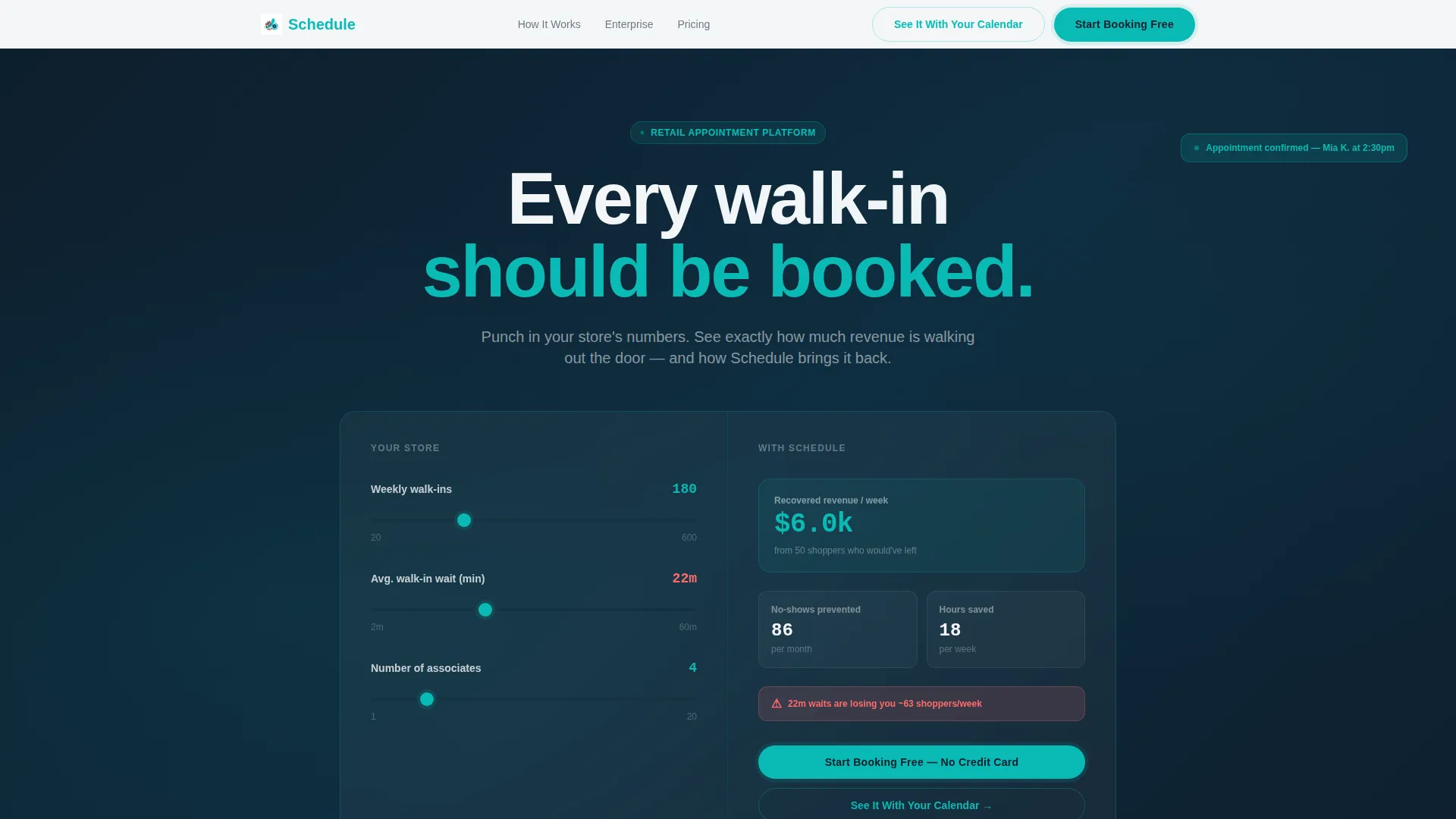
- An interactive calculator header that outputs personalized revenue, no-show, and time-saving estimates
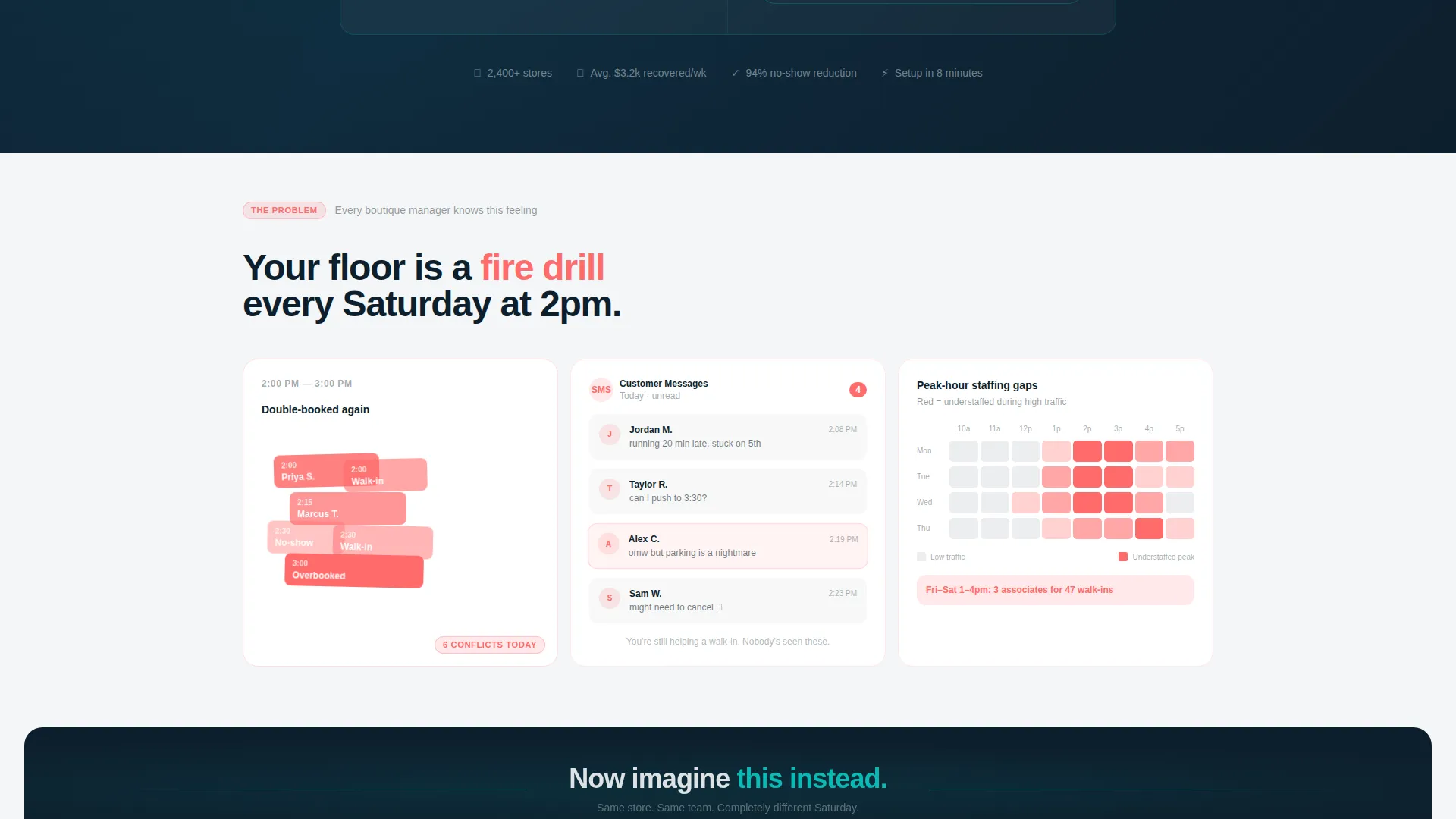
- A Problem-to-Solution arc with chaotic pain-state cards resolving into clean, organized solution cards
- A freemium conversion system with a two-step sign-up form and a one-click demo path
Feature list
This template ships with six purpose-built components that work together as a complete conversion system.
Interactive Revenue Estimator Header
Visitors enter their store's weekly foot traffic, average walk-in wait time, and number of associates. Animated counters instantly reveal recovered revenue, reduced no-shows, and hours saved per week. Teal digits tick upward against a deep midnight field, making the visitor's own data the hero within seconds.
Problem-to-Solution Bento Arc
The first bento row is deliberately chaotic, showing overlapping calendar blocks, simulated "running late" message threads, and heat maps of staffing gaps. A full-width divider card signals the shift. The row below mirrors each pain scenario with its resolved counterpart, building trust through direct visual contrast.
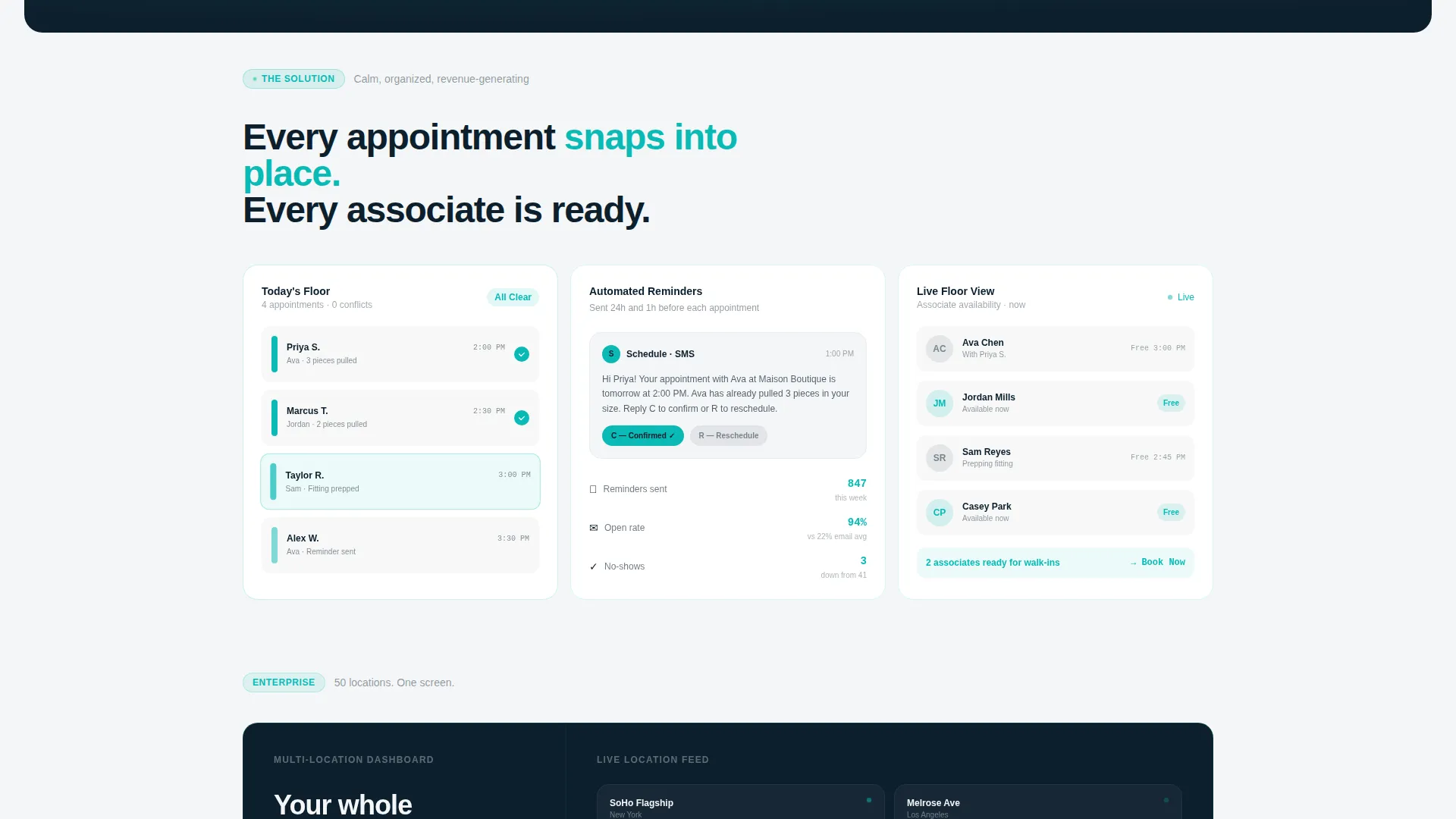
Color-Coded Appointment Grid Cards
Resolved solution cards show color-coded appointment slots snapping into place, automated reminder cards with open rates displayed, and a real-time floor view of associate availability. Each card is a concrete proof point, not a feature claim.
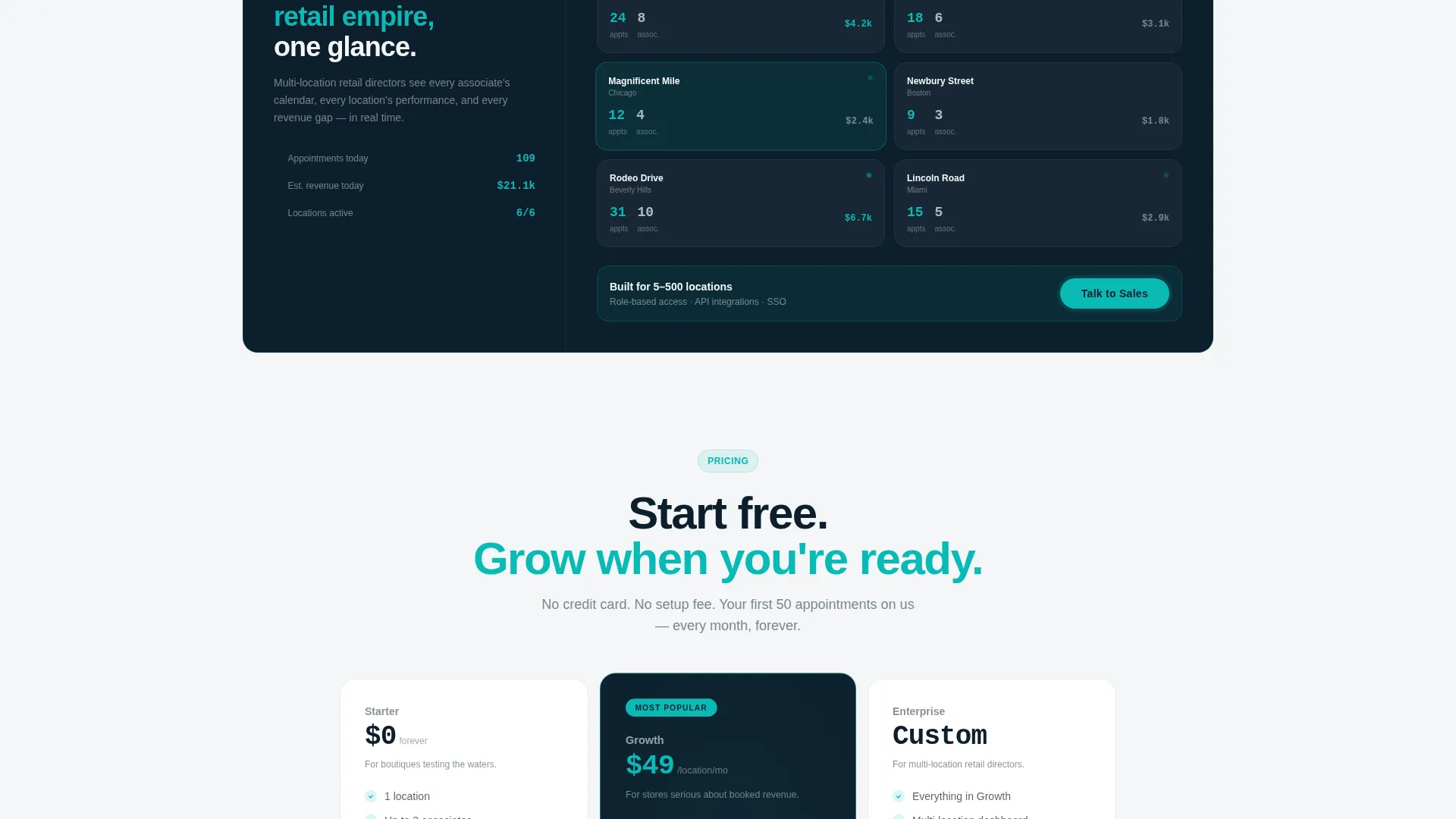
Scalable Enterprise Dashboard Section
The arc escalates from single-store fixes to enterprise-wide views. A bento card simulates a dashboard showing fifty locations at once, speaking directly to multi-location retail directors who need visibility across their entire operation.
Freemium Two-Step Conversion Form
Clicking the primary call to action opens a two-step form. Step one asks only for store name and number of locations, keeping commitment low. Step two collects work email and point-of-sale system from a dropdown, qualifying the lead without friction.
One-Click Demo Path
A secondary conversion path labeled "See It With Your Calendar" lets visitors import a sample week and drag mock appointments into place. This hands-on experience reinforces the platform's ease of use before any sign-up is required.
Page sections overview
| Section | Purpose |
|---|---|
| Calculator Estimator Header | Personalizes value with visitor's own store data |
| Problem State Row | Surfaces familiar retail scheduling pain points |
| Transition Divider Card | Signals the shift from chaos to solution |
| Solution State Row | Resolves each pain point with a visual proof card |
| Enterprise Dashboard Card | Demonstrates multi-location scheduling visibility |
| Primary call to action Block | Drives freemium sign-up at peak engagement |
| Two-Step Sign-Up Form | Converts interest into a qualified account |
| Demo Path Card | Offers a no-commitment interactive preview |
| Sticky Mobile Bar | Keeps the primary call to action visible on every scroll |
Design & branding system
The template uses a Teal Catalyst color system on a Dashboard Pro theme. The palette feels clinical enough to earn trust and warm enough to prompt action, much like a well-organized retail point-of-sale screen at opening time.
- Deep retail midnight (#0D1F2D) as the primary background, primary teal (#0ABAB5) for interactive elements and confirmed states, and soft cloud gray (#F4F6F8) across card backgrounds
- Warm coral (#FF6B6B) reserved exclusively for missed-appointment alerts and urgency states, keeping emotional weight precise and intentional
- No stock photography or lifestyle imagery; the interactive calculator and bento data cards carry all visual narrative weight
Mobile & speed optimization
The template is structured for a smooth mobile experience without sacrificing the bento grid's visual density. The sticky bottom bar ensures the primary call to action stays reachable at every scroll depth on smaller screens.
- Bento grid layout adapts to stacked card columns on mobile, preserving the Problem-to-Solution arc's readability
- Sticky "Start Booking Free" bar on mobile keeps conversion accessible without interrupting the scroll experience
- Micro-animations on the calculator counters are lightweight and confined to the estimator header to avoid visual overload
How this template helps you convert
Every design and copy decision in this template is built around reducing hesitation and increasing action.
- The calculator header makes value personal in under eight seconds, using the visitor's own store data to justify the sign-up before they read a single feature claim.
- The Problem-to-Solution arc builds emotional momentum by first validating the pain and then showing a clean, organized resolution, so visitors arrive at the call to action already convinced.
- The two-step form and one-click demo path offer two different commitment levels, capturing both ready-to-sign users and those who need one more proof point before deciding.
Other information about this template
This template is categorized under Technology and Retail Software, making it a strong foundation for any retail appointment scheduling product seeking to establish credibility with store operators at every scale.
- The Dashboard Pro theme and Teal Catalyst color system are pre-configured and ready to customize with your platform's branding
- The bento grid template style supports modular editing, so individual cards can be reordered or swapped without rebuilding the full layout
- The freemium and free trial conversion model is baked into the page structure, making it suitable for platforms using a "Start Booking Free" or trial-first growth strategy
- The template is designed for single-location boutiques through to enterprise retail groups managing fifty or more locations
Theme
Dashboard Pro
Creative direction
Problem→Solution Arc
Color system
Teal Catalyst
Style
Bento Grid
Direction
Freemium/Trial
Page Sections
Interactive Revenue Estimator
Problem-to-solution Bento Arc
Color-coded Appointment Cards
Enterprise Multi-location Dashboard
Two-step Freemium Sign-up Form
One-click Interactive Demo Path
Related questions
Who is this landing page template designed for?
Can I customize the calculator fields for my platform?
What conversion paths does this template include?
Does this template use any stock photography?
Is this template suitable for an enterprise retail audience?



