Schedule - Powerful Travelstaff Landing Page Template
Schedule is a bento grid landing page template built for travel staff scheduling platforms. It pairs a live-data header dashboard with interactive explorer sections, a Carbon Fiber color system, and a freemium conversion flow. Staffing coordinators, operations directors, and compliance managers get a cockpit-grade interface that turns shift chaos into a clear command view.
by Rocket studio
Quick summary
Schedule is a single-page bento grid template designed for travel staff scheduling platforms. It opens with a metrics dashboard frozen mid-operation, moves through interactive credential and shift-planning sections, and closes on a margin calculator. The Carbon Fiber visual system keeps every tile feeling technical, live, and decisive.
Who this template is for
This template is built for healthcare staffing businesses that deploy traveling clinical professionals at scale. If your team juggles hundreds of active placements and needs a landing page that speaks directly to operations-level buyers, Schedule was made for that conversation.
- Staffing coordinators managing 200 or more active travelers across multiple facilities
- Operations directors tracking margin erosion from unfilled shifts
- Compliance managers monitoring expiring certifications and state license windows
What problem this template solves
Staffing platforms in the travel healthcare space often look generic. A coordinator opening your page at 6 AM on a Monday needs to feel immediately understood, not marketed to. This template solves the credibility gap between what your platform does and what a skeptical, time-pressed buyer will believe in the first few seconds.
- Generic SaaS templates fail to reflect the operational complexity of travel nurse and locum tenens deployment
- Prospects cannot quickly visualize fill-rate improvements or credential compliance gains without hands-on context
- Standard landing page layouts do not give interactive proof of platform value before asking for a signup
What you get with this template
You get a fully structured bento grid landing page that communicates platform depth without overwhelming visitors. Every section is designed to match the mental model of a staffing operations professional.
- A live-data header dashboard with oversized monospace metrics, a fill-rate gauge, and a credential expiration heatmap
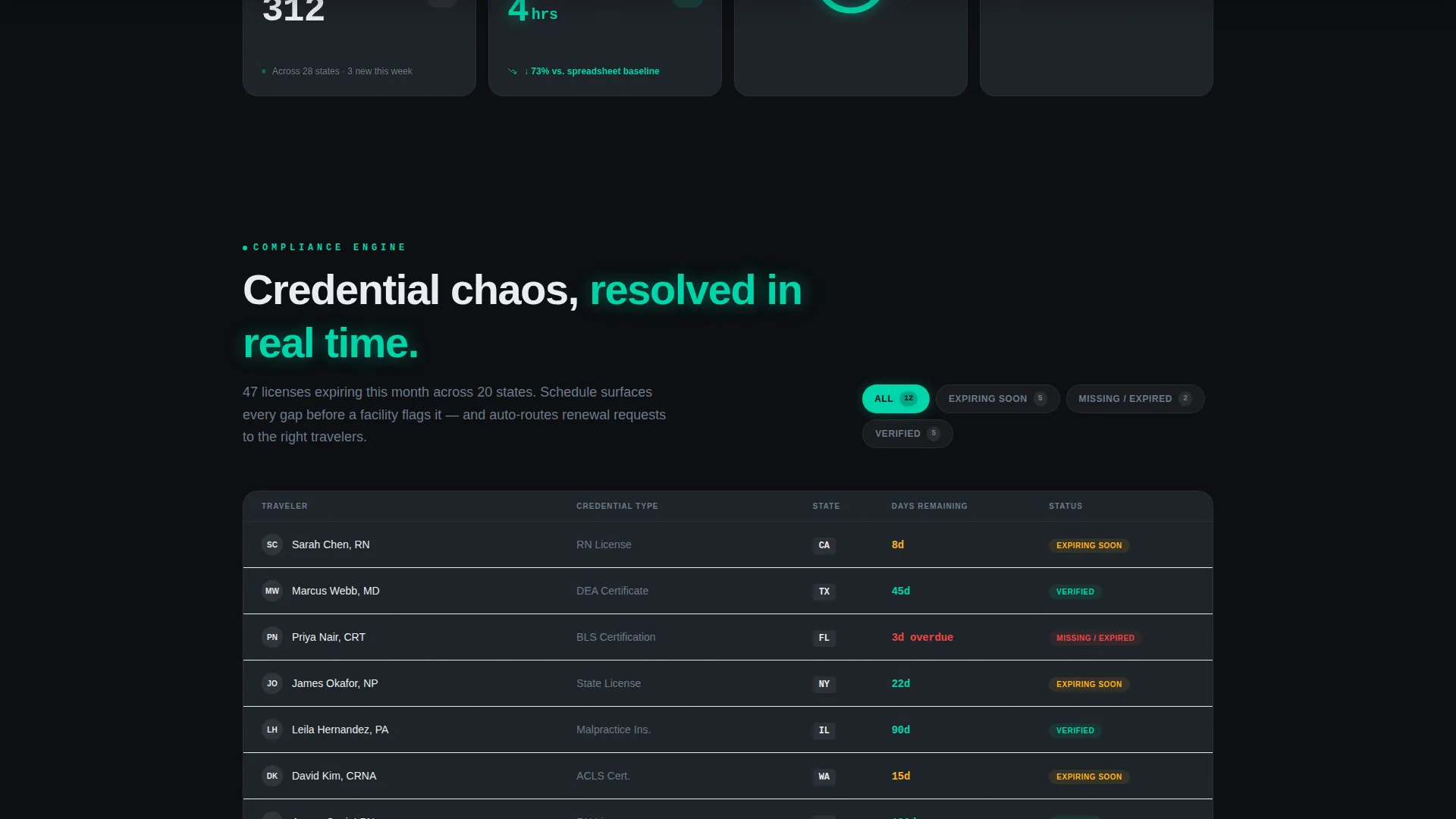
- Interactive bento sections including a drag-to-schedule sandbox, a compliance filter matrix, and an animated fill-rate projection slider
- A dual conversion flow with a primary freemium signup and a secondary ungated benchmarking calculator
Feature list
This template is built around six core design and interaction capabilities drawn directly from its source brief.
Live Metrics Header Dashboard
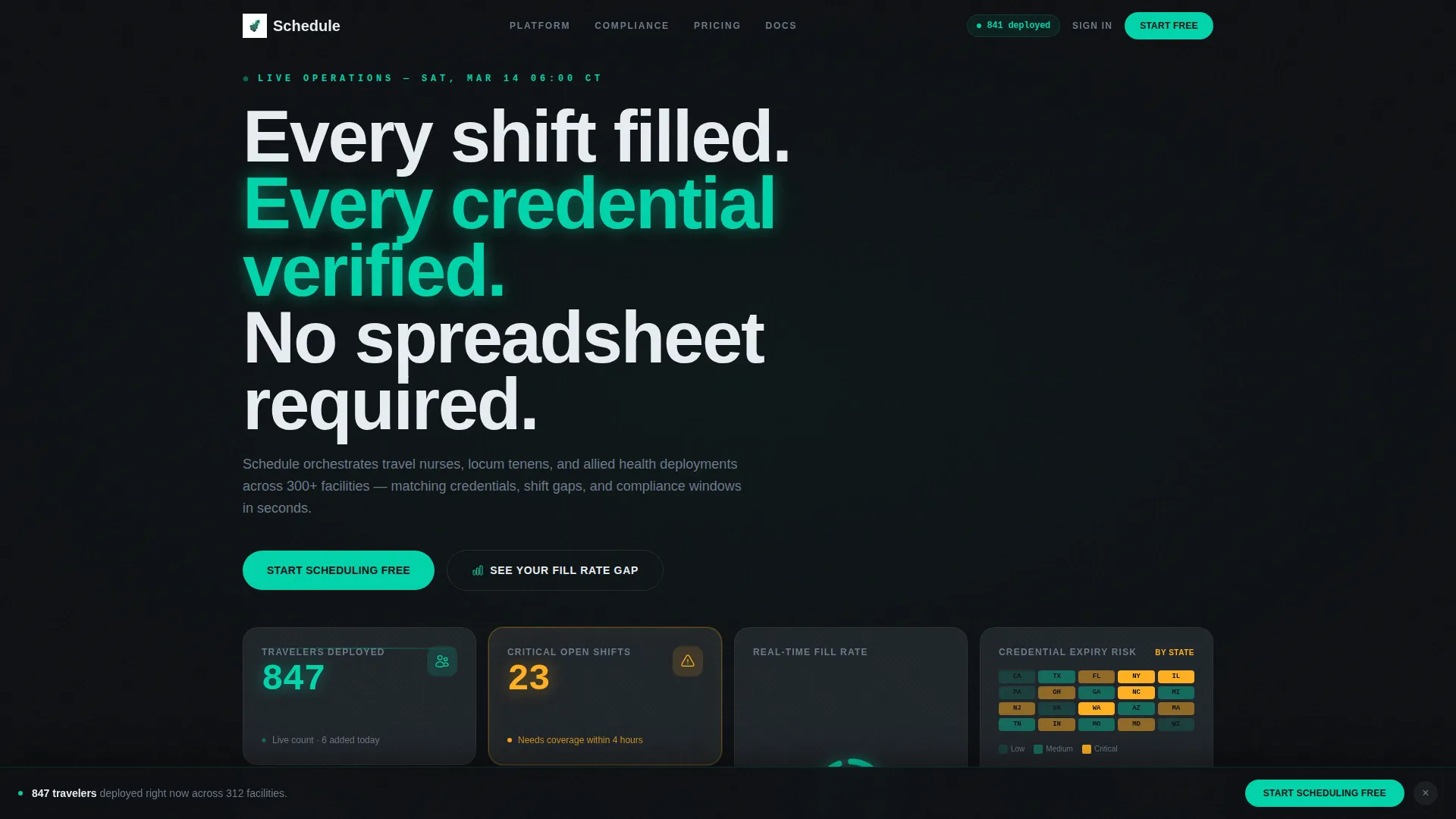
The header opens as a frozen-in-action stats mosaic. It displays 847 deployed travelers, 23 critical open shifts, a credential heatmap by state, and a 94.2% fill-rate gauge. Numbers are set in oversized monospace type against carbon black tiles, with teal values that appear faintly backlit.
Interactive Bento Grid Sections
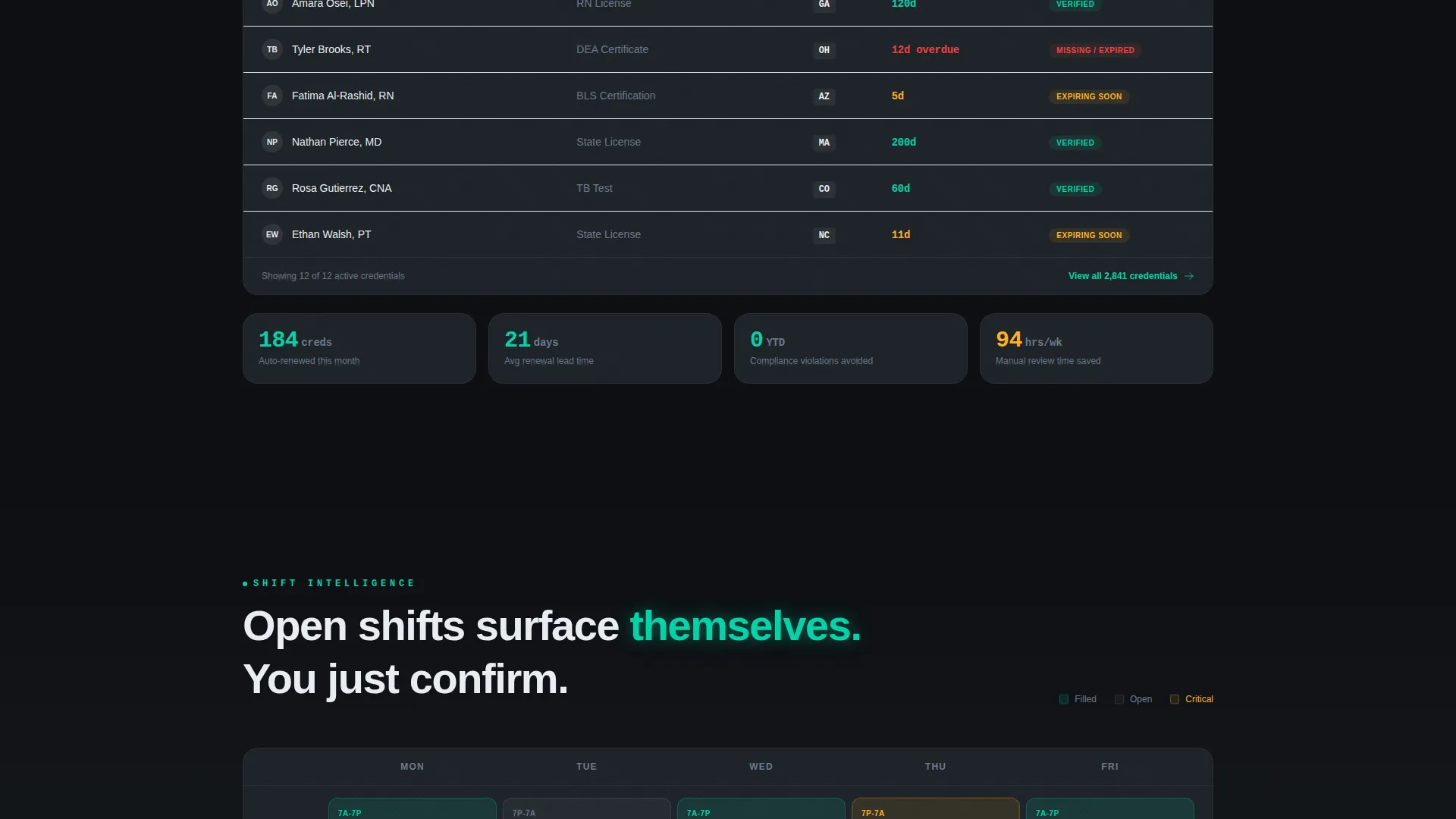
Each scroll section behaves like a miniature sandbox. Visitors can drag a nurse profile onto a shift calendar and watch conflicts resolve, toggle a compliance filter to reorganize a credential matrix, or slide a date range to animate fill-rate projections. Tiles expand on interaction and collapse when passed.
Dual Conversion Path Design
The primary call to action reads "Start Scheduling Free" in teal against carbon black. It appears inside the header dashboard and again as a persistent bottom bar after the third scroll interaction. A secondary path, "See Your Fill Rate Gap," leads to an ungated benchmarking calculator that requests an email only after delivering results.
Minimal Signup Friction Flow
The freemium signup asks for only two fields: work email and agency size. Agency size options are 1 to 50, 51 to 200, and 200 or more travelers. No credit card is required at any point in the primary conversion flow.
Margin Recovery Calculator
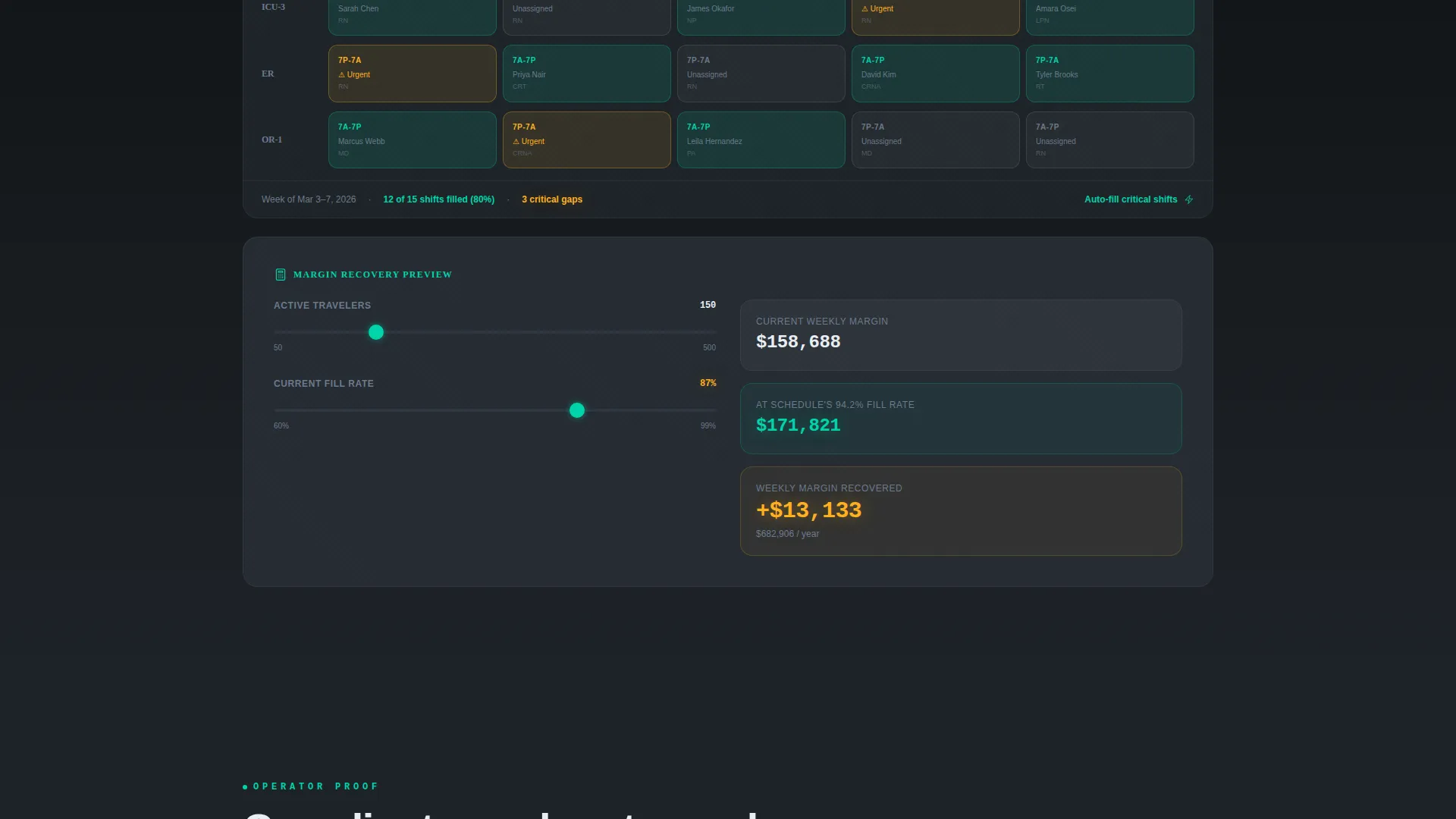
The page closes on a financial-impact section showing revenue recovered from a single percentage point of improved fill rate. This escalates the stakes from scheduling convenience to measurable business outcomes, giving operations directors a reason to act rather than browse.
Carbon Fiber Visual Identity
The color system uses deep cockpit black (#0D0F12) for backgrounds, woven carbon gray (#1E2328) for tiles, instrument-panel teal (#00D4AA) for live data and active states, and warning amber (#FFB020) reserved strictly for alerts and urgency markers. No stock photography is used anywhere in the layout.
Page sections overview
| Section | Purpose |
|---|---|
| Header Dashboard | Displays live staffing metrics and primary call to action |
| Shift Scheduling Sandbox | Lets visitors drag and resolve shift conflicts interactively |
| Credential Compliance Matrix | Shows real-time filter toggling across certification states |
| Fill Rate Projector | Animates projected fill rates across a draggable date range |
| Margin Recovery Calculator | Quantifies financial impact of fill-rate improvement |
| Persistent Conversion Bar | Reintroduces primary signup after third scroll interaction |
| Benchmarking Calculator | Delivers ungated fill-rate gap results before requesting email |
Design & branding system
The visual identity follows a Data Command theme that feels engineered rather than decorated. Every design decision reinforces the idea that complexity is under control.
- Color palette: cockpit black (#0D0F12) for backgrounds, carbon gray (#1E2328) for tile surfaces, teal (#00D4AA) for metrics and hover states, and amber (#FFB020) used only for alerts
- Typography: oversized monospace numerals for key metrics, creating a readout feel that matches the cockpit aesthetic
- No stock photography or lifestyle imagery anywhere in the layout; the data itself is the hero visual
Mobile & speed optimization
The bento grid layout is structured to remain legible and functional as screen sizes scale down. Interactive tiles adapt their behavior to touch input without losing the data-forward aesthetic.
- Bento tiles reflow into stacked single-column arrangements on smaller screens while preserving metric hierarchy
- Interactive sandbox sections are designed to remain usable on touch devices, with tap gestures replacing drag interactions where needed
- Amber alert markers and teal active states retain their visual weight at all viewport sizes
How this template helps you convert
Every layout decision in this template is pointed toward one outcome: turning a skeptical staffing professional into a signed-up user.
- The header dashboard creates instant credibility by showing the exact operational data your target buyer cares about, before they read a single line of marketing copy.
- The interactive sections let visitors experience platform logic firsthand, building confidence that the product delivers before any commitment is asked.
- The two-field signup and the value-first benchmarking calculator remove the two biggest barriers to conversion: form fatigue and trust deficit.
Other information about this template
Schedule is part of a broader library of travel software and SaaS landing page templates built for the technology category. It is specifically positioned at the intersection of travel staff scheduling and operational intelligence tools.
- Template style: Bento Grid, suited for platforms with multiple data-rich feature areas to showcase
- Theme: Data Command, designed for tools where the interface itself is the product differentiator
- Creative direction: Interactive Explorer, meaning the page rewards scroll and interaction rather than passive reading
- Header concept: Stats and Metrics, using real numbers and live-state visuals rather than hero imagery
- Conversion direction: Freemium and Trial, optimized for low-friction signups with a value-first secondary path
- This template works well for travel nurse staffing platforms, locum tenens deployment tools, and allied health professional scheduling software looking to position against spreadsheet-based workflows
Theme
Data Command
Creative direction
Interactive Explorer
Color system
Carbon Fiber
Style
Bento Grid
Direction
Freemium/Trial
Page Sections
Live Metrics Header Dashboard
Interactive Bento Grid Sections
Dual Conversion Path Design
Minimal Two-field Signup Flow
Margin Recovery Calculator
Carbon Fiber Visual Identity
Related questions
Who is this landing page template designed for?
Does the template include the interactive animations described in the preview?
Can I customize the metrics shown in the header dashboard?
Does the conversion flow require a credit card from visitors?
Is this template suitable for platforms outside travel nursing?



