Schedule - Precision Financial Landing Page Template
Schedule is a bento grid landing page template built for financial services staff scheduling platforms. It features a live-simulation header, animated capability cards, and a two-path lead generation flow. The Monochrome Steel palette and Dynamic Motion theme give it the precision feel of a trading floor at the opening bell, sharp, fast, and ready to convert.
by Rocket studio
Quick summary
Schedule is a single-page bento grid template designed for financial services staff scheduling platforms. It opens with an interactive schedule preview, builds momentum through animated capability cards, and closes with a reassembled dashboard. Two conversion paths, a primary form and a mid-page calculator, turn qualified visitors into leads before they reach the footer.
Who this template is for
This template is built for teams selling or launching staff scheduling software in the financial services sector. The design language and conversion structure speak directly to operational buyers, not casual browsers.
- Regional bank operations directors managing 40 or more branches
- Credit union human resources leads overwhelmed by shift-swap coordination
- Wealth management firms whose advisors lose billable hours to scheduling gaps
What problem this template solves
Scheduling software for financial institutions is a complex sell. Buyers need to see the product working before they commit to a demo. Generic SaaS landing pages fail here because they show screenshots instead of proof.
- Visitors leave before engaging because static pages do not demonstrate the product's value
- Operations buyers need to see compliance guardrails and conflict resolution, not just a feature list
- Lead capture forms with too many fields kill conversion before qualified buyers reach the call to action
What you get with this template
You get a fully structured bento grid landing page that doubles as a product demonstration. Every section serves a deliberate purpose in the buyer's journey from first impression to form submission.
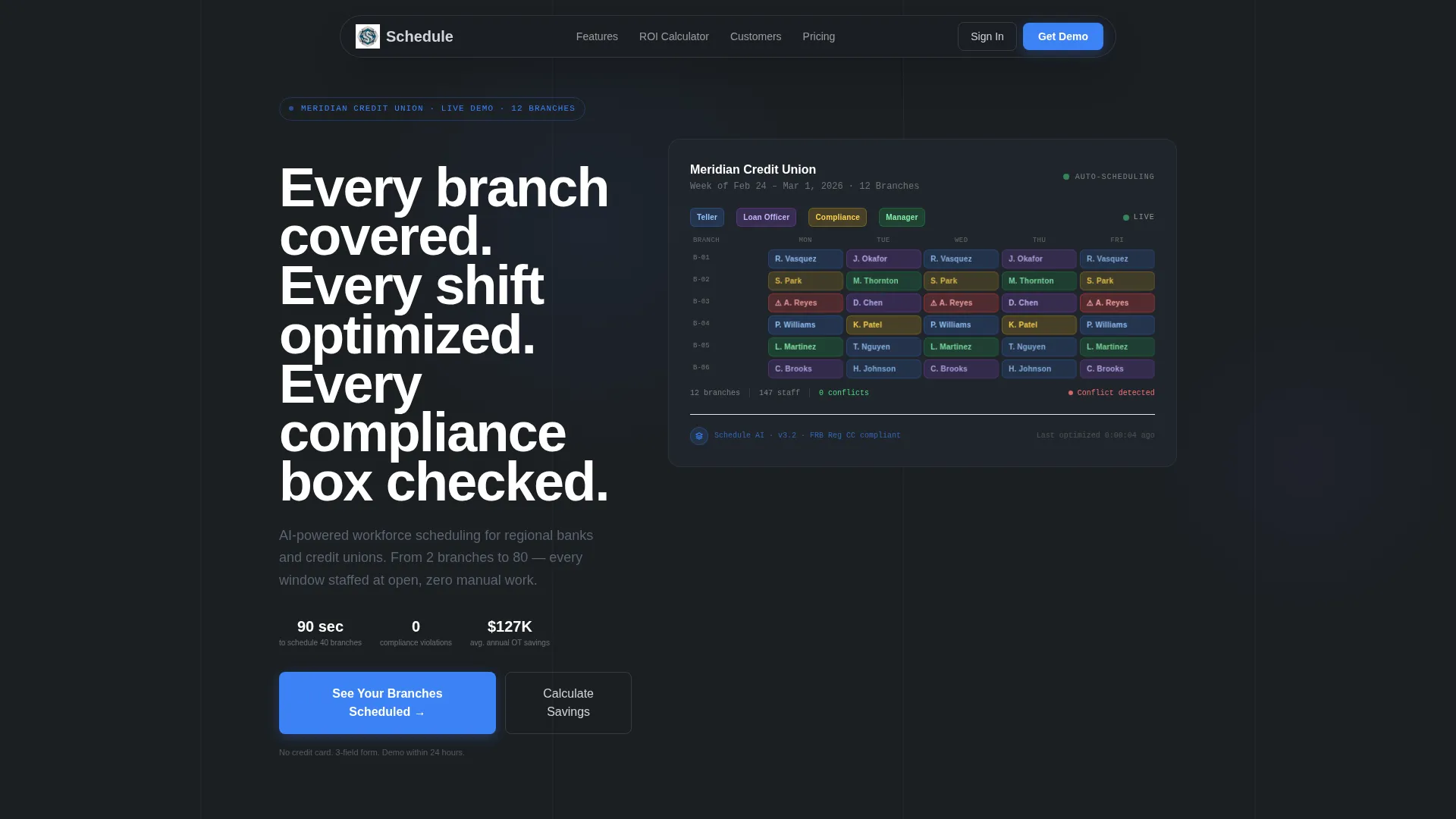
- An interactive header that simulates a live weekly schedule for a fictional 12-branch credit union
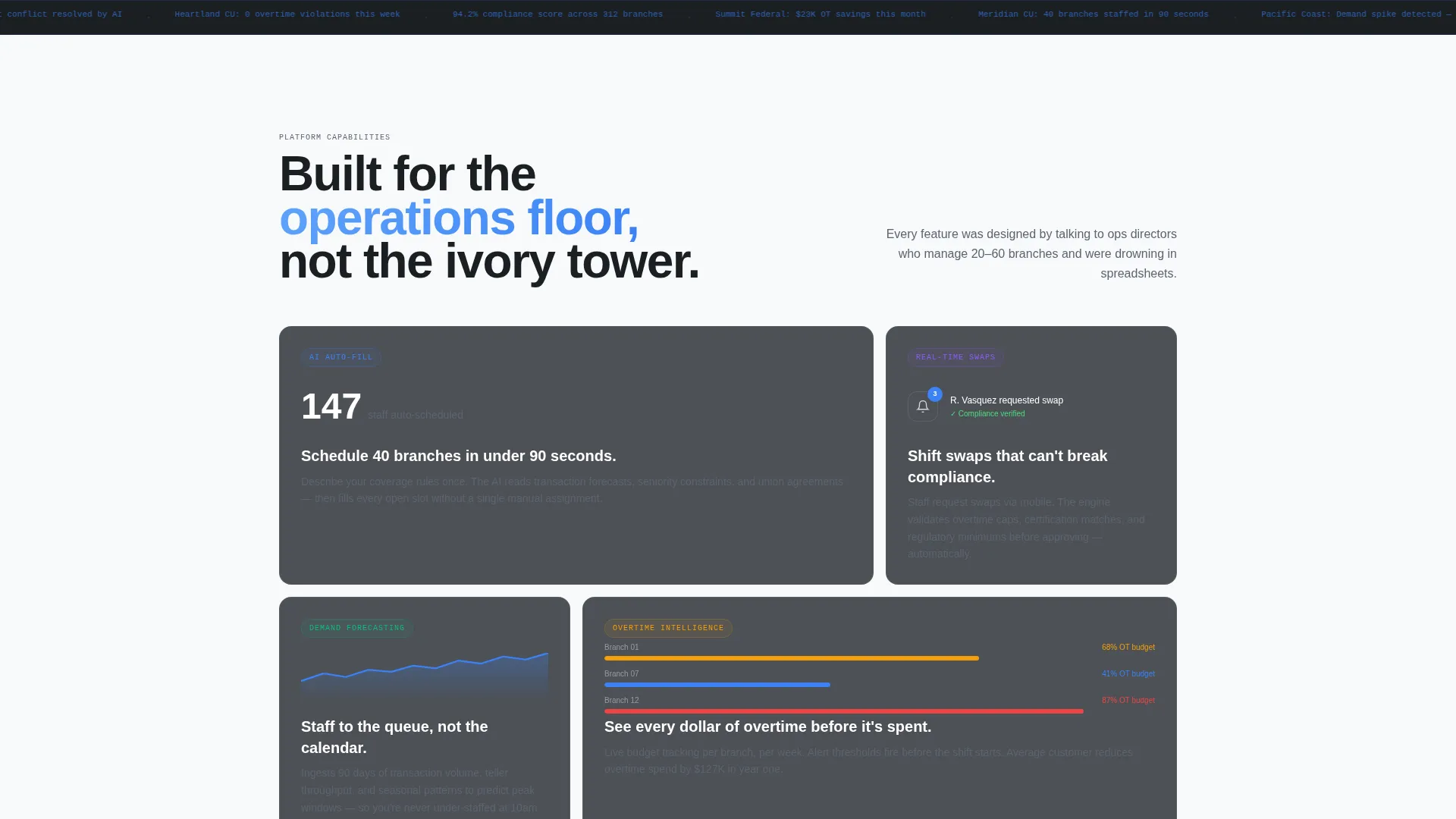
- Four animated capability cards that fragment and reassemble to tell a coherent product story
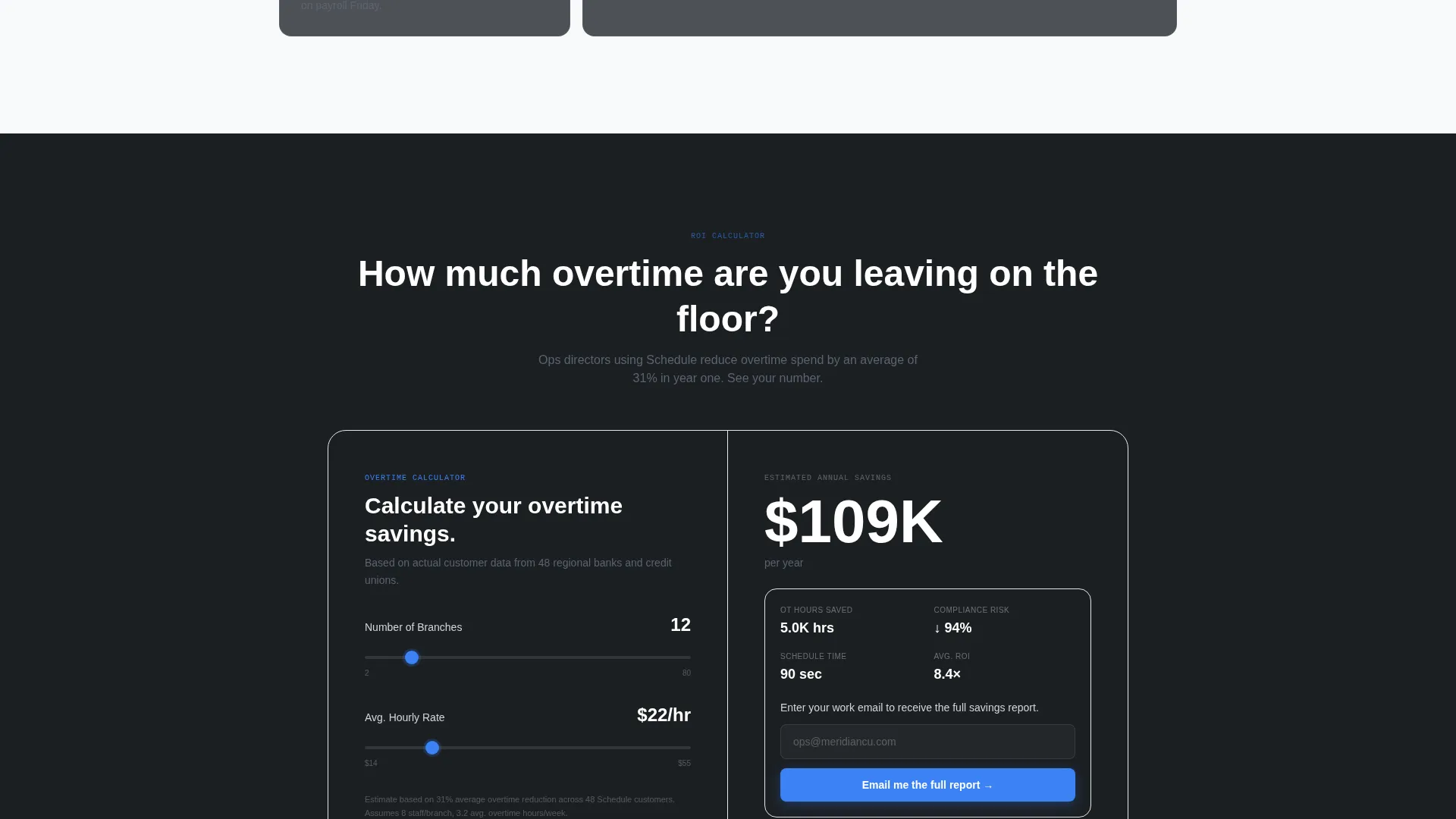
- Two distinct lead capture paths: a three-field progressive form and a soft-gated overtime savings calculator
Feature list
This template ships with six purpose-built components. Each one is designed to move a financial services buyer from curious to committed.
Interactive Schedule Preview Header
The header is not a hero image. It renders a simulated weekly schedule grid for "Meridian Credit Union" across 12 branches. Staff tiles are color-coded by role. Within four seconds, a shift conflict pulses red, an AI suggestion slides a tile into place, and the conflict resolves to green. No click required. The headline types itself below the grid.
Animated Capability Card Grid
Below the header, the bento grid breaks apart into four individual cards. Each card animates into its grid position with kinetic momentum, sliding, scaling, and snapping into place. Cards cover AI auto-fill across branches, real-time shift swaps with compliance guardrails, demand forecasting from transaction volume data, and overtime cost tracking with budget alerts.
Looping Micro-Interaction Cards
Every capability card contains a looping micro-interaction. A number ticks up, a chart draws itself, or a notification badge appears on a loop. These motion details keep the page feeling alive without requiring user input.
Overtime Savings Calculator
A mid-page bento card houses an interactive calculator. Operations directors input branch count and average hourly rate. The calculator returns an estimated annual savings figure. A soft gate then appears, "Email me the full report", capturing the lead through demonstrated value.
Two-Path Lead Generation Flow
The primary call to action, "See Your Branches Scheduled," appears in the header and again after the reassembled dashboard. It opens a three-field progressive form: number of branches, total staff headcount, and work email. No phone number. No last name. Friction is stripped to the minimum that qualifies the lead.
Reassembled Dashboard Closing Section
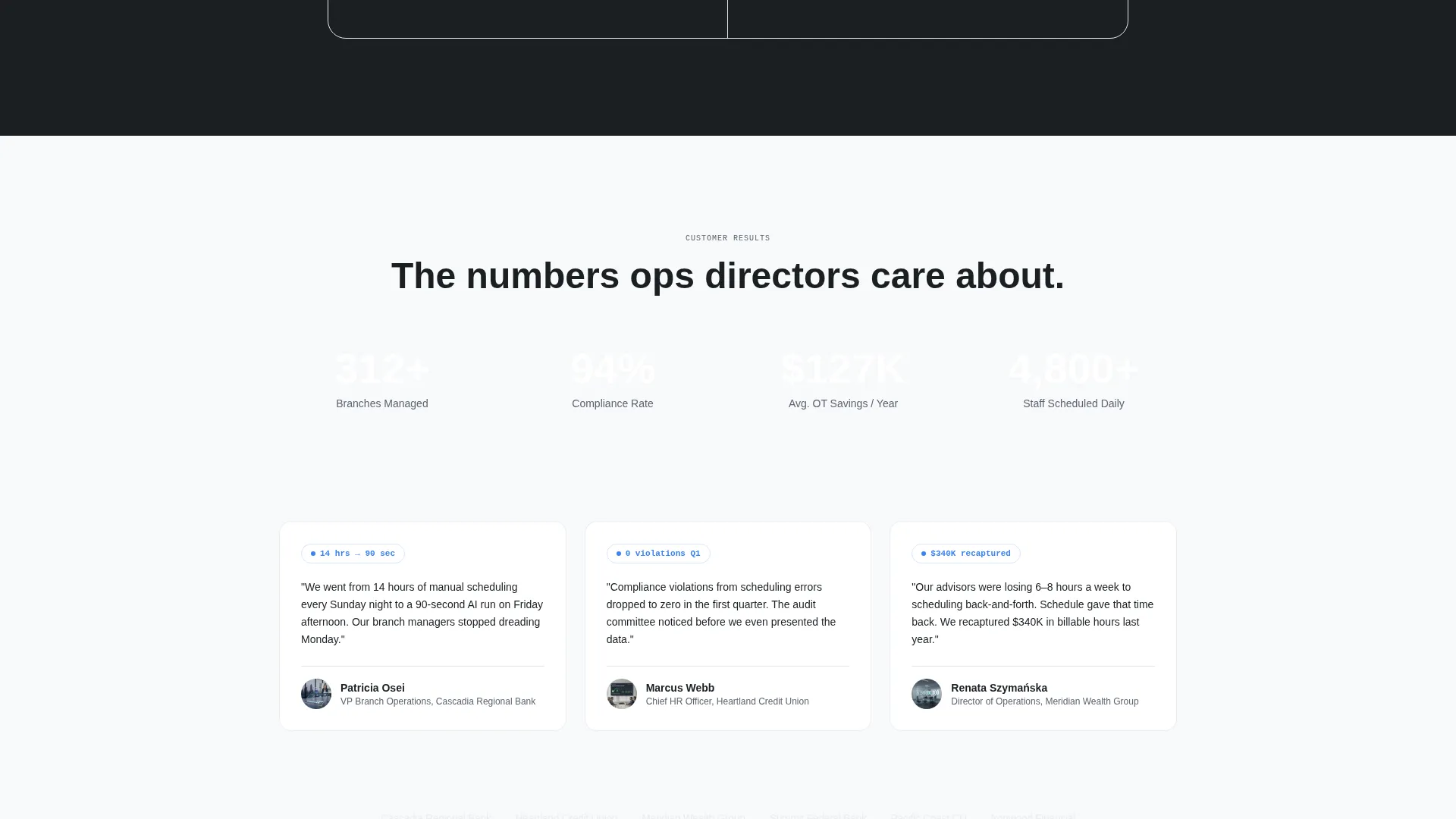
The page closes by reassembling all capability cards into a complete dashboard view. This is the visual payoff, every fragmented piece snapping back into one coherent system. The primary call to action reappears here, anchored for buyers who scrolled all the way through.
Page sections overview
| Section | Purpose |
|---|---|
| Interactive Header Grid | Simulate live schedule and hook attention immediately |
| Headline Typewriter Block | Reinforce value proposition as header animation completes |
| Capability Card: AI Auto-Fill | Demonstrate cross-branch scheduling automation visually |
| Capability Card: Shift Swaps | Show compliance-safe real-time swap capability in motion |
| Capability Card: Demand Forecasting | Connect transaction volume data to staffing decisions |
| Capability Card: Overtime Tracking | Visualize budget alerts and cost control in real time |
| Overtime Savings Calculator | Deliver personalized ROI and capture leads mid-page |
| Reassembled Dashboard View | Reunify all cards into one system for visual closure |
| Anchored Primary call to action | Re-engage scrollers with the main form after the dashboard |
Design & branding system
The visual identity follows a Monochrome Steel color system paired with a Dynamic Motion theme. The result feels like the inside of a bank vault door, machined, cold, and precise.
- Core palette: deep vault charcoal (#1B1F23), brushed steel mid-tone (#5C6370), polished aluminum highlight (#D1D5DB), and electric blue accent (#3B82F6)
- Backgrounds alternate between #1B1F23 and #F8F9FA; the blue accent fires only on interactive states and calls to action
- Grid cells breathe with subtle micro-animations; tiles shift gently to reinforce the "living system" impression
Mobile & speed optimization
The bento grid layout is structured to remain navigable and legible on smaller screens. Animation intensity scales with device context so the experience stays smooth regardless of viewport.
- Bento grid columns reflow for tablet and mobile viewports without breaking the visual hierarchy
- Micro-animations are designed as looping, lightweight interactions that do not depend on heavy assets
- The three-field progressive form stays minimal by design, reducing input friction on touch devices
How this template helps you convert
Every design and layout decision in this template is built around moving financial operations buyers toward a qualified lead action.
- The four-second auto-playing header demonstration replaces the need for a product video, eliminating the drop-off that happens when visitors are asked to press play.
- The overtime savings calculator delivers a personalized result before asking for any commitment, so the soft gate feels like a reward rather than a barrier.
- The reassembled dashboard at the bottom gives scrollers who did not convert earlier a second, contextually earned moment to act.
Other information about this template
This template is categorized under Technology, specifically within Financial Services Software and SaaS. It is built for the financial services staff scheduling niche and aligns with a Lead Generation landing page direction.
- Template style: Bento Grid
- Theme: Dynamic Motion
- Color system: Monochrome Steel
- Header concept: Interactive Preview
- Creative direction: Launch Energy
- The Intersection Match Score for this niche and template combination is 13, indicating strong alignment between the design system and the target buyer context
Theme
Dynamic Motion
Creative direction
Launch Energy
Color system
Monochrome Steel
Style
Bento Grid
Direction
Lead Generation
Page Sections
Interactive Schedule Preview Header
Animated Bento Capability Cards
Looping Card Micro-interactions
Overtime Savings Calculator
Two-path Lead Generation Flow
Reassembled Dashboard Closing Section
Related questions
Can I customize the fictional 'Meridian Credit Union' demo in the header?
Does the template require a developer to set up the animations?
Is the overtime savings calculator connected to a real calculation engine?
What makes this template suited for financial services buyers specifically?
Can both lead capture paths be active at the same time?



