AI for Entertainment Appointment Booking Website Template
Schedule is a card grid landing page template built for an AI-powered entertainment scheduling assistant. It combines an interactive header preview, modular feature cards, and a two-step lead capture form to turn curious visitors into signed-up users. The design uses a bold teal-and-coral palette that feels like a downtown night out, vivid, energetic, and immediately trustworthy.
by Rocket studio
Quick summary
Schedule is a single-page landing page template designed for an AI entertainment scheduling assistant. It opens with a live interactive preview that reshuffles event cards in real time, then walks visitors through modular feature sections before pulling them into a low-friction two-step signup. The layout is confident, visually immersive, and built to generate leads fast.
Who this template is for
This template is built for founders, product teams, and marketers launching an AI-driven entertainment discovery or calendar tool. It speaks directly to audiences who want a polished, conversion-focused first impression without starting from scratch.
- Teams building an AI entertainment scheduling assistant and needing a launch-ready landing page
- Marketers targeting culture-hungry professionals, busy couples, and executive assistants who book client entertainment
- Designers and developers who want a modular card grid they can customize quickly
What problem this template solves
Choosing what to do in a city feels harder than it should be. Showtimes live across five different apps, ticket drops get missed, and group plans collapse because nobody could agree in time. This template gives your product a front door that immediately proves the AI solves those exact frustrations.
- Visitors arrive skeptical; the interactive header lets them feel the product working before any signup is required
- The progressive two-step form removes commitment anxiety by asking only for city and email first
- Modular feature cards make complex AI capabilities feel clear and approachable rather than overwhelming
What you get with this template
You get a complete, structured landing page layout with every section pre-built and ready to customize. Nothing is generic filler, each block maps directly to a specific job the page needs to do, from sparking curiosity at the top to closing the lead at the bottom.
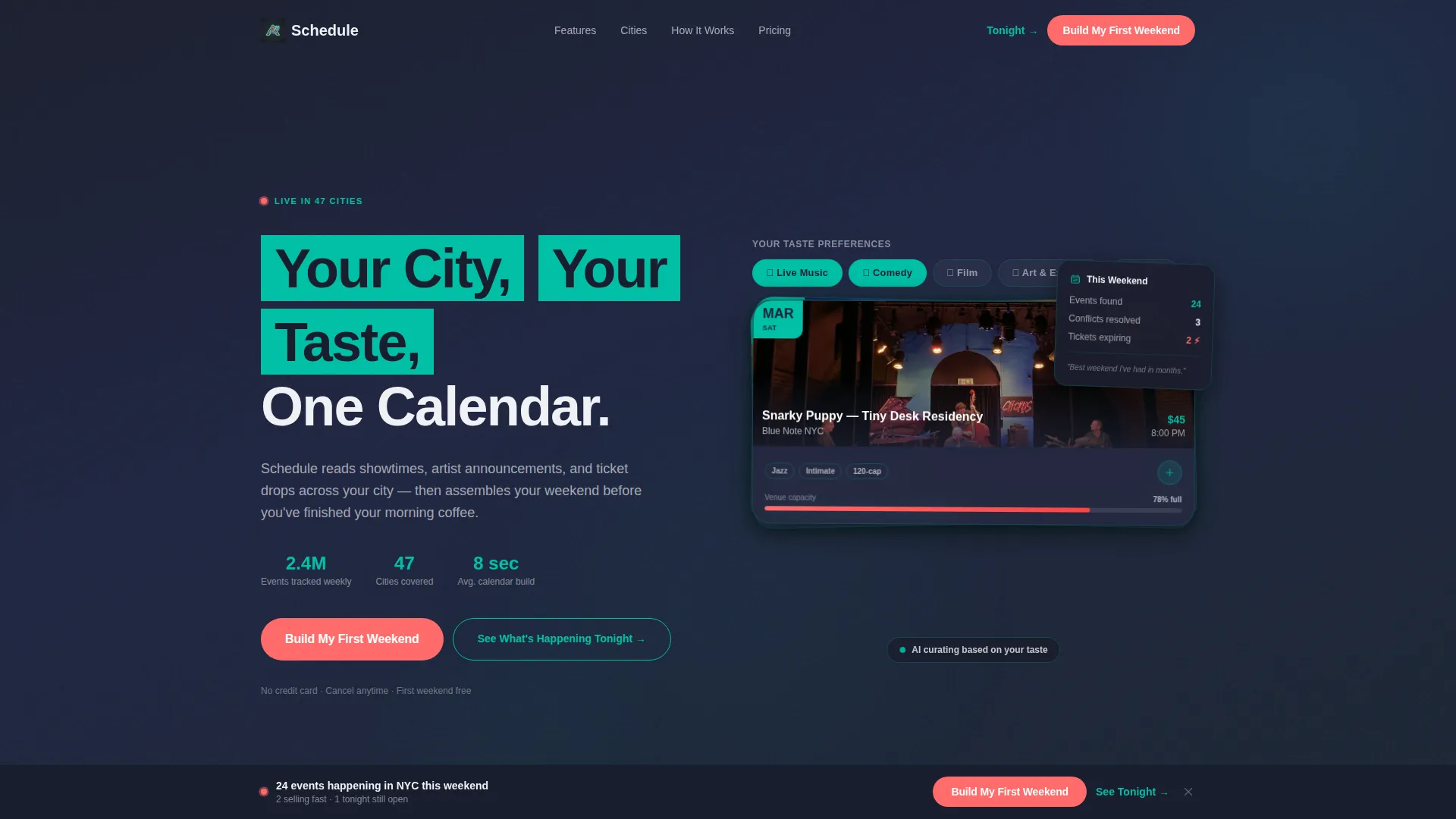
- An interactive header with three taste-preference toggles and an animated card stack that reshuffles on click
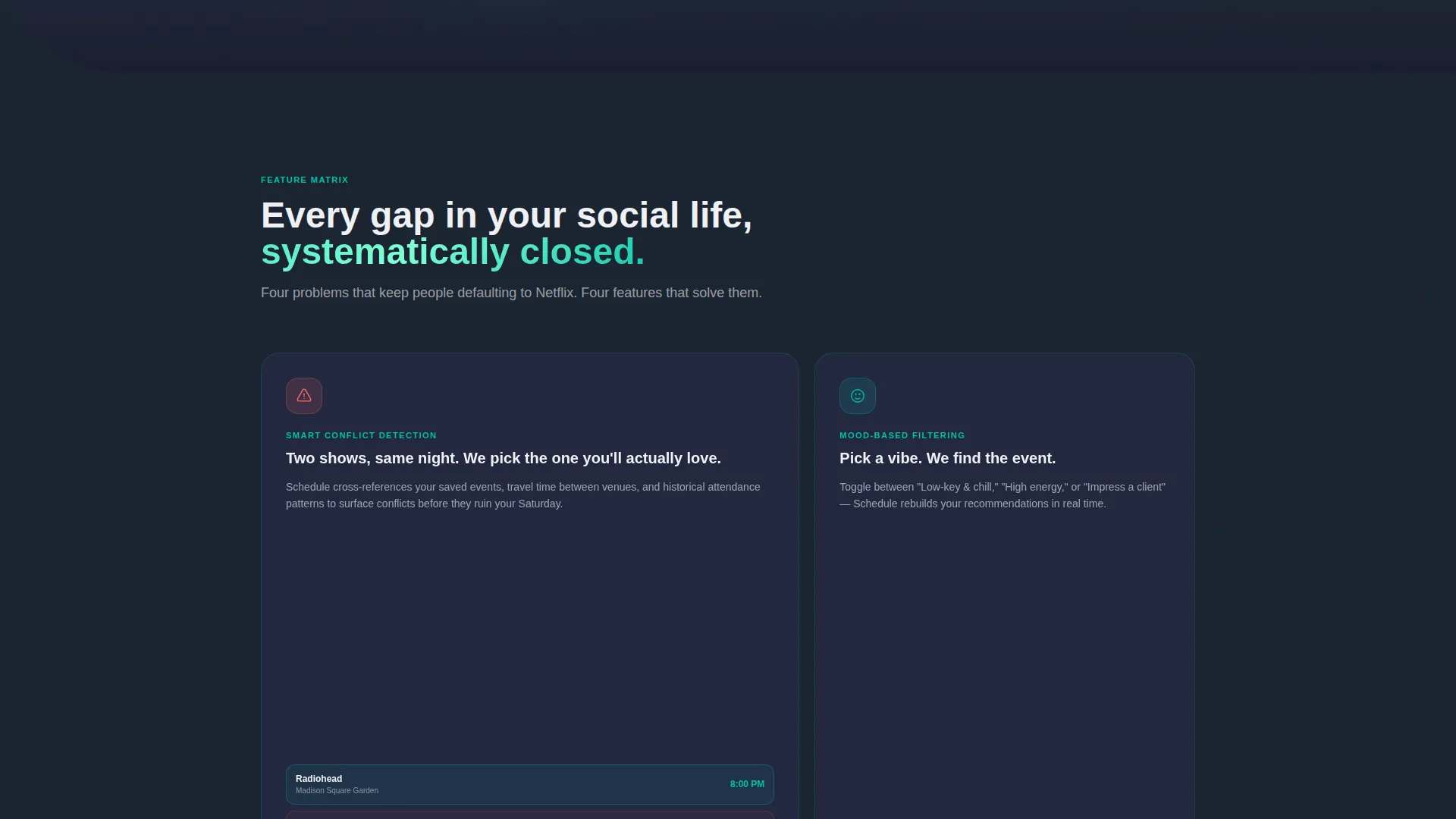
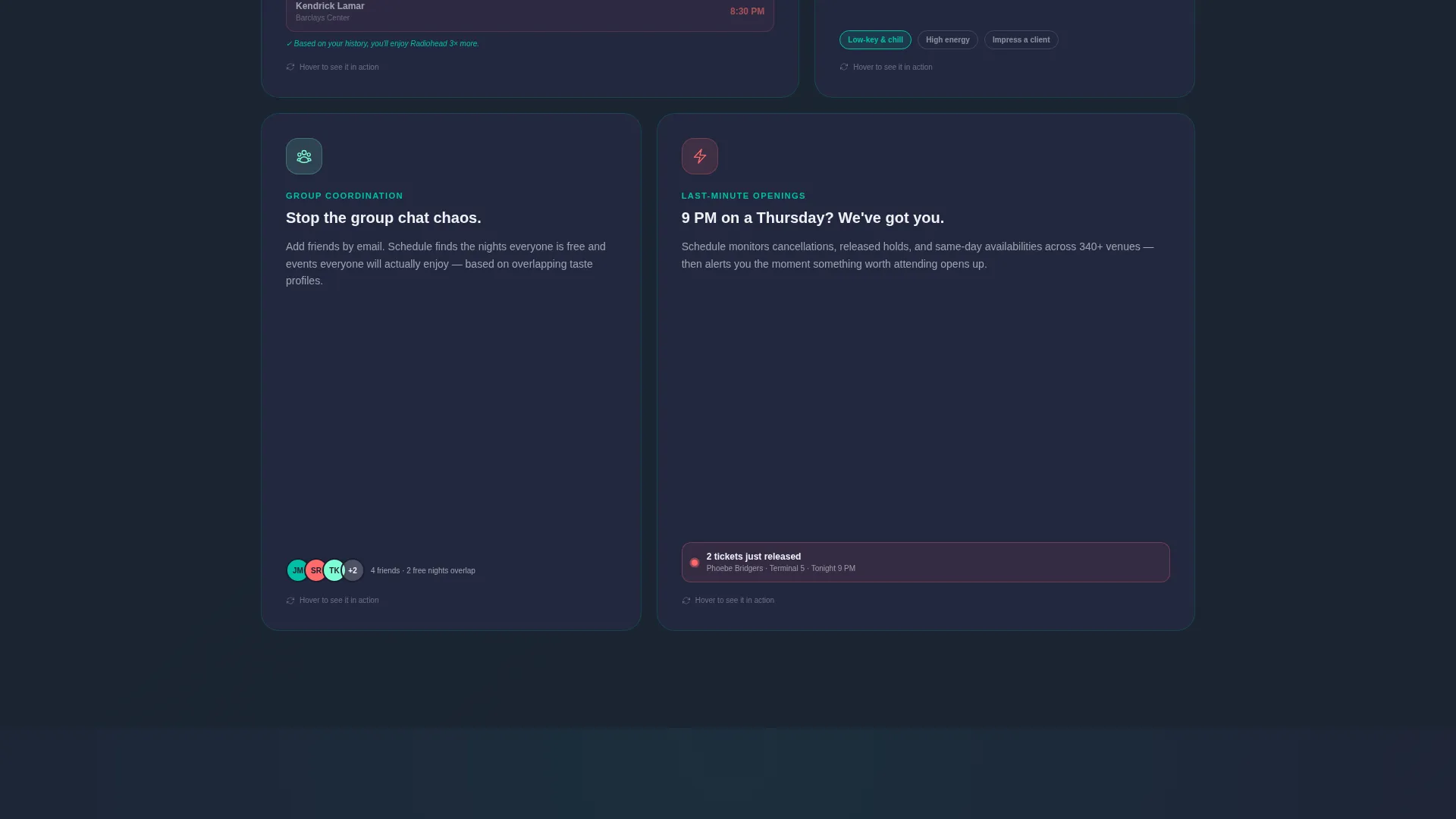
- A modular card grid covering smart conflict detection, mood-based filtering, group coordination, and last-minute openings
- A two-step progressive lead capture form styled as an inline search bar, plus a sticky bottom call-to-action bar
Feature list
This template ships with six focused capabilities built directly into its layout and interaction design.
Interactive Scheduling Preview Header
The header puts a functioning micro-version of the AI front and center. Three toggle buttons, live music, comedy, and film, sit above an animated card stack. Each card shows a sample event with venue name, time, and a one-tap calendar icon. Cards cast soft teal shadows and reshuffle in real time as visitors click, making the product feel alive before any account exists.
Modular Feature Card Grid
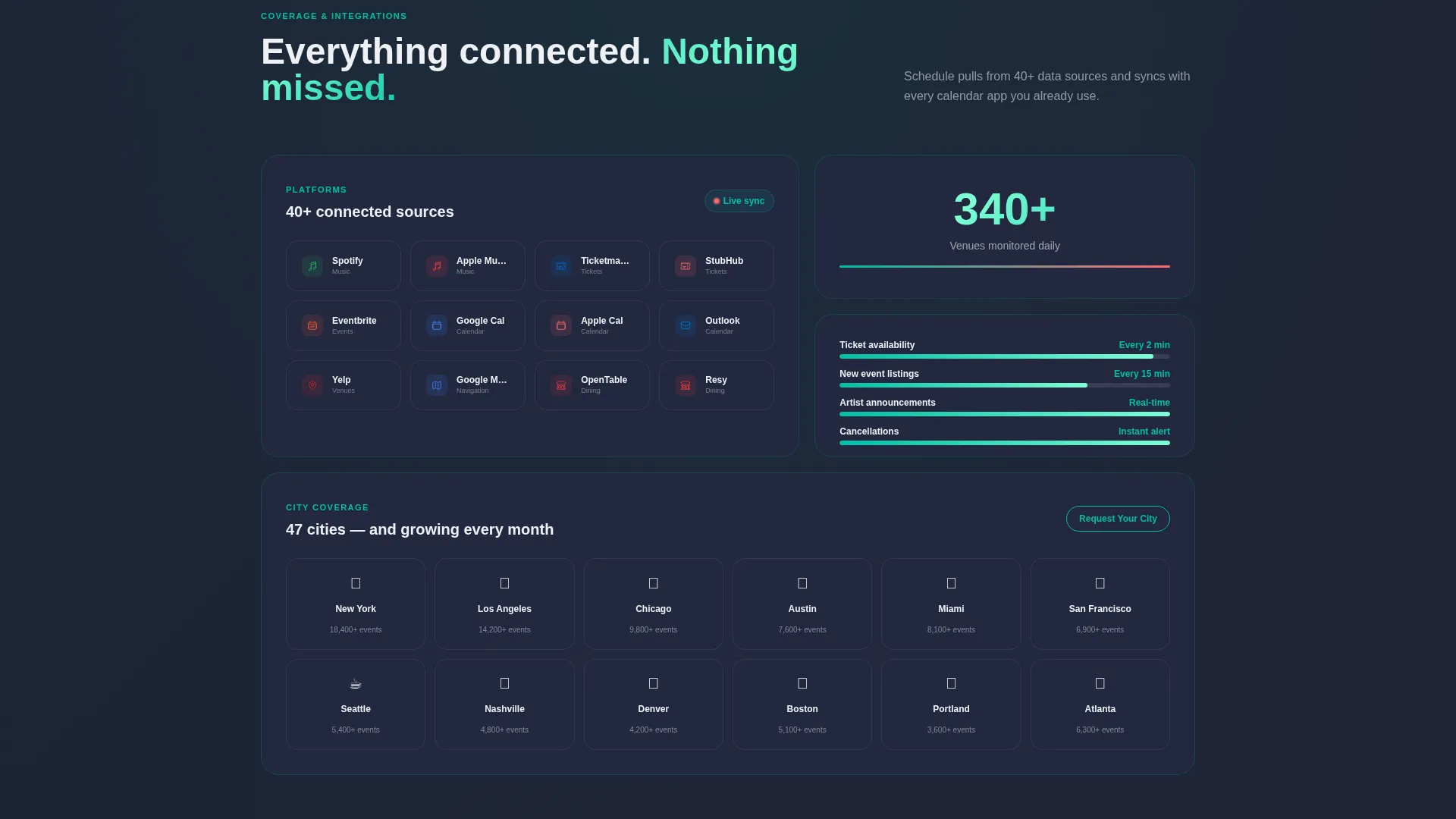
Each scrollable section isolates one AI capability in its own card block. Cards flip, expand, or highlight on hover, using micro-animations to demonstrate the feature rather than just label it. The grid rhythm starts with large explanatory cards, then compresses into denser rows covering integrations, supported platforms, and city coverage, building a sense of growing depth.
Two-Step Progressive Lead Capture
Step one of the form asks only for city and email, styled as a single inline row that feels more like a search bar than a form field. After submission, step two presents playful toggle chips for entertainment preferences. This sequence reduces drop-off by earning trust before asking for personal detail.
Sticky Coral Call-to-Action Bar
The primary call-to-action, "Build My First Weekend", appears in warm coral after the interactive header and again as a persistent sticky bar after the third card row. Repetition at key scroll depths keeps conversion opportunities visible without feeling aggressive.
Anonymous City Preview Path
A secondary path labeled "See What's Happening Tonight" lets visitors browse anonymized event results for their city without signing up first. This earns the signup by delivering genuine value upfront, converting hesitant visitors who need proof before committing.
Smart Conflict Detection Card
One dedicated card block demonstrates the AI's ability to flag scheduling conflicts across a user's existing calendar. The card uses hover animation to show the detection in action, making an abstract backend capability immediately concrete and compelling.
Page sections overview
| Section | Purpose |
|---|---|
| Interactive Header | Demonstrates AI scheduling with live taste toggles and reshuffling event cards |
| Headline Block | Anchors the value proposition with "Your City, Your Taste, One Calendar" |
| Primary call to action Row | Introduces the coral "Build My First Weekend" button after the header |
| Conflict Detection Card | Shows smart scheduling conflict detection with hover animation |
| Mood Filtering Card | Illustrates mood-based event filtering capability |
| Group Coordination Card | Highlights multi-person plan coordination feature |
| Last-Minute Openings Card | Surfaces same-day event discovery use case |
| Dense Integration Grid | Compresses platform, city, and integration coverage into scannable rows |
| Anonymous Preview Path | Lets visitors explore city events before signing up |
| Two-Step Capture Form | Collects city and email inline, then preferences via toggle chips |
| Sticky Bottom Bar | Keeps the primary call to action accessible throughout the scroll journey |
Design & branding system
The visual identity follows a Directory and Discovery theme using the Teal Catalyst color system. Every color choice has a clear emotional job, the dark background creates focus, the teal animates attention, and the coral signals urgency without shouting.
- Deep theater-dark charcoal (#1A1E2E) as the base, electric teal (#00BFA6) for interactive elements and card shadows, soft pearl (#F0F1F5) for card surfaces
- Warm coral (#FF6B6B) reserved exclusively for live-event urgency indicators and all primary call-to-action buttons
- The overall palette evokes stepping out onto a lit downtown block at 8 PM, dark sky, neon reflections, and the glow of open doors
Mobile & speed optimization
The card grid layout is designed to reflow cleanly across screen sizes. Modular blocks stack vertically on smaller viewports without losing the visual rhythm that makes the desktop experience feel premium.
- The sticky bottom call-to-action bar remains accessible on mobile, keeping the lead capture path visible throughout the scroll
- The inline two-step form collapses into a full-width row on narrow screens, preserving its search-bar feel on touch devices
How this template helps you convert
The page is built around a lead generation objective. Every design and layout decision traces back to moving a visitor from curiosity to committed signup.
- The interactive header delivers immediate product value, visitors experience the AI's logic before they read a single marketing claim, which builds trust faster than copy alone can
- The anonymous city preview path removes the "prove it first" objection by letting hesitant visitors see real results without giving up their email
- The two-step form structure and the sticky coral call-to-action bar work together to keep commitment pressure low at entry and high in visibility throughout the page
Other information about this template
This template sits at the intersection of the Technology category and the AI for Entertainment subcategory. It is purpose-built for the entertainment AI scheduling assistant niche, making it a strong fit for products that help users discover local events, manage social calendars, or surface personalized cultural recommendations.
- The template style is a Card Grid that is modular, meaning individual feature cards can be reordered, removed, or duplicated without breaking the layout
- The header concept is classified as an Interactive Preview, a relatively rare landing page pattern that puts product experience ahead of product description
- The creative direction follows a Feature Matrix approach, where each scrollable section is a self-contained capability showcase rather than a continuous narrative
- The Intersection Match Score for this template's niche and design pairing is 13, indicating strong alignment between the template's visual system and its target use case
Theme
Directory & Discovery
Creative direction
Feature Matrix
Color system
Teal Catalyst
Style
Card Grid (Modular)
Direction
Lead Generation
Page Sections
Interactive AI Scheduling Header
Modular Feature Card Grid
Two-step Progressive Lead Capture
Sticky Coral Call-to-action Bar
Anonymous City Preview Path
Smart Conflict Detection Card
Related questions
Can I customize the event categories in the interactive header toggles?
Is the two-step lead capture form connected to an email platform?
Who is this landing page template designed to attract?
Can I add or remove feature cards from the grid?
Does the sticky call-to-action bar work on mobile screens?



