Construction Digital Presence Booking Website Template
Schedulehub is a hub-and-spoke construction scheduling landing page built for general contractors, project managers, and operations directors. It uses a Problem-to-Solution scroll arc, a dashboard-style header with a live-looking Gantt chart, sticky anchor navigation, and a single click-through call to action that pushes visitors into a guided scheduling demo.
by Rocket studio
Quick summary
Schedulehub is a single-page construction scheduling template built around a sticky anchor navigation and a Problem-to-Solution Arc. The header opens on a dashboard preview showing a Gantt chart with color-coded trade rows. Four spoke sections, Book, Sync, Track, Adjust, each surface one scheduling pain point and resolve it with a focused interface shot. Every section ends with the same primary call to action: "See Your Schedule Built."
Who this template is for
This template is built for construction businesses that need to turn a complex scheduling workflow into a clear, compelling web presence. It speaks directly to the people managing real project pressure every day.
- General contractors managing multiple subcontractor crews across several active job sites at once
- Project managers responsible for preventing weather delays from cascading into costly schedule penalties
- Operations directors at mid-size firms ready to move beyond patchwork spreadsheet and shared-calendar setups
What problem this template solves
Construction scheduling is messy. Double-booked subcontractors, missed inspections, and last-minute crew reshuffles eat hours every week. Most construction businesses have no single page that explains their scheduling solution clearly enough to earn a new client's trust.
- Visitors arrive with no context and leave before they understand the product's value
- The scheduling chaos problem is never named clearly, so the solution never lands with weight
- There is no clear path from "I have this problem" to "I want to try this tool"
What you get with this template
You get a complete, single-page landing page designed specifically for a construction booking and scheduling product. Every section is built to move a visitor from pain recognition to demo click.
- A sticky anchor navigation bar with four construction-verb labels: Book, Sync, Track, Adjust
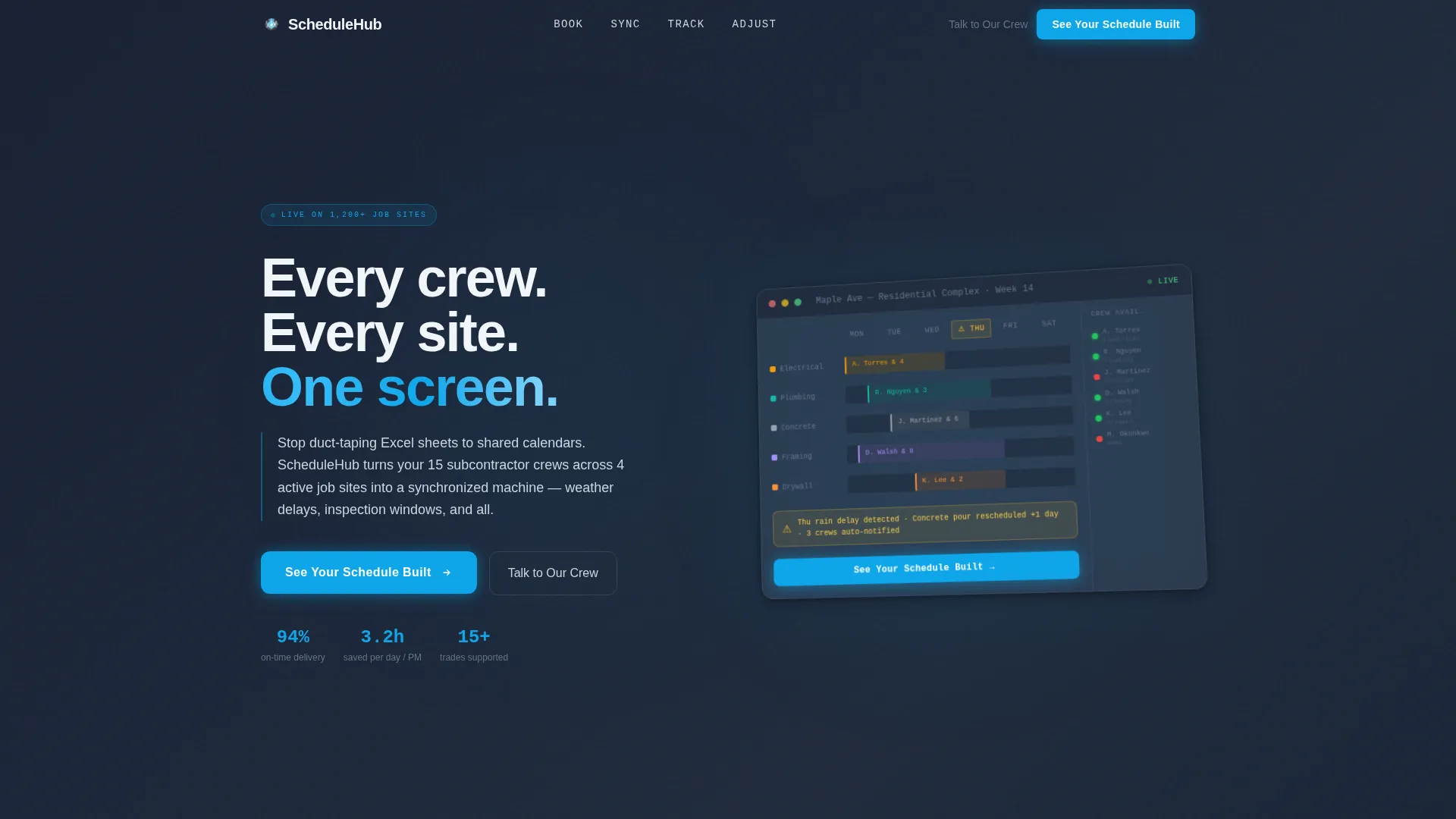
- A header section featuring an isometric dashboard preview of a Gantt chart with animated, color-coded trade rows and a crew availability sidebar
- Four spoke sections each opening with a named scheduling problem and closing with a "See Your Schedule Built" call to action, plus a secondary "Talk to Our Crew" text link for enterprise visitors
Feature list
This template delivers a focused set of design and layout features built around the construction scheduling use case. Each one is grounded in what the source brief explicitly describes.
Isometric Dashboard Header
The header displays a crisp, isometric-angled screenshot of a scheduling interface. It floats against a deep slate background with a subtle parallax drift on scroll. The Gantt chart shows color-coded trade rows, electrical in amber, plumbing in teal, concrete in warm gray, along with a weather-delay flag and a crew availability sidebar using green and red status dots. The interface appears to glow faintly as if backlit.
Sticky Anchor Navigation
A persistent navigation bar sits at the top of the viewport as visitors scroll. It is labeled with four construction verbs: Book, Sync, Track, and Adjust. Each label links directly to its corresponding spoke section, making it easy to jump between feature areas without losing context.
Problem-to-Solution Spoke Sections
Four spoke sections structure the page's scroll experience. Each section opens by naming a specific scheduling pain point, then resolves it with a focused interface presentation. The tension-and-resolution rhythm repeats across all four spokes, building trust incrementally.
Animated Conflict Counter
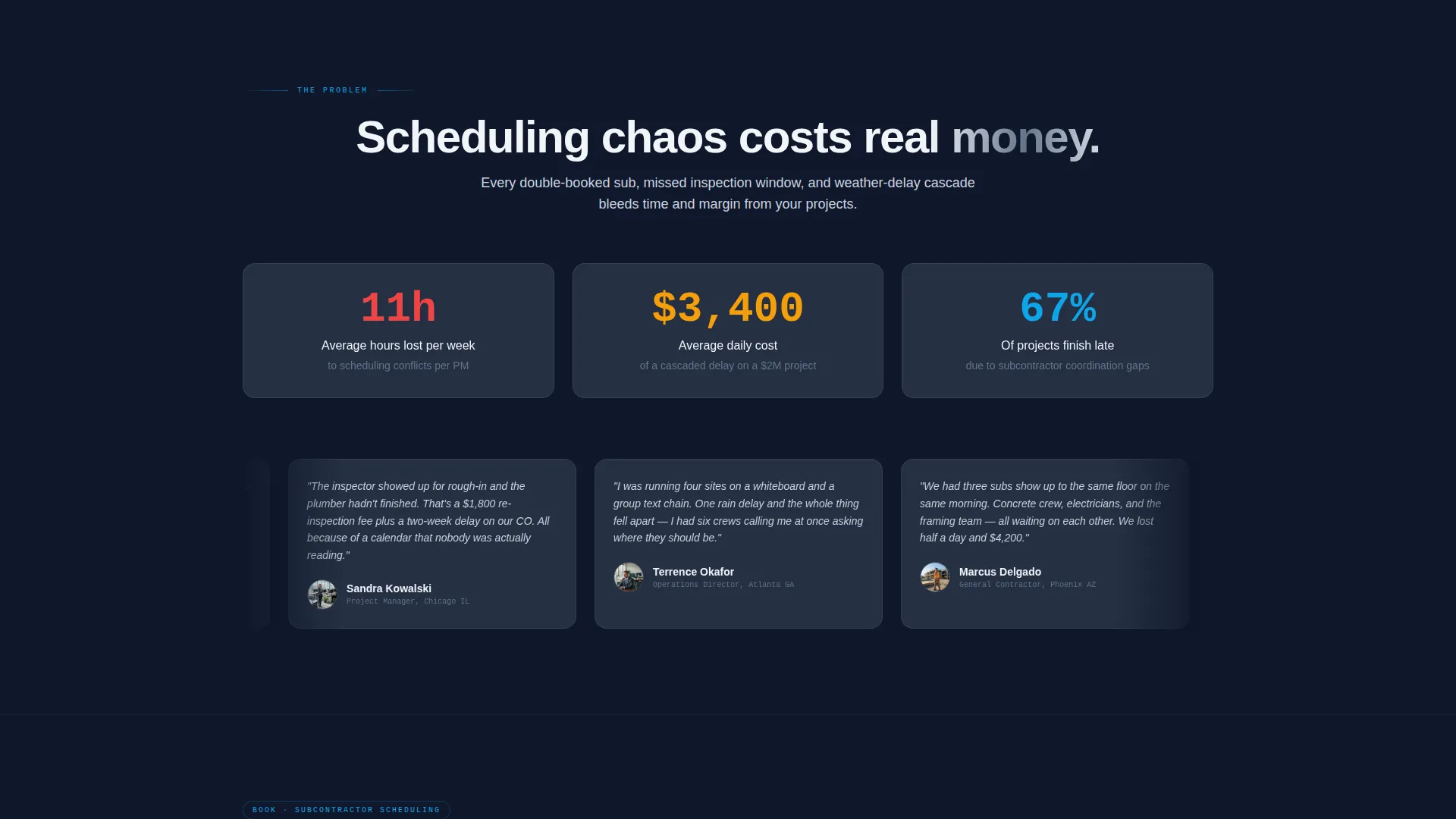
The first spoke section features an animated counter showing the average hours lost per week to scheduling conflicts. The number is intentionally striking. It is stacked alongside real contractor quotes about double-booked subcontractors and missed inspections to anchor the pain in familiar language.
Click-Through Call to Action System
The primary call to action, "See Your Schedule Built," appears first inside the header dashboard as a glowing blue button. It resurfaces at the close of every spoke section. A secondary text link, "Talk to Our Crew," is available for enterprise contractors who prefer a direct conversation over a self-guided demo.
Tech Glass Visual Theme
The page uses the Slate and Sky color system throughout. Deep construction slate (#1E293B) forms the primary background. Reinforced graphite (#334155) surfaces cards and content blocks. Open-sky blue (#0EA5E9) drives all interactive accents. Crane-cable silver (#CBD5E1) handles secondary text and divider lines.
Page sections overview
| Section | Purpose |
|---|---|
| Header Dashboard Preview | Opens the page with an isometric Gantt chart interface, headline, and primary call to action |
| Problem Statement Spoke | Introduces scheduling chaos with an animated conflict counter and contractor quotes |
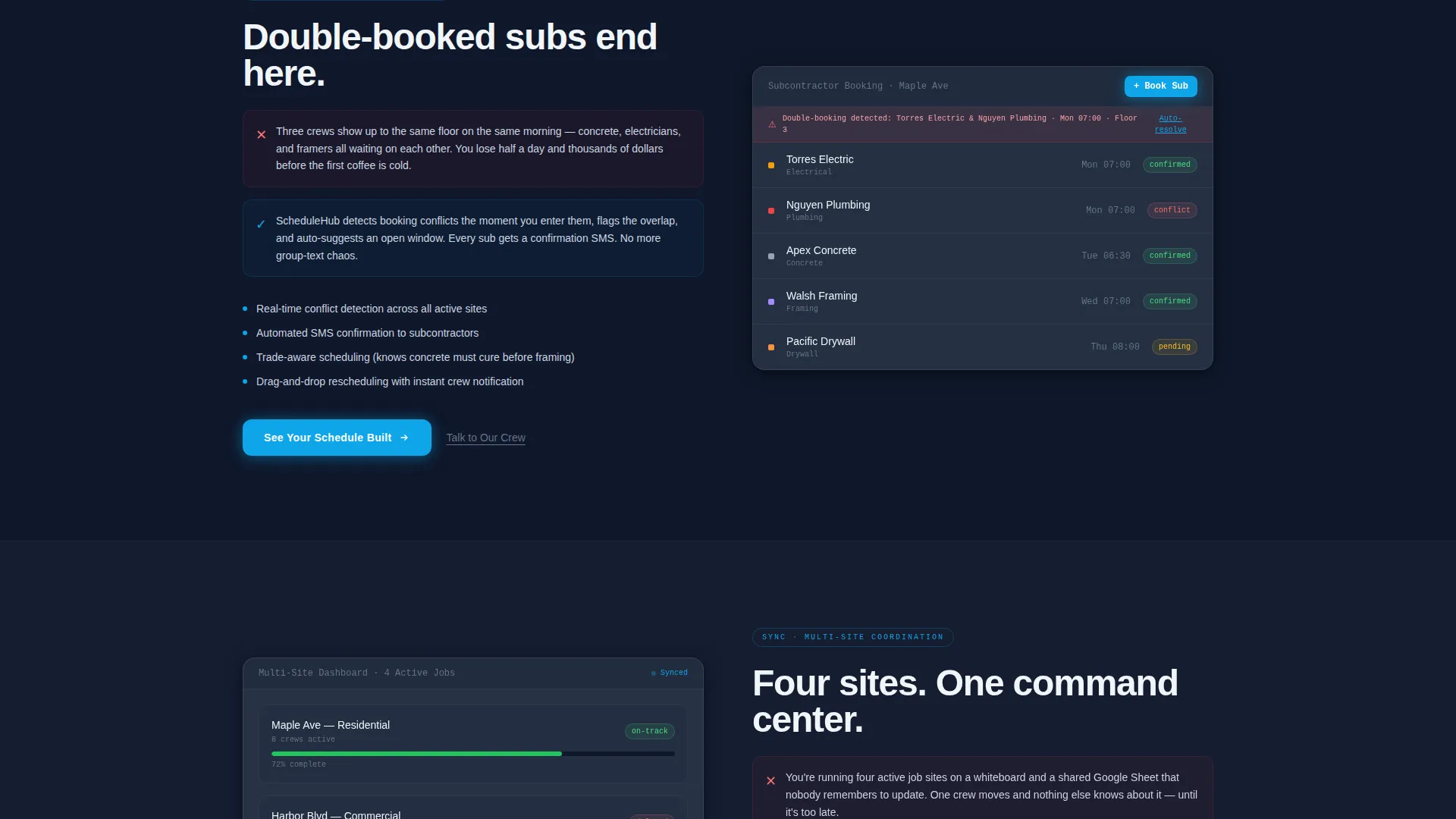
| Book Feature Spoke | Presents the booking workflow as the direct answer to double-booked subcontractors |
| Sync Feature Spoke | Shows cross-site crew synchronization as the fix for fragmented shared calendars |
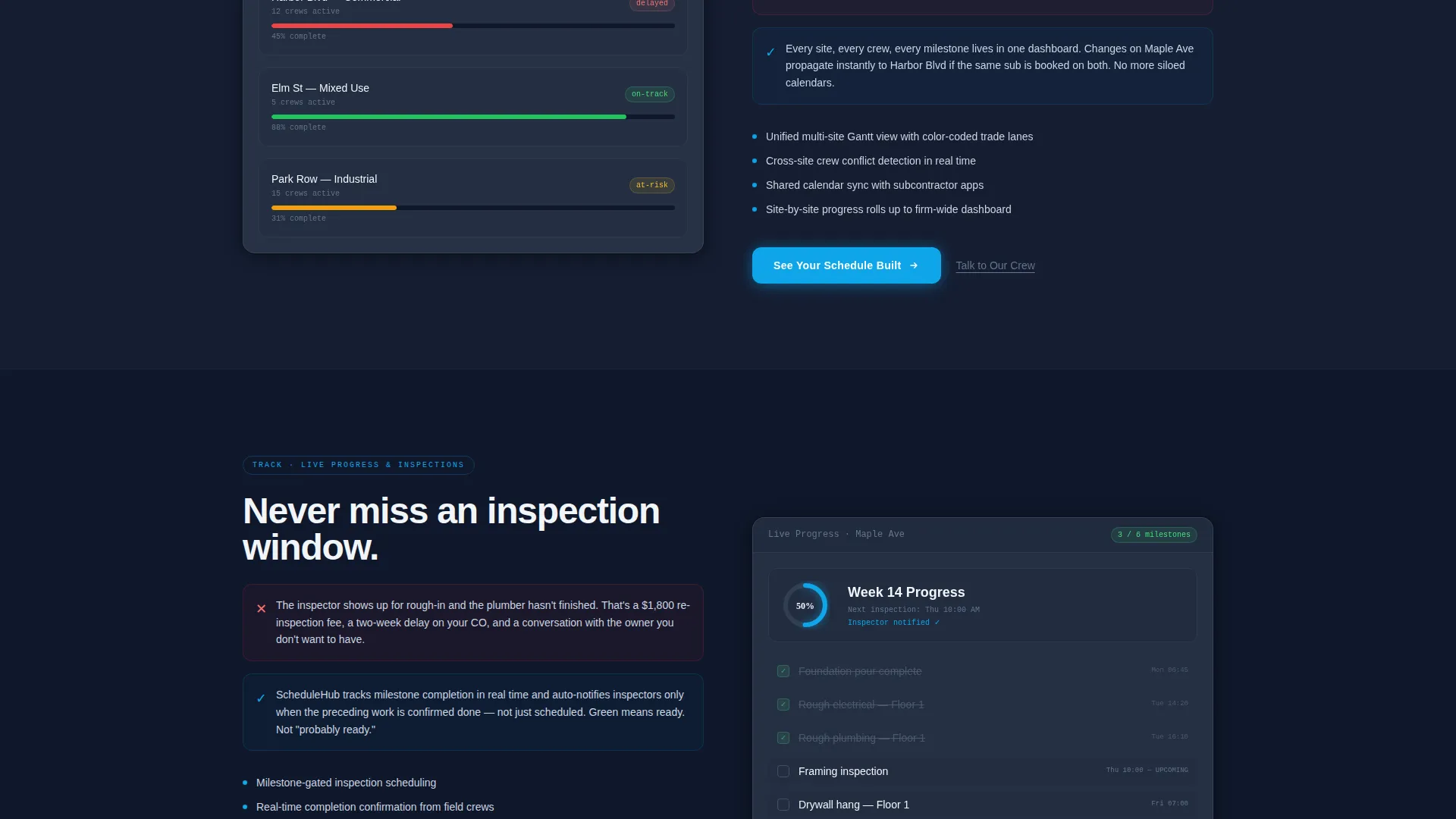
| Track Feature Spoke | Demonstrates real-time progress tracking as the solution to missed inspections |
| Adjust Feature Spoke | Highlights drag-and-drop rescheduling as the response to weather delay cascades |
| Footer Call to Action | Closes the page with the primary demo button and secondary enterprise contact link |
Design & branding system
The visual identity follows a Tech Glass theme built on the Slate and Sky color system. The palette is described in the brief as looking through a tinted glass curtain wall on a steel-framed high-rise: dark and grounded below, electric and open above.
- Primary backgrounds use deep construction slate (#1E293B); card surfaces use reinforced graphite (#334155)
- Open-sky blue (#0EA5E9) is the signature interactive accent color used for buttons, highlights, and active states
- Crane-cable silver (#CBD5E1) handles secondary text, divider lines, and supporting user interface details throughout the page
Mobile & speed optimization
The template is structured as a single-page layout, which keeps the total page footprint compact. The hub-and-spoke structure with sticky anchor navigation is inherently scroll-friendly on both desktop and mobile viewports.
- Sticky anchor navigation collapses cleanly for smaller screens, keeping spoke access available without blocking content
- Isometric dashboard visuals and the parallax drift effect are contained within the header section, limiting their impact on the rest of the scroll experience
- Each spoke section is self-contained, making it straightforward to adjust or reorder sections during customization without breaking the overall layout flow
How this template helps you convert
The page is built as a click-through landing page with one goal: move the visitor into a free interactive demo. Every layout decision supports that single conversion outcome.
- The primary call to action appears inside the header dashboard itself, so visitors see "See Your Schedule Built" before they scroll a single pixel
- The Problem-to-Solution Arc creates a recurring cycle of tension and relief across all four spokes, so by the time visitors reach the bottom they have already mentally solved their problem using the product
- The secondary "Talk to Our Crew" text link gives enterprise contractors a lower-friction path, capturing visitors who are ready to buy but not ready to self-serve
Other information about this template
This template is part of the Technology category under the Construction Digital Presence subcategory. It is purpose-built for the construction booking and scheduling niche and is designed to serve product teams, agency partners, and independent builders who need a high-converting starting point for a scheduling-focused construction web product.
- The template style is Hub and Spoke with Anchor Navigation, making it a strong fit for products with multiple distinct features that benefit from individual spotlight sections
- The header concept is a Dashboard Preview, which works well for any construction software or scheduling tool that has a visual interface worth showing
- The creative direction is a Problem-to-Solution Arc, a format proven to resonate with buyers who already feel the pain the product solves
- The landing page direction is Click-Through, meaning there is no form on the page; the conversion goal is a single demo click, reducing friction for first-time visitors
Theme
Tech Glass
Creative direction
Problem→Solution Arc
Color system
Slate & Sky
Style
Hub & Spoke (Anchor Nav)
Direction
Click-Through
Page Sections
Isometric Dashboard Header with Gantt Preview
Sticky Anchor Navigation Bar
Problem-to-solution Spoke Layout
Animated Scheduling Conflict Counter
Click-through Call to Action System
Tech Glass Visual Design System
Related questions
Can I change the color scheme to match my own brand?
Does this template include a contact form or booking form?
What type of construction businesses is this template best suited for?
Can the spoke sections be reordered or customized?
Is this a single-page layout or a multi-page website?



