AI for Home Cost Calculator Website Template
Score is a hub-and-spoke landing page template built for home services AI lead scoring platforms. It combines a live lead-estimator header, a pinned anchor navigation, and a spec-sheet layout to show visitors exactly how machine-learning lead prioritization works. The result is a technically dense, visually dynamic page that earns conversions through evidence, not persuasion.
by Rocket studio
Quick summary
Score is a single-page template designed for AI-powered lead scoring tools in the home services industry. It opens with an interactive estimator, guides visitors through five technical spokes via pinned anchor navigation, and closes with a comparison matrix built to earn trust through data density rather than marketing language.
Who this template is for
This template is built for companies selling intelligent lead prioritization tools to home services operators. It speaks directly to the buyers who feel the pain of wasted dispatcher time and misrouted calls.
- Home services software founders and product teams launching or relaunching an AI lead scoring platform
- Sales and marketing teams targeting multi-location plumbing franchises, roofing companies, or HVAC operators
- Agencies building high-converting landing pages for AI-driven home services technology products
What problem this template solves
Home services companies receive dozens of inbound leads every day: calls, form fills, and chat messages. Without a scoring system, dispatchers sort them manually, burning time on leads that never convert while high-value jobs sit waiting. This template gives a scoring platform a page that communicates its value the same way the product itself works: through clarity and ranked evidence.
- Visitors arrive skeptical; the interactive estimator lets them calculate their own wasted revenue before reading a single marketing claim
- Generic software pages fail to show technical credibility; the spec-sheet layout and real numbers close that gap immediately
- Comparison pages often feel one-sided; the Head-to-Head spoke uses a structured feature matrix that makes the gap visible without hyperbole
What you get with this template
The template delivers a fully structured, motion-driven landing page with five navigable content spokes and a conversion flow built around the visitor's own data. Every section is designed to function as a technical data card.
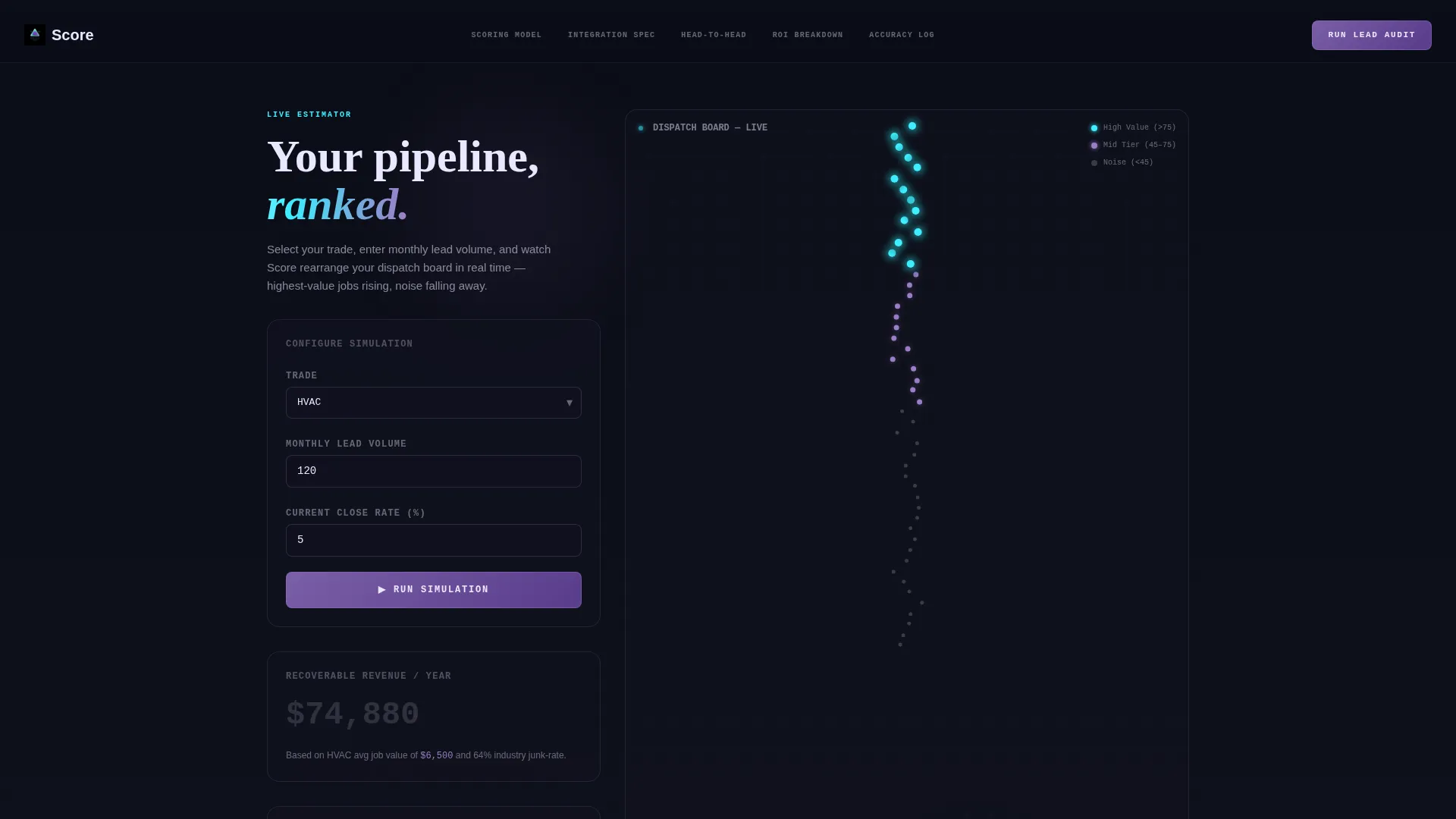
- An animated header estimator where visitors enter their trade, lead volume, and close rate, then watch a simulated lead queue reorganize in real time
- Five anchor-linked spokes covering Scoring Model, Integration Spec, Head-to-Head, ROI Breakdown, and Live Accuracy Log, each styled as a spec-sheet binder tab
- Two conversion paths: a primary "Run Your Lead Audit" form and a secondary "See the Scoring Model Live" demo link, both placed strategically within the page flow
Feature list
This section describes the core built-in components and interaction patterns included in the Score template.
Interactive Lead Estimator Header
The header is a fully functional calculator. Visitors choose their trade from plumbing, HVAC, roofing, or electrical, then enter monthly lead volume and current close rate. On submit, fifty animated dots scatter and reorganize into a ranked stack. A revenue ticker climbs to show the dollar value recovered by prioritizing top-tier leads. There is no hero image; the product demo IS the header.
Pinned Hub-and-Spoke Anchor Navigation
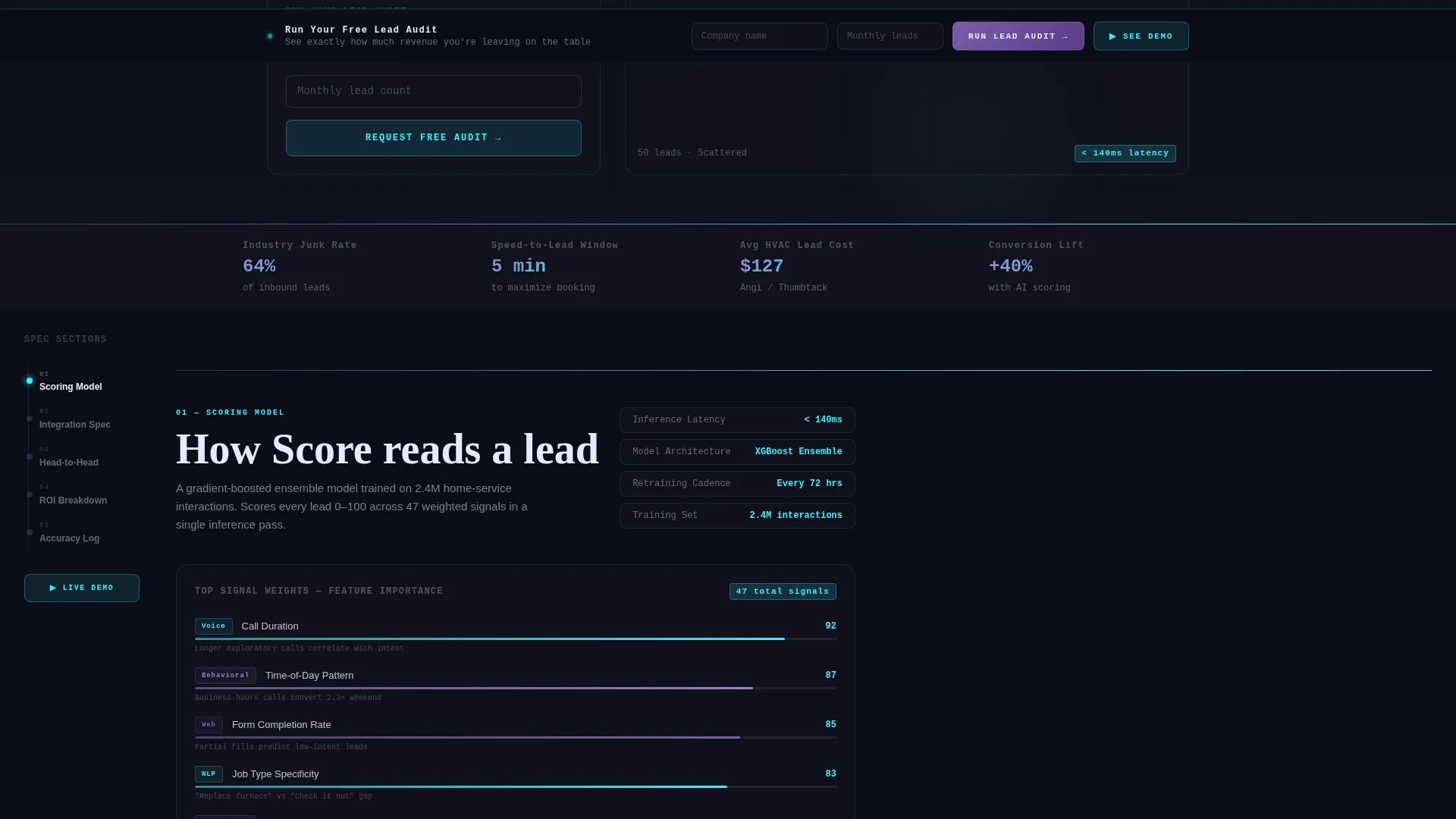
A left-pinned anchor navigation bar acts as the structural hub of the page. Five spoke labels sit persistently visible as the visitor scrolls. Each spoke jumps to its corresponding technical section. Active navigation states glow in spectral violet to signal position within the page.
Spec-Sheet Spoke Layout
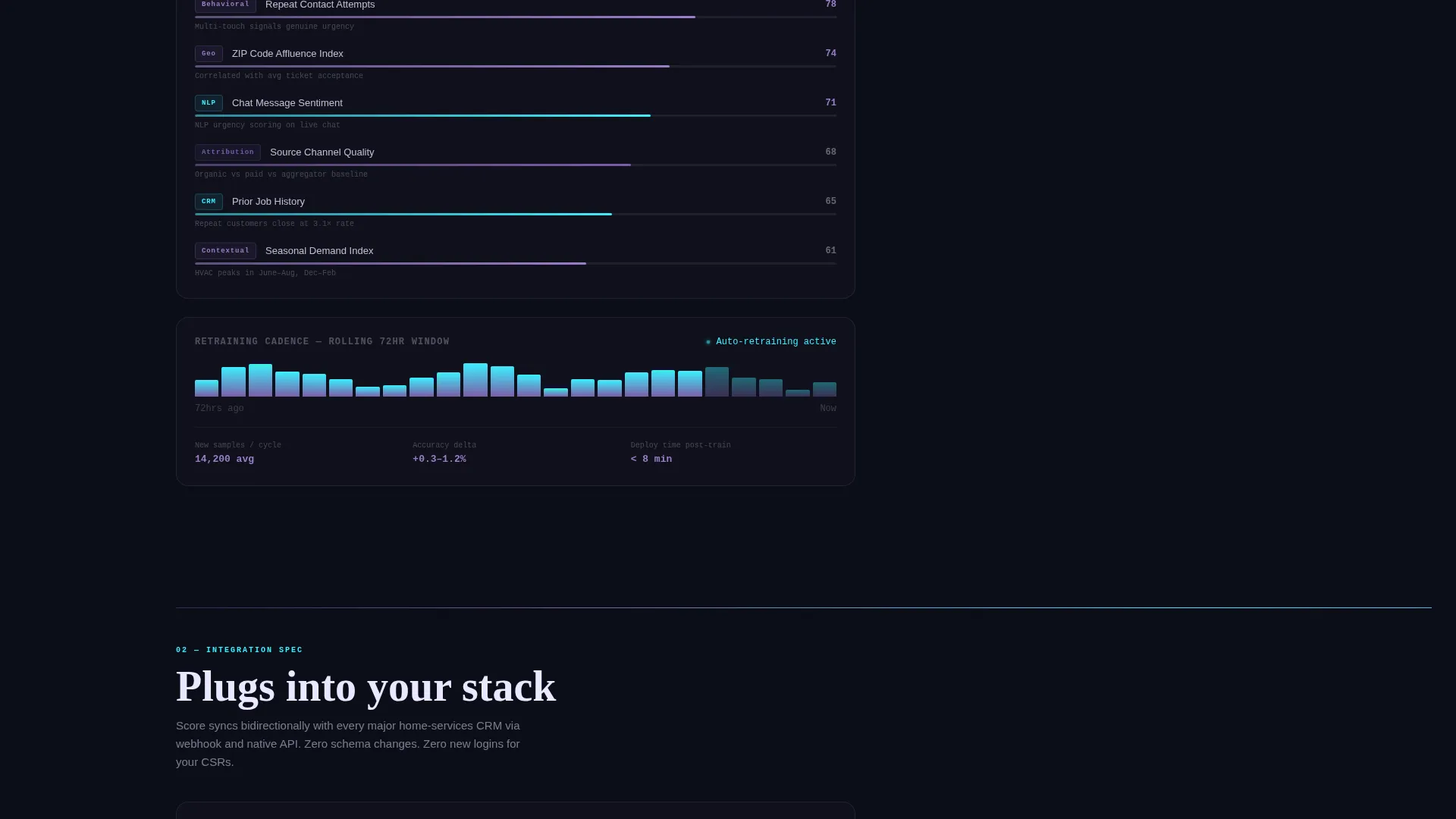
Each of the five spokes reads like a technical data card. The layout presents dense, real figures: score latency under 140 milliseconds, model retraining every 72 hours on live data, and webhook-based sync protocols. Motion-animated counters and micro-charts activate as each spoke enters the viewport.
Head-to-Head Comparison Matrix
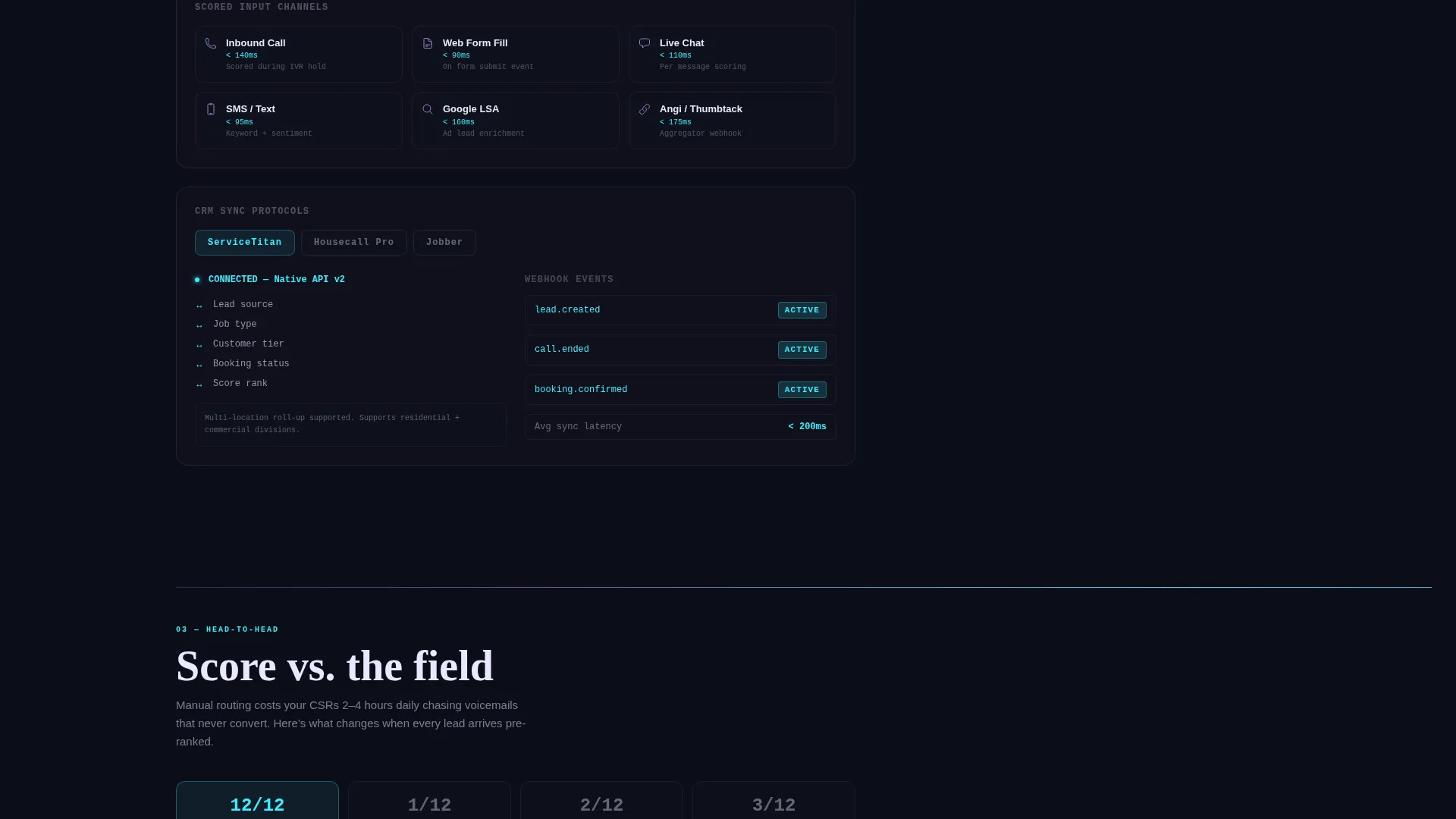
The Head-to-Head spoke is the page's gravitational center. It places the scoring platform against manual lead routing and two named competitors in a structured feature matrix. Animated checkmarks fill in and gap-highlight bars draw the eye to competitive advantages, making the comparison feel earned rather than claimed.
Dual Conversion Path System
The primary call to action, "Run Your Lead Audit," is a two-field form collecting company name and monthly lead count. It appears inside the estimator header and again as a sticky bar that activates after the comparison spoke. The secondary path, "See the Scoring Model Live," links to a recorded demo for visitors who need more proof before committing.
Viewport-Triggered Motion System
The Dynamic Motion theme drives micro-interactions throughout the page. Counters animate on scroll entry, chart lines draw themselves into view, and iridescent gradient washes bleed between violet and cyan on section dividers. Each transition reinforces the sense that the interface is actively computing, not just displaying static content.
Page sections overview
| Section | Purpose |
|---|---|
| Estimator Header | Interactive lead-value calculator with animated dot queue and revenue ticker |
| Anchor Nav Hub | Pinned left navigation linking all five content spokes |
| Scoring Model Spoke | Technical breakdown of how the machine-learning scoring engine works |
| Integration Spec Spoke | Webhook sync details and supported field-management platforms |
| Head-to-Head Spoke | Animated feature matrix comparing manual routing and named competitors |
| ROI Breakdown Spoke | Revenue impact data cards showing cost of unqualified lead volume |
| Live Accuracy Log Spoke | Real-number performance indicators with motion-activated micro-charts |
| Sticky Audit call to action | Persistent two-field form activated after the comparison section |
| Demo Link Section | Secondary conversion path to a recorded scoring model walkthrough |
Design & branding system
The Score template uses an AI Iridescent color system built on a void black base. The palette was designed to feel technological and alive, as if the interface is actively thinking. Gradient washes bleed continuously between violet and cyan as the visitor scrolls, giving the page a sense of unbroken computation.
- Void black (#0B0D17) as the primary background, spectral violet (#7B5EA7) for active navigation states and graph lines, shifting cyan (#3CEFFF) for score indicators and hover glows, and pearl white (#EAE8FF) for body text
- Iridescent gradient transitions appear on section dividers, sustaining visual momentum across each spoke without breaking the dark-field aesthetic
- The Dynamic Motion theme drives all interaction states: dot animations in the estimator, counter roll-ups on scroll, chart line draws, and hover glows on interactive elements
Mobile & speed optimization
The template is structured so that the hub-and-spoke layout adapts cleanly for smaller screens. The pinned left navigation collapses into a compact anchor menu, and the estimator retains its interactive functionality at mobile viewport widths.
- The animated dot estimator and motion counters are built to trigger on scroll entry, keeping the experience consistent across screen sizes
- Section cards in each spoke are laid out with readable column widths so the dense spec-sheet content remains scannable on a phone without horizontal scrolling
How this template helps you convert
The Score template earns conversions by making the visitor's own waste visible before asking for any commitment. The conversion architecture follows a deliberate sequence.
- The estimator header forces a personal calculation first. Visitors input their own numbers and see a simulated version of their current lead queue reorganized by value. The dollar figure that ticks upward is based on their data, not a generic claim, making the ROI argument feel immediate and personal.
- The Head-to-Head comparison spoke, positioned as the page's gravitational center, delivers competitive context at the exact moment a visitor has already quantified their problem. Animated checkmarks and gap-highlight bars make the advantage concrete without requiring the visitor to interpret marketing language.
- The sticky "Run Your Lead Audit" bar activates after the comparison spoke, catching visitors at peak intent. The two-field form asks only for company name and monthly lead count, lowering the commitment threshold while capturing a qualified lead.
Other information about this template
The Score template was purpose-built for the home services AI lead scoring niche, where technical credibility and speed-to-value are both required to earn a prospect's attention. The following details provide additional context about the template's scope and intended usage.
- The integration spec spoke references webhook-based sync with ServiceTitan, Housecall Pro, and Jobber as the named field-management platforms in the brief
- The scoring model data points included in the template copy reflect the brief's stated figures: sub-140-millisecond scoring latency and a 72-hour model retraining cadence on live company data
- The template is designed for a single landing page flow, not a multi-page site, making it suitable for product launch pages, paid traffic destinations, and demo request campaigns
- The page has no stock imagery by design; the estimator animation and motion system replace traditional hero visuals entirely
Theme
Dynamic Motion
Creative direction
Spec Sheet
Color system
AI Iridescent
Style
Hub & Spoke (Anchor Nav)
Direction
Comparison/Versus
Page Sections
Interactive Lead Estimator Header
Pinned Hub-and-spoke Navigation
Spec-sheet Spoke Layout
Head-to-head Comparison Matrix
Dual Conversion Path System
Viewport-triggered Motion System
Related questions
What type of business is this template designed for?
How does the estimator in the header work?
Can I customize the competitor names in the Head-to-Head matrix?
What are the two conversion paths included in this template?
Does this template require any stock photography or hero images?



