AI for Nonprofit Directory Website Template
Scribe is a nonprofit AI content writer landing page template built around two structured comparison tables. It targets development directors, program managers, and board volunteers who need grant narratives, donor appeals, and impact reports written fast. The page drives visitors toward a free-trial signup using scroll-triggered animations, a persistent call-to-action bar, and an inline sample modal.
by Rocket studio
Quick summary
Scribe is a single-page, click-through landing page template for a nonprofit AI writing tool. It uses two animated comparison tables to make the case for faster, voice-consistent grant writing. The design runs on a Monochrome Steel palette with scroll-triggered motion, a floating call-to-action bar, and an inline sample modal that shows proof before asking for a click.
Who this template is for
This template is built for teams selling or showcasing an AI writing tool aimed at the nonprofit sector. It speaks directly to people who write under resource pressure and deadline stress.
- Solo development directors managing grants, donor appeals, and reports with limited support
- Program managers juggling multiple funding cycles and communications at once
- Volunteer board members who took on newsletter duties and ended up owning a full communications calendar
What problem this template solves
Nonprofit communicators face a specific, exhausting problem: they need to produce high-quality written content in a distinct organizational voice, repeatedly, with almost no time or budget. Generic AI writing tools do not understand grant compliance language, donor tone, or the nuance of an impact report. This template gives that AI tool a page that explains the difference clearly.
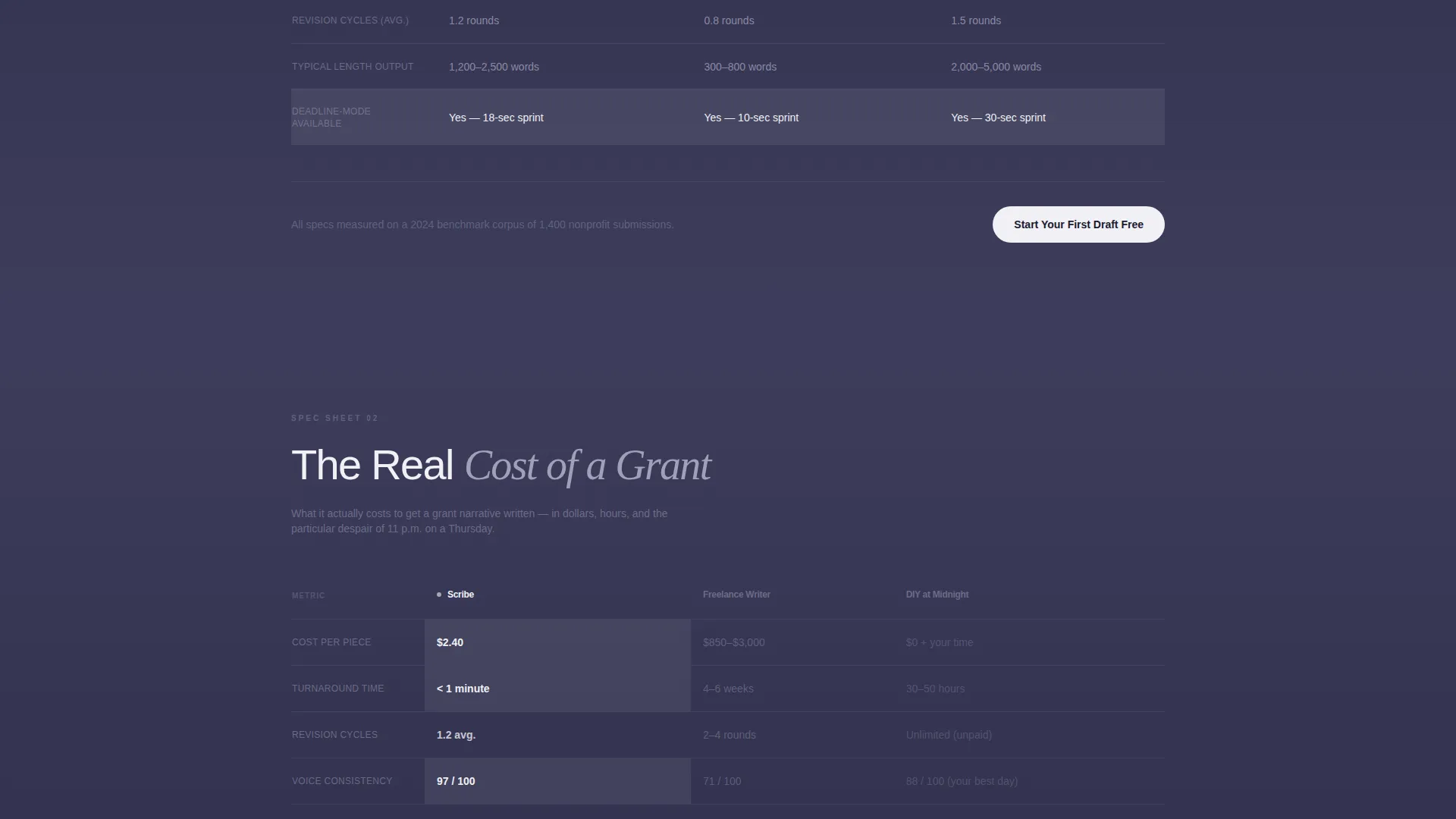
- Visitors need to see how the tool compares to hiring a freelance writer or doing it themselves at midnight
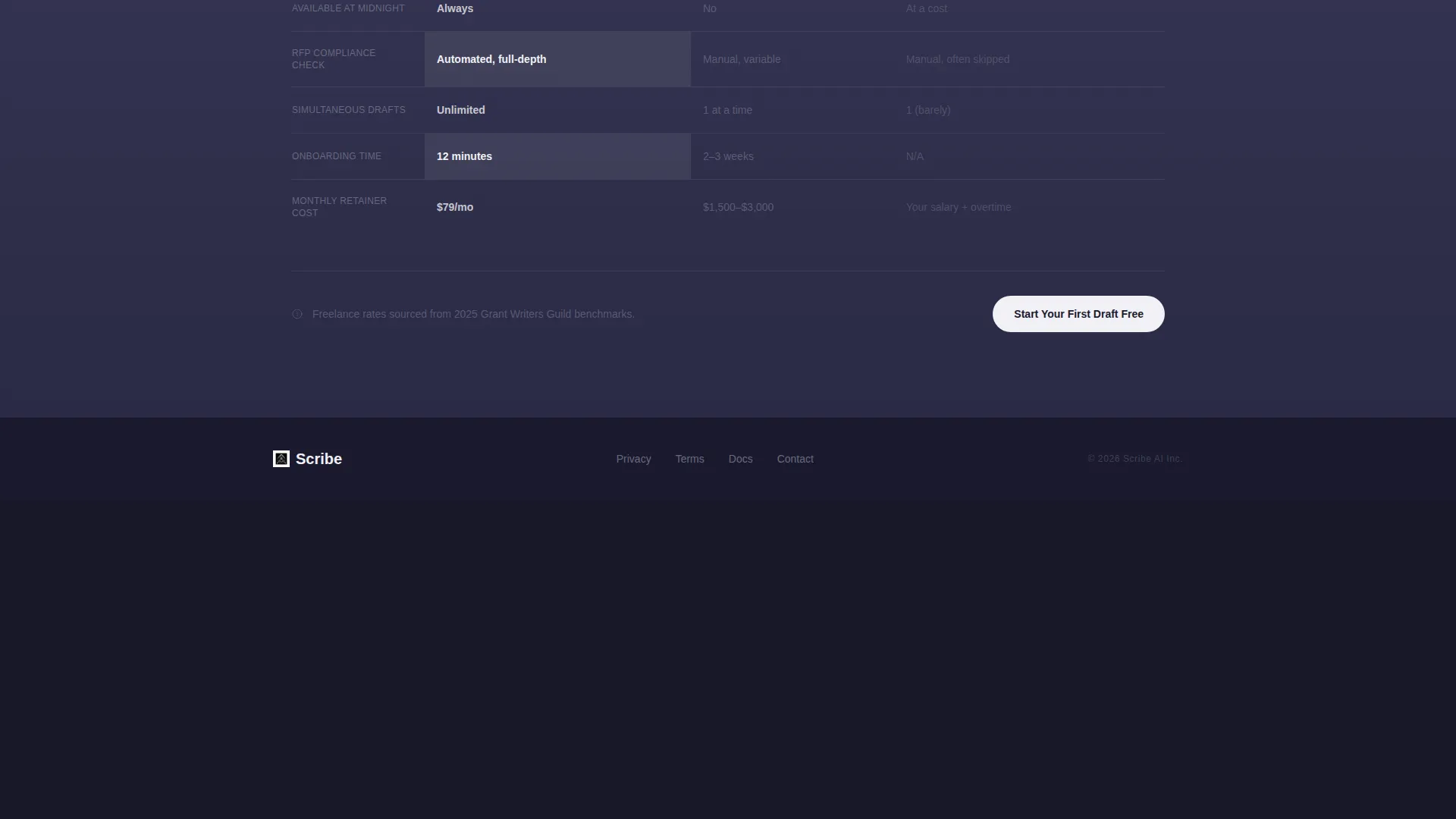
- The cost, turnaround, and voice-consistency gap between options is the core argument, and the comparison table structure makes it scannable
- Buyers need proof before they sign up, which is why the inline sample modal exists
What you get with this template
You get a fully structured, single-page landing page designed to move nonprofit professionals into a free-trial signup flow. Every section is purposeful and conversion-oriented, with no form fields on the page itself.
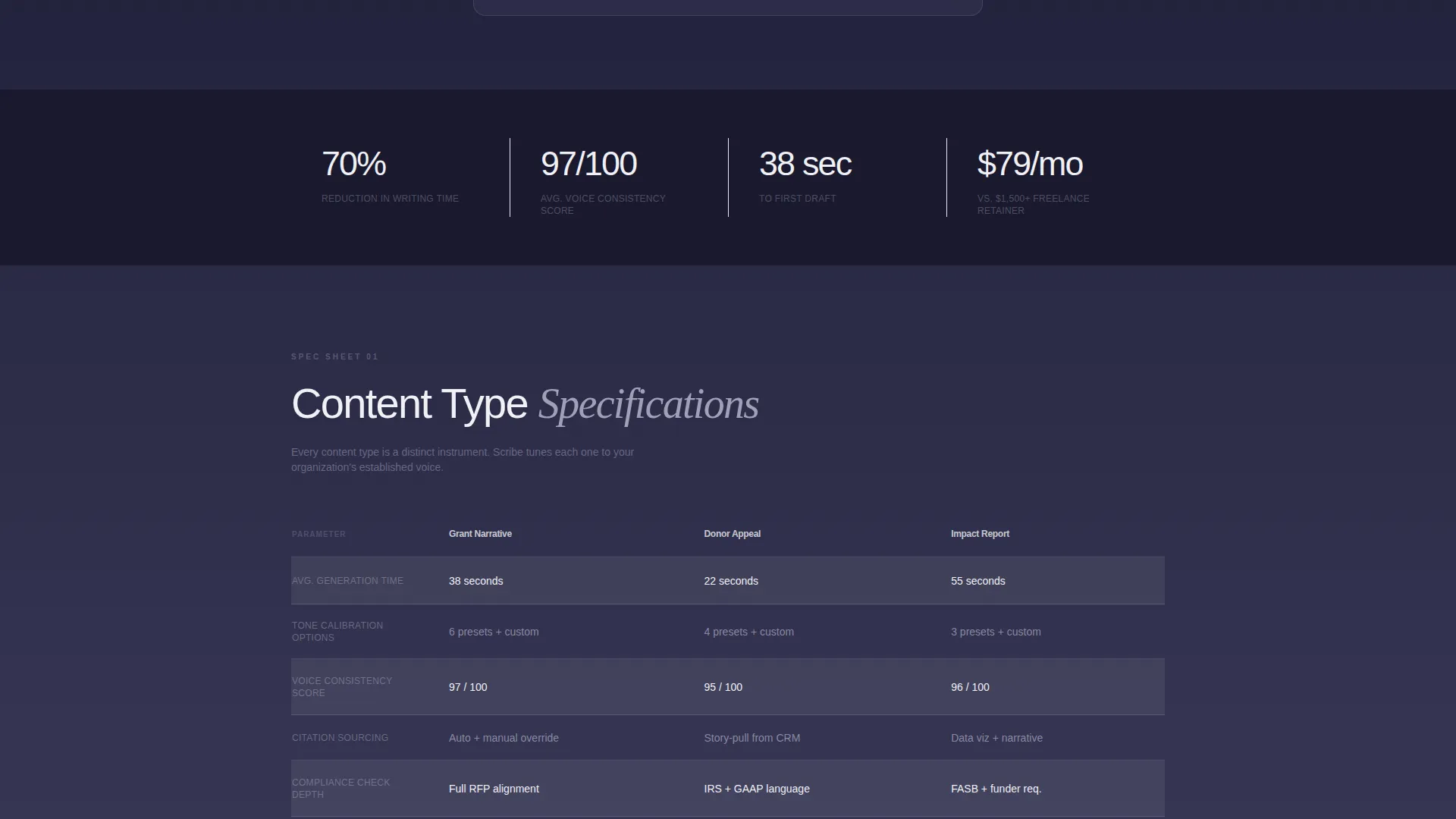
- Two animated comparison tables covering content type specifications and competitive cost comparisons
- A persistent floating call-to-action bar that appears after the second scroll and stays visible throughout
- An inline modal triggered by a secondary text link, displaying a real AI-generated letter of intent as proof content
Feature list
This template includes the following built-in design and layout features, all grounded in the source brief.
Animated Logo Bar Header
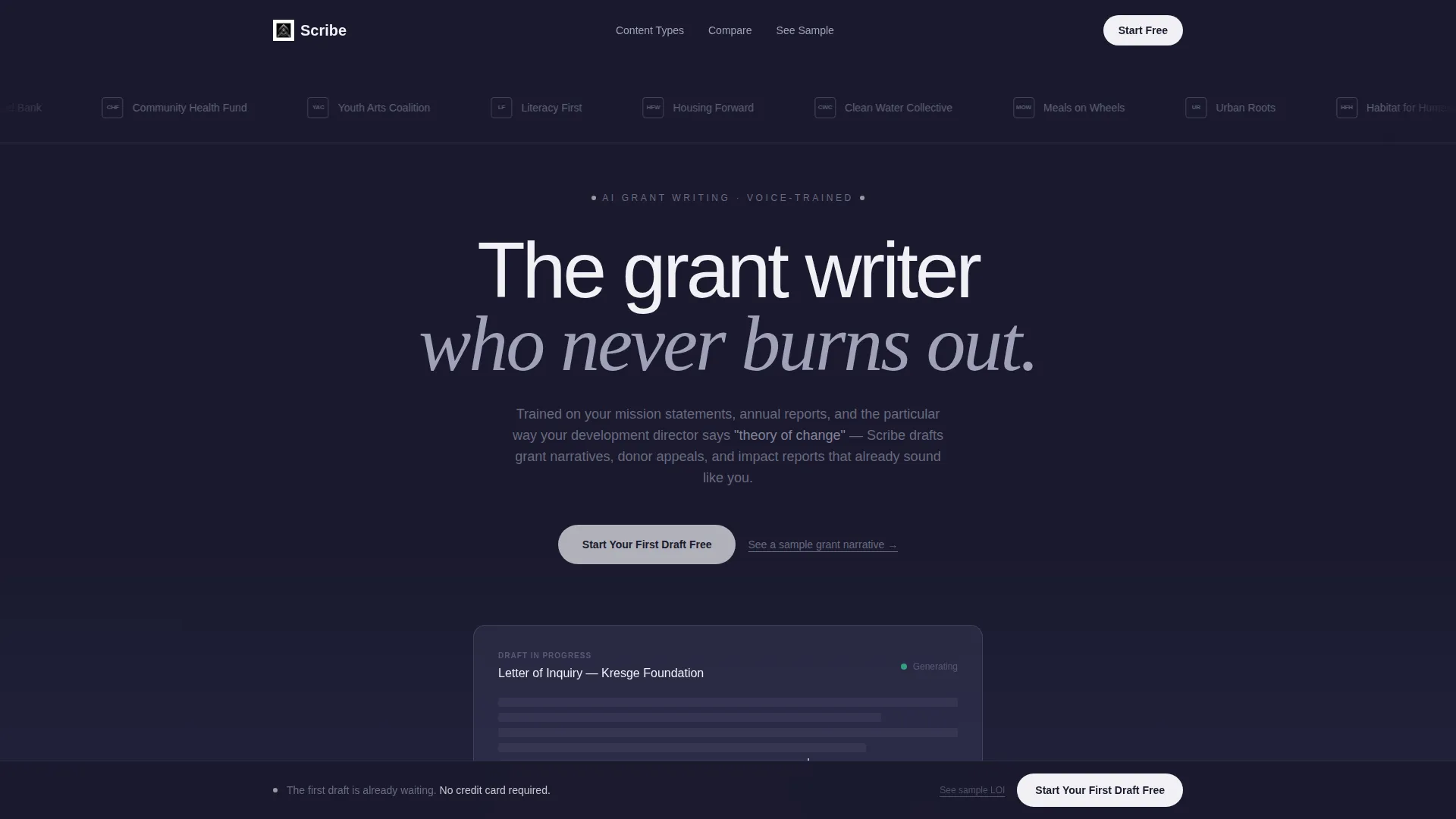
A horizontal scrolling bar of nonprofit organization logos glides left to right in polished nickel on a forge black background. There are no borders, no labels, and no static framing. The motion runs continuously, giving the header silent credibility before a single word is read.
Scroll-Triggered Comparison Tables
Two structured tables animate in row by row as the visitor scrolls. Steel lines draw themselves across the viewport and numbers tick up to their final values. The motion is mechanical and precise, treating grant writing specifications like product data rather than marketing copy.
Persistent Floating Call-to-Action Bar
After the visitor scrolls past the second section, a bottom bar locks into place and stays visible for the rest of the session. It carries the primary call-to-action label throughout the page without interrupting the reading flow.
Inline Sample Modal
A secondary text link triggers a modal overlay containing a real AI-generated letter of intent. Visitors can read proof of the tool's voice quality before committing to a click. The modal keeps the visitor on the page rather than sending them to a separate preview URL.
Click-Through Context Handoff
The primary call-to-action button carries context into the signup page, noting which comparison table the visitor engaged with longest. No form fields appear on this landing page. The entire conversion moment happens on the next page.
Page sections overview
| Section | Purpose |
|---|---|
| Animated Logo Bar | Establish nonprofit credibility through familiar organization marks in continuous horizontal motion |
| Hero Headline | Anchor the page with a single signal-white statement on forge black |
| Content Type Table | Compare grant narrative, donor appeal, and impact report specs side by side |
| Competitive Cost Table | Compare the tool against freelance hiring and self-writing across cost, turnaround, and voice consistency |
| Persistent call to action Bar | Keep the primary call-to-action visible after the second scroll throughout the rest of the page |
| Inline Sample Modal | Deliver an AI-generated letter of intent as proof content triggered by a secondary text link |
Design & branding system
The visual identity follows a Dynamic Motion theme expressed through a Monochrome Steel color system. Every color choice is functional, with no decorative warmth and no wasted surface.
- Forge black (#1A1A2E) anchors the header, nickel (#A0A0B8) rules table rows, and signal white (#F0F0F5) is reserved exclusively for call-to-action elements and active table cells
- The page background graduates from forge black at the top to brushed graphite (#3D3D5C) in the mid-page sections, creating depth without changing the palette
- Hover states pulse gently in signal white against the monochrome field, giving the page its only moment of interactivity outside the scrolling logo bar
Mobile & speed optimization
The template is designed with a lean, single-column scroll flow that translates directly to smaller screens without losing the table structure or animation logic.
- Comparison tables reflow cleanly on narrow viewports, keeping row labels and values readable without horizontal scrolling
- The persistent floating call-to-action bar scales to mobile widths and remains tappable throughout the scroll session
- The logo bar animation and row-by-row table reveals are scoped to work within a single-page layout without adding unnecessary load complexity
How this template helps you convert
Every structural decision on this page points toward one action: clicking through to the free-trial signup flow.
- The comparison tables do the persuasion work by letting numbers and specifications make the case, so the visitor arrives at the call-to-action already convinced rather than still evaluating
- The inline sample modal removes the last objection by showing real output before asking for any commitment, which shortens the trust gap between interest and action
- The persistent floating bar ensures the primary call-to-action is never more than one glance away, regardless of how deep the visitor has scrolled into the comparison data
Other information about this template
This template is part of a broader set of AI tool landing page templates built for technology-adjacent niches, particularly tools serving mission-driven organizations. A few additional details are worth noting for teams evaluating it.
- The template style is Comparison Table, which makes it well suited for any AI writing tool that needs to position itself against manual alternatives or competing approaches
- The click-through landing page direction means the page carries zero form friction; all data collection happens on the destination signup page
- The Dynamic Motion theme and Monochrome Steel color system together create a tone that feels engineered and precise, which reinforces the message that this is a professional-grade tool rather than a generic text generator
- This template can support a nonprofit AI writing tool, a grant writing software product, or any AI-assisted content platform targeting the social sector
Theme
Dynamic Motion
Creative direction
Spec Sheet
Color system
Monochrome Steel
Style
Comparison Table
Direction
Click-Through
Page Sections
Animated Scrolling Logo Bar
Row-by-row Table Animation
Persistent Floating Call to Action Bar
Inline Proof Modal
Context-aware Click-through Flow
Related questions
Can this template be used for a different type of AI writing tool?
Does this template include the AI writing functionality itself?
How does the inline sample modal work?
What does the context-aware click-through mean in practice?
Is the scrolling logo bar easy to customize?



