Entertainment AI Writing Landing Page Template
Scriptline is a dark-terminal landing page template built for AI writing tools serving the entertainment industry. It leads with animated production stats, side-by-side comparison tables, and a dramatic code-snippet header to prove capability before asking for anything. The design targets showrunners, indie producers, and studio executives who need fast, format-perfect script output from an AI engine.
by Rocket studio
Quick summary
Scriptline is a single-page lead generation template for entertainment AI writing tools. It opens with a full-viewport terminal animation and drives scroll through animated stats and comparison tables. The dark Dashboard Pro aesthetic signals professional production credibility. Every section builds toward one action: submitting a logline and getting something back.
Who this template is for
This template is built for AI-powered entertainment writing tools that need to prove their output quality before asking for a signup. It speaks directly to time-pressured production professionals who need evidence, not promises.
- Showrunners managing pilot rewrites on tight deadlines
- Indie producers working across multi-episode arcs with limited budgets
- Content studio heads sourcing fast, formatted treatments for executive review
What problem this template solves
Most AI tool landing pages lead with features. Entertainment professionals tune that out instantly. They need numbers, format proof, and a reason to trust the machine. This template flips the script by leading with production data and letting the comparison tables do the selling.
- Generic AI landing pages fail to speak the language of production pipelines
- Writers' room comparisons are missing, leaving buyers without a benchmark
- Standard templates cannot convey the urgency and precision that studio clients demand
What you get with this template
You get a fully structured, dark-themed single-page layout designed around proof-first conversion. Every visual element, from the terminal header to the amber call-to-action buttons, is built to move a skeptical production professional from curiosity to action.
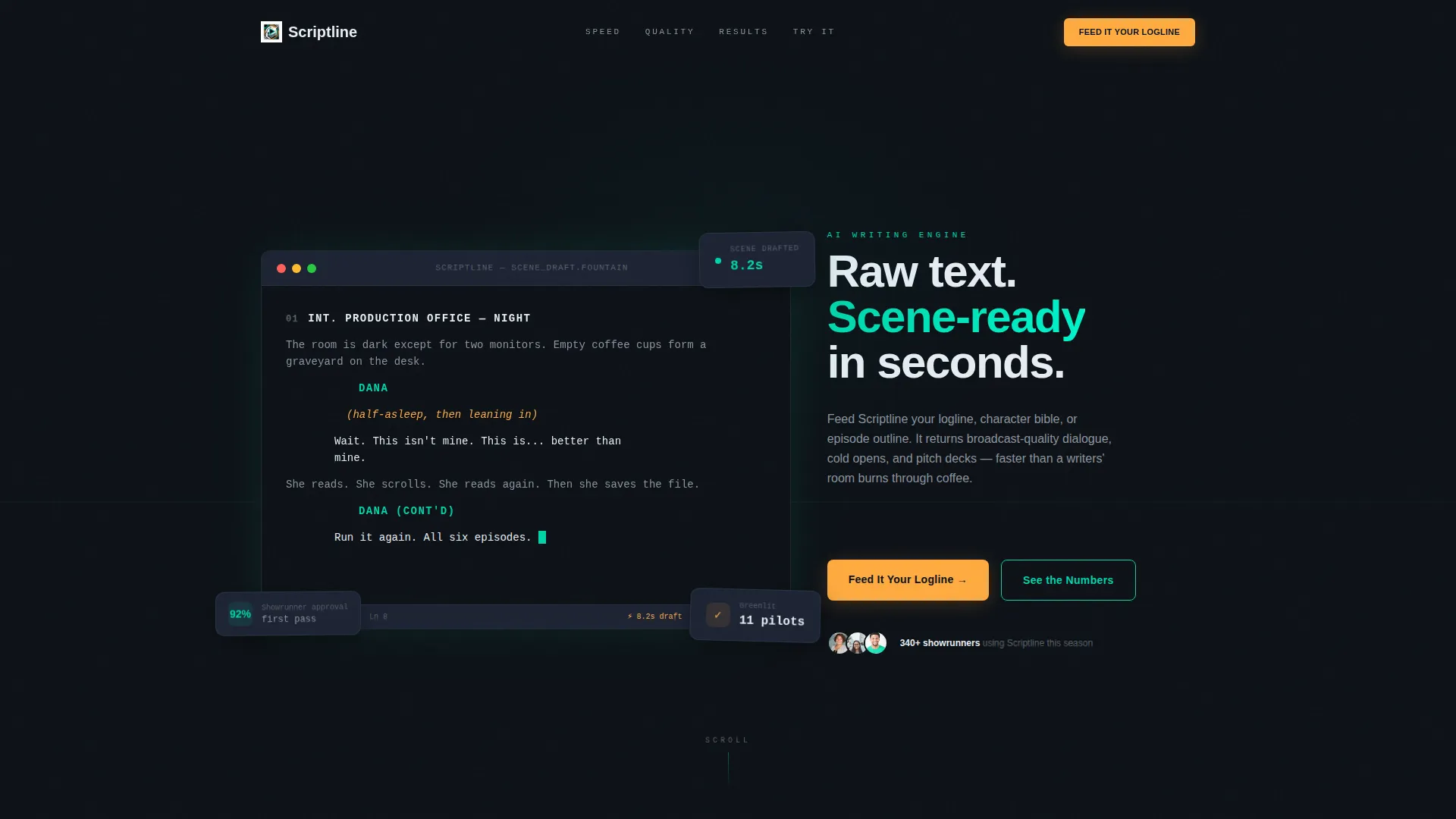
- A full-viewport animated terminal header displaying screenplay syntax in real time
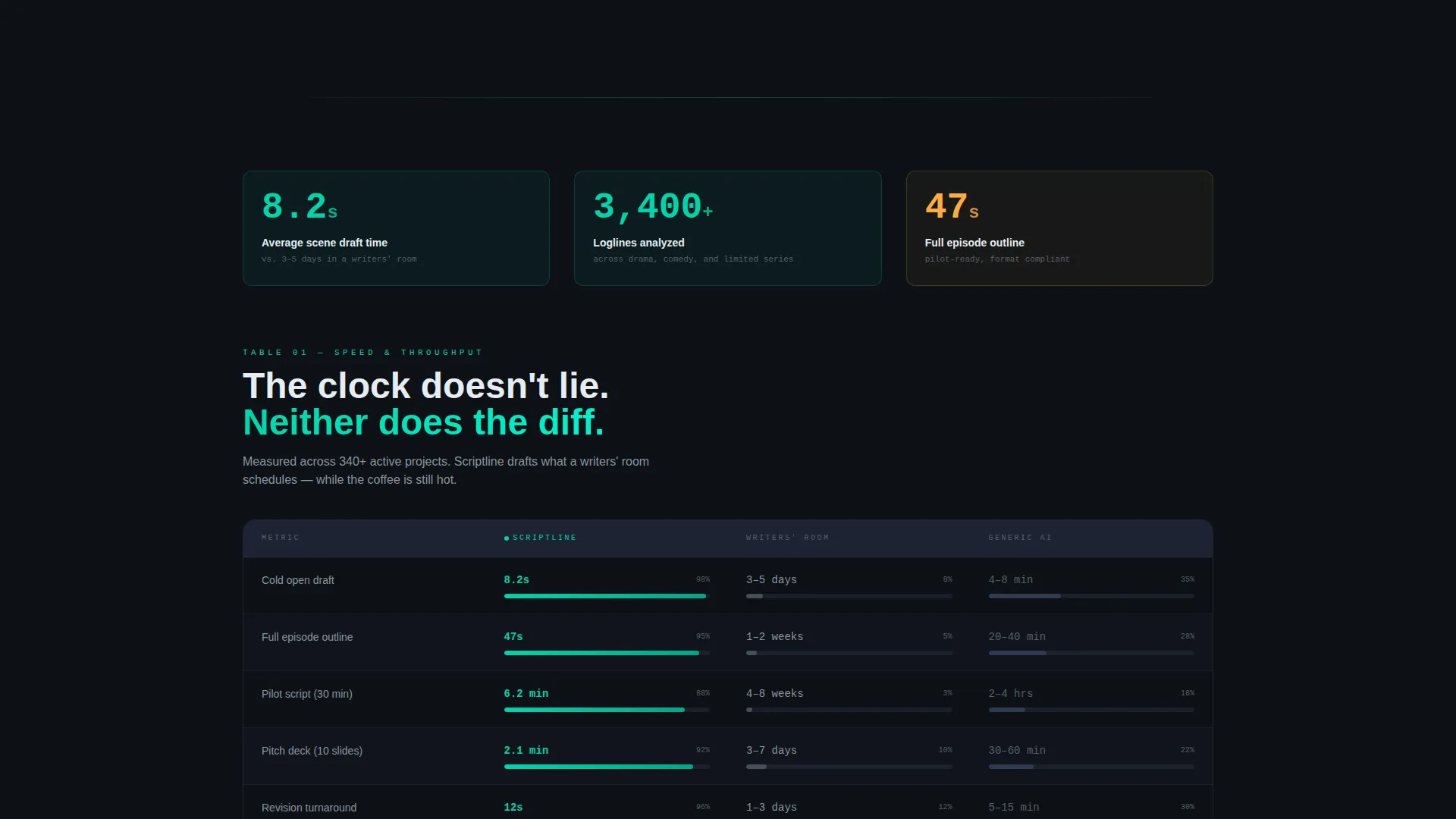
- Three stats-first comparison table sections scored across speed, tone, format, and revision depth
- A dual conversion path: a three-field logline submission form and a gated sample script download
Feature list
This template ships with purpose-built sections and interaction patterns tuned for entertainment industry buyers. Each feature below reflects a design or structural decision stated in the source brief.
Animated Terminal Header
The header fills the full viewport with a dark terminal window. Screenplay elements, including slug lines, action blocks, parentheticals, and dialogue, render line by line in real time. Syntax highlighting uses electric teal and reactor amber against deep black. A blinking cursor and a sharp closing line of dialogue anchor the opening impression.
Stats-First Section Architecture
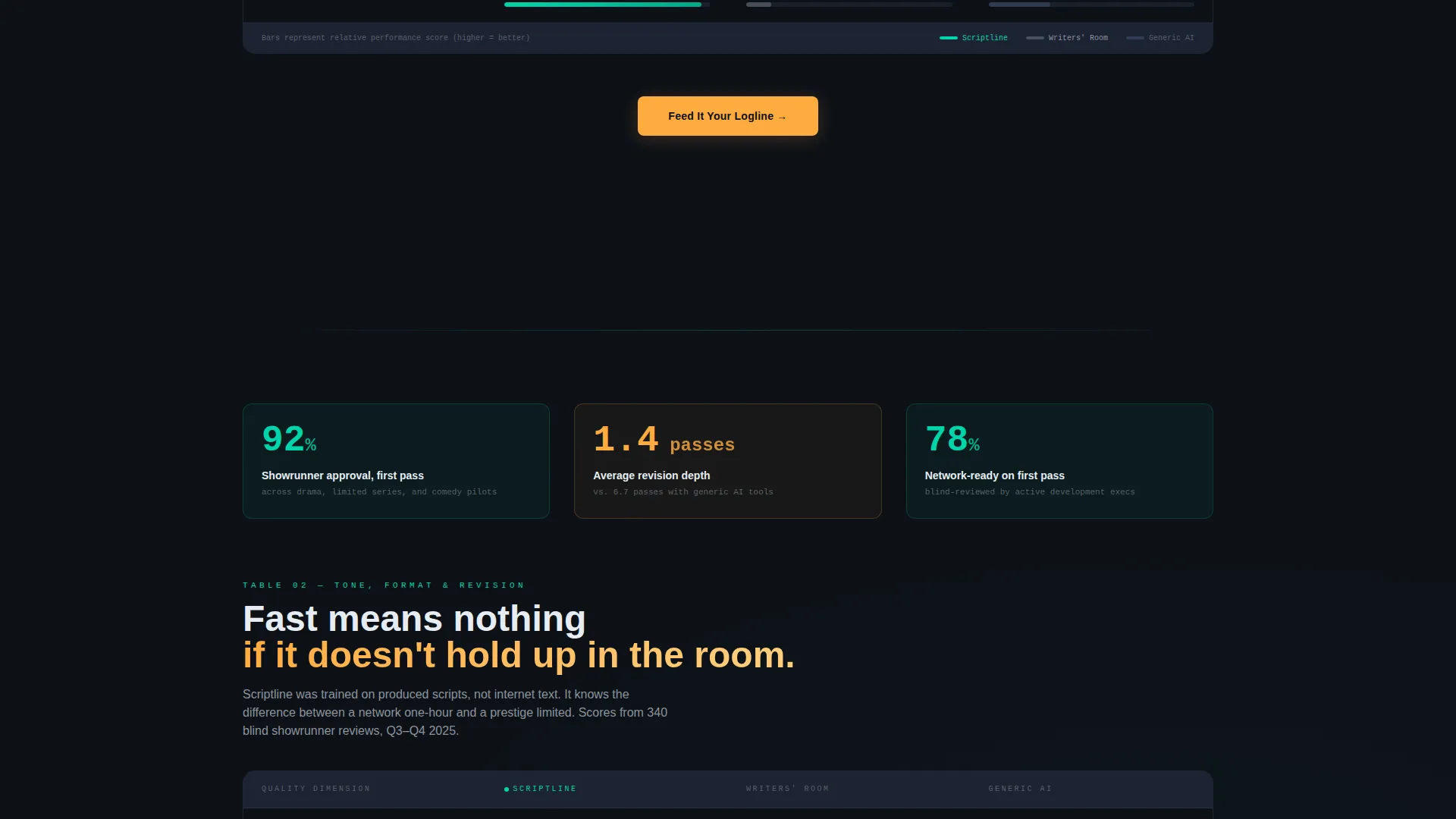
Every major section opens with a large animated number before any explanation appears. Stats like "8.2s average scene draft" and "92% showrunner approval on first pass" load before the supporting copy, so the data lands first and the narrative follows naturally.
Comparison Table Layout
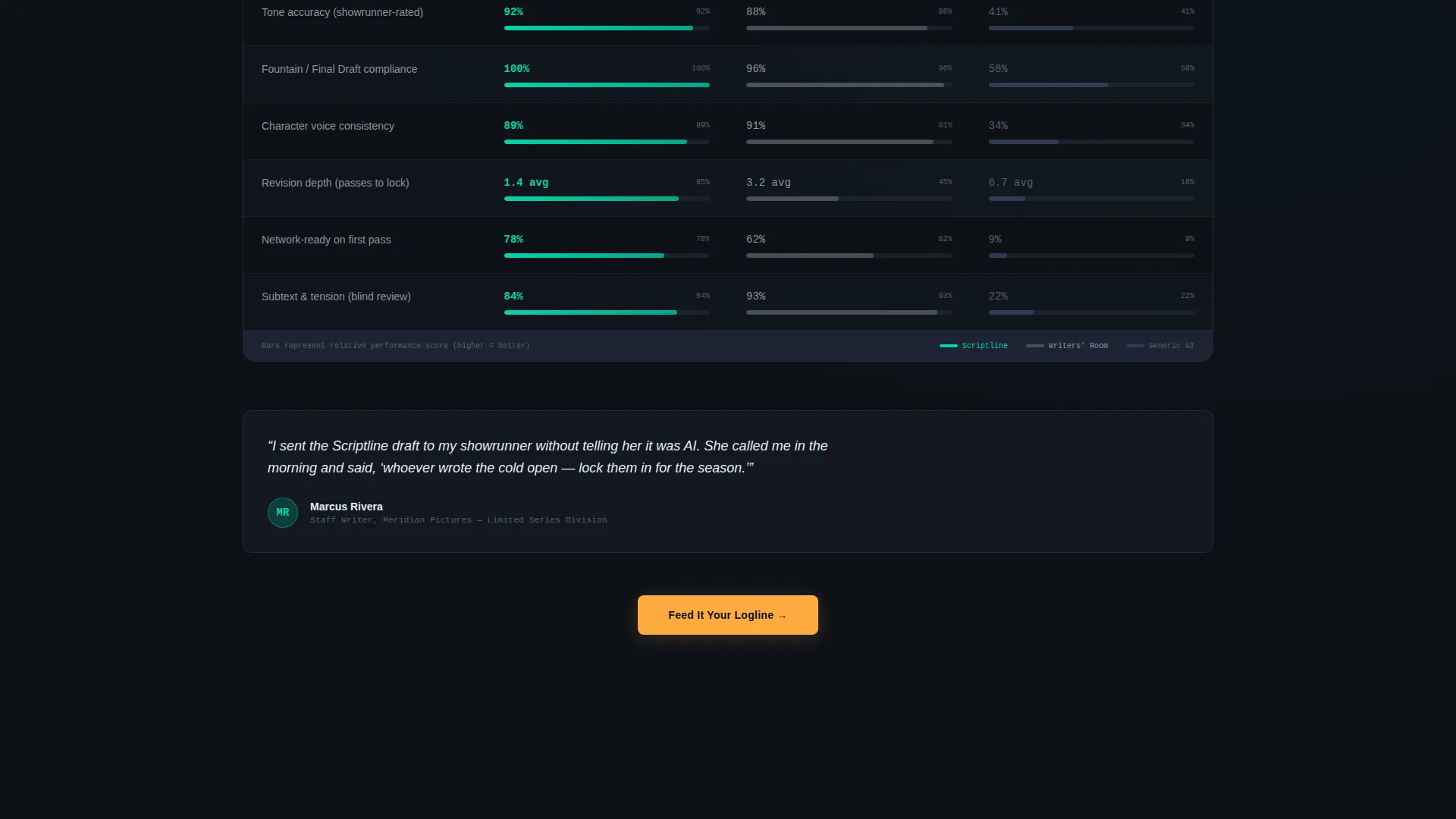
Each stat section includes a structured comparison table: Scriptline versus a traditional writers' room versus generic AI tools. Tables score each option across speed, tone accuracy, format compliance, and revision depth. Rows alternate between slate and black backgrounds, and teal progress bars animate on scroll.
Dual Conversion Path Design
The primary call-to-action, labeled "Feed It Your Logline" in reactor amber, anchors after the second comparison table and repeats as a sticky bar on mobile. A secondary path below the final table offers a downloadable AI-drafted cold open gated behind an email address only.
Three-Field Logline Submission Form
The lead capture form keeps friction minimal. It sequences a freeform logline textarea, a format dropdown covering pilot, feature, limited series, and pitch deck options, and a work email field. Nothing else is asked before the visitor submits.
Escalating Narrative Structure
The page builds deliberately. The first table establishes speed. The second proves quality. The third connects to real production outcomes, referencing named pilot seasons and studio partnerships. Each table is more specific than the last, so trust compounds as the visitor scrolls.
Page sections overview
| Section | Purpose |
|---|---|
| Terminal Header | Opens with real-time screenplay animation and a production stat |
| First Stats Block | Leads with speed metric and first comparison table |
| Second Stats Block | Presents quality proof and anchors the primary call to action |
| Third Stats Block | Delivers real production outcome data and final comparison table |
| Logline Capture Form | Collects logline, format type, and work email for lead generation |
| Sample Script Gate | Offers a downloadable cold open behind an email-only form |
| Sticky Mobile call to action | Repeats the primary call-to-action as a persistent bottom bar |
Design & branding system
The visual system is built on the Dashboard Pro theme using the Teal Catalyst color palette. The overall feeling is a production dashboard at wrap time: dark, data-dense, and quietly confident.
- Core palette: deep command-line black (#0D1117) for backgrounds, electric teal (#00D4AA) for accents and data highlights, muted slate (#1C2333) for card surfaces and table rows, and warm signal white (#E6EDF3) for body text
- Spark color: reactor amber (#FFAB40) is used exclusively on call-to-action buttons and live-stat counters to draw the eye without competing with the data layer
- Teal progress bars animate on scroll inside comparison table rows, reinforcing the sense that the data is live and responsive
Mobile & speed optimization
The template is structured to deliver the same proof-first experience on mobile that desktop visitors get. Layout decisions reflect the scroll behavior and screen constraints of a user checking the tool between production meetings.
- The sticky bottom bar keeps the primary call-to-action visible throughout the entire mobile scroll without interrupting the reading flow
- Comparison tables are designed as alternating-row layouts that remain readable at narrow viewport widths
- The animated terminal header and scroll-triggered stat counters are built as section-level interactions, keeping each component self-contained and lightweight in structure
How this template helps you convert
The conversion logic in this template is built around earning trust with evidence before asking for any commitment. Every layout decision delays the ask until the visitor has already seen the proof.
- The terminal header and opening stat create immediate credibility by showing script output and a real production number before any marketing copy appears.
- Three escalating comparison tables move the visitor from "this is fast" to "this is accurate" to "this works in real productions," compressing a full sales argument into a single scroll.
- The dual conversion path captures both high-intent visitors ready to submit a logline and lower-intent visitors who want to see a sample first, maximizing leads across the full audience range.
Other information about this template
This template is designed for a specific niche at the intersection of artificial intelligence and professional entertainment production. It sits within the broader category of AI for entertainment tools, targeting buyers who evaluate software the way they evaluate a writers' room hire: on output quality and turnaround speed.
- The template style is Comparison Table, making it well suited to any AI content tool that needs to position itself against both human workflows and competing software
- The header concept draws from the Code Snippet pattern, a layout approach that signals technical precision without requiring the visitor to understand the underlying technology
- The creative direction follows a Stats-First Impact model, which is particularly effective for entertainment buyers who are trained to read coverage reports and production dashboards
- The lead generation direction means every section is structured to move visitors toward a form, with the gated sample script offering a lower-commitment second path for buyers still in evaluation mode
- The Dashboard Pro theme and Teal Catalyst color system can be adapted to related tools in script coverage, production scheduling, or AI-assisted development if the same audience and tone apply
Theme
Dashboard Pro
Creative direction
Stats-First Impact
Color system
Teal Catalyst
Style
Comparison Table
Direction
Lead Generation
Page Sections
Animated Terminal Header
Stats-first Section Flow
Escalating Comparison Tables
Dual Conversion Path
Three-field Logline Form
Proof-to-pitch Narrative Arc
Related questions
What kind of AI writing tool is this template designed for?
Can I use this template if my tool covers more than one script format?
Is the terminal header animation editable?
Does the template support two separate conversion paths?
Who is the target audience for a template like this?



