Enterprise Data Transfer Landing Page Template
Migrate is a scroll-reveal landing page template built for CLI-based database migration tools. It combines a terminal typewriter hero, an interactive schema diff viewer, a scroll-animated compatibility matrix, and animated benchmark graphs into one high-impact page. Designed for backend engineers and CTOs, it drives lead generation through a frictionless three-field dry-run form placed at the credibility peak.
by Rocket studio
Quick summary
Migrate is a single-page, scroll-reveal landing page template purpose-built for developer-facing database migration tools. It opens with a full-viewport terminal animation, then progressively discloses an interactive schema diff viewer, a connector compatibility matrix, and animated performance benchmarks. A three-field lead capture form closes the page after credibility peaks. Every section earns the next click through interactive evidence.
Who this template is for
This template is built for technical product teams who need to convert skeptical engineers into qualified leads. It speaks directly to the people running late-night dry-runs and the executives signing off on modernization budgets.
- Backend engineers and DevOps leads managing legacy database migrations who need to see proof before they commit to a tool.
- CTOs and engineering managers who have board approval to move infrastructure and need a credible, conversion-ready page fast.
- Developer tool founders and product marketers launching a data migration SaaS to a technical B2B audience.
What problem this template solves
Over 83% of data migration projects either fail or exceed their timelines and budgets. Poor planning, weak tooling communication, and a lack of stakeholder alignment are the root causes. A generic landing page cannot earn the trust of an engineer who has survived a failed migration project before.
- Technical buyers need interactive proof, not stock photography. They want to see schema diffs, connector paths, and real benchmark numbers before filling out a form.
- Teams managing a data migration journey across legacy systems and modern cloud-native targets need a page that speaks their language, shows the migration process in action, and makes the tool feel production-ready.
- Conversion is lost when the page asks for contact details before it has demonstrated competence. This template reverses that order by building credibility through interactivity first.
What you get with this template
You get a fully structured, scroll-reveal landing page with five distinct interactive sections, a dark-mode terminal visual identity, and a lead generation form optimized for a technical audience. Every section is designed to reduce friction and build trust at each scroll depth.
- A terminal typewriter hero section with cascading migration command output, a live schema diff viewer with source and target database toggle, a scroll-animated compatibility matrix, and animated benchmark graphs.
- A three-field lead capture form ("Start a Free Dry Run") placed after the benchmark section, plus a persistent ghost-button secondary call to action in the navigation for engineers not yet ready to commit.
- A void-black, phosphor-green, ultraviolet color system paired with JetBrains Mono and DM Sans typography that signals a serious, dark-mode developer tool from the first pixel.
Feature list
This section walks through the core interactive and structural capabilities built into the Migrate landing page template.
Terminal Typewriter Hero Section
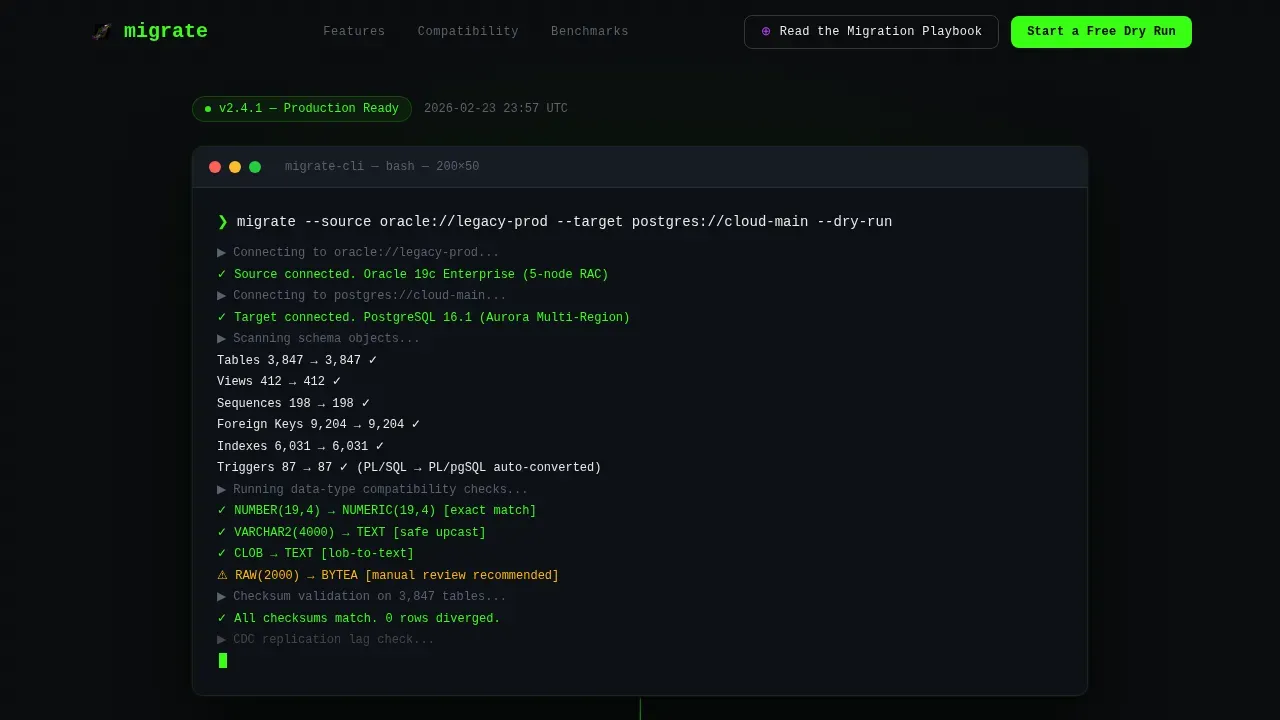
The hero opens as a full-viewport black terminal window. A blinking cursor types the migration command migrate --source oracle://legacy-prod --target postgres://cloud-main --dry-run at realistic keystroke speed. The output cascades in phosphor green: table counts, row diffs, schema validation checks. A single headline then types itself below: "Zero-loss migration. One command." No stock imagery is used. The code itself is the hero element.
Interactive Schema Diff Viewer
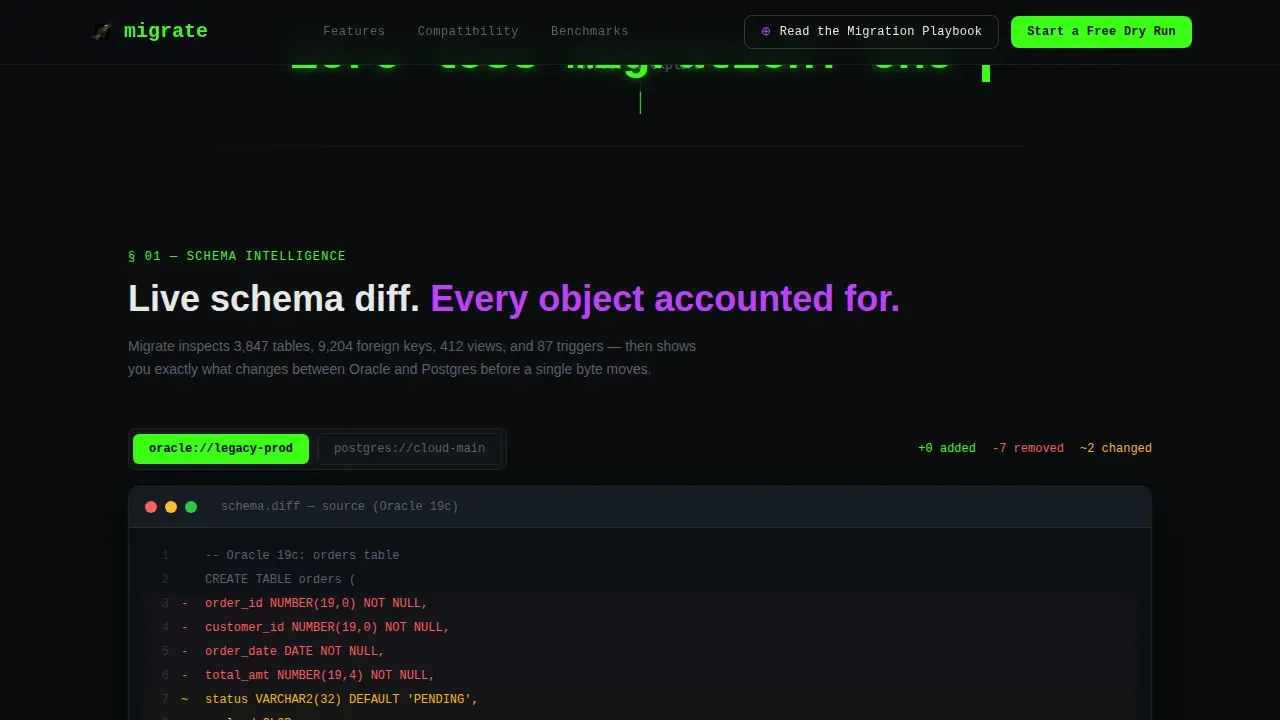
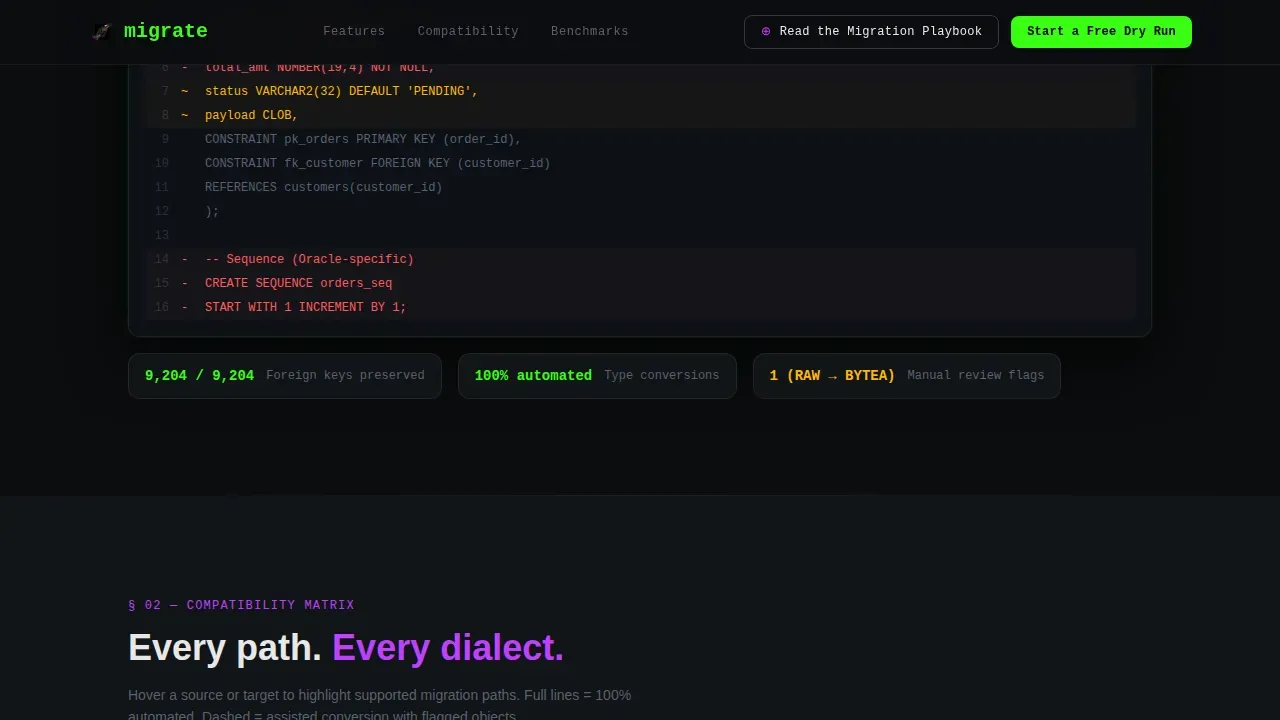
Section one of the scroll journey reveals a live schema diff viewer. Visitors can toggle between the source database and the target database to inspect schema changes side by side. Differences are highlighted in real time, letting engineers verify that foreign keys, indexes, and constraints have been correctly mapped before committing to an actual migration. This interaction builds the kind of trust that a static screenshot never could.
Scroll-Animated Compatibility Matrix
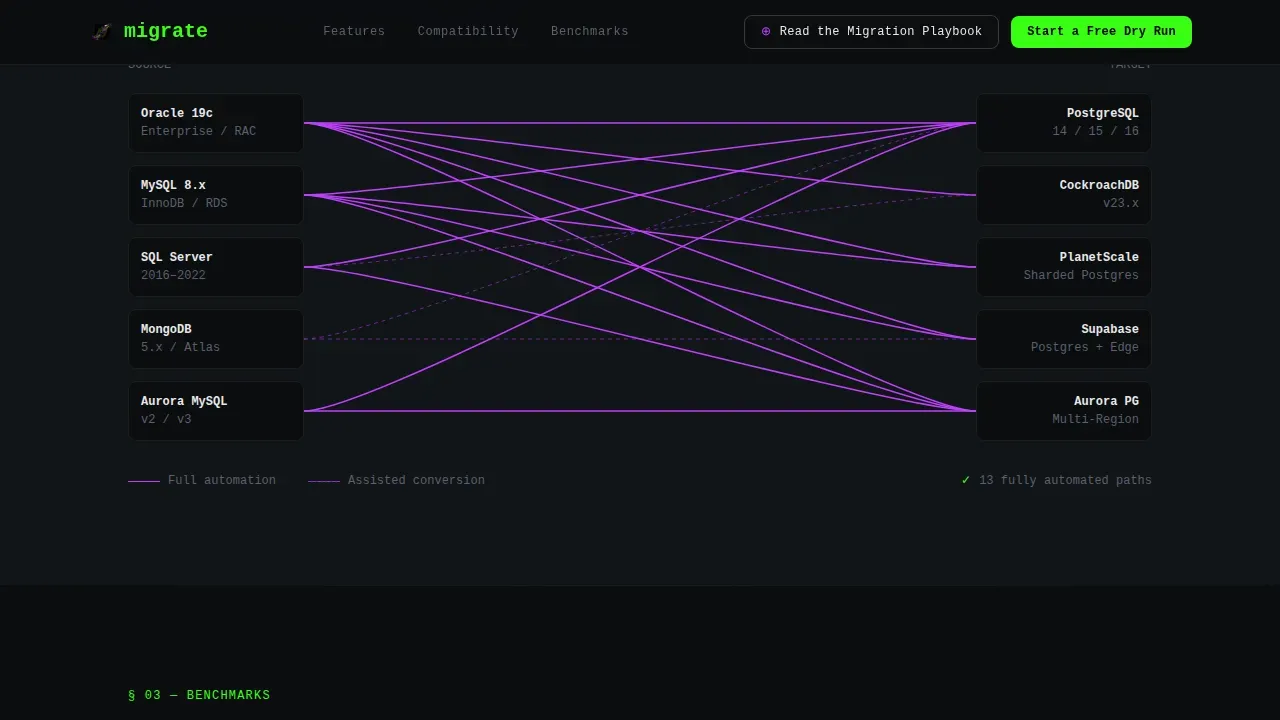
Section two unveils a connector compatibility matrix as the visitor scrolls. Source databases (including legacy instances such as Oracle and MySQL and SQL Server and MongoDB) appear on the left. Target databases (Postgres, CockroachDB, PlanetScale, Supabase) appear on the right. Ultraviolet connector lines draw themselves between supported migration paths as scroll depth increases, making it immediately clear which source and target combinations the tool supports.
Animated Benchmark Graphs
Section three animates bar and line charts into view on scroll. The graphs show row-transfer rates and downtime comparisons using real production data points. Setting clear performance benchmarks before an actual migration is essential for measuring success and identifying issues early. These animated charts make those performance benchmarks tangible and scannable without requiring visitors to read a whitepaper.
Three-Field Lead Capture Form
The lead generation form appears after the benchmark section, at the moment when credibility peaks. It asks for three inputs only: source database type via dropdown, estimated table count via range slider, and work email. Low friction is intentional. Engineers are more likely to start a free dry-run when the form matches the mental model they already have from the interactive sections above it.
Persistent Secondary Navigation call to action
A ghost button labeled "Read the Migration Playbook" floats in the navigation bar throughout the entire page. It captures engineers who are not ready to commit to a dry-run but will trade an email for a technical PDF. This dual conversion path ensures that both high-intent and research-phase visitors have a clear next step at all times.
Page sections overview
| Section | Purpose |
|---|---|
| Terminal Hero | Opens with typewriter migration command and cascading phosphor-green output |
| Schema Diff Viewer | Lets visitors toggle source and target database schemas with live diff highlights |
| Compatibility Matrix | Animates connector lines between supported source and target database pairs |
| Benchmark Graphs | Reveals animated row-transfer and downtime comparison charts on scroll |
| Lead Gen Form | Captures dry-run leads with a three-field form after credibility peak |
| Navigation Ghost call to action | Provides a persistent secondary path for playbook download throughout scroll |
| Footer | Minimal developer-style footer in GitHub-inspired pattern |
Design & branding system
The visual identity channels a dark-mode IDE at midnight with syntax highlighting set to maximum. Every color earns its place by signaling something alive and executing. The palette and type choices are deliberate: they communicate that this tool is built by engineers for engineers.
- Color system: void-black background (#0B0D0F) as the base, terminal phosphor green (#39FF14) for primary accents and output text, ultraviolet (#BF40FF) for connector highlights and interactive states, and cold interface white (#E8E8E8) for body copy.
- Typography: JetBrains Mono handles all terminal, code, and command-line output elements; DM Sans handles body paragraphs, labels, and user interface text for clean readability contrast.
- Animation style: typewriter character reveal at keystroke speed in the hero, scroll-triggered line drawing in the compatibility matrix, staggered chart data-point animation in the benchmark section, and progressive section disclosure throughout the scroll journey.
Mobile & speed optimization
The template is built desktop-first, reflecting the reality that backend engineers and DevOps leads typically work at workstations when evaluating tools for a migration project. The layout remains fully responsive for mobile viewports.
- Intersection Observer API drives scroll-triggered animations, ensuring that interactive elements activate only when they enter the viewport rather than on page load.
- GPU-accelerated transforms and CSS custom properties power the typewriter, line-drawing, and chart animations to keep visual performance consistent across devices.
- The dark-mode color system uses a minimal palette of four defined custom properties, making global theme adjustments straightforward without cascading style conflicts.
How this template helps you convert
This template is engineered to earn trust through interactive evidence before it ever asks for contact details. The conversion sequence is deliberate and mirrors how technical buyers actually evaluate tools.
- The terminal hero proves the tool exists and works by showing a real migration command executing in real time, which immediately signals competence to engineers and reduces the skepticism that kills data migration SaaS conversions.
- The schema diff viewer, compatibility matrix, and benchmark graphs progressively deepen credibility at each scroll depth, so that by the time the visitor reaches the lead form, they have already experienced the product's logic and seen real performance benchmarks.
- The dual conversion path captures both high-intent visitors via the "Start a Free Dry Run" form and research-phase visitors via the persistent "Read the Migration Playbook" ghost button, maximizing lead volume across different buyer readiness levels.
Other information about this template
This section covers additional context about the migration concepts, tooling vocabulary, and planning best practices that inform both the template's content strategy and the broader data migration journey it supports.
A successful data migration requires a structured process. Defining business objectives is the critical first step in any migration project, ensuring that each step serves a clear purpose and keeps key stakeholders and business units on the same page. Involving key stakeholders early validates priorities and prevents costly delays downstream.
Common migration approaches include blue-green deployment and canary releases. A phased approach reduces risk and ensures each key phase of the migration is manageable. Rollback plans are essential: a solid rollback plan allows teams to quickly revert to a stable state if unexpected issues arise during the migration process. Teams should define risk tolerance clearly before moving data from old and new systems simultaneously.
A data migration checklist ensures all post migration tasks are completed. This includes post migration validation to confirm that existing data remains accurate in the new system, post migration monitoring to catch any drift between source and target, and post migration success criteria agreed upon before the actual migration begins. Post migration testing is critical to validate that data has been transferred accurately and completely. Running test migrations in a sandbox or staging environment helps identify potential risks before the actual migration touches a production environment.
Logical migration and physical migration follow different paths. A logical migration transfers data at the schema and row level, while a physical migration moves data at the storage block level. Understanding which approach fits your migration strategy depends on your source database engine, your target database architecture, and your downtime migration tolerance.
Real-time data sync and validation are essential for maintaining consistency between source and target databases throughout the migration process. Mechanisms like Change Data Capture (CDC) monitor database changes and replicate them to the new system in real time, keeping old and new systems synchronized and preventing data loss. High availability configurations and failover mechanisms act as safety nets during migration, handling unexpected failures by redirecting traffic to backup systems. A data loss recovery appliance can serve as an additional safety layer for enterprise-grade migration projects where data integrity is non-negotiable.
Setting clear performance benchmarks before migration allows for effective measurement of success and early identification of issues. Real time monitoring tools help teams catch discrepancies and spot performance anomalies as they arise. Visual progress dashboards provide real time monitoring of migration health, latency, and throughput, keeping all teams aligned without requiring engineers to run the zdmcli query job command manually to check a job id. A response file can be used to pre-configure migration parameters, and a private key file handles authentication between the source system and the target environment securely.
Moving data at scale requires planning around object storage. Object storage is commonly used as an intermediate landing zone when transferring data between on-premises source databases and cloud-native target databases. An object storage service simplifies the logistics of large transfers, particularly for cloud migration scenarios involving platforms like AWS, Azure, or Google Cloud Platform. Archive logs play an important role in logical migration workflows, capturing incremental changes between the initial data pump export and the final cutover.
Data quality issues identified before migration begins are far cheaper to fix than those discovered post migration. Conducting a data audit and profiling helps surface data quality problems early. Automated validation tools can flag missing entries, mismatched formats, duplicate records, and inconsistencies during migration, helping teams catch discrepancies before they reach the target database. Customer records, financial data, and other critical data sources require the highest level of validation rigor.
Effective communication is essential during a migration to maintain user trust and minimize confusion. Regular updates about the migration process help align IT and business teams, reducing last-minute surprises. Involving business units early through pilot programs and feedback sessions builds stakeholder alignment and provides valuable insights. Training and support during the migration can include workshops, documentation, and help desks to ease the transition and support smooth execution across the organization.
This template also works well for teams navigating an autonomous database migration, where the target system manages indexing, tuning, and scaling automatically. For teams upgrading systems from a legacy oracle database instance, the compatibility matrix section can be adapted to reflect supported database release versions and connector configurations. The standby database pattern is a common strategy during zero downtime migration, where the standby database stays in sync with the source database until the final cutover is performed. The final cutover in a zero downtime migration is almost instantaneous, reducing or eliminating the need for a traditional maintenance window.
- This template is suitable for developer tool SaaS companies, data infrastructure startups, and enterprise migration service providers.
- The sys password field and private key file references in the template's form and documentation sections can be adapted to match your tool's actual authentication model.
- The response file concept can be incorporated into the Migration Playbook PDF gated behind the secondary navigation call to action.
- The template's scroll-reveal structure supports smooth execution of the lead generation sequence without overwhelming visitors at any single point.
Theme
Startup Velocity
Creative direction
Interactive Explorer
Color system
Acid Digital
Style
Scroll Reveal (Progressive)
Direction
Lead Generation
Page Sections
Terminal Typewriter Hero Animation
Interactive Schema Diff Viewer
Scroll-animated Compatibility Matrix
Animated Benchmark Graph Section
Three-field Lead Capture Form
Persistent Secondary Navigation Call to Action
Related questions
What types of data migration projects is this template designed for?
Can I adapt the compatibility matrix for my own source and target database combinations?
Does the template include rollback plan content or just the lead form?
Is the terminal hero animation editable?
How does the dual conversion path work?



