Storage Digital Presence Professional Website Template
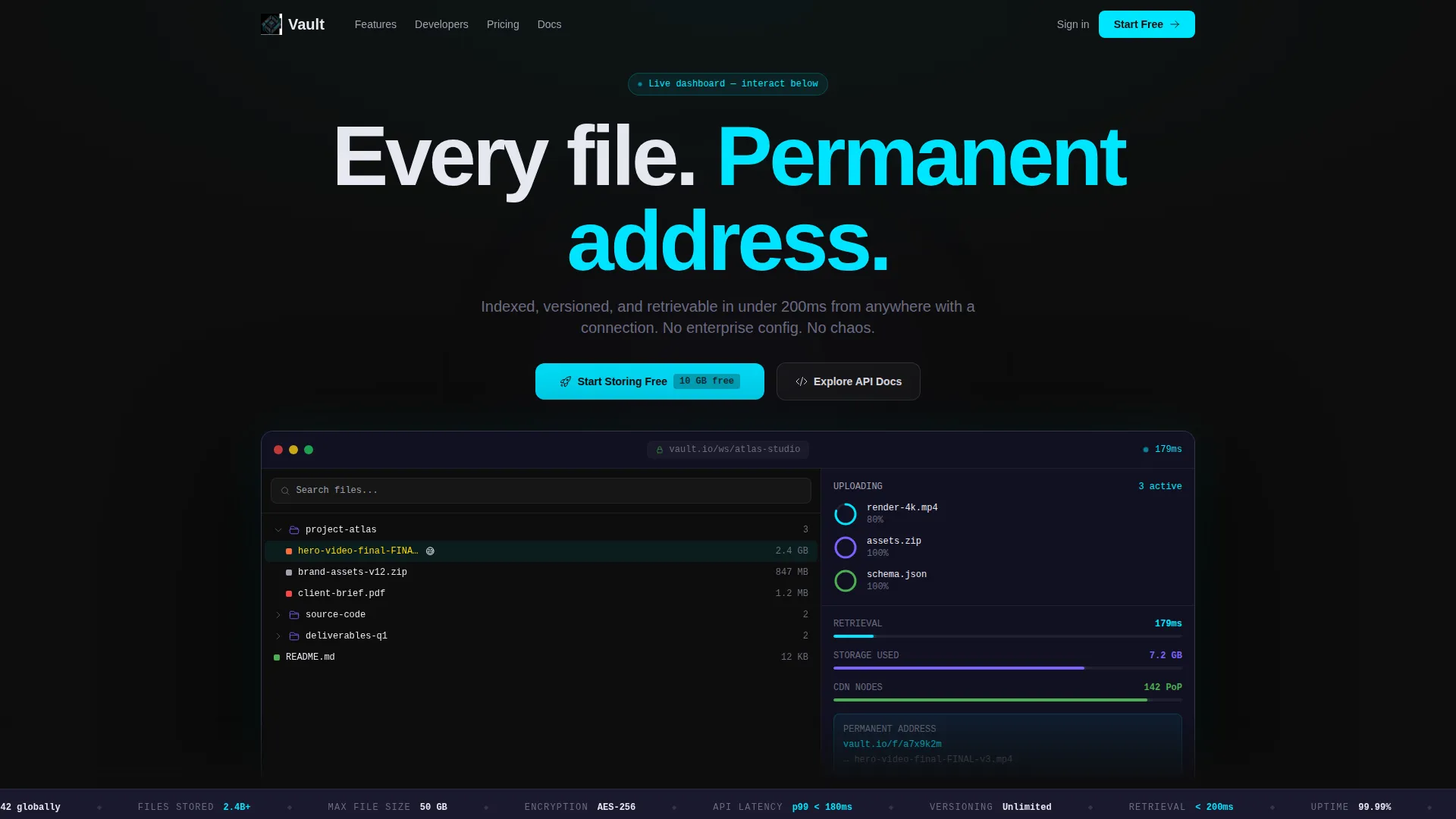
Vault is a Dashboard Pro landing page template built for digital storage platforms. It uses a Carbon Fiber color system and an interactive card grid layout to show off file versioning, CDN delivery, permissions, encryption, and API access. A live miniature dashboard sits above the fold, and a pinned free-tier call to action drives freemium sign-ups with zero friction.
by Rocket studio
Quick summary
Vault is a single-page, card grid landing page template designed for digital storage platforms. It pairs a dark, high-performance visual identity with an interactive header dashboard and a modular capability grid. The free tier call to action is pinned to a floating bottom bar, and every card deepens user engagement through live micro-demos.
Who this template is for
Vault speaks directly to the people who live inside file systems every day. It is built for builders and creatives who need a storage product that communicates speed, reliability, and clarity at first glance.
- Solo developers managing large volumes of project assets across multiple builds
- Startup technical leads who need more structure than consumer cloud tools but want to avoid complex enterprise storage configurations
- Freelance video editors delivering large 4K files to clients across different time zones
What problem this template solves
Most storage platform pages either look generic or bury their best features in long scrolling text. Vault solves the trust gap between a visitor and a file storage product by turning the page itself into a working demonstration.
- Visitors do not have to imagine how the product works because they can interact with it directly on the page
- The progressive sign-up flow removes friction by asking only for an email first, then workspace name, then an optional import source
- The free tier limit is shown plainly beside the call to action, so no visitor leaves with unanswered questions about pricing
What you get with this template
Vault gives you a complete, fully structured landing page ready for a digital storage platform. Every section is purpose-built around conversion and confidence.
- An interactive header preview showing a live simulated file tree, animated upload progress rings, and a working demo search bar
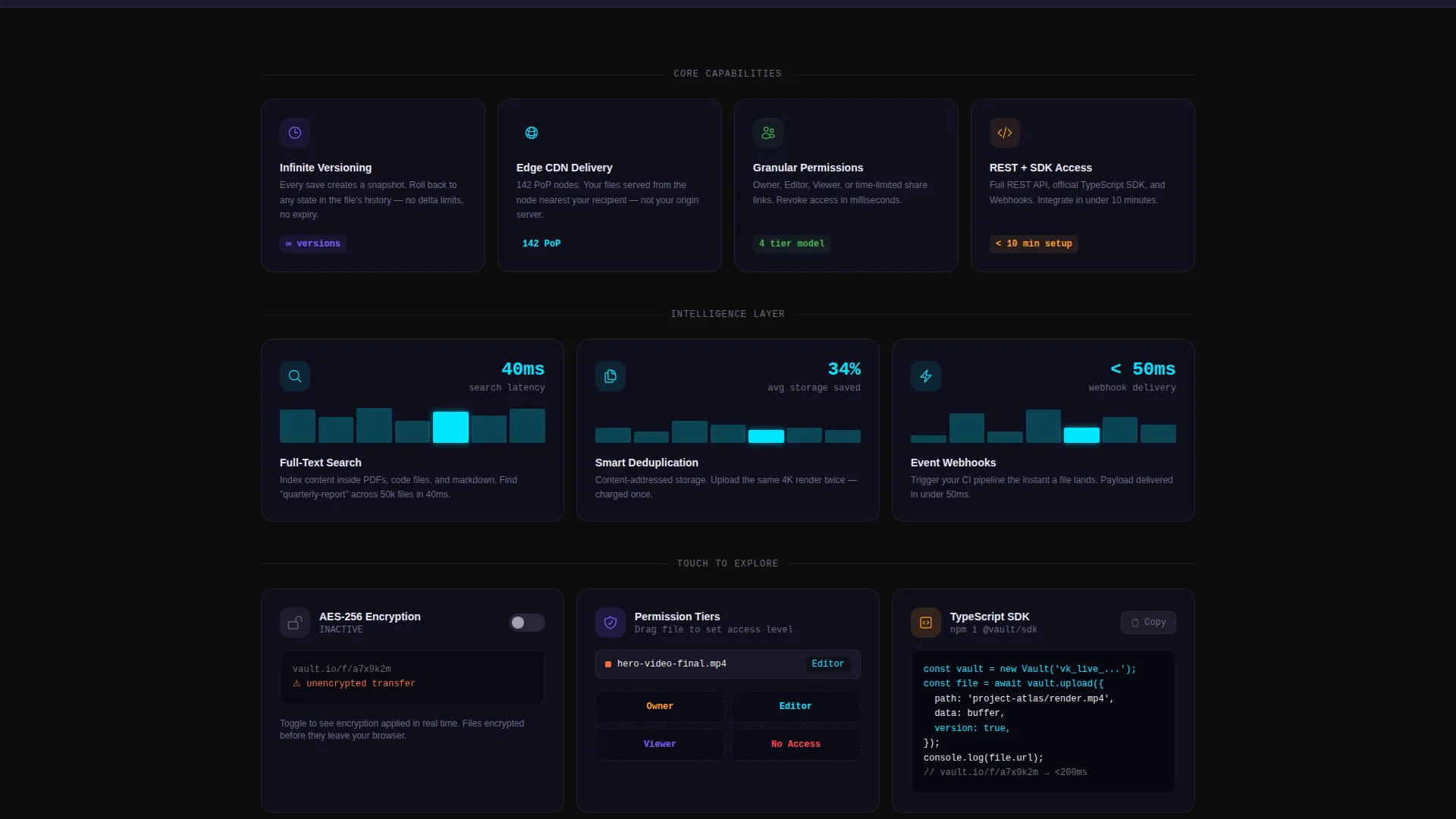
- A three-row card grid where each card expands into a live micro-demo covering versioning, delivery, permissions, API access, and encryption
- A floating bottom bar with a pinned "Start Storing Free" call to action and a secondary path to API documentation for developer leads
Feature list
Vault is packed with prompt-backed interactive capabilities. Each feature is a deliberate design decision that moves a visitor closer to signing up.
Interactive Header Dashboard
The header is a fully functional miniature dashboard embedded above the fold. It shows a simulated file tree with folders that expand on hover, upload progress rings that animate in real time, and a search bar that filters demo assets as the visitor types. A file named "hero-video-final-FINAL-v3.mp4" sits visibly in the tree as a knowing nod to real-world file chaos.
Modular Capability Card Grid
The page body is a three-row card grid, each row behaving differently. The first row presents features as static icons. The second row animates on viewport entry. The third row invites direct manipulation, including dragging a file between permission tiers and toggling encryption to watch a lock animate shut.
Progressive Disclosure Sign-Up Flow
The sign-up sequence uses progressive disclosure to reduce drop-off. It asks for an email first, then a workspace name, then an optional import source selector covering common cloud storage services. This sequence gets the visitor inside the product before asking for details.
Pinned Floating Conversion Bar
After a visitor interacts with any card, a floating bottom bar appears with the primary call to action in electric cyan. The free tier storage limit is stated plainly beside the button. A secondary link to API documentation serves developer leads who prefer to convert through technical reading.
Live Micro-Demo Cards
Each capability card expands into a live micro-demo when clicked. The demos cover file versioning, content delivery, team permission management, API access, and file encryption. The page teaches through direct interaction rather than passive reading.
Page sections overview
| Section | Purpose |
|---|---|
| Interactive Header Dashboard | Simulates the live product above the fold to build immediate trust |
| File Tree Preview | Shows folder expansion, upload rings, and a live demo search bar |
| Feature Card Row One | Presents core capabilities as scannable static icons |
| Feature Card Row Two | Animates capability cards on viewport entry for visual engagement |
| Feature Card Row Three | Enables direct manipulation for hands-on capability exploration |
| Floating Conversion Bar | Pins the primary call to action after any card interaction |
| API Docs Path | Provides a secondary conversion route for developer visitors |
Design & branding system
Vault uses the Carbon Fiber color system, which feels like the interior of a high-performance machine. Matte surfaces absorb light while a single bright accent color signals live activity.
- Deep cockpit black (#0D0D0D) and woven carbon gray (#1A1A2E) form the base surfaces throughout the page
- Brushed aluminum (#A0A0B0) handles secondary text, borders, and inactive interface elements
- Electric cyan (#00E5FF) is reserved exclusively for interactive states, progress bar fills, live data pulses, and the primary call to action button
Mobile & speed optimization
The Dashboard Pro theme underlying Vault is built with responsive layout principles so the card grid and interactive elements adapt across screen sizes. The template avoids heavy stock imagery and relies on interface-native rendering for its hero section.
- The card grid is modular, so columns reflow cleanly on smaller viewports without breaking the interaction model
- The header dashboard uses simulated interface elements rather than video or image assets, keeping initial page weight low
- Progressive disclosure in the sign-up flow reduces the number of visible form fields at any one time, keeping the mobile experience clean
How this template helps you convert
Vault treats trust as the primary conversion mechanic. Every design decision on the page is pointed toward the moment a visitor types their email into the sign-up field.
- The interactive header dashboard lets visitors experience the product's speed and organization before reading a single word of copy, building confidence immediately
- The floating bottom bar with the plainly stated free tier limit removes hesitation by answering the pricing question without requiring a click to a separate page
- The secondary API documentation path captures developer leads who are more likely to convert after exploring technical depth rather than filling out a form
Other information about this template
Vault sits at the intersection of the Technology category and the Storage Digital Presence subcategory. It is a strong fit for teams building a digital presence around a file storage or asset management product.
- The template style is Card Grid (Modular), making it straightforward to add or remove capability cards as the product feature set grows
- The Creative direction is Interactive Explorer, meaning the page prioritizes direct user manipulation over passive content consumption
- The Header concept is Interactive Preview, which replaces stock photography with a live running product interface
- The landing page direction is Freemium/Trial, optimized to move visitors from curiosity to a free account without a hard sales conversation
- This template can support use cases involving cloud file management, developer asset pipelines, and collaborative media delivery workflows


Theme
Dashboard Pro
Creative direction
Interactive Explorer
Color system
Carbon Fiber
Style
Card Grid (Modular)
Direction
Freemium/Trial
Page Sections
Interactive Header Dashboard
Three-row Modular Card Grid
Live Expanding Micro-demos
Pinned Floating Conversion Bar
Progressive Disclosure Sign-up
Carbon Fiber Visual Identity
Related questions
Can I customize the card grid to match my own storage product features?
Does the interactive header require a backend connection to function?
What does the free tier call to action include?
Is there a conversion path for developers who prefer documentation over forms?
Can the progressive sign-up flow be adjusted for a different onboarding sequence?



