Bilingual Preschool Immersion Landing Page Template
Semilla is a bilingual preschool landing page template built around a personalized quiz experience. Families answer five quick questions and receive a tailored program recommendation from three immersion tracks. A comparison table, tour registration form, and curriculum guide download work together to turn curious parents into enrolled families.
by Rocket studio
Quick summary
Semilla is a single-page template designed for bilingual and multilingual preschools. A five-question inline quiz personalizes the page for each family, highlighting the best-fit program in a side-by-side comparison table. The result is a warm, trust-building journey that ends with a tour reservation or a curriculum guide download.
Who this template is for
This template is built for preschools and early education programs that offer structured language immersion. It speaks directly to the families those schools are trying to reach, and gives admissions teams a page that does the explaining for them.
- Bilingual preschools offering full dual immersion, partial immersion, or heritage language enrichment tracks
- Early childhood programs serving multilingual households, embassy families, and dual-career couples in urban neighborhoods
- School administrators who want a registration-focused page that also educates and qualifies prospective families
What problem this template solves
Most preschool pages describe programs in one-size-fits-all language. Families with specific language goals, whether preserving a heritage tongue or building fluency from scratch, are left guessing which track fits their child. Semilla removes that friction entirely.
- Parents arrive with different language backgrounds and leave confused about which program applies to their family
- Generic inquiry forms collect leads but do not help schools understand what families actually need
- Comparison tables without context overwhelm rather than guide, especially when parents are evaluating multiple schools at once
What you get with this template
You get a complete, single-page layout that moves families from curiosity to commitment. Every section is sequenced to build trust before asking for a decision.
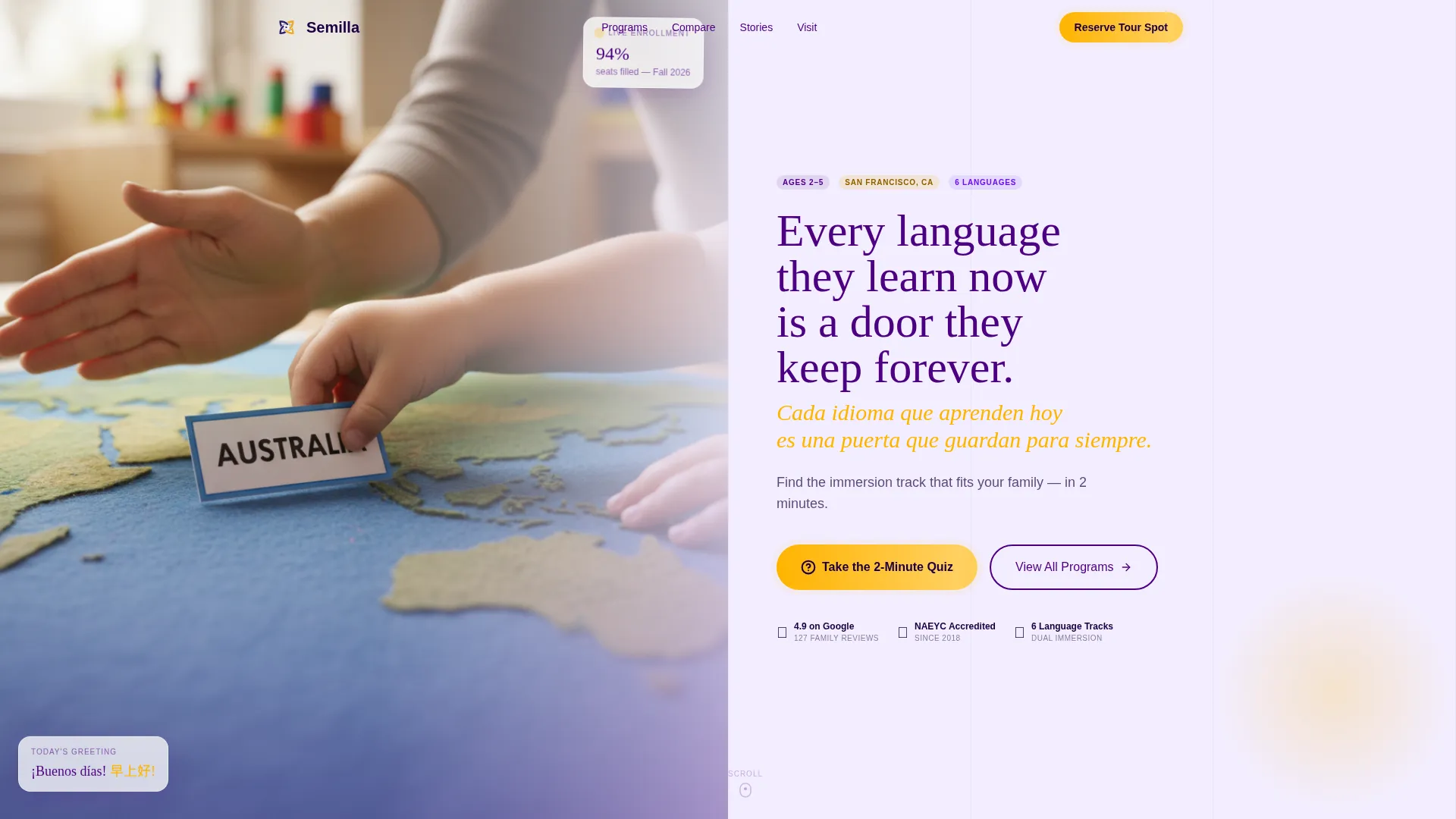
- A half-page photo-and-text header with a bilingual headline, a subheadline, and a prominent quiz entry button
- A five-question inline quiz module that reorganizes the comparison table around the family's answers
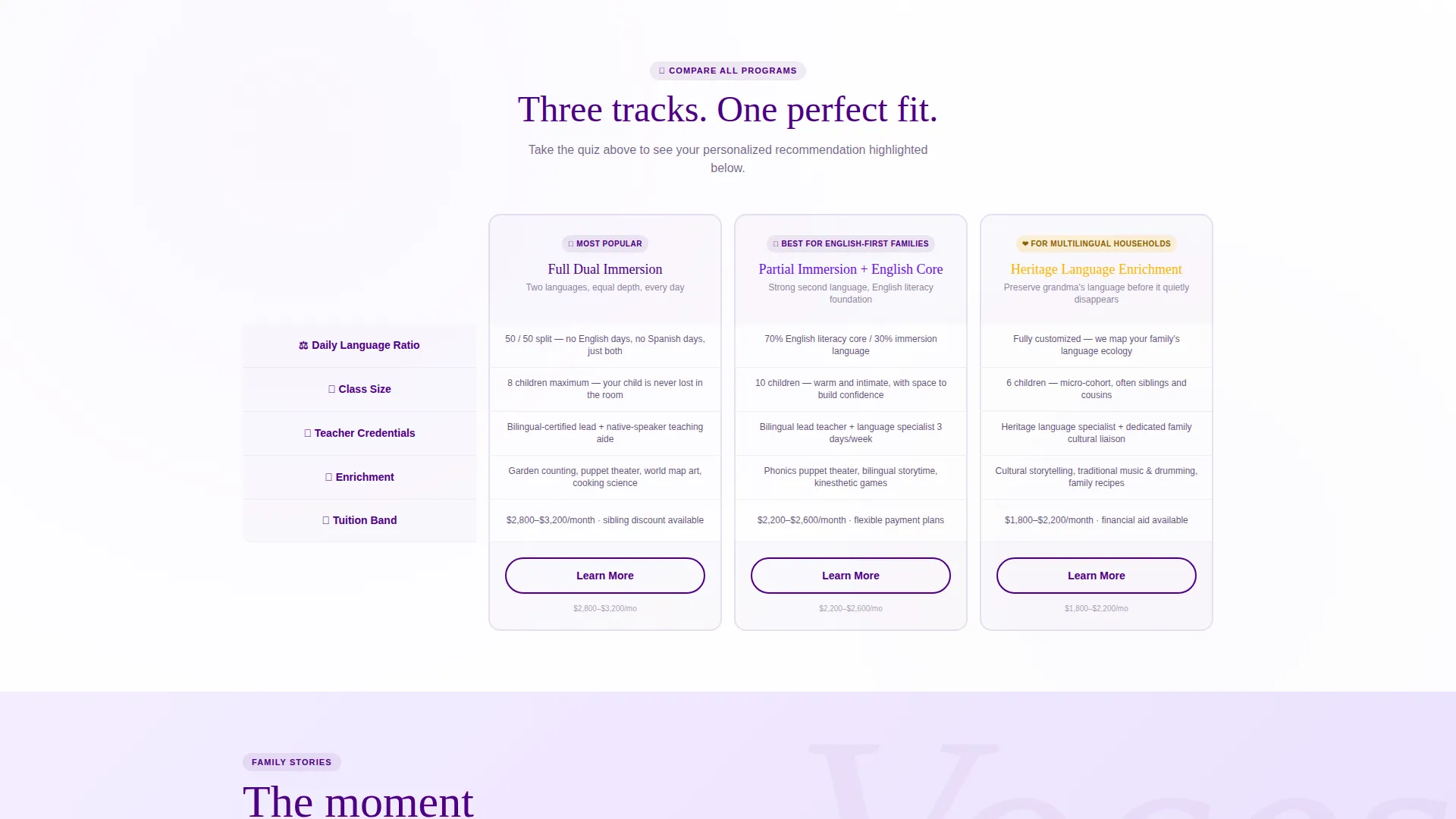
- A three-track program comparison table with rows for language ratio, class size, teacher credentials, enrichment extras, and tuition band
- A personalized "Your Family's Fit" summary card that appears after quiz completion
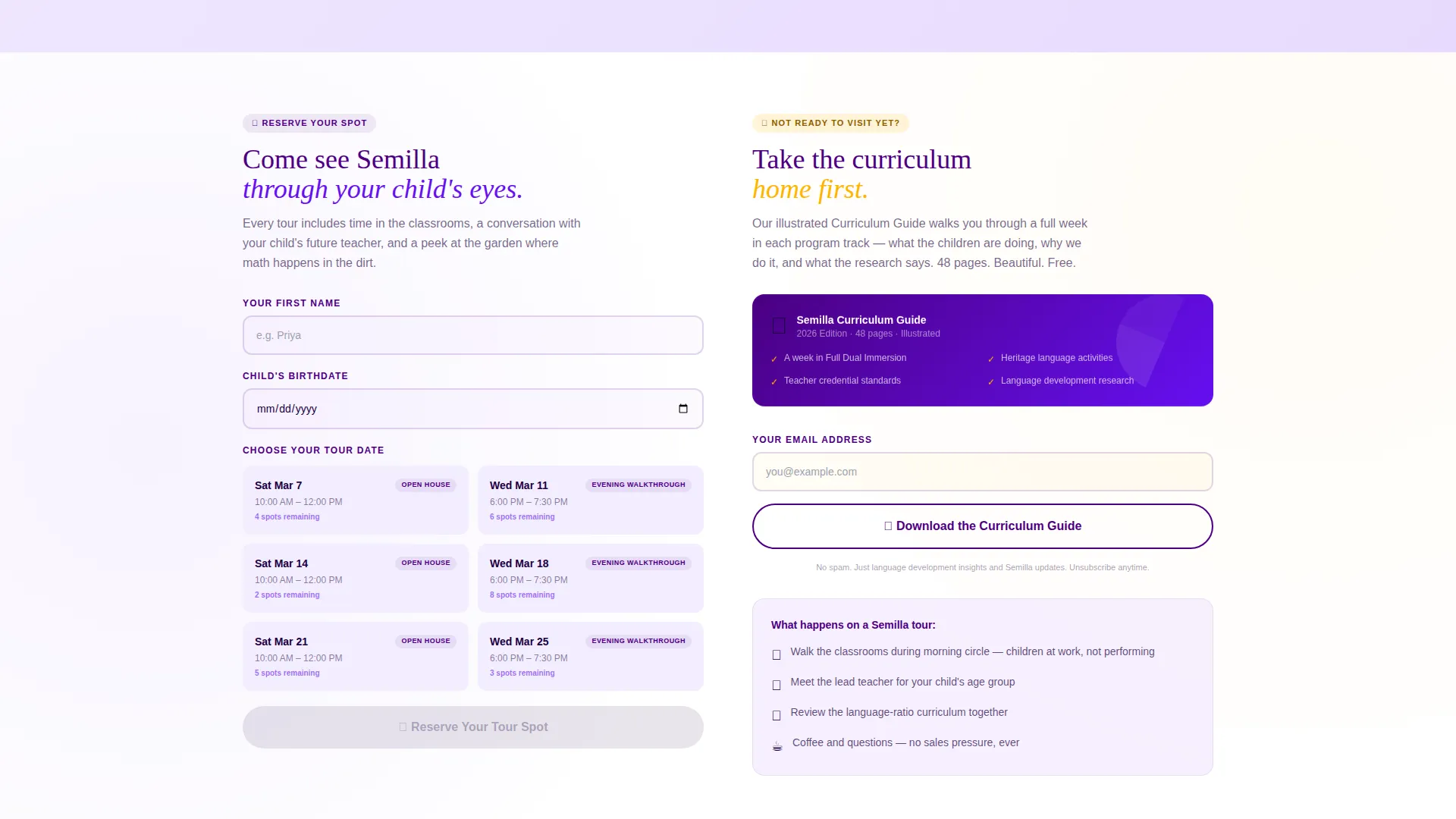
- A tour registration form with three fields and a visual calendar showing Saturday open houses and Wednesday evening walkthroughs
- A secondary "Download the Curriculum Guide" email capture path for families not yet ready to visit
Feature list
This template is built around a clear set of page-level capabilities drawn directly from its design brief.
Inline Personalization Quiz
The quiz opens directly on the page without redirecting the visitor. Five illustrated questions cover the child's age, home languages, learning style, schedule preference, and enrollment timeline. Answers drive the comparison table highlight in real time.
Dynamic Comparison Table
Three program tracks sit side by side: Full Dual Immersion, Partial Immersion with English Core, and Heritage Language Enrichment. Each row uses micro-illustrations instead of plain checkmarks. The quiz result highlights the recommended column with a pulsing indigo border and dims the others.
Personalized Fit Summary Card
Once the quiz is complete, a summary card appears below the comparison table. It reflects the family's specific answers and reinforces the recommended track, creating a natural bridge toward the registration step.
Tour Registration Form
The registration form is intentionally brief: parent first name, child's birthdate for automatic age-cohort sorting, and a preferred tour date selected from a visual calendar. Available slots include Saturday open houses and Wednesday evening walkthroughs.
Curriculum Guide Email Capture
Families who are not ready to book a tour can download a beautifully illustrated curriculum guide. The download is gated behind an email field, giving the school a secondary nurture path alongside the primary registration flow.
Bilingual Header Design
The header splits into a photograph on the left and text on the right. The headline is stacked in two languages: the English line in deep indigo and the second language line in marigold. This sets the immersive tone of the page before the visitor has scrolled at all.
Page sections overview
| Section | Purpose |
|---|---|
| Split Photo Header | Introduces bilingual identity and launches the quiz |
| Quiz Entry Button | Invites families to personalize their experience |
| Inline Quiz Module | Collects five family inputs to drive recommendations |
| Program Comparison Table | Compares three immersion tracks side by side |
| Your Family's Fit Card | Summarizes quiz results and highlights the recommended track |
| Tour Registration Form | Captures name, child's birthdate, and preferred tour date |
| Curriculum Guide Download | Provides an email-gated PDF path for undecided families |
| Sticky Mobile Footer | Keeps the "Reserve Your Tour Spot" button visible on scroll |
Design & branding system
The visual identity follows an Educational Guide theme built on an Electric Indigo color system. The palette is energetic and structured, balancing the trust parents need with the warmth children respond to.
- Deep classroom indigo (#4B0082) anchors headers and navigation; bright violet-blue (#6610F2) marks interactive quiz elements and progress indicators; soft lavender mist (#E8DAFE) fills section backgrounds for breathing room
- Sparkling marigold (#FFB400) is used exclusively for calls to action, badges, and the bilingual headline's second-language line, reserving it for moments that need immediate visual warmth
- Photography is shot at child-height with shallow depth of field, keeping the visual storytelling grounded in the actual classroom experience
Mobile & speed optimization
The layout is designed with mobile families in mind. Parents researching preschools are often doing so on a phone, between meetings or during a commute.
- A sticky footer button keeps "Reserve Your Tour Spot" accessible at all times on mobile screens without interrupting the quiz or comparison table experience
- The visual calendar in the registration form and the illustrated quiz questions are laid out to remain clear and tappable at small screen sizes
- Section backgrounds in soft lavender mist and the generous use of white space keep the page from feeling cluttered on narrower viewports
How this template helps you convert
The page is sequenced so that every step earns the next one. Families are not asked to commit before they feel understood.
- The quiz personalizes the page before asking for anything in return, so the comparison table and registration form feel like natural next steps rather than cold asks.
- Marigold call-to-action buttons appear at three points: after the quiz result, at the base of the comparison table, and in the sticky mobile footer, reducing the distance between decision and action.
- The curriculum guide download gives undecided families a low-commitment path, keeping them in the funnel while they take more time to decide.
Other information about this template
Semilla is a strong fit for schools that serve families with complex language backgrounds. It is equally useful for a school launching a new immersion program as it is for an established program that wants to modernize its admissions experience.
- The template style is a comparison table layout, making it straightforward to adapt the three program tracks to different language combinations or program structures
- The quiz-and-personalize creative direction means the page actively responds to each visitor rather than presenting the same static content to everyone
- The header concept follows a half-page photo-and-text split, which can be updated with any classroom photograph that reflects the school's own community
- The event registration landing page direction is reinforced at multiple scroll depths, giving admissions teams more than one opportunity to capture a booking
Theme
Educational Guide
Creative direction
Quiz & Personalize
Color system
Electric Indigo
Style
Comparison Table
Direction
Event Registration
Page Sections
Inline Personalization Quiz
Dynamic Program Comparison Table
Personalized Fit Summary Card
Visual Tour Registration Form
Curriculum Guide Email Capture
Bilingual Split Header
Related questions
Can I change the three program tracks to match my school's actual offerings?
Does the quiz result actually change what appears on the page?
What information does the tour registration form collect?
Is there an option for families who are not ready to book a tour?
Can the bilingual headline be updated to show different language combinations?



