Cybersecurity Cost Calculator Website Template
Sentinel is a scroll-reveal cybersecurity landing page template built for cloud security platforms. It opens with a live Cost-of-Breach Calculator, then guides visitors through a Problem-to-Solution arc that makes their own risk profile tangible. The dark Void and Violet visual identity, animated data panels, and dual call-to-action flow are designed to earn downloads before asking for a click.
by Rocket studio
Quick summary
Sentinel is a single-page, scroll-reveal landing page template for cloud security platforms. It leads with an interactive breach exposure calculator, then walks visitors through escalating vulnerability scenarios until every threat resolves into a unified command view. The design speaks directly to security professionals and builds enough trust to drive a free agent deployment.
Who this template is for
This template is built for teams and founders who need to communicate serious cloud security value fast. It suits technical buyers and executive audiences equally well.
- DevSecOps leads managing sprawling infrastructure across multiple cloud providers
- Chief Information Security Officers (CISOs) who present risk posture to non-technical boards
- Startup Chief Technology Officers (CTOs) who understand that a single misconfiguration can end fundraising before it begins
What problem this template solves
Cloud security platforms face a specific sales challenge: the risk is invisible until it is too late. Generic marketing copy does not move security buyers. This template replaces abstract claims with the visitor's own numbers.
- Visitors cannot feel urgency from bullet points alone, so static pages fail to convert them
- Security decision-makers need personalised exposure data before they trust a product enough to install it
- The gap between a misconfiguration and a board-level breach narrative is hard to bridge in a single page visit
What you get with this template
You get a fully structured, single-page scroll-reveal layout that takes a visitor from curious to converted. Every section is purposeful and sequenced.
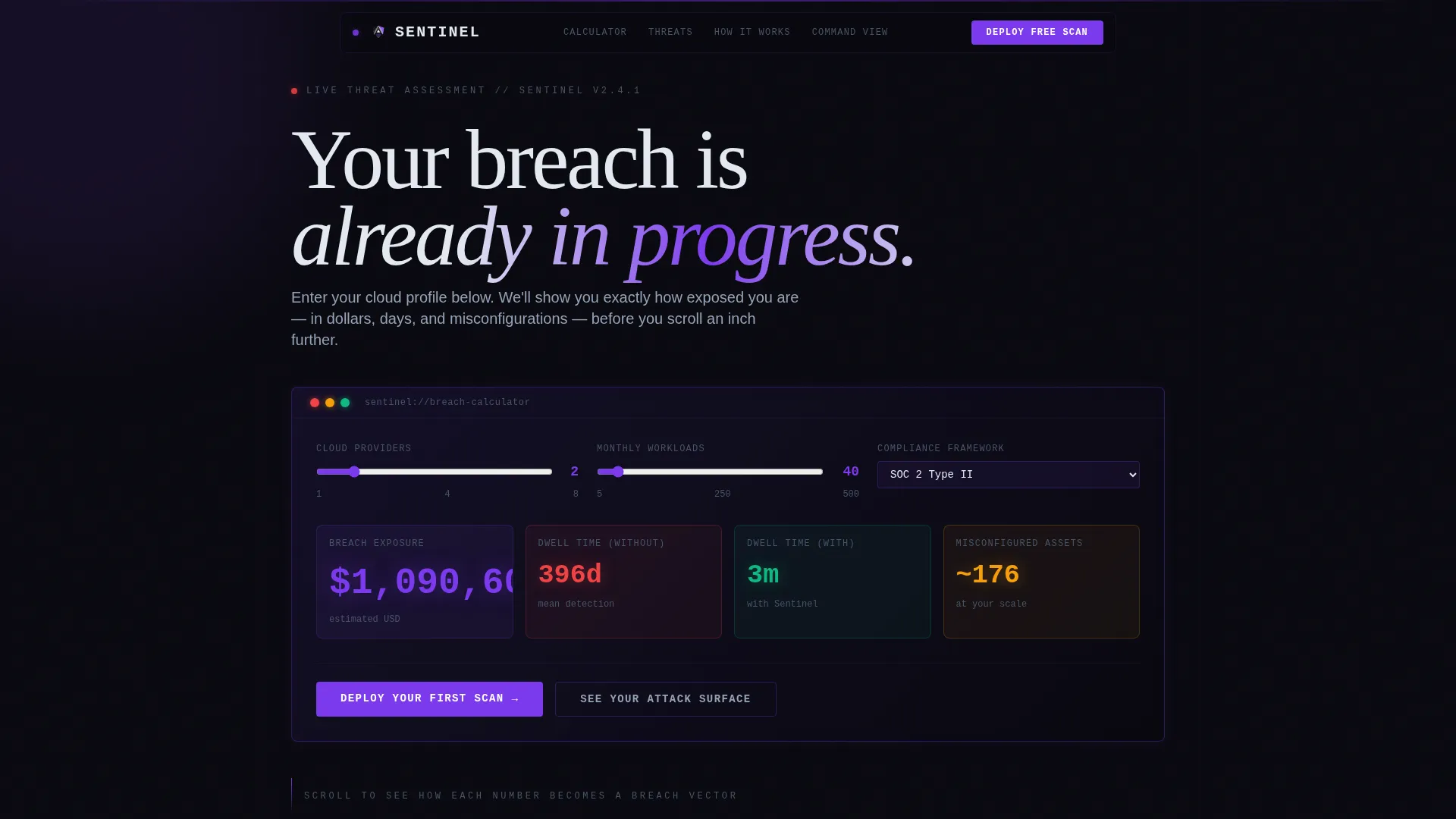
- An interactive Cost-of-Breach Calculator in the header that outputs personalised breach exposure estimates
- A Problem-to-Solution arc with paired problem panels and product user interface screenshot solution panels
- Two conversion paths: a primary "Deploy Your First Scan" email-capture flow and a secondary no-signup demo link
Feature list
This template packages several carefully designed components that work together to build credibility and drive action.
Live Cost-of-Breach Calculator
Visitors enter their cloud provider count, average monthly workload volume, and compliance framework (such as SOC 2, HIPAA, or PCI-DSS). The calculator instantly returns estimated breach exposure in dollars, mean detection time with and without the platform, and a count of typically misconfigured assets at their scale. All output numbers animate in electric violet, ticking like a live threat clock.
Scroll-Reveal Problem-to-Solution Arc
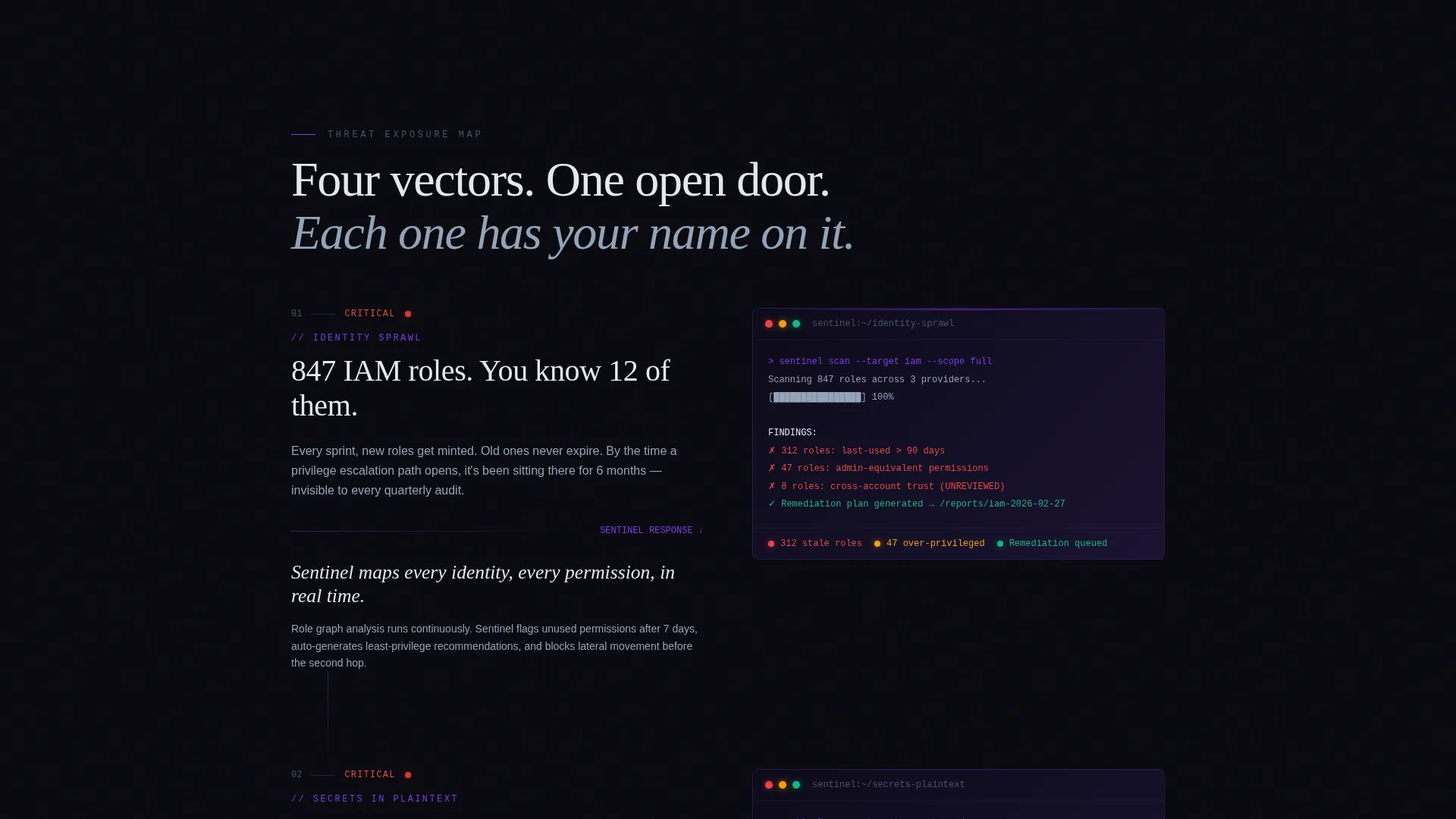
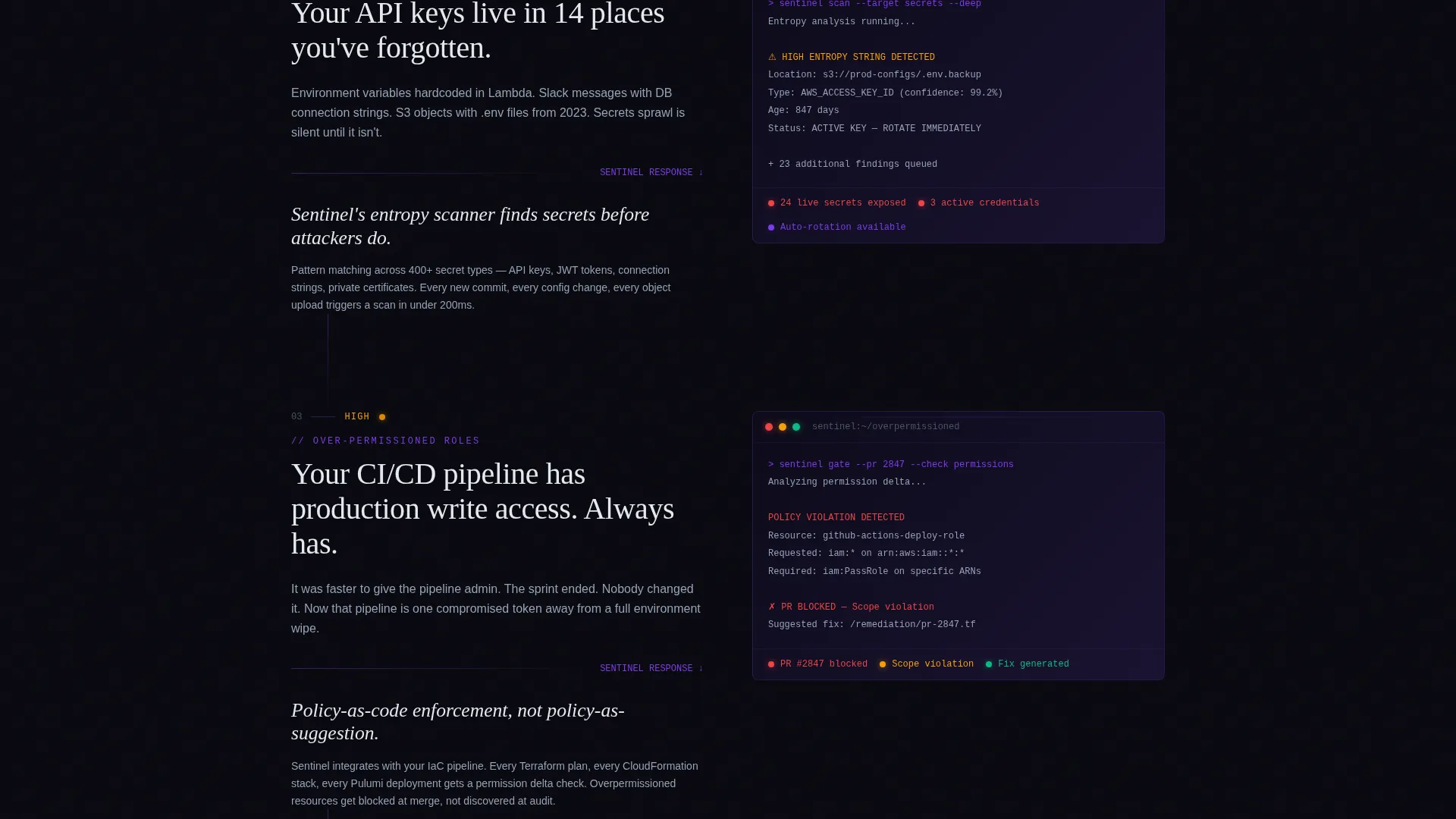
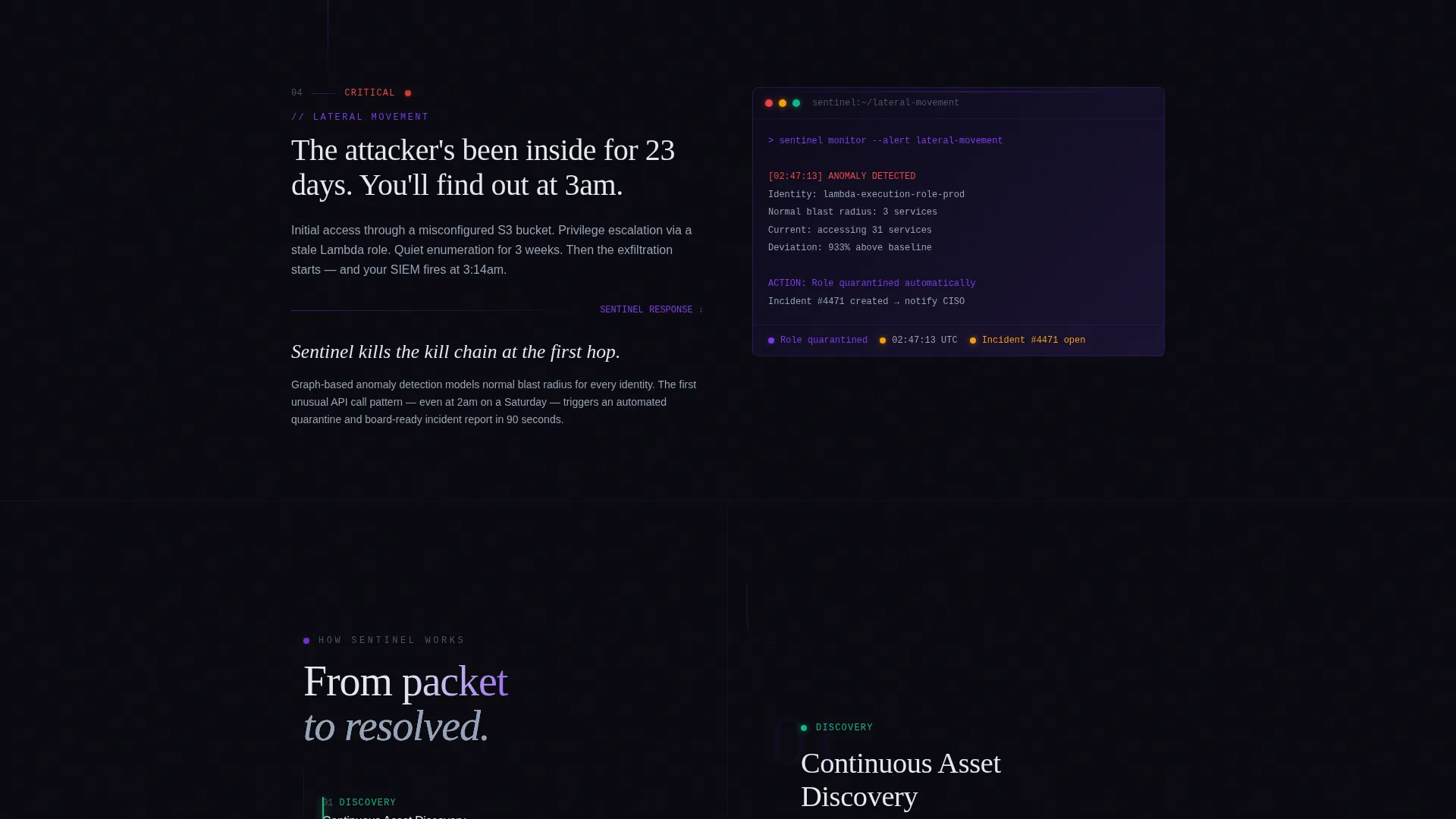
Each scroll section reveals one layer of cloud vulnerability in sequence: identity sprawl, plaintext secrets, over-permissioned roles, and unmonitored lateral movement. Problem panels load first in stark white-on-void typography, then the solution slides in from the right with a product user interface screenshot. Stakes escalate section by section, from misconfiguration through active exploit to full breach simulation.
Unified Threat Resolution Final Panel
The last revealed section presents a single command view where every threat in the narrative collapses into a resolved-state timeline. This payoff section is the emotional and logical close of the scroll journey. It reinforces platform confidence right before the primary call to action.
Dual Call-to-Action Conversion Flow
The primary call to action, "Deploy Your First Scan," uses a one-field email input that triggers a free cloud-connected agent install. Calculator results carry forward into the onboarding flow so the first scan feels personalised. A secondary call to action, "See Your Attack Surface," links to a read-only demo environment that requires no sign-up.
Data Command Visual Theme
The layout uses no stock photography or hero illustrations. Data itself is the visual hook. Animated number sequences, electric violet pulses on interactive elements, and cold terminal white typography on void black backgrounds create the feeling of a live security operations centre at work.
Page sections overview
| Section | Purpose |
|---|---|
| Breach Calculator Header | Personalise risk exposure instantly |
| Identity Sprawl Panel | Surface the first vulnerability layer |
| Secrets in Plaintext | Escalate stakes with exposed credentials |
| Over-Permissioned Roles | Show the blast radius of excess access |
| Lateral Movement Panel | Demonstrate unmonitored threat progression |
| Breach Simulation Reveal | Peak escalation before the resolution |
| Unified Command View | Resolve every threat into one timeline |
| Primary Download call to action | Capture email and deploy first scan |
| No-Signup Demo Link | Offer a low-friction second conversion path |
Design & branding system
The visual identity follows a Data Command theme using a Void and Violet color palette. Every color choice is intentional and functional.
- Absolute void black (#09090F) and deep space indigo (#1A1332) form the background system, evoking a darkened server room lit only by status LEDs
- Electric violet (#7C3AED) is reserved for interactive elements, animated data pulses, and calculator output numbers to draw the eye precisely where action lives
- Cold terminal white (#E2E8F0) handles all primary typography so every signal reads clearly against the dark field
Mobile & speed optimization
The scroll-reveal structure is designed to feel purposeful and smooth on any screen size. Progressive loading keeps the experience from feeling heavy.
- Each section reveals only when the visitor scrolls into it, keeping the initial render focused and uncluttered
- The single-field email capture and calculator inputs are built for fast interaction on both desktop and mobile viewports
- No hero imagery or large illustration assets means the visual weight stays low while the data-led design remains impactful
How this template helps you convert
Conversion happens because the page earns it through personalised data before it ever asks for a click.
- The calculator transforms a passive visitor into an invested one by showing their own breach exposure numbers in the first seconds on the page, making the download feel like a logical next step rather than a cold ask.
- The Problem-to-Solution arc builds cumulative urgency with each scroll reveal, so by the time the "Deploy Your First Scan" call to action appears, the visitor has already watched their attack surface unfold and resolve.
Other information about this template
This template is suited to any cloud security platform that needs to communicate technical depth to both security practitioners and executive stakeholders on a single page.
- The calculator results are designed to carry forward into the onboarding flow, creating continuity between the marketing page and the product's first-run experience
- The template style is Scroll Reveal (Progressive), meaning sections animate into view sequentially rather than loading all at once
- The page type is a landing page, making it well suited for paid acquisition campaigns, product hunt launches, or direct outbound links in sales sequences
- The compliance framework options in the calculator (SOC 2, HIPAA, PCI-DSS) signal credibility to regulated-industry buyers without requiring separate landing page variants
Theme
Data Command
Creative direction
Problem→Solution Arc
Color system
Void & Violet
Style
Scroll Reveal (Progressive)
Direction
App Download
Page Sections
Live Cost-of-breach Calculator
Scroll-reveal Problem-to-solution Arc
Unified Threat Resolution Panel
Dual Conversion Call-to-action Flow
Data Command Visual Identity
Related questions
Who is this landing page template designed for?
Can I customise the calculator inputs and output metrics?
Does the template include product user interface screenshots?
Is the scroll-reveal animation included in the template?
What makes this template different from a standard SaaS landing page?



