Sequence - Dynamic Squarespace Landing Page Template
Sequence is a split-screen landing page template built for a screen-recorded video tutorial library covering every corner of the Squarespace editor. It pairs a dark, code-editor visual identity with a structured feature matrix, dual lead-generation paths, and high-motion interactivity, designed to convert curious visitors into enrolled students from the first scroll.
by Rocket studio
Quick summary
Sequence is a single-page lead generation template built for a Squarespace video tutorial series. It uses a 50/50 split-screen layout, a dark Dynamic Motion visual identity, and a feature matrix that guides visitors from curiosity to enrollment. Two conversion paths, a free first module and a curriculum PDF download, work together to capture every type of visitor.
Who this template is for
This template is built for creators and educators selling structured video tutorial content. It works especially well when the course has multiple skill levels and needs to earn trust before asking for a commitment.
- Freelance web designers billing their first client projects who need a polished course landing page
- Small business owners and creative directors who want to sell tutorial content without relying on a developer
- Course creators running screen-recorded or software-focused educational products
What problem this template solves
Most course landing pages either overwhelm visitors with walls of text or undersell the depth of the content inside. Sequence solves both problems at once. It organizes course material visually so visitors understand the scope before they sign up, and it lowers the barrier to entry with a free first module.
- Visitors leave without converting because the value of the course is never made visually clear
- Long-form sales pages bury the curriculum and lose readers before they reach the call to action
- Generic templates do not reflect the hands-on, technical nature of a software tutorial series
What you get with this template
You get a fully structured, single-page layout built around a video tutorial library with multiple course modules. Every section has a clear job, and the visual hierarchy moves visitors naturally from headline to enrollment form.
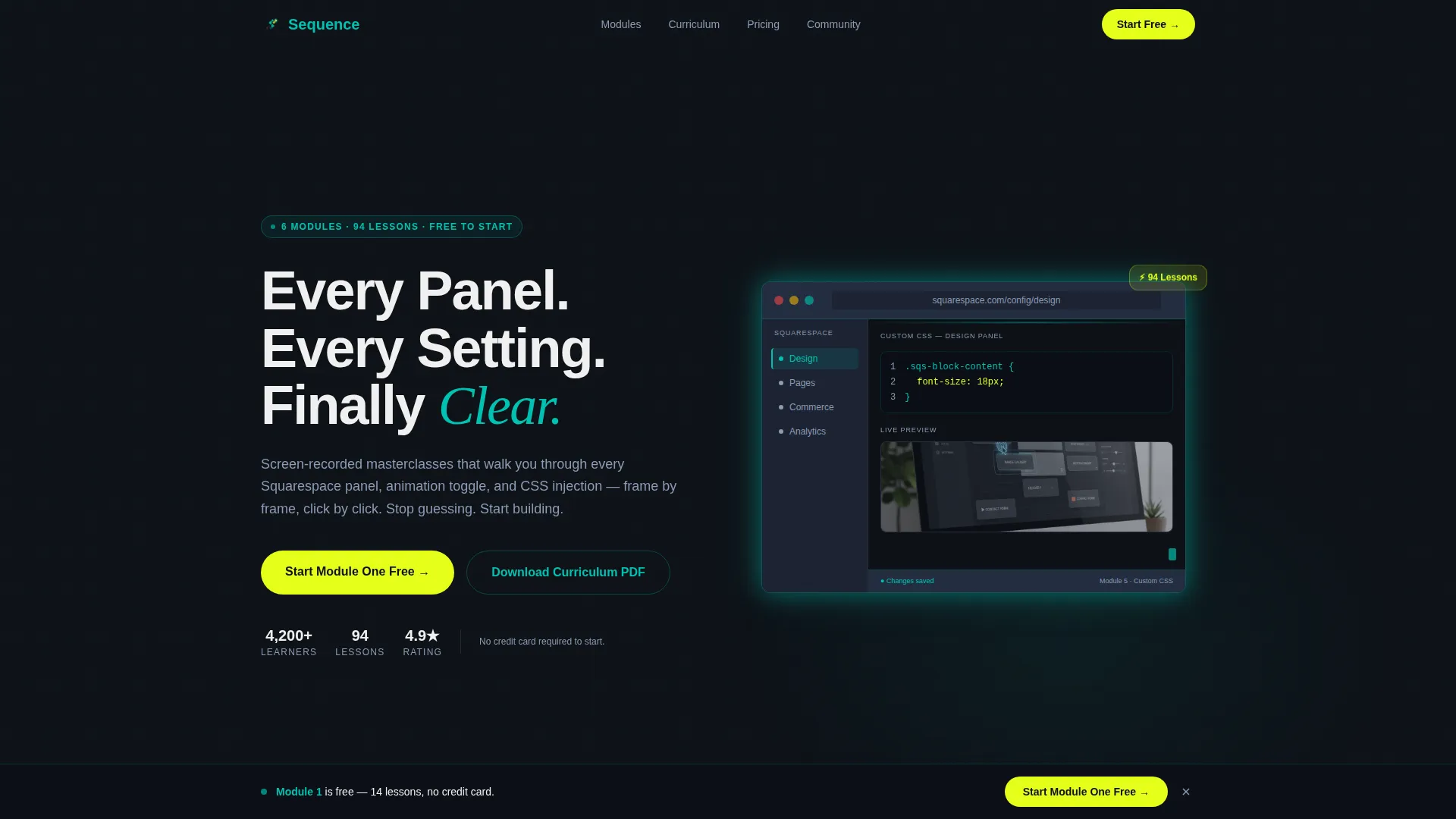
- A split-screen hero with a bold headline on the left and a live looping video mockup on the right
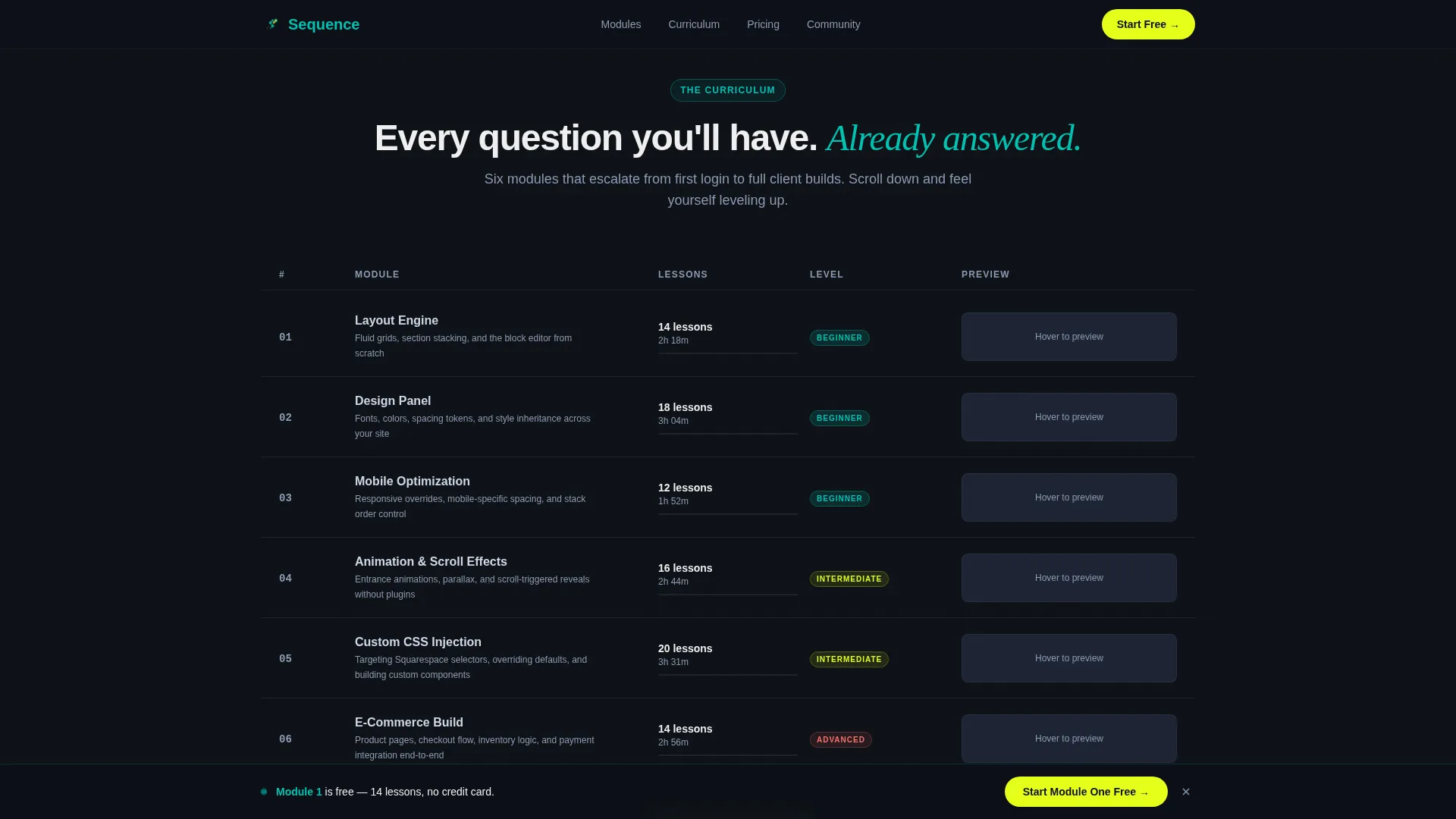
- A feature matrix module grid with hover-swap thumbnails, difficulty badges, and lesson counts
- Dual lead-generation paths: a free module signup form and a PDF curriculum download gate
Feature list
This template includes a set of purpose-built components that work together to showcase course depth and drive enrollment.
Split-Screen Hero with Teal Radial Glow
The header fills the full screen with a dark background and a teal radial glow emanating from the center. The left half carries the headline "Every Panel. Every Setting. Finally Clear." in weighted sans-serif type. The right half displays a looping video fragment of the Squarespace style editor in motion. The glow pulses subtly on each cursor click, syncing the animation to the action on screen.
Feature Matrix Module Grid
The course library is organized into a structured grid where each row represents one module. Left columns list module titles (Layout Engine, Design Panel, Mobile Optimization, Custom CSS, SEO Settings, E-Commerce Build), and right columns display a preview thumbnail that swaps on hover with a lesson count and difficulty badge. Rows escalate from beginner to advanced as visitors scroll, so the page feels like a progression rather than a catalog.
Three-Track Skill Path Bento
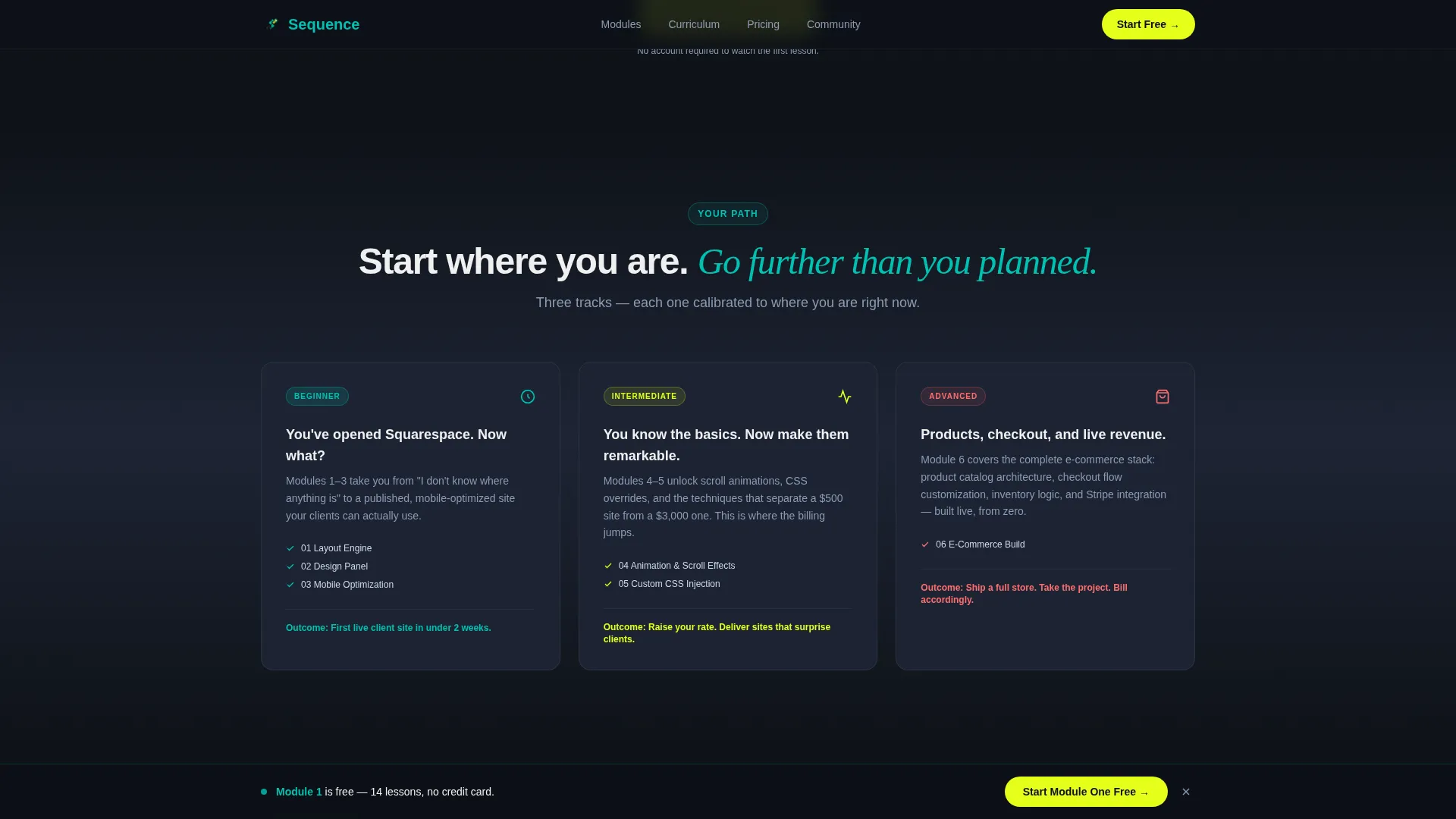
A bento-style section organizes course content into three tracks: Beginner, Intermediate, and Advanced. The asymmetric tile sizing gives each track a distinct visual weight. Visitors can immediately identify which track matches their current experience level.
Stacked Social Proof Cards
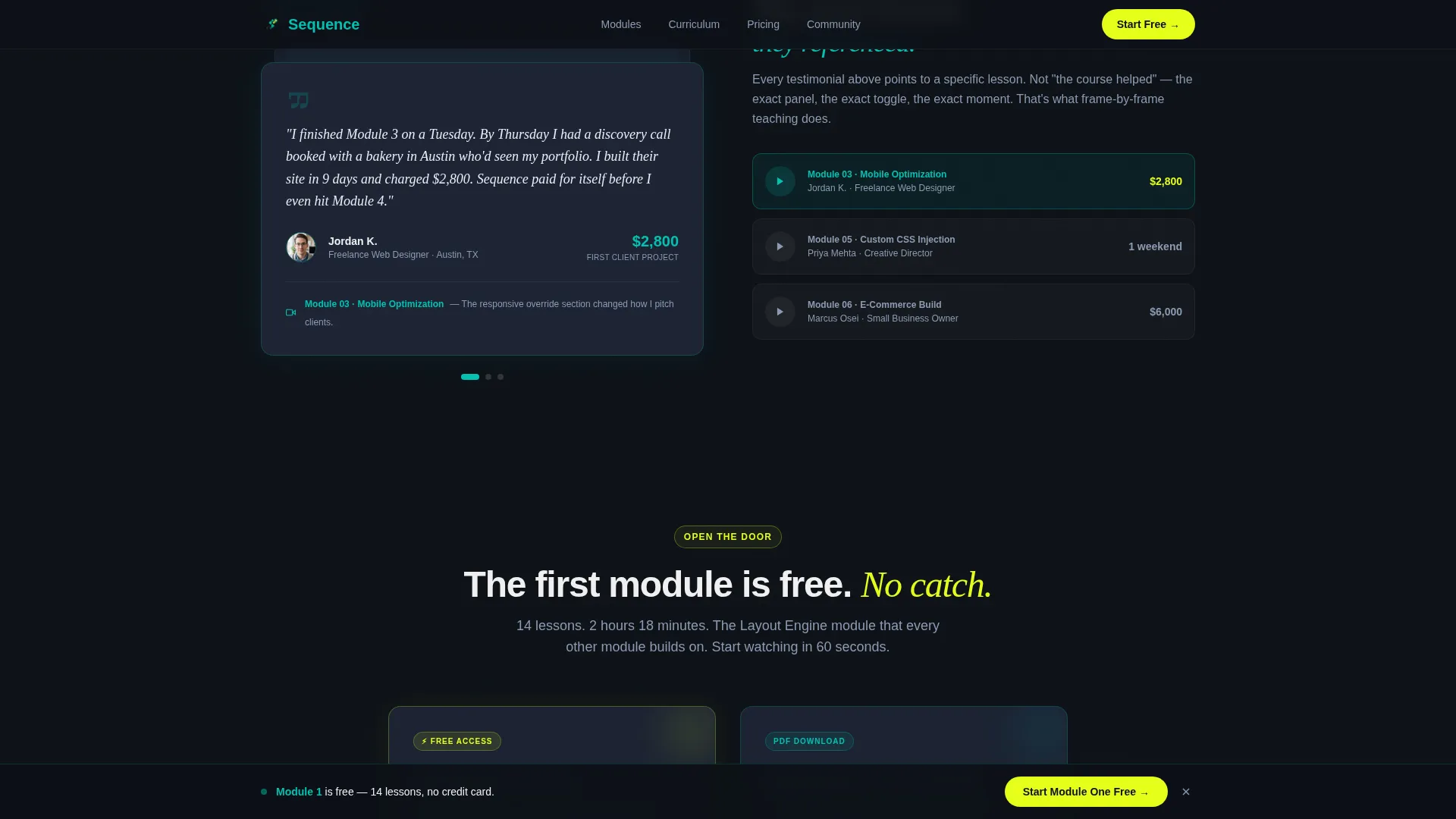
Testimonial cards are stacked with specific module references and freelancer outcome details. One card features a freelancer who landed a client after completing Module 3, paired with the exact tutorial clip they referenced. The testimonials are not generic praise, they point to specific course moments.
Dual Lead-Generation Forms with Sticky Bar
The primary call-to-action form collects an email address and a single dropdown response ("What's your Squarespace experience?"). A secondary path offers a curriculum PDF download requiring only an email. A sticky bottom bar appears after the first scroll and carries the primary call to action, keeping the enrollment option visible at all times.
High-Motion Animation System
The template includes slideInBlur stagger animations, scroll-fade effects using IntersectionObserver, orbital and pulse effects on teal accent elements, and a teal glow pulse on the hero. Animations are applied through a Client-side component system for interactive elements, while static sections use Server Components for performance.
Page sections overview
| Section | Purpose |
|---|---|
| Hero Split Screen | Introduces the course with headline, live video mockup, and teal glow |
| Feature Matrix Grid | Displays all course modules with thumbnails, difficulty badges, and hover swaps |
| Skill Path Bento | Organizes content by experience level across three asymmetric tracks |
| Social Proof Cards | Builds trust with specific freelancer testimonials and module outcome references |
| Lead Generation Forms | Captures emails via free module signup and PDF curriculum download gate |
| Sticky Bottom Bar | Keeps primary call to action visible after the first scroll |
| Footer Linear Row | Closes the page with a single-row linear footer pattern |
Design & branding system
The visual identity follows a Dynamic Motion theme built around the Teal Catalyst color system. The palette references a code editor running late at night, dark backgrounds, a glowing teal primary, and a yellow-green spark accent reserved for active calls to action and hover states.
- Colors: deep editor dark (#0D1117) for backgrounds, catalyst teal (#00C2B2) for interactive boundaries, soft interface gray (#1C2333) for surface layers, highlight spark (#E4FF1A) for hover states and primary call-to-action buttons, and clean white (#F0F0F0) for body text
- Typography: DM Sans for body copy and interface labels, Fraunces in italic for accent headlines
- Motion: teal glow pulse on the hero, slideInBlur stagger on module rows, scroll-fade IntersectionObserver on content sections, and orbital pulse effects on teal accent elements
Mobile & speed optimization
The template is built desktop-first to match the working environment of its primary audience, creators sitting at full-screen editors. It is fully responsive so the layout adapts cleanly on smaller screens without losing the visual hierarchy.
- Static sections are built with Server Components to reduce load time on initial render
- Interactive elements (animations, sticky bar, hover swaps) are isolated in Client Components so they do not block the rest of the page
- The sticky bottom bar is lightweight and activates only after the first scroll, keeping the initial load clean
How this template helps you convert
The entire page is structured around reducing friction between a visitor's first impression and their decision to enroll. Every design and layout choice serves the conversion goal.
- The free first module call to action appears in the hero and again in the sticky bar, so visitors always have a low-commitment entry point visible without scrolling back up.
- The feature matrix builds a cumulative case for the course's depth by escalating complexity row by row, so by the time visitors reach the lead-generation form, the value is already established.
- The PDF curriculum download offers a second conversion path for visitors who want to evaluate the full course before committing, capturing emails from browsers who would otherwise leave.
Other information about this template
This template is categorized under Documentation and Support, specifically within the Squarespace Documentation and Squarespace video tutorial series niche. It is designed for the EdTech and creator education space, serving both direct-to-consumer and business-to-business audiences.
- The layout style is Split Screen (50/50), and the header concept is Dark Full-Bleed with a centered glow effect
- The creative direction follows a Feature Matrix approach, organizing content into a grid that builds complexity as visitors scroll
- The lead generation direction supports dual paths: a free module gate and a PDF curriculum download, both requiring only an email address
- Localization is set to English with USD pricing and US date formatting
- The template is named Sequence and is suited for any screen-recorded software tutorial series using a modular curriculum structure
Theme
Dynamic Motion
Creative direction
Feature Matrix
Color system
Teal Catalyst
Style
Split Screen (50/50)
Direction
Lead Generation
Page Sections
Split-screen Hero with Glow Effect
Feature Matrix Module Grid
Three-track Skill Path Bento
Stacked Social Proof Section
Dual Lead-generation Forms
Sticky Call-to-action Bar
Related questions
What layout style does this template use?
How does the lead generation work in this template?
Who is the target audience for this template?
Can I adapt the module grid to a different course topic?
What animation effects are included in this template?



