Serve - Dynamic Restaurant Landing Page Template
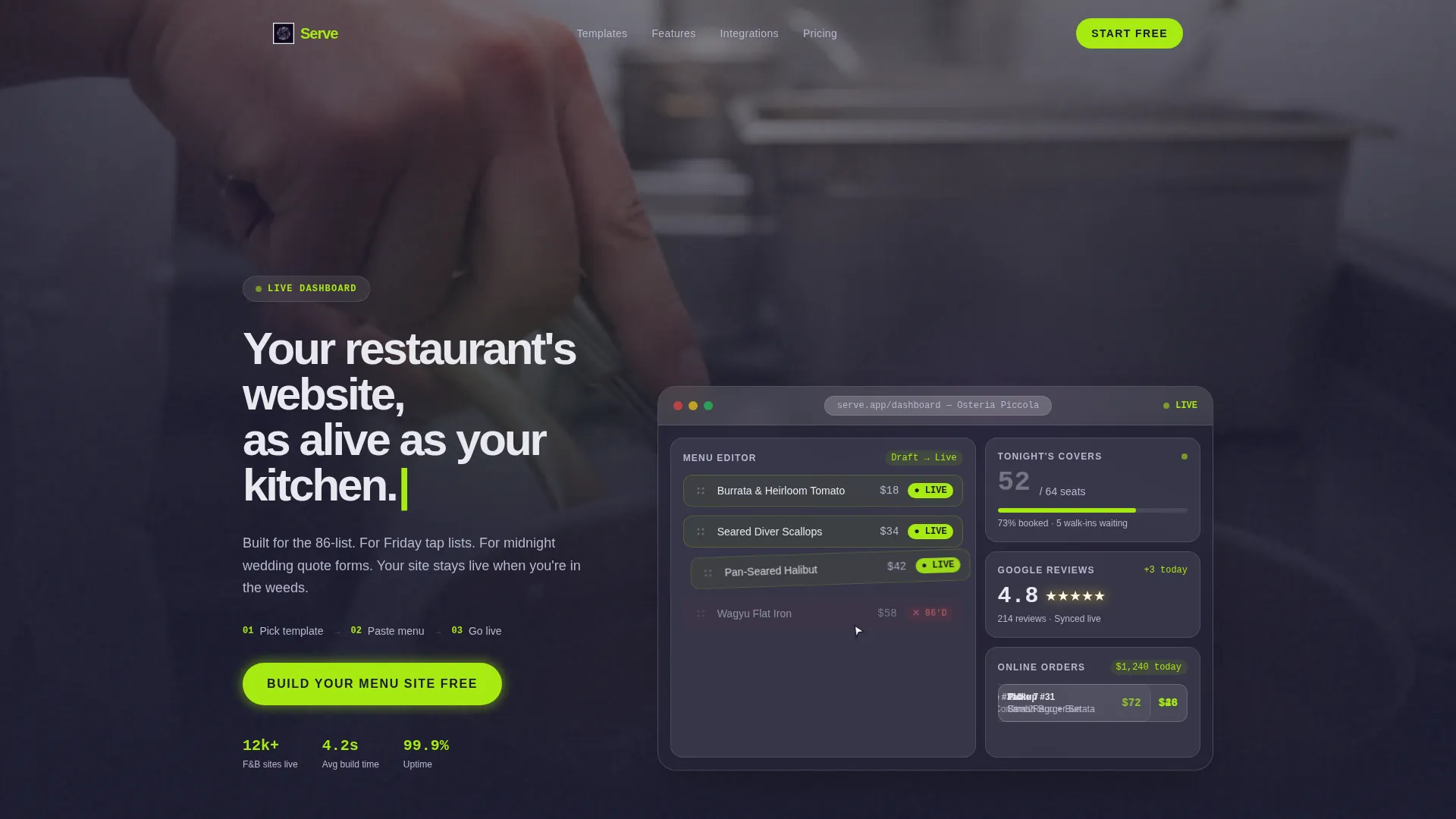
Serve is a dynamic landing page template built for food and beverage businesses that need a site as fast-moving as their kitchen. It pairs a glassmorphic dashboard hero with animated stat blocks, a template gallery, and a streamlined click-through funnel. Restaurateurs, brewery owners, and caterers can showcase menus, reservations, and order flow without a single friction point.
by Rocket studio
Quick summary
Serve is a single-page, dashboard-style landing page template designed for the food and beverage industry. It combines a live-feel restaurant backend preview with high-energy scroll animations, real-time-style stat counters, and a clear click-through funnel. The result is a landing page that communicates speed, confidence, and operational readiness from the first frame.
Who this template is for
This template is built for food and beverage business owners who need a website that works as hard as their team. It speaks directly to operators whose needs change by the hour, not by the quarter.
- Restaurateurs who toggle menu items between seatings and need a site that reflects that pace
- Craft brewery and taproom owners pushing new tap lists on a weekly basis
- Caterers and event food operators who rely on quote forms to close clients quickly
What problem this template solves
Most generic website templates are too slow, too static, and too focused on brand storytelling. Food and beverage operators need a site that mirrors the live nature of their business, not one that takes a week to update.
- Static templates cannot convey the urgency of nightly specials, live reservation counts, or rotating menus
- Generic layouts bury the reservation widget or order form, costing operators real bookings
- Friction-heavy signups push potential customers away before they ever reach the call to action
What you get with this template
Serve delivers a fully designed landing page with a dashboard-preview hero, animated content sections, and a focused click-through funnel. Every visual and layout decision is calibrated for food and beverage use cases.
- An interactive mock-up hero showing a menu editor, reservations widget, Google review score, and online order cards
- Scroll-triggered animations including a template gallery, speed test bar, and mobile preview rotation
- Three strategically placed calls to action and a trust bar of point-of-sale integrations above the final button
Feature list
This template is built around deliberate motion, data-forward design, and a layout that never lets momentum drop. Here is what makes Serve work.
Live Dashboard Hero
The header presents a fully interactive mock-up of a restaurant's backend interface. It includes a drag-and-drop menu editor, a reservations widget counting up tonight's covers, a pulsing review score, and sliding online order cards. An autonomous cursor animation drags a menu item from draft to live, with a status badge flipping to electric lime in real time.
Scroll-Triggered Section Animations
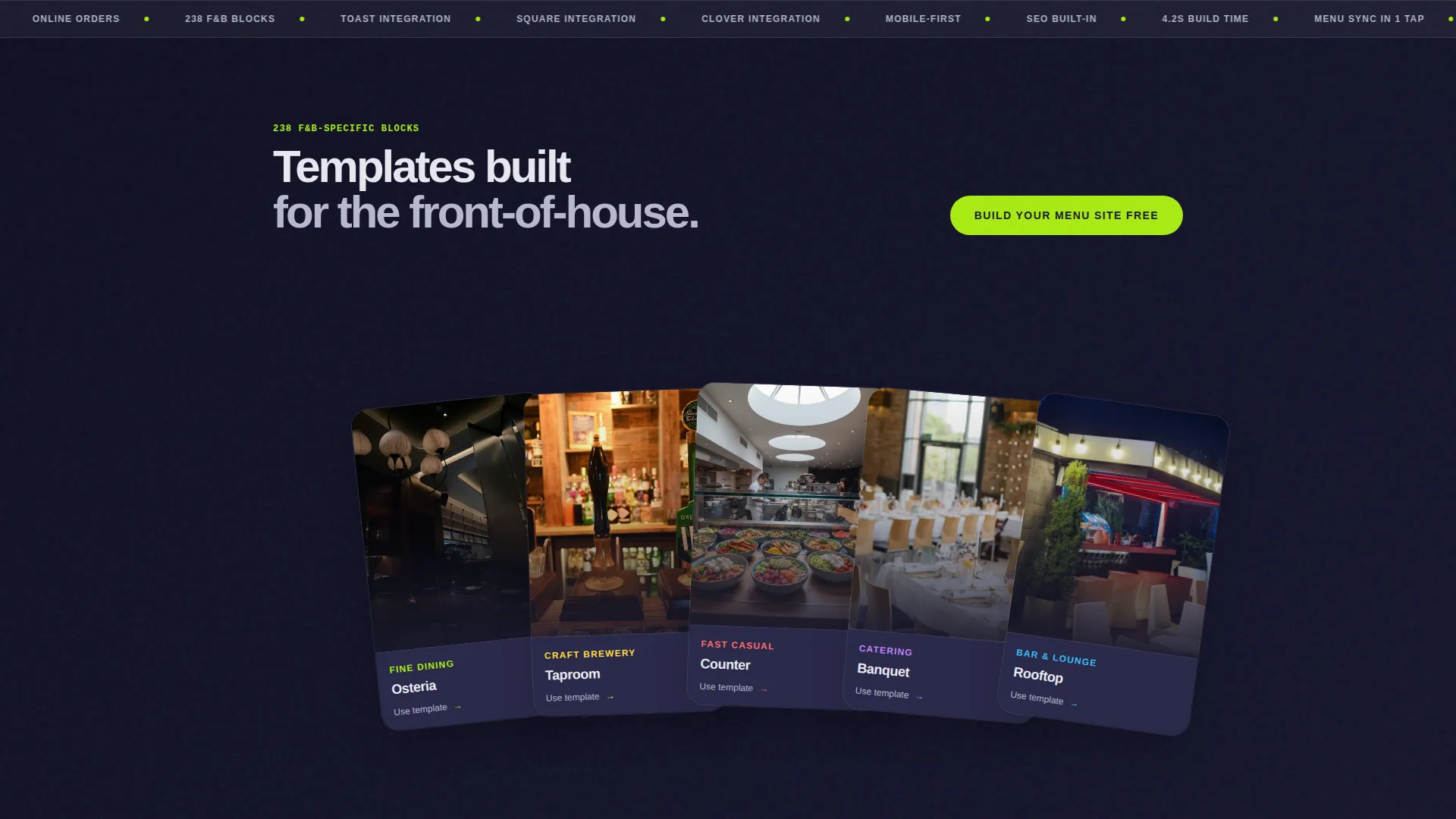
Every content section activates on entry. A template gallery fans out like dealt cards. A speed test animates a loading bar. A mobile preview rotates from portrait to landscape with a ghost thumb-swipe. These animations keep the visitor engaged through every scroll without requiring any interaction.
Animated Stat Counter Blocks
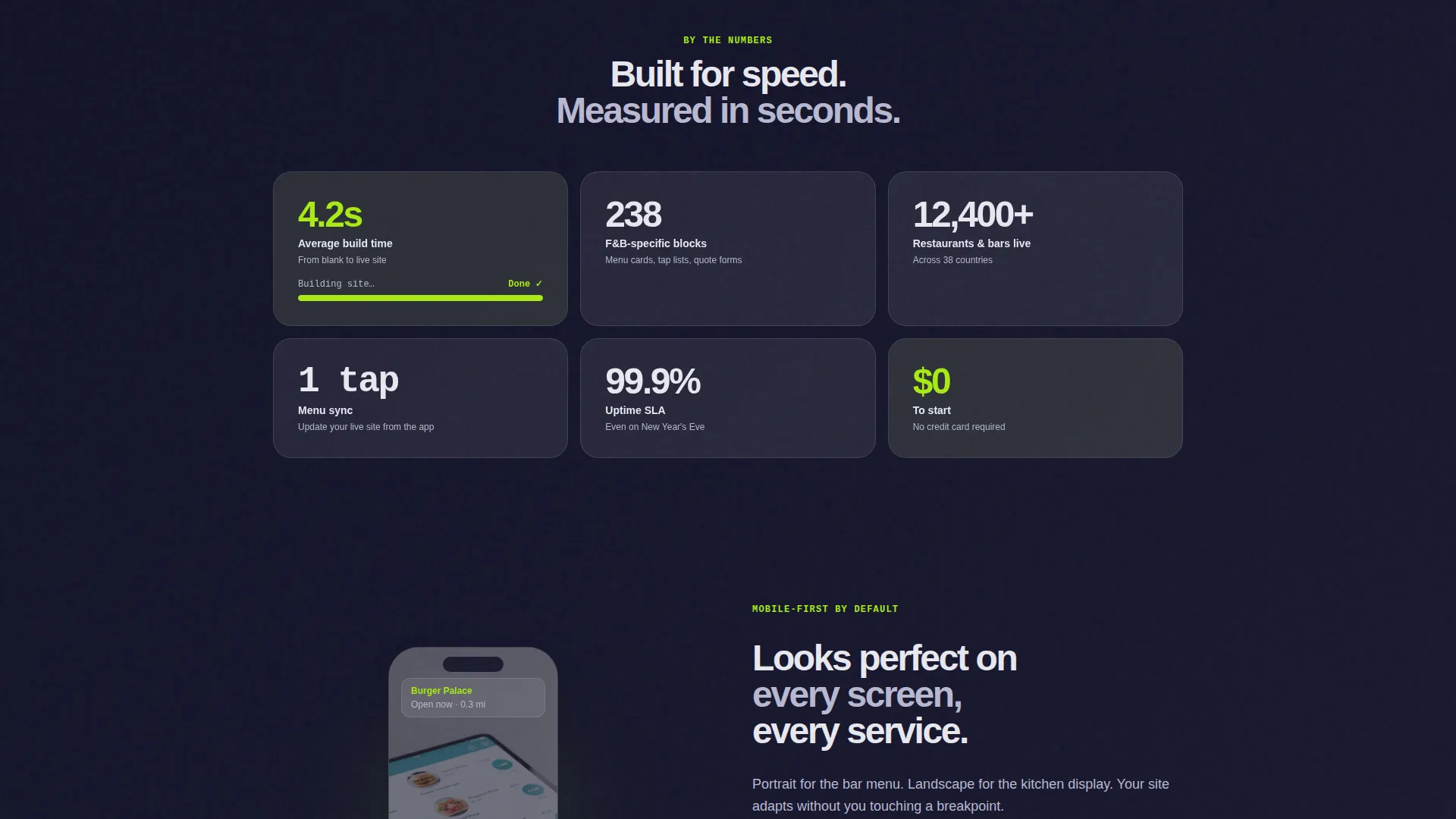
Tight data-grid blocks present key numbers that count upward on scroll. Stats like build time, the number of food and beverage-specific blocks, and menu sync speed are displayed as live-counting figures. This reinforces credibility with specific, scannable proof points.
Three-Step Micro-Animation Funnel
A compact animation walks visitors through the entire onboarding flow in under four seconds: pick a template, paste a menu, go live. This dissolves hesitation right before the main call to action and makes the signup feel effortless.
Repeating High-Voltage Call to Action
The primary call to action appears three times across the page. It is anchored below the hero, floated after the template gallery, and fixed to the bottom of the viewport on the closing section. Each instance routes directly to the signup and template picker with no intermediate form.
Point-of-Sale Trust Bar
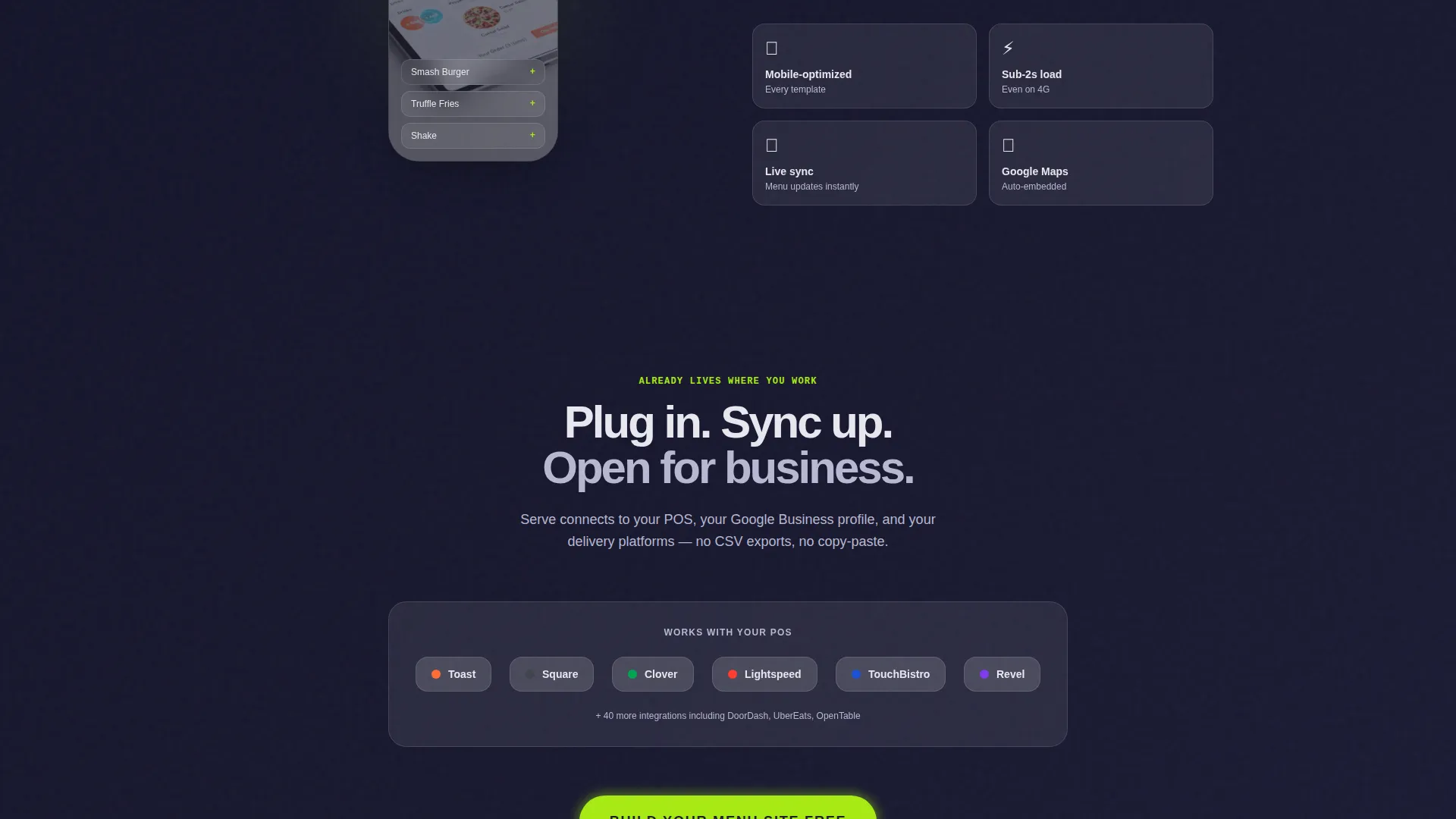
A trust bar sits just above the final call to action, displaying recognizable point-of-sale system logos. This signals that the tool already connects with the platforms operators use daily, reducing last-moment doubt before the signup click.
Page sections overview
| Section | Purpose |
|---|---|
| Dashboard Hero | Showcases the live restaurant backend mock-up with animated menu, reservations, reviews, and order cards |
| Hero Call to Action | First placement of the primary call to action anchored directly below the dashboard preview |
| Template Gallery | Fans out available templates on scroll to demonstrate design variety |
| Speed Test Block | Animates a loading bar to communicate fast site build time |
| Stat Counter Grid | Counts up key data figures on scroll to deliver scannable proof points |
| Mobile Preview Demo | Rotates a device mock-up from portrait to landscape with a swipe gesture |
| Three-Step Flow | Micro-animation showing pick, paste, and go-live steps in under four seconds |
| Floating Mid-Page call to action | Second call to action placement after the template gallery section |
| Trust Bar | Displays point-of-sale integration logos above the final call to action |
| Closing call to action Section | Fixed viewport-bottom call to action that stays visible through the final scroll |
Design & branding system
The visual identity channels a glassmorphic aesthetic inspired by a rain-streaked restaurant window at night. Every element feels luminous and slightly elevated above the surface beneath it.
- Deep charcoal substrate (#1A1A2E) as the page base, frosted translucent card surfaces using white at 12% opacity, electric lime (#A8EB12) on live-data elements and calls to action, and soft lavender-gray (#B8B8D1) for secondary text and divider lines
- Dynamic Motion theme drives all interactions: the hero camera subtly zooms, stat numbers count up, and section elements fire in sequence on scroll entry
- Launch Energy creative direction keeps the visual rhythm fast and purposeful, alternating full-width motion demos with tight stat grid blocks
Mobile & speed optimization
The template is designed with a mobile-first mindset given that a large share of restaurant guests browse and book on their phones. Motion and layout adapt gracefully to smaller screens.
- The mobile preview section explicitly demonstrates portrait-to-landscape rotation with a ghost thumb-swipe gesture, showing visitors the experience on handheld devices
- Scroll-triggered animations are sequenced to work on touch-based scrolling, keeping the launch-energy pacing intact on mobile viewports
- The fixed viewport-bottom call to action remains visible during mobile scroll, ensuring the signup button is always within reach
How this template helps you convert
Serve is structured as a pure click-through funnel. Every layout decision removes hesitation and routes the visitor toward a single action.
- The three-step micro-animation resolves the biggest objection before it forms, showing the full signup-to-live flow in under four seconds so the visitor knows exactly what they are committing to.
- The trust bar of point-of-sale integrations positioned just above the final call to action gives operators the last reassurance they need, confirming the tool fits inside their existing workflow before they click.
- Three placements of the primary call to action across the page mean the visitor is never more than one visible button away from starting, regardless of where they stop scrolling.
Other information about this template
Serve is categorized under Technology, specifically within the Food and Beverage Software and Software-as-a-Service subcategory. It is built for the food and beverage website builder niche and is designed to serve as a high-converting landing page for that product category.
- The template style is Dashboard and Data Grid, making it well suited for showcasing software products that have a backend interface worth showing off
- The header concept is Dashboard Preview, a format that works especially well for food and beverage software because it puts the actual product experience front and center
- The color system is Glassmorphic and the theme is Dynamic Motion, giving this template a distinct visual signature compared to standard flat or minimal food and beverage site designs
- The landing page direction is Click-Through, meaning there is no on-page form; all traffic is routed directly to the signup and template picker
- This template carries an intersection match score of 13, reflecting a strong alignment between the niche, template style, and creative direction
Theme
Dynamic Motion
Creative direction
Launch Energy
Color system
Glassmorphic
Style
Dashboard/Data Grid
Direction
Click-Through
Page Sections
Live Dashboard Hero with Animations
Scroll-triggered Section Animations
Animated Stat Counter Blocks
Three-step Micro-animation Funnel
Triple Call-to-action Placement
Point-of-sale Integration Trust Bar
Related questions
Is this template suitable for a single restaurant or a multi-location group?
Does the page include any forms or lead-capture fields?
What makes this template different from a generic website builder page?
How many times does the call to action appear on the page?
Can the animated sections be customized?



