Session - Calming Therapist Landing Page Template
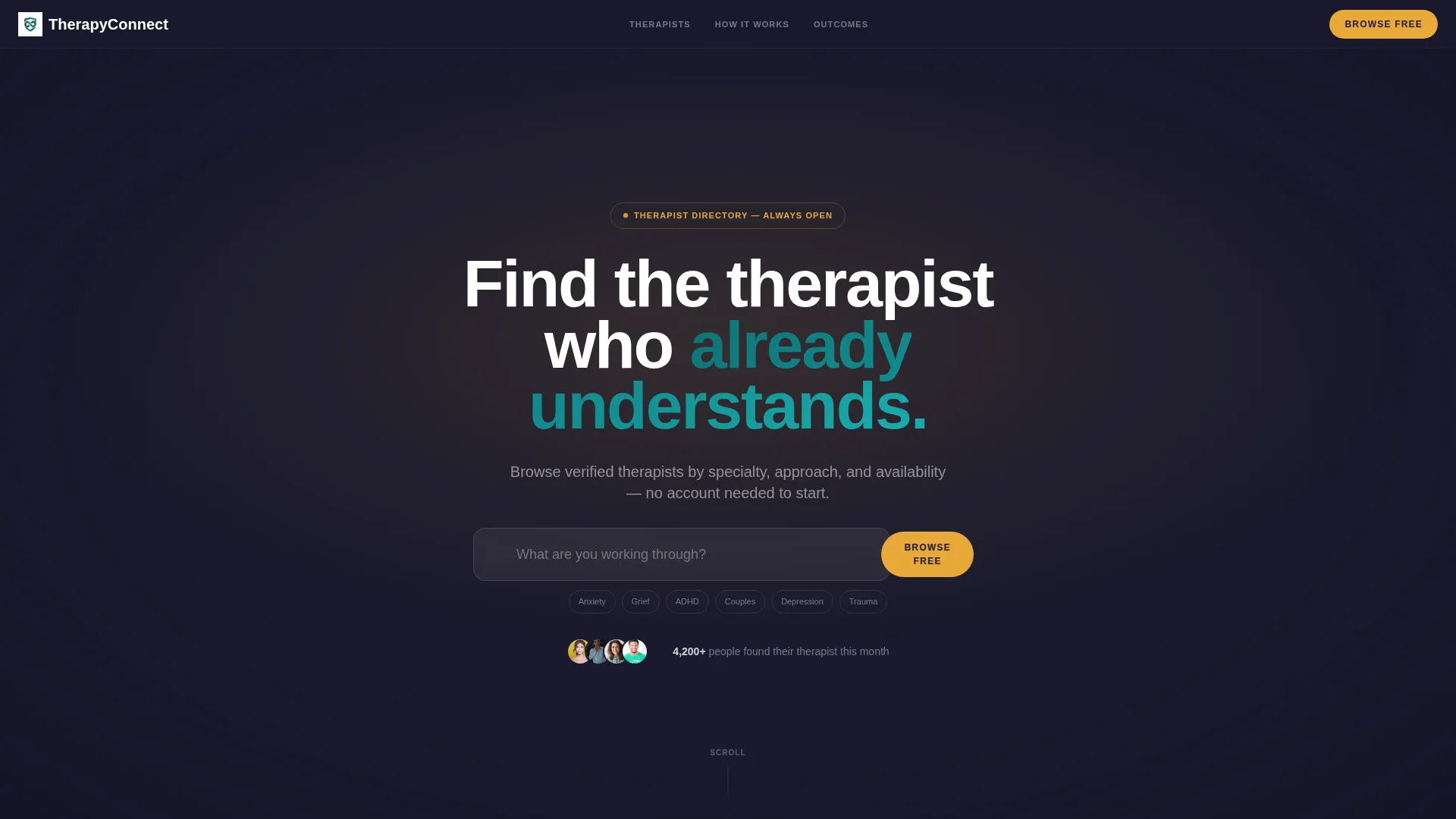
Session is a scroll-reveal therapist directory landing page built for therapy and counseling client portals. It guides visitors from a calming full-bleed header through profile cards, a filterable directory grid, and a low-friction signup flow. The warm amber and deep teal palette creates clinical trust while keeping the experience human and approachable.
by Rocket studio
Quick summary
Session is a single-page, scroll-reveal therapist directory landing page designed for therapy and counseling client portals. It opens with a dramatic dark header and progressively discloses richer content as visitors scroll, moving them naturally from curiosity to commitment. Every design decision prioritizes calm, trust, and a frictionless first step toward booking.
Who this template is for
This template is built for anyone launching or managing a therapy and counseling digital presence that needs to connect people with the right therapist quickly and gently.
- Solo practitioners and group therapy practices wanting a polished client-facing directory
- HR directors and employee assistance program managers building staff-facing counseling portals
- Mental health platform founders and product teams launching a freemium therapist discovery experience
What problem this template solves
Finding a therapist is one of the most emotionally charged searches a person can make. Most directory pages add friction at exactly the wrong moment, burying helpful information behind walls of forms and navigation. Session removes those barriers.
- Visitors lose courage when signup gates appear before they can explore, so this template lets them browse freely first
- Cluttered layouts overwhelm people who are already anxious, so every section arrives only when the visitor reaches it
- Vague profile pages create doubt, so this template surfaces specialties, intro videos, and outcome data to build immediate trust
What you get with this template
You get a fully structured, single-page scroll-reveal landing page with every section pre-built and ready to customize. The layout paces information the way a skilled therapist paces a session, disclosing detail progressively rather than all at once.
- A dark full-bleed header with animated amber glow, a specialty search bar, and a primary call-to-action button
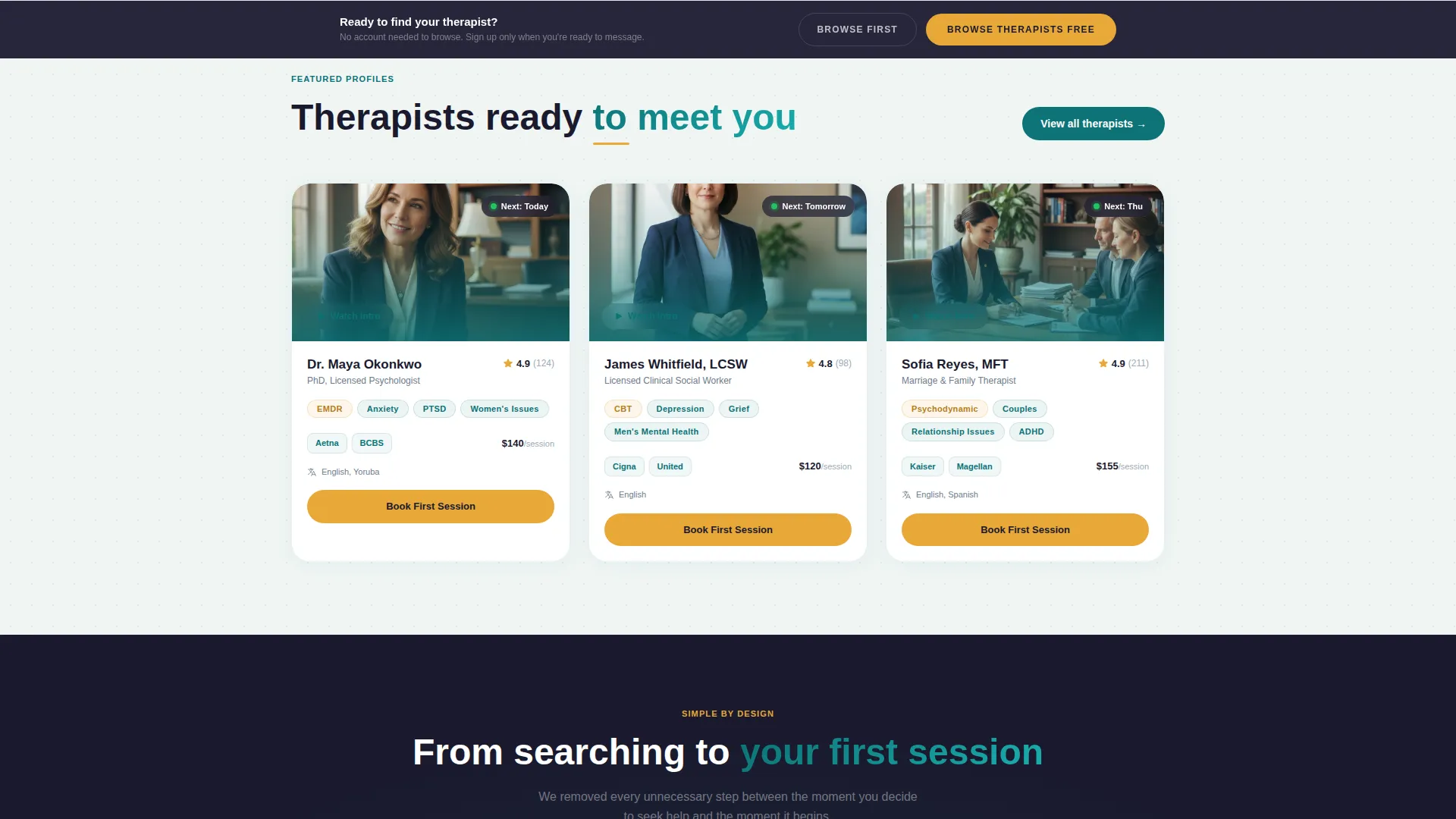
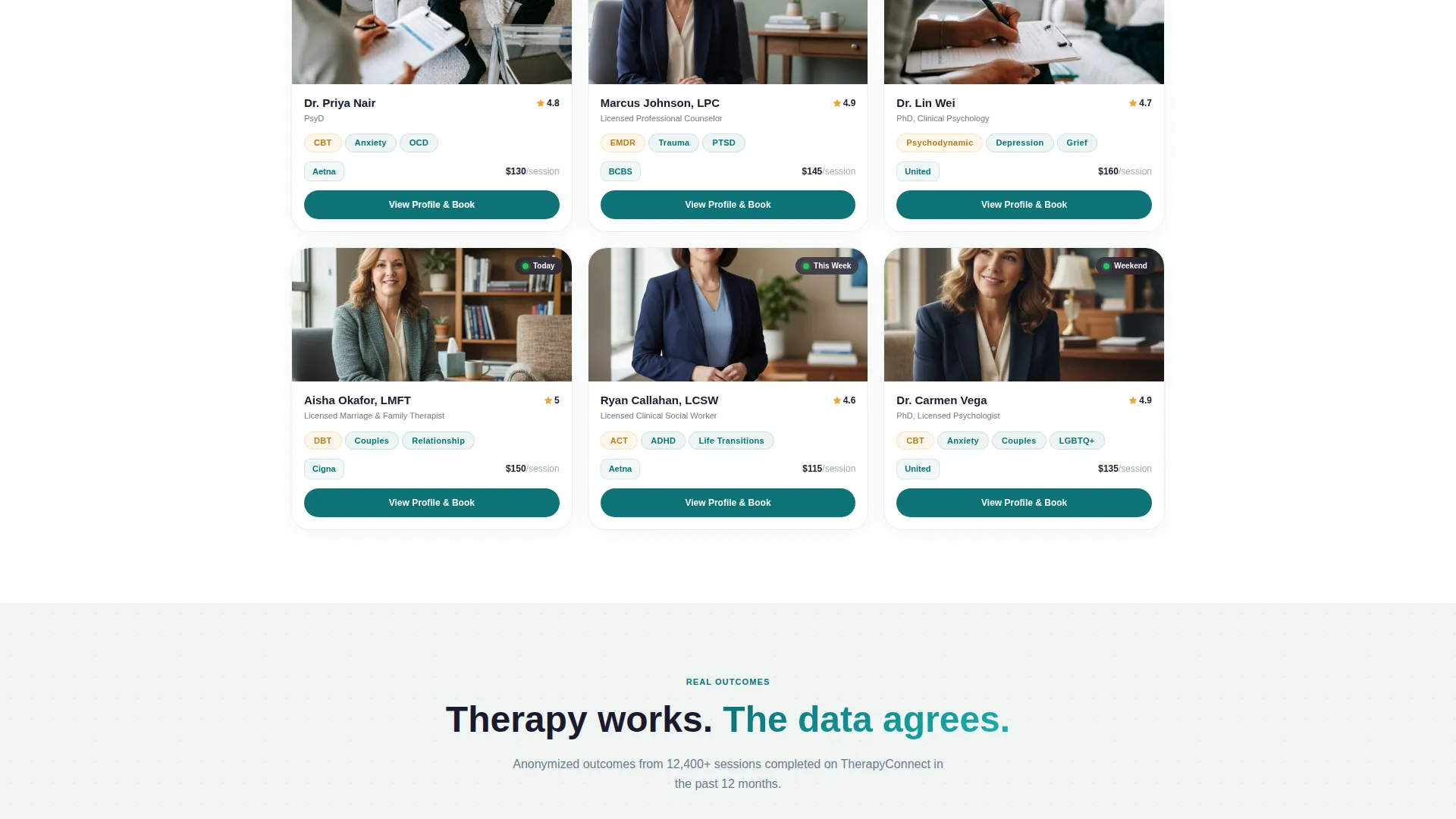
- Three featured therapist profile cards, a how-it-works rail, a filterable directory grid, and a session outcome data section
- A freemium conversion flow including a sticky bottom call-to-action bar and a contextual lightweight signup form
Feature list
This template is built around a precise set of components drawn directly from the Session brief. Each one serves a specific role in turning a hesitant visitor into a booked client.
Animated Dark Full-Bleed Header
The header uses a midnight charcoal background with a soft radial amber glow that pulses behind the headline. As visitors type into the search bar, the glow subtly intensifies, creating a responsive visual cue that the page is listening.
Progressive Scroll Reveal Layout
Each content section slides into view only when the visitor scrolls to it. This paced disclosure respects the emotional state of someone considering therapy and mirrors the natural rhythm of a first counseling session.
Filterable Therapist Directory Grid
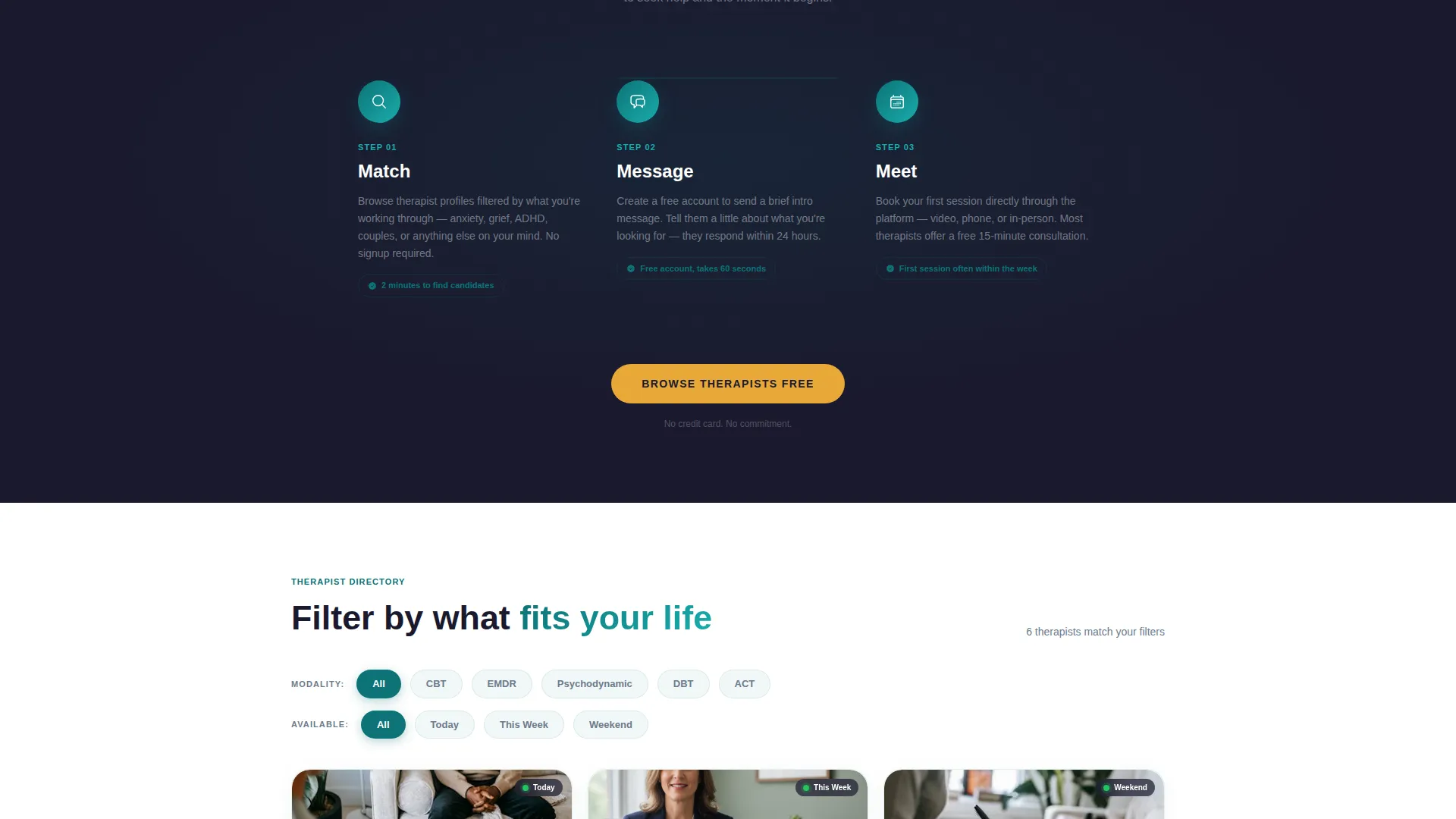
The directory grid lets visitors sort therapists by modality such as Cognitive Behavioral Therapy (CBT), Eye Movement Desensitization and Reprocessing (EMDR), and psychodynamic approaches, as well as by availability, insurance accepted, and language spoken.
Therapist Profile Cards with Intro Video
Featured profile cards display a photo, specialty tags, and a "Watch Intro" video thumbnail. This gives visitors a human sense of each therapist before committing to any further step.
Session Outcome Data Visualizations
Anonymized outcome statistics, for example "82% of users reported reduced anxiety within 4 sessions," are presented as calm data visualizations that build as they enter the viewport, lending clinical credibility without feeling cold.
Contextual Freemium Signup Flow
The signup prompt appears only after a visitor has viewed three profiles, earning the ask through demonstrated value. The form requests only a first name, a help-seeking dropdown, and an email address, nothing more.
Page sections overview
| Section | Purpose |
|---|---|
| Dark Full-Bleed Header | Anchors the page with a search bar and primary call to action |
| Featured Profile Cards | Introduces three therapists with specialties and video |
| How It Works Rail | Explains match, message, and meet in three steps |
| Filterable Directory Grid | Lets visitors sort by modality, availability, and language |
| Outcome Data Section | Builds trust with anonymized session result visualizations |
| Sticky Bottom Bar | Re-surfaces the primary call to action after the second scroll section |
| Contextual Signup Form | Captures first name, help category, and email with minimal friction |
Design & branding system
The Teal Catalyst color system is the emotional backbone of this template. It balances clinical authority with warmth, making visitors feel safe enough to take the next step.
- Deep therapeutic teal (#0D7377) anchors the primary palette, midnight charcoal (#1A1A2E) backs the header and text-heavy areas, and soft cloud (#F0F5F4) provides breathing room between sections
- Warm amber (#E8A838) is reserved exclusively for call-to-action buttons, hover states, and the radial header glow, drawing the eye without creating alarm
- Typography is clean, unhurried sans-serif throughout, scaled so the headline reads as the single dominant element on first load
Mobile & speed optimization
The scroll-reveal structure is designed to work cleanly at every screen size. Sections that stack vertically on desktop collapse into a focused single-column flow on smaller devices.
- Profile cards and directory grid reflow gracefully from multi-column to single-column layouts on mobile screens
- The sticky bottom call-to-action bar is sized and positioned for thumb-friendly tapping on smartphones and tablets
- Sections load progressively as they enter the viewport, so visitors are never waiting on content they have not yet reached
How this template helps you convert
Session is built around a freemium conversion model that earns trust before asking for anything. Every design and flow decision is aimed at reducing the moment someone decides to close the tab.
- The header places "Browse Therapists Free" in warm amber as the very first action available, removing signup anxiety from the initial impression
- The sticky bottom bar re-surfaces the primary call-to-action after the visitor has scrolled past two sections, catching the moment interest becomes intent
- The contextual signup form appears only after three profile views, asking for just three fields at the precise moment a visitor has already demonstrated they are ready
Other information about this template
Session is a strong starting point for any therapy and counseling digital presence that needs to balance discovery with conversion. A few additional details are worth noting before you build.
- The template is designed around a Directory and Discovery theme, making it well suited for multi-practitioner portals as well as solo practices that want a curated, warm presentation
- The Spec Sheet creative direction means the layout communicates credibility through structured, data-forward sections rather than marketing language
- The scroll-reveal progressive style is controlled through the template structure itself, so the pacing is built in and does not require additional configuration to feel intentional
- This is a single landing page template, not a multi-page website, so all content lives within one scrollable experience
Theme
Directory & Discovery
Creative direction
Spec Sheet
Color system
Teal Catalyst
Style
Scroll Reveal (Progressive)
Direction
Freemium/Trial
Page Sections
Animated Dark Full-bleed Header
Progressive Scroll Reveal Layout
Filterable Therapist Directory Grid
Therapist Profile Cards with Intro Video
Session Outcome Data Visualizations
Contextual Freemium Signup Form
Related questions
Can I use this template for a single therapist rather than a directory?
Does the search bar filter the directory in real time?
Can I change the color palette to match my existing brand?
What is the freemium conversion flow, and can I adjust it?
Is this template suitable for an employee assistance program directory?



