Micro-SaaS & Developer Tools Professional Website Template
Shell is a split-screen SSH and server management landing page built for DevOps engineers, sysadmins, and indie developers. It pairs a live stats dashboard with an interactive latency simulator, platform-detect download buttons, and terminal-style motion design. The Acid Digital color palette and Dynamic Motion theme make the product feel powerful before a single word is read.
by Rocket studio
Quick summary
Shell is a single-page landing page template designed for an SSH and server management app. It opens with a 50/50 split-screen stats dashboard, drops visitors straight into an interactive latency simulator, and closes with platform-aware app download calls to action. The design feels like a live terminal, high-voltage, dark, and built for technical audiences.
Who this template is for
This template is built for technical founders and developers shipping a server management or SSH tool. It speaks directly to the kind of engineer who evaluates software by touching it, not reading about it.
- DevOps engineers who need to SSH into production servers from a phone at odd hours
- Sysadmins managing dozens of cloud instances across staging and production environments
- Indie developers who run their own hardware and want one clean tool instead of six separate ones
What problem this template solves
Most landing pages for developer tools waste the first scroll on headlines and stock photography. Engineers want proof, not pitch. This template removes that friction by leading with working interface density and an interactive tool that simulates the product before a download is requested.
- Visitors never hit a signup wall or email gate before experiencing the product
- The live latency simulator earns trust before the call to action appears
- Platform-detect download buttons reduce the steps between interest and install
What you get with this template
You get a fully structured, single-page landing page with every section mapped to a deliberate conversion flow. From the stats-heavy header to the terminal-reveal feature breakdowns, every component is built from the source brief and ready to adapt.
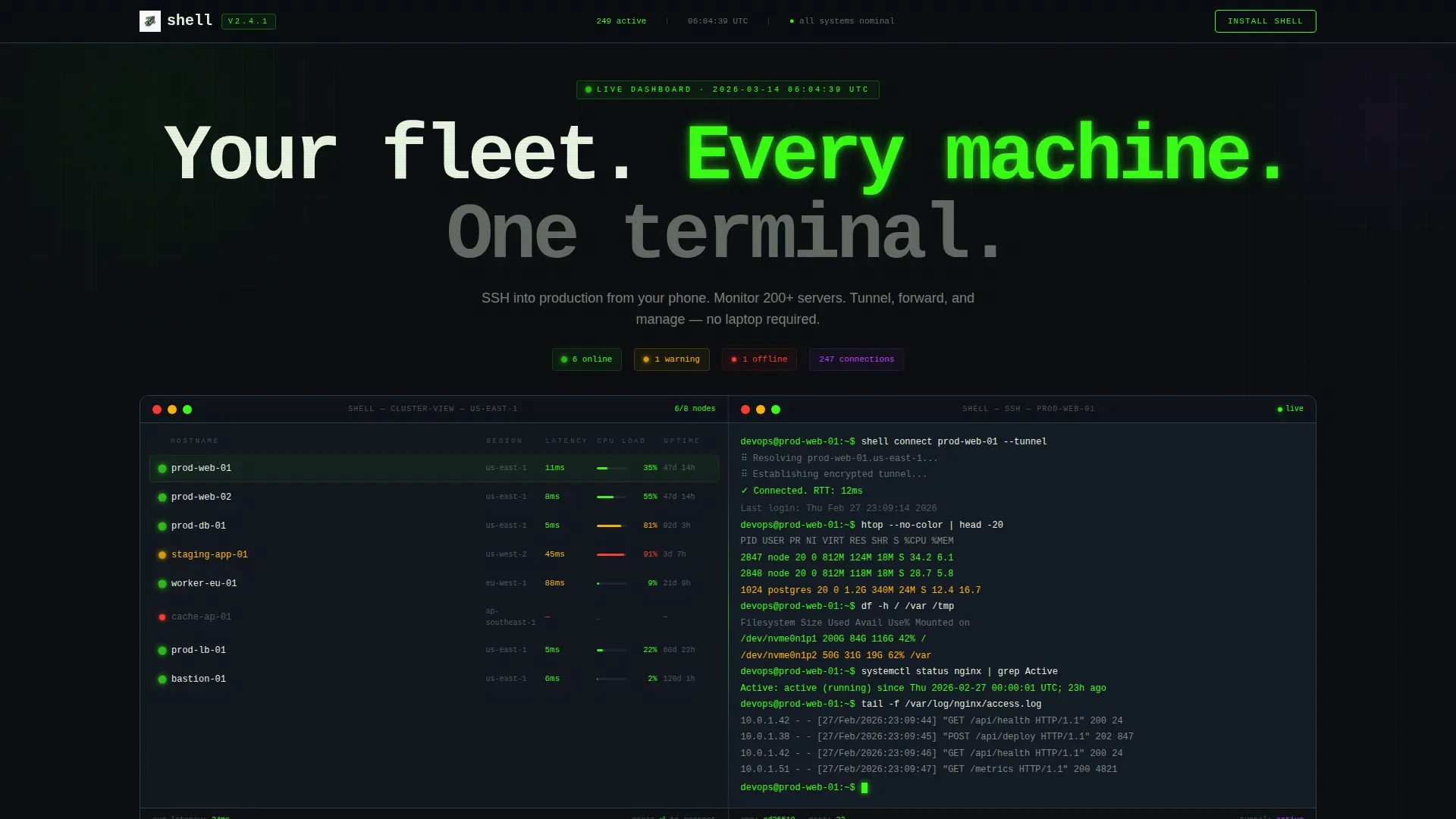
- A 50/50 split-screen header showing a live server cluster view alongside an active SSH session
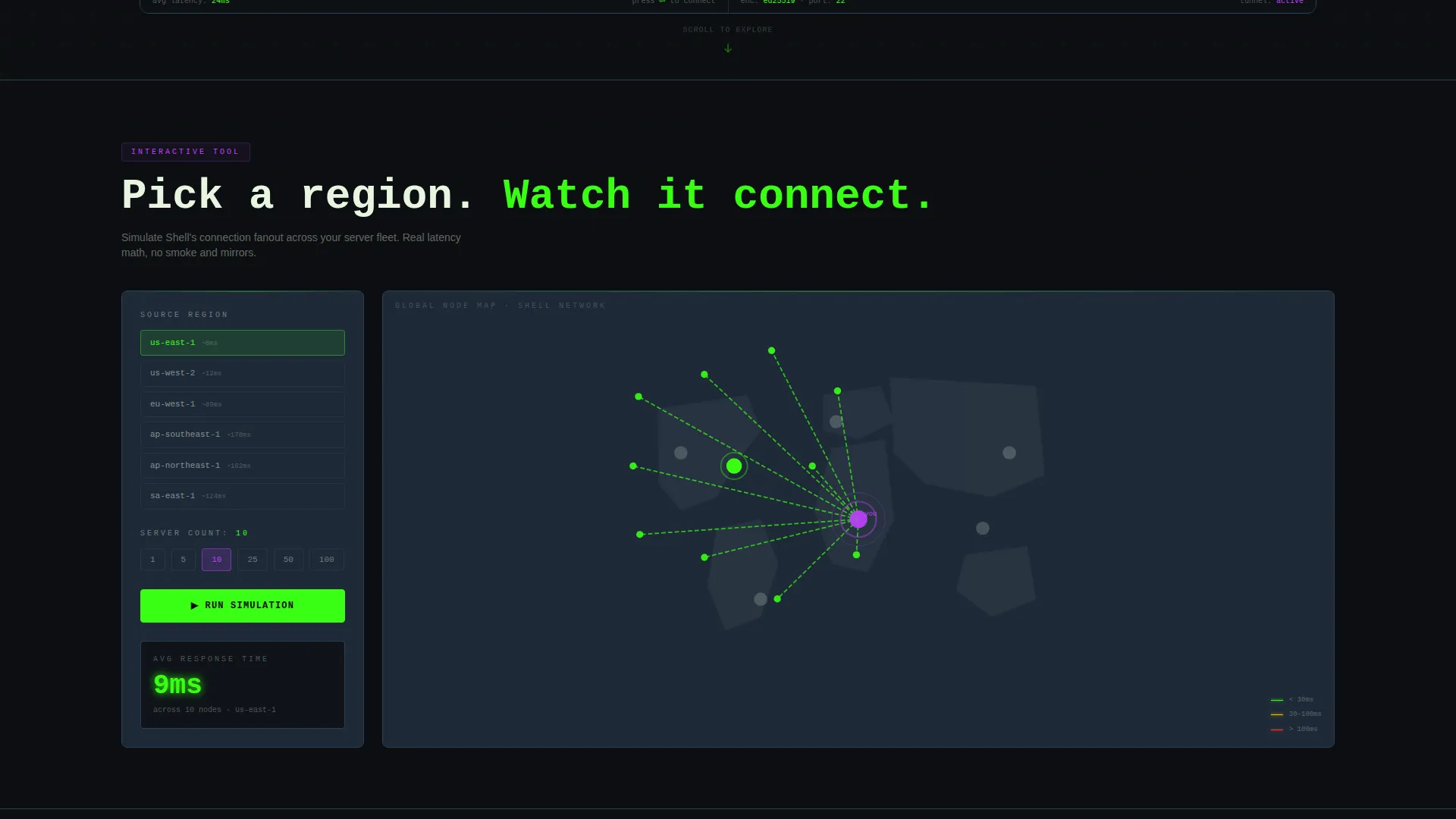
- An interactive latency simulator with region selection, server count controls, and animated node map output
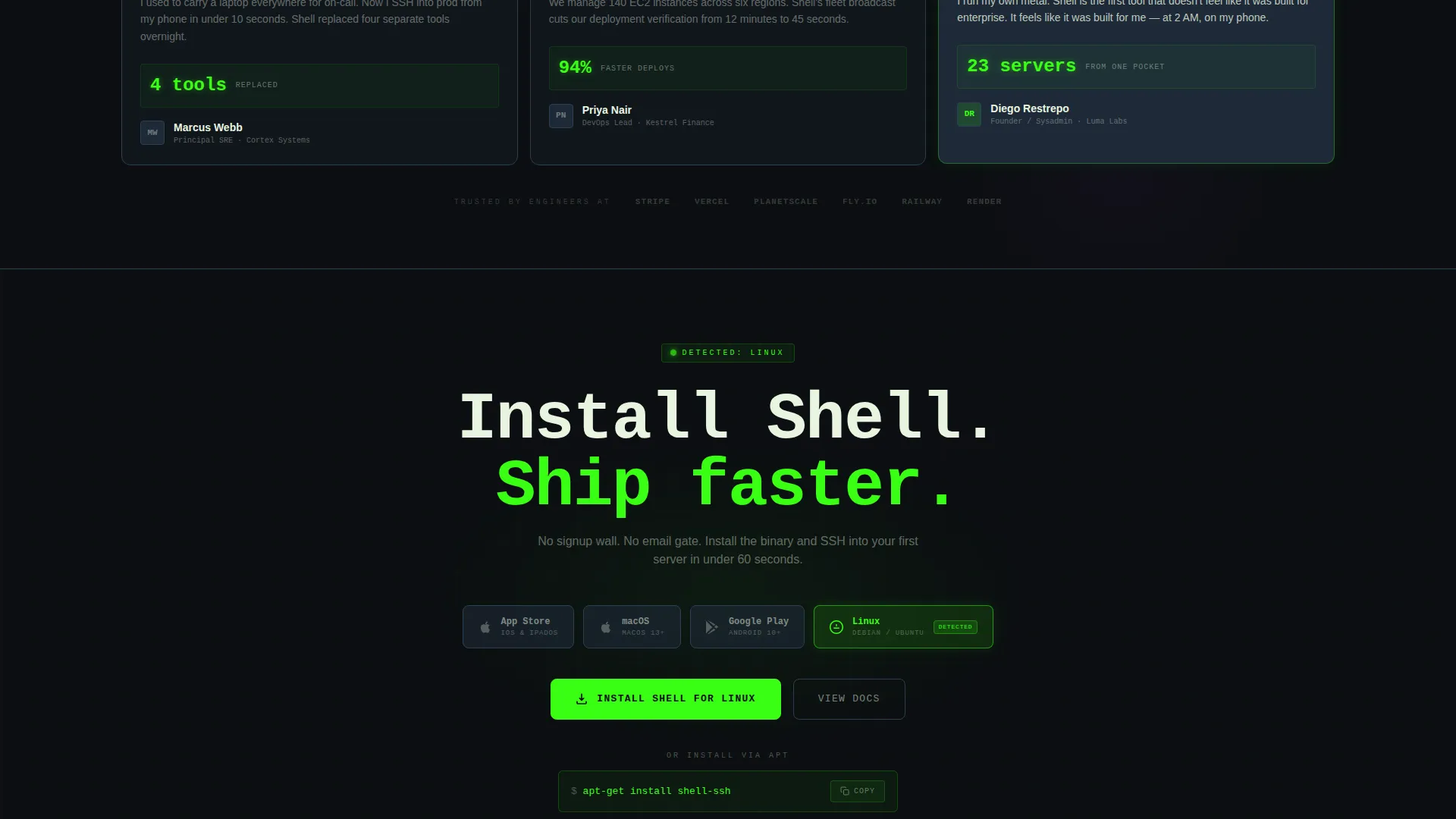
- Platform-detect download buttons for iOS, macOS, and Android, plus a copyable one-line install command
Feature list
This template ships with purpose-built sections that reflect how technical users actually evaluate tools. Every feature below is drawn directly from the template brief.
Split-Screen Stats Header
The header divides cleanly down the middle. The left panel displays a real-time server cluster view with ping latency values, CPU load bars, and green or red status dots beside hostnames. The right panel shows an SSH session mid-command with scrolling output and syntax-highlighted responses. Numbers animate on load, uptime counters increment, latency values flicker, and a connection count climbs.
Interactive Latency Simulator
Immediately below the header, visitors land on a live tool rather than a feature list. They pick a region, set a server count, and watch animated connection lines fan out across a node map. Simulated response times return in real time, letting engineers feel the interface before committing to a download.
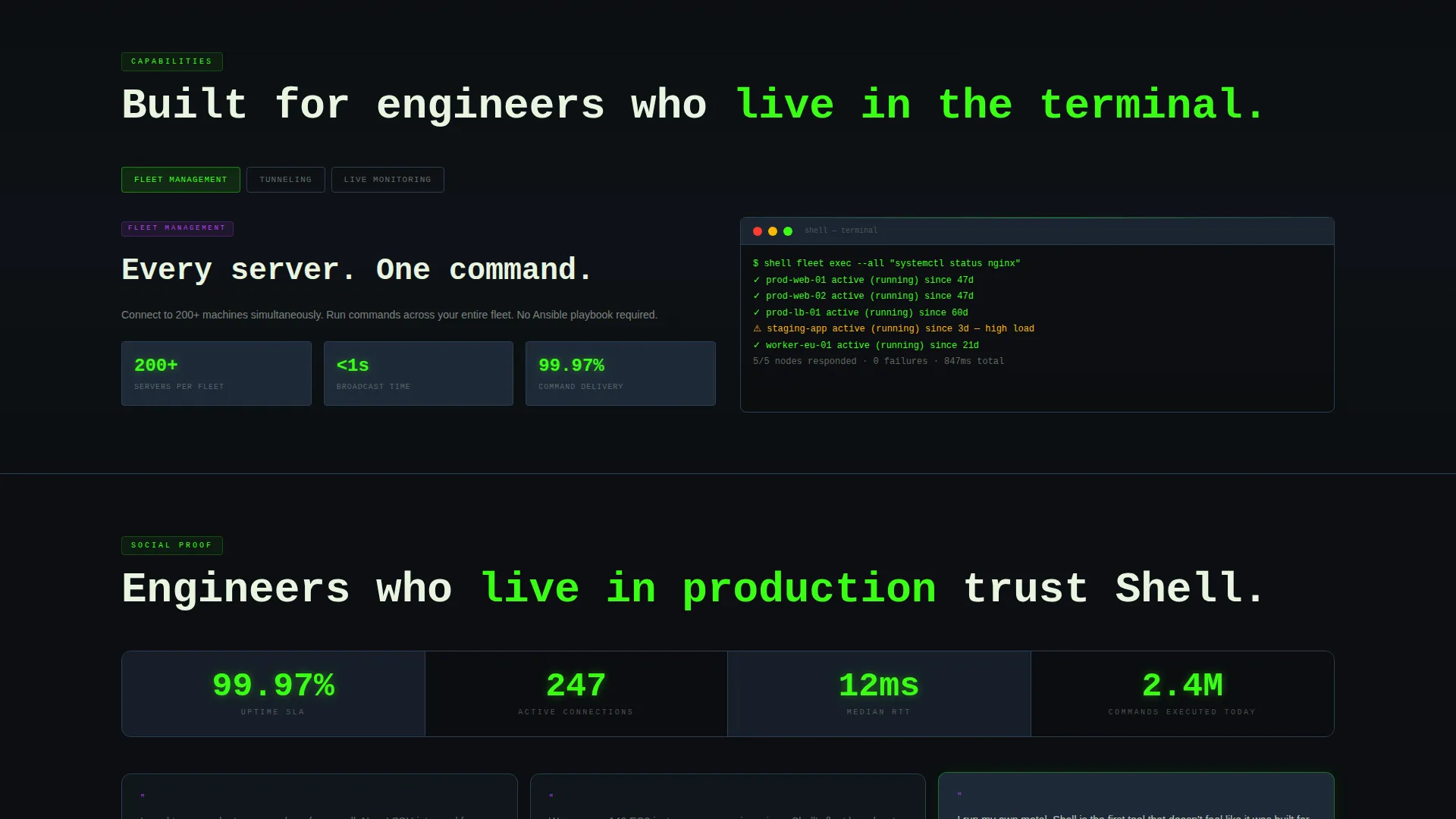
Terminal-Style Typewriter Reveals
Feature breakdowns animate in with typewriter-style text reveals as the user scrolls. Each section uses a terminal aesthetic that matches the overall visual identity, reinforcing the product's command-line character without relying on stock imagery or generic illustrations.
Platform-Detect Download Buttons
The primary call to action reads "Install Shell" and surfaces the correct download button automatically based on the visitor's device. iOS, macOS, and Android buttons appear contextually. A secondary one-line install command, either brew install or apt-get, is displayed inline and copyable with a single click.
Packet-Travel Section Transitions
Each section transitions with a subtle packet-travel motion effect that keeps the eye moving downward. The scroll flow goes from interactive tool to feature proof to download, mimicking the way data moves through a pipe and maintaining momentum without distracting from the content.
Session Recording Mockups
Auto-playing session recordings sit inside device mockups at key scroll points. They demonstrate real SSH session behavior, giving technical visitors a genuine preview of the product interface without requiring them to install anything first.
Page sections overview
| Section | Purpose |
|---|---|
| Split-Screen Header | Live server stats and active SSH session preview |
| Latency Simulator Tool | Interactive region and server count explorer |
| Feature Breakdown | Typewriter-reveal sections for each core capability |
| Session Mockups | Auto-playing SSH session recordings in device frames |
| App Download call to action | Platform-detect install buttons and copyable commands |
Design & branding system
The visual identity runs on the Acid Digital color system, built to feel like a CRT monitor bleeding phosphor light into a dark room. Every color choice is intentional and high-contrast.
- Void black (#0B0E11) as the background that never relents, cold titanium (#1E2A38) for card surfaces and dividers
- Phosphor green (#39FF14) dominates live data text, uptime counters, and status indicators throughout the page
- Electric violet (#BF40FF) fires on hover states, active connection highlights, and interactive element accents
Mobile & speed optimization
The template is designed with mobile-first engineers in mind. A DevOps professional SSHing into production from a phone is a primary use case, so the layout adapts cleanly to smaller screens.
- The 50/50 split-screen header stacks vertically on mobile without losing the density of the stats display
- Platform-detect download buttons surface the correct option automatically based on the visitor's device type
- Animated elements are built to run smoothly within the scroll flow without blocking content visibility
How this template helps you convert
The conversion flow is structured around earning trust before asking for action. Every scroll step moves the visitor closer to a download decision without pressure.
- The interactive latency simulator at the top lets engineers experience the product feel directly, removing skepticism before any copy makes a claim.
- Terminal-style typewriter reveals and auto-playing session mockups provide layered proof as the visitor scrolls, building confidence in the product's depth.
- Platform-detect download buttons and a copyable install command reduce friction to near zero at the moment the visitor is ready to act.
Other information about this template
This template sits at the intersection of the Micro-SaaS and Developer Tools category within the broader Technology space. It is purpose-built for the SSH and server manager niche and reflects the specific expectations of that audience.
- The Dynamic Motion theme and Calculator/Tool First creative direction are matched to the intersection context of this niche
- The template style is Split Screen (50/50), and the landing page direction is App Download, both specified in the matched intersection row
- The Stats/Metrics header concept is implemented as the live server cluster and SSH session split, aligned with the header concept field
- This template is well suited for products targeting engineers who prefer direct CLI-style tools over graphical dashboards
Theme
Dynamic Motion
Creative direction
Calculator/Tool First
Color system
Acid Digital
Style
Split Screen (50/50)
Direction
App Download
Page Sections
Split-screen Live Stats Header
Interactive Latency Simulator
Platform-detect Install Buttons
Terminal Typewriter Animations
Auto-playing Session Mockups
Packet-travel Scroll Transitions
Related questions
Can I change the color palette in this template?
Does this template work for a server management tool that is not SSH-focused?
Is the latency simulator a real backend tool or a visual component?
What platforms does the download call to action support?
Who is the ideal builder for this template?



