Certified Pet Boarding Landing Page Template
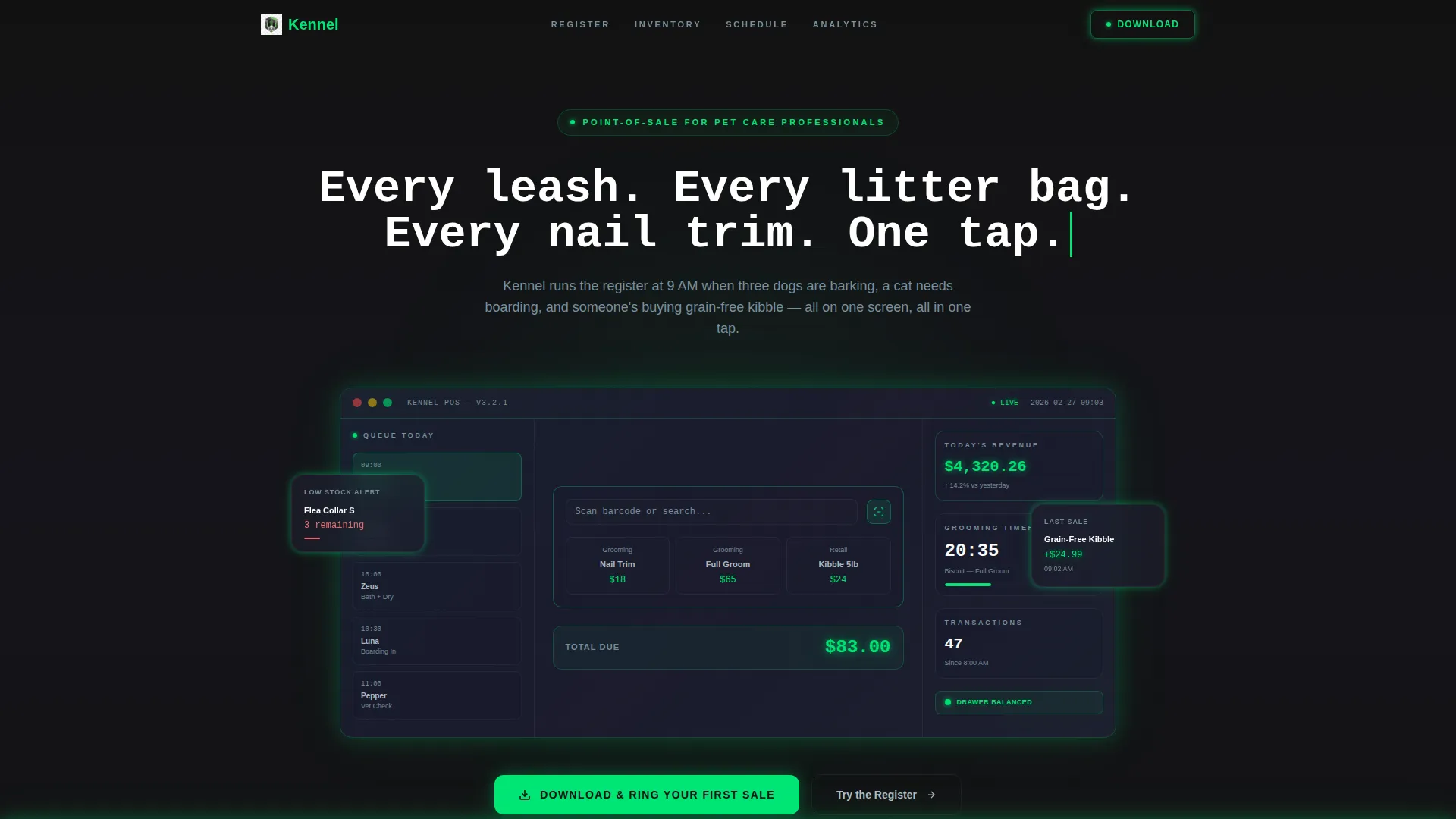
Kennel is a scroll-reveal landing page template built for pet care point-of-sale software. It uses a Data Command visual theme and Carbon Fiber color system to showcase an interactive POS experience. Designed for independent pet shops, grooming salons, and veterinary clinics, the page guides visitors from a live register demo to an app download in one seamless flow.
by Rocket studio
Quick summary
Kennel is a single-page, scroll-reveal landing page template for a pet care point-of-sale system. It combines a dark Data Command visual identity with interactive section demos, a live register mockup, an inventory dashboard, and a booking calendar, to let visitors operate the product before they download it. The primary call to action drives app downloads across iOS, Android, and countertop terminals.
Who this template is for
This template is built for software founders and product teams launching a pet care point-of-sale application. It speaks directly to the real operators those teams are trying to reach, using language and visuals those buyers already understand.
- Independent pet shop owners managing inventory across treats, toys, and medications
- Grooming salon operators handling appointment bookings and product sales on one register
- Veterinary clinic managers who need controlled substance tracking alongside routine checkout
What problem this template solves
Pet care businesses run complex, multi-role operations at the front counter. A generic software landing page cannot convey that depth. Kennel solves the trust gap by putting the product in the visitor's hands before asking for a download.
- Visitors who interact with a live register mockup feel product confidence faster than those who read feature lists
- Operators with specific needs, boarding, grooming, retail, clinical, see their own workflow reflected in the page
- The progressive scroll structure escalates from a single transaction to full business intelligence, matching how real buyers evaluate software
What you get with this template
You get a fully structured, single-page landing page built around an interactive scroll experience. Every section is designed to earn the download by making the product feel familiar before installation.
- A dark full-bleed header with a glowing POS terminal interface, live revenue ticker, appointment queue, and grooming countdown timer
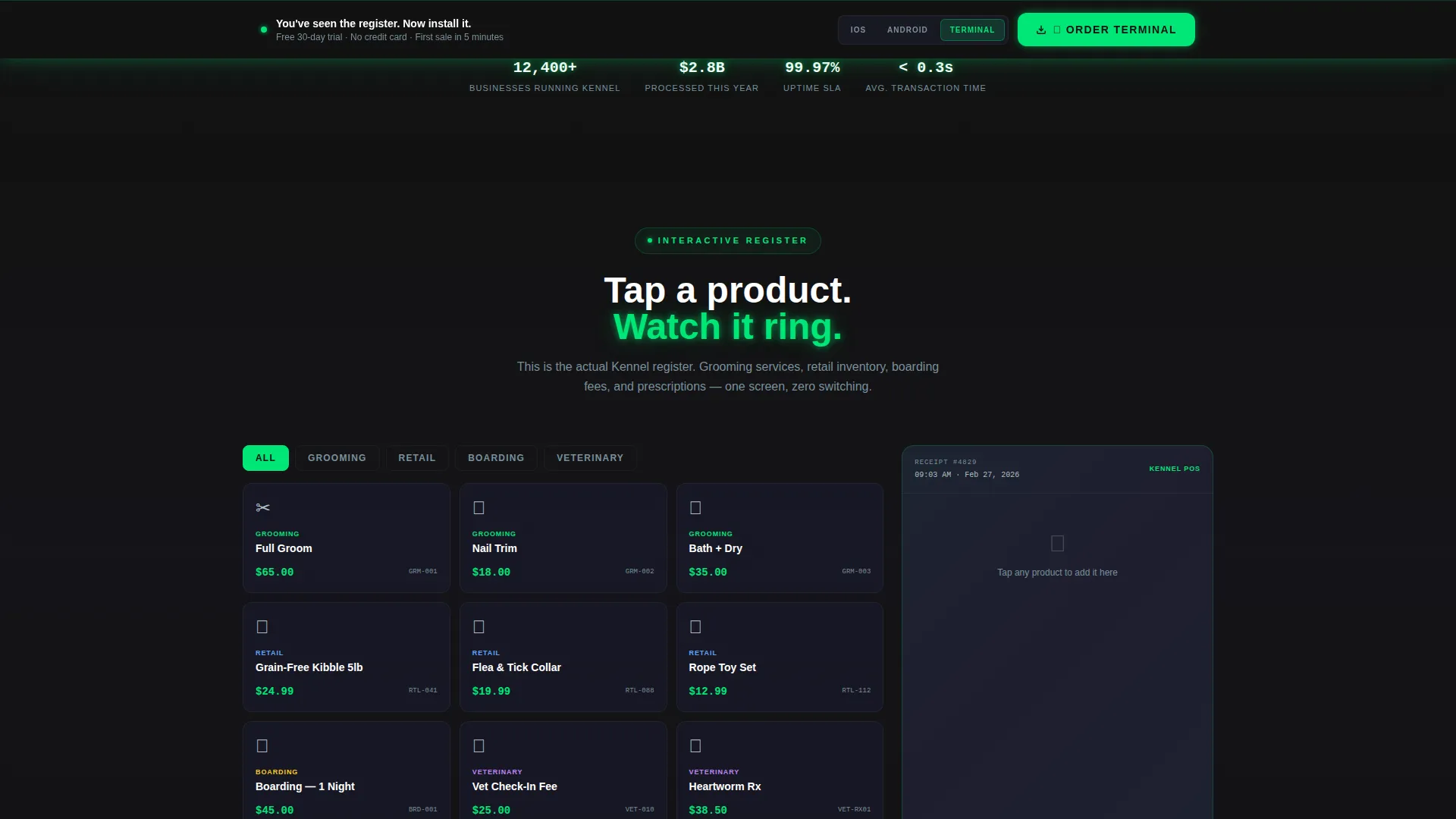
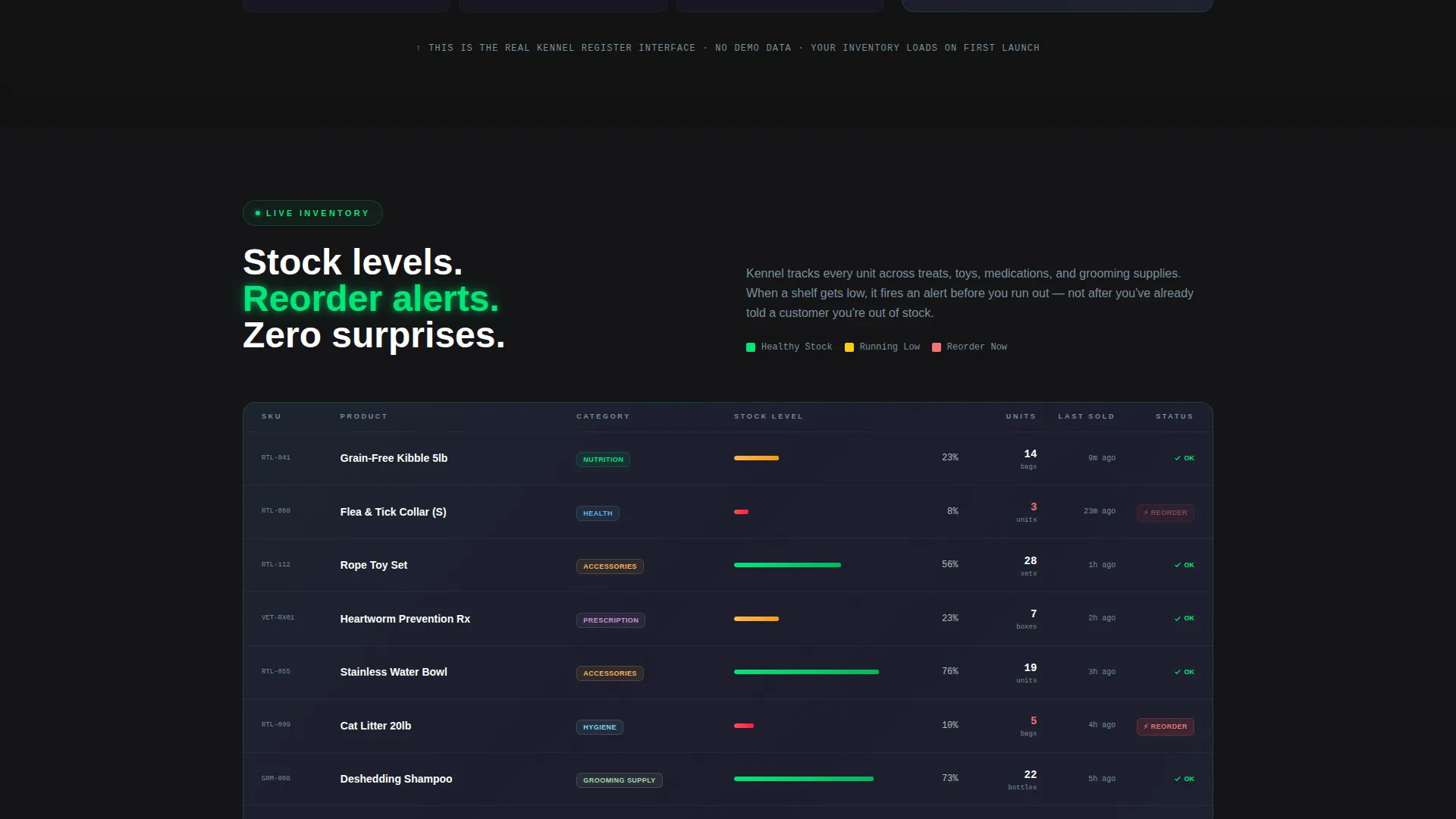
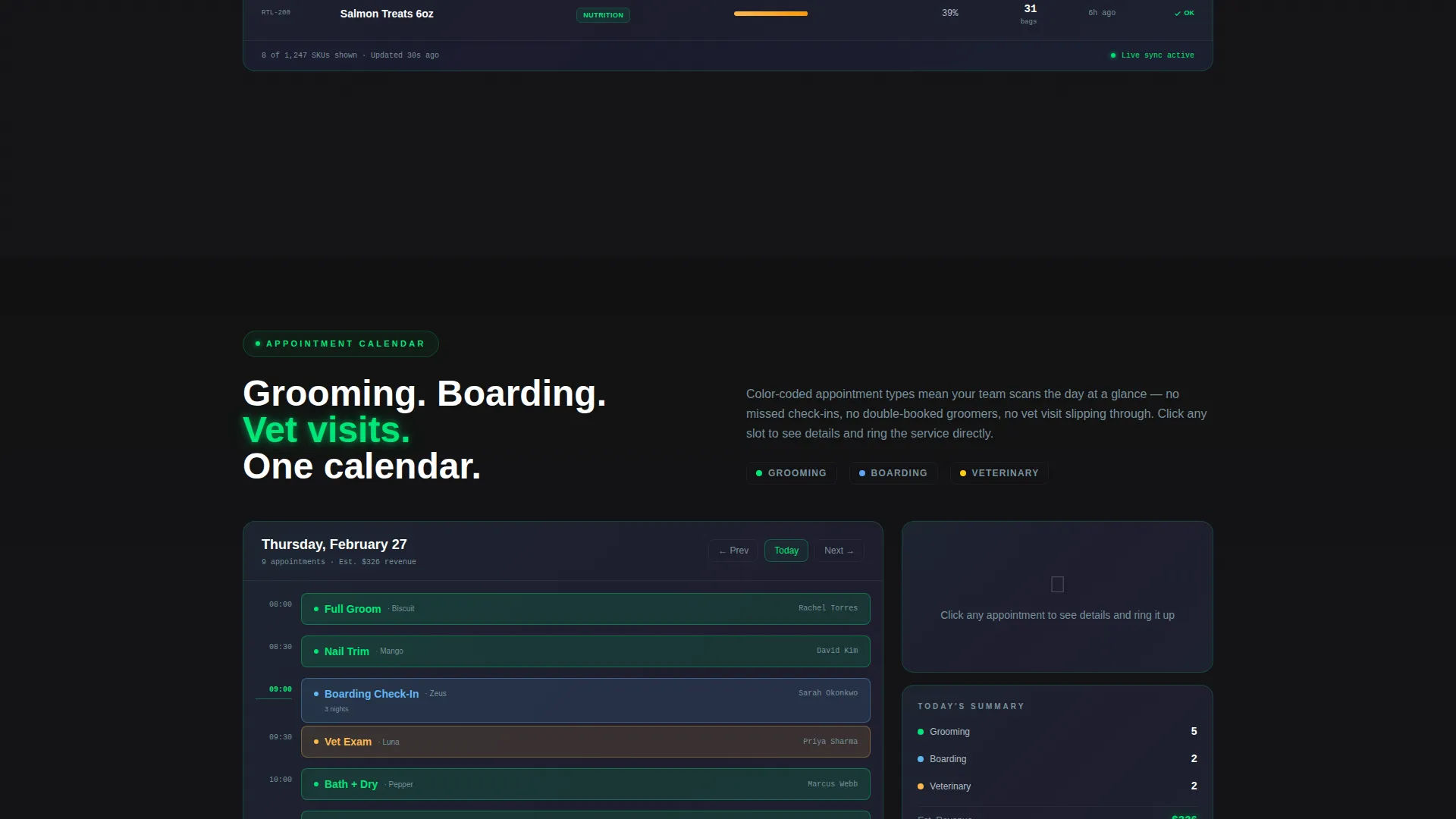
- Three interactive demo sections: a tappable register mockup, a live inventory dashboard, and a draggable appointment calendar
- A persistent bottom-bar call-to-action with a platform toggle for iOS, Android, and countertop terminal, plus a secondary demo path for inventory preview
Feature list
This template delivers purpose-built sections and interactive components grounded in how pet care POS buyers actually evaluate software.
Interactive Register Mockup
The first scroll section drops visitors into a tappable product tile grid. Tapping items builds a receipt in real time, letting potential customers feel the speed of the checkout flow before reading a single feature claim.
Live Inventory Dashboard
As the visitor scrolls, shelf quantities populate and tick down on screen. Reorder alerts fire in status-green, making the inventory management capability visible and immediate rather than described in text.
Draggable Appointment Calendar
Visitors can drag time blocks to see grooming slots, boarding check-ins, and veterinary visits color-code themselves across the calendar view. The interaction demonstrates multi-service scheduling in one clear gesture.
Persistent App Download Bar
A sticky bottom bar activates after the second interactive section. It includes a platform toggle that auto-detects the visitor's device, iOS, Android, or countertop terminal, and anchors the primary call to action throughout the page.
Inventory Demo Secondary Path
A secondary conversion path invites visitors to paste their own product list into a 60-second demo. The system auto-categorizes products into pet care verticals, giving prospective buyers a personalized preview without a full sign-up.
Progressive Data Reveal
Carbon panels slide apart as the visitor scrolls deeper, revealing daily revenue graphs, top-selling product rankings, and customer lifetime value cards. The escalating data sequence mirrors the real decision journey from single transaction to full business overview.
Page sections overview
| Section | Purpose |
|---|---|
| Dark Header Terminal | Establishes product identity with glowing POS interface and animated headline |
| Interactive Register Demo | Lets visitors tap product tiles and watch a receipt build in real time |
| Live Inventory Dashboard | Shows shelf counts populating and reorder alerts firing on scroll |
| Appointment Calendar | Demonstrates multi-service scheduling through draggable time blocks |
| Business Intelligence Panel | Reveals revenue graphs, product rankings, and lifetime value cards progressively |
| App Download Bar | Anchors the primary call to action with platform toggle across all device types |
| Inventory Demo Path | Offers a personalized 60-second demo using the visitor's own product list |
Design & branding system
The visual identity follows a Data Command theme built on a Carbon Fiber color palette. Dark surfaces dominate, and information glows from within them rather than sitting on top of a light background. The overall effect is close to the instrument panel of a high-end electric vehicle at night.
- Core colors: deep carbon black (#121212) and woven graphite (#1E1E2E) for all backgrounds, cool titanium (#B0BEC5) for secondary text, and status-green (#00E676) for every interactive element, button, toggle, hover state, and data visualization
- The header uses a dark full-bleed void with a centered POS terminal interface surrounded by a soft green edge glow bleeding outward from the device frame
- Typography and motion work together: the headline materializes letter by letter, and data panels slide apart progressively on scroll to reinforce the sense of a live system powering up
Mobile & speed optimization
The template is designed with a scroll-reveal, section-by-section load structure that keeps each interactive panel contained and manageable. The progressive disclosure model means heavier content, graphs, calendar grids, inventory tables, only activates when the visitor reaches that section.
- Interactive components load progressively, reducing upfront rendering load on entry
- The persistent download bar is designed to remain visible and functional across screen sizes, including mobile viewports
- Platform auto-detection on the download toggle ensures the correct app store or terminal path appears without extra taps from the visitor
How this template helps you convert
Kennel earns the download by dissolving friction before the call to action appears. The page is structured so visitors feel ownership of the product before they are ever asked to commit.
- Visitors interact with a live register, an inventory dashboard, and a booking calendar before the primary download bar activates, so the app already feels familiar by the time the ask arrives.
- The secondary demo path, paste your product list, watch auto-categorization happen, personalizes the value proposition for buyers who manage specific inventory and need proof before committing.
- Platform auto-detection on the download toggle removes the decision of which version to choose, cutting the final step down to a single tap.
Other information about this template
This template is categorized under Technology and the Pet Care Software and SaaS subcategory, targeting the Pet Care POS System niche specifically. It is built as a scroll-reveal, progressive landing page and pairs well with product-led growth marketing strategies where hands-on demos replace traditional feature copy.
- The template style is Scroll Reveal (Progressive), meaning each section animates into view as the visitor scrolls rather than loading all at once
- The creative direction is Interactive Explorer, where each scrolled section functions as a working demo, not a static screenshot
- The header concept is Dark Full-Bleed with a center-glow terminal, which sets an immediate tone of technical precision from the first pixel
- The landing page direction is App Download, meaning every design decision, section order, call to action placement, demo paths, supports a single conversion goal
Theme
Data Command
Creative direction
Interactive Explorer
Color system
Carbon Fiber
Style
Scroll Reveal (Progressive)
Direction
App Download
Page Sections
Interactive Register Mockup
Live Inventory Dashboard
Draggable Appointment Calendar
Persistent App Download Bar
Progressive Data Reveal Panels
Inventory Demo Secondary Path
Related questions
Who is the Kennel template designed for?
What makes the interactive sections different from a standard demo video?
Can the color palette and branding be customized?
Does the template include more than one conversion path?
Is this template suitable for a focused single-product app launch?



