Roofing Digital Presence Professional Website Template
Shingle is a bold brutalist landing page template built for a roofing job board. It connects general contractors, independent crews, and property managers through a bento grid layout that reads like a spec sheet. Job listings filter by zip code, material specialty, and start date. The primary call to action is a three-field "Post Your First Job Free" form with zero friction.
by Rocket studio
Quick summary
Shingle is a single-page bento grid landing page template designed for a roofing trades job board. It uses a bold brutalist visual system in Midnight Blue to match the no-nonsense world of field crews and general contractors. Every section stacks one hard fact, one clear action, and nothing decorative. The goal is simple: get the right people to post a job or browse open work.
Who this template is for
This template is built for anyone launching or marketing a roofing-specific job board. It speaks directly to the people who use these platforms every day, not tech-savvy marketers running polished SaaS funnels.
- General contractors managing multiple active subdivisions who need crews fast
- Independent roofing crews browsing work by zip code and material specialty
- Commercial property managers facing urgent tear-off deadlines and no available team
What problem this template solves
Finding roofing crews through generic job boards or staffing agencies is slow, expensive, and full of friction. The people who need to connect most are stuck using platforms that were never built for the trades.
- No specialized filtering by roofing material, start date, or zip code on generic boards
- Staffing agencies add cost and delay that field-focused teams cannot afford
- Most job boards require lengthy signups that lose crews before the first listing loads
What you get with this template
You get a fully structured, single-page landing page template built around a bento grid layout. Every cell is self-contained and designed to move a visitor toward one of two actions: posting a job or browsing open work.
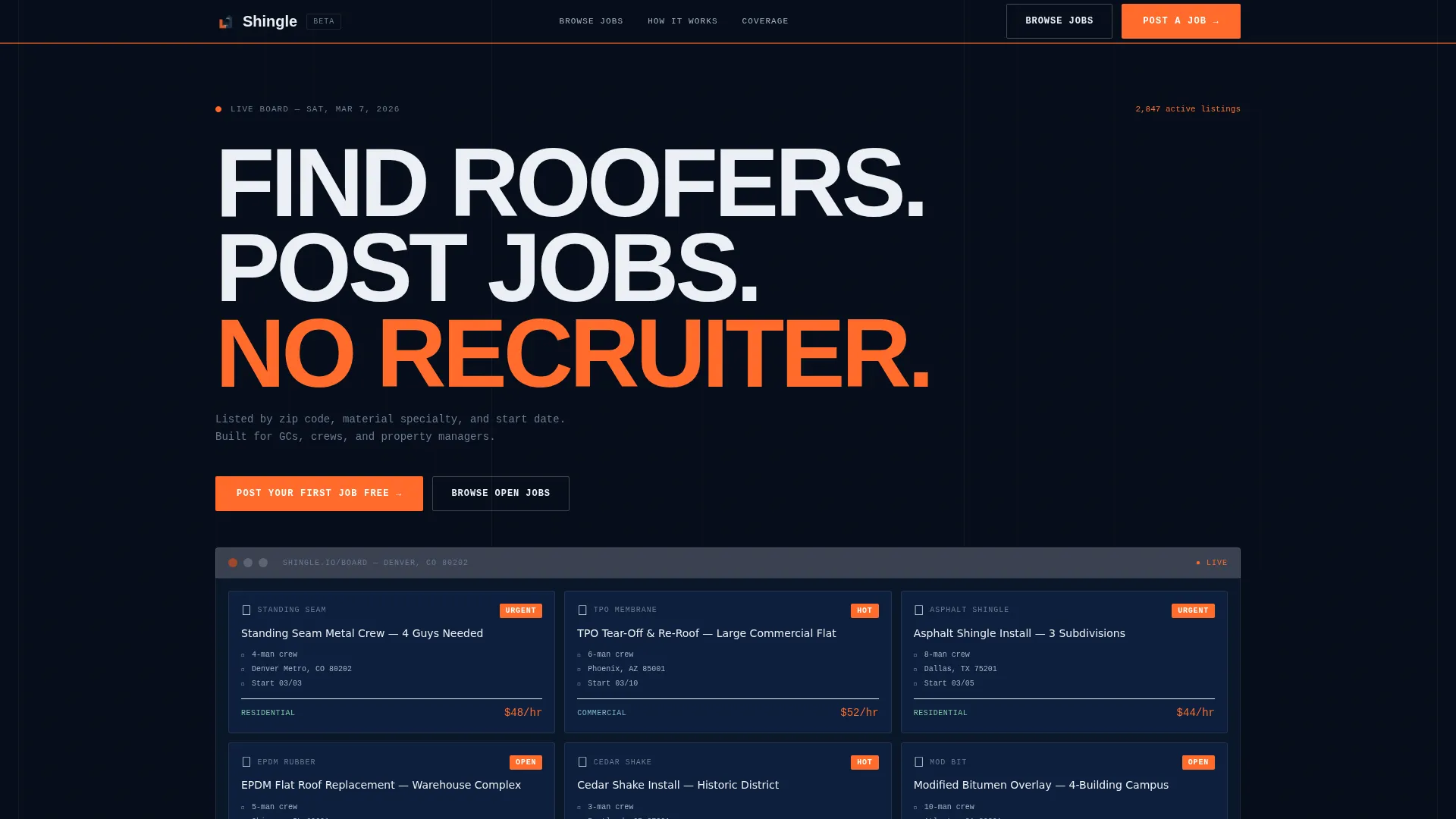
- A hero section with a product screenshot grid of six live-looking job cards and a brutal headline
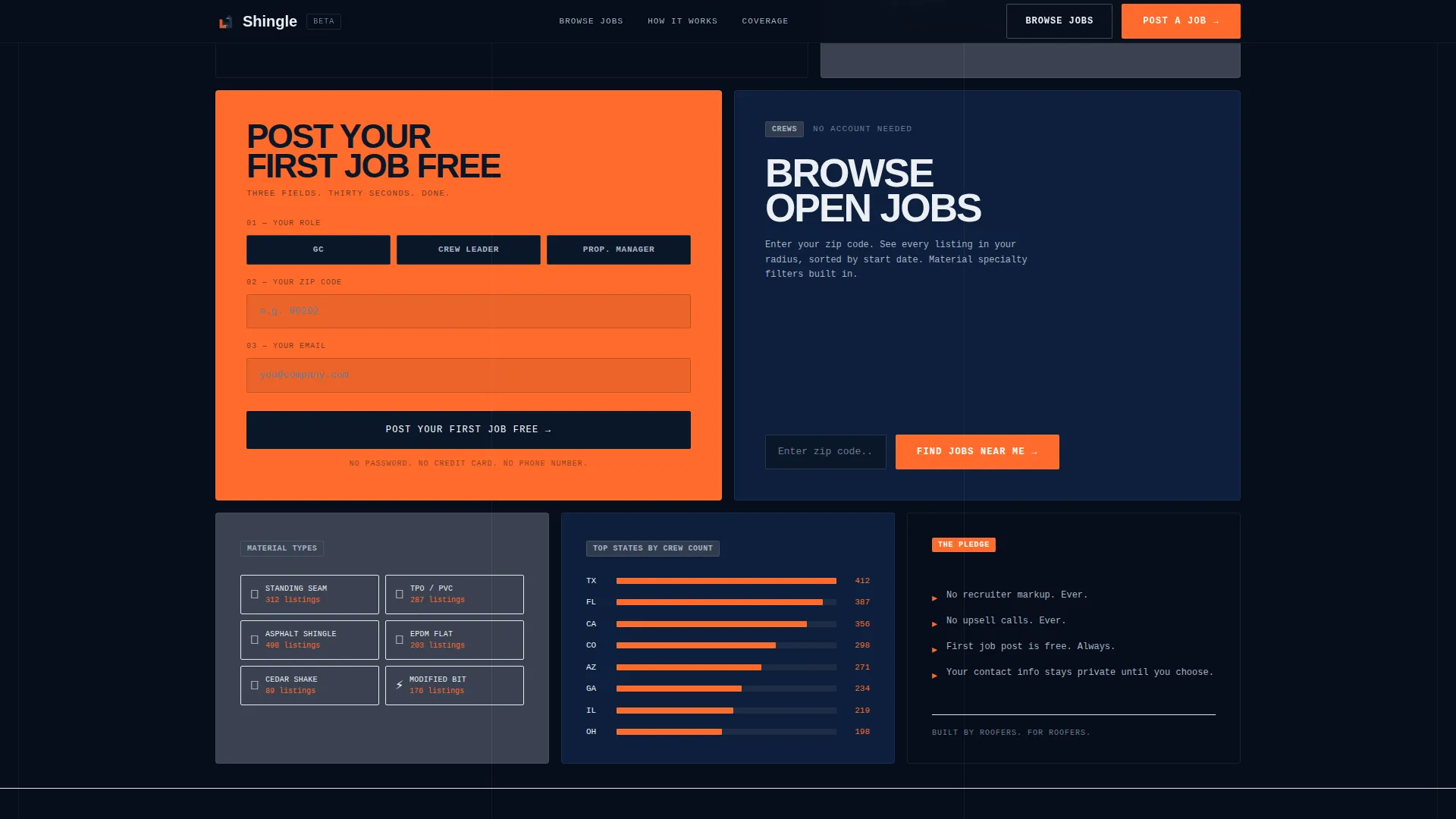
- A three-field lead generation form asking only for role, zip code, and email
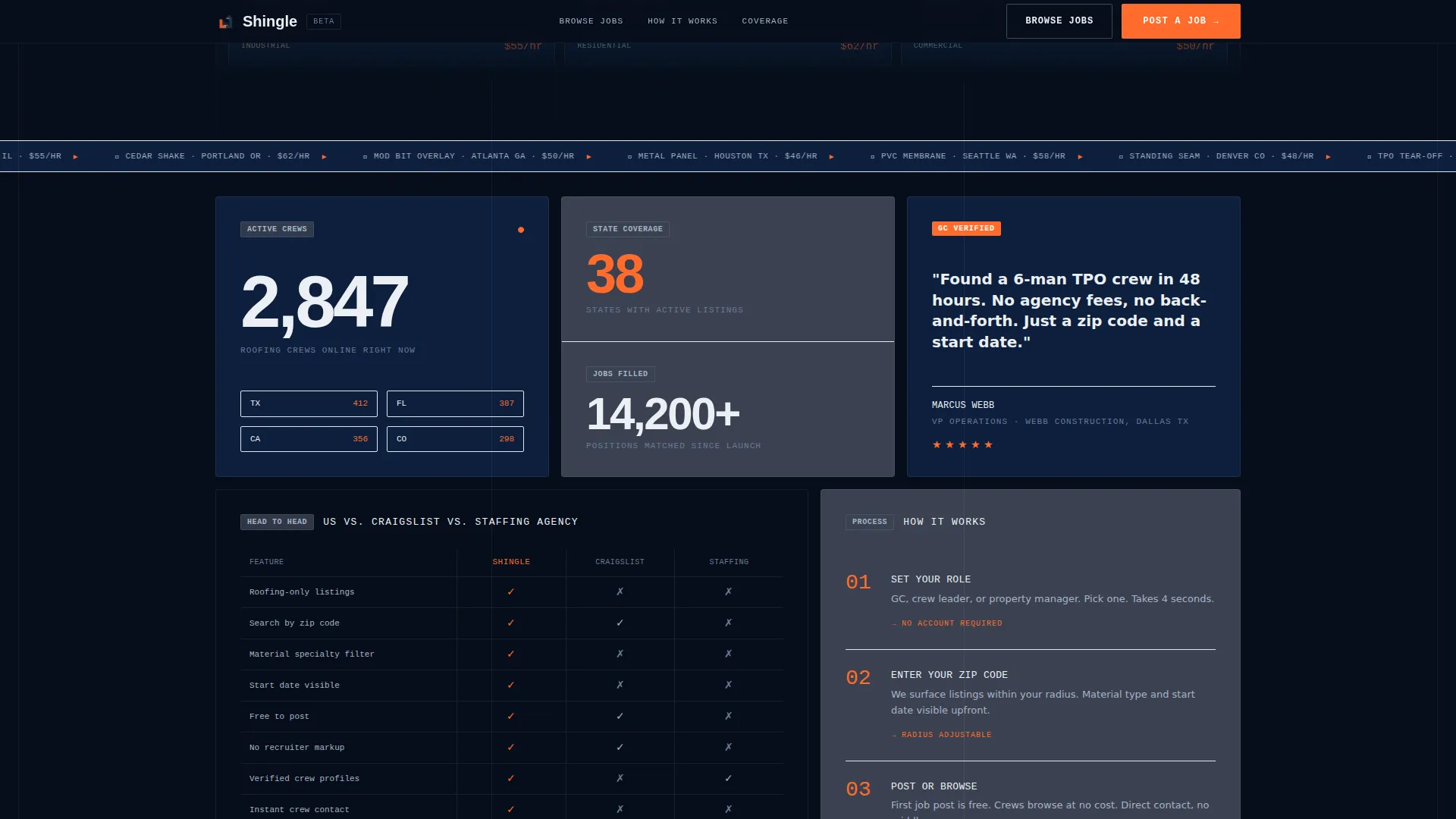
- A comparison table cell, a how-it-works step block, a testimonial cell, and an animated stats bento
Feature list
This template ships with a set of purpose-built components. Each one is grounded in the spec-sheet creative direction and the lead generation objective stated in the brief.
Bento Grid Job Card Display
The hero section features a full-width product screenshot showing six live-looking job cards. Each card displays crew size, location, pay rate or start date, material type, and urgency badges in safety-orange. The grid communicates the product immediately, without lifestyle imagery or abstract promises.
Three-Field Lead Generation Form
The primary conversion form collects exactly three inputs: user role (general contractor, crew leader, or property manager), zip code, and email address. No password, no phone number, and no company size field. Friction is stripped to the minimum needed to capture a qualified lead.
Sticky Mobile Call-to-Action Bar
On mobile, the "Post Your First Job Free" button is anchored inside a sticky bottom bar. Crews browsing on small screens can always reach the primary action without scrolling back to the top. A secondary "Browse Open Jobs" path captures crew-side leads with a soft location prompt.
Comparison Grid Cell
A side-by-side comparison cell pits the platform directly against Craigslist and staffing agencies. It uses checkmarks and X marks with no prose. Visitors can scan the difference in under two seconds and understand the value without reading a single paragraph.
Animated Active Crew Counter
A stats bento cell displays the number of active crews by state as a live-looking counter with scroll-triggered animation. This provides immediate social proof in a format that matches the spec-sheet tone of the rest of the page.
How It Works Step Block
A three-step numbered process is set in monospace type inside its own bento cell. Each step is one short line. The block explains posting from start to finish with no ambiguity and no marketing language.
Page sections overview
| Section | Purpose |
|---|---|
| Hero Product Screenshot | Show the live job board and deliver the core headline |
| Stats Bento Cells | Display active crew count and state coverage as proof |
| Comparison Grid Cell | Contrast the platform against generic alternatives |
| How It Works | Explain the three-step posting process in monospace |
| Testimonial and Form | Pair a GC quote with the three-field signup form |
| Footer Horizontal Flow | Close the page with navigation and secondary links |
Design & branding system
The visual identity is bold brutalist, built around a Midnight Blue color system that feels like a job site at dusk. Every design decision prioritizes readability and function over decoration.
- Color palette: deep terminal navy (#0A1628) for backgrounds, steel flashing gray (#3B4252) on card surfaces, chalk line white (#ECEFF4) for all body and heading text, and safety-orange (#FF6B2B) on every button, badge, and urgency indicator
- Typography: JetBrains Mono for monospace-critical elements and step numbers, DM Sans for body copy, with oversized headers slammed tight to the grid with minimal padding
Mobile & speed optimization
The template is designed mobile-first because the primary audience, independent roofing crews, browses jobs on phones between site visits. The layout adapts without losing readability or scanability.
- Sticky bottom bar keeps the primary call-to-action reachable at all times on small screens
- Static-first build approach with low-to-medium animation (counter animation and scroll reveals only) keeps the page light and avoids heavy library dependencies
How this template helps you convert
The page is structured as a sequence of evidence, not emotion. Each bento cell adds one more reason to act, and every path leads back to the same two conversion points.
- The three-field form removes every unnecessary input, so the drop-off rate between landing and submitting stays low for both general contractors and crew leaders
- The sticky mobile call-to-action bar and the repeated "Post Your First Job Free" button after the comparison cell ensure the primary action is always one tap away regardless of scroll position
Other information about this template
This template is part of a broader ecosystem of Bold Brutalist and neobrutalist design patterns suited to blue-collar software and trades-focused digital products. It pairs a spec-sheet creative direction with a bento grid template style and a product screenshot header concept to create a landing page that feels authentic to its audience.
- The Midnight Blue color system and safety-orange accent palette can be adjusted to match any roofing brand's existing job site signage or safety colors
- The page is localized for the United States market, using zip codes, USD pricing references, and imperial measurements throughout all job card examples
- The footer follows a horizontal flow pattern suited to compact single-page layouts, keeping navigation accessible without dominating the scroll experience

Theme
Bold Brutalist
Creative direction
Spec Sheet
Color system
Midnight Blue
Style
Bento Grid
Direction
Lead Generation
Page Sections
Bento Grid Job Card Display
Three-field Lead Generation Form
Sticky Mobile Call-to-action Bar
Side-by-side Comparison Cell
Animated Active Crew Counter
Monospace How It Works Block
Related questions
Can I customize the job card content shown in the hero section?
Does the lead generation form connect to a backend or email service?
Is the template suitable for crew-side users, not just job posters?
Can the Midnight Blue and safety-orange color palette be changed?
What sections are included in this landing page template?



