Photography Digital Presence Provider Directory Website Template
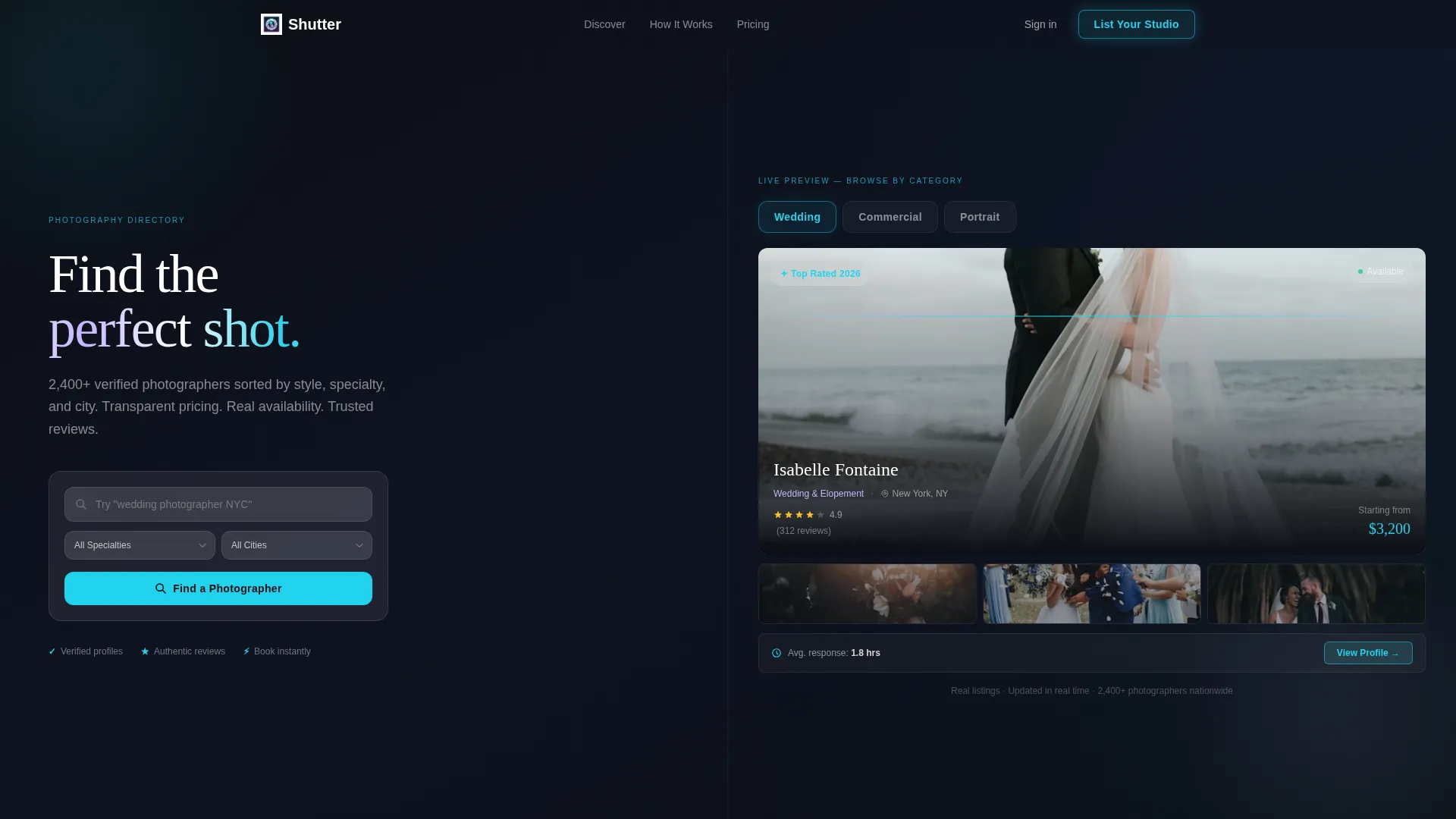
Shutter is a split-screen photography directory landing page built for lead generation. It connects clients with photographers through style, specialty, and city filters. The glassmorphic Tech Glass design features frosted panels, a tab-switching hero, and a three-step listing modal. The primary call to action drives photographers to list their studio.
by Rocket studio
Quick summary
Shutter is a single-page photography directory landing page with a 50/50 split-screen layout. It combines a glassmorphic visual identity with a spec-sheet content structure. The page is built to attract photographers who want to be listed, while showing clients a seamless search experience. Frosted panels, live-switching tabs, and a three-step sign-up modal do the heavy lifting.
Who this template is for
This template is purpose-built for anyone launching or promoting a photography directory or listing platform. It speaks directly to two audiences at once: photographers looking for more clients, and clients searching for the right photographer.
- Founders and operators building a curated photography directory or listing site
- Photographers who want a ready-made lead generation page to promote their studio listing
- Small agencies or creative platforms sourcing talent across wedding, commercial, and portrait niches
What problem this template solves
Finding the right photographer online is slow, inconsistent, and trust-thin. Clients scroll through scattered portfolios with no pricing, no availability, and no verified reviews. Photographers, on the other hand, have no single high-quality surface to display their work and attract serious inquiries.
- Clients lack a single place that shows style, price, availability, and reviews in one view
- Photographers have no structured lead generation page that demonstrates the quality of their listing before they commit
- Directory operators need a landing page that builds trust with both sides of the marketplace at once
What you get with this template
You get a fully designed, single-page landing page layout that makes the case for your photography directory with precision and style. Every section is structured to move visitors from curiosity to action.
- A 50/50 split-screen hero with three interactive glass tabs and a live photographer card preview
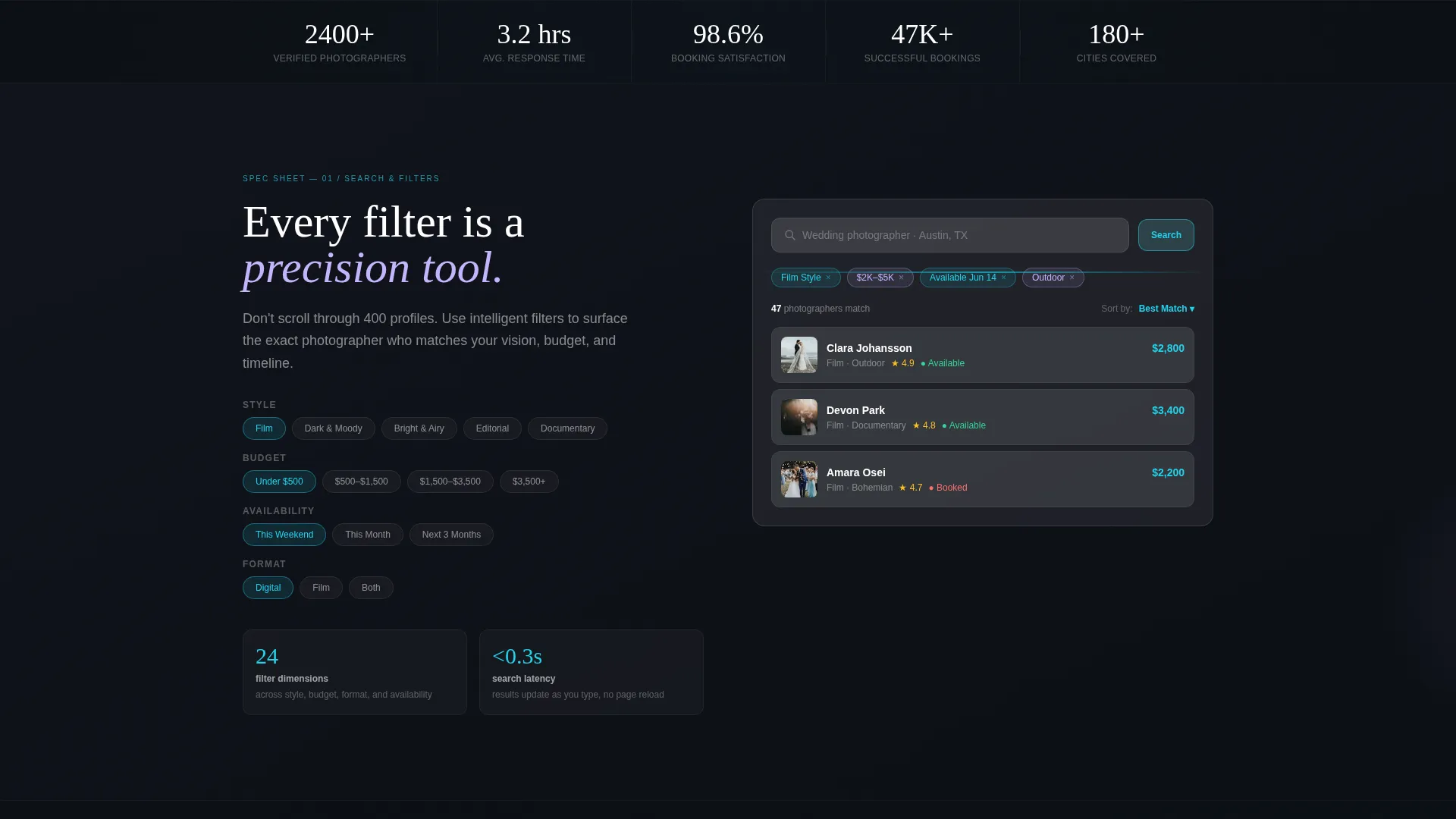
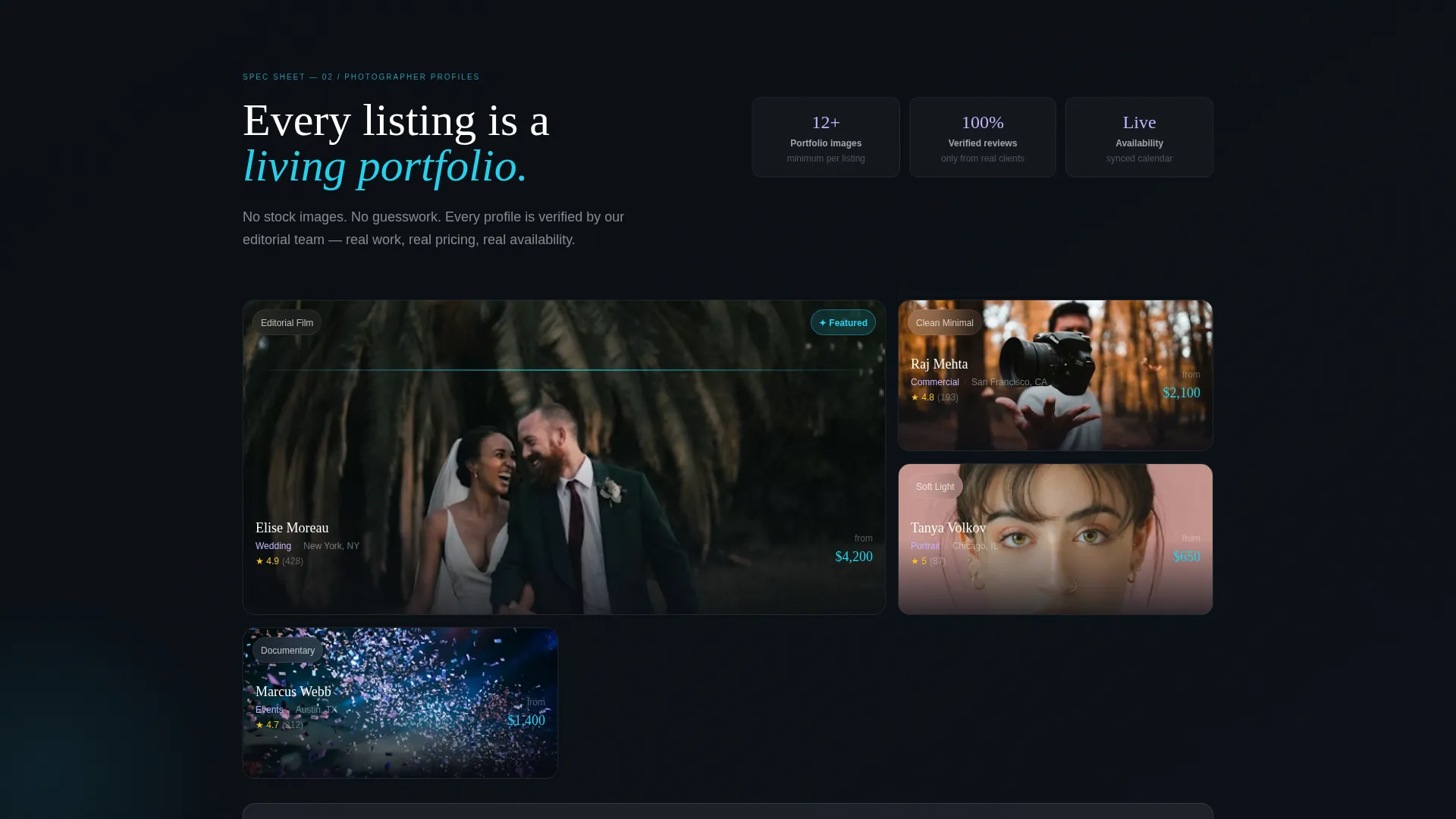
- A spec-sheet scroll layout with glass-panel diagrams, data points, and feature breakdowns for search, profiles, booking, and reviews
- A three-step frosted modal for photographer sign-up, plus a client-side "Find a Photographer" search bar embedded in the hero
Feature list
This section breaks down the core built-in components of the Shutter template.
Feature Tab Switcher Header
The hero is split 50/50. The left side holds three frosted glass tabs labeled "Wedding," "Commercial," and "Portrait." Clicking any tab swaps the right panel in real time to show a full photographer card with name, hero image, rating stars, location badge, starting price, and a three-image micro-gallery.
Spec Sheet Scroll Sections
Each scroll section below the hero isolates one directory feature: search filters, photographer profiles, booking flow, or review verification. Every section pairs a glass-panel diagram with tight, data-forward copy. Prominent numbers like "2,400+ verified photographers," "Average response time: 3.2 hours," and "98.6% booking satisfaction" build the case section by section.
Three-Step Listing Modal
The primary call-to-action triggers a frosted three-step modal. Step one collects name, photography specialty via dropdown, and city. Step two requests a portfolio link and Instagram handle. Step three presents an availability toggle and a preferred price range slider.
Dual-Path Conversion Design
The page serves two visitor types without splitting focus. Photographers are pulled toward the "List Your Studio" call to action. Clients are guided through the "Find a Photographer" search bar. Both paths coexist on the same page without competing for attention.
Glassmorphic Card Components
Photographer listing cards are rendered with 1px luminous borders that react on hover with a signal cyan ring. Each card displays a hero image, star rating, location badge, starting price, and a row of thumbnail images. The card design shows photographers exactly how their work will appear once listed.
Page sections overview
| Section | Purpose |
|---|---|
| Split-Screen Hero | Introduce the directory with live tab-switching photographer previews |
| Search Filter Spec | Showcase style, specialty, and city filter capabilities |
| Photographer Profile Spec | Highlight living portfolio cards with pricing and availability |
| Booking Flow Spec | Demonstrate the structured client booking experience |
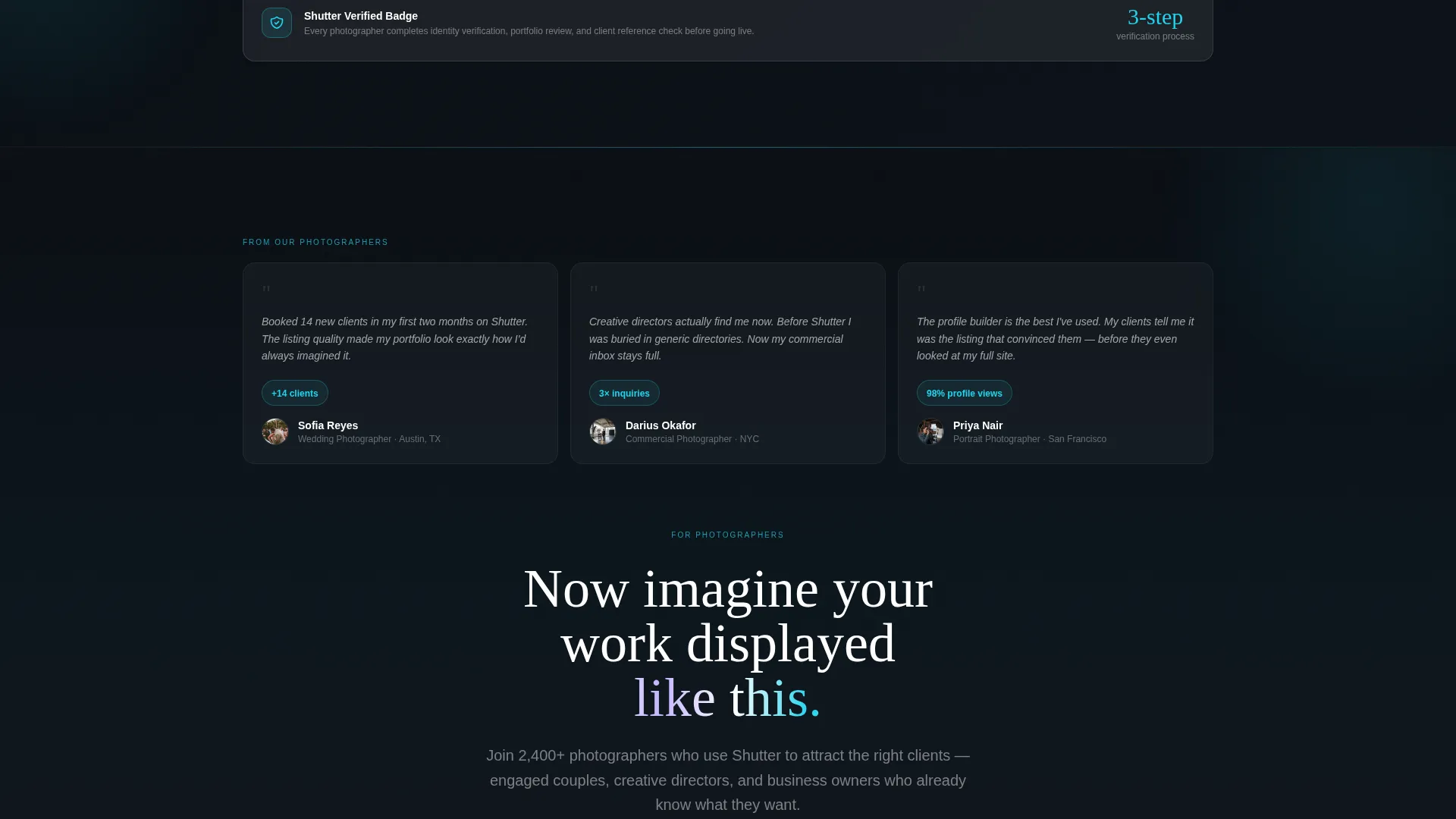
| Review Verification Spec | Build trust with verified review data and satisfaction metrics |
| Listing call to action Footer | Repeat the "List Your Studio" call to action and close the page |
Design & branding system
The Shutter template uses a Tech Glass visual identity built on a glassmorphic color system. Every surface feels cool, luminous, and precisely layered over dark gradients.
- Core palette: translucent panel white (#FFFFFFB3), deep void black (#0B0E14), frosted lilac (#C4B5FD), and signal cyan (#22D3EE) reserved for active states, hover rings, and call-to-action pulses
- Backdrop-blur panels are layered over dark gradients throughout the scroll; text lives in pure white or muted lavender
- Cards carry 1px luminous borders that catch the accent cyan on interaction, reinforcing the "frosted glass display case" aesthetic
Mobile & speed optimization
The template is designed with a lightweight, single-page structure that keeps the layout clean and fast to load across screen sizes. The glassmorphic layers and blur effects are applied with performance in mind, using the visual system defined in the brief.
- The split-screen layout is built to reflow gracefully for smaller screens without losing the frosted panel aesthetic
- The three-step modal is compact and touch-friendly, keeping the sign-up flow accessible on mobile devices
- Frosted glass panels and backdrop-blur sections are scoped to avoid unnecessary render overhead in the layout
How this template helps you convert
The Shutter template converts because it earns trust before it asks for anything. Photographers see the client experience first, then receive the invitation to list.
- The hero tab switcher shows photographers exactly how their listing will look, removing doubt before they reach the call to action
- The spec-sheet scroll builds a data-backed case section by section, each frosted panel adding a new layer of credibility
- The three-step modal reduces friction by breaking sign-up into small, logical steps, with the "List Your Studio" button fixed in the header and repeated at page bottom for consistent visibility
Other information about this template
This template is well-suited for photography directory platforms, listing site launches, and creative marketplace pages in the photography vertical. It is especially effective as a lead generation surface aimed at photographers across wedding, commercial, and portrait specialties.
- The template is built as a single landing page; it does not include a multi-page directory structure or live database connections out of the box
- The page layout supports the photography directory and listing site niche, with the dual-path design addressing both photographer acquisition and client discovery
- The "List Your Studio" call to action is fixed in the header and anchored at the footer, ensuring the primary conversion goal stays visible throughout the entire scroll
Theme
Tech Glass
Creative direction
Spec Sheet
Color system
Glassmorphic
Style
Split Screen (50/50)
Direction
Lead Generation
Page Sections
Feature Tab Switcher Hero
Spec Sheet Scroll Layout
Three-step Listing Modal
Dual-path Conversion Flow
Glassmorphic Photographer Cards
Related questions
Who is this template designed for?
Does this template include a working directory or live listings?
Can I customize the photographer card content and tab labels?
Is the three-step listing modal included in the template?
How does the dual-path design serve two different audiences?



