Art & Design School Professional Website Template
Shutter is a single-page photography school landing page built around a comparison table and timeline progression. It targets beginners ready to move from snapshots to intentional photography. With animated data storytelling in the header, a freemium trial flow, and a Forest Trust color system, it turns curiosity into enrollment one scroll at a time.
by Rocket studio
Quick summary
Shutter is a photography school landing page template designed to convert curious beginners into enrolled students. It leads with animated enrollment data, walks visitors through a twelve-week learning journey, and uses a side-by-side comparison table to make the case for full enrollment over a free trial. The visual identity is warm, geometric, and alive.
Who this template is for
This template is built for photography educators who want to attract beginners and turn first-time visitors into committed students. It suits schools, independent instructors, and workshop organizers running a freemium or trial-based enrollment model.
- Photographers running a structured beginner course with a free trial entry point
- Independent educators or small schools offering hands-on, in-person or hybrid photography training
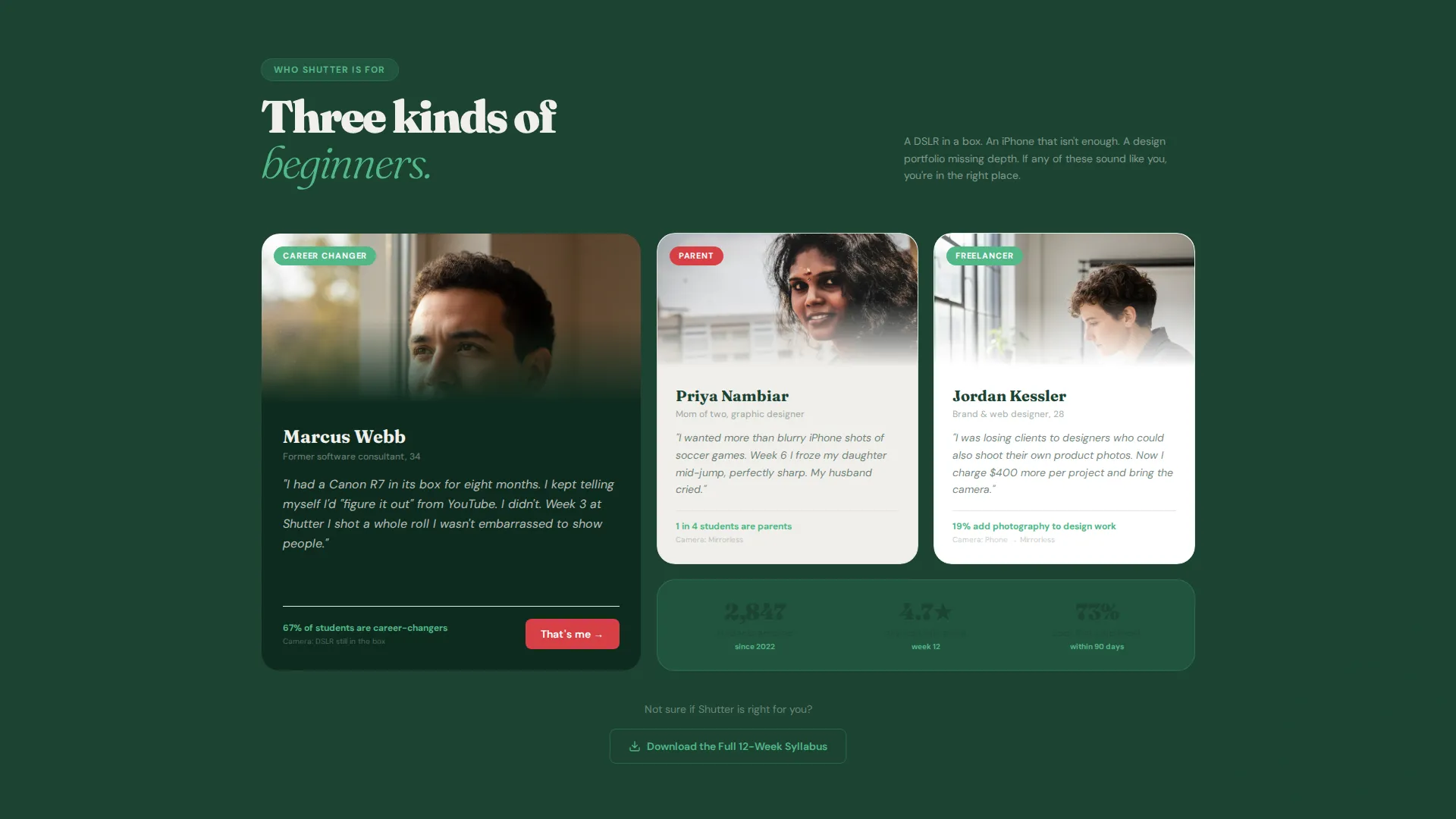
- Instructors who want to showcase student progress and portfolio outcomes to build trust before sign-up
What problem this template solves
Most photography course pages either overwhelm beginners with technical jargon or undersell the transformation students actually experience. Visitors leave without a clear picture of what they will learn, what the trial includes, or why upgrading matters.
- Beginners cannot easily tell what they get for free versus what requires full enrollment
- Course pages rarely show proof of student progress in a way that feels real and emotionally resonant
- There is no clear, low-friction path for visitors who are curious but not yet ready to commit
What you get with this template
You get a fully designed, single-page layout built specifically for a photography school with a freemium conversion model. Every section is purposeful, from the animated header down to the trial sign-up form.
- An animated data storytelling header with enrollment counters, portfolio rating progression, and a radial chart
- A scrollable twelve-week timeline comparison table contrasting Free Trial access against Full Enrollment
- A minimal trial sign-up form and a secondary syllabus PDF download path for browsers still deciding
Feature list
This template delivers a focused set of design and layout features drawn directly from the brief. Each one is built to support the photography school use case.
Animated Data Storytelling Header
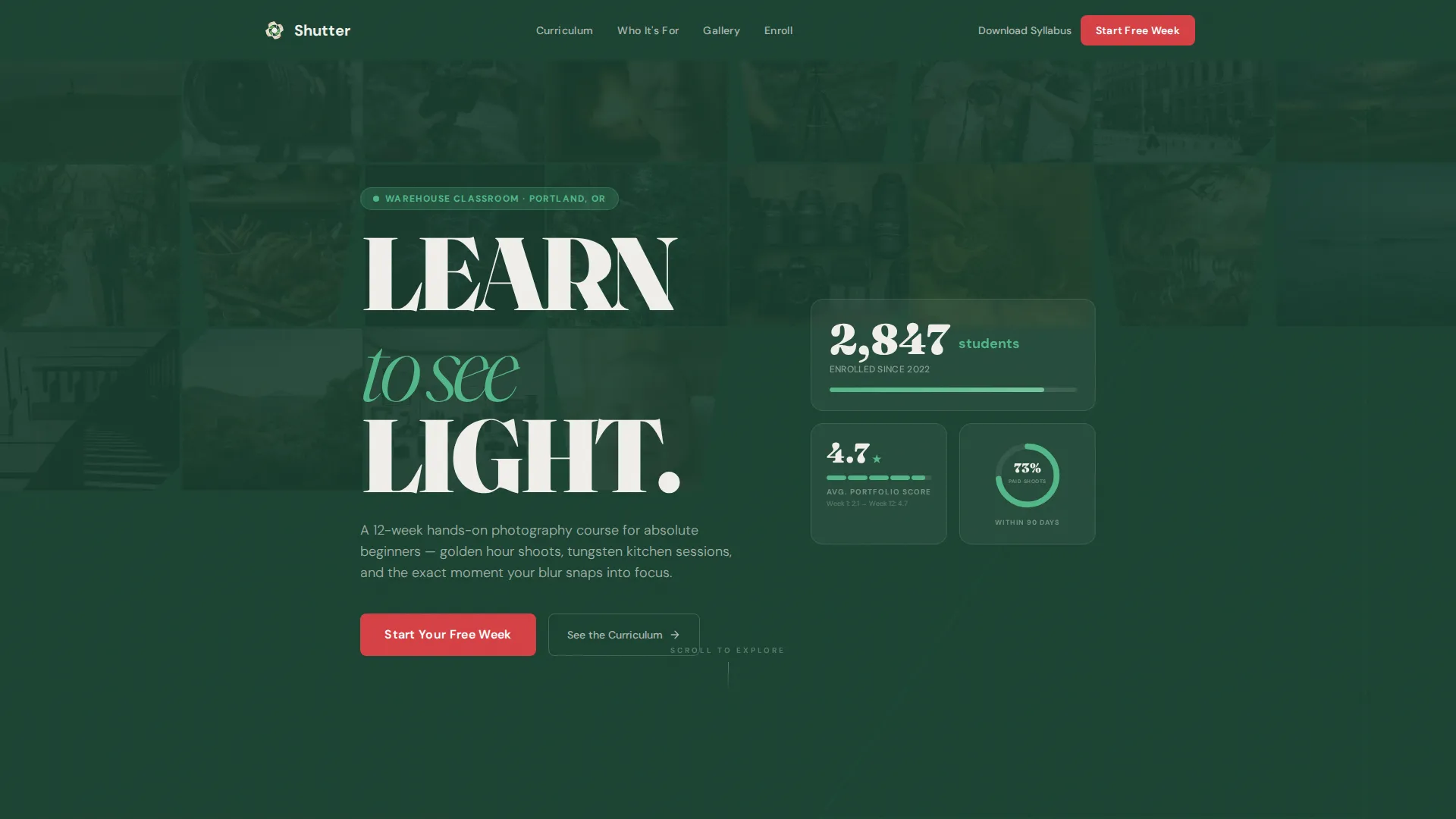
The header opens with oversized geometric numbers that rotate and lock into place like viewfinder brackets snapping to focus. It displays live-style enrollment counters, a portfolio rating arc climbing from 2.1 to 4.7 stars across twelve weeks, and a radial chart that blooms open to show that 73% of graduates book their first paid shoot within ninety days.
Timeline Progression Comparison Table
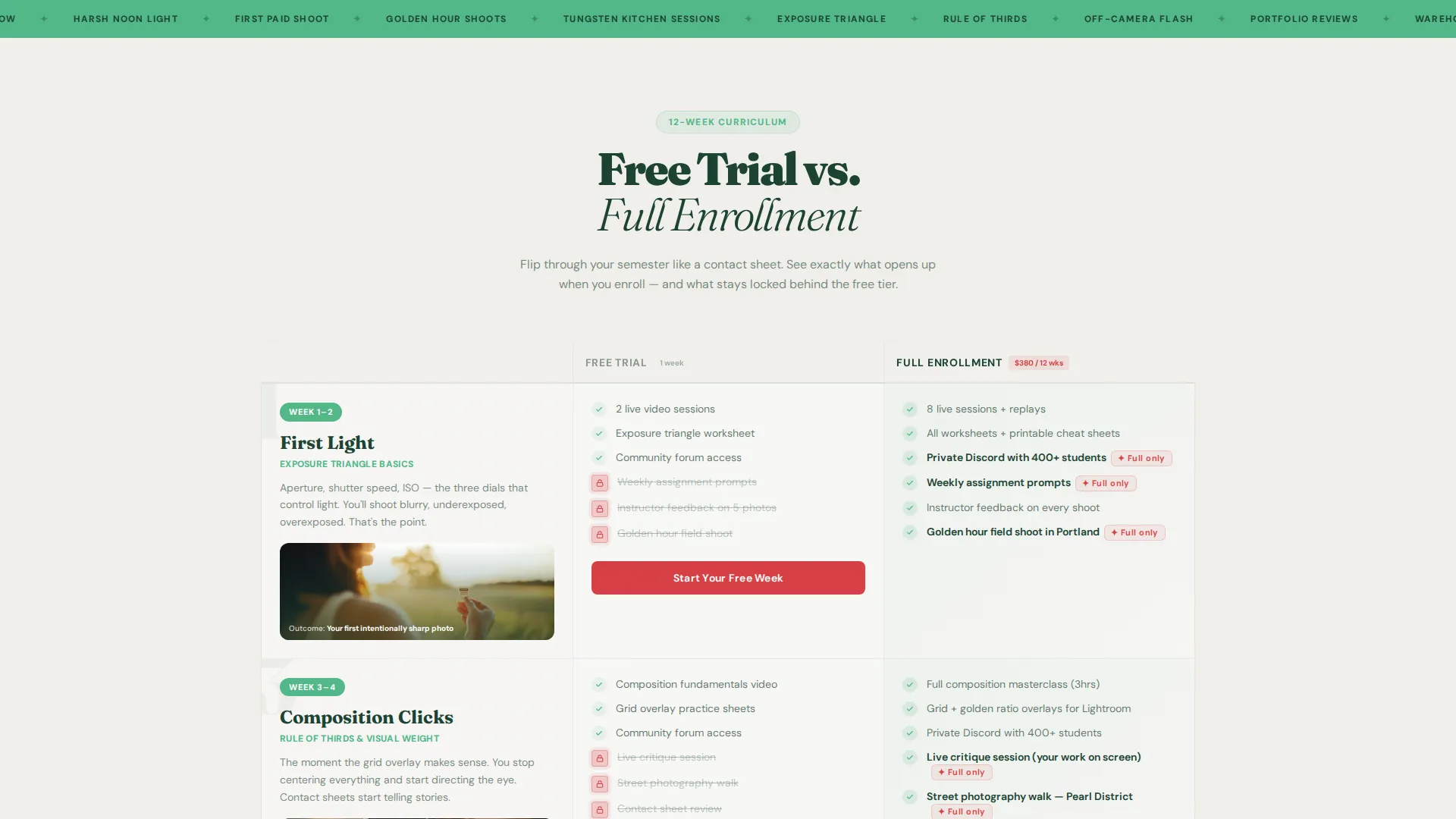
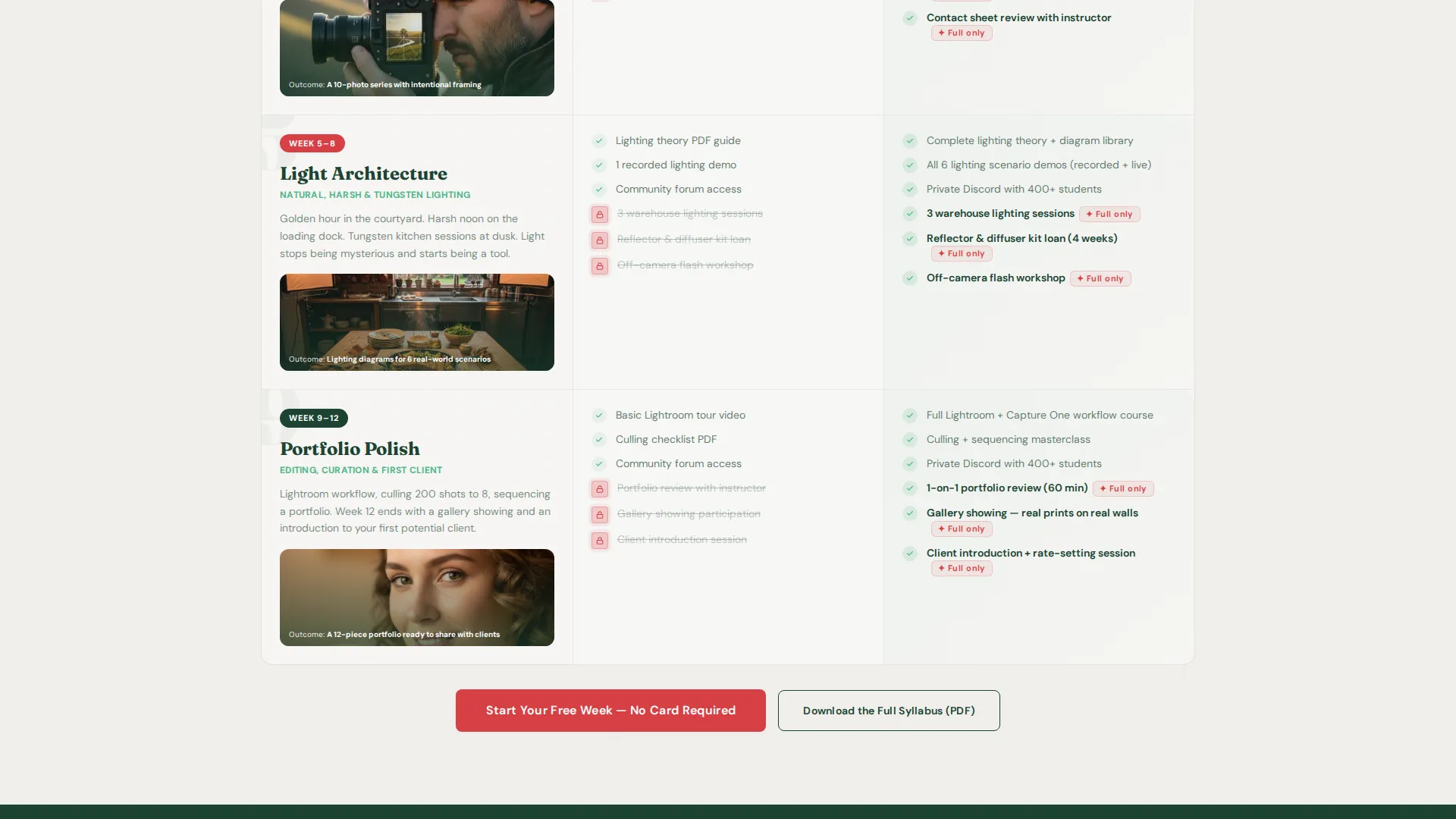
A scrollable comparison table maps the twelve-week semester journey row by row. Each row contrasts what Free Trial access unlocks against what Full Enrollment delivers. Locked features in the Free column carry a subtle berry-colored unlock icon that builds quiet urgency without hard-sell language.
Freemium Trial Sign-Up Form
The primary call to action reads "Start Your Free Week" and appears first inside the Week 1 comparison row. It then floats persistently after the midpoint scroll. The form asks only for first name, email, and camera type via a dropdown that includes phone, mirrorless, Digital Single-Lens Reflex (DSLR), film, and "I don't own one yet."
Syllabus PDF Download Gate
A secondary conversion path offers "Download the Syllabus" for visitors who are not ready to start the trial. This gives undecided browsers something concrete to take away while keeping them in the funnel.
Student Photography Mosaic Background
Behind the header data, a looping mosaic of student-shot photographs tiles itself in triangular and hexagonal crops. The layout is playful and asymmetric, giving the page an immediate sense of student energy and real-world output.
Persistent Floating Call-to-Action
After the midpoint scroll, the primary "Start Your Free Week" call to action floats persistently on screen. This ensures the conversion trigger stays visible as visitors move through the weekly timeline content.
Page sections overview
| Section | Purpose |
|---|---|
| Animated Data Header | Opens with enrollment stats, portfolio ratings, and graduate outcome chart |
| Student Photo Mosaic | Tiles student-shot images in geometric crops behind the header |
| Week 1 Row | Introduces exposure triangle basics and embeds the first trial call to action |
| Week 4 Row | Shows composition progress with rule-of-thirds grid overlays |
| Week 8 Row | Displays lighting setups with geometric diagram overlays |
| Week 12 Row | Presents polished portfolio pieces in a gallery-style display |
| Floating Trial call to action | Persists after midpoint scroll to keep sign-up always reachable |
| Trial Sign-Up Form | Collects first name, email, and camera type with minimal friction |
| Syllabus PDF Gate | Offers a secondary download path for visitors not ready to enroll |
Design & branding system
The template follows a Playful Geometric theme built on the Forest Trust color system. The palette is drawn from old-growth woodland imagery, where deep greens anchor the structure and warm cream opens up breathing room.
- Deep evergreen (#1B4332) anchors backgrounds and navigation; sun-dappled moss (#52B788) carries secondary headings and progress indicators
- Birch bark cream (#F0EFEB) opens content blocks into readable clearings; wild berry (#D64045) pulses on buttons, toggle states, and unlock icons
- Geometric type is oversized and rotates into position to echo the feeling of manual focus snapping sharp
Mobile & speed optimization
The layout is designed to remain readable and functional on smaller screens without losing the visual energy that makes the comparison table work. Key interactive elements are sized and spaced for touch interaction.
- The comparison table rows are structured to scroll cleanly on mobile without horizontal overflow
- The floating call-to-action is positioned to remain visible without obstructing table content on narrow viewports
- The mosaic background crops adapt to screen width so the photographic energy carries through at any size
How this template helps you convert
The page is engineered around a single conversion logic: let the comparison table do the persuading so the visitor arrives at sign-up feeling informed, not pressured.
- The animated header leads with proof before making any ask, showing real student outcome data in a format that feels earned rather than promotional.
- The timeline comparison table reveals the full semester picture row by row, making the gap between trial and full enrollment feel like an opportunity rather than a paywall.
- Two distinct conversion paths, the trial form and the syllabus download, ensure that both ready-to-act visitors and slower researchers have a clear next step.
Other information about this template
This template is a strong fit for photography schools that teach in a physical studio or warehouse-style classroom setting, but the layout is flexible enough to support hybrid or online-first course formats as well. The comparison table structure can be adapted to different course lengths or tier names without breaking the design logic.
- The camera type dropdown in the trial form ("phone, mirrorless, DSLR, film, I don't own one yet") signals inclusivity and lowers the perceived barrier for complete beginners
- The week-by-week table structure can be repurposed for other creative skill courses such as videography, design, or illustration schools
- The Forest Trust palette and Playful Geometric theme give the template a distinctive visual voice that separates it from the clinical white-and-black aesthetic common in photography education marketing
Theme
Playful Geometric
Creative direction
Timeline Progression
Color system
Forest Trust
Style
Comparison Table
Direction
Freemium/Trial
Page Sections
Animated Data Storytelling Header
Timeline Comparison Table
Freemium Trial Sign-up Form
Syllabus PDF Download Gate
Student Photography Mosaic
Persistent Floating Call to Action
Related questions
Who is the ideal student this template is designed to attract?
What does the comparison table actually compare?
Can I use this template if my course is shorter or longer than twelve weeks?
Does the trial sign-up form support different camera types?
What is the secondary conversion path for visitors not ready to sign up?



