Photography Appointment Reminder Landing Page Template
Shutter is a photography appointment reminder landing page template built for portrait photographers, boutique studio owners, and second-shooters who need clients to actually show up. It showcases a multi-channel reminder tool sending text, email, and voice nudges at precisely the right moments. The hub-and-spoke layout walks visitors through the real cost of no-shows before inviting them to start free.
by Rocket studio
Quick summary
Shutter is a single-page, anchor-navigated template for a photography appointment reminder tool. It uses an interactive phone preview, animated comparison sections, and an inline revenue calculator to show photographers exactly what no-shows cost them. The design runs on a teal and mint palette with coral reserved for every call to action.
Who this template is for
This template is designed for independent photography professionals who manage their own client communication and scheduling. It speaks directly to the people who feel every no-show in their wallet.
- Solo portrait photographers running mini-sessions from the field
- Boutique studio owners balancing boudoir, branding, and newborn shoots back to back
- Second-shooters who need a reminder workflow independent from the lead photographer's client management system
What problem this template solves
Most photographers lose bookings not because clients cancel but because no one followed up at the right time. A generic calendar notification or a rushed manual text rarely carries enough warmth or timing precision to move a client from "maybe" to "confirmed."
- Clients ghost scheduled sessions when reminders feel automated and impersonal
- Manual follow-up takes time photographers simply do not have between shoots
- No-show revenue loss compounds quietly across weekends, seasons, and years without ever being calculated
What you get with this template
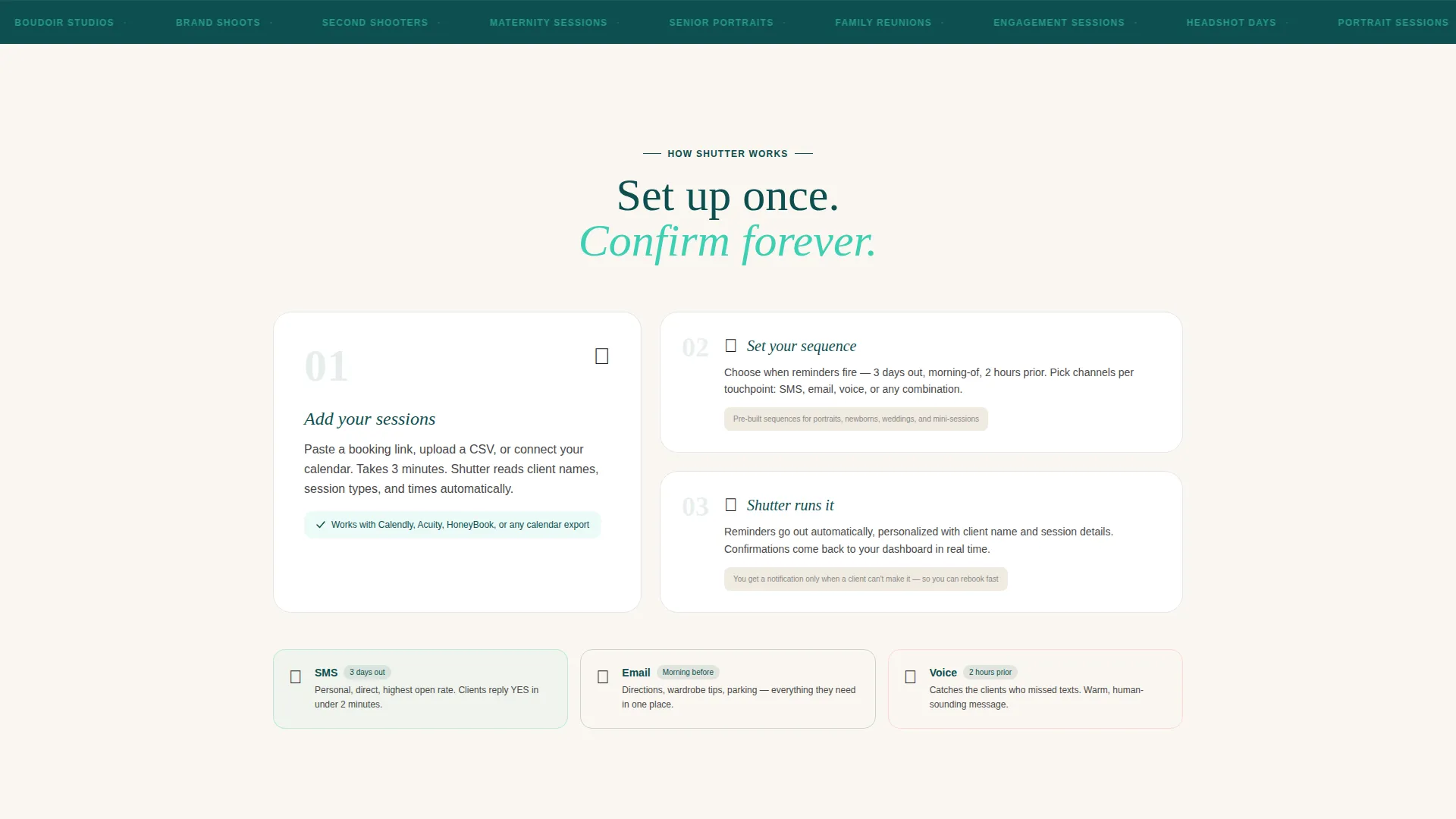
This template delivers a complete anchor-navigated landing page structured as a hub-and-spoke layout. Every section connects back to a central discovery navigation, keeping visitors oriented and moving forward.
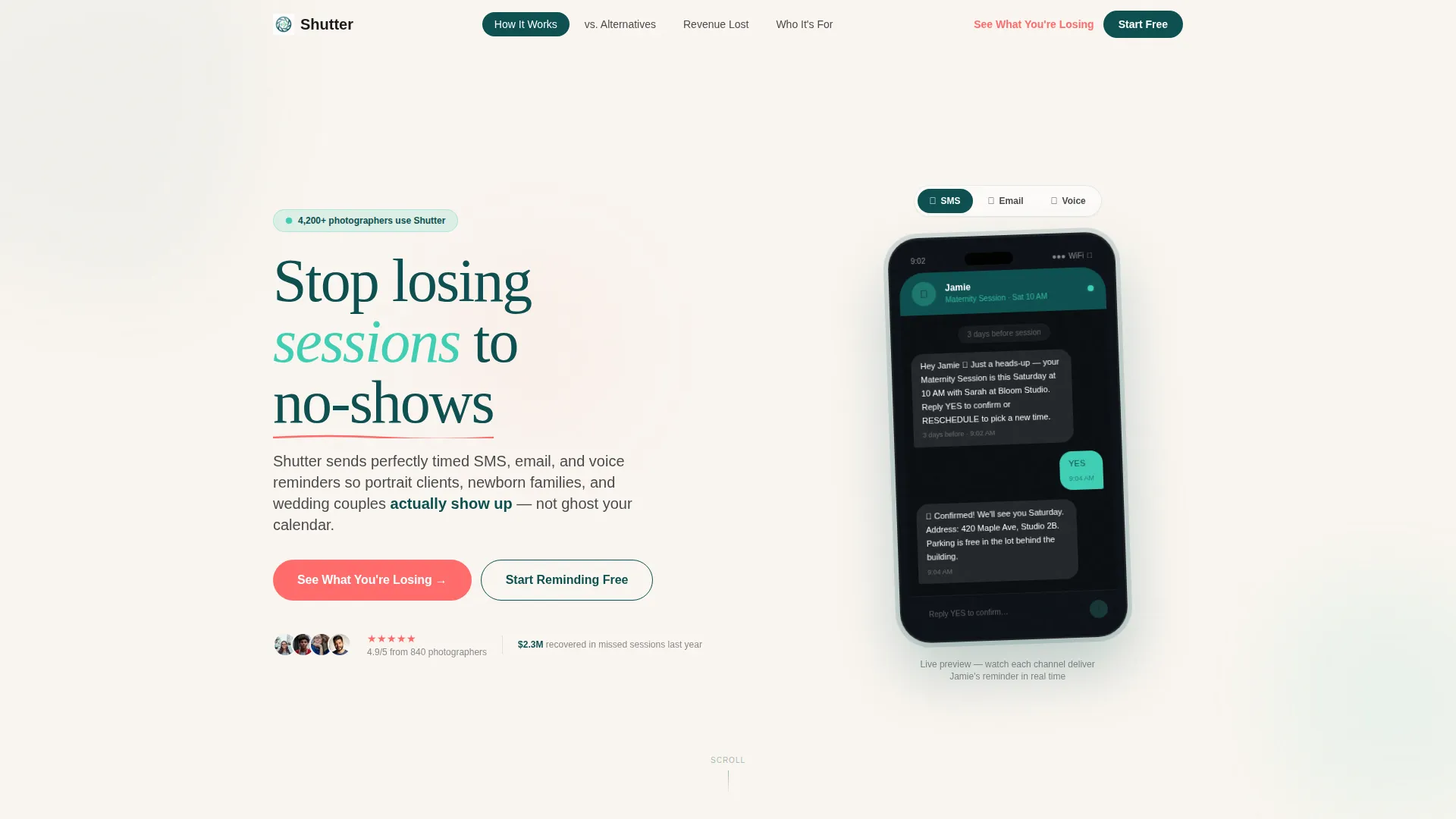
- An interactive header with a simulated phone screen showing a live reminder sequence for a maternity client
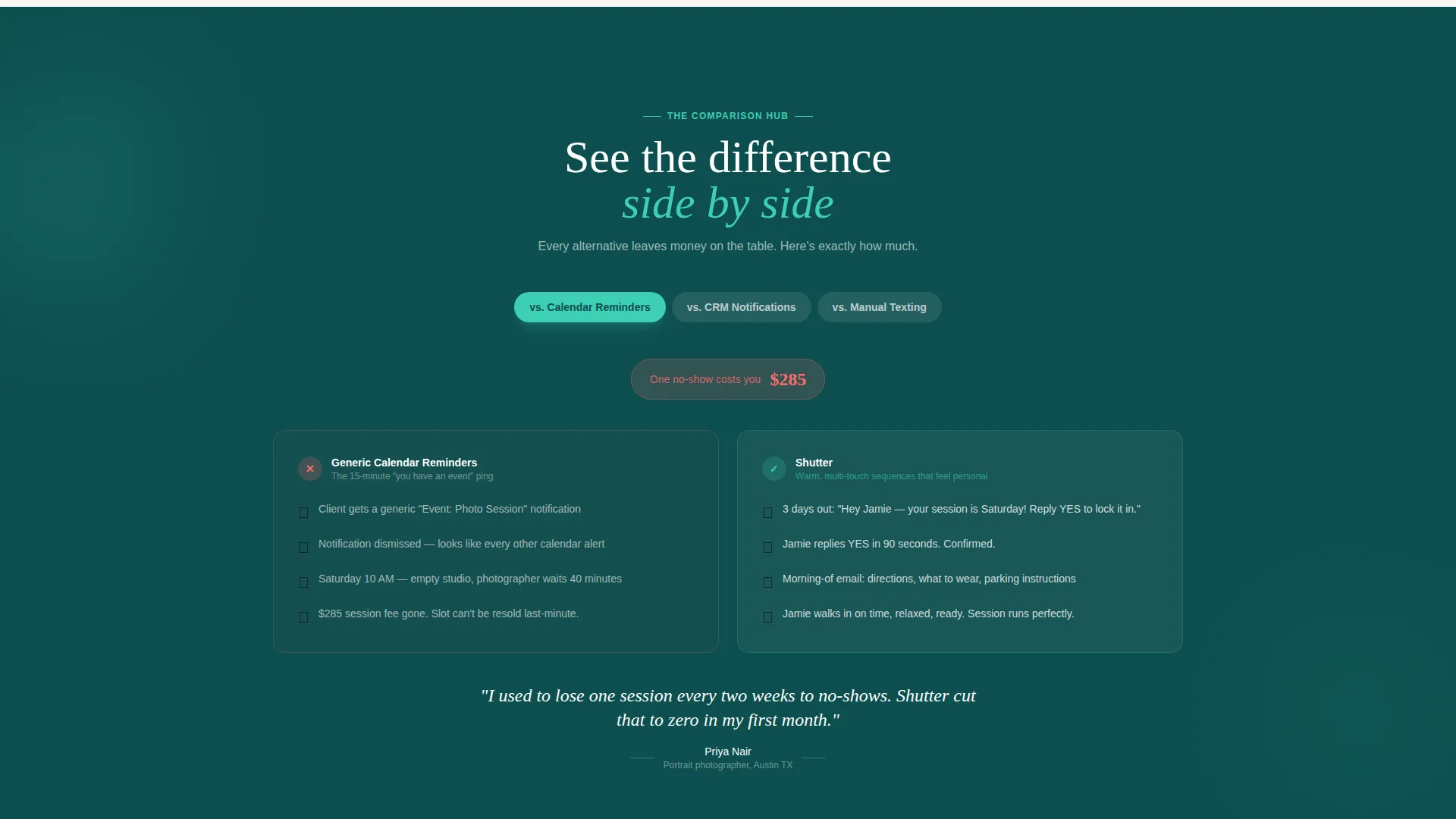
- Three animated comparison spokes that pit the tool against generic calendars, bundled notifications, and manual texting
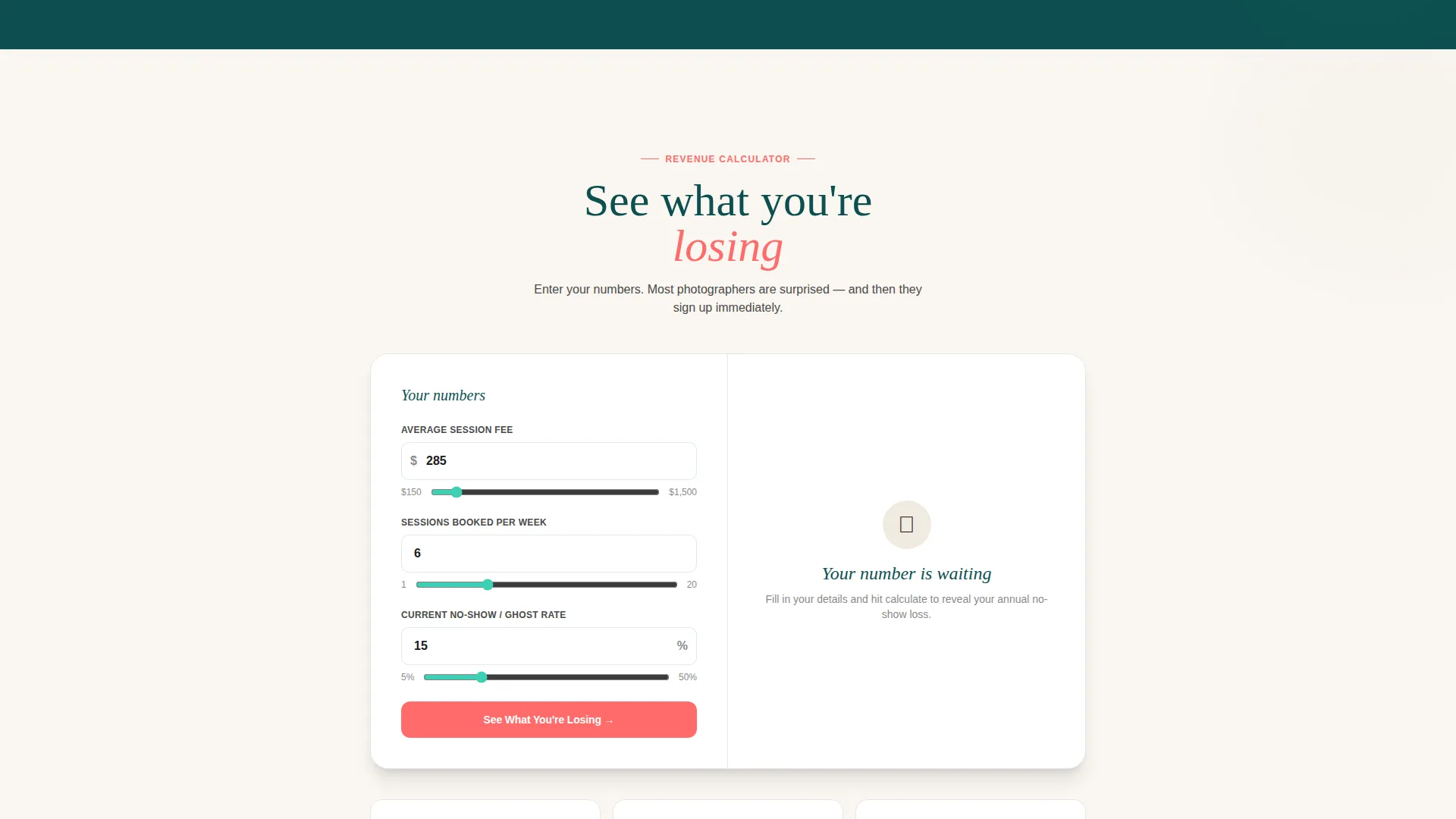
- An inline revenue calculator and a zero-card-required trial signup form collecting only name, email, and weekly session count
Feature list
This template packages several purpose-built interactive components. Each one earns visitor trust before asking for a commitment.
Live Reminder Sequence Preview
The header features a functioning mock-up of a reminder flow playing out on a simulated phone screen. A client named "Jamie, Maternity Session, Saturday 10 AM" receives a text three days before the session, an email the morning before, and a voice reminder two hours prior. Realistic typing animations and delivery timestamps make the sequence feel tangible and immediate.
SMS, Email, and Voice Channel Tabs
Visitors can toggle between three channel tabs directly inside the phone preview. Each tab triggers its own animated message delivery so the visitor experiences all three reminder formats without leaving the header. This hands-on preview removes doubt about how the tool communicates.
Animated Versus Comparison Spokes
Three anchor-linked comparison sections each run a side-by-side animated simulation. One path shows a missed appointment and an empty studio; the other shows a confirmed client arriving on time. The stakes escalate from a single no-show to a full weekend cancellation to long-term lost rebooking revenue.
Inline Revenue Loss Calculator
The primary call to action opens a built-in calculator where photographers enter their average session fee, weekly booking count, and current no-show rate. The result displays the estimated annual revenue walking out the door. This makes the cost of inaction concrete before any signup is requested.
Zero-Card Trial Signup Form
Directly below the calculator result, a secondary call to action leads to a lightweight signup form. It asks only for a name, an email address, and average sessions per week. There is no credit card required, reducing friction to the lowest possible point.
Scroll Parallax Phone Frame
The simulated phone in the header tilts subtly as the visitor scrolls. The parallax effect gives the mock-up a dimensional, almost physical quality. It reinforces the product's core promise: reminders that feel personal enough to make a client tap "Confirm" without hesitation.
Page sections overview
| Section | Purpose |
|---|---|
| Interactive Header Preview | Showcases the live reminder sequence on a simulated phone screen |
| Anchor Navigation Hub | Links all comparison spokes and anchors the discovery flow |
| Shutter versus. Calendar Reminders | First spoke showing cost of generic calendar notifications |
| Shutter versus. CRM Notifications | Second spoke comparing bundled notification quality |
| Shutter versus. Manual Texting | Third spoke escalating to full weekend revenue loss |
| Revenue Loss Calculator | Lets visitors calculate their own annual no-show cost |
| Free Trial Signup | Captures name, email, and session count with no card required |
Design & branding system
The visual identity follows a Directory and Discovery theme built on the Teal Catalyst color system. Every color choice serves a specific communication role, keeping the page legible and intentional throughout.
- Deep darkroom teal (#0D4F4F) anchors the navigation rails and section headers, creating a sense of calm precision
- Shutter-click mint (#3ECFB4) marks active states, interactive hotspots, and hover effects across the comparison spokes
- Soft studio backdrop cream (#FAF6F1) fills content panels, giving the page an airy, editorial breathing room
- Signal-flare coral (#FF6B6B) appears exclusively on calls to action and comparison highlights, making every decision point impossible to miss
Mobile & speed optimization
The template is structured with a mobile-first layout in mind, ensuring the phone preview and calculator work cleanly on smaller screens.
- The simulated phone mock-up and channel tabs are sized and stacked for thumb-friendly interaction on mobile viewports
- Anchor navigation collapses cleanly so visitors can jump between comparison spokes without losing context on any screen size
How this template helps you convert
Every layout decision in Shutter is designed to move a hesitant visitor toward a confident signup. The sequence is deliberate and cumulative.
- The interactive header lets visitors feel the product working before reading a single feature claim, building immediate credibility through direct experience.
- The three escalating comparison spokes reframe inaction as an active financial cost, making the free trial feel like a sensible, low-risk next step rather than a sales pitch.
- The inline calculator personalizes the stakes using the visitor's own numbers, and the zero-card signup form removes the final barrier between interest and commitment.
Other information about this template
This template is categorized under the Technology and Photography Email Templates niche, with a specific focus on the photography appointment reminder use case. It is built as a hub-and-spoke anchor navigation landing page using the Interactive Explorer creative direction and the Interactive Preview header concept.
- The Comparison/Versus landing page direction drives the content architecture, making it well suited to photographers evaluating reminder tools for the first time
- The template can support use cases beyond portrait photography, including newborn family sessions and wedding couple pre-session workflows
- The Teal Catalyst palette and Directory and Discovery theme make the page feel more like a curated tool showcase than a generic software sales page
Theme
Directory & Discovery
Creative direction
Interactive Explorer
Color system
Teal Catalyst
Style
Hub & Spoke (Anchor Nav)
Direction
Comparison/Versus
Page Sections
Live Reminder Sequence Preview
Sms, Email, and Voice Channel Tabs
Animated Versus Comparison Spokes
Inline Revenue Loss Calculator
Zero-card Trial Signup Form
Scroll Parallax Phone Frame
Related questions
What types of photographers is this template designed for?
What reminder channels does the template showcase?
Does the signup form require a credit card?
How does the revenue calculator work?
Can the comparison sections be updated with custom messaging?



