Statistics Study Guide Sidebar Landing Page Template
Sigma is a sidebar companion landing page template built for statistics education platforms. It combines an interactive study guide layout, an annotated formula display, and a five-question diagnostic quiz to turn anxious learners into confident users. The design uses deep graphite, electric violet, and hot coral to make dense statistical content feel approachable, rewarding, and genuinely useful at any hour.
by Rocket studio
Quick summary
Sigma is a sidebar companion landing page template designed for statistics study guide and notes platforms. It pairs a persistent navigation sidebar with an interactive main panel, contributor profiles, and a built-in diagnostic quiz. The result is a page that teaches while it sells, building trust before asking for a single email address.
Who this template is for
This template is built for creators and educators in the statistics education space who need a landing page that does more than describe their product. It works best when the product itself is the proof.
- College course supplement creators targeting sophomore-level statistics students
- Statistics tutors or independent educators launching a digital notes platform
- Self-taught data professionals building a structured study resource for working analysts and MBA candidates
What problem this template solves
Most study tool landing pages describe features without demonstrating value. Visitors leave before they trust the product. Sigma closes that gap by making the landing page itself a learning experience.
- Students and analysts arrive confused about whether a notes platform is worth their time or money
- Dense statistical concepts like p-values, standard deviations, and regression tables feel intimidating without a preview
- Generic "sign up now" calls to action fail to convert visitors who haven't seen the product in action
What you get with this template
Sigma delivers a fully structured sidebar companion landing page with distinct functional zones. Every section is designed to demonstrate value before asking for commitment.
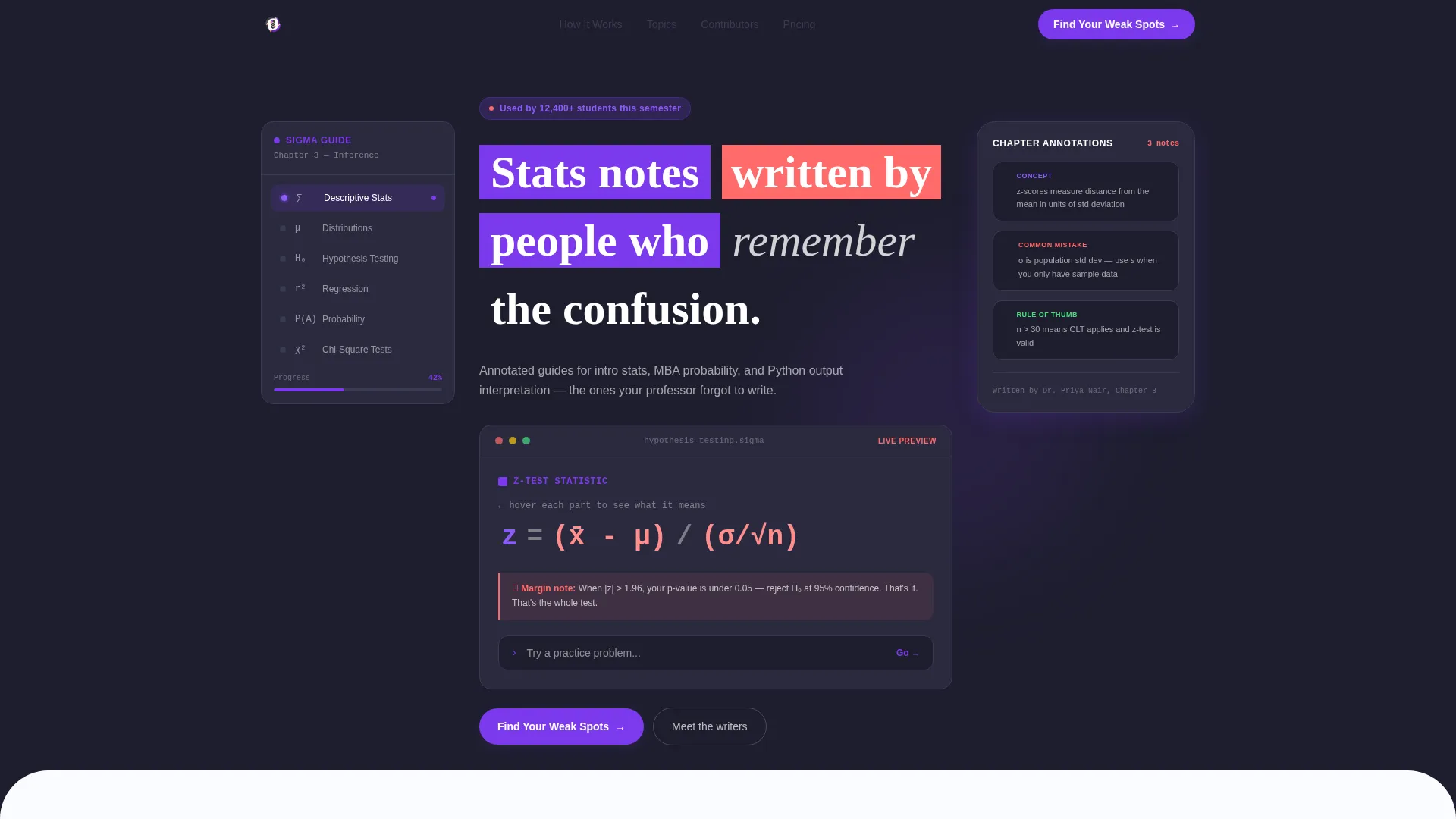
- An interactive header panel showing a live annotated lesson on hypothesis testing, complete with a formula display and hover-triggered explanation bubbles
- A contributor section pairing real team member photos, one-sentence philosophies, and sample chapter pages to build credibility through human voices
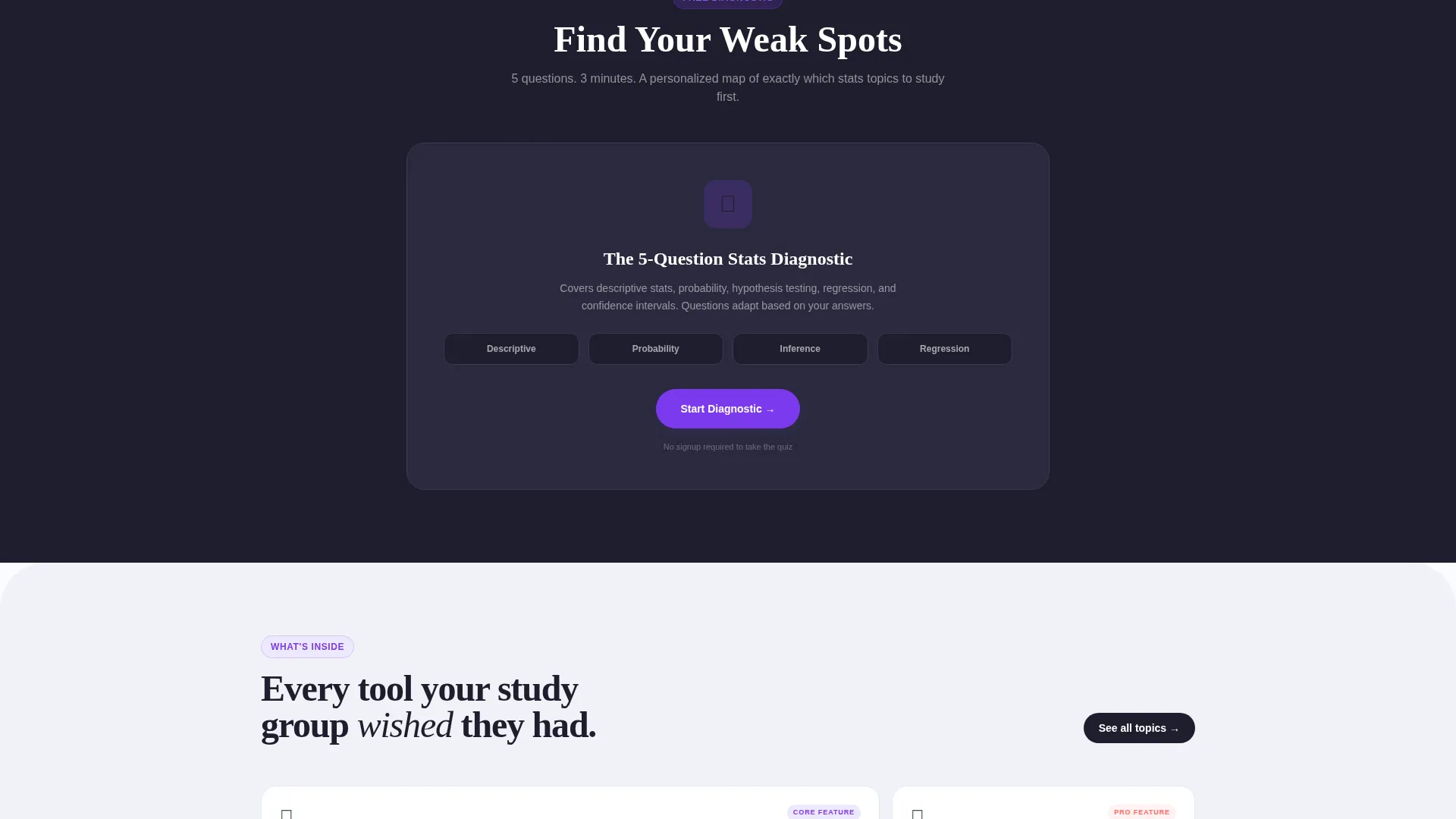
- A five-question adaptive diagnostic quiz that delivers a personalized results card and a secondary conversion offer tied to a custom study plan
Feature list
This section covers the core built-in capabilities that define the Sigma template experience.
Persistent Sidebar Navigation
A fixed sidebar holds a clickable table of contents with chapter icons rendered in electric violet. As the visitor scrolls, the sidebar updates its active state in parallel with the main content panel, keeping orientation clear throughout the page.
Live Annotated Formula Display
The header panel showcases a real formula, z = (x̄ - μ) / (σ/√n), with coral annotation bubbles that expand on hover. Each bubble explains one variable in plain English, giving visitors an immediate taste of the product's teaching style.
Contributor Profile Section
As the visitor scrolls, the page introduces the humans behind the notes. Each contributor block pairs a photo, a one-sentence teaching philosophy, and a sample page from their chapter. This section proves the content is handcrafted, not auto-generated.
Adaptive Diagnostic Quiz
The primary call to action, "Find Your Weak Spots," launches a five-question quiz. Difficulty adapts based on each answer and covers descriptive statistics, probability, inference, and regression. The quiz itself is the value demonstration.
Personalized Results Card
After the quiz, visitors receive a results card showing their strongest and weakest topics alongside a confidence score. This moment of personalization leads naturally into the secondary conversion: "Unlock Your Custom Study Plan."
Email Capture with Course Context
The secondary conversion requires only an email address and a current course name. This low-friction form ties the product directly to the visitor's immediate academic or professional situation.
Page sections overview
| Section | Purpose |
|---|---|
| Interactive Header Panel | Shows a live annotated hypothesis testing lesson with a formula, hover bubbles, and a practice problem input field |
| Persistent Sidebar | Provides a fixed, scrollable table of contents with chapter icons that update as the visitor moves down the page |
| Contributor Profiles | Introduces the team behind the notes with photos, philosophies, and sample chapter previews |
| Diagnostic Quiz Flow | Delivers a five-question adaptive quiz covering four core statistics topics |
| Personalized Results Card | Reveals strongest and weakest topics with a confidence score after quiz completion |
| Study Plan call to action | Presents the secondary conversion offer requiring only an email and course name |
Design & branding system
Sigma follows a Corporate Precision theme expressed through a Dopamine Pop color system. The palette is disciplined in structure but deliberately rewarding in its accent choices, mirroring the feeling of a correct answer lighting up on a practice test.
- Deep graphite (#1E1E2E) anchors the sidebar and all primary text blocks for readability and focus
- Electric violet (#7C3AED) drives interactive elements including chapter icons, hover states, and the primary call-to-action button
- Hot coral (#FF6B6B) marks annotation callouts, highlights, and result indicators to draw the eye at key moments
- Chalk-white (#FAFBFF) provides the main canvas, giving formulas and annotated content room to breathe without visual clutter
Mobile & speed optimization
The sidebar companion layout is designed to reflow cleanly for smaller screens. The persistent sidebar collapses into an accessible navigation drawer on mobile, keeping the study guide content dominant without losing orientation.
- The main content panel and annotation bubbles are sized for touch interaction, so hover behaviors translate to tap-friendly alternatives on mobile
- The quiz flow and results card are stacked vertically on smaller viewports, maintaining a clear single-column reading experience throughout the diagnostic sequence
How this template helps you convert
Sigma is structured as a quiz and assessment funnel. Every section earns trust before it asks for anything in return.
- The interactive header panel lets visitors experience the product's teaching style immediately, before any call to action appears, so curiosity is established on arrival.
- The contributor profiles replace generic testimonials with real faces and specific philosophies, building the kind of credibility that moves a hesitant visitor toward the quiz.
- The adaptive quiz delivers personal, specific feedback, making the results card feel genuinely useful. By the time visitors see "Unlock Your Custom Study Plan," they already believe the platform understands their needs.
Other information about this template
Sigma is a strong fit for statistics education platforms that want a landing page combining content depth with conversion structure. A few additional details worth noting:
- The template style is a Sidebar Companion layout, meaning the sidebar and main panel work as a coordinated pair rather than as independent sections
- The "Try a practice problem" input field with a blinking cursor appears in the header panel, inviting immediate interaction before the visitor has scrolled at all
- The color system is intentionally described as feeling like a highlighter exploding across a pristine textbook, making it suitable for student-facing products that want energy without chaos
- The template is suited for use by statistics tutors, course creators, data science educators, and self-study platform founders who want their landing page to reflect the quality of their teaching materials


Theme
Corporate Precision
Creative direction
Team & People
Color system
Dopamine Pop
Style
Sidebar Companion
Direction
Quiz/Assessment
Page Sections
Persistent Sidebar with Chapter Navigation
Live Annotated Formula Display
Contributor Profile Blocks
Adaptive Five-question Diagnostic Quiz
Personalized Results Card
Low-friction Study Plan Offer
Related questions
Who is this template built for?
What does the diagnostic quiz section include?
Can I use this template to promote a free trial experience?
What does the email capture form ask for?
How does the contributor section help build trust with visitors?



