Advanced Tech & AI Platforms Privacy Policy Website Template
Signal is a hub and spoke landing page template built for multi-touch attribution platforms. It uses a Data Command visual identity with a terminal aesthetic, syntax-highlighted code header, toggleable model comparison tables, integration connector maps, live latency counters, and a privacy architecture diagram. The freemium trial flow captures work email and ad spend tier with no credit card required.
by Rocket studio
Quick summary
Signal is a single-page, anchor-nav landing page template designed for attribution modeling platforms. It opens with a syntax-highlighted signal.init() code snippet, guides visitors through five specification-card sections, and converts them with a lightweight two-field trial signup. The design follows a Data Command theme: void black backgrounds, phosphor green accents, and monospaced data counters that feel mission-critical.
Who this template is for
This template was built for technical and performance-focused teams who need a landing page that speaks the same language as their product. It respects the reader's intelligence and proves value through real data shapes rather than marketing generalities.
- Analytics engineers who evaluate tools bottom-up through documentation and API syntax before ever talking to sales
- Performance marketing directors running six-figure monthly budgets across multiple marketing channels and needing a unified attribution view
- Growth leads at Series B SaaS companies accountable to a CFO who keeps asking which marketing activities actually drove pipeline
What problem this template solves
Marketing teams spending heavily across paid, organic, and owned channels face a core challenge: no single view of which marketing touchpoints contribute to revenue. Traditional attribution tools force a choice between oversimplified single touch attribution models and expensive enterprise platforms that take months to implement.
- Fragmented attribution data scattered across ad platforms, data warehouses, and spreadsheets makes it impossible to see the complete customer journey
- Single touch attribution models like last-click or first-click ignore the assisted conversions that make up most of the real customer journey
- Analytics engineers waste hours stitching together queries to answer attribution questions that should be one API call
What you get with this template
You get a fully structured, design-ready landing page for an attribution modeling platform. Every section is built to function as a data-capture point and a proof-of-capability showcase at the same time.
- A code snippet hero, five specification card sections, a sticky anchor nav with a persistent trial call to action, and a developer-minimal footer
- A freemium trial form that asks only for work email and estimated monthly ad spend, with no credit card and no sales call required
- A complete visual system using void black, phosphor green, terminal gray, UV white, and warning magenta, with JetBrains Mono for code and Manrope for headings
Feature list
This section describes the core built-in components and design capabilities included in the Signal template.
Syntax-Highlighted Code Snippet Hero
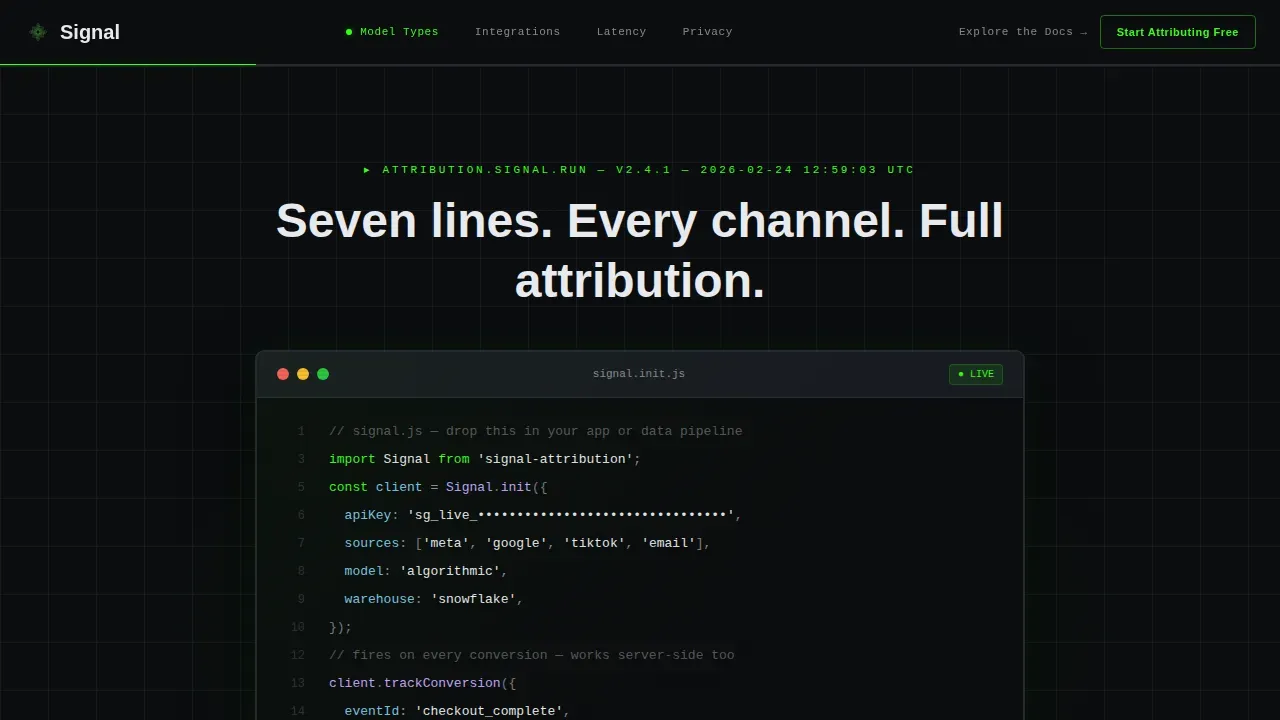
The header centers a fully syntax-highlighted signal.init() JavaScript block on a void black background. Phosphor green keywords, UV white strings, and magenta error-handling lines render in JetBrains Mono. A blinking cursor sits at the end of the last line. One headline reads: "Seven lines. Every channel. Full attribution." A single phosphor green call-to-action button sits directly below the snippet.
Toggleable Attribution Model Comparison Table
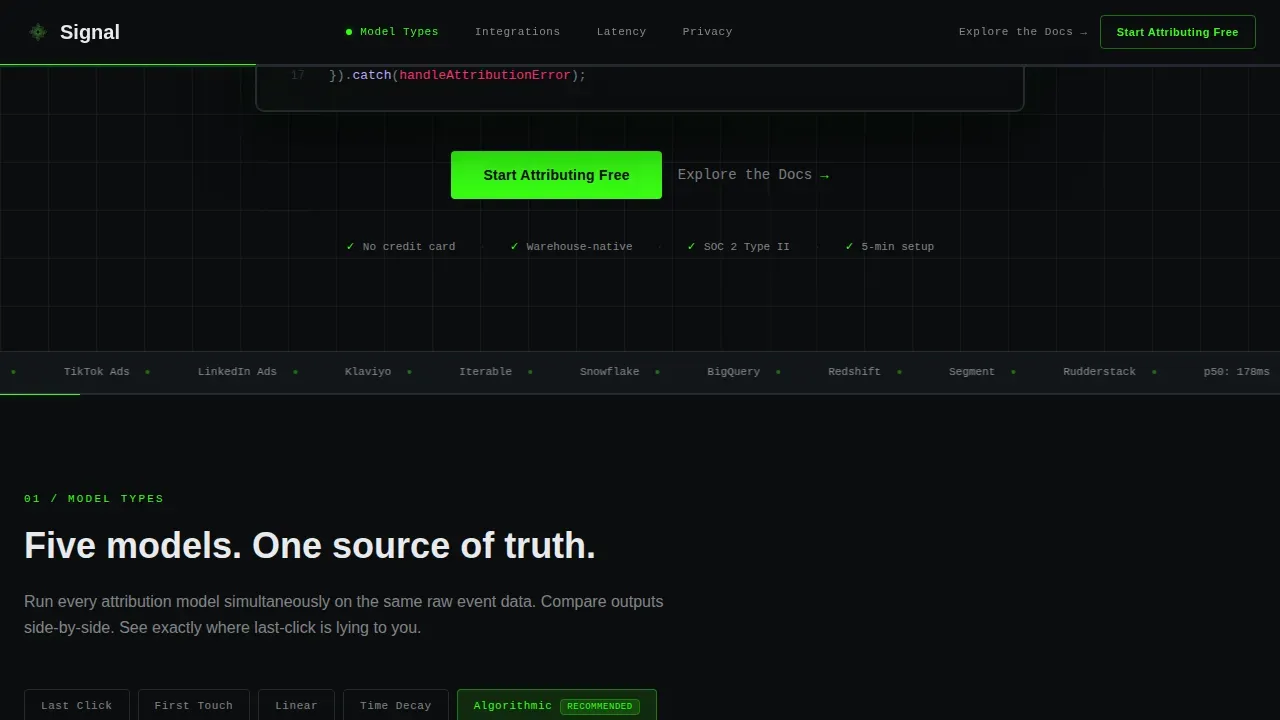
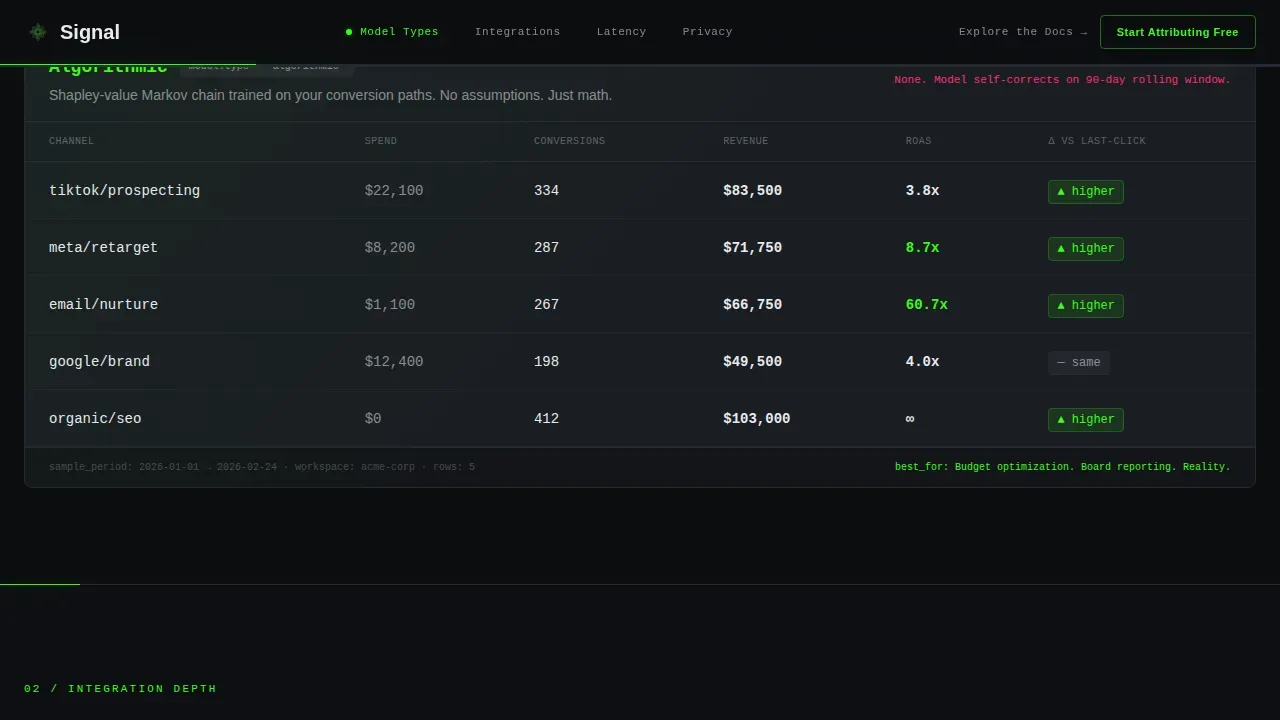
The Model Types section includes a toggleable comparison table that lets visitors switch between attribution models side by side. Last-click, first-touch, linear attribution, time decay attribution model logic, and algorithmic attribution outputs are displayed on real sample data rows. This lets visitors understand how different attribution models assign conversion credit before they even sign up.
Integration Connector Dependency Map
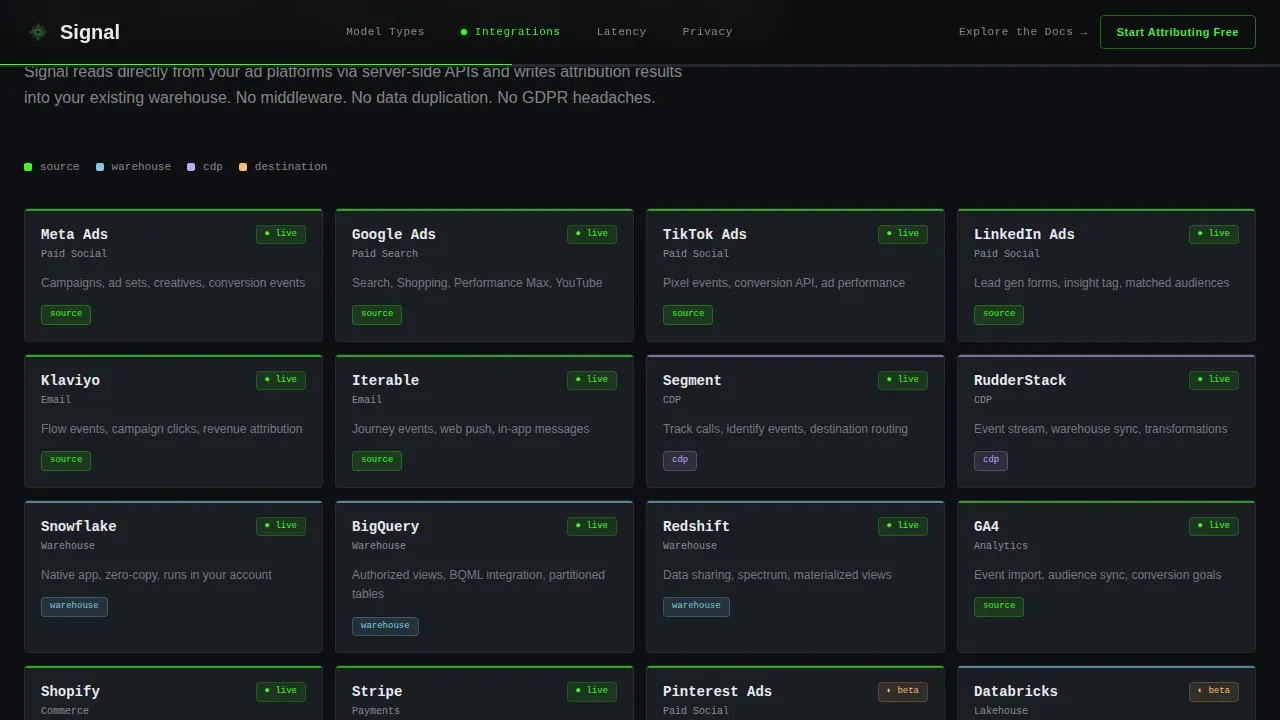
The Integration Depth section renders a visual dependency map showing connectors to Segment, Snowflake, BigQuery, GA4, Meta, Google, and TikTok. Each node is styled as a specification card in terminal gray. Hover states highlight active connectors with a phosphor green glow, giving visitors an immediate sense of how the platform fits into an existing technology stack.
Live Latency Benchmark Counters
The Latency and Processing section displays actual benchmark numbers for p50, p95, and p99 response times in animated monospaced counters. The counters tick up on scroll reveal using GSAP animations. Presenting real data points here replaces vague performance claims with specific, verifiable evidence.
Privacy Architecture Data-Flow Diagram
The Privacy Architecture section includes a data-flow diagram that shows exactly where personally identifiable information is hashed, where attribution models run, and what data never leaves the customer's warehouse. This addresses the specific concerns of analytics engineers evaluating the platform against their data governance requirements.
Sticky Anchor Nav with Progress Indicator
A sticky phosphor green anchor navigation bar ticks through all five specification sections like a progress bar on a deployment pipeline. A ghost button version of the primary trial call to action persists in the nav on every scroll position, keeping the conversion path accessible without interrupting the reading experience.
Page sections overview
| Section | Purpose |
|---|---|
| Hero Code Snippet | Establish technical credibility instantly with a live-syntax header and primary call to action |
| Model Types Toggle | Show all attribution models side by side on real sample data for direct comparison |
| Integration Depth Map | Visualize connector coverage across the full existing technology stack |
| Latency Benchmark Counters | Prove processing speed with real p50, p95, p99 benchmark data points |
| Privacy Architecture Diagram | Address data governance questions with a clear PII hashing flow diagram |
| Trial Signup Form | Convert visitors with a two-field freemium form and a secondary docs link |
Design & branding system
Signal uses a Data Command visual identity built for technical audiences. Every color choice carries functional meaning, the way a mission-critical dashboard uses color only when something is live, working, or needs attention.
- Void black (#0B0D0F) primary background, terminal gray (#1A1D23) card surfaces, UV white (#E8EAED) body text, phosphor green (#39FF14) interactive accents and live data highlights, and warning magenta (#FF2D6B) reserved for anomaly indicators and destructive actions
- JetBrains Mono for all code blocks, counter displays, and data labels; Manrope for all interface headings and body copy
- Spec Sheet creative direction renders each hub section as a discrete specification card, dense and precise, with GSAP-powered scroll reveals and high interactivity including model toggle tables and integration hover states
Mobile & speed optimization
The template is built desktop-first to serve analytics engineers on large monitors, with a fully responsive layout that adapts cleanly to smaller screens. Performance is treated as a conversion factor: a one-second delay in load time can reduce conversions by 7%, so the template separates static and animated concerns.
- Server components handle all static sections for fast initial render; client components are scoped only to animated counters and the toggle table to minimize JavaScript payload
- The anchor nav collapses cleanly on mobile and the code snippet hero adapts to a vertically stacked layout without breaking the syntax highlighting or the blinking cursor animation
How this template helps you convert
Signal earns the click by proving technical fluency before asking for anything. Every section adds a layer of evidence that removes doubt for the skeptical, bottom-up buyer who will not convert on a generic promise.
- The code snippet hero establishes immediate credibility with real API syntax, making analytics engineers feel the product speaks their language before they read a single word of copy
- The toggleable attribution model comparison table and live latency counters let visitors evaluate the product on their own terms, turning passive readers into active evaluators who arrive at the trial form already convinced
- The two-field trial form with no credit card removes every friction point from the conversion path, and the secondary "Explore the Docs" link captures developer-intent visitors who convert bottom-up through documentation before ever engaging sales
Other information about this template
Signal is built to function as a data-capture point as much as a conversion surface. The design philosophy treats every scroll, hover, and click as a signal worth capturing. The following points cover additional context relevant to buyers evaluating this template for an attribution modeling platform.
- Attribution models are frameworks that help analyze the customer journey and assign credit to the various touchpoints prior to the conversion. Single touch attribution models give all credit to one touchpoint. Multi-touch attribution models distribute credit across multiple touchpoints in the customer journey, giving a more accurate picture of how marketing touchpoints contribute to revenue.
- First-touch attribution assigns full credit to the initial interaction. Last touch attribution model logic gives full credit to the final interaction. Linear attribution assigns equal credit to every touchpoint. Time decay attribution gives more weight to touchpoints closer to the conversion. Position based attribution models assign different weights based on where touchpoints occur in the customer journey. Data driven attribution models use algorithmic estimation to assign credit based on actual conversion path data.
- Choosing the best attribution model depends on sales cycles length, business complexity, and the specific attribution insights needed. Short sales cycles with simple funnels may work well with single touch attribution. Long or complex sales processes with multiple marketing channels benefit from multi touch attribution models or a custom attribution model that reflects real customer behavior.
- An attribution window defines the time frame during which a conversion is credited to a specific touchpoint. Configuring the right attribution window is essential for data accuracy, especially across long sales cycles or multi-channel marketing campaigns.
- Collecting customer data from all marketing touchpoints is essential for building a custom attribution model. User-level data helps identify individual customer interactions across multiple touchpoints. A customer data platform can help integrate this data for effective attribution analysis.
- Attribution modeling helps marketing teams understand how different marketing channels drive conversions and allocate the marketing budget more effectively. Attribution insights from multi touch attribution models allow marketers to assess marketing effectiveness across paid search, paid social, organic search, and direct channels. This supports smarter decisions about where to invest across multiple marketing channels.
- The landing page design matches the spec sheet creative direction: each section acts as a discrete capability reference, dense enough to satisfy data driven evaluators but visually clean enough to hold attention. The page must feed attribution data into downstream systems for cross channel analysis.
- A signal full attribution modeling landing page template like this one is designed to capture, analyze, and map every user interaction across the customer journey. Strategic headlines match the referring ad copy to maintain the attribution trail. Robust UTM parameters ensure correct identification of first and last touchpoints across all inbound conversion paths.
- Traditional attribution tools often fail to handle complex sales processes with long sales cycles spanning multiple marketing channels. Advanced attribution modeling with algorithmic attribution and custom attribution logic addresses this gap. Marketers evaluating many different attribution models often settle on a data driven attribution model once they see the improvement in attribution analysis quality.
- Google Analytics 4 delivers data driven attribution modeling powered by machine learning, analyzing millions of conversion paths to assign credit across marketing touchpoints. Adobe Analytics provides sophisticated multi touch attribution modeling with advanced algorithmic and custom attribution models for enterprise teams. These analytics tools represent the competitive landscape this template is designed to position a platform against.
- The template supports a freemium conversion path that drives conversions without a sales call. The primary call to action appears twice: directly below the hero and as a persistent ghost button in the anchor nav. A secondary path labeled "Explore the Docs" captures developer intent and supports bottom-up sales cycles.
- Marketing teams evaluating this template can adapt the color system, typography, and specification card layout to match their product's branding while keeping the terminal aesthetic that resonates with technical buyers. The Data Command theme and Acid Digital color system are fully documented in the design tokens.
- Conversion paths are tracked from first click through trial signup. Every inbound link should use standardized UTM parameters to ensure correct identification of first touch and assist channels. The page structure supports integration with customer data platforms and data warehouses to map the full customer journey across devices and sessions.
- Customer lifetime value and long sales cycles are common challenges for the Series B SaaS and DTC audiences this template targets. Attribution modeling that covers the complete customer journey from first touch through closed deal helps marketing teams justify spend and drive conversions with clearer evidence than single touch attribution alone provides.
Theme
Data Command
Creative direction
Spec Sheet
Color system
Acid Digital
Style
Hub & Spoke (Anchor Nav)
Direction
Freemium/Trial
Page Sections
Syntax-highlighted Code Snippet Hero
Toggleable Attribution Model Comparison Table
Integration Connector Dependency Map
Live Latency Benchmark Counters
Privacy Architecture Data-flow Diagram
Sticky Anchor Nav with Persistent Call to Action
Related questions
What types of attribution models does this template showcase?
Who is this landing page template designed for?
Does the freemium trial form require a credit card?
Can the integration connector map be updated for different platforms?
How does the page support attribution data capture and conversion tracking?



