Construction Property Management Landing Page
Siteplan is a scroll-reveal landing page template built for construction property management platforms. It opens with a live-feel dashboard preview, then unfolds like an industry benchmark report, surfacing data insights section by section. The design uses a Midnight Blue color system with amber accents to guide attention. The page is built to convert through a freemium trial and a gated PDF lead-capture path.
by Rocket studio
Quick summary
Siteplan is a single-page, scroll-reveal landing page template designed for construction property management software. It opens with a fully populated dashboard header, then progressively reveals industry benchmark data to build trust. The conversion path leads visitors toward a free portfolio trial or a gated PDF download, capturing leads at every intent level.
Who this template is for
This template is built for teams selling or showcasing construction property management platforms. It speaks directly to the people managing complex, multi-site projects who feel the daily pain of scattered data.
- General contractors managing ten or more active job sites at once
- Owner's representatives tracking punch list closeout across mixed-use portfolios
- Facility managers inheriting buildings mid-warranty with little or no documentation
What problem this template solves
Construction property managers are losing time to spreadsheets, disconnected punch lists, and unresolved Requests for Information (RFIs). There is no single place to see what is open, what is overdue, and what is about to expire. This template gives a platform the right stage to prove it solves that exact problem.
- Scattered punch lists and change orders have no unified view
- RFI resolution bottlenecks slow project closeout and add risk
- Warranty expiration tracking gets lost in handoff gaps between teams
What you get with this template
You get a fully structured, scroll-reveal landing page that positions a construction property management platform as a data-driven command center. Every section is designed to carry a specific conversion job, from first impression to final signup.
- A full-viewport dashboard header pre-populated with realistic property portfolio data
- Progressive scroll sections that reveal benchmark statistics and animated data visualizations
- A dual conversion path: a freemium trial signup form and a gated PDF lead-capture offer
Feature list
This template includes purpose-built sections and visual components grounded in the construction property management use case. Each feature serves a specific persuasion or usability goal.
Full-Viewport Dashboard Header
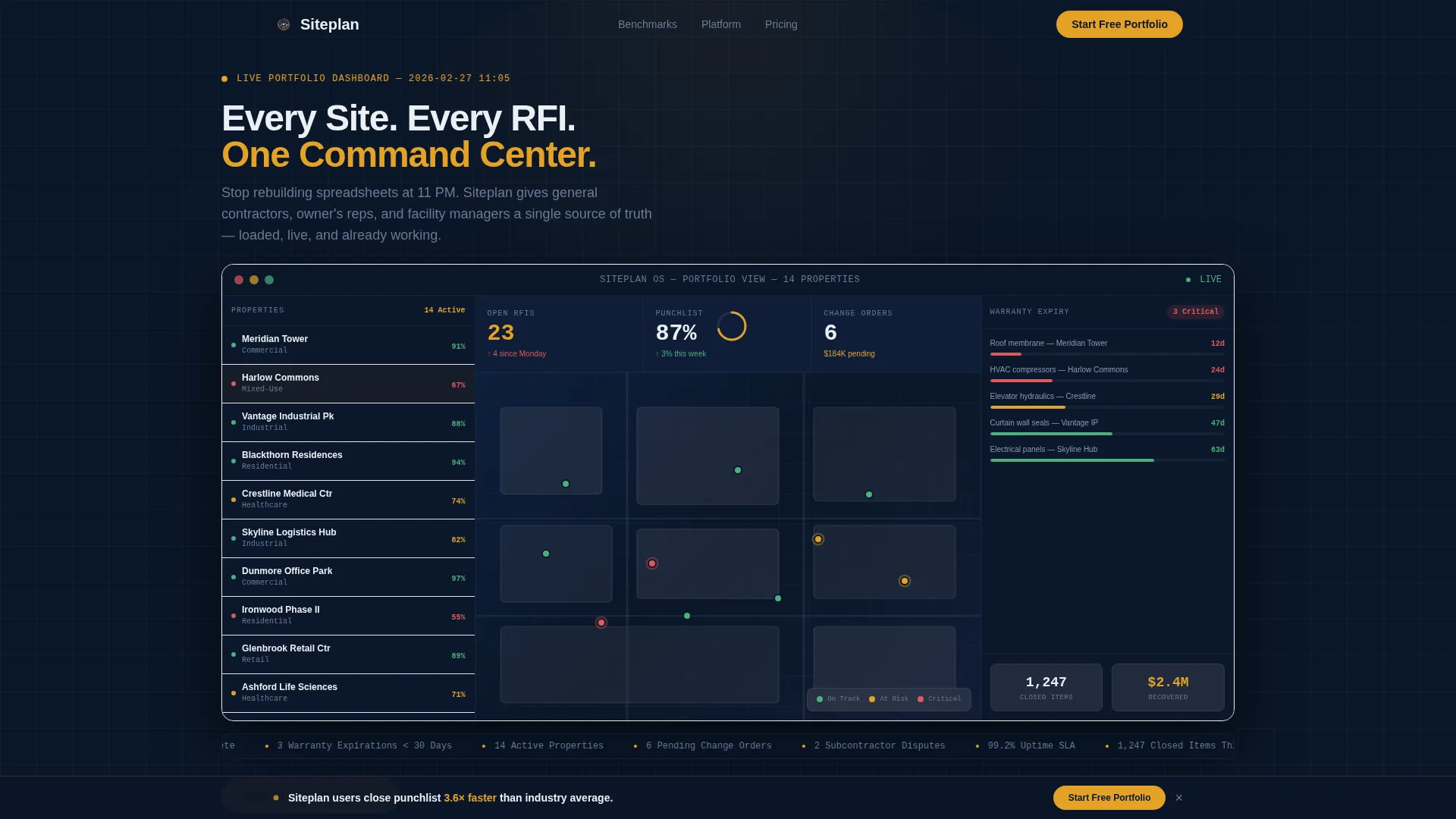
The page opens with a simulated property management interface at full viewport width. It shows fourteen active properties, a color-coded site map, an open RFI count, an amber progress ring for punch list completion at 87 percent, and a warranty timeline flagging three items expiring within 30 days. The product is the hero from the first pixel.
Scroll-Reveal Industry Benchmark Sections
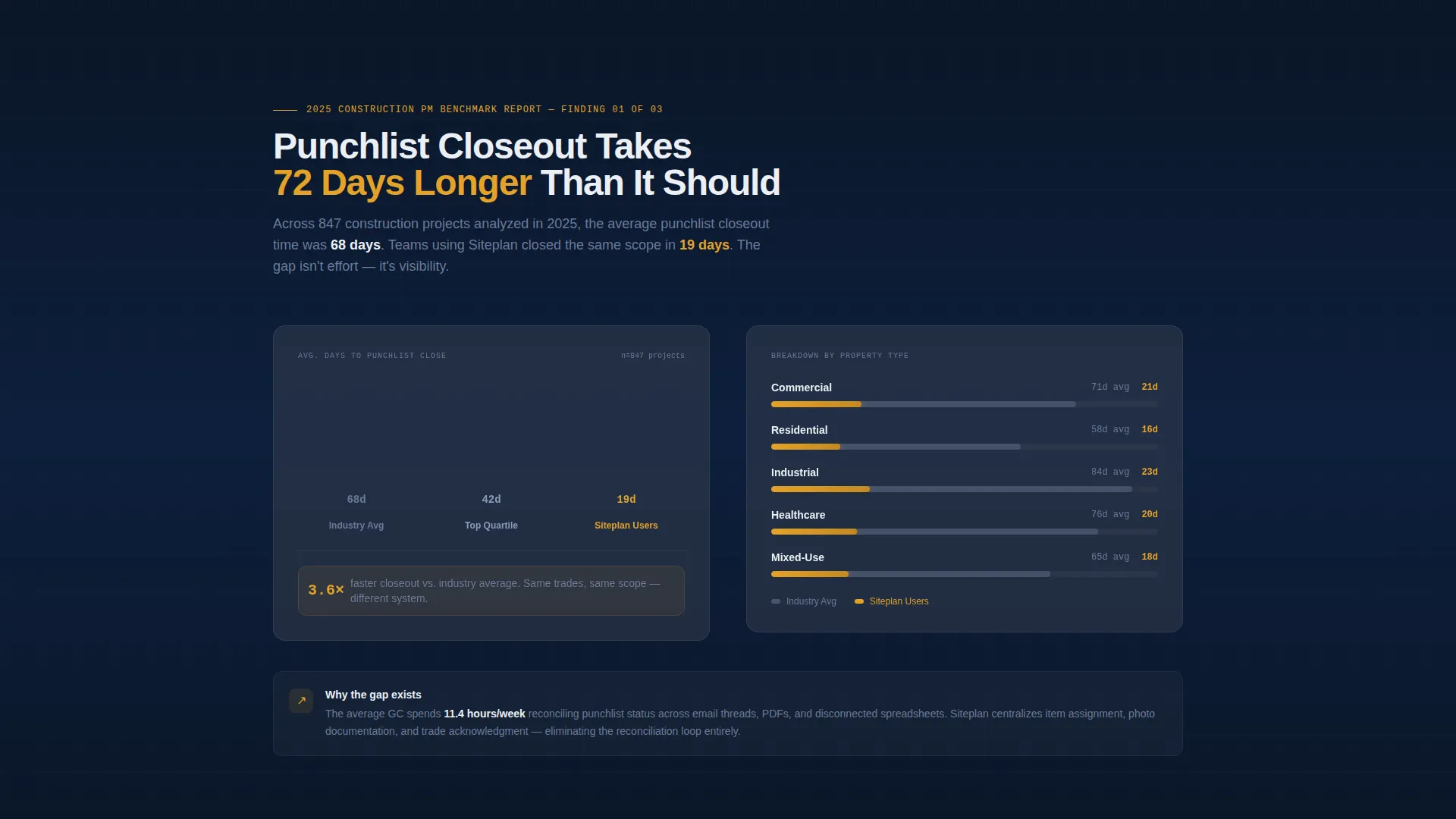
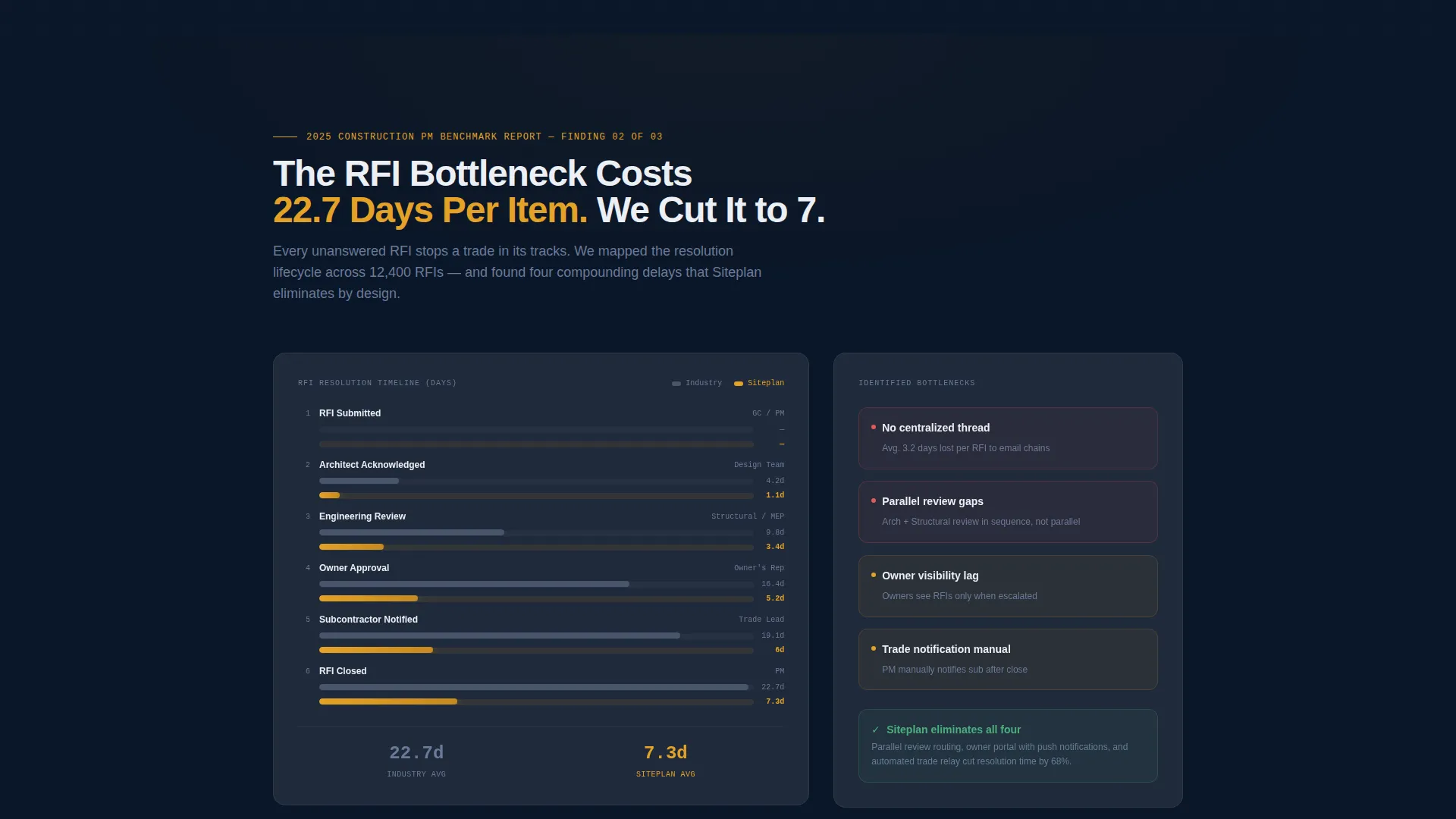
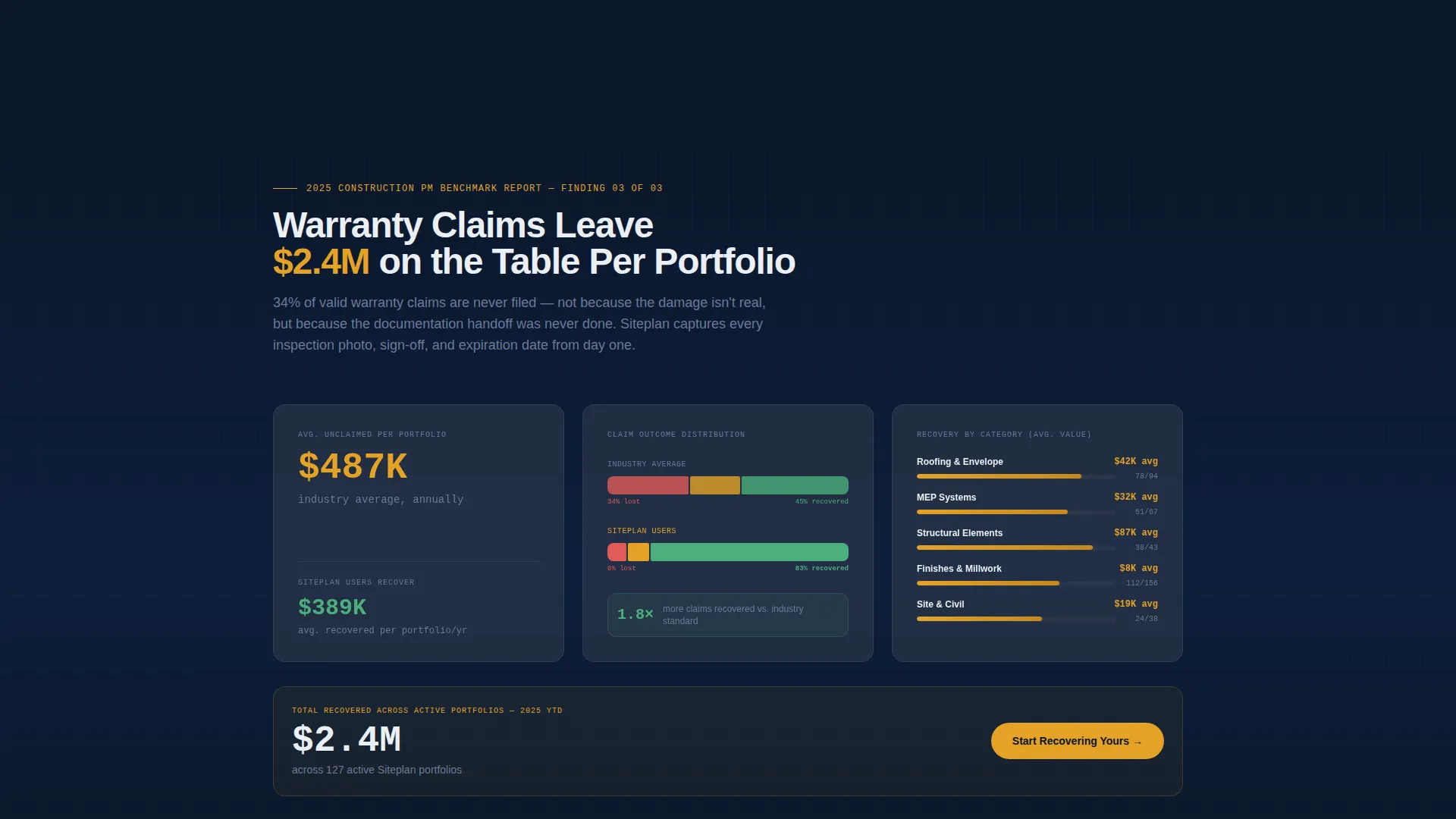
Each scroll reveal surfaces a new data insight styled as a proprietary benchmark report. Sections cover average punch list closeout time, RFI resolution bottlenecks with waterfall chart visuals, and warranty claim recovery rates with specific dollar figures. Every section earns the next scroll by making the reader feel they are accessing competitive intelligence.
Persistent Conversion Bottom Bar
After the second scroll reveal, a persistent bottom bar appears with the primary call to action: "Start Your Free Portfolio." It stays visible as the visitor continues reading, keeping the conversion path present without interrupting the content flow.
Freemium Trial Signup Form
The signup sequence asks for work email first, then company name, then number of active properties through a dropdown with four ranges. This stepped approach lowers friction and personalizes the onboarding experience from the first interaction.
Gated PDF Lead Capture
A secondary conversion path offers visitors the 2025 Construction PM Benchmark Report as a downloadable PDF. This captures leads from visitors who are not yet ready to start a trial, while reinforcing the platform's authority as an industry data source.
Midnight Blue Data Command Design
The visual system uses deep terminal navy as the primary background, reinforced concrete gray for card surfaces, cold halogen white for body text, and safety-vest amber exclusively for live data points, alert badges, and interactive elements. Color is used with strict intent, so every amber element signals something that matters.
Page sections overview
| Section | Purpose |
|---|---|
| Dashboard Header | Opens with a live-feel portfolio interface to establish product credibility immediately |
| Punch List Benchmark | Reveals industry closeout time versus platform user performance to create contrast |
| RFI Resolution Section | Discloses bottleneck data with animated waterfall chart visuals |
| Warranty Recovery Section | Surfaces claim recovery rates and dollar figures to show financial impact |
| Persistent call to action Bar | Keeps "Start Your Free Portfolio" visible after second scroll reveal |
| Final Benchmark Section | Closes the data narrative and leads into the full-width trial signup |
| Trial Signup Form | Collects work email, company name, and active property count |
| PDF Lead Capture | Offers gated benchmark report for visitors not ready to trial |
Design & branding system
The template uses a Midnight Blue color system built around four specific roles. No color is decorative; every choice carries meaning tied to the construction data theme.
- Deep terminal navy (#0A1628) as the primary background for all sections
- Reinforced concrete gray (#3B4252) for card and surface elements, cold halogen white (#ECEFF4) for all typography
- Safety-vest amber (#E5A228) reserved strictly for live data points, alert badges, progress indicators, and primary interactive elements
Mobile & speed optimization
The template is built with a scroll-reveal progressive structure that loads content in stages. This approach keeps the initial viewport clean and focused while the rest of the page activates on demand.
- Progressive scroll reveal loads each benchmark section only as the visitor reaches it
- The dashboard header is designed as a rendered interface preview, avoiding heavy image dependencies
- The stepped signup form reduces page weight by presenting one input at a time
How this template helps you convert
The page is structured around a give-first, ask-second conversion model. Every section delivers value before presenting an action, making the trial feel like the logical conclusion of what the visitor just read.
- The dashboard header proves the product is real and already working before a single word of marketing copy appears
- Each benchmark section builds authority by releasing data insights progressively, so the visitor feels informed rather than sold to
- The dual conversion path captures leads at two intent levels, freemium trial for ready buyers and the gated PDF for researchers still evaluating
Other information about this template
This template is categorized under Technology, specifically within the Construction Software subcategory and the Construction Property Management niche. It is suited for platforms positioning themselves as an all-in-one command center for multi-site property oversight.
- Template style is Scroll Reveal (Progressive), meaning sections animate into view as the visitor scrolls
- The creative direction follows an Industry Report format, giving the page the authority feel of a benchmark publication rather than a typical product page
- The header concept is a Dashboard Preview, placing the actual product interface front and center rather than using stock photography or illustration
- The landing page direction is Freemium/Trial, optimized for lead capture and low-friction signup rather than direct purchase
- The Data Command theme ties visual choices directly to the jobsite and data-monitoring context of construction property management
Theme
Data Command
Creative direction
Industry Report
Color system
Midnight Blue
Style
Scroll Reveal (Progressive)
Direction
Freemium/Trial
Page Sections
Full-viewport Dashboard Header
Scroll-reveal Benchmark Sections
Persistent Freemium Call to Action Bar
Stepped Trial Signup Form
Gated PDF Lead Capture
Midnight Blue Data Command Visual System
Related questions
What industries is this landing page template designed for?
Can I customize the dashboard header data to match my platform?
What is the conversion strategy built into this template?
Does the template include the actual benchmark report PDF?
What does the stepped signup form collect?



