Slate - Dynamic Roofing Landing Page Template
Slate is a single-page roofing directory landing page template built for urgency and data clarity. It combines animated metric counters, side-by-side contractor comparison tables, regional cost charts, and a frictionless zip-code search flow. The Void and Violet color system gives every data point sharp contrast against a deep black background, making it feel like mission control for finding a roofer fast.
by Rocket studio
Quick summary
Slate is a comparison table landing page template designed for roofing directory and listing sites. It opens with a kinetic stats wall, moves through an industry-report-style data breakdown, and closes with a low-friction search flow. The Void and Violet palette keeps every metric legible against a deep black background, and every section is built to move visitors toward a single action: finding a roofer now.
Who this template is for
Slate is built for operators running a roofing directory, contractor listing platform, or regional roofing referral service. It speaks directly to the audiences those platforms serve and reflects their urgency in every design decision.
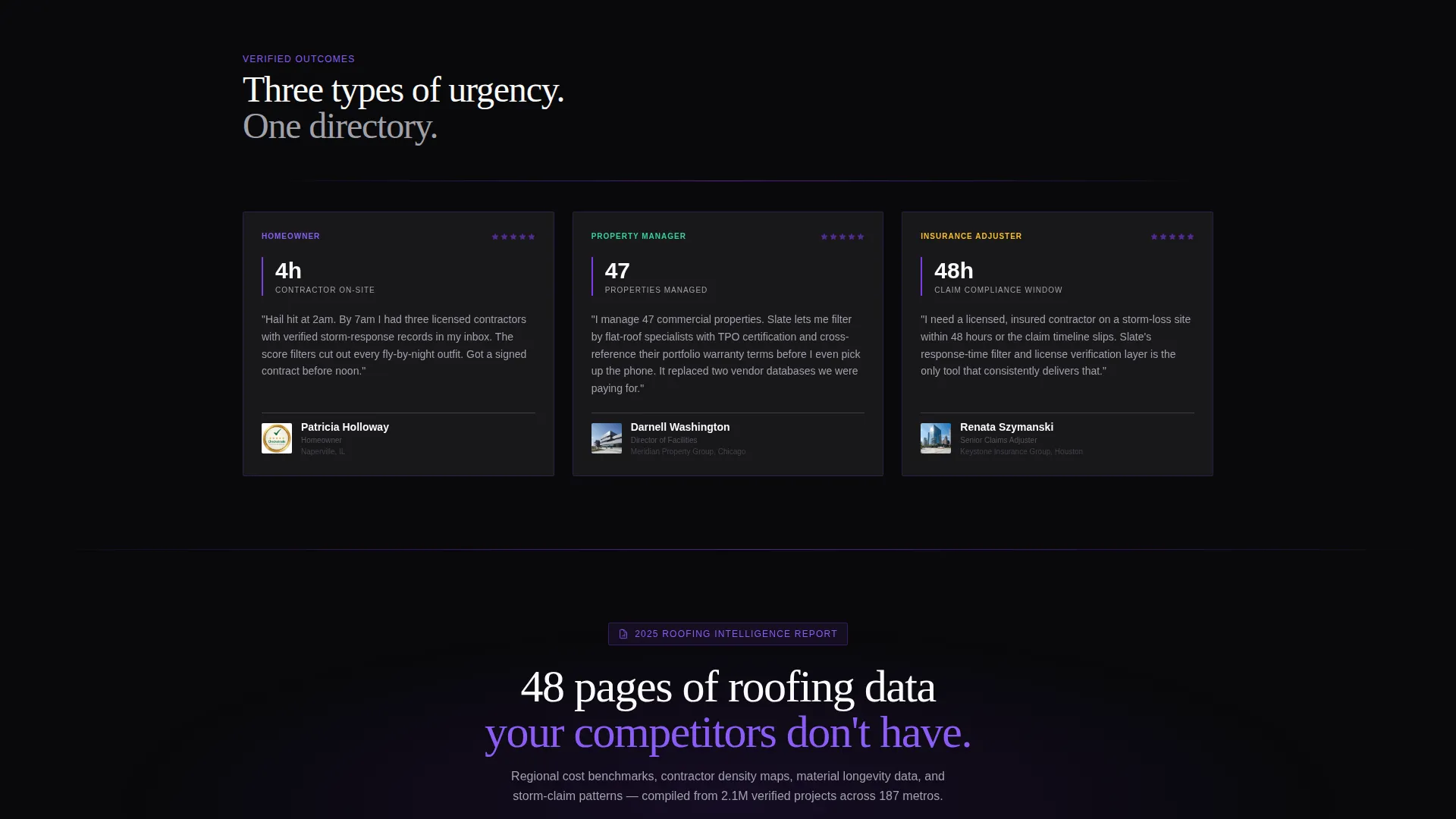
- Homeowners who need a verified roofer quickly after storm or hail damage
- Property managers tracking contractor availability across multiple sites
- Insurance adjusters who must place a licensed contractor on-site by a firm deadline
What problem this template solves
Finding a qualified roofer fast is harder than it should be. Generic search results offer no way to compare contractors on the metrics that actually matter: response time, material specialty, warranty length, or verified review score. Slate solves this by putting all that data on one page, structured for scanning under pressure.
- Visitors cannot quickly compare multiple contractors side by side on a standard directory page
- Storm-urgent users abandon slow or registration-gated search flows before finding help
- Directory operators struggle to communicate the depth and quality of their contractor index at first glance
What you get with this template
Slate delivers a fully designed single-page layout ready to be populated with real contractor data and directory content. Every section has a defined purpose and a matching visual treatment.
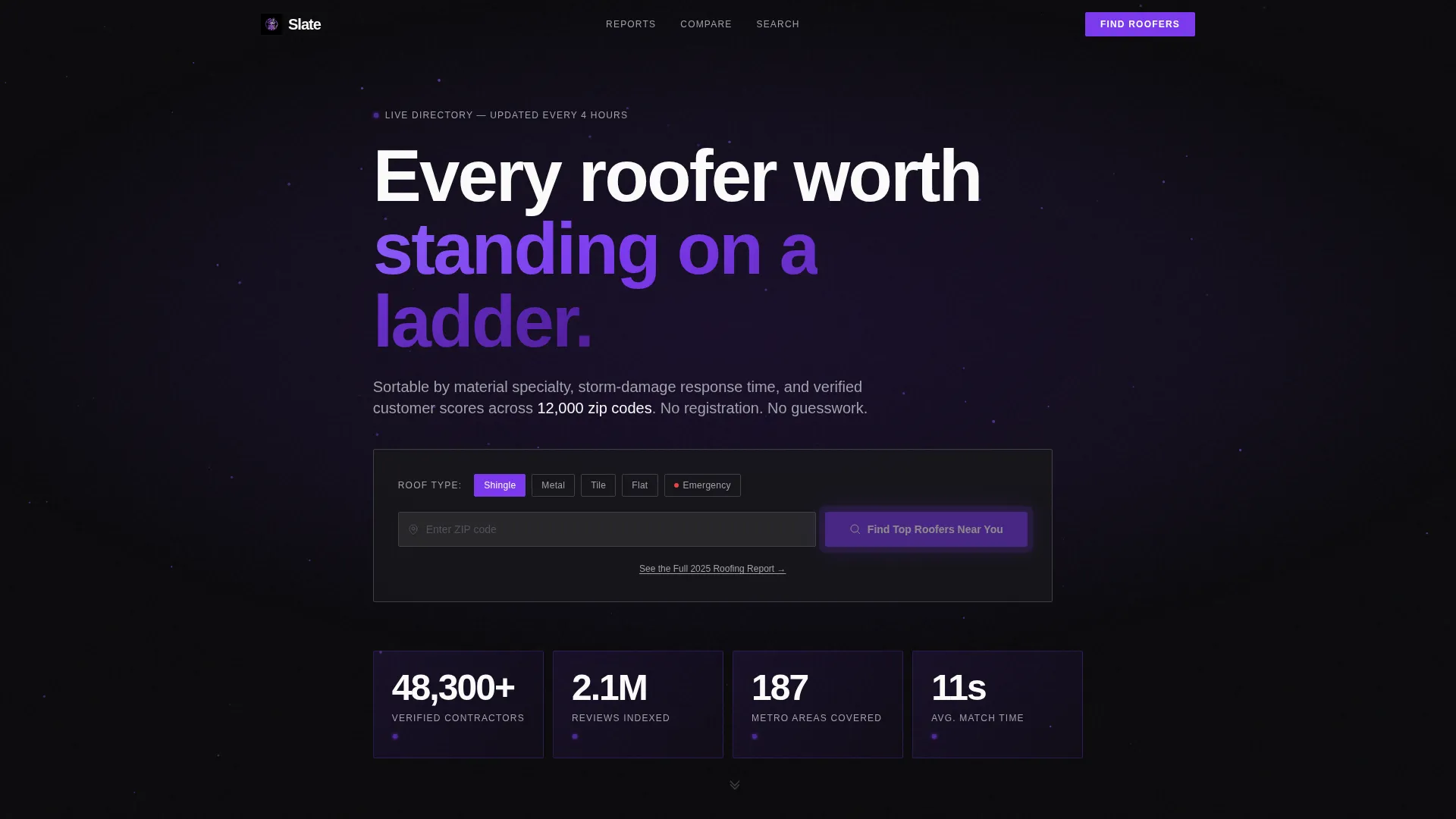
- An animated stats wall header showing verified contractor count, total reviews indexed, metro coverage, and average match time
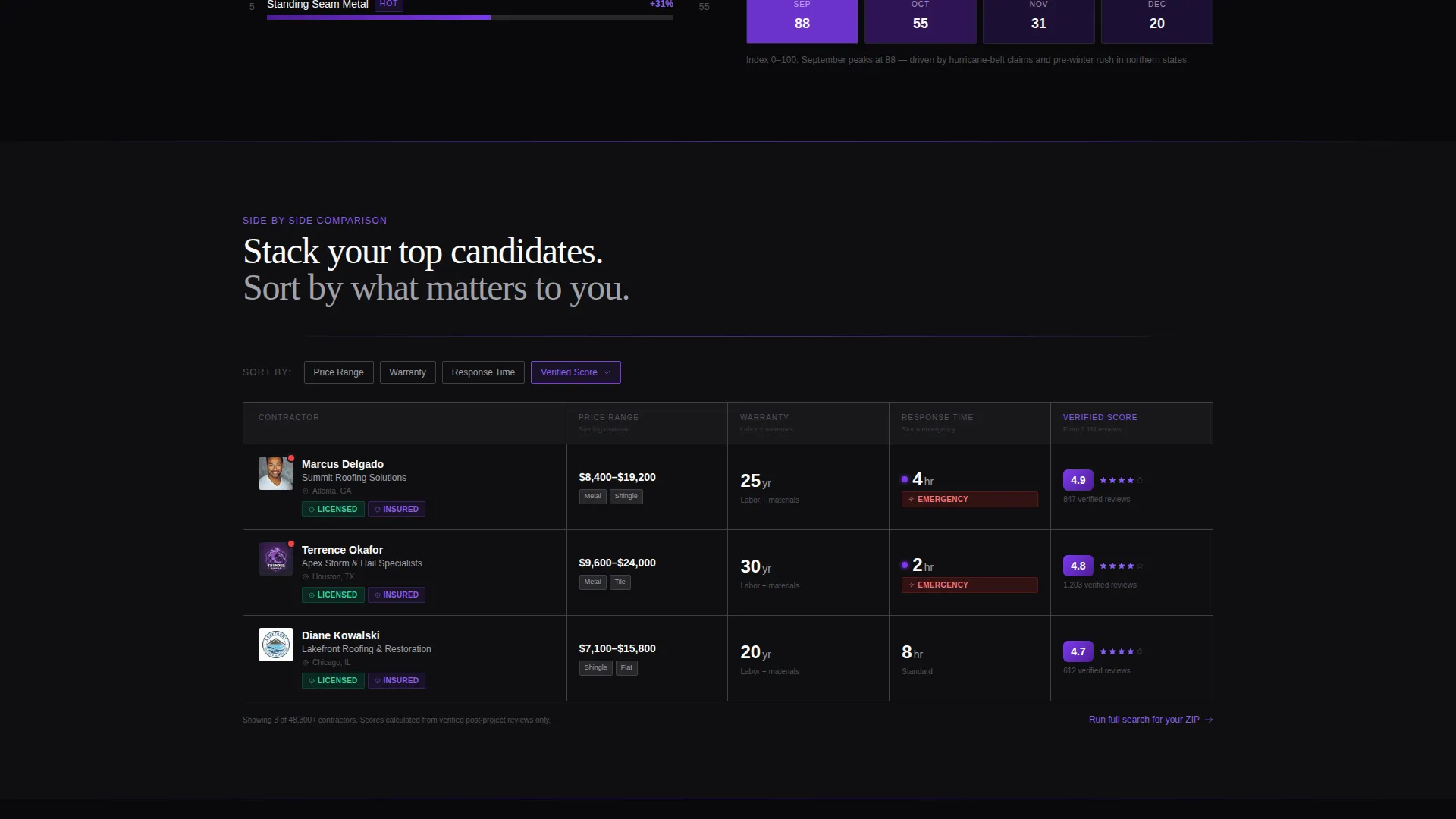
- Mid-scroll comparison tables letting visitors stack three roofers side by side on price, warranty, response time, and review score
- A primary search module with a zip-code input, roof-type pill selectors, and a pulsing violet call-to-action button
Feature list
Slate includes purpose-built sections and interaction patterns drawn directly from the brief. Each one serves a specific role in the directory experience.
Animated Stats Wall Header
The header opens with four kinetic counters rolling upward: 48,300 plus verified contractors, 2.1 million reviews indexed, 187 metro areas covered, and an average match time of 11 seconds. Each digit eases into place like a departures board resetting. A particle field in violet drifts behind the numbers, reinforcing the sense of live data in motion.
Side-by-Side Contractor Comparison Table
The comparison table lets visitors stack three roofers next to each other across four key rows: price range, warranty length, response time, and review score. Table rows highlight in violet on hover, drawing the eye to the active metric. This format gives storm-urgent visitors a clear path to a decision without scrolling away to separate contractor profiles.
Regional Cost and Trend Charts
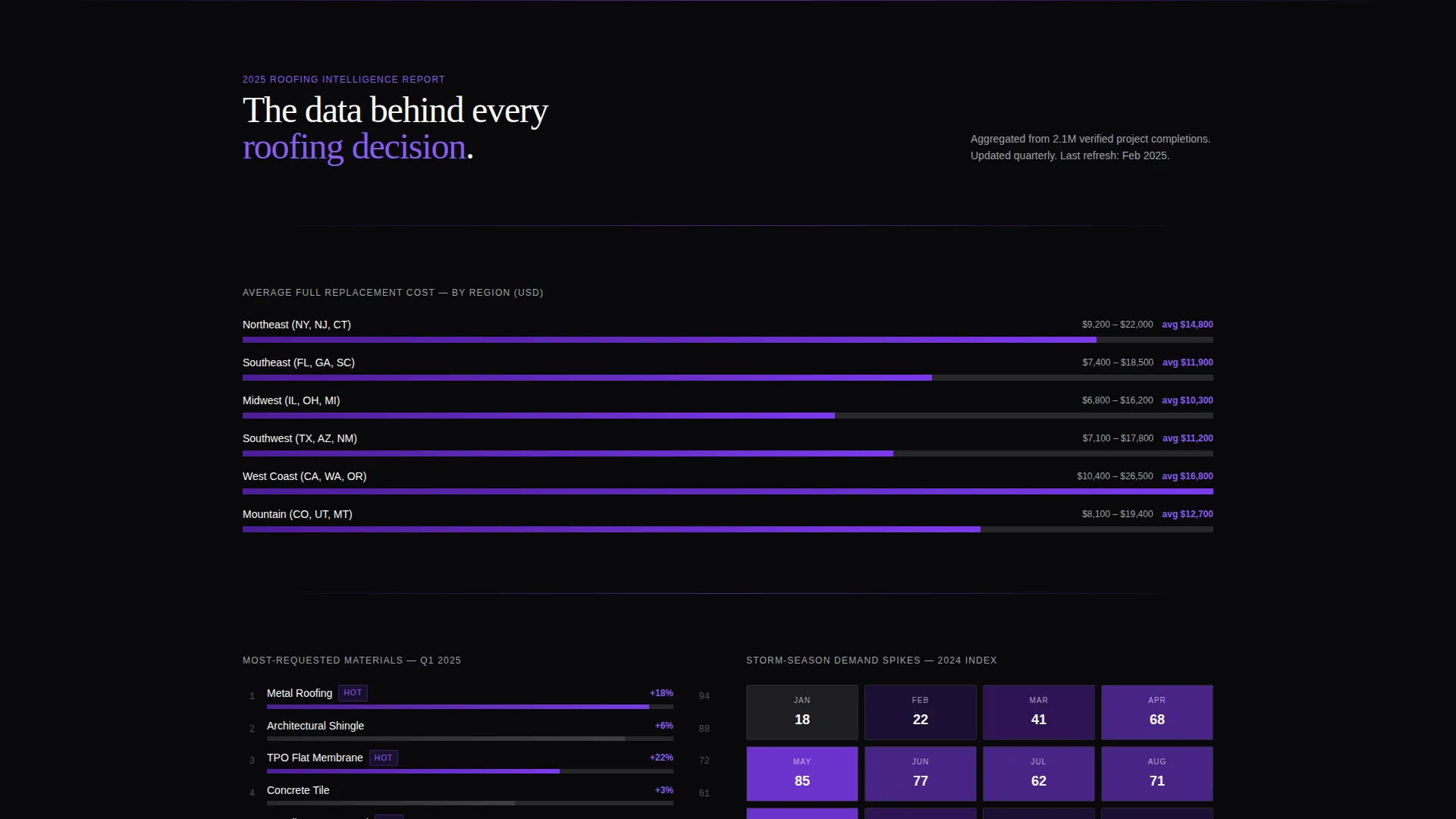
Horizontal bar charts display average roofing replacement costs broken down by region. Separate trend indicators show the most-requested materials this quarter and storm-season demand spikes mapped on a heat overlay. The data presentation follows an industry report format, building credibility and signaling the depth of the directory's coverage.
Zip-Code Search with Roof-Type Filters
The primary call-to-action module centers on a single zip-code input field paired with roof-type pill selectors covering shingle, metal, tile, flat, and emergency repair. No registration is required. Entering a zip routes the visitor directly to filtered results, keeping the commitment threshold as low as a single keystroke.
Secondary Research Capture Link
Below the primary search button, a text link reads "See the Full 2025 Roofing Report." This secondary path captures visitors still in research mode and collects email on download, broadening the conversion funnel without cluttering the primary flow.
Dynamic Motion Visual Theme
Every animated element follows the Dynamic Motion theme: easing counters, pulsing call to action glow, and hover-activated row highlights all work together. Motion is purposeful rather than decorative, directing attention to the metrics and actions that matter most at each scroll depth.
Page sections overview
| Section | Purpose |
|---|---|
| Stats Wall Header | Establishes directory scale with animated contractor, review, metro, and match-time counters |
| Regional Cost Charts | Presents replacement cost data by region using horizontal bar charts |
| Material Trend Panel | Shows most-requested roofing materials and storm-season demand spikes |
| Contractor Comparison Table | Lets visitors compare three roofers side by side on price, warranty, response time, and score |
| Zip-Code Search Module | Drives visitors into the search flow with a single input and roof-type pill selectors |
| Research Capture Link | Offers the 2025 Roofing Report to hold research-phase visitors and collect email |
Design & branding system
Slate uses the Void and Violet color system, which pairs absolute darkness with high-energy violet to create a mission-control aesthetic. Every color choice is functional: black recedes, violet activates, and white stays legible.
- Void black (#09090B) dominates all backgrounds, keeping data elements forward
- Electric violet (#7C3AED) powers calls to action, active sort indicators, and hover states; nebula purple (#4C1D95) anchors section dividers
- Signal white (#FAFAFA) is used for all body text and table column labels to maintain razor-sharp legibility against dark backgrounds
Mobile & speed optimization
Slate is designed so that its data-dense sections remain readable and actionable on smaller screens. The layout adapts to the compressed space a user on a phone faces when searching for emergency roofing help.
- Comparison tables are structured to scroll horizontally on narrow viewports, keeping all columns accessible
- The zip-code search module and pill selectors are sized for thumb interaction, reducing input friction on mobile devices
- Animated counters and particle effects are scoped to the header section, keeping the rest of the page lightweight to render
How this template helps you convert
Slate removes every unnecessary step between a visitor's arrival and their first search action. The conversion path is short, clear, and reinforced by data that builds trust before asking for a click.
- The stats wall immediately signals directory authority, showing verified scale before the visitor scrolls a single pixel, which reduces bounce from skeptical first-time users
- The comparison table meets visitors mid-scroll with structured contractor data, giving them a reason to engage deeper instead of leaving to search elsewhere
- The no-registration zip-code search keeps the commitment to a single input, so even a visitor who arrived in a panic can act in seconds without creating an account
Other information about this template
Slate is a standalone landing page template. It is not connected to a live data feed or backend directory system by default. The template provides the visual and structural framework; your team populates it with real contractor records, chart data, and regional cost figures.
- The template style is Comparison Table, making it well-suited for any niche where side-by-side evaluation drives decisions
- The Industry Report creative direction positions the page as an authoritative source, which is particularly effective for roofing directory and listing site operators who want to differentiate from thin-content aggregators
- The Click-Through landing page direction means every design decision prioritizes moving visitors into an active search rather than passively reading content
- The Dynamic Motion theme and Void and Violet palette are fully described in the brief and can be adapted by a designer working in any modern front-end environment
Theme
Dynamic Motion
Creative direction
Industry Report
Color system
Void & Violet
Style
Comparison Table
Direction
Click-Through
Page Sections
Animated Stats Wall Header
Side-by-side Comparison Table
Regional Cost and Trend Charts
Zip-code Search with Roof-type Pills
Secondary Research Capture Link
Dynamic Motion Visual System
Related questions
Does this template require visitors to create an account before searching?
Can I customize the roof-type pill selectors in the search module?
How does the side-by-side comparison table work?
What is the secondary conversion path on this landing page?
Are the animated counter figures real data or placeholder values?



