Event Planning Digital Presence Cost Calculator Website Template
Slate is a bento grid landing page template built for event planning professionals. It opens with an interactive budget estimator, live dashboard panels, and micro-interaction feature cards. The Monochrome Steel color system and Dashboard Pro theme create a calm, focused command-center feel. Slate is designed to convert first-time visitors into free trial sign-ups through earned, tool-first engagement.
by Rocket studio
Quick summary
Slate is a single-page, bento grid landing page template for event planning platforms. It leads with a live budget estimator, moves through case-study snapshots and animated feature cards, and closes with a contextual call to action. The Dashboard Pro theme and Monochrome Steel palette make every section feel like a working tool, not a brochure.
Who this template is for
Slate is designed for event planning product teams and digital agencies building a conversion-focused landing page. It speaks directly to the workflows that real event professionals live inside every day.
- Corporate event managers running quarterly town halls with tight turnaround windows
- Wedding planners tracking multiple vendor contracts at the same time
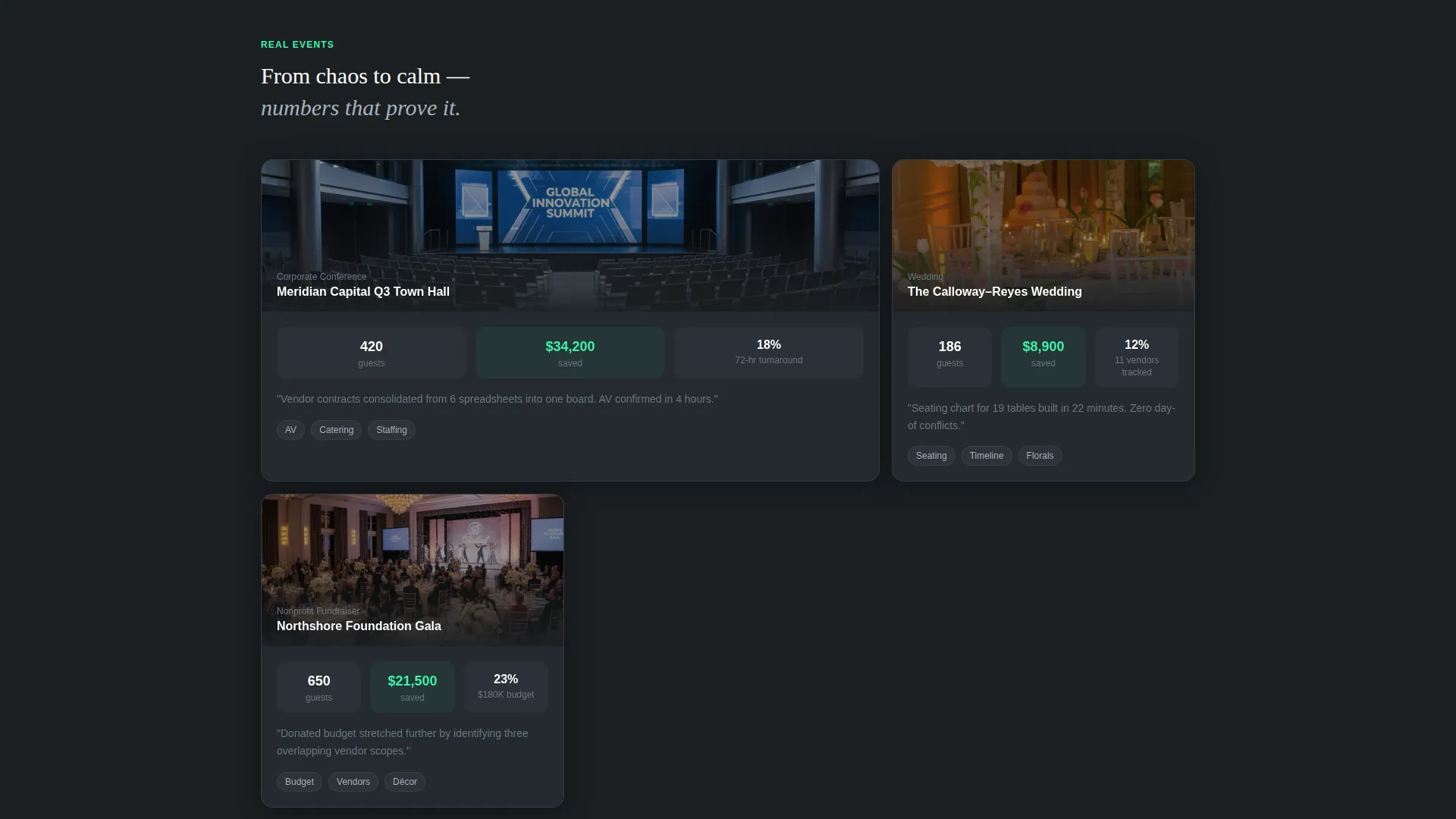
- Nonprofit gala coordinators balancing catering, audio-visual, and décor budgets
What problem this template solves
Event planning platforms often lose visitors before a single feature registers. Generic hero sections and static screenshots fail to communicate the tool's actual value in the first few seconds. Slate replaces passive reading with active doing.
- Visitors interact with a budget estimator before they read a word of marketing copy
- The page removes the gap between "curious visitor" and "engaged prospect" through tool-first design
- Contextual calls to action appear only after the visitor has already built something, making conversion feel natural
What you get with this template
Slate ships as a complete, ready-to-customize bento grid landing page. Every section is purpose-built and sequenced to move a visitor from curiosity to commitment.
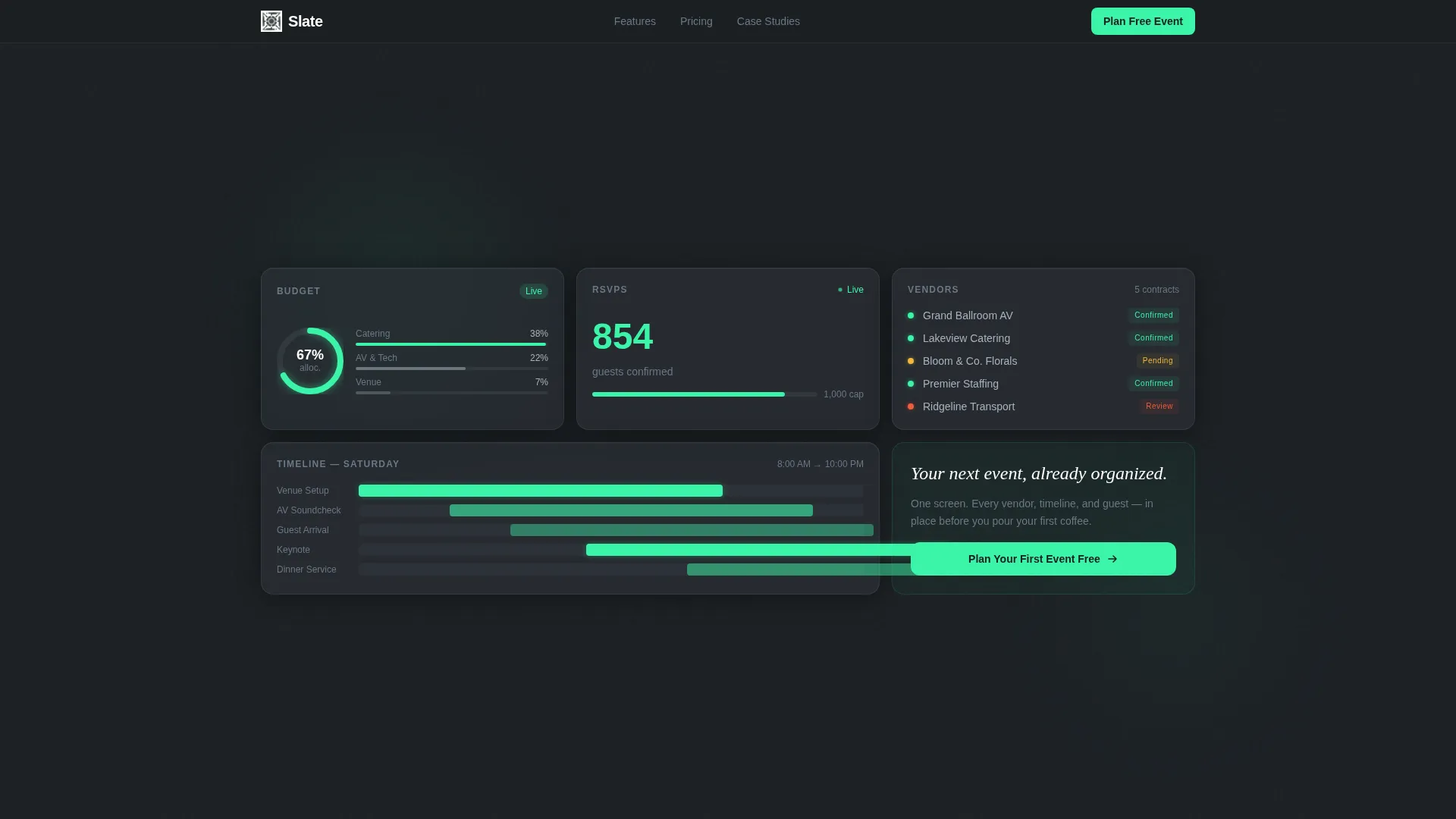
- A glassmorphism header grid with live-fragment dashboard panels and staggered load animations
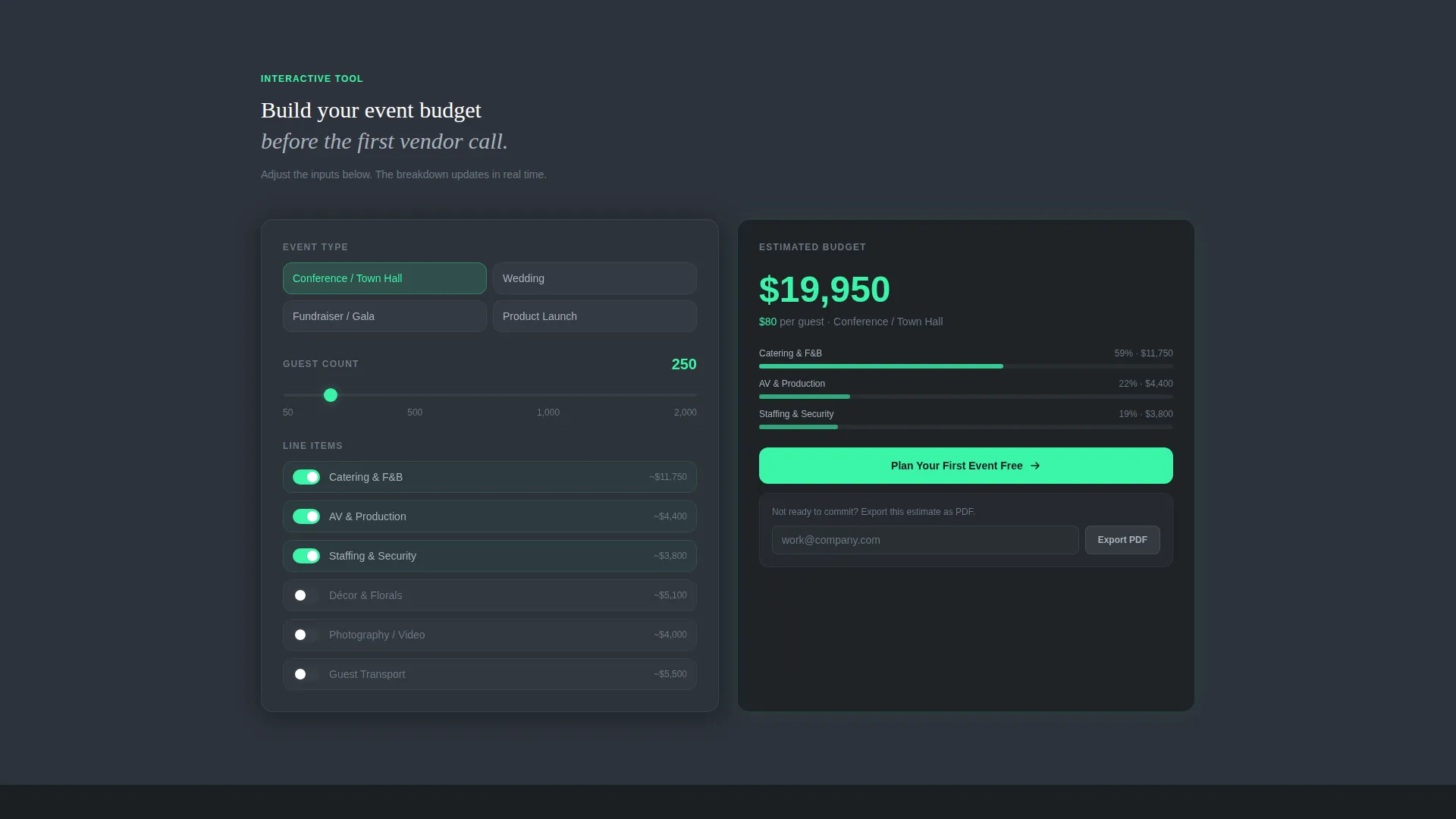
- A fully interactive Event Budget Estimator with real-time cost breakdown and mint-accented number animations
- A sticky bottom call-to-action bar, a PDF lead magnet path, and a three-field sequential sign-up form
Feature list
Slate includes six core built-in features, each grounded in the template's tool-first creative direction.
Bento Grid Header with Live Dashboard Panels
The header is a wall of frosted, semi-transparent cards floating over a near-black background. Each panel shows a different live tool fragment: a budget donut chart, a guest RSVP ticker, a vendor status board with color-coded dots, and a Gantt timeline bar. Panels drift into position with staggered easing on page load.
Interactive Event Budget Estimator
The first scrollable section is a live estimator embedded directly into the page. Visitors select an event type, drag a guest-count slider from 50 to 2,000, and toggle line items like audio-visual rental, catering tier, and staffing. A bento panel on the right rebuilds a real-time cost breakdown with mint-accented number animations on every change.
Micro-Interaction Feature Cards
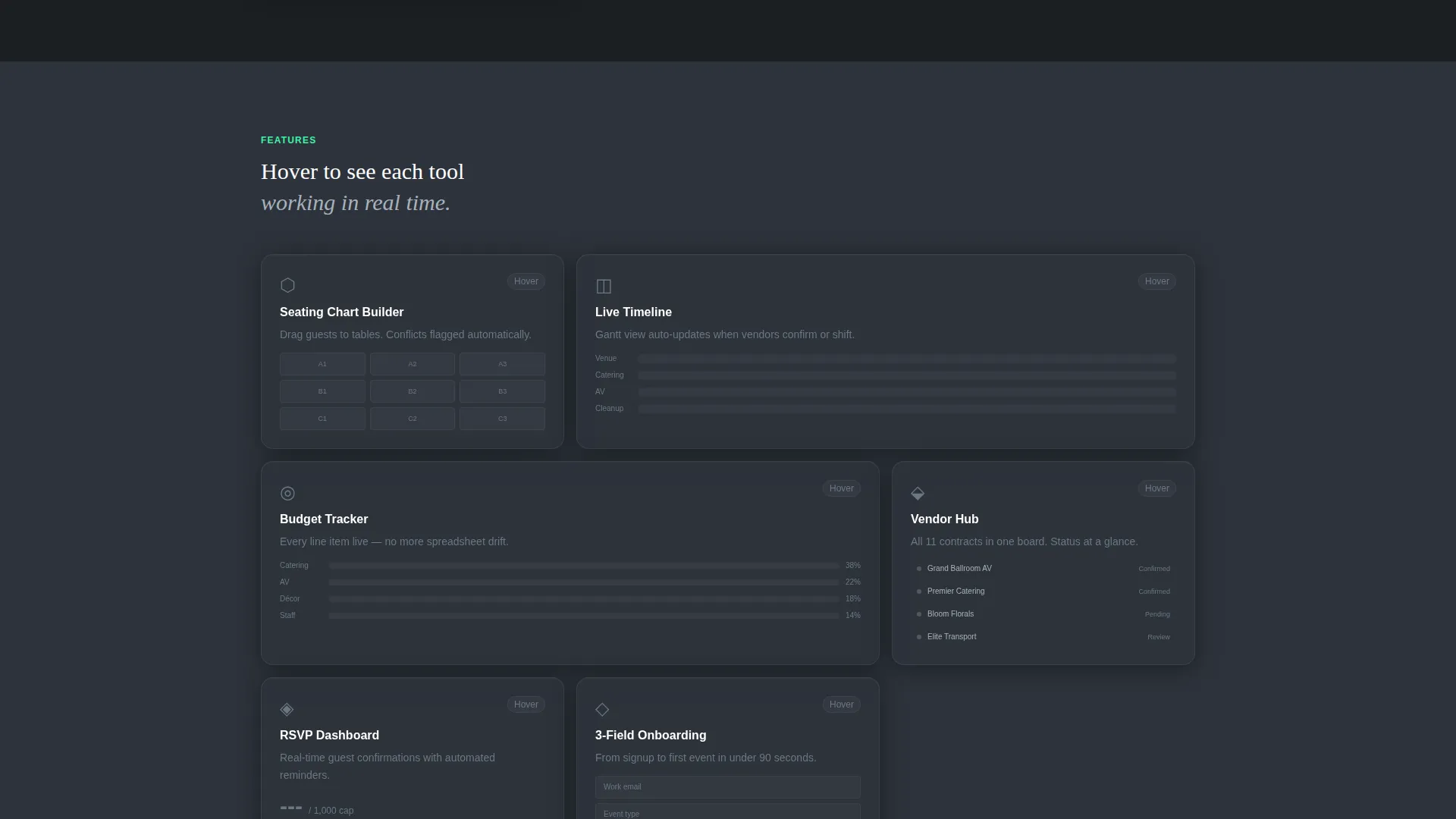
Each feature cell in the feature grid responds to hover with a small, contained animation. Hovering the Seating Chart card, for example, plays a miniature drag-and-drop animation inside the cell. The page teaches its own capabilities through direct interaction rather than static descriptions.
Case Study Snapshot Cells
After the estimator, bento cells reveal real proof points in a compact format. Each snapshot shows an event name, headcount, and budget saved. This sequencing moves the visitor from active tool use to social proof without breaking the visual rhythm.
Contextual and Sticky Call-to-Action System
The primary call to action, "Plan Your First Event Free," appears first inside the budget calculator results panel. It is earned, not imposed. A sticky bottom bar surfaces the same action again after the visitor has scrolled past 60 percent of the page, creating a second window without interrupting flow.
PDF Lead Magnet and Sequential Sign-Up Form
Visitors who are not ready to commit can export their budget estimate as a PDF by providing their email address. The three-field sign-up form collects work email, event type, and estimated guest count in sequence, mirroring the estimator inputs so the visitor feels they have already begun.
Page sections overview
| Section | Purpose |
|---|---|
| Bento Header Grid | Establishes dashboard feel with live panel fragments and staggered load animations |
| Budget Estimator Tool | Drives immediate interaction before any marketing copy is read |
| Case Study Snapshots | Delivers social proof in compact, scannable bento cells |
| Feature Grid | Demonstrates capabilities through hover-triggered micro-interactions |
| Sticky call to action Bar | Recaptures scroll-depth visitors with a persistent, low-friction action |
| PDF Lead Magnet | Captures emails from visitors not ready for a full sign-up |
| Sequential Sign-Up Form | Converts warm visitors using inputs that mirror the estimator |
Design & branding system
The visual identity uses the Dashboard Pro theme with a Monochrome Steel color palette. The result feels like a precision instrument, not a decorative layout.
- Core colors: deep gunmetal (#1B1F23) for backgrounds, brushed aluminum (#A8B2BD) for body text, and panel charcoal (#2D333B) for bento cell fills
- Electric mint (#3BF4A8) appears exclusively on live data points, toggle states, and primary calls to action, making every appearance feel deliberate and active
- Glassmorphism styling uses 1-pixel luminous borders and a frosted blur on header panels, while backgrounds alternate between gunmetal and charcoal to visually separate each bento cell
Mobile & speed optimization
Slate's bento grid layout is structured to reflow cleanly across screen sizes. The visual weight of each cell is intentional, keeping the mobile experience organized without sacrificing the dashboard aesthetic.
- Bento cells stack in a logical reading order on smaller screens, preserving the tool-first flow
- Animations and staggered easing are scoped to their containers so they do not disrupt the overall scroll experience
- The sticky call to action bar and lead magnet path remain accessible and functional at all viewport sizes
How this template helps you convert
Slate is built around a freemium and free trial conversion model. Every design decision serves the goal of moving a visitor from passive browser to active user.
- The budget estimator creates immediate personal investment before any sign-up is requested, making the eventual call to action feel like a natural continuation of work already started
- The contextual "Plan Your First Event Free" button appears inside the results panel, so it arrives at the exact moment the visitor sees value
- The PDF lead magnet provides a secondary conversion path for hesitant visitors, capturing an email address in exchange for the estimate they just built
Other information about this template
Slate is a strong fit for teams building an event planning digital presence in the technology category. It combines a bento grid template style with a Calculator/Tool First creative direction and a Freemium/Trial landing page direction. The Dark Glass Panels header concept makes it visually distinct in any event planning niche. This template is ready to customize with your platform's branding, event types, and pricing tiers.
- Template style: Bento Grid with Dashboard Pro theme
- Color system: Monochrome Steel with electric mint accent for active states
- Conversion model: Freemium/Trial with a secondary PDF lead magnet path
- Header concept: Dark Glass Panels with glassmorphism blur and staggered entrance animations
Theme
Dashboard Pro
Creative direction
Calculator/Tool First
Color system
Monochrome Steel
Style
Bento Grid
Direction
Freemium/Trial
Page Sections
Bento Grid Header with Live Panels
Interactive Event Budget Estimator
Micro-interaction Feature Cards
Case Study Snapshot Cells
Contextual and Sticky Call to Action System
PDF Lead Magnet with Sequential Form
Related questions
Who is the Slate landing page template designed for?
Can I customize the event types inside the budget estimator?
What is the PDF lead magnet feature?
How does the sticky call to action bar work?
Does the sign-up form connect to any external tools?



