Video Production Vertical SaaS Professional Website Template
Slate is a dark-mode video production CRM landing page built for producers managing complex shoots, crews, and budgets. The modular card grid layout pairs an animated live-dashboard hero with capability-focused feature cards, a freemium trial conversion flow, and a carbon fiber visual system that feels like stepping into a professional edit suite.
by Rocket studio
Quick summary
Slate is a single-page landing page template designed for video production CRM platforms. It opens with an animated stats dashboard hero, moves through a self-contained modular feature card grid, and closes on a single-field email capture. The dark-mode design system and real-time data visuals make the product feel operational before a trial even begins.
Who this template is for
This template is built for teams and founders launching a video production command center to a professional audience that already knows what it costs to run productions across too many tools.
- Production coordinators at mid-size agencies who manage multiple shoots simultaneously
- Independent producers running branded content operations from a single workstation
- Post-house owners who lose margin when revision cycles fall through informal communication threads
What problem this template solves
Most production teams manage their work across spreadsheets, group chats, shared drives, and separate invoicing tools. That fragmentation costs time and margin every week. This template presents a single-workspace alternative in a visual language that resonates with the people who feel that pain most acutely.
- Visitors immediately see a live dashboard rather than a static screenshot, making the value tangible from the first second
- Each feature card isolates one replaced tool, building cumulative proof that the platform consolidates a real stack
- The freemium conversion path removes friction by showing a pre-populated workspace instead of an empty sign-up form
What you get with this template
The template delivers a complete, conversion-ready landing page with every section pre-built and visually cohesive. No placeholder layouts or generic hero images are included.
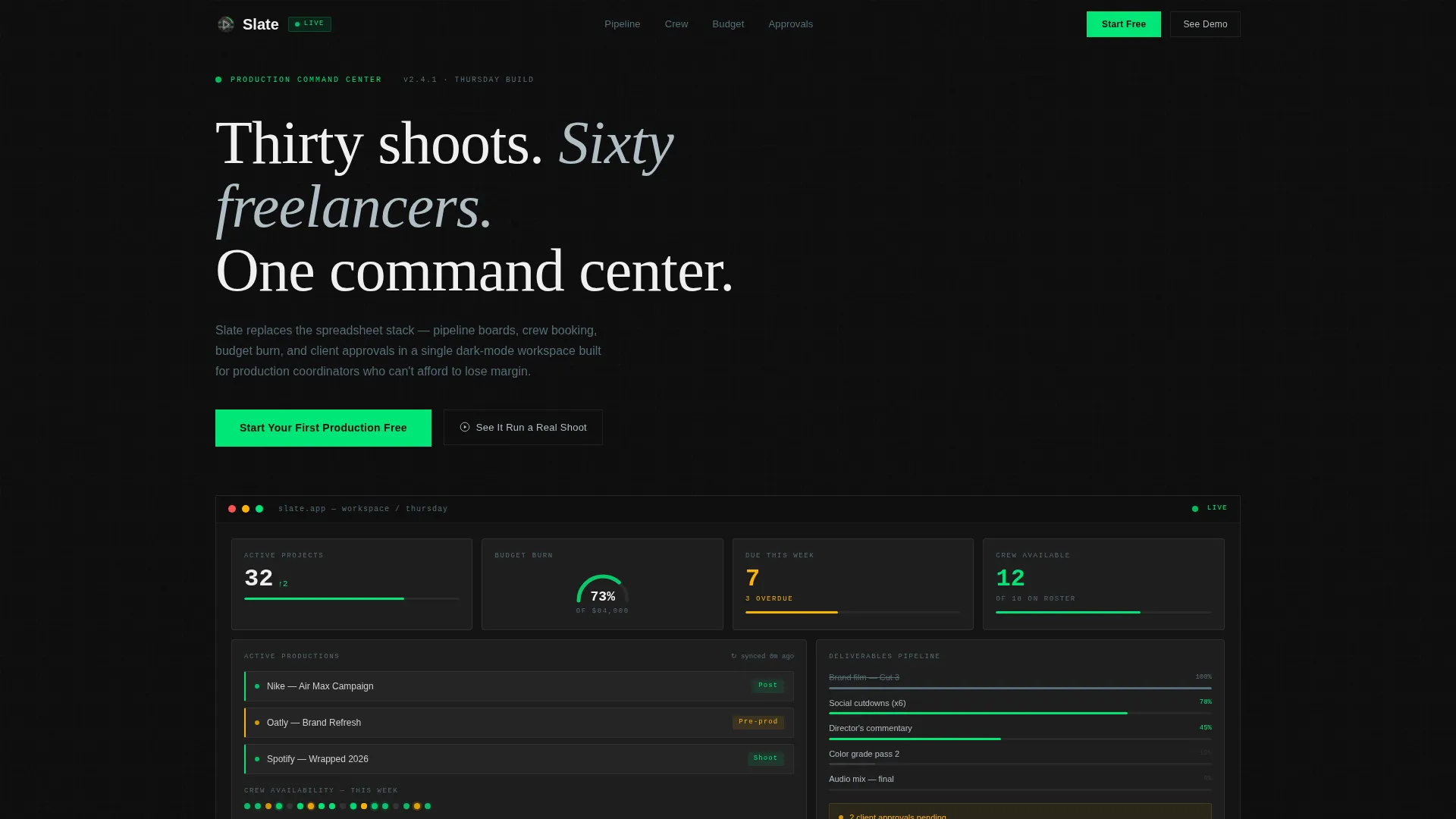
- An animated hero section with live-counting project metrics, a budget gauge, crew availability dots, and a deliverables progress bar
- A modular feature card grid with five capability cards, each designed to trigger a hover micro-animation
- A pinned navigation call to action, an inline email capture modal, and a secondary interactive walkthrough path
Feature list
This section covers the core capabilities built into the Slate template.
Animated Live-Data Hero
The hero section renders as a working dashboard, not a product screenshot. A project counter ticks upward, a budget gauge needle settles at 73%, crew availability dots pulse green and amber across a calendar strip, and a deliverables progress bar slides to completion. Every element is designed to look like someone's actual production week in progress.
Modular Feature Card Grid
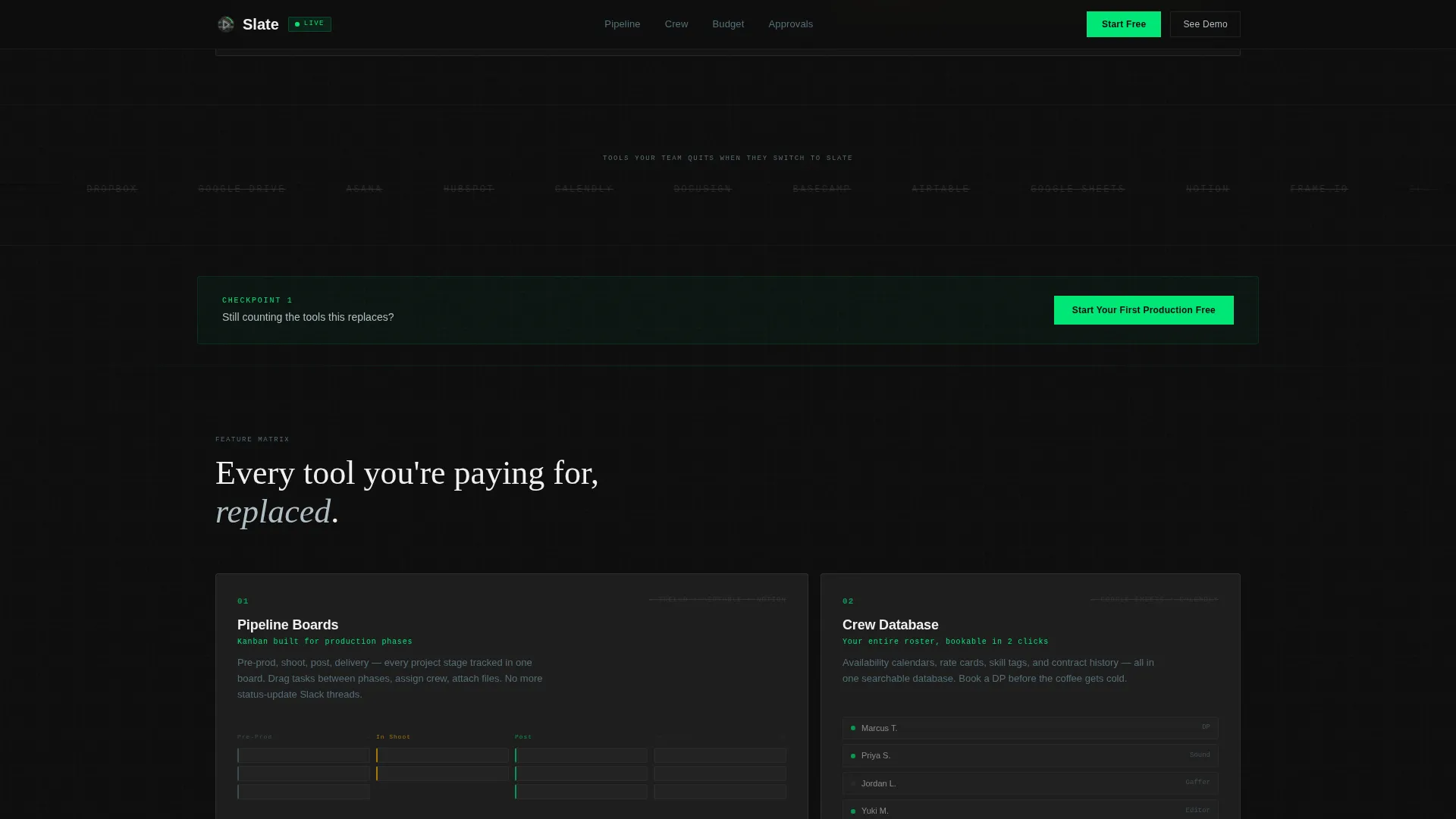
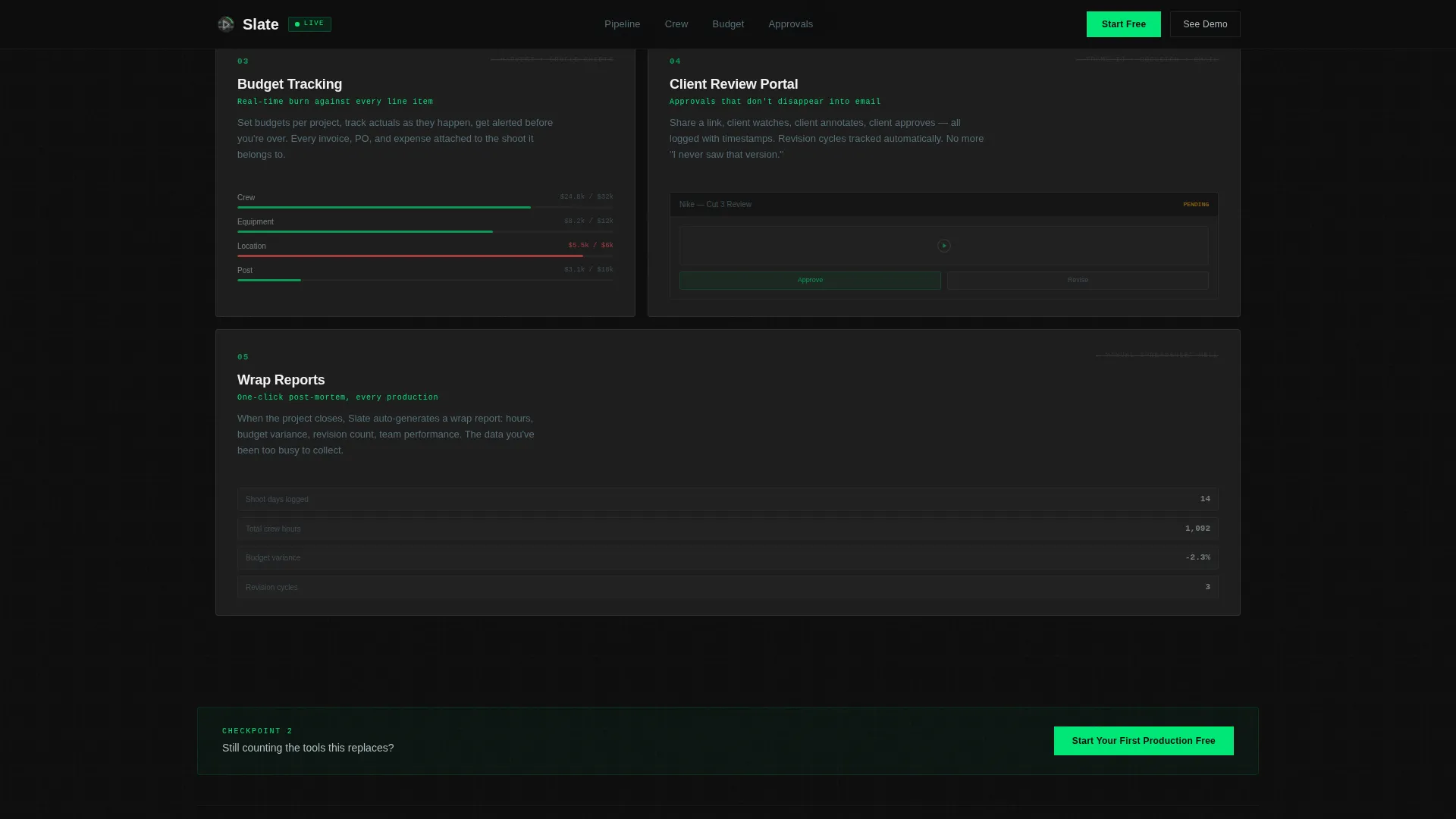
Five capability cards each focus on a distinct platform function: pipeline boards, crew databases, budget tracking, client review portals, and wrap reports. Cards are self-contained and scroll-revealed, designed so each one makes a standalone case for the feature it represents.
Hover Micro-Animations on Cards
Each feature card activates a micro-animation on hover that shows the capability in motion. The interaction demonstrates the feature rather than describing it, reinforcing the "show, never promise" conversion principle built into the page.
Freemium Trial Conversion Flow
The primary call to action, "Start Your First Production Free," appears pinned in the navigation and repeats after every third card. Clicking opens a single-field email capture modal that provisions a workspace pre-loaded with sample project data, so new users land inside a populated dashboard immediately.
Secondary Interactive Walkthrough Path
A second conversion option, "See It Run a Real Shoot," triggers a 90-second interactive walkthrough. This path serves visitors who want to evaluate the platform before committing an email address, giving the page two distinct conversion touchpoints for different buyer readiness levels.
Tools-Replaced Marquee Section
A scrolling marquee section lists the individual tools the platform replaces, creating an accumulation effect. By the time a visitor reaches the sixth feature card, the visual logic has made clear that nine separate tools collapse into one workspace.
Page sections overview
| Section | Purpose |
|---|---|
| Pinned Navigation Bar | Persistent call to action anchor across scroll |
| Animated Hero Dashboard | Live metrics establish product credibility |
| Tools Replaced Marquee | Visual accumulation of replaced tools |
| Feature Bento Grid | Pipeline, crew, budget, approvals overview |
| Deep Feature Cards | Five hover-animated capability proofs |
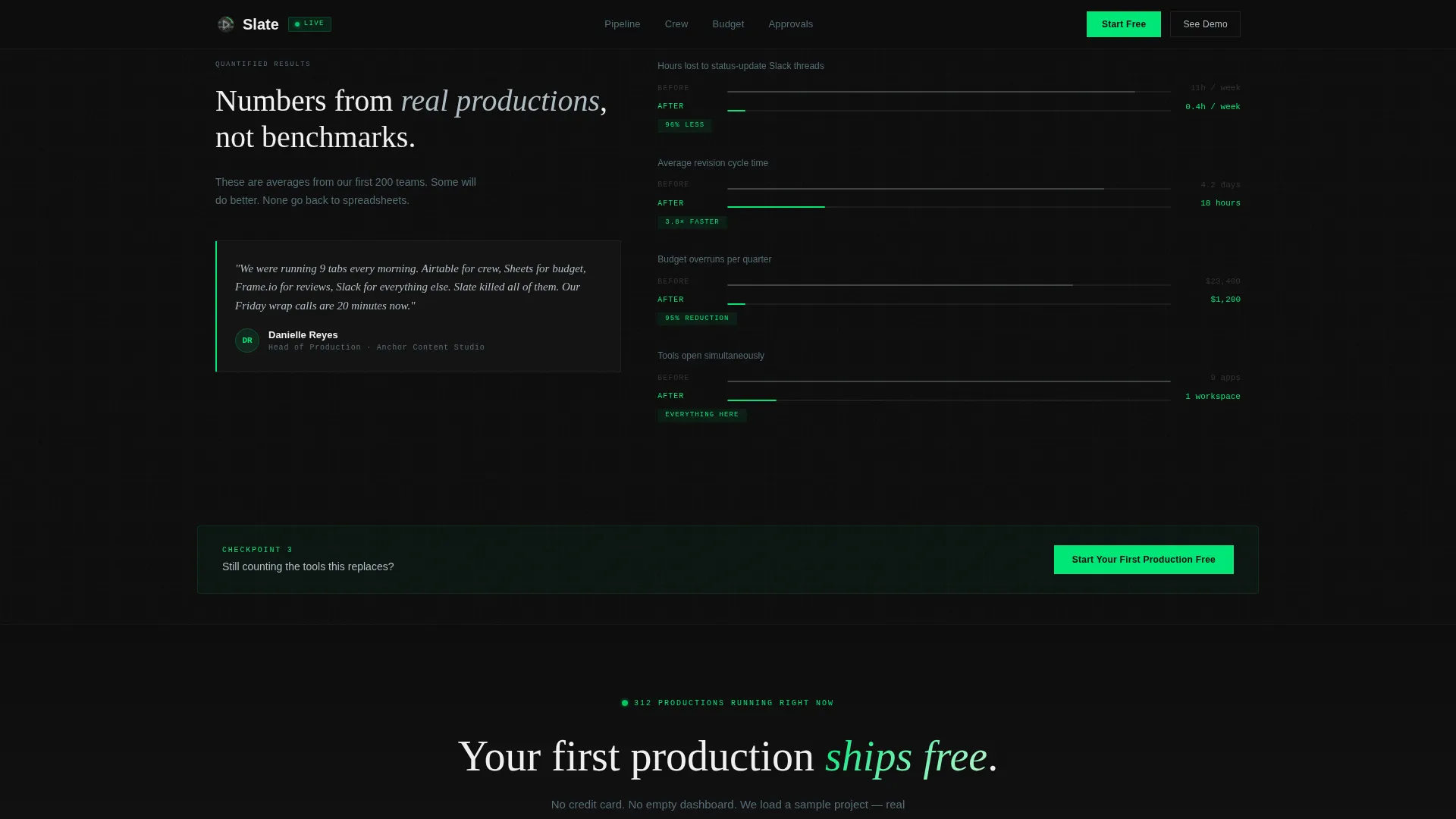
| Results Metrics Section | Before-and-after outcome numbers |
| Email Capture Call to Action | Single-field trial sign-up modal |
| Linear Single-Row Footer | Minimal navigation and legal links |
Design & branding system
The visual identity follows a Dashboard Pro theme built on a Carbon Fiber color system. The palette is engineered for purposeful contrast: nothing illuminates without meaning. Typography pairs DM Sans for body copy, JetBrains Mono for data and numeric displays, and Fraunces for display headings.
- Deep cockpit black (#0D0D0D) as the base background, brushed graphite (#1E1E1E) on card surfaces, signal green (#00E676) for live-status indicators and primary accents
- Cool aluminum (#B0BEC5) for secondary text, dividers, and supporting labels
- No stock photography or lifestyle imagery; the animated dashboard and feature cards are the primary visual content
Mobile & speed optimization
The template is designed desktop-first to serve an edit-suite audience working on large monitors, with a mobile fallback layout that keeps the core experience intact on smaller screens.
- CSS animations handle the majority of motion effects including the hero counters, pulsing dots, and scroll-reveal card entries
- GSAP powers scroll-reveal transitions only, keeping the animation dependency scope intentionally narrow
How this template helps you convert
The page is structured to earn the click at every stage rather than front-loading a single persuasive pitch.
- The animated hero delivers immediate proof of product credibility before a visitor reads a single line of copy, replacing the trust gap that static screenshots leave open.
- The repeating call-to-action pattern, pinned in the nav and placed after every third feature card, keeps the trial entry point visible without interrupting the evaluation flow.
Other information about this template
Slate is categorized under Technology, specifically the Video Production Vertical SaaS subcategory, and is built to serve the video production CRM platform niche. A few additional details worth noting:
- The template style is Card Grid (Modular), which means sections can be reordered or extended without breaking the layout system
- Social proof is structured around specific outcome metrics and named testimonials with role and company attribution rather than generic star ratings
- Date formatting follows United States conventions (MM/DD/YYYY) and currency is displayed in USD
- The FAQ section on the live page is built as an accordion component, keeping the page length manageable without hiding content entirely
- The footer follows a Linear Single-Row pattern, keeping the bottom of the page clean and uncluttered
Theme
Dashboard Pro
Creative direction
Feature Matrix
Color system
Carbon Fiber
Style
Card Grid (Modular)
Direction
Freemium/Trial
Page Sections
Animated Live-data Hero Dashboard
Modular Feature Card Grid
Hover Micro-animations
Dual Conversion Path Design
Tools-replaced Marquee Section
Results Metrics Section
Related questions
What type of product is this template designed to promote?
Can I customize the feature cards for my own platform capabilities?
What conversion model does this template support?
Is this template designed for desktop or mobile users?
Does the hero section use static images or real animations?



