Construction Digital Presence Cost Calculator Website Template
Scaffold is a bold brutalist bento grid landing page built for construction professionals who need to present their services with the weight and precision of the work itself. It replaces tired PDF quotes and email spreadsheets with an interactive service catalog, live estimate calculator, and scheduling view, all wrapped in a teal-charged, charcoal-heavy visual identity built to close deals.
by Rocket studio
Quick summary
Scaffold is a single-page bento grid landing page template designed for construction businesses ready to replace static documents with a living, interactive service catalog. It features a tab-switching header, drag-and-drop demo cells, and a freemium signup flow that lets visitors touch the product before they ever enter an email address.
Who this template is for
This template is built for construction professionals who present services to clients and need something more credible than a spreadsheet attachment. It fits teams that quote regularly and need a faster, more impressive way to deliver scope and pricing.
- Mid-size commercial general contractors and subcontractors tired of back-and-forth email quotes
- Specialty trade businesses quoting concrete, HVAC, or similar packages to commercial clients
- Construction marketers and project managers who need a bid-ready catalog that works before the truck leaves the lot
What problem this template solves
Most construction businesses still send clients a flat PDF or a tangled spreadsheet when quoting work. Those documents feel disposable, invite back-and-forth, and rarely close on the first send. Scaffold replaces that friction with an interactive digital presence that makes scope, materials, and pricing feel as solid as the work itself.
- Removes the "reply with questions" loop by putting scope breakdowns and material specs inside the page
- Eliminates the credibility gap between a polished commercial contractor and an outdated quote document
- Gives clients a shareable, navigable menu instead of a file attachment they may never open
What you get with this template
Scaffold delivers a fully structured single-page layout with every section already in place. The design, interactions, and conversion flow come ready to customize, so your team spends time on content, not construction.
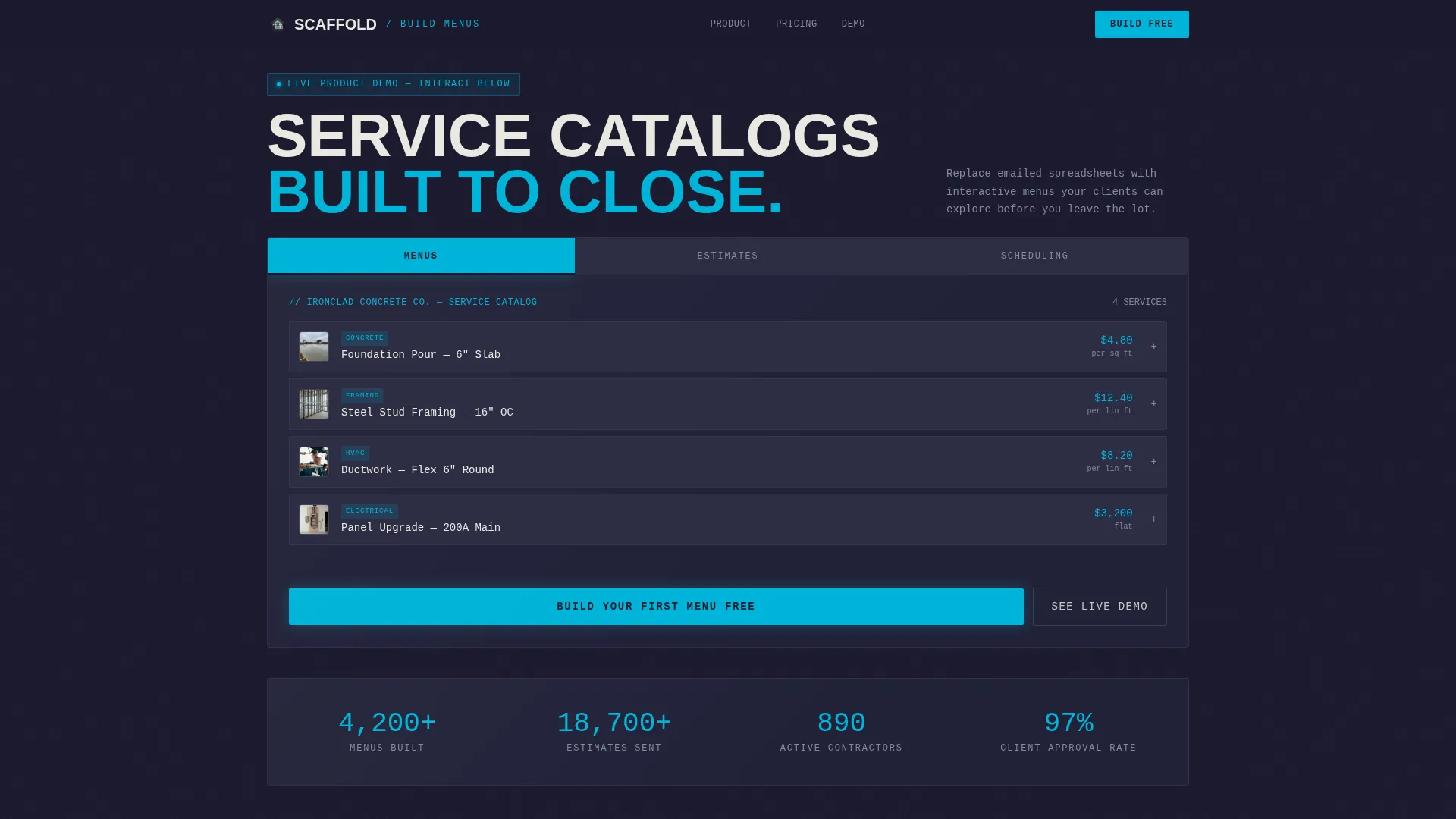
- A feature tab switcher header with three active states: Menus, Estimates, and Scheduling
- Interactive bento grid cells including a drag-and-drop menu builder, a mobile preview simulator, and a plan comparison toggle
- A freemium conversion flow with a two-field signup form and a secondary "See a Live Demo Menu" path
Feature list
This template ships with a focused set of high-impact interactive components. Each one is designed to keep visitors engaged and move them toward signing up.
Feature Tab Switcher Header
The header bento card holds three tabs labeled Menus, Estimates, and Scheduling. Each tab restructures the grid in real time. The active tab glows catalyst teal against rebar shadow inactive states, making navigation unmistakable.
Live Interactive Service Catalog
The Menus tab reveals an expandable service catalog with line items and thumbnail material photos. Visitors can browse scope breakdowns the way a client actually would, building familiarity with the product before any commitment.
Estimate Calculator Interface
The Estimates tab surfaces a calculator with sliding quantity fields and a running total. This lets prospects understand exactly how pricing works inside the platform before they sign up.
Gantt-Style Scheduling View
The Scheduling tab displays a timeline with draggable phase blocks. It gives project managers a direct preview of how the template handles time-based planning, not just pricing.
Drag-and-Drop Menu Builder Cell
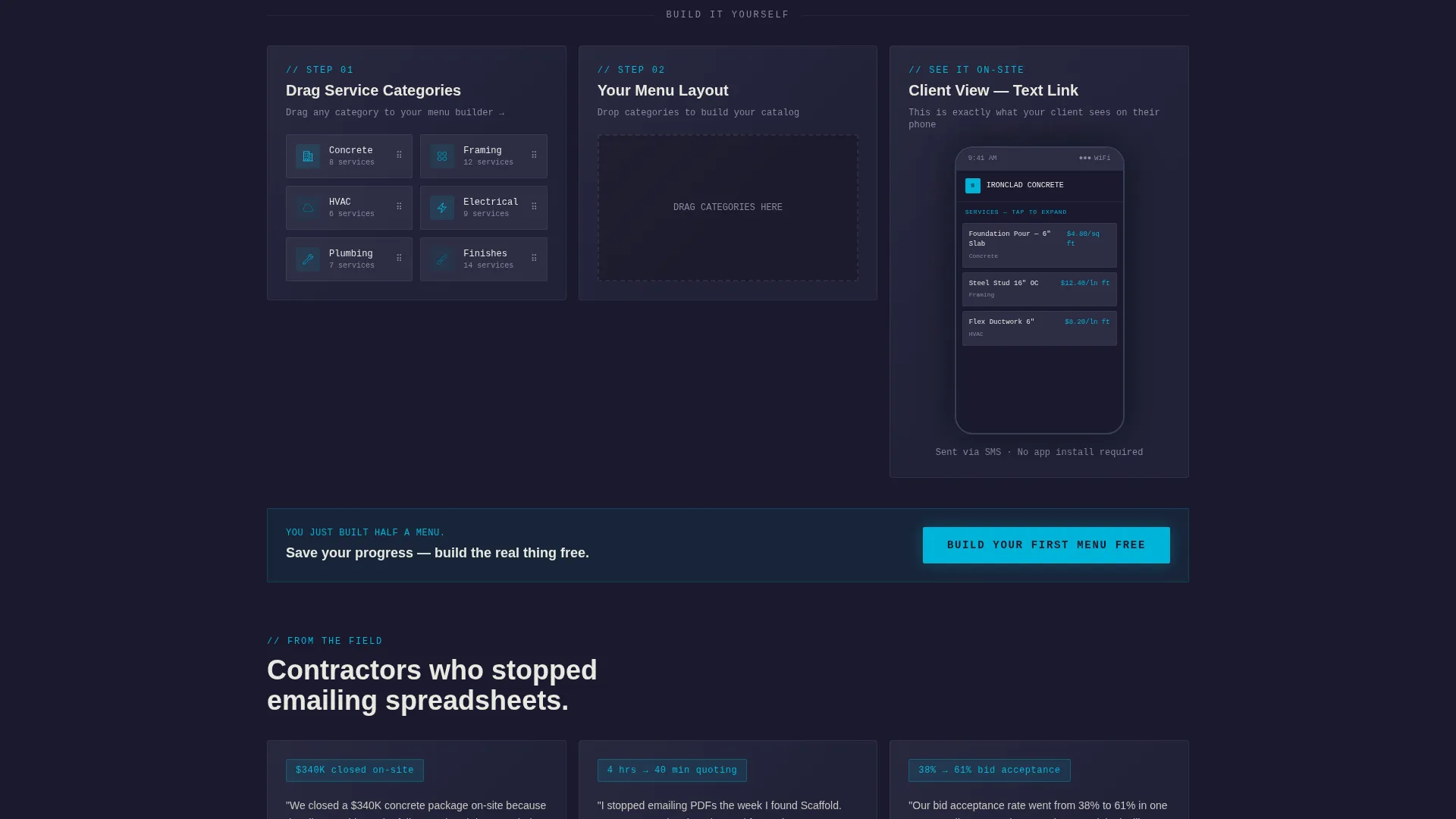
A dedicated bento cell lets visitors drag service categories into a mock layout. By mid-page, a visitor has already half-built their first menu, making signup feel like saving progress rather than starting a funnel.
Freemium Signup with Demo Path
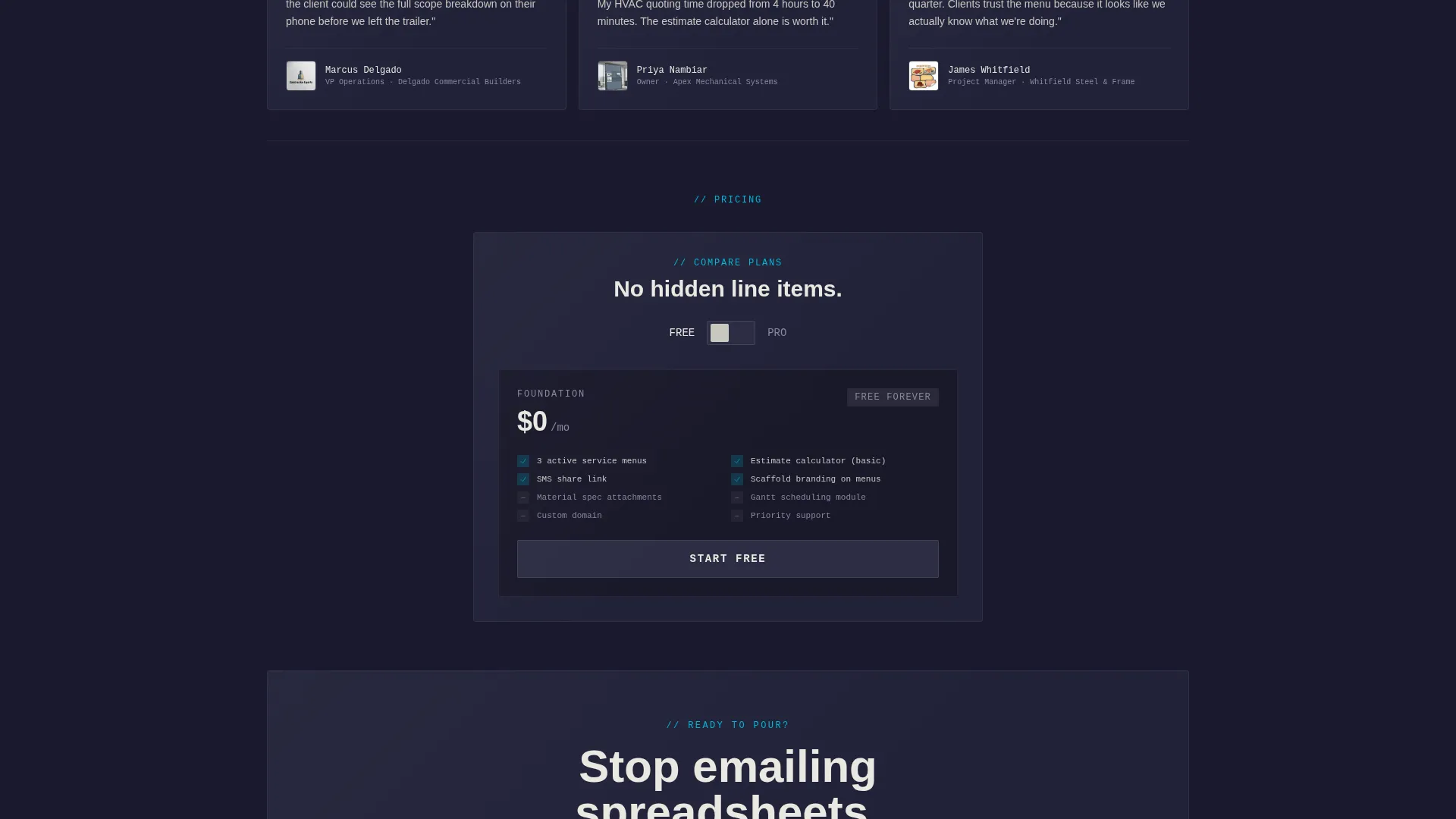
The primary call to action reads "Build Your First Menu Free" and appears three times across the page. A secondary path, "See a Live Demo Menu," lets skeptical visitors explore a sample concrete subcontractor catalog before entering any details.
Page sections overview
| Section | Purpose |
|---|---|
| Feature Tab Header | Showcases Menus, Estimates, and Scheduling in one interactive bento card |
| Menu Catalog Cell | Displays expandable service line items with material thumbnail photos |
| Estimate Calculator Cell | Lets visitors adjust quantities and watch a running total update live |
| Scheduling Timeline Cell | Shows draggable Gantt-style phase blocks for project planning |
| Build Your Menu Cell | Drag-and-drop interaction lets visitors mock up their own service layout |
| On-Site Preview Cell | Simulates a phone screen showing how a client receives the menu via link |
| Compare Plans Cell | Toggle styled as a breaker switch flips between free and pro tier details |
| Primary call to action Block | "Build Your First Menu Free" signup with two fields, no credit card required |
| Demo Menu Path | Secondary call to action directing visitors to a live sample catalog before signing up |
| Sticky Mobile Bar | Persistent bottom bar on mobile keeps the primary call to action always reachable |
Design & branding system
The visual identity is Bold Brutalist, driven by a Teal Catalyst color system. The palette evokes a brutalist structure at dusk lit by a single electric color, industrial mass made navigable by one brave tonal choice.
- Core colors: deep formwork charcoal (#1A1A2E) for backgrounds, catalyst teal (#00B4D8) for active states and buttons, rebar shadow (#2D2D44) for inactive elements, and poured-concrete off-white (#E8E8E0) for card surfaces
- Typography is oversized and flush-left, with monospaced styles applied to functional interface elements like calculator fields and tab labels
- Teal accent hits buttons, toggle states, and active grid cells like a surveyor's spray-paint mark on raw concrete, sudden and impossible to miss
Mobile & speed optimization
The template's sticky mobile bottom bar keeps the primary call to action visible at all times on smaller screens. The bento grid layout adapts to narrower viewports without losing the interactive cell structure.
- Sticky "Build Your First Menu Free" bar persists across the full mobile scroll so the signup entry point is never out of reach
- Interactive cells including the phone screen simulator and plan toggle are designed to remain functional and tappable on mobile
- The two-field signup form keeps friction minimal on any device, no credit card, phone number, or project size qualifier required
How this template helps you convert
Scaffold is built around the principle that visitors who touch a product convert better than visitors who only read about it. Every section earns the next click before asking for anything in return.
- The header tab switcher puts the product at full fidelity above the fold, so visitors engage with real functionality before they scroll
- The drag-and-drop builder, phone preview, and plan toggle create six distinct interaction points before the signup form ever appears, making the email request feel like saving work rather than starting a sales process
- The "See a Live Demo Menu" secondary path captures skeptical visitors who are not ready to sign up, giving them a complete product experience that does the convincing on its own
Other information about this template
Scaffold is categorized under Technology with a subcategory focus on Construction Digital Presence. It is built specifically for the construction digital menu niche, where the gap between professional work quality and document presentation quality is widest.
- Template style: Bento Grid single-page layout
- Theme: Bold Brutalist with a Teal Catalyst color system
- Creative direction: Interactive Explorer, where every cell invites manipulation
- Header concept: Feature Tab Switcher with three real-time grid states
- Conversion model: Freemium and free trial with no payment details required at signup
- Best paired with a construction brand that wants its digital presence to match the weight and precision of its physical work

Theme
Bold Brutalist
Creative direction
Interactive Explorer
Color system
Teal Catalyst
Style
Bento Grid
Direction
Freemium/Trial
Page Sections
Feature Tab Switcher Header
Interactive Estimate Calculator
Gantt-style Scheduling Timeline
Drag-and-drop Menu Builder
Mobile Preview Simulator Cell
Freemium Signup with Demo Path
Related questions
Who is this template best suited for?
Does this template require a credit card to get started?
Can visitors explore the product before signing up?
Is this a multi-page template or a single-page layout?
How customizable is the visual identity?



