Electrical Digital Presence Careers & Recruitment Website Template
Sparks is a scroll-reveal landing page template built for electrical job boards. It presents live job listings, filterable job cards, and contractor profiles in a data-first layout designed to connect journeymen, apprentices, and electrical contractors fast. The Void and Violet color system and terminal-style header give it a sharp, trade-specific identity that earns trust immediately.
by Rocket studio
Quick summary
Sparks is a single-page, scroll-reveal landing page template purpose-built for an electrical job board. It opens with a terminal-style code snippet that types out a live listing in real time. As visitors scroll, hard job data, filterable job cards, and contractor profiles reveal section by section with mechanical precision.
Who this template is for
This template is built for founders and operators running a niche job board in the electrical trades. It speaks directly to the people posting and finding work in this field.
- Licensed electricians, including journeymen and apprentices, looking for their next project
- Electrical contractors needing to fill a crew before a permit deadline
- Job board operators who want a credible, trade-specific page that converts visitors without a signup wall
What problem this template solves
Generic job board layouts feel soft and corporate. Electricians and contractors need a page that communicates like a spec sheet, not a brochure. This template closes that gap.
- Most landing pages bury the data that trade workers actually scan for, such as pay rate, license type, and start date
- Contractors lose candidates when registration friction appears before a single listing is shown
- A bland, one-size-fits-all design fails to signal that the board understands the electrical trade
What you get with this template
You get a fully structured, single-page layout that moves visitors from curiosity to click with every scroll step. Each section is designed to deliver a specific data payload before asking for anything in return.
- A typing terminal header block, three progressively revealed data sections, and two clearly defined call-to-action paths
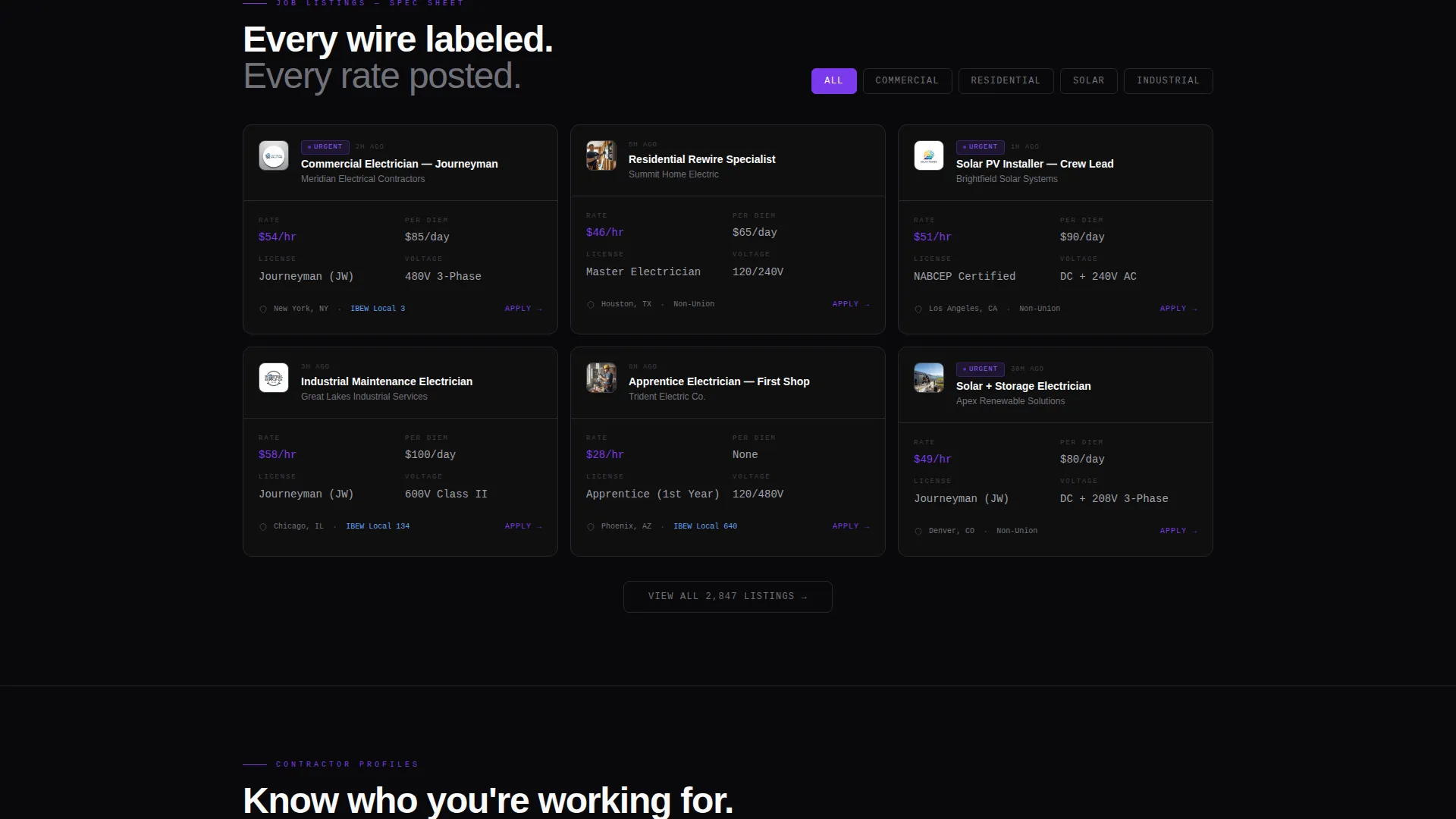
- A filterable job card stack showing license type, voltage class, union or non-union status, and per-diem details
- Contractor profile cards displaying crew size, project backlog, and payment terms
Feature list
This template is built around five core delivery components drawn directly from the brief.
Animated Terminal Header
The header renders a code snippet in monospaced type, structured like a data object with fields for role, rate, clearance level, and start date. Each line populates as if being typed live, with a blinking cursor and violet field highlights that make the listing feel active and current.
Scroll-Reveal Section Flow
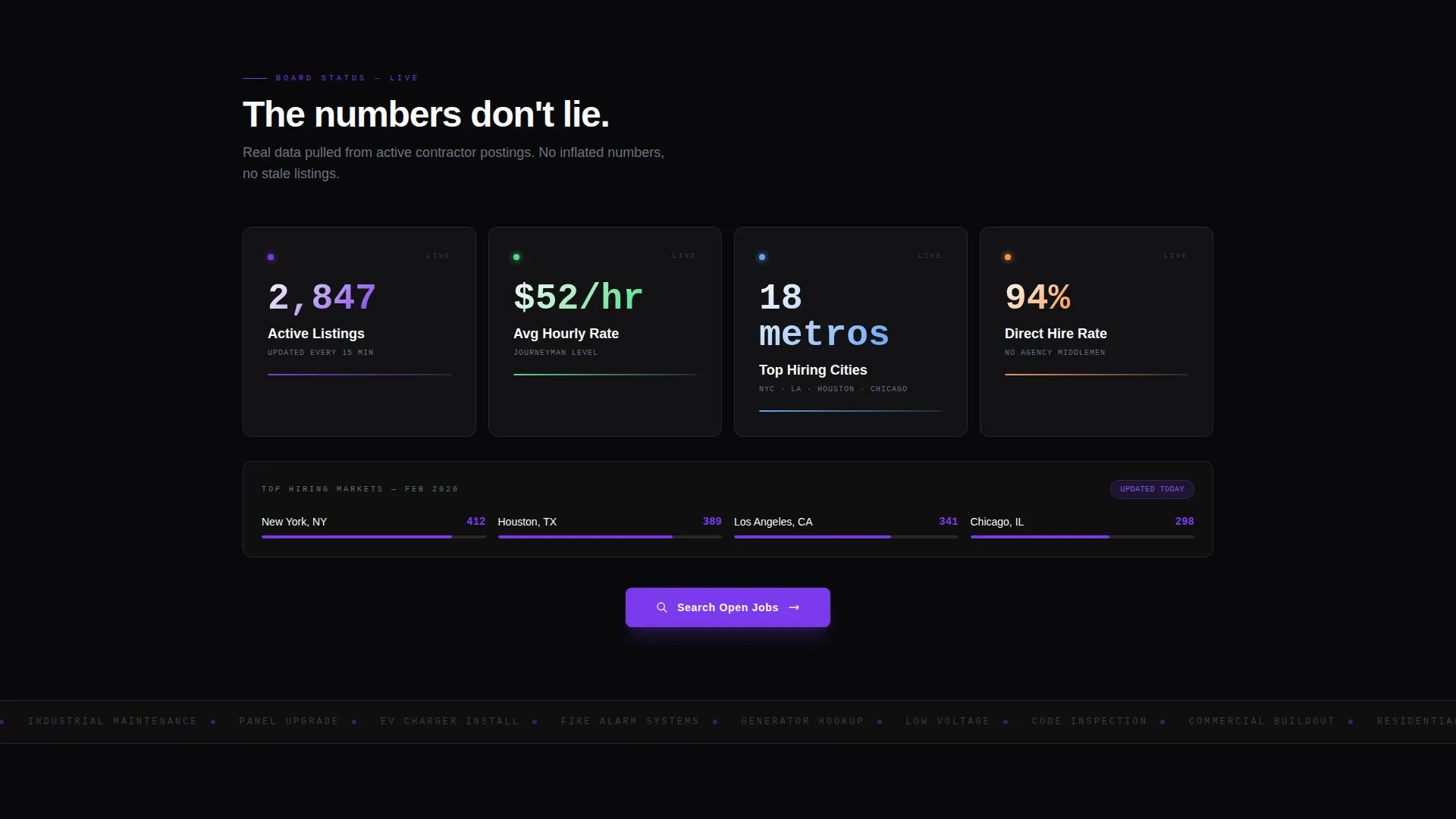
Three major content sections snap into view as the visitor scrolls. The first reveals hard platform numbers including total active listings, average hourly rate, and top-hiring metro areas. The second shows the filterable job card stack. The third presents contractor profiles. Each section lands with mechanical precision.
Filterable Job Card Stack
The job card component displays the details trade workers scan for first: license type, voltage class, union or non-union status, and per-diem details. Cards are structured for fast visual parsing so a journeyman between projects can evaluate a listing at a glance.
Contractor Profile Cards
Each contractor profile surfaces crew size, current project backlog, and payment terms. This gives electricians the context they need to decide whether a contractor is worth pursuing before they click through.
Pinned Floating Call-to-Action Bar
After the second scroll reveal, a floating bar pins to the viewport with the primary call to action. It stays visible as visitors continue reading, removing the need to scroll back up to take action.
Dual Call-to-Action Architecture
The primary path reads "Search Open Jobs" in violet on void black. A secondary path offers contractors a free 72-hour job posting in a conduit-gray outlined button. Both paths coexist without competing, serving two distinct user intents from a single page.
Page sections overview
| Section | Purpose |
|---|---|
| Terminal Header Block | Types out a live job listing in real time to establish immediate trade credibility |
| Primary Headline | Delivers the value proposition after the code snippet fades in |
| First Data Reveal | Shows total active listings, average hourly rate, and top-hiring metro areas |
| Primary call to action Placement | Drives visitors into filtered job search results immediately after the first data reveal |
| Filterable Job Cards | Lets visitors scan listings by license type, voltage class, union status, and per-diem |
| Pinned Floating Bar | Keeps the primary call to action visible after the second scroll reveal |
| Contractor Profiles | Displays crew size, project backlog, and payment terms for each hiring contractor |
| Secondary call to action Block | Invites contractors to post a job free for 72 hours |
Design & branding system
The visual identity follows a Dashboard Pro theme using a Void and Violet color system. The palette is built for high-contrast data readability, not decorative warmth.
- Four core colors: absolute void black (#09090B) for backgrounds, live-wire violet (#7C3AED) for interactive elements and highlights, conduit gray (#27272A) for section separators, and arc-flash white (#FAFAFA) for all body text and data labels
- Violet is applied to buttons, progress bars, and notification badges so every interactive element pulses like an active circuit against the dark background
- Monospaced typography anchors the header and data sections, reinforcing the terminal and spec-sheet visual language throughout
Mobile & speed optimization
The scroll-reveal layout is structured to work cleanly on smaller screens. Each section is self-contained and designed to snap into view without layout breakage as viewport size changes.
- Section-by-section reveal pacing keeps the mobile experience focused and avoids overwhelming smaller displays with simultaneous content loads
- The floating call-to-action bar is positioned to remain accessible on mobile without obscuring job card content
How this template helps you convert
This template is engineered as a click-through landing page. Every design and content decision is oriented toward one outcome: getting the visitor into the job search before they leave.
- The terminal header creates immediate relevance for trade visitors by showing a real-looking listing before any pitch copy appears, building trust in the first few seconds
- Hard platform numbers in the first scroll reveal, such as total listings and average hourly rate, establish credibility with data-driven workers who distrust vague marketing claims
- Removing the signup wall before search means visitors reach filtered results on the first click, so the registration ask arrives only after they have found a listing worth applying to
Other information about this template
This template is built on the Scroll Reveal (Progressive) template style, which is well suited to data-heavy products where staged disclosure keeps visitors engaged rather than overwhelmed. The Spec Sheet creative direction pairs naturally with trade audiences who read technical documents daily.
- The template style and creative direction make it straightforward to adapt for related trades such as plumbing, HVAC, or industrial maintenance job boards
- The Void and Violet color system is deliberately unconventional for a job board, which helps it stand out from mainstream hiring platforms and signal trade-specific credibility
- The Dashboard Pro theme supports a terminal-screen aesthetic that resonates with technically minded visitors who value precision over polish


Theme
Dashboard Pro
Creative direction
Spec Sheet
Color system
Void & Violet
Style
Scroll Reveal (Progressive)
Direction
Click-Through
Page Sections
Animated Terminal Header Block
Three-stage Scroll Reveal Layout
Filterable Job Card Stack
Contractor Profile Cards
Pinned Floating Call-to-action Bar
Dual Call-to-action Architecture
Related questions
Can electricians search jobs without creating an account first?
What information does each job card display?
How does the contractor job posting path work?
Does the template cover different types of electrical work?
Can this template be adapted for other skilled trades beyond electrical?



