Spatial - Powerful Computing Landing Page Template
Spatial is a hub-and-spoke landing page template built for a managed spatial computing service. It opens with a live-style dashboard hero, flows into an interactive infrastructure estimator, and branches into five focused anchor sections. The layout speaks directly to enterprise decision-makers running mixed-reality workloads across warehouses, hospitals, and factory floors.
by Rocket studio
Quick summary
Spatial is a single-page, anchor-nav template for a managed spatial computing service. It leads with a pixel-accurate dashboard preview, hands the visitor an infrastructure cost estimator before any pitch copy, then guides them through five spoke sections covering deployment, monitoring, scaling, security, and integration. Every section earns trust before it asks for a click.
Who this template is for
This template is built for enterprise technology teams selling or evaluating managed infrastructure for mixed-reality environments. It speaks clearly to operational leaders who measure risk in headsets, sessions, and uptime windows.
- Chief technology officers at logistics firms rolling out warehouse augmented-reality guidance systems
- Hospital information technology directors piloting surgical holography programs
- Innovation leads at automotive original equipment manufacturers managing persistent digital twins across multiple factory floors
What problem this template solves
Enterprise teams adopting spatial computing face a painful gap: the technology is ready, but building the supporting infrastructure from scratch requires XR (extended reality) infrastructure engineers most organizations cannot hire or justify. This template gives service providers a way to prove competence visually and numerically before asking for commitment.
- Visitors arrive skeptical of cost and complexity; the estimator tool answers both questions immediately
- Decision-makers often cannot picture the operational scope; the dashboard hero makes it tangible
- Long sales cycles stall when buyers cannot self-qualify; the conditional secondary call-to-action surfaces the right path for large deployments automatically
What you get with this template
You get a fully structured landing page that leads with live-data aesthetics and earns conversion through interactive utility. Every element is designed to serve a technically literate, time-constrained buyer.
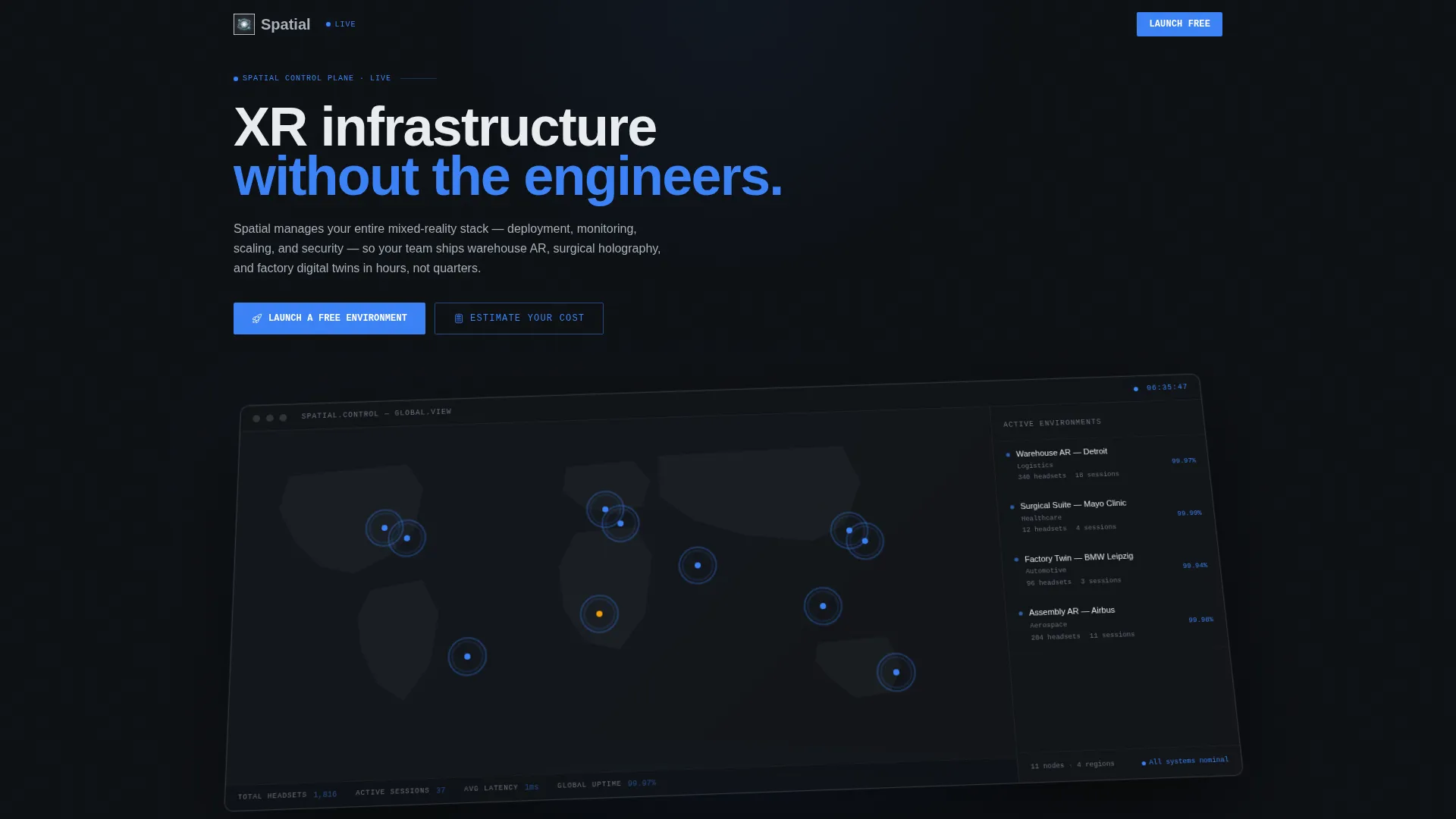
- A viewport-filling dashboard hero rendered at an isometric tilt with frosted-glass depth layers
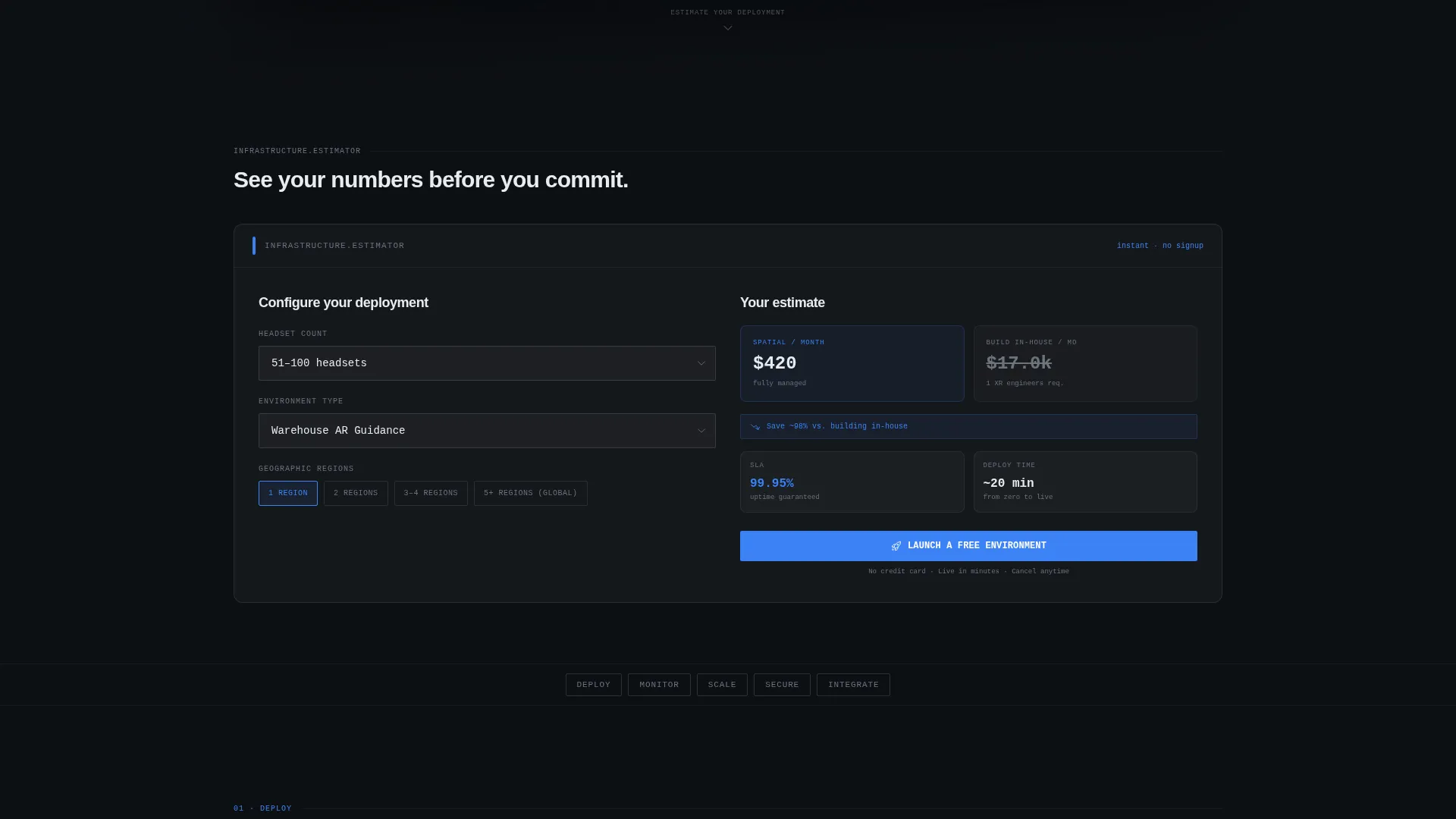
- An interactive infrastructure estimator with dropdown controls returning monthly cost, projected uptime SLA, and a build-versus-buy comparison
- Five anchor-linked spoke sections (Deploy, Monitor, Scale, Secure, Integrate) with a sticky navigation rail
Feature list
This template is built around a small set of high-impact components. Each one is designed to carry real information weight.
Isometric Dashboard Hero
The header fills the entire viewport with a pixel-accurate rendering of the Spatial control plane. It shows a world map with eleven glowing nodes pulsing across global cities, a sidebar listing active environments with live headset counts and session numbers, and ticking latency and uptime figures. A frosted-glass depth blur on the back layer creates a three-dimensional, operations-center feel without any stock photography.
Interactive Infrastructure Estimator
Placed directly below the hero, this calculator-style tool lets visitors select headset count, environment type, and geographic regions using dashboard-styled dropdown controls. It returns an instant estimate of monthly cost, a projected uptime service level, and a side-by-side column comparing internal build-and-staff costs. The tool gives value before asking for anything in return.
Hub-and-Spoke Anchor Navigation
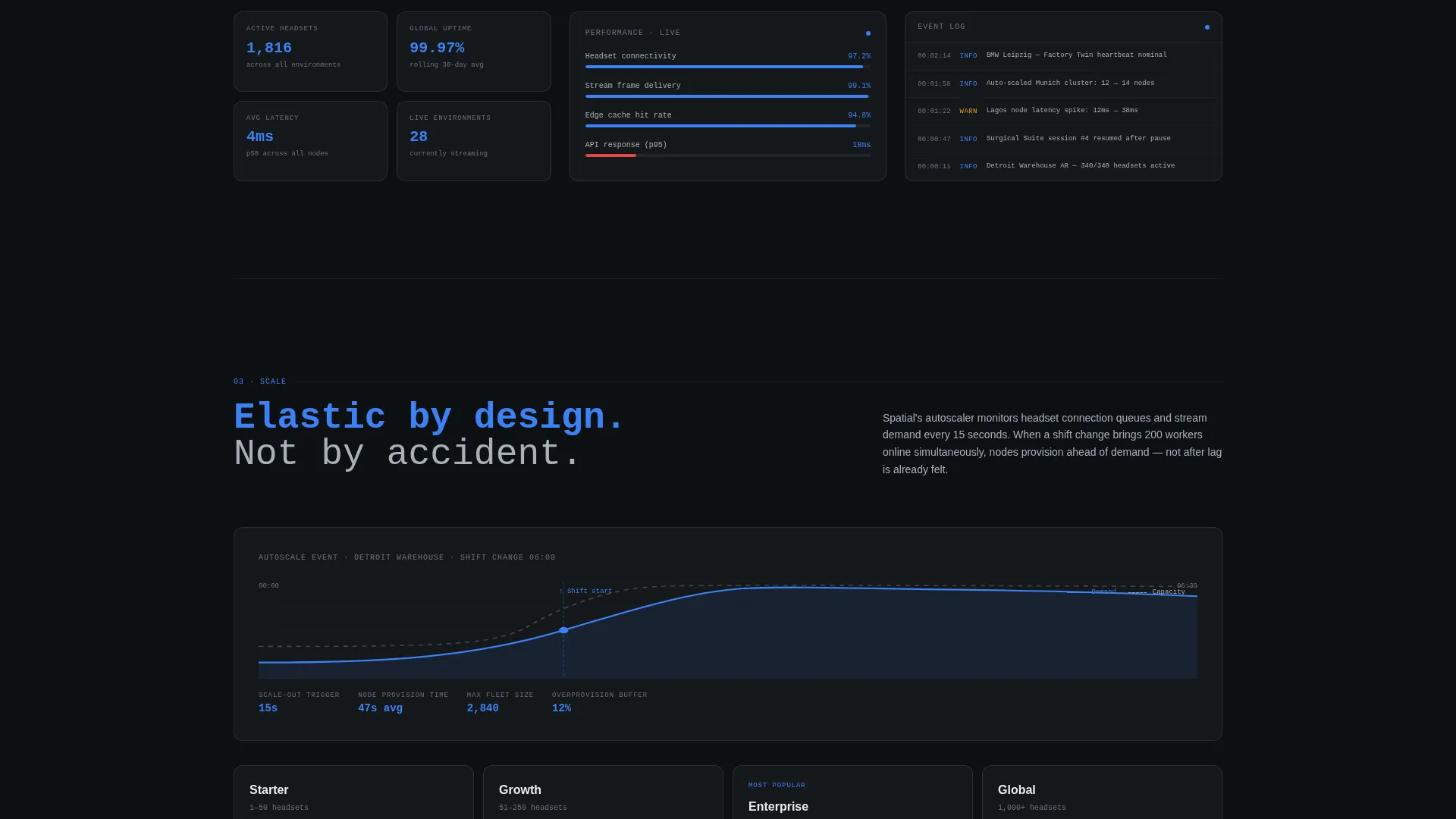
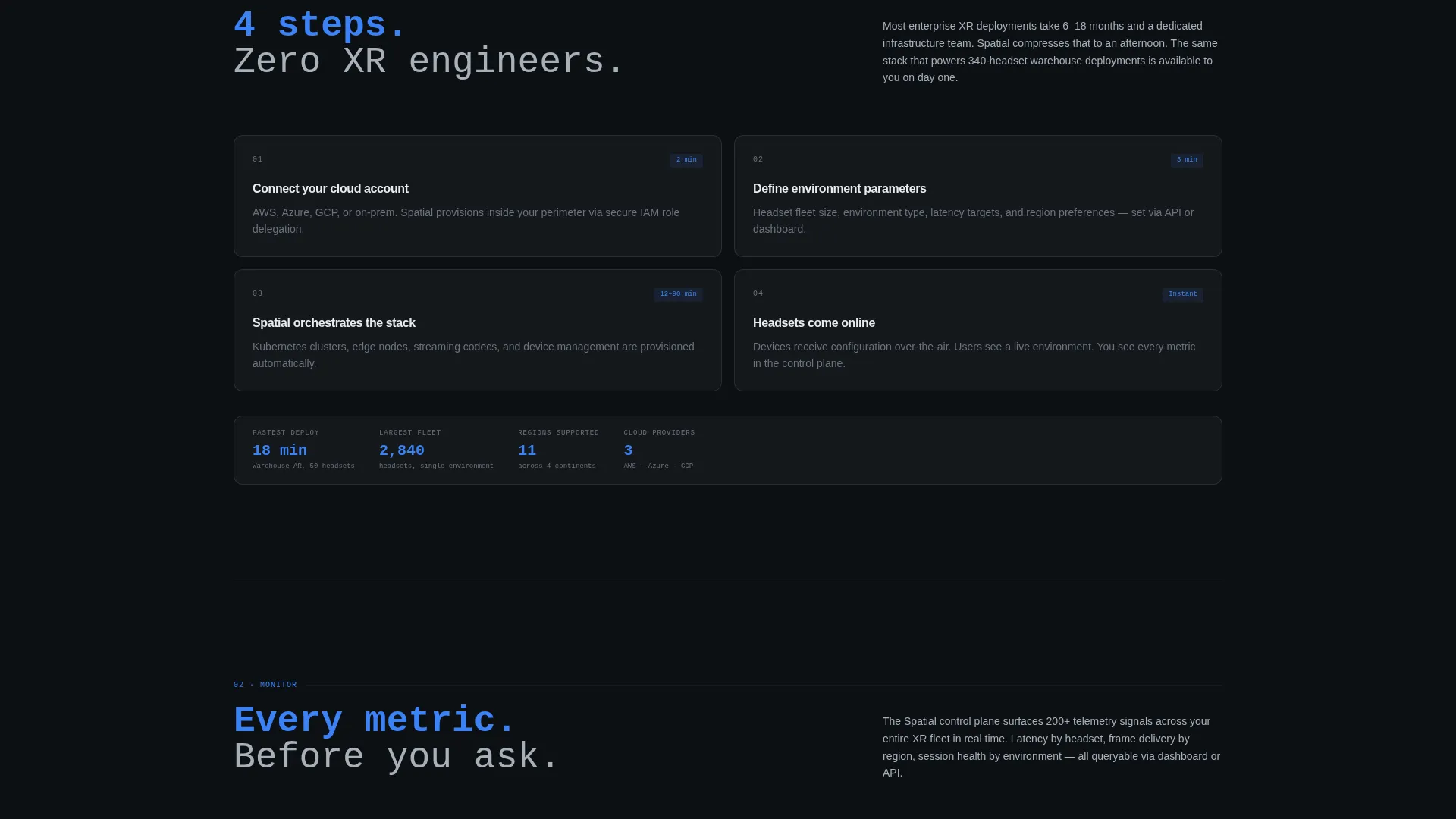
Five labeled spokes (Deploy, Monitor, Scale, Secure, Integrate) radiate from a central anchor nav. Each spoke opens with a single metric or diagram, expands into a short explanatory paragraph, and includes a supporting screenshot. The nav compresses into a sticky top rail on scroll, so skimmers and deep-readers both reach the same destination.
Contextual and Conditional Calls-to-Action
The primary call-to-action, "Launch a Free Environment," appears inside the estimator results panel and as a persistent ghost-button in the sticky nav. A secondary path, "Talk to an Architect," surfaces conditionally when the headset count input exceeds five hundred. Both flows use a two-step form: work email and company name first, then environment type and headset count.
Tech Glass Visual System
The entire template is rendered in a Monochrome Steel palette. Backgrounds sit in a deep gunmetal-to-black range, card surfaces float in frosted white with one-pixel chromium borders, body text reads in mid-steel, and a single signal-blue accent is reserved exclusively for interactive states and live data pulses.
Page sections overview
| Section | Purpose |
|---|---|
| Dashboard Hero | Open with a live-style control-plane rendering to establish product credibility immediately |
| Infrastructure Estimator | Let visitors calculate cost and uptime before reading any pitch copy |
| Anchor Nav Rail | Give skimmers instant access to any spoke section from a sticky top bar |
| Deploy Spoke | Show how environments are provisioned with a single metric and supporting screenshot |
| Monitor Spoke | Visualize real-time latency and uptime data to demonstrate operational visibility |
| Scale Spoke | Explain multi-region and multi-floor scaling with a diagram and short paragraph |
| Secure Spoke | Address enterprise security concerns with a focused metric and explanatory copy |
| Integrate Spoke | Cover connection to existing enterprise workflows with a diagram and brief description |
| Free Environment call to action | Convert high-intent visitors with a no-credit-card two-step signup form |
| Talk to Architect call to action | Capture large-deployment leads with a conditional secondary conversion path |
Design & branding system
The template uses a Tech Glass aesthetic built on a Monochrome Steel color system. The palette is precise and restrained, giving every interactive element room to command attention when it appears.
- Core colors: deep gunmetal (#1B1F24) for backgrounds, brushed chromium (#A8B0BA) for borders and secondary text, frosted panel white (#E8ECF0) for card surfaces, and signal-blue (#3B82F6) used only for clickable states and live data pulses
- Card surfaces float with one-pixel chromium borders and frosted-white fills, creating a layered depth effect without heavy shadow
- The isometric tilt on the dashboard hero and frosted-glass blur on background layers reinforce a three-dimensional, precision-instrument aesthetic throughout the page
Mobile & speed optimization
The layout is structured to remain legible and functional as it scales down to smaller screens. The estimator controls and spoke sections restack cleanly, and the sticky anchor nav remains accessible throughout the scroll journey.
- Dropdown estimator controls and results panels are sized for touch interaction on tablet and mobile viewports
- The sticky nav rail compresses efficiently, keeping all five spoke labels reachable without crowding the screen
- Isometric dashboard layers are layered using CSS depth blur rather than heavy image files, keeping the visual hero lightweight
How this template helps you convert
Every structural decision on this page is built to reduce friction and build trust before asking for a commitment. The flow moves visitors from curiosity to qualified intent in a single scroll.
- The infrastructure estimator places the visitor's own numbers on screen before any marketing claim appears, making the value proposition feel personal and immediately credible.
- The contextual call-to-action inside the estimator results panel catches visitors at peak intent, right after they have seen their cost comparison, and offers a no-credit-card free environment start.
- The conditional "Talk to an Architect" path surfaces automatically for large-scale deployments, routing enterprise buyers to the right conversion track without manual qualification.
Other information about this template
This template is designed specifically for the spatial computing managed service category, where buyer trust depends on demonstrated operational depth rather than marketing language. A few additional details worth noting:
- The template style is Hub and Spoke with anchor navigation, making it suitable for services with multiple distinct capability areas that buyers may want to explore non-linearly
- The Freemium and Trial conversion direction means the primary flow requires no payment commitment, lowering the barrier for initial sign-up significantly
- The two-step form design (email and company name first, then environment details) is intentionally lightweight to reduce drop-off at the point of conversion
- The Calculator and Tool First creative direction is a deliberate reversal of the typical landing-page pattern: the product logic runs before the pitch copy, so visitors arrive at the call-to-action already engaged with their own data
- The dashboard hero uses no stock imagery or lifestyle photography; the rendered control plane is the entire visual statement
Theme
Tech Glass
Creative direction
Calculator/Tool First
Color system
Monochrome Steel
Style
Hub & Spoke (Anchor Nav)
Direction
Freemium/Trial
Page Sections
Isometric Dashboard Hero
Interactive Infrastructure Estimator
Hub-and-spoke Anchor Navigation
Contextual and Conditional Ctas
Tech Glass Visual System
Related questions
Who is this landing page template designed for?
What does the infrastructure estimator show visitors?
How does the free trial conversion flow work?
Is the dashboard hero a live data feed or a designed component?
Can this template support a service with multiple deployment regions?



