Voice-Activated POS ROI Calculator Landing Page Template
Speak is a hub-and-spoke landing page template built for a voice-activated point-of-sale system targeting high-volume bars, fast-casual franchises, and food halls. An interactive three-slider ROI calculator anchors the hero, animating live savings in real time. Every spoke section then reinforces the numbers with demos, heatmaps, and lead capture forms designed to convert curious operators into qualified prospects.
by Rocket studio
Quick summary
Speak is a single-page, anchor-nav landing page template for a voice-activated POS system. The hero opens with a live ROI calculator. Visitors drag three sliders, watch teal counters animate their projected savings, and then scroll through spoke sections that prove every number. The design runs on a terminal-black and signal-teal palette that feels like a heads-up display inside a dim restaurant back-office.
Who this template is for
This template was built for hospitality technology companies, POS software vendors, and voice AI product teams who sell to venue operators. If your product turns a spoken order into a printed ticket, this page shows buyers exactly why that matters in money terms before they ever talk to sales.
- High-volume bar owners frustrated by Friday-night queue times and slow ticket entry
- Fast-casual franchise operators losing new hires to clunky touchscreen training costs
- Food hall managers who handle multiple concepts on one floor and need a scalable voice agent solution
What problem this template solves
Operators who evaluate a new POS system need to answer one question fast: can I afford this, and does it pay back quickly? Generic product pages do not answer that. They make buyers work to calculate ROI on their own, and most give up. This template puts the roi calculator front and center so visitors build the business case themselves using their own numbers.
- Buyers leave pages that cannot show them real cost savings in context of their actual call volume and staff count
- Long sales cycles form when prospects cannot calculate financial impact without speaking to a rep first
- Missed calls, slow order entry, and high labor costs stay invisible until a tool forces them into view
What you get with this template
You get a fully structured, ready-to-customize landing page with a hero calculator section, five spoke sections reachable by an anchor nav, and a lead capture form at multiple points on the page. Every element is laid out to help a voice AI product company move a venue operator from first visit to completed lead form.
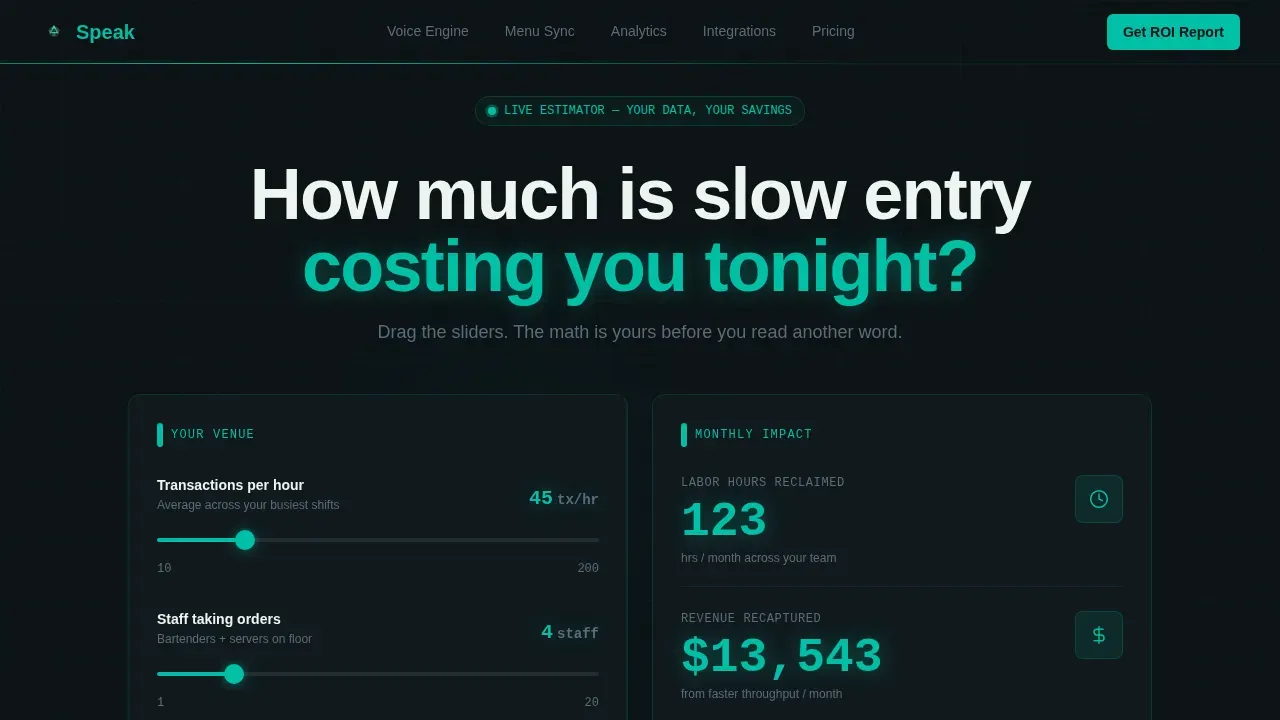
- A three-slider interactive ROI calculator with live animated teal counters showing time saved and revenue recaptured
- Six named sections: Hero Calculator, Voice Engine, Menu Sync, Analytics, Integrations, and Pricing, each with a lead generation call-to-action
- A secondary gated video path for visitors who want to watch a 90-second demo before talking to sales
Feature list
This section covers the core built-in capabilities delivered inside the Speak template.
Three-Slider ROI Calculator Hero
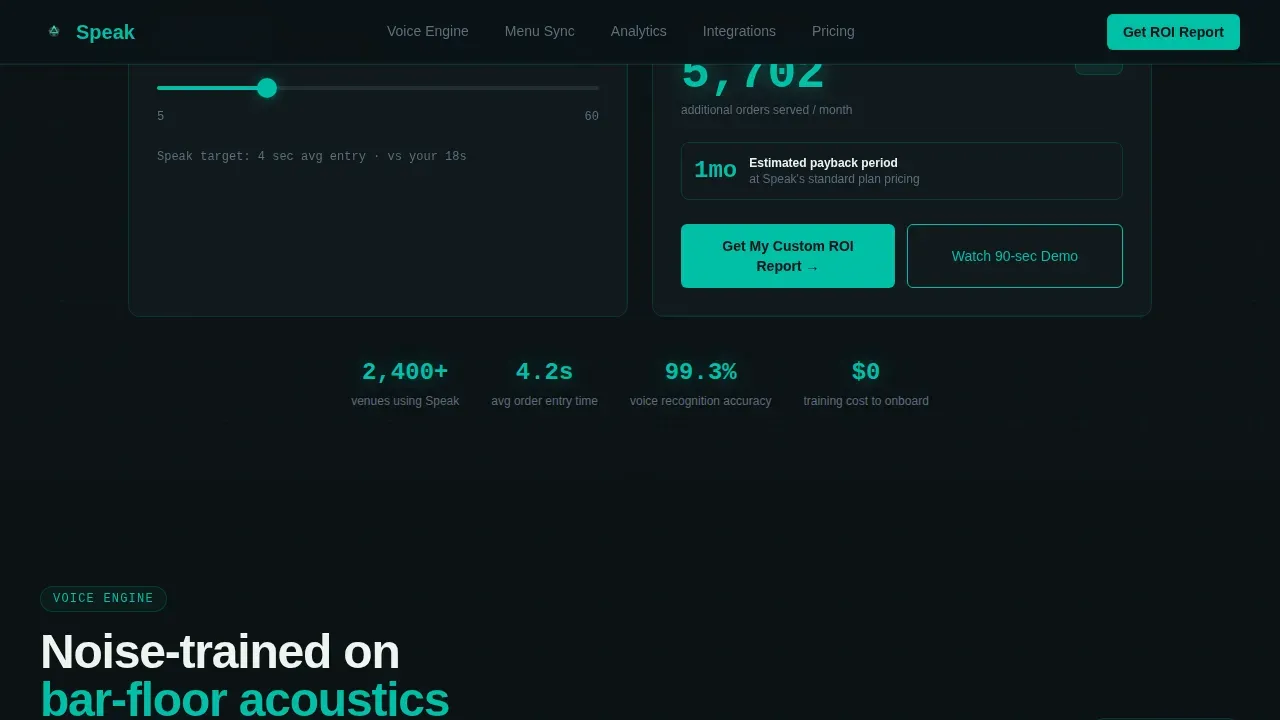
The hero section places a savings estimator dead-center on a terminal-black field. Visitors set average transactions per hour, current staff count, and average order entry time in seconds. As they drag, a live teal counter updates projected labor hours saved per month and estimated revenue recaptured from faster throughput. The calculator answers the question of how many calls and orders slip through before a voice agent is in place, making the financial impact personal and immediate.
Anchor Navigation Hub-and-Spoke Layout
A sticky hub nav pins to the top of the viewport after the hero. It carries five spoke labels: Voice Engine, Menu Sync, Analytics, Integrations, and Pricing. Each click jumps the visitor to the matching section. Each section opens with a single metric pulled from the visitor's calculator inputs, so the numbers stay connected across the full scroll experience.
Voice Engine Demo Section
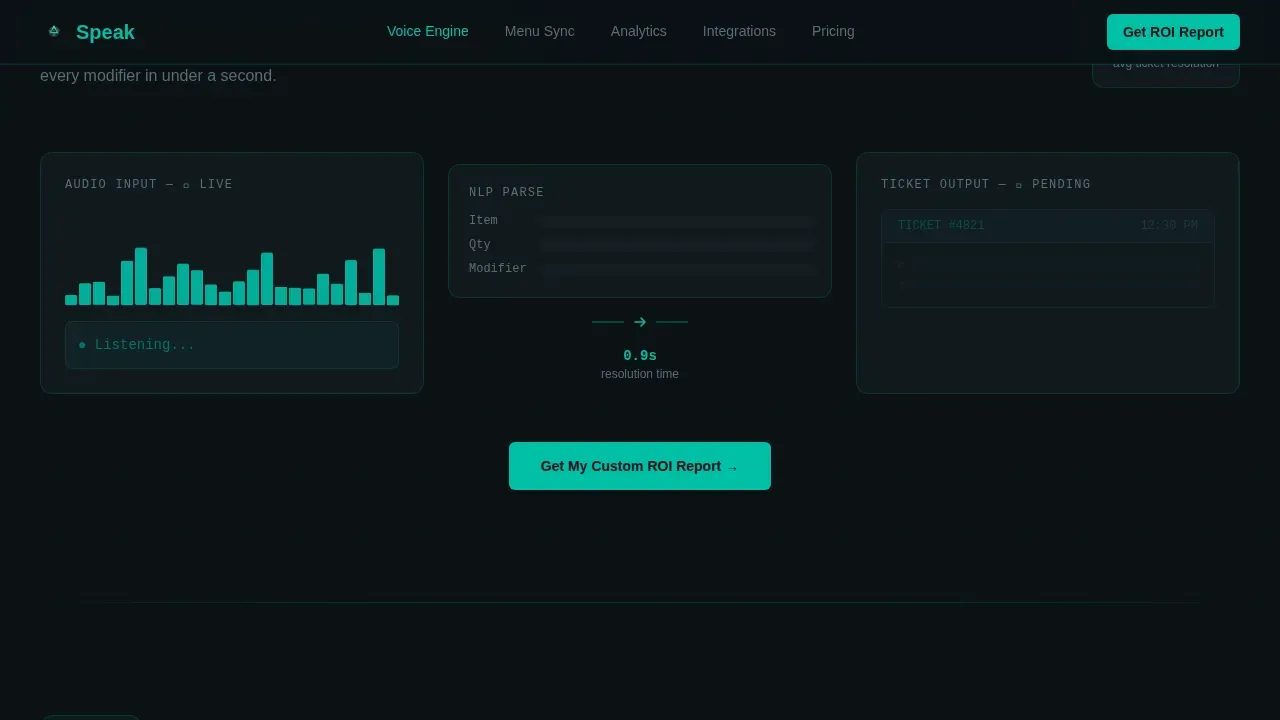
The Voice Engine spoke includes a spectrogram visualization loop showing a spoken order resolving into a printed ticket. This mechanical proof connects the ai voice promise to a real, watchable outcome. Operators see how speech recognition turns natural conversations into structured order data without human intervention.
Live Menu Sync Section
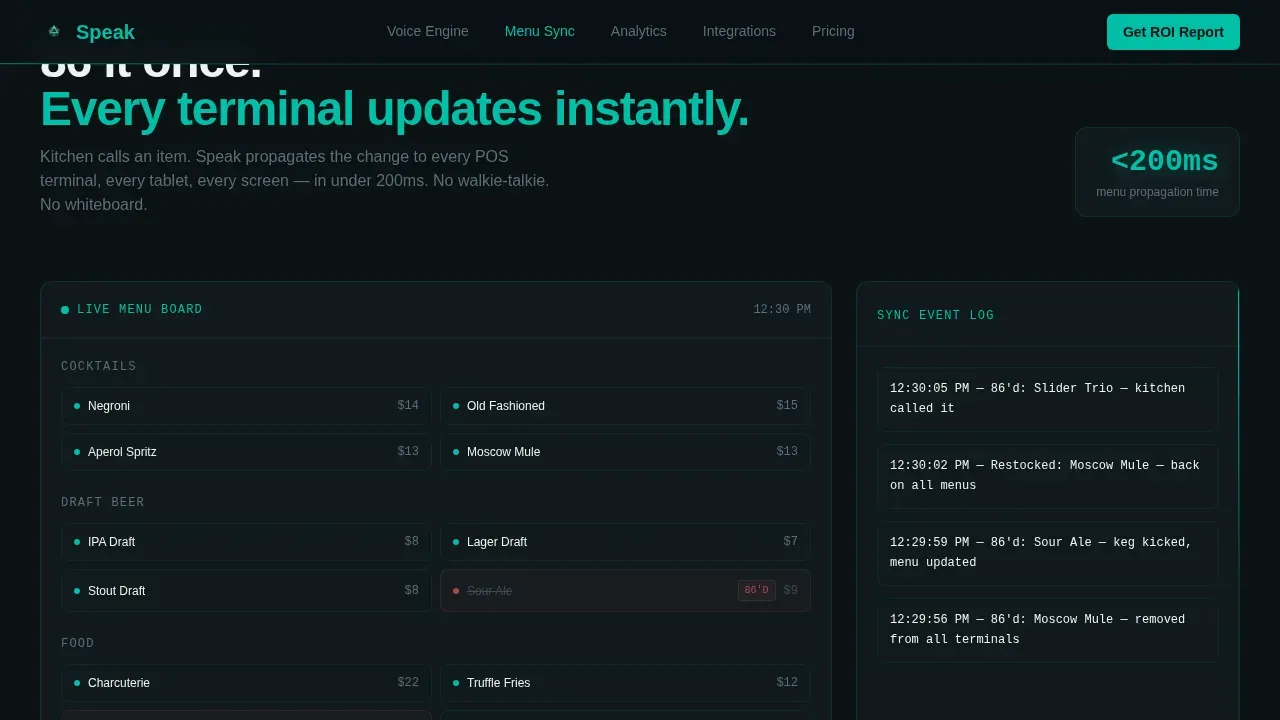
The Menu Sync spoke simulates a live menu board reshuffling when an item is marked as unavailable, a process known as "86ing" in hospitality. This shows operators how ai agents keep every station current, reducing the repetitive tasks staff handle manually and lowering the real cost of menu errors.
Real-Time Analytics Heatmap
The Analytics spoke renders a sales heatmap by hour of day, giving operators a visual of peak call volume windows and revenue patterns. The display helps build a business case by connecting throughput data to labor costs. Buyers who focus on cost center performance can immediately see where the savings land.
Dual Lead Capture Paths
The primary call-to-action, "Get Your Custom ROI Report," appears at the calculator and at the bottom of every spoke. The form captures venue type, number of locations, current POS provider, and a work email. A secondary path, "Watch a 90-Second Demo," is a gated video modal requiring only an email address, catching buyers who are curious but not yet ready to commit.
Page sections overview
| Section | Purpose |
|---|---|
| Hero Calculator | Three-slider ROI estimator with live teal savings counters as the above-the-fold anchor |
| Voice Engine Demo | Spectrogram animation showing a spoken order resolving into a printed ticket |
| Menu Sync Simulation | Live menu board 86 demo showing how the ai voice system updates items in real time |
| Analytics Heatmap | Real-time hourly sales heatmap connecting throughput data to labor cost patterns |
| Integrations Row | Compatible platform and POS provider logos supporting the business case visually |
| Pricing Tier Cards | Tiered pricing blocks with embedded ROI report lead capture form |
| Footer | Linear single-row footer with secondary links and contact reference |
Design & branding system
The Speak template uses a Data Command visual identity built on the Teal Catalyst color system. The aesthetic is clinical and reactive, designed to feel like a heads-up display glowing inside a dim restaurant back-office. Every color serves a role: terminal black grounds the panels, signal teal fires on live data and buttons, cool slate holds section dividers, and high-alert white surfaces card backgrounds.
- Color palette: terminal black (#0B1215), signal teal (#00BFA6), cool slate (#3B4B59), high-alert white (#EDF5F0) for card surfaces
- Typography: DM Sans for headings, JetBrains Mono for all data and number displays, Manrope for body copy
- Animation: beam borders, spectrogram pulse on the Voice Engine section, live counter updates on the calculator, and an hourly heatmap in the Analytics spoke
Mobile & speed optimization
The template is built desktop-first to match the bar back-office environment where operators review new tools on a monitor. The layout is fully responsive so the calculator and anchor nav work on tablets and smartphones, which are frequently used in retail and hospitality environments.
- Calculator sliders and live counters are touch-friendly and function on tablets and smartphones without losing real-time update behavior
- Intersection Observer powers section reveals so each spoke loads its animation only when visible, keeping the page responsive as visitors scroll
- CSS custom properties drive the live counter values, allowing the user interface to update calculator outputs without full page reloads
How this template helps you convert
The page is structured so that every section builds on the one before it. Visitors who engage with the calculator are already invested in their own numbers before they read a single feature description.
- The hero calculator earns trust immediately by letting visitors input their own data and see personalized monthly savings before any marketing copy appears, which compresses the payback period conversation that normally happens on a sales call.
- Each spoke section opens with a metric from the visitor's calculator session, reinforcing that the labor savings and revenue gains shown are tied to their specific inputs, not industry averages pulled from a generic benchmark.
- Two lead capture paths, the ROI report form and the gated demo video, mean the page can convert both decision-ready buyers and early-stage researchers in the same session without forcing either group into a path they are not ready for.
Other information about this template
This template was designed for companies selling voice AI products into the hospitality vertical where the cost of missed calls and slow order entry is measurable and large. The following points provide additional context on the use case and the template's alignment with current market conditions.
- The average restaurant loses over $27,000 annually from unanswered calls, making a visible roi calculation a compelling entry point for any sales conversation
- Voice AI can reduce missed call rates from 40% to under 5%, which directly increases annual revenue and customer loyalty at high-volume venues
- AI voice agent costs typically include five components: speech recognition, text-to-speech, large language model, voice agent platform, and telephony, and the ROI calculator in this template is designed to show how those costs compare to current human labor expenses
- A single interaction handled by a human agent can cost up to $5.70, while ai voice agents handle the same task at a fraction of that, improving both cost savings and customer satisfaction simultaneously
- Businesses can see ROI from ai voice agents in as little as 16 days for high-volume venues, making the payback period argument central to why this template leads with a calculator rather than a feature list
- The speak voice activated pos roi calculator landing page template is suited for companies that need to demonstrate ai adoption ROI before a prospect will agree to a demo, placing the interactive roi calculator as the primary trust-building tool
- Two thirds of venue operators report that long hold times and missed calls directly damage customer loyalty and brand loyalty, both of which are hard to recover once lost
- AI agents that handle repetitive tasks, manage call volume spikes during business hours, and escalate complex issues to a real person or human agent when needed can position a voice POS as infrastructure rather than a luxury
- Quality monitoring, human oversight, and the ability to escalate complex issues without dropping customer experience standards are all considerations operators bring to every initial investment conversation
- This template also supports positioning for operators in e commerce adjacent food and beverage contexts, such as ghost kitchens and delivery-first food halls, where outbound sales and inbound order calls run simultaneously
- Industry standards for hospitality ai adoption are rising, and the template's data-forward design signals that the company behind the product is serious about showing actual results rather than making unverifiable claims
- The overhead expenses tied to training, onboarding, and continuous improvement of human staff represent a cost center that ai voice tools directly address, and the template frames this as a business case supported by the visitor's own calculator data
Theme
Data Command
Creative direction
Calculator/Tool First
Color system
Teal Catalyst
Style
Hub & Spoke (Anchor Nav)
Direction
Lead Generation
Page Sections
Interactive Three-slider ROI Calculator
Hub-and-spoke Anchor Navigation
Voice Engine Spectrogram Demo
Live Menu Sync Simulation
Real-time Hourly Sales Heatmap
Dual Lead Capture Paths
Related questions
What type of buyer is this landing page template built for?
How does the interactive ROI calculator work?
What sections are included in this template?
Can the lead capture form fields be changed?
Is this template useful outside the bar and restaurant niche?



