Powerful Excel Landing Page Template
A modular card-grid landing page built for an Excel and spreadsheet online course. It uses cinematic data animation, real student case study cards, and a dual-call to action lead flow to turn curious visitors into enrolled learners. The Electric Indigo color system gives it the sharp, confident feel of a university computer lab at night.
by Rocket studio
Quick summary
This landing page template is designed for an Excel and spreadsheet online course targeting mid-career professionals, assistants, and small business owners. It combines a cinematic header animation, case study card grid, and a free cheatsheet lead magnet to move visitors from curiosity to sign-up with a clear, structured flow.
Who this template is for
This template is built for course creators and educators selling practical spreadsheet and data skills to working adults. It works best when the offer has a tangible outcome, a skill gap closed, a promotion earned, hours saved every week.
- Course creators teaching Excel, spreadsheet formulas, or data analysis to working professionals
- Educators who want a lead magnet funnel built directly into the page layout
- Online skill instructors who need a visually credible page that converts skeptical, busy adults
What problem this template solves
Most course landing pages either look too generic to earn trust or bury the value proposition under walls of text. For a spreadsheet course, the challenge is harder: you need to make abstract technical skills feel immediately useful and achievable.
- Visitors do not immediately see why the course applies to their specific job situation
- A weak page fails to justify the free cheatsheet offer or the click to watch a free lesson
- Without social proof tied to real outcomes, working professionals hesitate and leave
What you get with this template
You get a fully structured, single-page layout built around a modular card grid. Every section has a defined role, from the cinematic hero header down to the sticky lead-capture bar that reappears after the third card row.
- A cinematic hero header with a data cascade animation and a self-typing headline
- A card grid where each card tells a real student story with a before-and-after flip on hover
- Two conversion paths: a free formula cheatsheet form and an ungated first-lesson video link
Feature list
This template is built around six core design and content features that work together to build trust, demonstrate value, and capture leads from the right audience.
Cinematic Data Storytelling Header
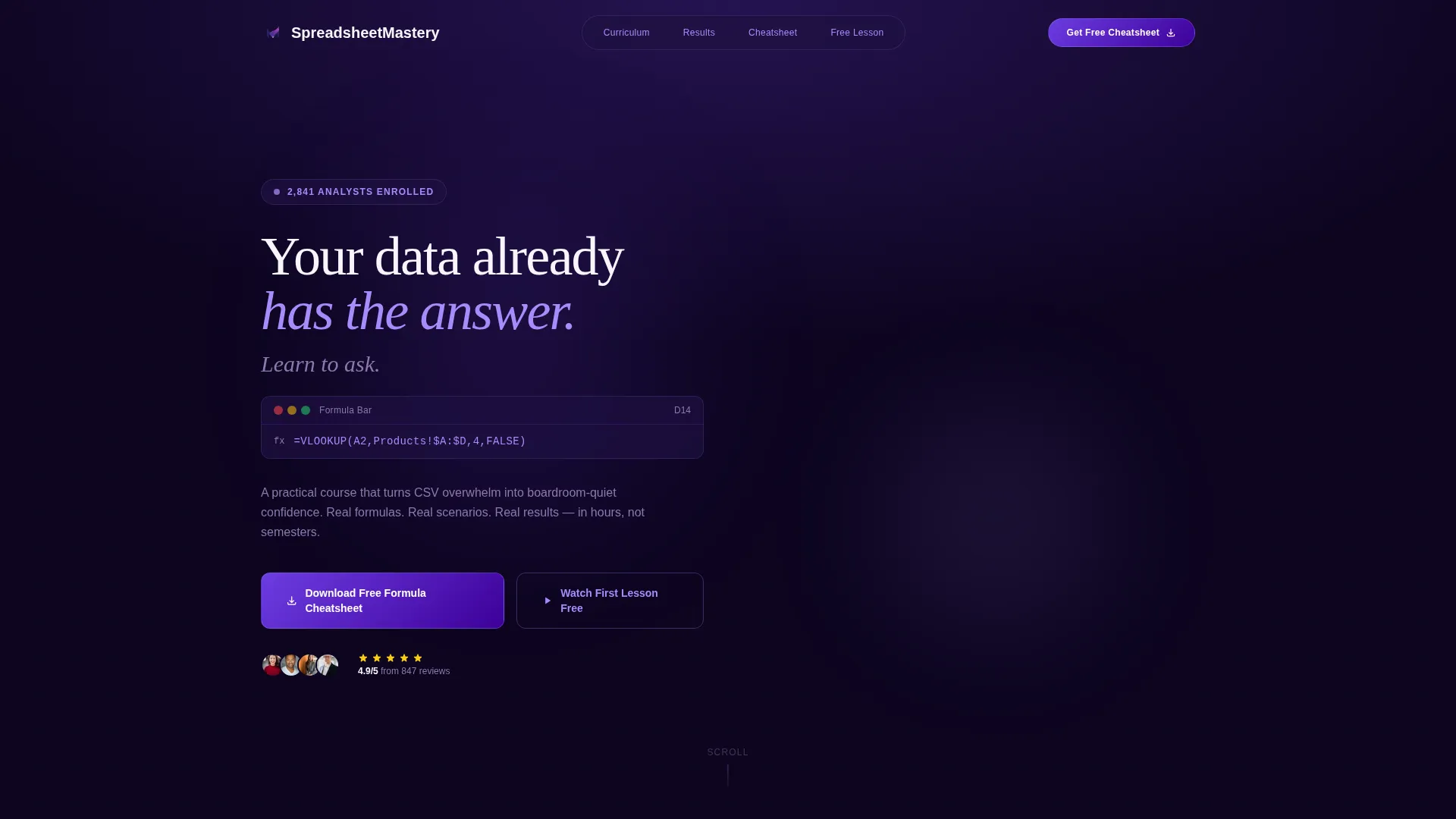
The header opens with raw spreadsheet data cascading down the screen, then freezing and reorganizing into a clean, color-coded dashboard. A VLOOKUP formula populates itself character by character in the formula bar, the cell resolves, and a headline types itself below: "Your data already has the answer. Learn to ask." This sequence immediately communicates the course transformation.
Modular Case Study Card Grid
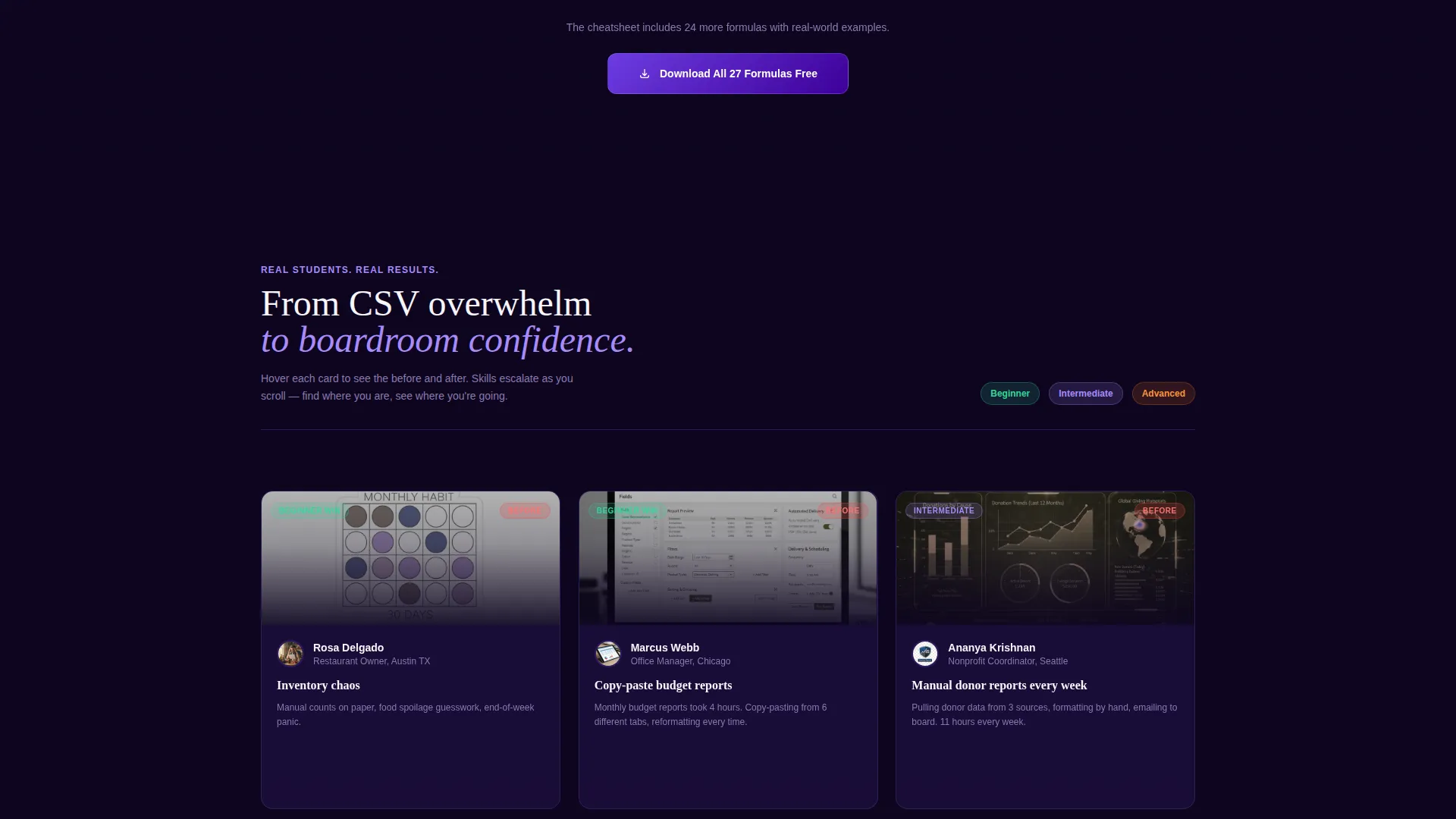
Each card in the grid features a real student scenario with a measurable outcome. A restaurant owner cut food waste by 22 percent. A nonprofit coordinator reclaimed eleven hours a week. A marketing analyst built the dashboard that earned her a promotion. Cards progress from beginner wins to advanced mastery as the visitor scrolls, showing a rising skill ceiling row by row.
Before-and-After Card Flip Interaction
Every case study card opens with a messy "before" spreadsheet thumbnail. On hover, the card flips to reveal the polished "after" version: clean formatting, named ranges, and dynamic charts. This interaction makes the course benefit tangible before the visitor reads a single paragraph of course copy.
Dual Conversion Path Design
The primary call to action, "Download the Free Formula Cheatsheet," appears at the top of the grid and repeats as a sticky bar after the third card row. The form collects first name and email only. A secondary path, "Watch the First Lesson Free," links to an ungated video so lower-intent visitors still have a reason to engage.
On-Page Formula Preview Section
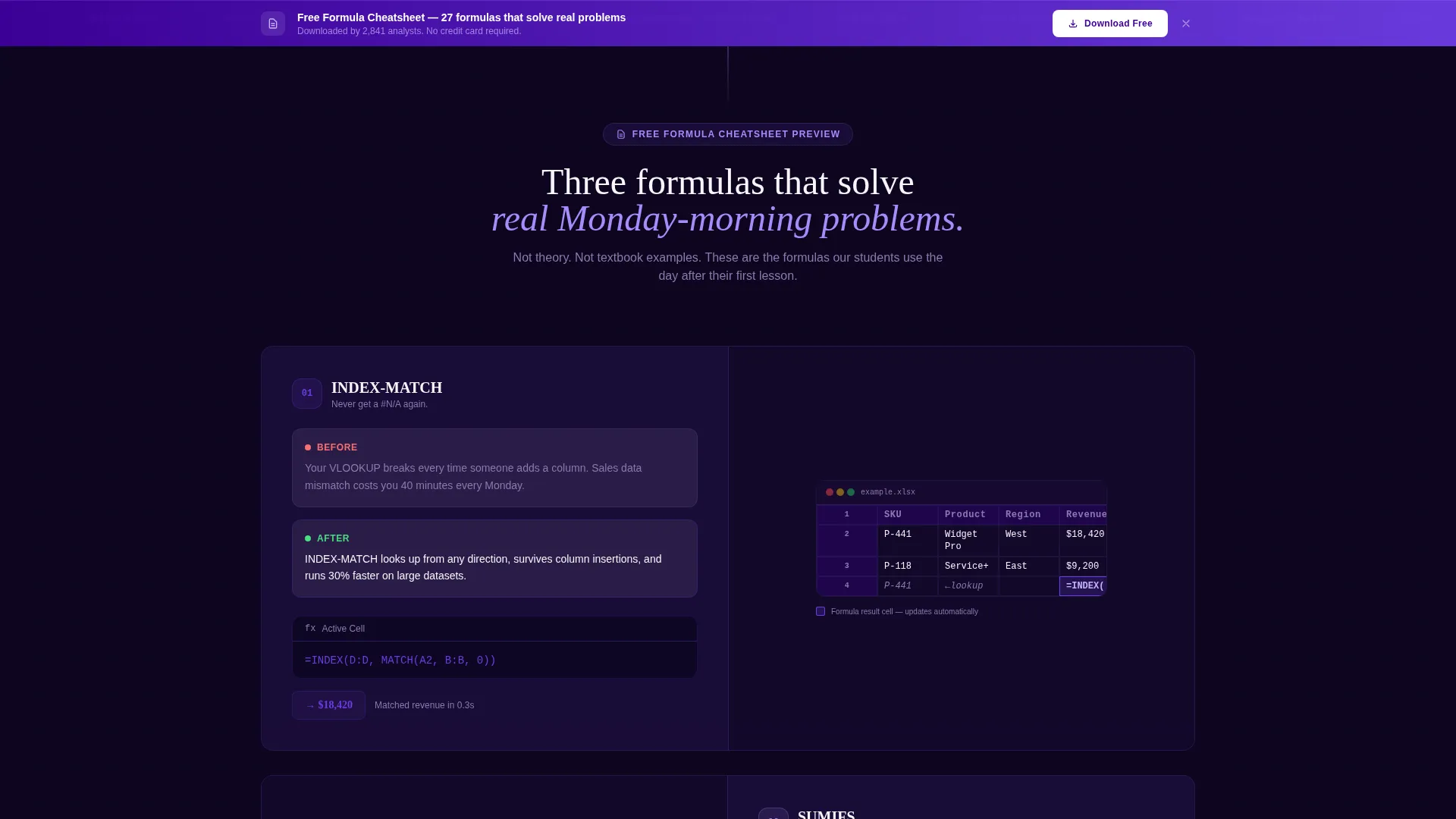
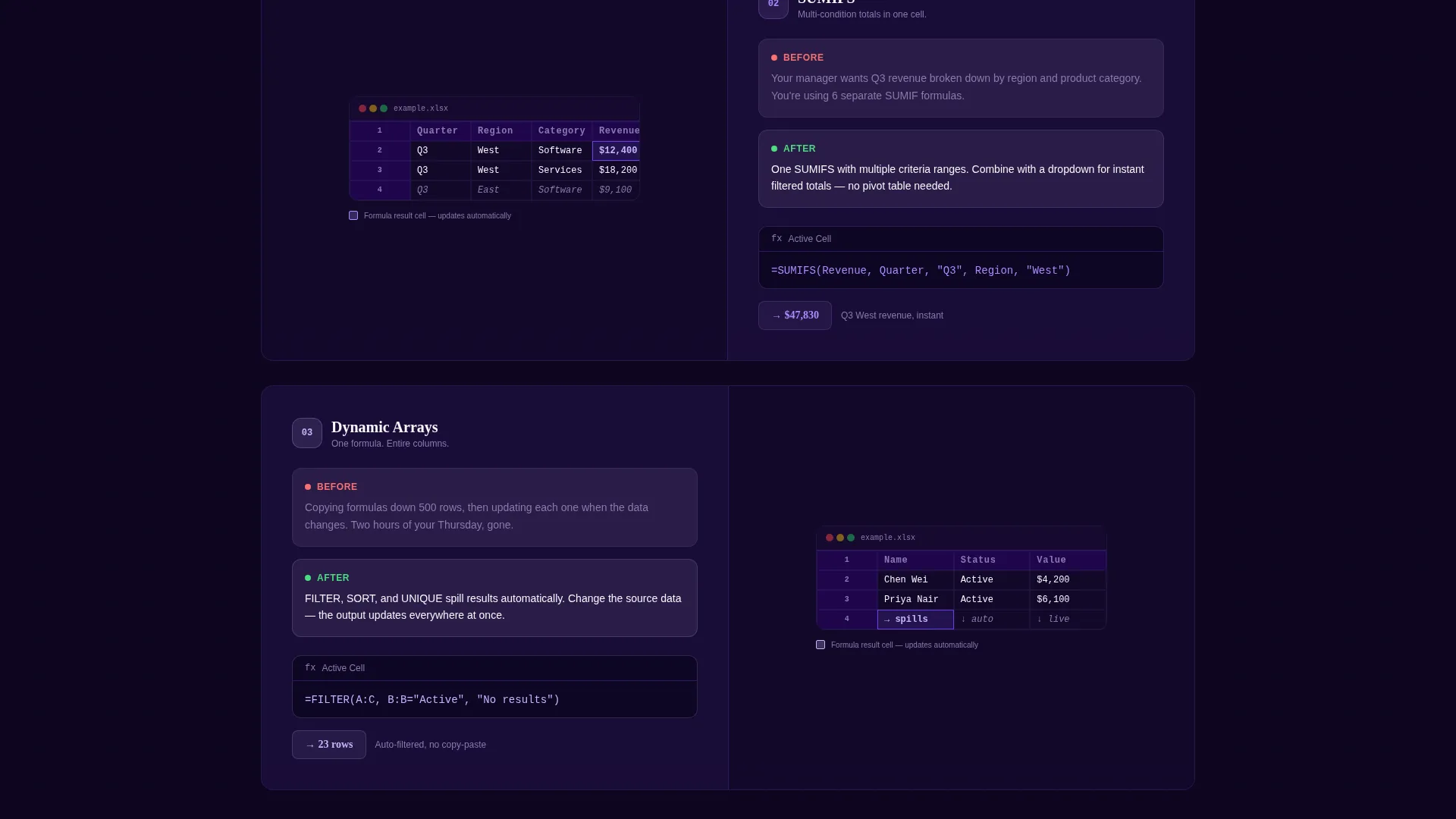
Three formulas from the cheatsheet are previewed directly on the page: INDEX-MATCH, SUMIFS, and dynamic arrays. Each is shown solving a real-world problem in a single screenshot. This earns the cheatsheet click by proving the course teaches practical fluency, not just textbook theory.
Institutional Authority Visual Theme
The Electric Indigo color system applies deep lecture-hall indigo, active-cell violet, formula-bar white, and highlight neon on hover states. The result is a page that feels precise and credible, like a serious professional development resource rather than a casual tutorial site.
Page sections overview
| Section | Purpose |
|---|---|
| Cinematic hero header | Opens with data cascade animation and self-typing course headline |
| Formula bar animation | Populates VLOOKUP arguments to show the course transformation moment |
| Primary call to action bar | Offers free formula cheatsheet with a first name and email form |
| Card grid row 1 | Beginner case studies with before-and-after card flip interactions |
| Card grid row 2 | Intermediate scenarios showing time savings and reporting automation |
| Card grid row 3 | Advanced mastery cards escalating complexity and outcomes |
| Sticky call to action repeat | Reappears after row 3 to recapture scrolling visitors |
| Formula preview section | Shows INDEX-MATCH, SUMIFS, and dynamic arrays solving real problems |
| Secondary video call to action | Links to ungated first lesson for lower-intent visitors |
Design & branding system
The template uses an Institutional Authority theme that draws its credibility from the Electric Indigo color system. The palette is deliberate: it evokes a university computer lab at night, where glowing screens and precise keystrokes signal expertise rather than entertainment.
- Deep lecture-hall indigo (#3D0099) anchors backgrounds and structural elements for a serious, academic feel
- Active-cell violet (#6C3CE1) drives interactive components, buttons, and card borders with confident energy
- Formula-bar white (#F7F5FB) keeps text areas clean and readable against the dark palette, while highlight neon (#A78BFA) activates on hover states and interactive accents
Mobile & speed optimization
The card grid layout is modular by design, which means it adapts naturally to smaller screens by collapsing columns without breaking the case study narrative flow. Each section is self-contained, so the page remains scannable and purposeful on any device.
- Card flip interactions are designed to work on touch screens, triggering the after-state on tap rather than hover
- The sticky call to action bar is sized for thumb-friendly interaction on mobile, keeping the cheatsheet offer accessible throughout the scroll
How this template helps you convert
The page is structured as a content and resource hub, which means it gives visitors something valuable before asking them to commit. Every layout decision supports a short path from arrival to lead capture.
- The cinematic header creates immediate emotional resonance by dramatizing the before-and-after transformation the course delivers, earning attention in the first few seconds of the visit.
- The on-page formula previews act as proof of value, showing three specific techniques solving real problems so visitors trust the cheatsheet before they enter their email.
- The dual call to action structure captures both high-intent visitors ready to download and lower-intent visitors who prefer to watch a free lesson first, reducing drop-off across the full audience range.
Other information about this template
This template is purpose-built for the online skill course niche and is especially well-suited for Excel and spreadsheet training offers targeting working adults. It is part of a card grid modular template style, making individual sections easy to reorder or expand as a course curriculum grows.
- The case study card content can be updated to reflect your own student outcomes and course topics
- The formula preview section supports any three formulas or techniques you want to highlight as course samples
- The template fits within the Education and Training category and aligns with online skill course marketplace standards
- The page type is a single-page landing page with a content and resource hub structure, not a multi-page website
Theme
Institutional Authority
Creative direction
Case Study Narrative
Color system
Electric Indigo
Style
Card Grid (Modular)
Direction
Content/Resource
Page Sections
Cinematic Data Storytelling Header
Before-and-after Card Flip Interaction
Escalating Case Study Card Grid
Dual Conversion Path Layout
On-page Formula Preview Section
Institutional Authority Color System
Related questions
Who is this landing page template designed for?
Can I replace the case study cards with my own student stories?
What does the free cheatsheet lead magnet form collect?
Do I need to use the exact formulas shown in the preview section?
Is this template suitable for a spreadsheet course beyond Excel?



