Open-Source Enterprise Operations Landing Page Template
The Maintain open source enterprise asset management landing page template is a hub-and-spoke, anchor-nav single page built for reliability engineers, facility directors, and fleet supervisors. It leads with a cinematic isometric wireframe hero, industry-report spoke sections, and a zero-friction deploy modal. The Carbon Fiber color system and Dynamic Motion theme make every data point feel operational, not decorative.
by Rocket studio
Quick summary
Maintain is a free, open-source computerized maintenance management system landing page template. It gives industrial maintenance teams a showcase as powerful as the platform itself. The template uses a hub-and-spoke anchor navigation structure, a cinematic dark hero, and scroll-linked Industry Report sections to carry visitors from problem awareness to a single deploy action.
Who this template is for
This asset management template is built for teams that manage critical physical and digital infrastructure at scale. It speaks directly to the operators who live inside dashboards, not beside them.
- Reliability engineers who track mean-time-between-failure on aging turbines and need a credible platform page to share with procurement and finance teams.
- Facility directors juggling thousands of work orders across large campuses who want other stakeholders to understand the system at a glance.
- Fleet supervisors and IT managers responsible for mobile, offline-capable asset tracking in remote environments such as mines or logistics depots.
What problem this template solves
Enterprise-grade IT asset management software has historically been locked behind seven-figure licenses. Open-source alternatives often lack a landing page that communicates the same authority. This template closes that gap.
- Teams cannot effectively reduce downtime or stay compliant when their platform page fails to build trust with compliance officers and decision-makers.
- Without a structured approach to presenting lifecycle management capabilities, visitors leave before they ever reach the deploy button.
- A weak first impression forces unnecessary purchases of expensive proprietary tools, wasting both cost and valuable time.
What you get with this template
The template includes a complete, production-ready single page that covers every stage of the buyer journey, from first impression to terminal command. It is built to help your team stay organized and save valuable time on positioning work.
- A full hub-and-spoke anchor navigation layout with five named spoke sections, a sticky call-to-action bar, and a deploy modal offering Docker, Helm, and installer options.
- An Industry Report creative direction that pairs sourced statistics with live-captured screenshots and data-flow micro-animations, turning scroll into evidence.
- A Carbon Fiber visual identity using JetBrains Mono for headlines and code blocks alongside DM Sans for body text, fully ready to customize for your organization.
Feature list
The following built-in capabilities make this template a comprehensive asset tracking and conversion tool for open-source infrastructure projects.
Isometric Wireframe Hero Animation
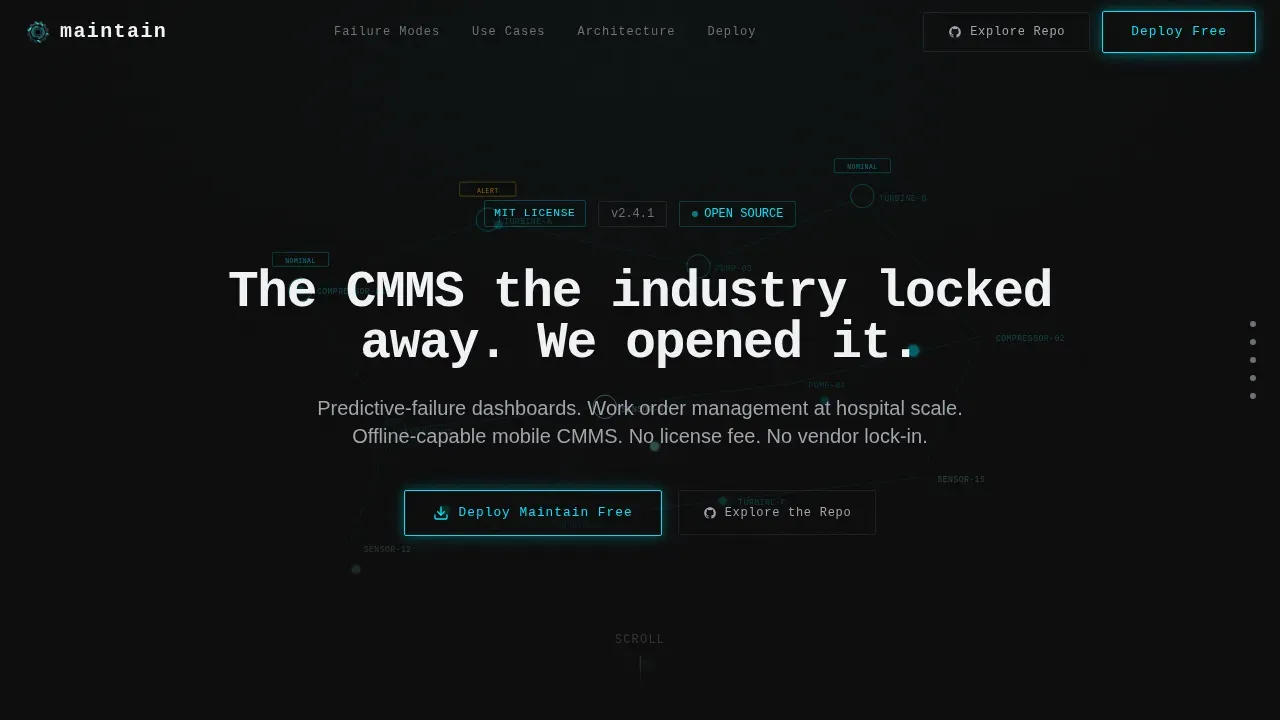
The hero opens on a pitch-black viewport where a faint isometric wireframe of an industrial facility assembles itself node by node. Each pipe, compressor, and conveyor run pulses with a reactive cyan glow as it comes online. After the animation settles, a typewriter headline appears in monospaced type, followed by a single glowing deploy button.
Hub-and-Spoke Anchor Navigation
Five anchor-linked spoke sections let visitors jump directly to the content relevant to their role. IT teams can navigate to architecture transparency, while fleet supervisors can jump straight to the mobile deployment section. The sticky navigation bar resurfaces the primary call to action after the second spoke.
Industry Report Spoke Sections
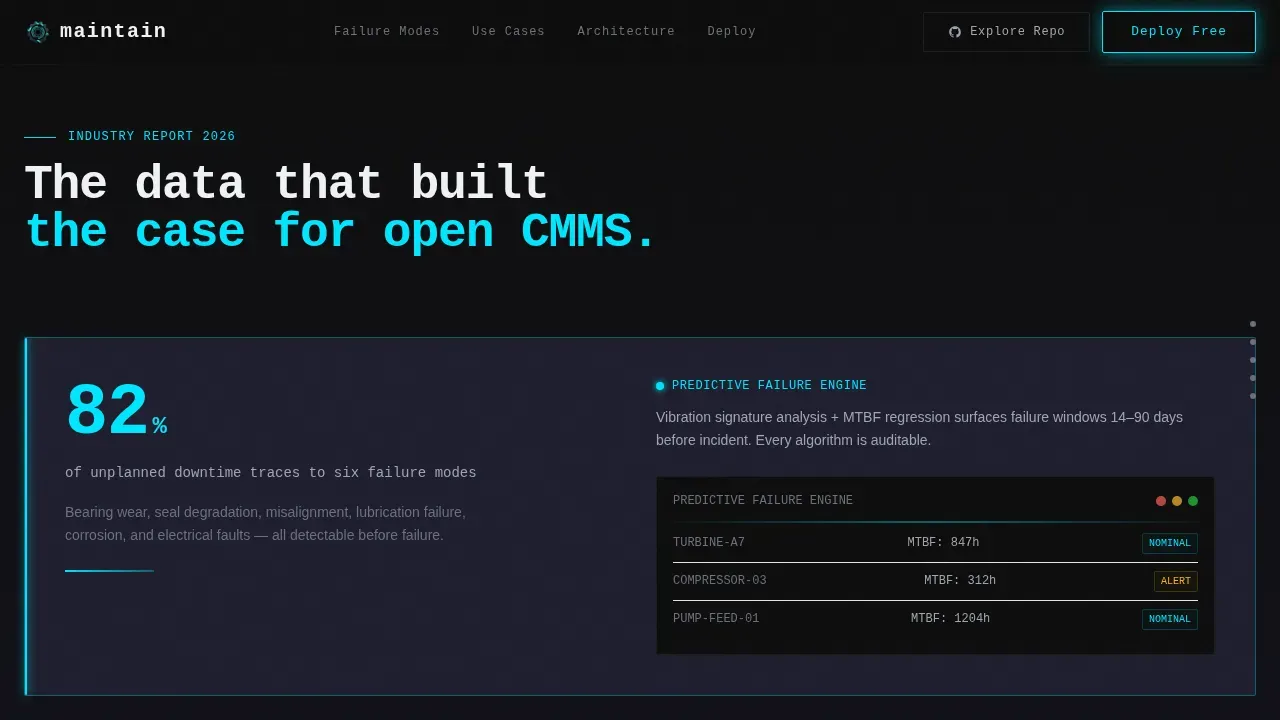
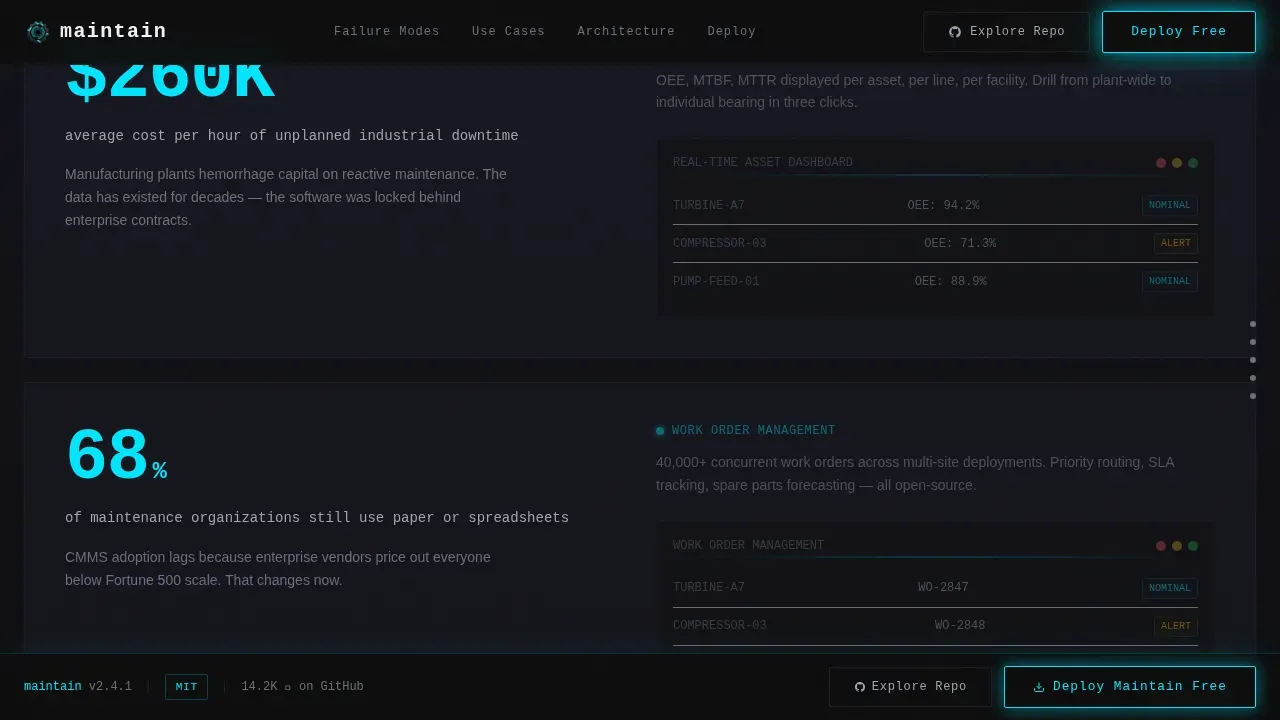
Each spoke opens with a bold, sourced statistic that frames the failure mode at scale. The statistic is immediately followed by a module proof block containing a user interface screenshot and a micro-animation of the data flow. This structure lets the page track a visitor's understanding from problem to solution without losing momentum.
Three-Persona Use Case Bento Grid
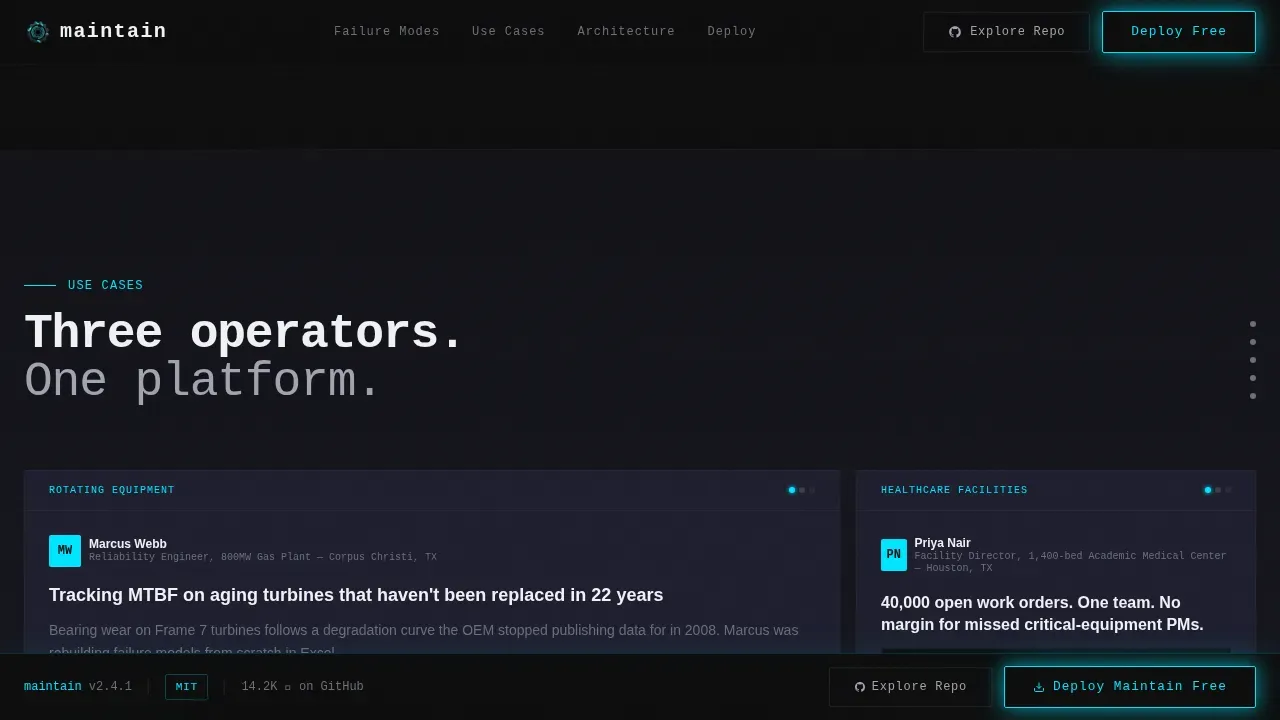
A bento-style grid presents three distinct use cases: turbine reliability, hospital campus work-order management, and mine fleet asset tracking. Each persona card speaks to the specific projects and asset inventory challenges of that role. This layout helps different departments quickly recognize their own business needs in the page.
Zero-Friction Deploy Modal
Clicking the primary call-to-action opens a slim modal with three deployment paths: a Docker pull command with copy-to-clipboard, a Kubernetes Helm chart link, and a direct installer toggle for desktop or Android Package Kit. No email is required. The modal also includes an "Explore the Repo" secondary path for engineers who need to read the code before they trust it.
Open-Source Transparency Architecture Section
The architecture spoke displays the MIT license badge, visible commit history, and forkable module structure. A live community contribution graph shows contributor count, GitHub stars, work orders processed, and total deployment count. This section supports risk management conversations by showing governance and community health at a glance.
Page sections overview
| Section | Purpose |
|---|---|
| Hero Full-Bleed | Animated wireframe facility assembly with typewriter headline and deploy call to action |
| Industry Report Spokes | Sourced statistics paired with module screenshots and data-flow animations |
| Use Case Bento | Three-persona grid covering turbines, hospital campus, and mine fleet assets |
| Architecture Transparency | Open-source license badge, commit visibility, and forkable module overview |
| Deployment Speed | Docker, Helm, and installer modal with community contribution graph |
| GitHub Developer Footer | Minimal footer with repo links and social proof metrics |
Design & branding system
The visual identity uses a Carbon Fiber color system that feels like peering into a CNC enclosure at night. Everything is matte and recessive until a status indicator flares to life.
- Core palette: deep carbon black (#0D0D0D) for backgrounds, woven graphite (#1E1E2E) for card surfaces, brushed alloy (#A0A4B0) for secondary text, and reactive cyan (#00E5FF) reserved for hover states, active navigation indicators, and data-pulse animations.
- Typography: JetBrains Mono drives all headlines and code-block elements, giving the page a terminal-native feel. DM Sans handles body paragraphs for readability across hardware and software contexts.
Mobile & speed optimization
Mobile-first design is essential for any asset management system used by field technicians. This template prioritizes mobile parity so fleet supervisors can access the page in low-connectivity environments.
- GPU-accelerated transforms power all animations, including the isometric wireframe assembly and scroll-linked section reveals, keeping motion smooth across devices.
- Intersection Observer controls scroll-triggered reveals, loading content only when it enters the viewport to reduce initial page weight and support fast rendering on field hardware.
How this template helps you convert
The page earns the deploy click by building a methodical argument that tightens from problem scale to proof to action. Each design decision serves the asset management process of moving visitors toward a rational decision.
- The hero animation establishes authority immediately, making the platform feel alive before a single word is read, which reduces the friction that slows down IT asset management decisions across large organizations.
- Sourced statistics in each spoke section validate the cost of inaction, helping compliance officers, finance teams, and reliability engineers align on the same page before the modal even opens.
- The zero-friction deploy modal removes every barrier between intent and action, replacing a signup form with a terminal command that respects the engineering culture of the audience.
Other information about this template
This template is designed for open-source contributors and ops teams who want a production-ready presence without starting from scratch. It follows practices that support long-term maintainability.
- Version control is built into the workflow. The template is structured for storage in a Git repository, making it straightforward to track changes across every update and keep documentation as part of the codebase.
- The template supports a "Docs-as-Code" approach. A dedicated /docs folder structure is recommended, with contribution guidelines and a comprehensive README covering setup, customization, and pull-request standards.
- Automated testing practices apply cleanly to this template. Teams can run checks for responsiveness, broken links, and linting on every commit through a continuous integration and continuous delivery pipeline.
- Clear roles for asset owners and custodians can be established within the contribution model, ensuring accountability for content updates in an open-source environment.
- The maintain open source enterprise asset management landing page template is designed for small businesses and large organizations alike. Whether a small team is launching a community project or a large organization is replacing proprietary asset management software, the template scales to the mission.
- This asset management template can support lifecycle management workflows by presenting procurement, deployment, maintenance schedules, and disposal stages clearly to visitors who need to understand the full asset lifecycle before committing to a platform.
- Tracking assets from purchase date through end of life, including asset depreciation records and software licenses, is a core use case this page communicates to prospects. An IT asset management system built on this template can surface asset inventory data, network device status, and software assets in a way that helps IT teams make confident, data-driven decisions.
- The page's structured approach to presenting an IT asset management system reduces unnecessary purchases by helping organizations see the full value of their existing resources before seeking new tools. Centralized asset tracking, inventory management, and lifecycle management are all represented as capabilities within the platform narrative.
- Ensuring compliance with industry regulations is addressed directly in the architecture section, which highlights license transparency and regulatory requirements visibility. Compliance officers and IT managers will find the governance framing reassuring.
Theme
Dynamic Motion
Creative direction
Industry Report
Color system
Carbon Fiber
Style
Hub & Spoke (Anchor Nav)
Direction
App Download
Page Sections
Isometric Wireframe Hero with Typewriter Headline
Hub-and-spoke Anchor Navigation
Industry Report Spoke Sections
Three-persona Use Case Bento Grid
Zero-friction Deploy Modal
Open-source Transparency Architecture Block
Related questions
Who is this landing page template built for?
Can I customize the color system and typography?
Does this template require a backend or database to run?
How does this template support open-source contribution practices?
Is this template suitable for a small team as well as a large organization?



